
Omnichannel contact center software enables seamless customer-agent communication across voice and digital channels, syncing all interactions into a shared inbox in real time. Customers can connect with support teams on their preferred channel, and switch between channels and devices over the course of a single interaction. This is important, given that 78% of customers use more than one channel to start and complete a transaction.
Popular communication channels of omnichannel contact centers are VoIP voice calling, live website chat, social media messaging, SMS texting, and email.
In this article, we'll review the benefits of deploying an omnichannel contact center, best practices, top omnichannel platforms, and features to look for.
What is an Omnichannel Contact Center?
An omnichannel contact center is a customer service department that uses cloud-based contact center software to integrate all customer communications from multiple channels into a single interface. Within the omnichannel unified interface, contact center agents can review complete interaction history, access third-party data from integrated CRM and helpdesk solutions, and seamlessly move between communication channels during live conversations.
Omnichannel contact center platforms also leverage automation and AI to optimize customer self-service options like IVR and ACD, chatbots, and Intelligent Virtual Agents (IVAs). Advanced speech and text analytics identify trends in customer/agent behavior and automate SLA alerts when KPIs near performance thresholds.
Taking an omnichannel approach to service and support lets customers set their communication channel preferences and eliminates constant app switching for agents. Shared agent inboxes display live and assigned incoming support requests, let agents transfer or accept interactions, and streamline ticket management. Providing omnichannel customer service also helps call center managers balance workloads when facing increased or peak inbound contact volumes.
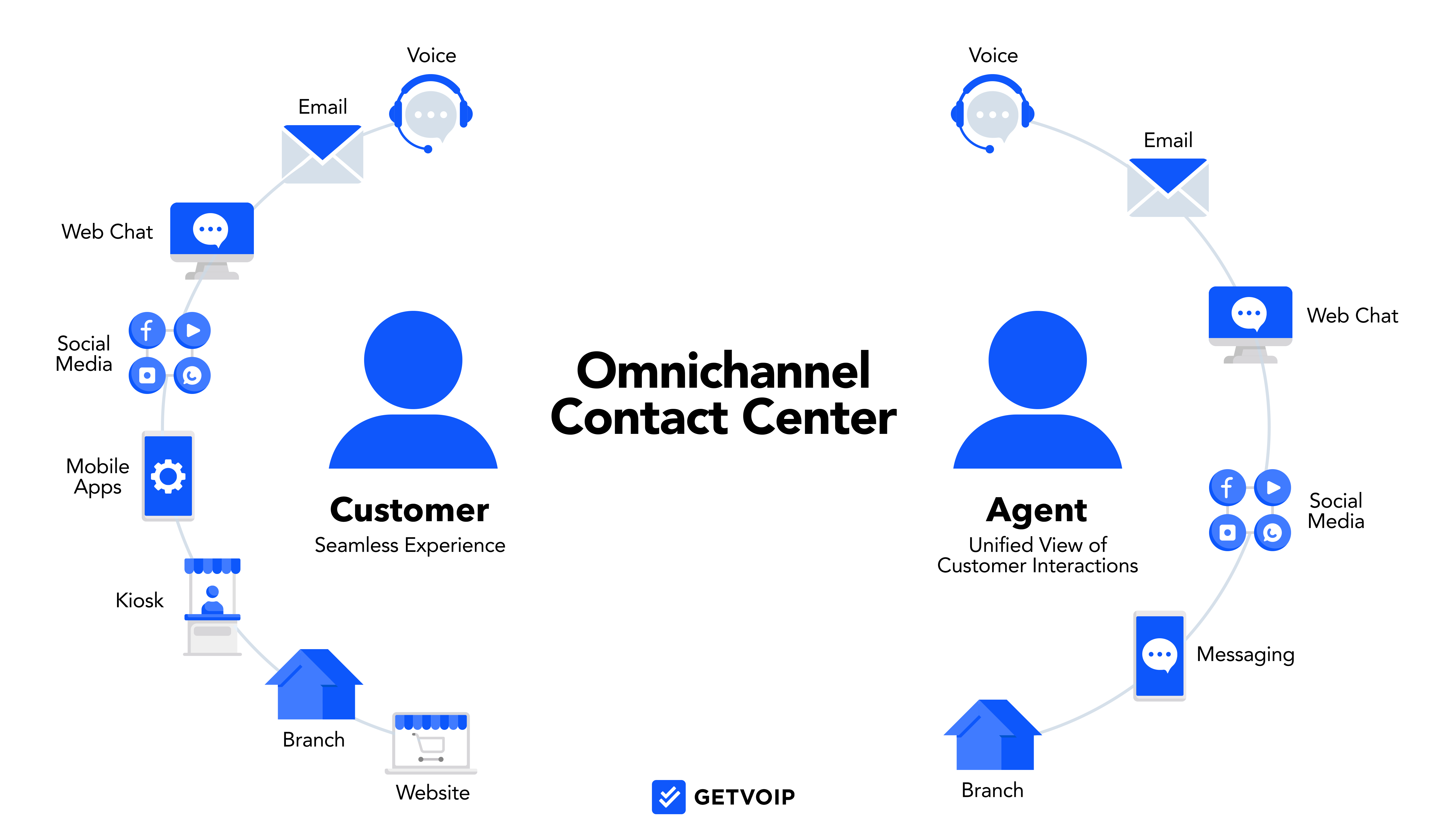
Popular omnichannel customer service channels include:
- Voice calling via VoIP telephony
- Business Texting (SMS/MMS)
- Website or in-app chat messaging
- Social media messaging
- Video calling with agent-customer screen sharing
- Virtual faxing
Multichannel vs Omnichannel Contact Center Solutions
Omnichannel contact center solutions use real-time syncing to integrate communications across all voice and digital channels into one unified interface. Multichannel contact centers completely separate business communications and monitor customer-agent interactions by specific communication channel
The table below explores additional differences between omnichannel and multichannel platforms:
| Omnichannel CCaaS | Multichannel CCaaS | |
| Definition | Omnichannel contact center software automatically syncs communications across voice and digital channels, providing a single agent interface where team members can review all cross-channel interactions in one place | A multichannel contact center provides, but does not integrate, different voice and digital communication channels. Multichannel contact centers separate interactions by channel, requiring agents to manually switch between channels to review customer communications and support ticket updates |
| Integrates Communication Channels | All channels feed into a single agent workspace with shared interaction history | Each channel operates independently with its own interface and interaction log |
| Enables Real-Time Channel Switching | Agents can move a conversation from chat to phone to email without opening a new ticket | Switching channels creates a new ticket, often routed to a different agent |
| Main Advantages | - More personalized customer support on preferred communication channels
- Includes unified communication+collaboration tools like team chat, video meetings, and file sharing/co-editing - AI-powered real-time/historical analytics identify workflow bottlenecks, monitor and score agent performance, and automate CSAT/NPS scores |
- Provides digital support channels in addition to standard voice calling
- Lets managers assign agents to specific channels, ensuring each channel is optimally staffed - Provides channel-specific insights and analytics that help business owners understand which communication channels customers prefer |
| Main Disadvantages | - Advanced features+functionalities create a higher learning curve and a longer onboarding process
- Effective and efficient contact center scheduling is a challenge - Omnichannel CCaaS software is expensive, and may be cost-prohibitive to small businesses |
- Communication silos between channels leads to miscommunications and an inconsistent support experience
- Increased average handle times, longer support resolution process - Frequent task duplication and outdated file versions |
| Best For | - Remote/blended telemarketing and sales teams
- Smaller call/contact centers reliant on business process optimization and automation to free up more live agents - Enterprise-level contact centers struggling to manage a high daily call/contact volume |
- Call centers that only want to add one digital communication channel (like live chat) to take pressure off phone support agents
- Businesses with a customer base that self-segments by channel preference - Contact centers with exceptionally high first call resolution rates, meaning follow-ups are rarely needed |
Learn more: Omnichannel vs Multichannel Contact Center: Which to Choose?
Call Centers vs Contact Centers
A call center handles customer interactions exclusively over the phone. A contact center handles interactions across multiple channels, including voice, email, SMS, live chat, and social media. If your customers reach you through more than one channel, you're running a contact center.
For a full breakdown of how the two differ, read our guide on contact centers vs call centers.
The Benefits of an Omnichannel Contact Center
Omnichannel strategies don’t just help your customers -- they also make life much easier for your agents.
Here are the top business benefits of deploying an omnichannel contact center.
Higher Levels of Customer Retention
Recent research shows that companies using an omnichannel business communication strategy have greater year-to-year customer retention rates than companies not using omnichannel solutions.
Given the high level of customer service omnichannel tools offer, it’s not hard to see why.
Omnichannel platforms allow customers to communicate on the channel they prefer, prevent them from having to repeat themselves, decrease hold times, offer a more personalized experience, and increase first call resolution rates (more on that in a minute.)
Today’s consumers expect a digital-first customer service experience, especially given that more than 60% of shoppers rely on chat messaging, social media, and self-service options before making a phone call to the customer service department.
Omnichannel contact centers also provide a consistent cross-platform experience, which helps increase brand recognition and makes it easy for customers to find the help they need faster.
Plus, a consistent experience prevents employees from having to learn and remember how to use several different communication tools.
Faster Customer Support Resolution Times
Omnichannel contact centers not only increase the likelihood that a customer will be connected to an agent on their first contact, but they also ensure that the agent is the most qualified to assist.
Advanced multi-level IVR capabilities provide better customer self-service functionalities, meaning that in many cases, the client can solve their problems without ever needing to speak to a live agent. Plus, this leaves team members available for more pressing issues, increasing agent productivity as a result.
Plus, complete customer interaction histories make it easy for multiple agents to work on the same support ticket, and, as stated earlier, prevent the time-consuming process of customers having to repeat their issues to every agent they speak to.
Remote Workforce Empowerment
Given that more people are working from home now than in the past ten years, any business communication tool should align with the needs of a remote workforce.
Compatible mobile apps for Apple and Android smartphones and tablets mean agents can access customer history from anywhere at any time, while advanced omnichannel routing options make it more likely that an agent will always be available when a customer makes contact.
Features like remote call forwarding mean that inbound calls are automatically sent from an agent’s desk phone to their smartphone to their voicemail, (or any other designated call path), and call routing options transfer calls to the next available agent within the correct department.
Analytics allow for remote workforce monitoring, while integrations and APIs with team collaboration software help agents working from home to check project statuses, message one another, and even edit documents in real-time.
Reduced Agent Burnout and Improved Efficiency
Agents working across disconnected tools burn out faster. Constantly switching between a CRM, ticketing system, email client, and phone interface to handle a single interaction is exhausting and slows everything down.
Omnichannel contact centers consolidate every channel into a unified agent desktop. Agents handle voice, chat, email, and SMS from one place, with customer history and context already visible. Automated post-call workflows handle summaries and ticket updates, cutting after-call work that quietly drains time across a full shift.
Lower Customer Churn Rates
Bad service experiences drive customers away fast. According to leading researchers, 73% of customers will switch to a competitor after multiple bad experiences, and more than half will leave after just one.[*]
Reports show the most common trigger is having to repeat information to multiple agents, which is exactly what omnichannel eliminates. Companies with strong omnichannel strategies retain an average of 89% of their customers, compared to 33% for companies without one.[*]
More Personalization
Providing a personalized omnichannel customer experience is one of the influencing factors when it comes to improving customer relationships.
Omnichannel contact centers make personalization easy by providing automated personalized text messages, emails, social media messages, and more. Face-to-face personalization, especially when it comes to customer support and product recommendations, is also a key benefit of omnichannel communication.
Because agents have access to both the entire customer history and the details of the current interaction, they’re much better prepared for calls — and know how to handle those difficult personalities, too.
In addition to improving customer support, personalized omnichannel strategies also work wonders for marketing.
Based on data from past interactions, you can segment your customers into several audiences and provide each market segment with the type of ad that’s most likely to appeal to them. For example, if you know a customer purchased a subscription that’s about to end or a product that’s about to run out, you can send them a coupon for subscription renewal or a product discount.
Plus, you can send those marketing materials via the digital channel they’re most likely to engage with.
Case in point: marketing departments that engage with customers on at least three channels have a purchase rate that’s close to 300% higher than companies that only market on one channel.
Omnichannel Contact Center Features to Look For
Now that we’ve covered the benefits of omnichannel contact centers, let’s talk about the most important features to look for when choosing a platform.
They include:
- Omnichannel routing
- Customer sentiment analysis
- Business software integration
- Analytics and reporting
- Workforce management
Omnichannel Routing
Omnichannel routing allows admins to set rules for which agents respond to customer inquiries regardless of which channel the interaction starts on. Routing options include:
- Skills-Based Routing: Matches interactions to agents based on defined competencies like product knowledge, language, or department. Admins set the rules and the system handles matching automatically across every channel.
- Sentiment-Based Routing: AI analyzes tone and language before assigning an interaction. Frustrated or high-priority customers can be routed to senior agents or pushed to the front of the queue automatically.
- Predictive Routing: Uses historical performance data to match customers with the agent most likely to resolve their specific issue. Some platforms use this to reconnect customers with agents they've had positive interactions with previously.
AI continuously improves all three routing types by processing interaction data over time, adjusting decisions at a scale manual rules cannot match, and redistributing load during peak periods without supervisor intervention.
Customer Sentiment Analysis
Customer sentiment analysis uses automated artificial intelligence to detect words, phrases, and patterns of speech that indicate a customer’s emotion during an interaction.
It provides an opportunity to optimize employee training and allows agents and managers to better understand their customer base as a whole.
With voice calls, AI uses Natural Language Processing (NLP) tools to identify customer service keywords, such as “billing,” “order late,” or “refund.” This helps managers to see the most common reasons why customers contact support and what needs work/.
With text messages and team chats, customer sentiment analysis also identifies essential words and phrases for sentiment analysis. It can also use this analysis to automatically direct agents to specific, relevant sections of customer service wikis to provide better and faster help.
Business Software Integration
Just as you should be able to transition between available communication channels within a single unified interface in an omnichannel contact center, so too should you be able to transition between software platforms.
This means your contact center will need to integrate with popular third-party CRM, marketing, outbound dialers, team collaboration, and project management tools like:
- Salesforce and Zendesk
- Asana and Basecamp
- Mailchimp
- Trello
- Slack and popular alternatives
- Zoom and GoToMeeting
- GSuite and Microsoft Office365
Analytics and Reporting
Tracking live and historical communication center KPIs helps admins to better understand their customers, measure department and individual agent efficiency, and identify common roadblocks and the most active channels of communication.
Communication platforms should include both pre-made, exportable template reports that are automatically run at set intervals, as well as customizable reports that allow admins to choose and track their most important metrics.
Top analytics include:
- First contact resolution rates
- Average phone/video call duration
- Number of interactions per channel
- The average number of daily/weekly/month inbound/outbound interactions
- Cost per contact
- Average hold time, number of transfers, the average speed of answer, and number of callbacks
- Contact abandonment rate
- Call quality and overall customer satisfaction rates (CSAT score)
- Customer engagement rates
Workforce Management
Contact center workforce management, (WFM) especially when used in conjunction with analytics, allows admins to create a more productive team.
It helps to:
- Evenly distribute workloads
- Allow customer service agents to select their own shifts
- Streamline agent scheduling
- Forecast future trends
- Monitor current agent availability and activity
- Outline agent skills, ensuring someone from each department is always available
In most cases, workflow management tools are add-on features for contact center platforms.
How to Implement an Omnichannel Contact Center
There are numerous steps to ensure that your organization properly implements an omnichannel contact center. Below we’ve outlined the key moments pivotal to ensuring your solution works towards both customer and administrative needs with as little friction as possible:
Step 1: Audit Your Current State
Document every channel customers use to reach you, every tool agents use to respond, and every integration between those tools. Identify where handoffs break down and where data gets lost between systems. This gives you a clean baseline before you build anything new.
Step 2: Map the Customer Journey
Outline every touchpoint a customer has with your brand from first contact through resolution. Identify where they switch channels, where they get stuck, and where they disengage. This tells you which channels to prioritize and where self-service would have the biggest impact on live agent volume.
Step 3: Define Your Channel Priority
Launch on the two or three channels where your customers are most active first. Get those running well before adding more. Launching too many channels at once spreads your team thin and increases the risk of a poor experience across all of them.
Step 4: Choose the Right Platform
Evaluate providers against your channel requirements, integration needs, team size, budget, and compliance obligations. Request a demo built around your actual use cases, not a generic walkthrough.
Step 5: Plan Your Integrations
Map every third-party tool you need to connect, including your CRM, helpdesk, and workforce management software. Confirm each integration is technically supported early. Integration issues are the most common source of delays in omnichannel rollouts.
Step 6: Migrate Your Data
Clean your data before migrating it. Duplicate records, outdated contacts, and inconsistent formatting all create problems once agents rely on that data in live conversations. Audit the migrated data after the transfer before going live.
Step 7: Configure Routing and Automation Rules
Set up routing logic, IVR menus, chatbot flows, and automated responses before agents start handling interactions. Test every routing path thoroughly to confirm customers are reaching the right destination.
Step 8: Train Your Team in Phases
Train supervisors before agents. Then train agents in small groups focused on the channels they will use first. Provide written reference guides they can access independently when questions come up mid-shift.
Step 9: Run a Controlled Pilot
Launch with a small group of agents handling live interactions before full deployment. Monitor handle times and first contact resolution rates closely. Use the feedback to refine routing rules, knowledge base content, and training before expanding to the full team.
Step 10: Go Live and Monitor Closely
Increase supervisor monitoring frequency for the first two to four weeks. Watch core KPIs daily and set up automated alerts for any metric that drops below threshold so you can respond quickly.
Step 11: Optimize Continuously
Review analytics monthly, update IVR menus and chatbot flows as your offering changes, and run regular QA reviews of agent interactions. The contact centers that get the most value from omnichannel treat optimization as an ongoing process, not a post-launch checklist item.
Best Practices For Omnichannel Contact Centers
Below, we’ll share our 10 best tips for your omnichannel contact center to help you ensure you provide the best possible customer experience.
Identify Top Communication Channels
Though the goal of omnichannel contact centers is to give customers multiple channels to reach out to your support team, your specific customer base will prefer some channels over others.
Allocating the right amount of resources to each channel according to consumer popularity is an essential way to optimize your customer service. Rely on past data to understand where your customers are most likely to connect, and which channels seem to get similar queries.
You may find that you’re dedicating far too many agents to phone support, while live website chat support is seriously lacking.
Improve Self-Service Options
Better self-service options ensure that agents are free to assist with more pressing customer support problems and provide customers with a faster overall resolution to their problems.
Whether you provide self-service options through an interactive call center IVR menu, website chatbots, or even an online support base/tutorial videos, it’s a huge boost to overall customer satisfaction rates.
Don’t Neglect Social Media
Social media customer service is growing, with over half of consumers relying on social platforms like Facebook, Instagram, and Twitter to receive support. Social media is also the channel where customers are most likely to be overlooked.
Putting more effort into social media support offers major advantages. Social media agents can handle between 4-8 times as many queries per hour than phone reps.
In addition to providing all social media customers with an automated message including an estimated response time, make sure you have agents monitoring social media messages at all times. Set up omnichannel alerts to include social platforms.
Finally, make sure your automated responses include a link to the customer online knowledge database as well as information about other means of contact (phone number, email, etc.) and support hours.
Provide a Consistent Cross-Channel Experience
In both customer service and sales, it’s important that you provide consumers with a consistent experience across communication channels.
Customers need to be able to recognize that they’re in the right place, feel familiar with the UI, and understand how to access what they need. If they can’t, then ask yourself if your contact center is truly omnichannel.
Start with basic consistencies like font, colors, language, and overall design. Then, ensure functionality is the same across all channels, automate real-time omnichannel conversation syncing, and run tests to make sure the experience is consistent across devices.
Schedule Automatic Customer and Agent Behavior Reports
Omnichannel contact centers provide a wide variety of pre-made and customizable analytics and reports, both real-time and historical — use them.
Key KPIs like average hold time, first call resolution rate, call length, customer churn rate, and customer satisfaction ratings offer excellent insight into the efficiency and quality of your customer service.
Agent activity reports clarify which agents may need more training, areas where training is lacking, productivity levels, and identify top performers.
Contact center software makes it easy to set up automated reports that are sent to your inbox at the frequency you choose.
Make It Easy To Connect With A Live Agent
Most consumers prefer speaking to a live representative as opposed to interacting with a pre-recorded IVR menu.
As much as you’d like to be able to instantly connect a caller with a “real person,” especially in high volume contact centers, that’s not always possible.
What you can do is keep your IVR menus short and to-the-point and provide customers with an easy, transparent way to connect to a live agent when needed. Keep things moving by setting up warm transfers, where the customer is connected to a live agent only after receiving basic information about the nature of their request and contact information.
In an omnichannel contact center, the advantage is that you can offer live support across multiple channels, like chat messaging, SMS texting, phone, and even video calling. Especially when combined with strong internal knowledge bases and automation (two things we’ll discuss below) you should be able to manage the number of live agent requests.
Improve Your Internal Knowledge Base
It’s always important to keep your employee training up-to-date — but business owners often overlook one of the most essential ingredients to a successful customer service interaction: your internal knowledge base.
Having detailed internal documents and call scripts available to your agents ensures your customers are getting the best possible and most accurate assistance.
Additionally, a complete internal wiki keeps calls concise and often eliminates the need to transfer calls to another agent or schedule a follow-up call. But it’s not just about increasing your first call resolution rates.
A quality knowledge base means that if your call volume gets unexpectedly high, agents from other departments can access the scripts/steps needed to assist customers with basic issues. All the information they need is contained in an internal, searchable wiki.
Use Artificial Intelligence (AI) and Automation
AI and automation save customers and agents serious time while reducing the costs associated with running a contact center. Key capabilities to look for include:
- AI Agent Assist: AI agent assist will relevant knowledge base articles, suggested responses, and next-best-action prompts in the agent's dashboard during live interactions, reducing handle time and supporting newer agents
- Real-Time Transcription: Converts voice calls to text as the conversation happens, allowing supervisors to monitor without listening in and giving agents a searchable record stored directly in the customer profile
- Intelligent Routing: Goes beyond skills-based matching by analyzing customer history, sentiment, and agent performance data to connect each interaction to the best available agent automatically
- Self-Service AI Bots: Handle appointment booking, order lookups, and basic troubleshooting without a live agent. When escalation is needed, the full conversation transcript passes to the agent so the customer never repeats themselves
- Predictive Analytics: Examine historical contact volume to anticipate busy periods, forecast staffing needs, and flag when queue conditions are trending toward an SLA breach before it becomes a customer-facing problem
- Automated Workflows: Trigger post-interaction summaries, CRM updates, and satisfaction survey requests automatically once an interaction closes, reducing manual after-call work across the team
Integrate Third-Party Communication and CRM Tools
Effective CRM and VoIP integration gives your team access to customer history, contact information, past orders, and even notes from previous interactions with agents.
Especially when it comes to omnichannel communication, where a conversation could begin via SMS texting and end with a social media chat message, agents need a unified and synced conversation history. This meets customer needs by preventing them from having to repeat their problems with multiple agents and speeds up the overall resolution process.
CRM integrations will provide better customer data in call pops, so agents won’t need to switch to additional tools when making or receiving client calls. Instead, all the relevant information will instantly pop up on the agent’s screen, providing a more streamlined customer service interaction for all.
Try Customer Journey Mapping
A customer journey map, like the one pictured below, outlines the steps of an interaction an omnichannel consumer has with your brand.
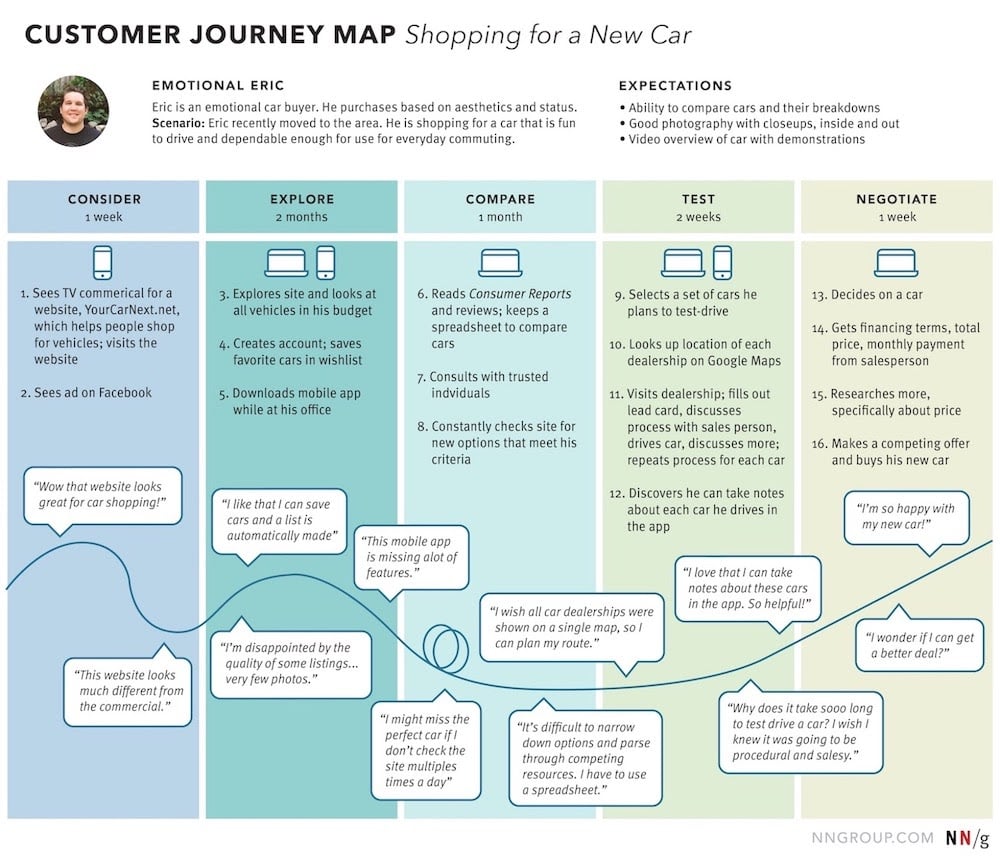
These journey maps follow your customers and callers across all key touchpoints to give you a birds-eye-view of their overall experience. Journey mapping helps agents keep better track of customers needs in addition to providing detailed insight into consumer behavior.
It helps you to identify and eliminate common bottlenecks, get a strong sense of preferred communication channels, understand what needs improvement, and speed up the resolution process.
How To Choose an Omnichannel Contact Center Software
When considering which omnichannel contact center system is best for your business, consider:
- Available Communication Channels: Which digital and voice communication channels are included in your contact center software? Does the provider offer all the ones you need, including compatibility with specific social media platforms or communication apps?
- Workforce Management Features: Are workforce management features included in some omnichannel cloud contact center plans, or are they only available as paid add-ons? What analytics and automations are included? Are scheduling, forecasting, agent performance monitoring, and quality management tools included?
- Pricing Structure: Are annual and monthly pricing options available? Are scalable tiered plans available, and which features are included in each? What paid add-ons are available? Does the price already include taxes and additional fees? Does the provider charge per user or offer pay-as-you-go options?
- Customer Support: Is 24/7 support offered? If so, which plans include it? Are multiple support channels (phone, live chat, online support portal, etc.) available? Does the provider offer paid customer service and support upgrades? What is the support team’s average response and resolution time?
- Platform Security: Does the provider meet the required compliance standards your business needs, such as HIPAA, GDPR, FINRA, or PCI certification? Can you enable real-time alerts for suspicious activity? Is 24/7 network monitoring included? How is your data backed up, and are custom retention policies available?
- Available Integrations: Does the contact center integrate with your most-used third-party applications, including any CRM, marketing, or helpdesk software you already own? Are APIS available to add custom functionality to your CCaaS system?
Best Omnichannel Contact Center Platforms
The specific omnichannel CCaaS software you choose depends on your contact center’s budget, size, industry, and goals. However, our research has found the top 5 omnichannel solutions with the most diverse use cases, ideal user experience, and competitive pricing.
The below comparison table outlines each provider’s contact center pricing, plans, and standout features:
| Five9 | NICE CXone | Talkdesk | Genesys Cloud CX | 8x8 | Dialpad | RingCentral | Vonage | Nextiva | |
| Starting Price | $119/concurrent user/mo | $110/agent/mo | $85/user/mo | $75/named user/mo | Quote-based | $80/user/mo | $65/user/mo | Quote-based | $75/agent/mon |
| Channels | Voice, video, SMS, chat, email, social | 30+ channels including voice, SMS, chat, email, social, fax | Voice, SMS, chat, email, social | Voice, SMS, chat, email, fax | Voice, video, SMS, chat, email, social, fax | Voice, SMS, chat, email, social | Voice, SMS, chat, email, social, video | Voice, SMS, chat, email, social | Voice, SMS, chat, email, social |
| WFM Features | Scheduling, quality management, real-time interaction summaries | AI Agent Assist, omnichannel forecasting, screen recordings | Agent Assist, Talkdesk Studio | Scheduling, forecasting, agent scoring | Scheduling with adherence monitoring, agent coaching | AI coaching, live call transcription | Scheduling, quality management, performance tracking | Conversation analyzer, agent scorecards | Scheduling and forecasting on higher tiers |
| Self-Service | No-code IVAs with NLU and Conversational AI | Enlighten Autopilot virtual agents | Virtual Agent with intelligent call handling | IVR, chatbots, voicebots via Bot Flow builder | Intelligent IVR, Intelligent Customer Assistant | Ai Virtual Agent | Intelligent IVR, AI virtual agents | AI Virtual Assistant, dynamic IVR | Intelligent IVR, AI chatbots |
| Analytics | Sentiment analysis, agent gamification, customer feedback analytics | Agent performance scoring, self-service and engagement analytics | Customer Experience Analytics Suite, Talkdesk Live | Predictive Engagement, routing KPIs, Conversational AI insights | Conversation IQ, sentiment analysis, survey analytics | Sentiment analysis, real-time transcription, custom moment tracking | Interaction analytics, real-time monitoring, custom dashboards | Real-time dashboards, speech analytics, historical reporting | Interaction analytics, customer journey tracking, social monitoring |
| Key Integrations | Salesforce, Zendesk, Zoho, Oracle, Microsoft 365, ServiceNow | Zoom, Microsoft Teams, Zendesk, Salesforce, SugarCRM, ServiceNow | Salesforce, Zendesk, Freshdesk, Zoom, Microsoft Teams, Slack | Salesforce, Zendesk, Microsoft Teams, Zoom, Microsoft Dynamics, Freshworks | Salesforce, Microsoft Teams, Google Workspace, HubSpot, Zendesk, Zoho | Salesforce, Zendesk, Microsoft 365, Google Workspace | Salesforce, Microsoft Teams, Google Workspace, Zendesk, ServiceNow, 300+ via app gallery | Salesforce, Microsoft Dynamics, Zendesk, ServiceNow | Salesforce, HubSpot, Zendesk, Microsoft Teams, Google Workspace |
| Best For | Telemarketing, debt collection, tech support | SMBs with moderate volume prioritizing ease of use | High-volume industries: hospitality, healthcare, insurance | Companies needing advanced integrations and self-service | Large enterprises: government, retail, hospitals | Teams wanting strong AI at a mid-market price | Organizations consolidating UCaaS and CCaaS with one vendor | Businesses needing high customizability and strong API access | Companies prioritizing social engagement and combined UCaaS and CCaaS |
FAQs
Below, we’ve compiled a list of the most common FAQs people have when researching business contact center software.
The specific hardware you choose will depend on the different channels you’re planning to use. Though companies usually opt to keep their traditional office telephones, VoIP softphone functionalities also allow contact center agents to make and receive phone calls on desktop computers and mobile devices. Internet with adequate bandwidth, routers, compatible webcams, and agent headsets are also key pieces of hardware.
In the vast majority of cases, you’ll be able to keep your current business phone number when making the shift to an omnichannel communication platform. Most providers will also offer toll-free vanity numbers and local presence phone numbers.
That depends on the specific software you choose. Some platforms allow companies to pick and choose which channels they need and add-on new channels in the future, while others provide bundled channel options within tiered plans.
Though the tendency is to assume that only enterprise-level, large-scale corporations and companies are best suited for omnichannel communication, the reality is that businesses of any size can benefit from the software. Any company, even SMBs, that communicates with customers across multiple channels should consider making the switch. That being said, call centers and telemarketing firms, healthcare providers, the education sector, retailers, and software companies often see the biggest benefit.