
Multi-level interactive voice response (IVR) takes your inbound calling system to the next level. It’s an automated system that improves call routing for your customers and your employees.
In this article, we share everything you need to know about multi-level IVR.
IVR systems from top providers
What is Multi-Level IVR?
Multi-level IVR is an automated phone system that provides callers a self-service menu to reach their intended destination: an agent, queue, information, or action.
While a regular IVR system provides callers a single-level menu–with up to 9 choices–a multi-level IVR provides more specific service by offering multiple layers of menu choices. Each menu option in the IVR call flow leads to a submenu of more specific options, helping customers reach exactly the destination they want.
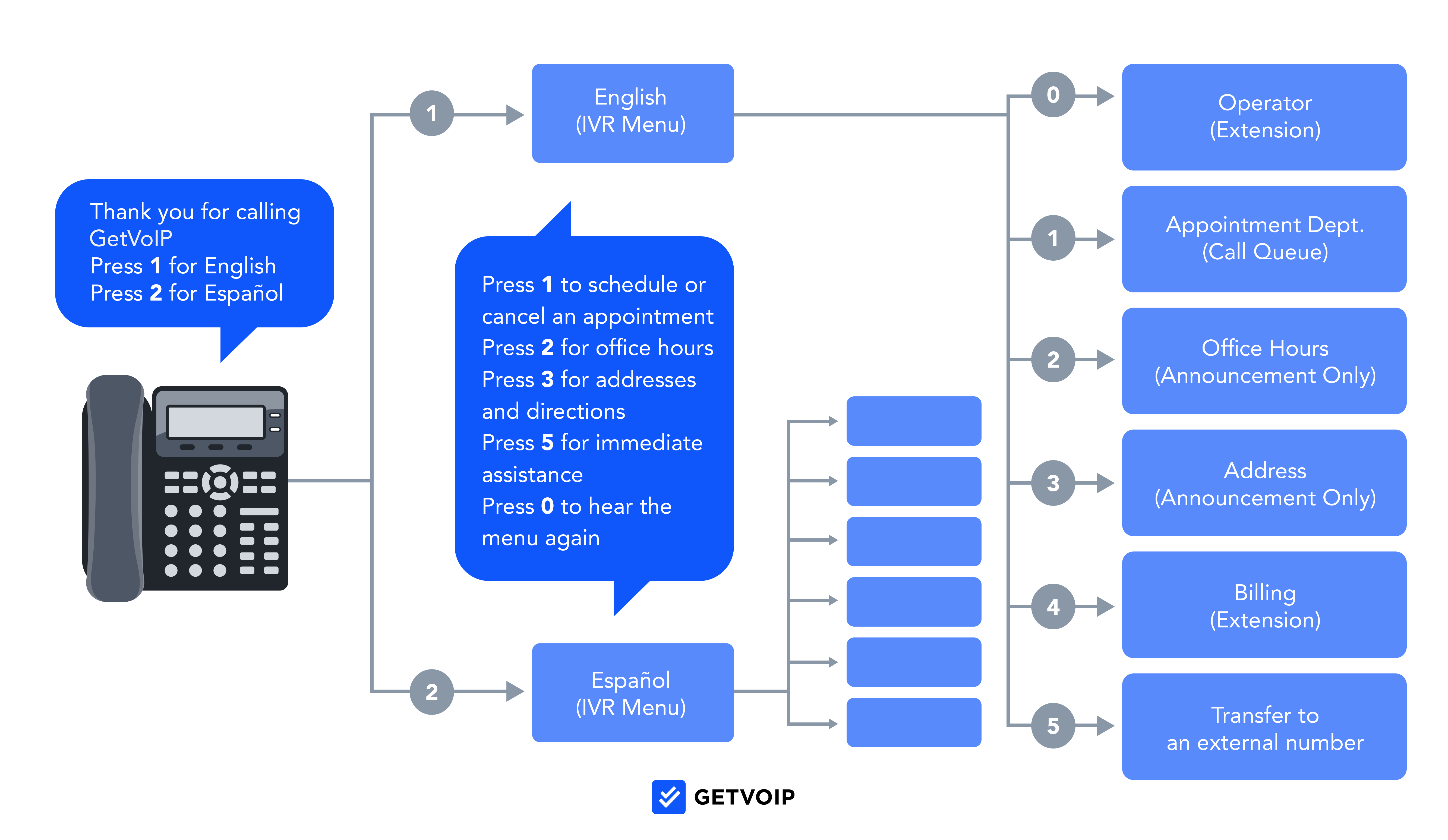
For example, when an inbound caller reaches your multi-level IVR, the automated system can guide them through multiple layers of menu options:
- Layer 1: Greeting and language selection
- Layer 2: General menu options–schedule an appointment, office hours, speak with a representative, customer service, etc.
- Layer 3: More specific options within each layer 2 menu item
Multi-level IVR is ideal for large companies with multiple products and services. Since single-level IVR doesn’t get as nuanced and dispersed as multi-level, single-level is a good fit for small businesses mainly focused on routing calls to a few departments or agents.
IVR vs Auto Attendant
Both single- and multi-level IVR systems have similar functions to an auto attendant–the difference is that an auto attendant focuses specifically on routing, while IVR also provides announcements and self-service capabilities. Therefore, all multi-level IVR systems are also auto attendants since both types of software are used to route incoming calls, but that is the limit of an auto attendant’s capabilities.
IVR is more advanced than an auto attendant. Not only do IVR menus route calls, but they can interact with customers via speech, process and store contact information, initiate texts and emails, and more. In short, IVR is better suited for businesses that offer the ability to complete self-service tasks over the phone.
How Does a Multi-Level IVR Work?
A multi-level IVR moves each caller through a branching series of menus until they reach the right destination or complete a task on their own. Here’s how a typical call moves through the system:
- The system answers and plays a welcome message: As soon as the call connects, the IVR greets the caller with a recorded or text-to-speech message that confirms they’ve reached the right business and, if needed, asks them to select a language.
- The caller hears the main menu: The first layer presents broad choices -- sales, customer service, billing, or store hours -- which the caller selects with a keypad press or spoken response.
- The selection opens a sub-menu: Each main-menu option branches into a second layer of narrower choices. A caller who presses 2 for customer service might then choose among technical support, order status, and returns.
- The IVR looks up caller data for personalization: Using CRM or database integrations, the system can identify the caller by phone number or account information and tailor the path, for example, by retrieving an order status, balance, or preferred language without asking for the same information again.
- The call reaches its final destination or self-service action: Depending on the path, the IVR routes the caller to an agent, queue, extension, voicemail box, or completes the request by reading account information, confirming an appointment, or processing a payment.
- Fallback and escalation catch stuck callers: If the caller presses an invalid key, says nothing, or requests help, the IVR repeats the prompt, returns them to the previous menu, or transfers them to a live agent so they don’t loop endlessly through the options.
What are the Benefits of Multi-Level IVR?
Multi-level IVR can offer a host of benefits for your customers, agents, and business as a whole:
- Saves time for agents and customers
- Self-service
- Accurate routing
- Fuller customer context
- Around-the-clock availability
Saves Time for Agents and Customers
Implementing multi-level IVR into your contact center, VoIP phone system, or unified communications platform will act as a huge timesaver for your team and its customers.
IVR menus route callers to the right department or voicemail inbox. So if someone calls hoping to speak to your sales team, they just have to press a series of buttons to get there. With these tools, human representatives no longer have to perform the tedious task of fielding and transferring calls.
Quicker calls lead to lower average handle times and higher customer satisfaction. Nearly 30% of customers would not wait on hold for more than one minute. With those holds typically come call transfers and customers having to repeat themselves to various agents. The more complex their issue, the more often they will probably have to do this. IVR omits those long wait times.
The IVR menus and sub-menus offered by these tools mean that customers can quickly find the answer to their questions. Customers value quick and effective responses, so this will improve their satisfaction with your business.
Self-Service
IVR’s self-service features can meet a wide variety of customer needs without involving a live agent. By syncing your IVR system with app-based actions, third-party integrations like CRM systems, and by building conversational call flows that use AI to provide canned responses to customers, customers can solve issues independently. This saves company time and keeps customers happy.
Multi-level IVR self-service tools can accomplish the following:
- Booking and canceling appointments
- Retrieving account information, like passwords or records
- Answering questions, with answers from a knowledge base or database
- Authenticating users through verification questions
Accurate Routing
Multi-level IVR software integrates with your VoIP phone system’s automatic call distribution (ACD) engine, providing accurate routing with a high chance of getting your customers to the right destination on the first try.
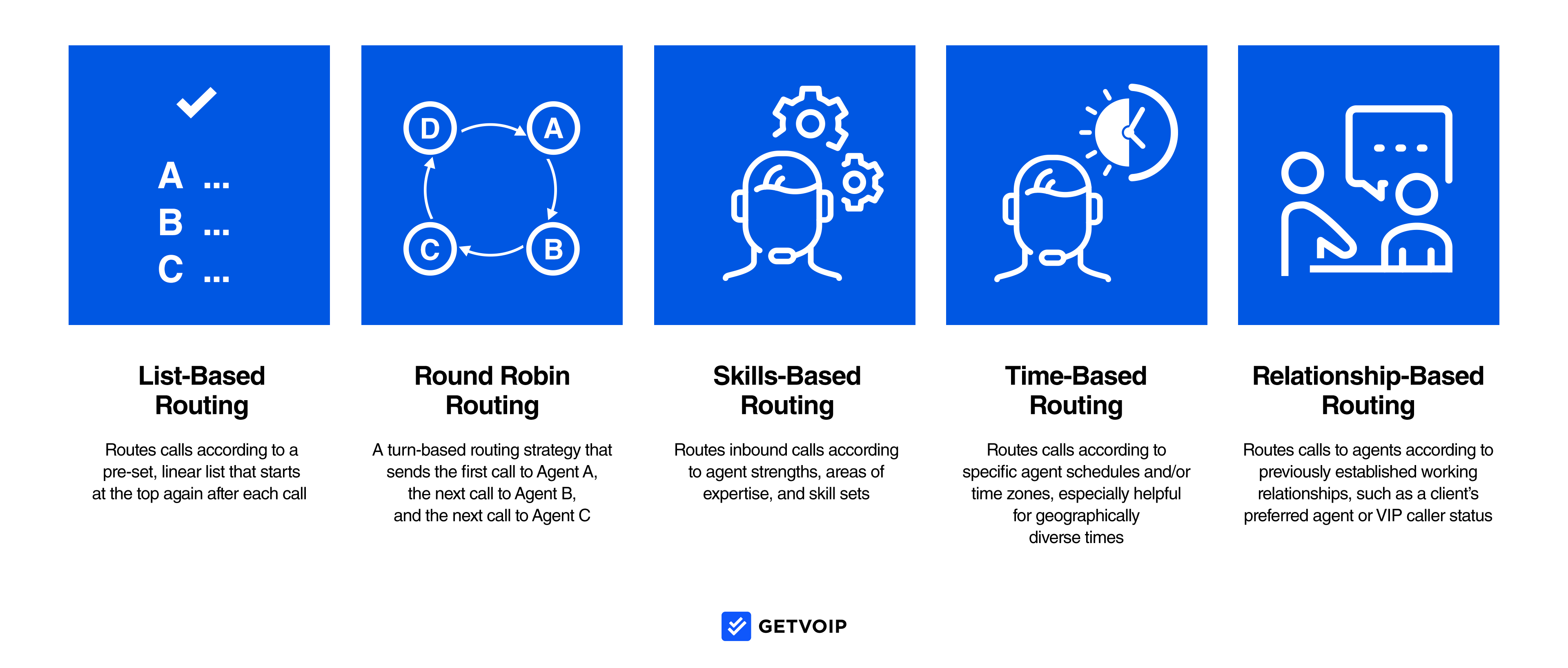
Customers can navigate multiple levels of the IVR to dictate exactly where they want to go. Meanwhile, they can use the IVR to indicate details like their location, language, and the reason for their call. This information can tell intelligent routing–like skills-based or geography-based routing–to help customers reach the agent optimally suited to provide support. Multi-level IVR cuts down on misrouted calls, which saves agent time and improves first-call resolution–an important customer service metric.
Fuller Customer Context
As a customer progresses through a multi-level IVR system, the software logs their choices as data.
IVR choices can inform multiple types of data analytics about each customer:
- Language and communication channel preferences
- Journey history
- Sentiment scores
- Reasons for calling, and more
This information helps your business in a variety of ways. A customer’s sentiment lets you know where the pain points are in your IVR system or call flow, giving your feedback about potential IVR mistakes. Over time, this information helps supervisors better understand not only specific customers but your general audience’s user experience.
When an agent receives the caller routed from an IVR menu, their IVR menu choices give an agent critical information to serve the customer more quickly. For example, if the customer inputs their language preferences and the product they’re calling about, the agent doesn’t have to ask the customer to repeat this information. This cuts down on handle time and improves customer relationships.
Around-the-Clock Availability
This is possible because IVR is available 24/7. By implementing this software, you can offer your customers support at any time without having to hire an additional team. If a customer is experiencing an issue with your product, they can call whenever to attempt to solve that problem with the self-service offerings that this software provides. If they cannot solve the question on their own, they can leave a message for the next available representative.
Multi-Level IVR Best Practices
A multi-level menu only helps if callers can navigate it quickly. These rules can keep your IVR from becoming a frustrating maze:
- Cap each level at 3 to 5 options: Callers struggle to remember more than a handful of choices, so split long lists into sub-menus instead of reading nine options at once.
- Limit total menu depth: Two or three layers are usually enough. Every extra layer adds time and increases the chance that a caller will give up or choose the wrong path.
- Always offer a path to a live agent: Include a “press 0 to speak with a representative” option at every level for callers whose issue doesn’t fit the menu.
- Add a return-to-previous-menu key: A single key that takes the caller back one level prevents them from having to hang up and start over after a wrong turn.
- Keep prompts current with your service lineup: Review menus whenever you add products, change hours, or reorganize departments so callers aren’t routed to a dead end.
- Offer multilingual menus where relevant: If a meaningful share of your customers prefer another language, let them select it in the first prompt and retain that choice through every sub-menu.
- Test every call path before launch: Place test calls and follow each branch, including invalid key presses and after-hours calls, to confirm that the routing, recordings, and fallback options work as designed.
How to Set Up a Multi-Level IVR
Most cloud phone systems and contact center platforms let admins build a multi-level menu from an online dashboard without coding. The exact labels differ by provider, but the sequence is generally consistent:
- Create the IVR or voice-menu extension: In your admin portal, add a new IVR (sometimes called an auto attendant or voice menu) and assign the phone number or extension that should receive inbound calls first.
- Record or generate the greeting: Most platforms provide several options: record the prompt from your desk phone, record it with your computer’s microphone, enter a script and use text-to-speech to generate the audio, or upload a professionally produced audio file.
- Map key presses to destinations: Assign each keypad digit to a destination -- a ring group or call queue, a specific extension, a voicemail box, an external number, or another IVR menu. Reserve one key for reaching a live agent and another for repeating the menu.
- Add your sub-menus: For each main-menu option that needs more detail, build a second IVR menu and direct the corresponding key press to it. Repeat the process for any third-level options, and include a key that returns callers to the previous menu.
- Validate and activate the flow: Use the platform’s visual editor or flow preview to check for unassigned keys and dead ends, then place test calls through each branch. Once you’ve confirmed that the paths work, publish the IVR and apply it to your business-hours and after-hours schedules.
Top Multi-Level IVR Providers
Here’s a list of VoIP providers that offer multi-level IVR within their platforms:
| Provider | Price | Key IVR Features | Best For |
| RingCentral | RingEX: 3 plans from $20-$35/user/month billed annually
RingCX starts at $65/user/month |
Visual IVR designer, skills-based routing, call recording, CRM integrations | UCaaS collaboration features and call center functionality |
| Talkdesk | 4 packages from $85-$225/user/month | Talkdesk Studio visual routing designer, voice IVR, CX analytics, AI-powered routing and automation | AI live-agent assistance tools |
| Cloudtalk | 3 plans from $25-$49/user/month billed annually | Multi-level IVR, call flow designer, skills-based routing, Salesforce integration on Expert | Phone-focused contact center at a budget price |
| Five9 | 5 bundles: Digital from $119 and Core from $159/month per concurrent user.
Higher tiers custom-priced. 50-seat minimum. |
Skills-based routing, visual call routing designer, IVR, CRM screen pop | Large companies with a wide variety of IVR-based self-service and queue options |
| Genesys | 4 plans from $75-$240/user/month billed annually | Adaptive IVR, IVR analytics and reporting, speech-enabled IVR with natural language understanding (NLU) | Data-based companies that plan to use analytics to refine IVR experience |
| PlumVoice | Custom pricing; Plum Voice is now part of SharpenCX | Low-code drag-and-drop IVR builder, conversational AI/NLU, IVR analytics and reporting | Companies that want to build or modernize custom IVR applications |
| NICE CXone | 5 core packages from $110-$249/agent/month | AI-powered routing, skills- and sentiment-based routing, omnichannel routing, CRM integrations | Companies whose customers call for a wide variety of specific reasons |
Enhance Your Customer Experience with IVR
Multi-level IVR is the right choice when customers call about many different products, departments, or issue types. If callers only need to reach two or three departments, a single-level IVR or auto attendant will be easier to navigate.
When you compare providers, focus on three factors:
- Menu depth and option limits: Confirm that the platform supports as many layers and sub-menu destinations as your call mix requires.
- A visual IVR editor: A drag-and-drop flow builder lets you restructure menus yourself instead of filing a support ticket.
- CRM and database integration: This capability turns a basic routing tree into personalized, data-driven self-service.
Your next step is to pull a month of inbound call data and map call volumes by department and reason for calling. That map will show you how many menu layers you need and give you concrete requirements to share with providers when requesting quotes.