
AI phone systems now cover far more than basic call routing. Depending on the platform, they can answer calls autonomously, book appointments, qualify leads, transcribe conversations, coach agents, and analyze what happens across every customer interaction.
This guide compares eight leading AI phone systems across pricing, automation, integrations, compliance, and best-fit use cases to help you narrow down which type of platform actually fits your business.
How We Evaluated These AI Phone Systems
We ranked the providers below against a fixed set of criteria so the picks stay comparable rather than anecdotal:
- Published pricing and add-on costs: Entry price per user or per call, plus what the AI layer costs on top of the base plan
- Autonomous vs. assistive AI: Whether the system answers and resolves calls on its own or only assists a human agent with transcription, notes, and coaching
- Compliance certifications: HIPAA support, SOC 2 attestation, encryption, and audit trails for regulated buyers
- Integration depth: Native CRM and helpdesk connections, and whether data syncs both ways or only logs one way
- Setup effort: Hours versus weeks to a working deployment, and whether configuration needs technical help
- Best-fit vertical: The industries and team sizes each platform is actually built around
Our sources were vendor pricing pages, published product documentation, and GetVoIP’s own provider reviews linked throughout this page. We did not run a controlled side-by-side latency or call-quality benchmark across all nine platforms, and pricing changes often, so confirm current rates with the vendor before you buy.
Best AI Phone Systems for Businesses
To assist you as you navigate through different options, we found six major providers who meet the standards we’ve discussed so far and offer their own proprietary advantages and qualifications.
| Provider | Key AI Features | Pricing | Best For |
| Nextiva | Conversational AI, CRM integration, call analytics | Starting at $15/user/month | Mid-size businesses seeking all-in-one solutions |
| RingCentral | RingEX AI Assistant for notes and summaries. Paid AI receptionist for answering, booking, and routing | RingEX from $20/user/month annually. AI Receptionist from $39/month as an add-on or $49 standalone | Businesses needing the deepest integration library |
| Quo | Advanced NLP, multi-language support, custom voice agents | Starts at $15/user/month with 10 included Sona calls | Growing enterprises like startups or small businesses |
| Upfirst.ai | Voice AI for appointment booking, lead qualification | Starts at $24.95/month for 300 calls with additional calls at $1.50 | Service businesses focused on scheduling |
| Phonely.ai | Customizable AI receptionists, multilingual support | 1 free plan with 100 free minutes/month and paid plans starting at $33/month | Contact centers and businesses with high call volumes |
| CallRail | Call tracking, conversation intelligence, lead scoring | Starting at $50/month for just call tracking | Marketing agencies and sales teams |
| Dialpad | Connect transcription and summaries; coaching in Sell/Support; separate autonomous AI Agents | Starts at $15/user/month. Coaching products and AI Agents priced separately | Small sales teams wanting AI notes and coaching |
| GoTo Connect | Unified communications, basic AI routing, SMS | Contact for pricing | Small to mid-size businesses wanting simplicity |
Nextiva
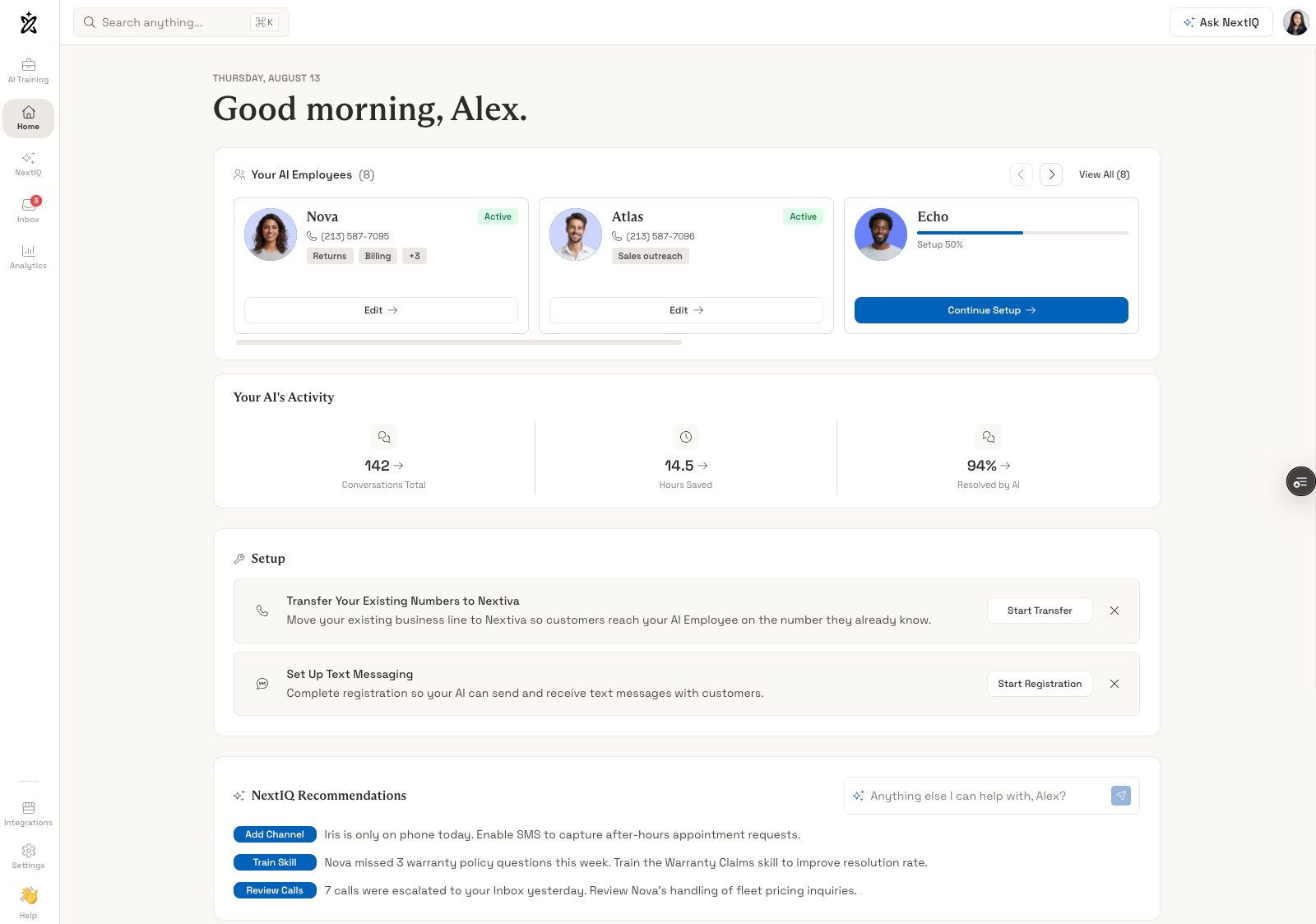
Nextiva is a business phone system with conversational AI capabilities that handles inbound call routing, basic inquiry resolution, and intelligent call distribution across teams. It's a solution very versed in the art of unified communications taking voice calls, video meetings, team messaging, and SMS and jam-packing it into an elegant single interface. The platform's AI features include natural language IVR that lets callers describe their needs conversationally, sentiment-based routing that prioritizes annoyed customers, and automated after-hours handling.
One killer feature is their dashboard providing AI-powered conversation intelligence that transcribes calls, identifies keywords and topics, scores call quality, and surfaces coaching opportunities for managers. For autonomous answering, Nextiva XBert handles calls, texts, and web chats, answering routine questions and booking or rescheduling appointments through connected calendars. Businesses set the rules for when XBert should pass a request to staff, with conversation context included in the handoff.
The system scales from small businesses to enterprises with hundreds of users while maintaining consistent feature access across pricing tiers.
Pricing
Plans start at $15 per user per month (the basic Core plan), with Engage at $25 per month and Power Suite CX at $75 per month for advanced AI and analytics capabilities. AI transcription is charged on a per-use basis. Pricing can increase significantly as you add users and unlock premium features like advanced analytics and custom AI workflows.
What We Like
- Comprehensive feature set: The platform eliminates the need for multiple vendors by combining phone, video, messaging, and AI in one system. This consolidation simplifies administration and reduces the complexity of managing disparate tools.
- User-friendly interface: Visual call flow builders make adoption easier for teams without technical expertise. You don't need a developer to configure basic AI workflows.
- Unified communications: Maintaining conversation context as customers switch between voice, video, and messaging creates seamless experiences that simpler single-channel systems can't match.
What We Dislike
- AI capabilities less advanced: The conversational AI features are less sophisticated than specialized providers focused exclusively on phone intelligence. Nextiva prioritizes breadth over depth in AI capabilities.
- Pricing complexity: While the base price seems reasonable, costs can escalate as you add users and features. The final bill may be higher than anticipated for teams wanting advanced functionality.
Best For
- Growing businesses seeking consolidation: Companies that want a complete communications platform with solid AI features rather than best-in-class AI specialization from multiple vendors.
- Teams prioritizing unified communications: Organizations where seamless switching between phone, video, and messaging matters more than cutting-edge AI phone capabilities.
- SMBs without dedicated IT: Businesses that need professional phone features with AI enhancement but lack the resources to integrate and manage multiple specialized systems.
RingCentral
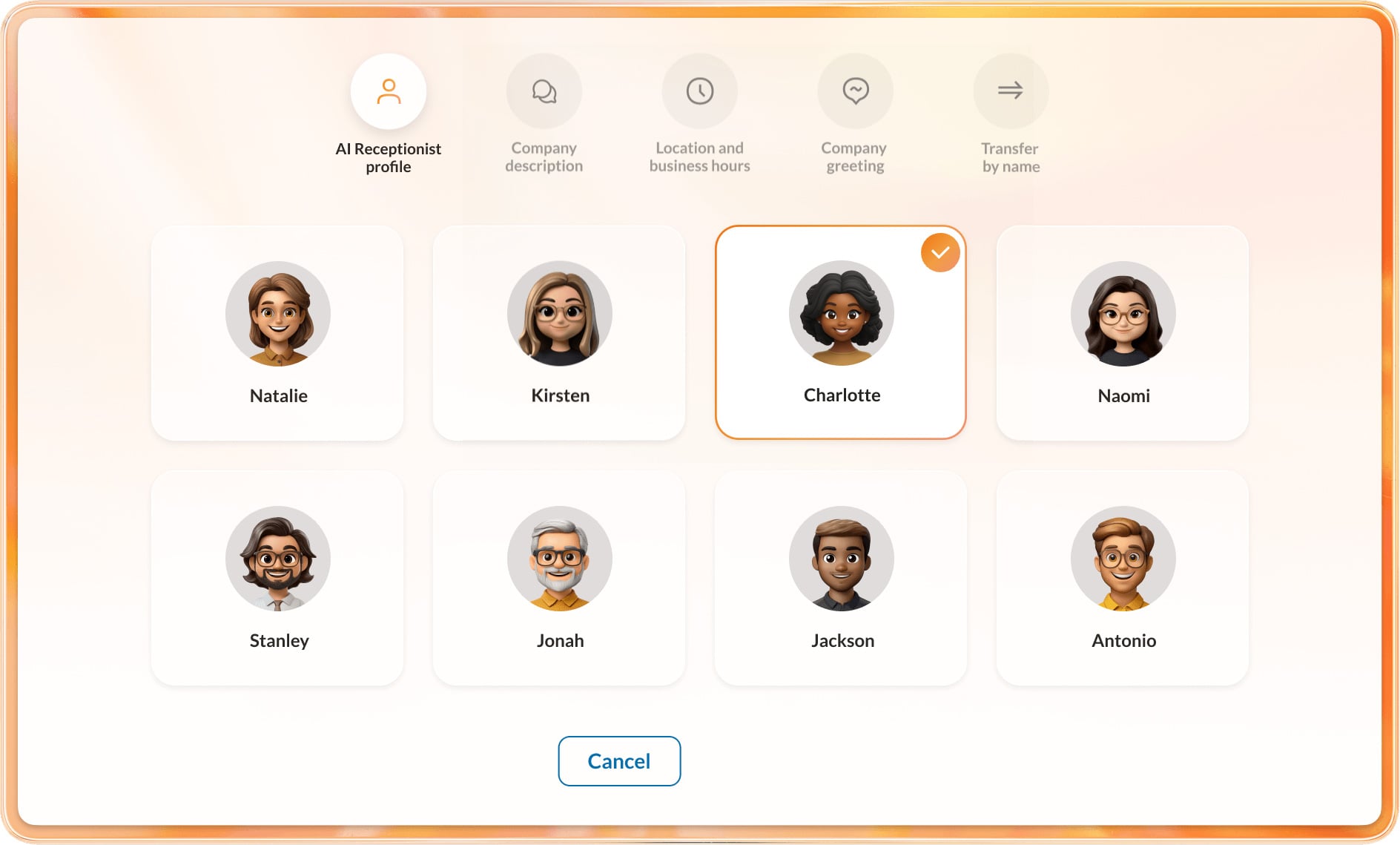
RingCentral combines an established business phone platform with AI for both employees and incoming callers. RingEX provides calling, messaging, and meetings, with an AI Assistant that supports tasks such as transcription and call summaries. Its separately priced AI Receptionist, or AIR, handles the front desk: answering questions, collecting lead details, arranging appointments, and transferring calls.
The connection between those products is especially useful for existing RingCentral customers. AIR can reuse their numbers, extensions, contacts, and routing settings, allowing the business to add automated answering around its current phone setup. A company with several branches can apply different opening hours and transfer destinations, while employees receive a summary when a call needs their attention.
Businesses can also buy AIR independently and connect it to a compatible third-party phone system. That makes RingCentral relevant to companies adding AI answering as well as those replacing their broader communications platform.
Pricing
RingEX plans start at $20 per user per month for Core, $25 for Advanced, and $35 for Ultra with annual billing. AI Assistant capabilities vary by tier, while AI Receptionist carries a separate charge.
AIR starts at $39 per month as a RingEX add-on or $49 as a standalone service. Both options include 100 minutes, with additional usage at $0.50 per minute. Businesses buying RingEX and AIR together therefore need to budget for employee licenses and receptionist usage.
What We Like
- Works with an established phone setup: Existing customers can reuse RingCentral's directory and routing configuration when adding AIR. This reduces the amount of information they need to recreate and keeps automated answering connected to the people who handle escalations.
- Useful application connections: RingCentral's integrations let businesses bring calling into applications such as Salesforce and Teams. AIR also supports lead capture into selected CRMs, giving staff a record to work from when following up on an inquiry.
- Supports different deployment needs: AIR can serve a single business number or handle routing across locations, and it can connect to compatible phone systems outside RingCentral. Businesses have options for introducing AI without moving every employee to a new service at once.
What We Dislike
- The full AI offering spans several purchases: RingEX, AIR, and deeper conversation-intelligence tools have different pricing and feature boundaries. A buyer comparing only the advertised phone-plan price could miss a substantial part of the cost of their intended setup.
- Integration breadth needs closer inspection: A long app directory does not establish whether a specific connection can read records, update fields, or trigger actions during an AI call. Buyers need to verify those capabilities for the exact product and plan they are purchasing.
Best For
- Existing RingCentral customers: Businesses adding automated answering while retaining their employee directory, phone numbers, and routing arrangements.
- Organizations with several locations or departments: Teams that need calls to follow different schedules and reach the appropriate branch or specialist.
- Businesses working in CRM and collaboration platforms: Companies that want phone activity connected to tools such as Salesforce, HubSpot, or Microsoft Teams, with the required integration confirmed during evaluation.
Quo
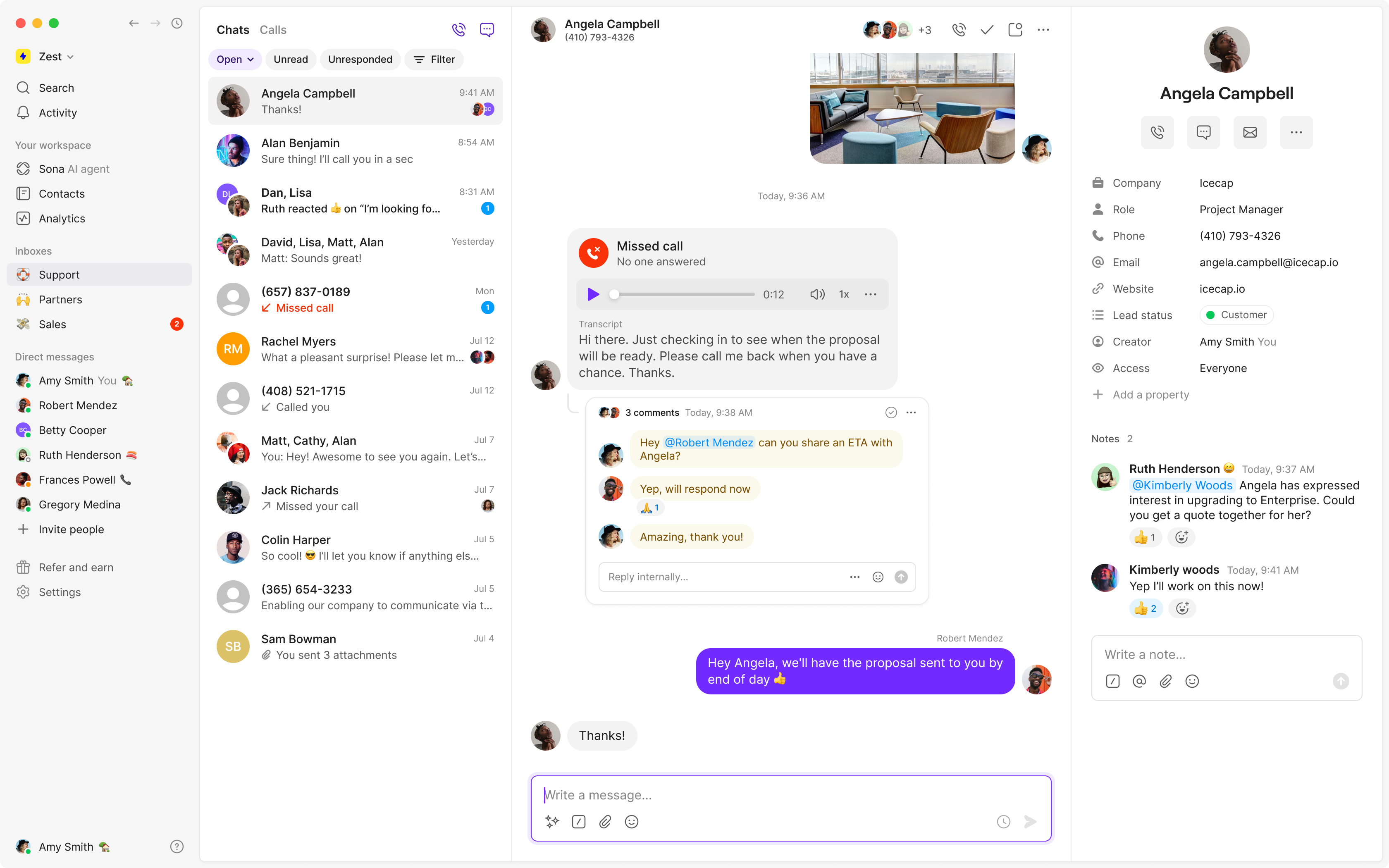
Quo aims itself particularly towards small businesses and start-ups but we also found it a rather robust system. It's a solution more concerned with bringing calls, texts, and customer information together in one collaborative space rather than overwhelming teams with features they don't need. The platform's AI capabilities huddle around its newer solution, Sona, a 24/7 AI agent that answers calls when teams are unavailable, captures detailed messages, and even handles common customer questions using a customizable knowledge base.
Quo is particularly useful for any small or growing business where missing calls means missing revenue. Real estate agents, home services, dental practices, and consulting firms use Quo to ensure every customer gets a response even after hours or when staff is busy. The system handles shared phone numbers where multiple team members can see all calls, texts, and voicemails in one shared inbox with full context and collaboration features like internal notes and typing indicators.
Qup also includes AI-powered call summaries, automatic transcriptions, and smart call tagging that categorizes conversations without manual logging.
Pricing
Quo’s plans start with a free trial that includes basic calling and recording features. Paid plans begin at $15-$19 per user per month with standard features, and Sona AI starts free with approximately 10 calls monthly before moving to paid plans at $25 per month that scale based on usage. Quo remains one of the most affordable options for small businesses needing 24/7 phone coverage.
What We Like
- Collaborative shared inbox: Multiple team members can share one phone number with full visibility into all calls, texts, and voicemails. Internal notes and typing indicators keep everyone aligned without confusion about who's handling what.
- Sona AI agent: The 24/7 AI answering service captures leads and answers customer questions around the clock at a fraction of traditional answering service costs. Sona learns from your business documentation to provide accurate, helpful responses.
- Simple setup and mobile-first: No hardware required, no complex IT involvement. Download the app, choose a number, and start calling within minutes. The mobile and desktop apps sync seamlessly for teams working from anywhere.
What We Dislike
- Sona pricing adds up: While Quo itself is affordable, the Sona AI agent costs over $800 annually after the free tier, which can be steep for solo practitioners or very small teams compared to some competitor offerings.
- Limited enterprise features: The platform lacks sophisticated call routing, queue management, and overflow logic that larger support or sales teams might need. This is a small business solution, not a contact center platform.
- Basic integrations: While Quo connects with popular tools like HubSpot and Salesforce, the integrations are lightweight and lack the deep, bi-directional data synchronization that enterprise systems provide.
Best For
- Startups and small businesses: Teams of 2-20 people who need professional phone capabilities without complexity, long implementations, or enterprise-level costs.
- Service-based businesses: Real estate agents, home services, legal practices, dental offices, and consultants where capturing every call directly impacts revenue and missing opportunities means losing business.
- Teams prioritizing collaboration: Organizations where multiple people need to handle customer calls and texts with full context and visibility rather than siloed individual lines.
Upfirst.ai
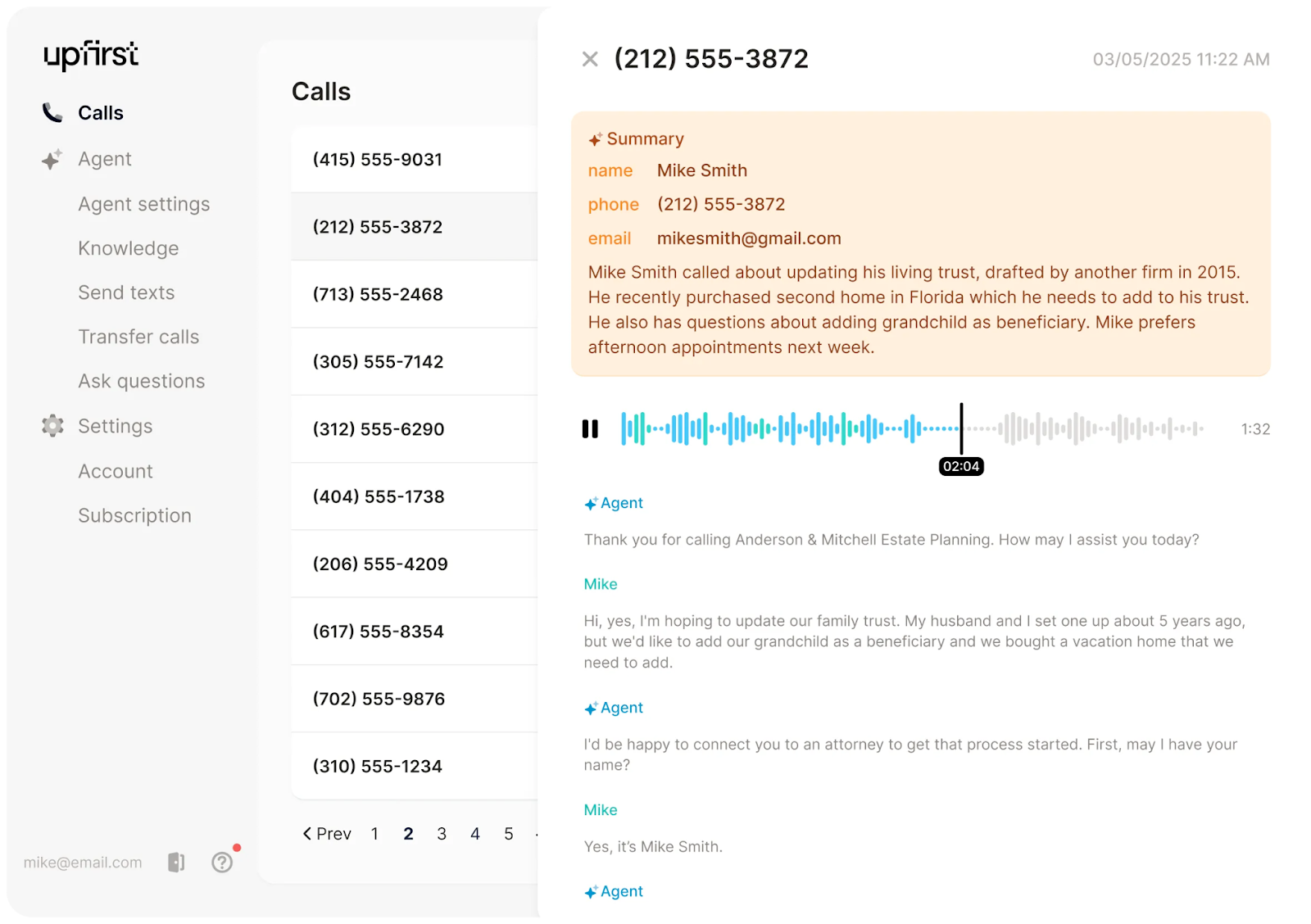
Upfirst.ai is a conversational AI phone system purpose-built for appointment scheduling, call answering, and lead qualification workflows common in service businesses. It's a solution more concerned with 24/7 coverage and handling the complete scheduling lifecycle rather than general-purpose call handling. The platform frees up so much bandwidth because of its range of abilities from answering calls when teams are unavailable to checking real-time availability across multiple calendars, booking appointments, sending confirmations, managing reschedules and cancellations, and sending automated reminders to reduce no-shows.
The AI engages callers conversationally in over 90 languages to gather necessary intake information like service preferences, insurance details, or project scope before confirming appointments.
The system integrates with popular scheduling platforms like Calendly and Acuity, plus CRM systems and industry-specific tools for dental practices, medical offices, home services, and professional services. Upfirst.ai's AI adapts to business-specific terminology and workflows. For example, understanding that "root canal" requires longer appointment blocks than "cleaning" for dental offices, or that emergency plumbing calls need same-day scheduling priority.
Pricing
Plans start at $24.95 per month for 30 calls and actively push their “best value” offering of $159.95 per month for 300 calls. Spam calls are not counted against your limits. Costs scale with call volume but remain predictable based on usage tiers. Overage rates decrease with each pricing tier.
What We Like
- Purpose-built excellence: Focusing exclusively on 24/7 answering and scheduling workflows means it handles these use cases exceptionally well with minimal configuration required. The AI understands the nuances of appointment booking and lead capture that general-purpose systems miss.
- Multilingual powerhouse: Support for over 90 languages means businesses can serve diverse customer bases without hiring multilingual staff. The AI automatically detects and responds in the caller's language.
- Quick implementation: Businesses get up and running within days rather than weeks typical of general-purpose systems. The focused scope eliminates complexity that plagues broader platforms.
What We Dislike
- Limited scope: The platform is restricted to specific use cases rather than general-purpose call handling. Businesses need additional tools for customer support or technical inquiries beyond scheduling.
- Narrow analytics: Metrics focus primarily on scheduling performance rather than comprehensive conversation intelligence. You won't get the depth of insights that full-featured phone systems provide.
- One-trick pony: If scheduling isn't your primary phone use case, you're paying for specialized capabilities you won't use while still needing another solution for everything else.
Best For
- Service-based businesses: Medical practices, salons, home services, and consulting firms where appointment scheduling and 24/7 call answering represent the majority of incoming calls and directly impact revenue.
- Small businesses needing coverage: Organizations that can't afford round-the-clock staff but need to capture every call opportunity, especially after hours and on weekends.
- Businesses with complex scheduling: Companies managing multiple service types, providers, and locations where intelligent calendar management prevents double-bookings and optimizes utilization.
Phonely.ai
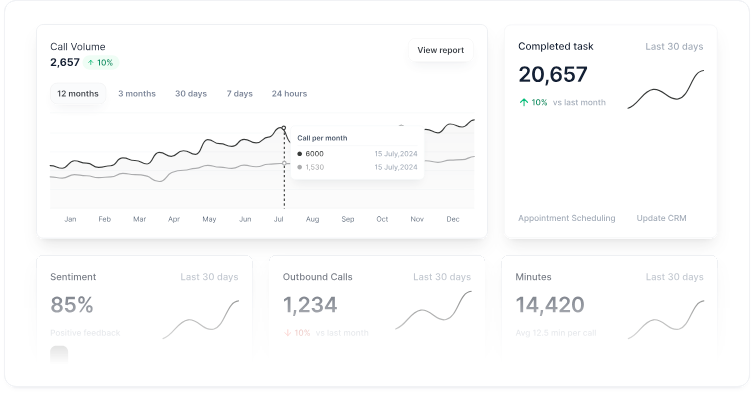
Phonely.ai is a customizable AI phone system formed specifically for businesses needing to automate support and sales calls at scale. It's a solution built for high-volume call handling with enterprise features like HIPAA and SOC II compliance, voice cloning, and support for 100+ languages and voices.
Phonely.ai is killer at handling incoming calls with customizable workflows, routes inquiries to appropriate departments, captures detailed call information, schedules appointments by checking integrated calendars, and fine tunes the AI's capabilities through workflows and integrations with CRM systems like HubSpot and Salesforce. Phonely.ai supports richly complex use cases beyond basic reception. Voice cloning lets businesses create AI agents that sound just like team members if needed. Call recording, transcription, and analysis provide insights into customer conversations.
For healthcare organizations and legal services, the platform offers HIPAA-compliant configurations that takes care of sensitive information while maintaining strict privacy controls.
Pricing
Plans start at $0 per month and rise up to $100 per user, per month for their Professional tier. Phonely.ai also offers custom Enterprise pricing and usage-based pricing at $0.05-0.20 per minute depending on volume. This flexibility accommodates both small teams and high-volume operations.
What We Like
- Enterprise-grade compliance: HIPAA and SOC II compliance make it suitable for healthcare, legal, and other regulated industries that need secure, auditable call handling with strict privacy controls.
- Multilingual scale: Support for 100+ languages and voices with voice cloning capabilities means businesses can create authentic-sounding AI agents for diverse markets and customer bases.
- High-volume optimization: Usage-based pricing and robust infrastructure handle thousands of calls efficiently, making it cost-effective for contact centers and businesses with significant call volume.
What We Dislike
- Pricing complexity: The range of pricing tiers and usage-based models can make it difficult to predict exact costs. Businesses need to carefully estimate call volumes to budget accurately.
- Setup sophistication: While not requiring coding, configuring advanced workflows and voice cloning features requires more upfront investment than plug-and-play alternatives designed for small businesses.
- Feature overwhelm: The breadth of capabilities (inbound, outbound, voice cloning, compliance) may be excessive for simple use cases like basic reception or appointment scheduling.
Best For
- Contact centers and high-volume operations: Businesses handling hundreds or thousands of calls where usage-based pricing and scalable infrastructure deliver cost-effective automation at scale.
- Healthcare and legal services: Organizations in regulated industries needing HIPAA-compliant call handling with audit trails and data governance for sensitive patient or client information.
- Multilingual businesses: Companies serving diverse, global customer bases where 100+ language support and voice cloning create authentic experiences across markets without hiring multilingual staff.
CallRail
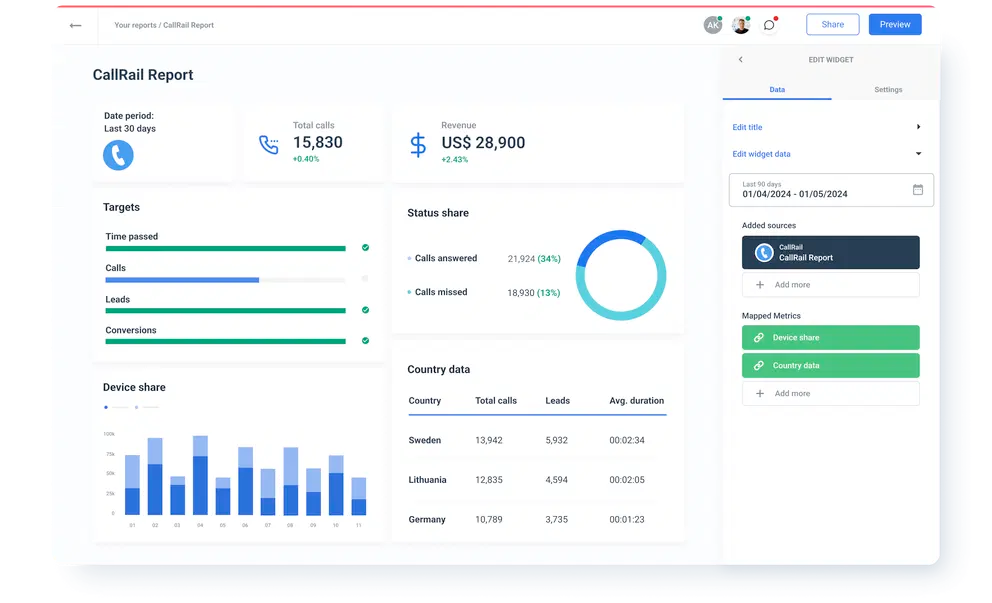
CallRail is a call tracking-first and conversation intelligence-second platform built primarily for marketing teams, agencies, and sales organizations measuring ROI on advertising spend. It's way more concerned with analytics and attribution rather than autonomous call handling which may be a no-go for those looking for autonomy-first and future forward wizardry. The platform's AI analyzes inbound calls to identify which marketing campaigns, keywords, or channels drove each conversation, then attributes revenue and conversions accordingly.
Conversation intelligence features automatically transcribe calls, identify keywords and topics discussed, score lead quality based on configurable criteria, and surface insights about messaging effectiveness. CallRail's AI smartly can peek when prospects mention competitors, complain or raise price concerns, or indicate buying readiness. This is all help for your hungry sales teams looking to pounce follow-ups and refine any approach.
The system integrates with advertising platforms like Google Ads and Facebook Ads to feed conversion data back for campaign optimization. The platform tracks customer journeys across multiple touchpoints (form submissions, website chats, and phone calls) to provide comprehensive attribution reports.
Pricing
Plans start at $50 per month for the basic Call Tracking and $195 per month for the Complete Suite. Voice Assist AI agent is available as an add-on for $95 per month. Usage-based charges apply for call tracking minutes and conversation intelligence features.
What We Like
- Marketing attribution excellence: The call analytics and marketing attribution capabilities provide clear ROI measurement for advertising spend. Finally, phone calls get the same attribution rigor as digital channels.
- Lead scoring intelligence: AI-detected buying signals and conversation quality metrics help sales teams prioritize follow-ups based on actual conversation content rather than gut feel.
- Agency-friendly features: White-label reporting and per-client tracking make it ideal for agencies managing multiple client campaigns and needing to demonstrate clear value.
What We Dislike
- Analytics over automation: AI features emphasize measurement over call handling automation. Businesses seeking AI receptionists or autonomous agents need additional tools beyond CallRail.
- Not a phone system: This is analytics software first, with basic routing capabilities second. Don't expect the call handling features of dedicated phone platforms.
- Narrow focus: If you're not heavily invested in paid advertising or measuring marketing ROI, much of CallRail's value proposition disappears.
Best For
- Marketing agencies and teams: Organizations that need to prove ROI on advertising spend through detailed call tracking and attribution across campaigns and channels.
- Sales-driven organizations: Companies where phone calls represent significant revenue opportunities and lead quality scoring directly impacts conversion rates and sales efficiency.
- Performance marketers: Businesses running paid advertising campaigns where understanding which keywords and ads drive quality phone conversations determines budget allocation.
GoToConnect
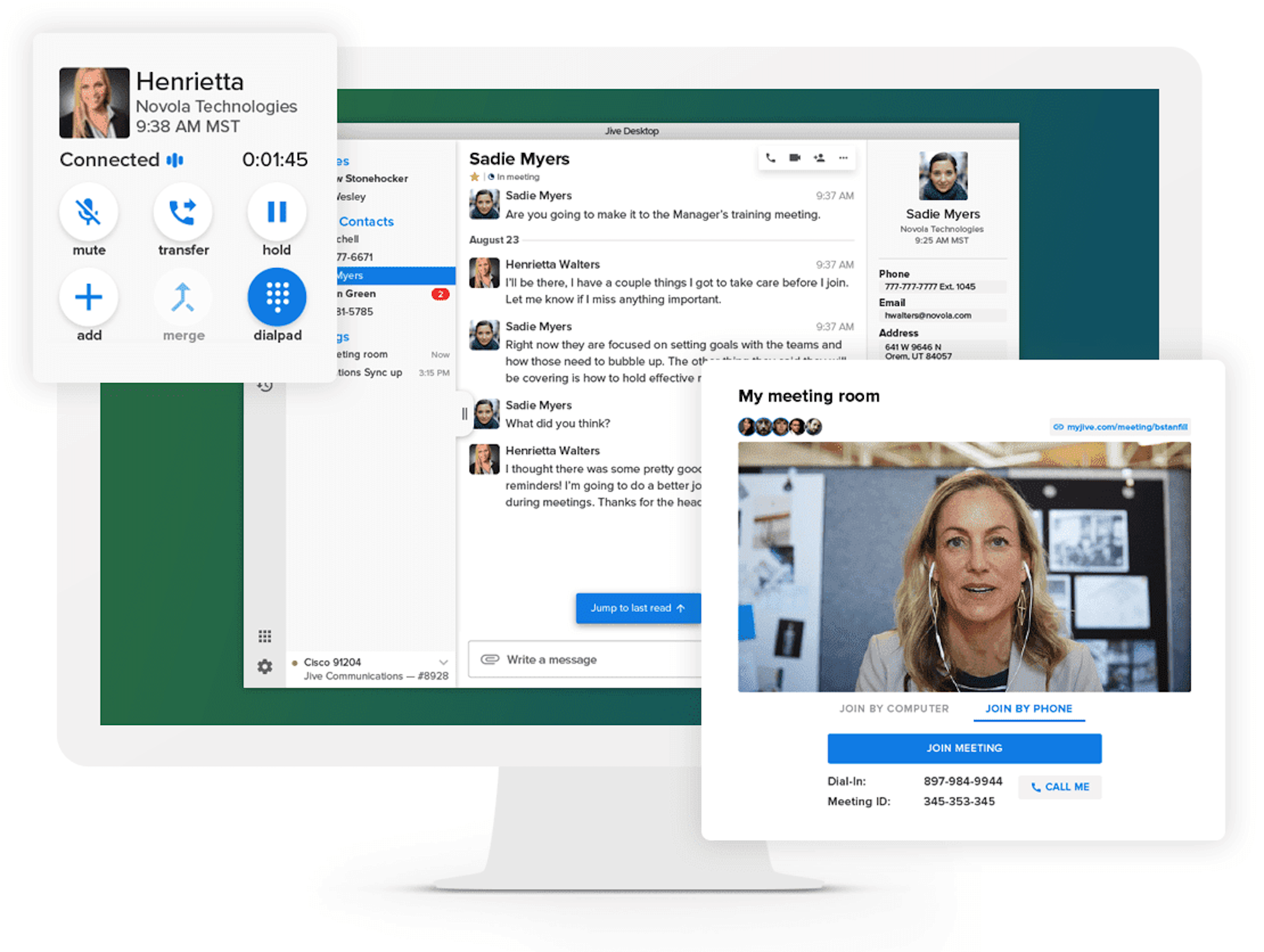
GoTo Connect is a UCaaS platform with AI-driven routing, analytics, and productivity features for those who find reliability and simplicity paramount and the top of the wish list. It's built for small and mid-size businesses that want incremental improvements over traditional phone systems without complexity or time-sucking implementations. The platform can take on voice calls, video meetings, SMS messaging, and fax in a single application with straightforward administration that doesn't require any tech know-how.
AI capabilities include a modest AI receptionist add-on, smart call routing, voicemail transcription, call queue management, GoPilot AI setup assistant, and analytics dashboards showing call volume, duration, and missed call patterns.
Mobile apps maintain rare full feature parity with desktop, allowing remote teams to handle business calls from anywhere while preserving professional caller ID and company routing rules. Integration with common business tools like Microsoft 365, Google Workspace, and basic CRM platforms keeps the system connected to daily workflows.
Pricing
Pricing often requires contacting sales for exact quotes based on team size and feature needs. The AI receptionist is available as an add-on feature. You must call to get a true number.
What We Like
- Mobile-first design philosophy: GoTo Connect's interface is standard across both mobile and desktop with feature parity. It becomes exceptionally easy for your remote and hybrid teams to handle AI reception settings and track performance from preferred devices and locations.
- Plug-and-play implementation: The setup process is simple compared to enterprise solutions. Most businesses can get their AI receptionist running within hours rather than weeks.
- A bargain compared to others: The pricing structure offers good value for growing businesses that need reliable AI reception without paying for advanced enterprise features they won't use.
What We Dislike
- Limited AI feature sets compared to direct competitors: The AI capabilities are more basic compared to specialized providers, which may result in more frequent escalations to human agents for complex inquiries.
- Fewer integration options: The platform connects with fewer third-party business tools compared to enterprise solutions, potentially requiring manual data transfer for some workflows.
Best For
- Remote and hybrid teams: Companies with distributed workforces benefit from GoTo Connect's mobile-first design and consistent experience across devices and locations.
- Growing businesses: Small to medium businesses that need reliable, scalable AI reception without the complexity or cost of enterprise solutions.
- Quick deployment needs: Organizations that need to get an AI receptionist up and running within hours rather than weeks of implementation time.
Dialpad
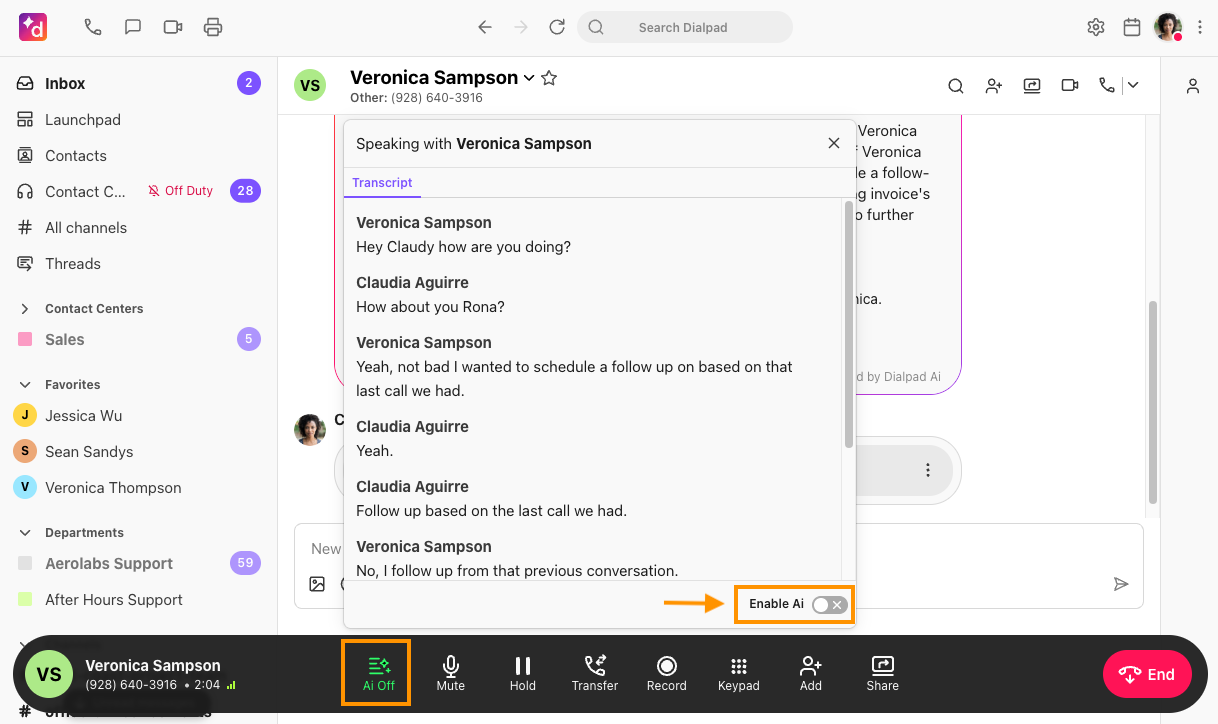
Dialpad Connect puts AI transcription and call summaries inside the business phone service. Employees can follow the live transcript during a conversation, then use the recap and suggested action items to prepare their follow-up. For teams handling back-to-back calls, this reduces the amount of information they need to reconstruct afterward. Its AI Recaps can be shared with colleagues, making the call record useful beyond the person who answered.
More advanced coaching sits in Dialpad's Sell and Support products. Their AI Live Coach Cards can surface guidance when particular phrases arise, helping a salesperson respond to an objection or a support agent follow a procedure. Managers also gain monitoring tools that go beyond the everyday calling features in Connect.
Dialpad offers autonomous AI Agents for voice and digital conversations as well, including workflows such as appointment scheduling and order lookups. Those agents are a separate purchase, so buyers should distinguish between a phone plan that helps employees handle calls and an AI service that handles requests itself. Dialpad supports both, but they are not included in the same starting price.
Pricing
Dialpad Connect starts at $15 per user per month for Standard and $25 for Pro with annual billing, Enterprise is custom-priced. Standard includes real-time transcription and call summaries, while Pro adds CRM integrations and multi-office management.
AI Live Coach Cards and contact center monitoring sit within Sell and Support, with availability depending on the plan. Autonomous AI Agents use separate conversation-based pricing, which requires a sales quote.
What We Like
- Useful AI in the entry phone plan: Connect Standard includes transcription and summaries, giving a small team an immediate use for AI during and after calls. Employees can review the record and follow-up tasks without buying a separate conversation-intelligence product.
- Call records support follow-up: Shareable recaps and CRM logging help colleagues understand what happened before they contact a customer again. The benefit is particularly relevant when responsibility for an account moves between employees.
- Coaching for sales and support: Sell and Support extend the platform with live guidance and supervisor tools. These can help teams apply their own procedures during conversations, with keyword-triggered cards available for both sales objections and service questions.
What We Dislike
- Advanced features require a different package: Connect's included AI does not cover the full coaching and monitoring toolkit. Teams attracted by those capabilities need to price Sell or Support against their requirements, rather than treating them as phone-plan upgrades.
- CRM access raises the entry cost: Connect Standard includes AI notes, but the CRM integrations described here are a reason to move to Pro. Small teams buying primarily for automatic customer-record updates should compare the Pro price, rather than the advertised $15 starting rate.
Best For
- Teams wanting AI notes within their phone service: Businesses whose employees handle the calls but need help recording decisions and organizing follow-up.
- Sales and support teams investing in coaching: Organizations evaluating Sell or Support for in-call guidance, supervisor visibility, and more structured reviews.
- Businesses that rely on CRM call records: Teams that need conversations logged against customer accounts and are prepared to select a plan with the appropriate integration.
Features to Look for in an AI Business Phone System
The most useful features depend on who will handle the conversation. An AI receptionist needs to understand requests and complete tasks, while an employee-facing assistant needs to produce accurate notes and relevant guidance. Across both, the phone system still has to route calls reliably and keep customer information accessible.
Conversation Quality and Language Support
A convincing voice is only part of the experience. The system also needs to handle interruptions, recognize names and industry terms, and follow a caller who changes their mind halfway through a request. Long pauses or repeated misunderstandings can undermine an otherwise capable service.
Language coverage deserves the same scrutiny. Test the accents and languages your customers use, including conversations that switch between them, and check whether transcripts and summaries remain useful to the employees handling follow-up.
Actions and Business-System Integrations
An AI that takes an appointment request performs a different job from one that checks availability and confirms the booking. Establish what each integration allows the agent to do, including whether it can retrieve current information, change a record, or only leave a note for staff.
For transactions such as rescheduling, look for confirmation that the change reached the calendar or customer system. The conversation should also have a defined next step if the connection fails or the requested action cannot be completed.
Routing and Handoffs to Staff
Routing should reflect the way the business works, including opening hours, locations, specialist teams, and urgent requests. A caller asking for an employee should be able to reach the appropriate destination without restarting the inquiry.
The handoff needs more than a transfer button. Look for a summary of the request and the information already collected, alongside rules for unanswered transfers. Depending on the situation, the next step might be a callback, a message, or another available team.
Notes and Assistance for Employees
For employee-handled calls, useful AI begins with a reliable transcript and a summary that captures decisions and next steps. Staff should be able to review the underlying conversation when a recap is unclear and share relevant details with colleagues.
Teams with more demanding sales or support procedures may also benefit from live guidance and supervisor tools. Check the product boundaries carefully: these capabilities often sit in a contact-center package rather than the standard phone subscription.
Reporting That Explains Call Outcomes
Call counts and average duration show how busy the service is, but they reveal little about whether it helped the customer. Look for reporting on completed tasks, failed bookings, transfers, and unresolved requests, with access to the conversations behind those results.
Managers should also be able to inspect how the system defines success. A call that ends without a transfer may still leave the customer needing help, so an automation rate alone is a poor measure of service quality.
Customer History Across Calls and Messages
If customers follow phone calls with texts or web chats, employees need a way to see those exchanges together. Check whether the system links them to the same customer record and whether that history is available to both staff and the AI.
Channel availability and shared context are separate capabilities. A platform can offer calling, SMS, and chat while still leaving the team to piece together what happened in each conversation.
Administrative Controls and Data Handling
Businesses need to control what the AI can answer, which actions it may take, and when it must involve a person. Look for ways to test revised instructions before publishing them and to identify who changed a setting when something goes wrong.
For recordings, transcripts, and customer data, review access permissions, retention settings, deletion options, and the provider's use of data for model training. Any industry-specific requirements should be checked against the exact product, configuration, and agreement being purchased.
How to Choose the Right AI Phone System
Start with the work you need to improve. Missed calls, time spent writing notes, and inconsistent customer service point to different purchases, even when vendors describe all three as an AI phone system. A useful evaluation follows those needs through to a working call flow and a realistic monthly bill.
1. Decide Whether You Need a New Phone System
If the current service handles employee calling and routing well, an AI answering add-on may be enough to cover missed calls or routine inquiries. Replacing the whole platform makes more sense when the problems also include administration, fragmented customer records, or inadequate call management.
Identify the employees who need phone licenses and the numbers or queues that need AI coverage. This prevents a limited answering requirement from turning into an unnecessary company-wide migration.
2. Choose an Initial Use Case from Actual Calls
Review a representative sample of recent conversations and missed-call records. Separate repeatable requests, such as opening hours or appointment changes, from work that depends on judgment, negotiation, or exceptions to company policy. Include busy periods and after-hours demand when estimating volume.
Then define a measurable first goal. That might be completing routine bookings, capturing after-hours inquiries, or reducing the time employees spend documenting calls. The goal should determine the shortlist and the pilot's success criteria.
3. Ask Vendors to Demonstrate the Whole Task
Give each shortlisted provider the same scenarios and watch what happens in the connected systems. For a rescheduling request, the demonstration should show the existing booking being found, a new time being confirmed, and the calendar being updated. A fluent conversation alone does not establish that the work was completed.
Include an unavailable appointment, a caller correcting their details, and a failed transfer. These reveal more about the service's limits than a demonstration in which every request succeeds.
4. Establish Who Will Run and Maintain It
Before choosing a platform, identify who will update business information, review unsuccessful calls, and maintain integrations. A service that requires a developer for routine changes may be a poor fit for a small team, while a more configurable platform may justify that effort for a complex operation.
Bring IT and the people responsible for data handling into the evaluation early. Confirm the required permissions, retention controls, agreements, and support arrangements before committing to a deployment schedule.
5. Compare Costs for the Same Workload
Ask each vendor to price the same number of employees, calls, average call minutes, and expected peak demand. Include the AI subscription, additional usage, phone charges, integrations, implementation, and any paid human assistance. Check what happens to the bill after a transfer or when several calls arrive together.
Compare a typical month with a busy one, then review contract terms and number-porting arrangements. Treat time saved as a benefit to measure during the pilot, rather than assuming every automated call translates into a staffing reduction.
6. Pilot a Limited Call Flow Before Expanding
Begin with one location, inquiry type, or period of coverage, with a clear route back to staff. Measure completed tasks, incorrect answers, unsuccessful transfers, customer callbacks, and the work employees still need to do afterward. Review actual conversations alongside the dashboard results.
Expand once the service meets the criteria set at the start and the team can maintain it. Continue reviewing performance after changes to instructions, integrations, or business policies, since a successful launch does not guarantee that every later change will behave as expected.
FAQs
Traditional PBX systems route calls using static menus and pre-recorded prompts. AI phone systems use conversational agents that understand natural language, engage in dynamic dialogue, and handle inquiries without human intervention.
Pricing ranges from $79/month for basic small business solutions to custom enterprise pricing going up to $10,000/month. Most providers charge per user ($15-50/month) plus usage-based fees for AI interactions.
Modern AI systems handle moderately complex inquiries involving multiple steps, data lookups, and conditional logic. Highly nuanced situations requiring judgment, empathy, or specialized expertise still require human agents.
Many enterprise providers offer HIPAA and GDPR compliant solutions with encryption, access controls, and audit trails. You will need to verify for yourself compliance certifications and review data processing agreements before implementation.
Simple deployments for small businesses can go live in days. Enterprise implementations requiring custom integrations, workflow design, and agent training typically take 4-12 weeks.
Yes, number porting allows you to transfer existing business numbers to new providers. The process typically takes 7-14 business days and maintains continuity for customers.
Yes. The standard pattern is a greeting that identifies the assistant in the first sentence, such as “Hi, you’ve reached the automated assistant for Rivera Dental.” FCC regulations require AI callers to announce themselves as such, and callers who know they are talking to software tend to state their request more directly instead of testing the system.
A well-configured agent asks a clarifying question before escalating, then rephrases once more if the answer is still unclear. If it cannot resolve the intent, it performs a warm transfer that hands the human agent the transcript and collected context, so the caller does not have to repeat themselves from the beginning.