

Omnichannel and multichannel contact center solutions enable you to serve customers with multiple channels and touchpoints. However, the two types of call center software unify channels differently, leading to distinct agent and customer experiences.
In this article, we’ll compare omnichannel vs multichannel contact center software platforms. Read on to learn about each type’s features, use cases, advantages, and disadvantages.
Key Differences Between Omnichannel and Multichannel Contact Centers
Both omnichannel and multichannel contact centers provide customer service through multiple communication channels like phone, SMS, live chat, and email. However, omnichannel contact centers unify these channels into a singular customer journey, while multichannel contact center software isolates each touchpoint as a distinct interaction.
From an agent’s perspective, omnichannel cloud contact centers offer a unified agent desktop of the customer’s history, while a multichannel contact center leads to each agent having a more siloed view.
| Omnichannel Contact Center | Multichannel Contact Center | |
| Available channels |
|
|
| Channel unity | Touchpoints unified into a singular, continuous customer journey | Touchpoints isolated into separate tasks and events |
| Cost | $125-$225 monthly per user | $75-$175 monthly per user |
| Agent experience | Convenient, with unified agent desktop view of the customer’s experience and history across channels | Siloed, since agents can only access one touchpoint from the customer’s interaction history |
| Customer experience | Streamlined. Agents have fuller context for each interaction, requiring the customer to repeat less information | Frustrating. Since agents lack full context, customers often need to repeat themselves more |
| Best for | Contact centers with repeat customers or whose customers call multiple times across channels | Call centers that only offer one channel, or teams whose customers typically call only once |
What is an Omnichannel Contact Center?
An omnichannel contact center is a customer engagement solution that unifies multiple communication channels into a single, unified customer journey. Contact center agents can access each communication channel from the software dashboard, with the ability to switch between channels during an interaction.
Omnichannel software logs the customer’s journey in their customer profile, which is accessible to any agent serving the customer. Agents have access to the customer’s data of contact, sentiment scores, channels used, call transcripts, the representatives who previously served the customer, and more.
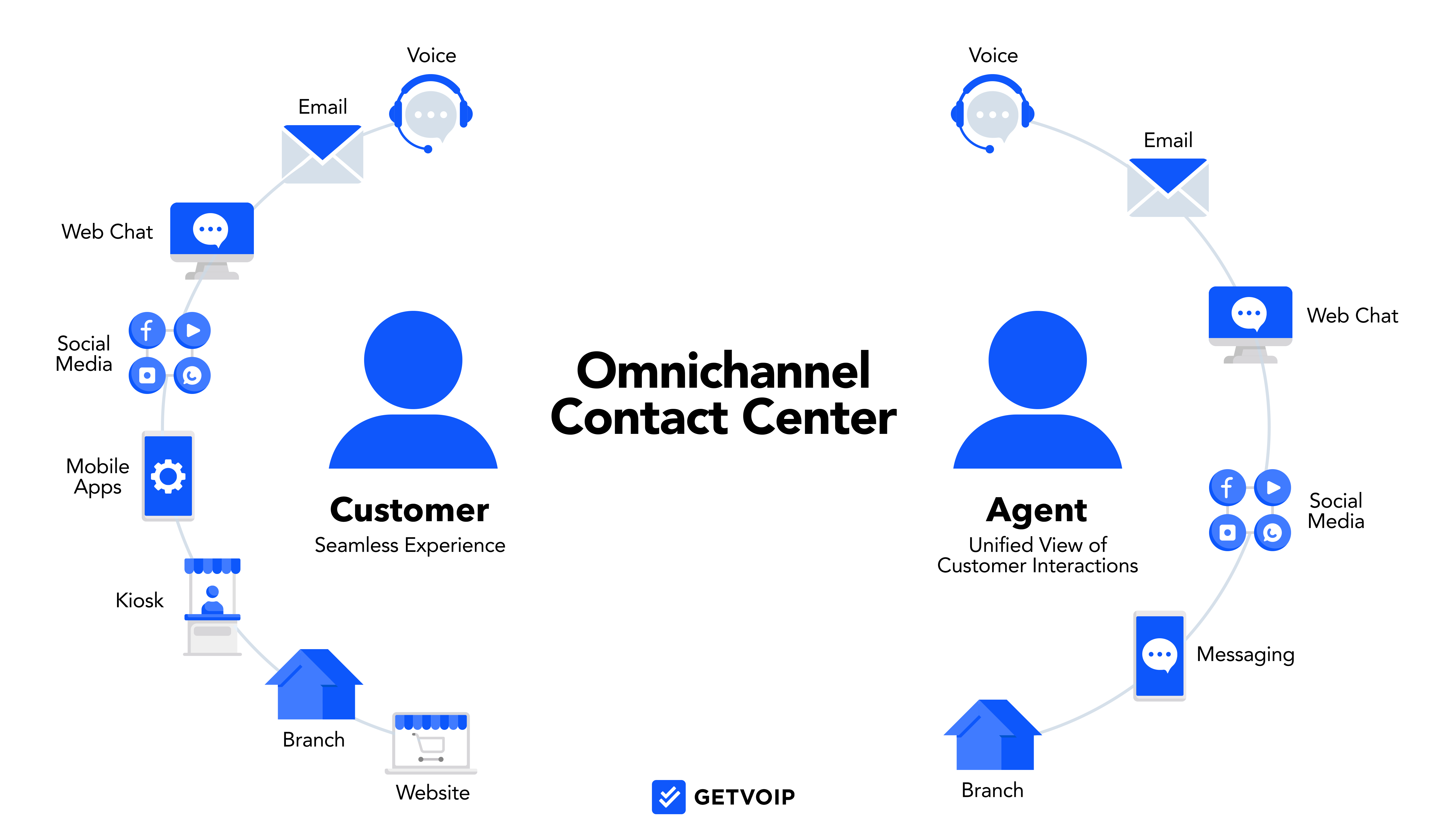
This unified agent desktop shows a full view of the customer’s journey provides each representative with a deep context of the customer’s needs. Since agents can access previous transcripts and actions taken, they can offer a more seamless customer experience. Omnichannel agents can switch between channels during a live call without initiating a new ticket or task. This convenience and improvised customer support are part of why omnichannel solutions are expected to maintain a 13.6% annual growth rate through 2030.
Learn more: Omnichannel Contact Center: Key Features, Benefits, and Best Practices
Standout Features of Omnichannel Contact Centers
Omnichannel contact centers offer several features that set them apart from multichannel contact centers. Look for the following in an omnichannel CCaaS platform:
- Omnichannel dashboard: An omnichannel contact center features a more dynamic and comprehensive user dashboard. Accessible via desktop app, the omnichannel dashboard provides agents a view of all communication channels, tasks, call queues, and rich customer profiles.
- Rich customer profiles: Omnichannel CCaaS solutions provide rich customer profiles, featuring a more intricate view of the customer’s experience. Staff members can view the customer’s full interaction history, the representatives who served them, touchpoints used, sentiment scores, and even purchases made on a database. This information is often extracted from and shared with your CRM system.
- Omnichannel routing: Omnichannel platforms provide skills-based routing automation for all tasks and channels. The software analyzes the customer’s identity, and other information like chatbot and IVR interactions, then forwards the task to the available agent best-suited to help. Omnichannel platforms can also connect customers to agents they previously had, which boosts customer relationships and customer loyalty.
- Conversational chatbots: While multichannel chatbots may offer intelligent virtual agents (IVA), omnichannel platforms offer more conversational IVA systems that use natural language understanding and provide rich service. Omnichannel chatbots identify customers, pull and add information to their profiles, and provide more dynamic services like appointment booking and information retrieval.
- Customizable analytics: Omnichannel analytics track dozens of metrics and trends that traditional multichannel software doesn’t. These real-time analytics include customer sentiment scores, success and resolution rates, and the more frequently discussed topics.
Advantages of Omnichannel Contact Centers
Omnichannel CCaaS software provides several business advantages over a multichannel contact center:
- Better customer service: By unifying each customer interaction into a singular history that any agent can view, omnichannel platforms improve the customer service experience. Providing options for multiple touchpoints, including digital channels, helps you meet customer preferences. This convenience makes a huge difference with the millennial generation, 87% of whom consider convenience a major priority.
- Increased agent productivity: Omnichannel CCaaS software provides agents with more customer context, pulled from your CRM system. Since agents can see customer information like recent purchases and journey history, they can get to the heart of the issue faster.
- Shorter wait times: Omnichannel platforms provide accurate multichannel routing and better live-agent support, which improves first-call resolution and helps agents serve customers faster. This leads to shorter wait times and more customers served.
- Reduced staffing needs: With conversational chatbots and IVA menus with rich capabilities, omnichannel solutions provide strong self-service for customers and reduce call center staffing needs, saving money for your company
- Business insights: An omnichannel platform’s advanced analytics provide unique business insights that help refine your customer-service strategy. The CCaaS platform helps you analyze which agents are providing the best service, which channels your customers prefer, and general customer satisfaction. This data guides more informed business decisions.
- Unified Reporting: Omnichannel platforms consolidate performance data across every channel into a single reporting view. Instead of checking separate dashboards for email, voice, and chat, supervisors can see the full picture in one place. That makes it easier to spot patterns like customers escalating from chat to phone, or certain channels driving higher satisfaction scores than others.
Limitations of Omnichannel Contact Centers
Generally, omnichannel customer service offers more features and functionality than multichannel contact centers. Still, an omnichannel strategy has a few drawbacks:
- More expensive: Since omnichannel contact centers include more advanced features and customer-support tools, they generally cost more than multichannel CCaaS solutions
- Steep learning curve: The advanced features, dashboards, and communication channels can take a few weeks to learn–for both agents and supervisors. Analytics dashboards and omnichannel routing can also be frustrating at first, requiring several attempts to customize the way you want.
- Less specialized agents: Some sales and customer-service reps may thrive with a certain channel–such as voice or live chat. An omnichannel platform requires an agent to learn various channels of communication, which may reduce the agent’s opportunities to specialize.
- Unnecessary features: Omnichannel contact centers often bundle hundreds of features–including AI tools, workforce management features, quality management tools, and dozens of analytics options. Many call centers end up using only a fraction of these features, diminishing the platform’s value.
When to Use an Omnichannel Contact Center
An omnichannel contact center supports customer service or sales use cases. Here are three scenarios where it makes the most sense.
Companies with Repeat Customers
Omnichannel CCaaS provides a better customer experience for repeat callers. The software logs a comprehensive contact and purchase history, helping agents pick up right where the last interaction left off. A subscription fitness brand, for example, sees the same customers contact support every few months about billing, pauses, or plan changes. Omnichannel profiles let agents pull up that history immediately, which shortens calls and reduces customer frustration.
Multi-Demographic Customer Base
Omnichannel platforms work well for companies whose customers are spread across various demographics, ages, income levels, and interests. These customers tend to use different channels, and omnichannel CCaaS delivers a consistent experience regardless of how they reach out. A regional bank serving both older customers who prefer phone and younger customers who prefer chat can use omnichannel software to unify those interactions into one customer record without losing context between channels.
Outbound Sales and Marketing
Sales-focused call centers benefit from the deep CRM integrations, outbound dialers, and dynamic customer profiles that omnichannel platforms offer. A SaaS company running enterprise deals, for instance, has customers who chat with support, email account managers, and join onboarding calls sometimes all in the same week. Omnichannel software gives every team member a shared view of that account so no one walks into a conversation missing key context.
What is a Multichannel Contact Center?
A multichannel contact center is a customer-service platform that enables communication via multiple channels: voice, SMS, live chat, email, video, and social media. Agents can access these channels for inbound and outbound communication, from the desktop app dashboard. However, each customer interaction generates a new task; multichannel software does not unify each touchpoint or interaction into a singular view of the customer journey.
Compared to omnichannel CCaaS software, multichannel software leads to a more fragmented agent experience. Each time a customer initiates a contact request, the software creates a new task, requiring the agent to start over with no context. If a customer wants to switch channels during a live call, this generates a new task and risks reaching a new agent.
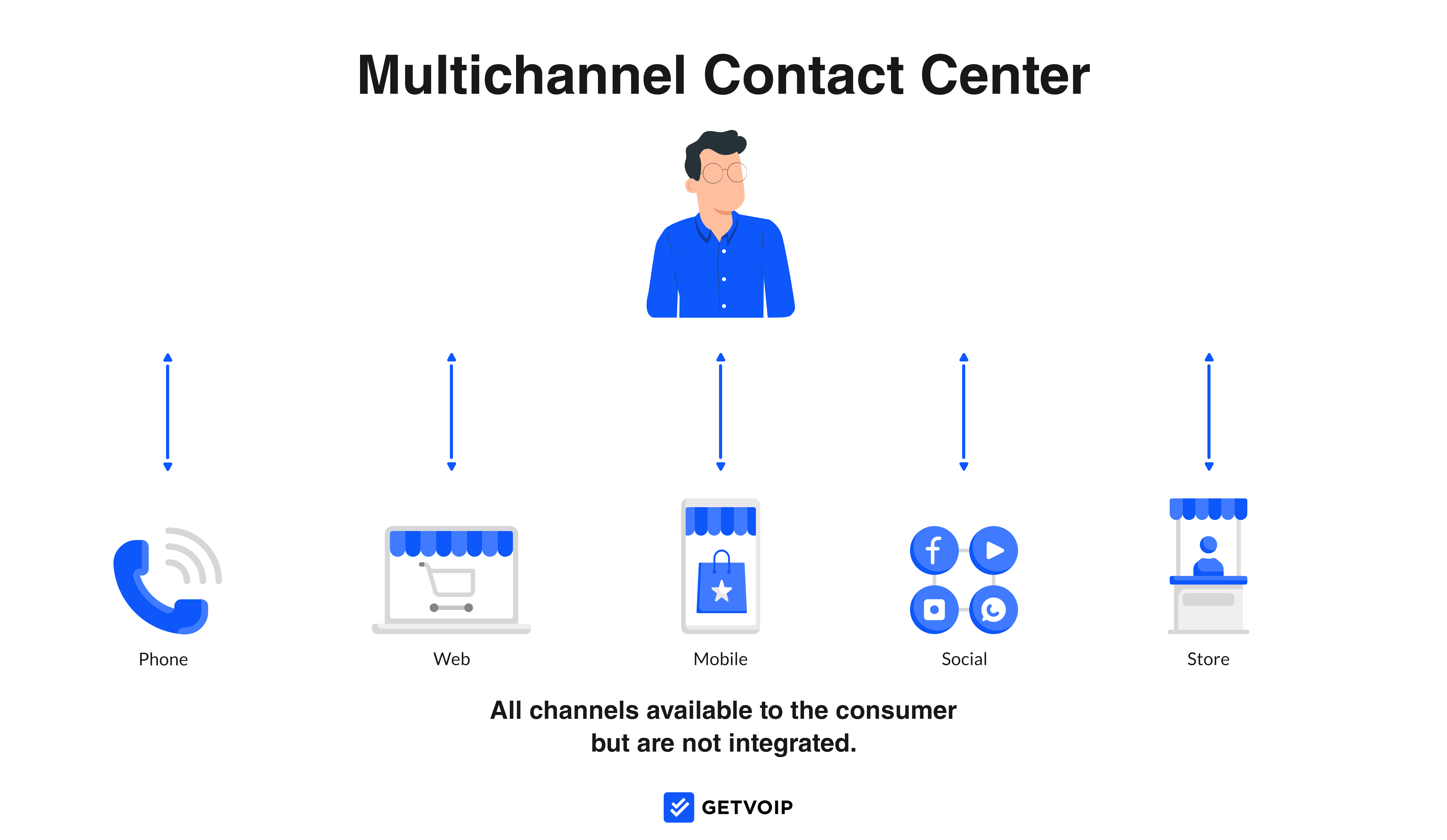
While customers can still reach your company through their preferred channel, agents have a more siloed experience. They can’t see a customer’s previous contact attempts or purchase history, forcing the representative to ask clarification questions that the customer has probably answered in previous interactions.
Learn more: Multichannel Contact Center: Key Features, Benefits & Top Providers
Standout Features of Multichannel Contact Centers
While most multichannel contact center features are also included in omnichannel platforms, look for the following capabilities in a multichannel CCaaS software:
- Multichannel dashboard: The app’s desktop dashboard enables inbound and outbound communication through any of the available channels. However, agents cannot switch channels during a live call, and each inbound query initiates a new task. Customer interactions typically do not display the customer’s journey history.
- Skills-based routing: Multichannel CCaaS platforms analyze a caller’s needs and route them to the best-available agent based on availability and skill. Compared to omnichannel platforms, multichannel routing does not offer the same depth in CRM integrations and analysis of the customer’s history.
- Call queues: Administrators combine agents into departments or hold queues, which organize inbound phone calls in a waiting list if all agents are busy
- IVR menu: Create a self-service routing menu that presents callers with options of departments, users, and announcements. Customers select an option and then either route the destination or reach a submenu.
- Auto dialers: Outbound auto dialers retrieve phone numbers from a database or campaign list, automatically calling numbers down the list one after another. If a recipient answers the phone, the dialer connects the agent. This technology saves agents the time of dialing contacts, waiting for the phone to ring, and leaving a voicemail.
Advantages of Multichannel Contact Centers
A multichannel strategy offers a few advantages over omnichannel platforms. Let’s take a look at the positives of a multichannel approach:
- Easy to learn: Since multichannel platforms have fewer features and a simplified dashboard, they generally have a shorter learning curve than omnichannel CCaaS software
- Lower cost: Multichannel CCaaS platforms generally cost between $75 an $150 monthly per user, which is roughly $75 below what an omnichannel platform may cost
- Agent specialization: With a multichannel contact center, agents can specialize in particular channels. This may lead to more consistent customer service, as agents are more familiar with the controls and features they use most often.
- Easier to monitor: A multichannel contact center generally gives a supervisor less call-center activity and agent performance to monitor. With fewer features and a less comprehensive view of agent performance and customer history, supervisors don’t have to comb through as much information to keep tabs on the call center’s performance.
- Channel-Specific Metrics: Multichannel platforms report on each channel independently, which makes it straightforward to evaluate performance within a single channel. If you want to know how your email queue is performing or what your average phone handle time is, multichannel reporting gives you that without the added complexity of cross-channel analysis.
Limitations of Multichannel Contact Centers
Compared to an omnichannel contact center, multichannel contact centers have a few drawbacks, or limitations:
- Siloed agent experience: Each time an agent handles an inbound query on a multichannel system, they have no picture of the customer’s overall journey. This limited context disables agents from seeing information that would be helpful, like orders and recent interactions.
- Customer Frustration: Customers who have to repeat themselves are significantly more likely to churn. According to research from Salesforce, 76% of customers expect consistent interactions across departments, but 54% say it feels like sales, service, and marketing teams don't share information.[*] That disconnect is exactly what multichannel siloing creates, and customers notice it every time they have to re-explain their situation to a new agent.
- Slower customer service: Compared to an omnichannel platform, multichannel software generally has less sophisticated routing tools and CRM integrations. This may lead to customers reaching the wrong representative on their first attempt, decreasing first call resolution rate and prolonging the required support time.
When to Use a Multichannel Contact Center
Multichannel works best when simplicity and cost efficiency matter more than unified customer history. Here are three scenarios where it fits well.
Voice-First Call Centers
Call centers that primarily serve customers over the phone, with little or no digital support, don't need the complexity of omnichannel software. A regional plumbing company that takes inbound calls to schedule jobs and answer questions is a good example. Customers rarely follow up more than once, and all support happens over the phone. A multichannel platform covers their needs without the added cost of tools they would never use.
Companies Just Starting a Contact Center
Those building a contact center for the first time often benefit from starting with a simpler, more approachable interface. An early-stage e-commerce brand with six support agents, for instance, is likely handling one-and-done order questions over email and phone. Starting with multichannel keeps costs manageable and gives the team time to learn the basics before deciding whether an upgrade makes sense.
Organizations with a Small Budget
Support teams working within tight budget constraints will save meaningfully by choosing multichannel software. A nonprofit with a small donor support team, for example, needs to handle inbound calls and emails without justifying the per-seat cost of a full omnichannel platform. Multichannel gives them the channel coverage they need at a price point that fits their operating budget.
Which Should You Choose?
Picking between omnichannel and multichannel comes down to four things: your business size, your budget, how complex your customer journeys are, and how ready your team is to adopt new technology. Here are some points to discuss internally before proceeding:
- Business size matters: because omnichannel routing and unified profiles are most valuable when you have enough agents that customers might reach a different person each time they call. If your team is small and customers regularly talk to the same rep, that unified history is less critical
- Budgeting should be direct: Multichannel platforms run roughly $75 to $175 per user per month. Omnichannel platforms run $125 to $225. If you're running a lean operation, that gap adds up fast across a full team
- Journey complexity: Jus how often are your customers contacting you more than once? If a typical customer calls, then follows up by email, then calls again, omnichannel pays for itself by giving every agent full context. If most customers contact you once and get resolved, multichannel handles that fine.
- Technical readiness: This element is one teams tend to overlook. Omnichannel platforms require more setup, more integrations, and more training time. If your team is building a contact center for the first time or doesn't have IT support, starting with multichannel is more realistic
Be sure to ask yourself these questions before deciding:
- Do your customers contact you more than once to resolve a single issue? If yes, lean omnichannel.
- Do your agents regularly hand off customers to other team members? If yes, lean omnichannel.
- Is your primary channel still voice, with digital as secondary? If yes, multichannel likely covers your needs.
- Are you working with a tight per-seat budget and a small team? If yes, multichannel is the more practical starting point.
How to Transition from Multichannel to Omnichannel
Most companies don't start with omnichannel, only opting for it once their needs change. Here's how to make that transition without disrupting your team:
- Start by auditing your current channel data: Before you migrate, take stock of what customer data you already have and where it lives. Interaction logs, CRM records, and call transcripts all need to be accounted for before you move anything.
- Choose a platform that supports phased rollout: Some omnichannel providers let you activate channels and features gradually rather than all at once. That approach reduces the learning curve and gives your team time to adjust before the full system goes live.
- Run multichannel and omnichannel in parallel briefly: If possible, run both systems simultaneously during a short transition window. This lets agents get comfortable with the new platform while the old one still handles live volume, reducing the risk of dropped interactions during the switch.
- Retrain supervisors before agents: Supervisors need to understand the new routing rules, queue structures, and reporting tools before agents go live. If supervisors aren't confident in the platform, they can't support their teams effectively during the adjustment period.
- Set a benchmark before you switch: Pull your current CSAT, FCR, and average handle time before migrating. That gives you a clean baseline to measure whether the omnichannel platform is actually delivering the improvements you expected.
Hybrid Contact Center Models
Some businesses don't have to choose one model entirely. A hybrid contact center model uses omnichannel software for primary, high-volume channels like voice, email, and chat, while treating secondary channels like social media or video as separate, siloed interactions.
This approach works well for companies that want the unified history and routing benefits of omnichannel for their core support channels, without paying to fully integrate channels that see low contact volume. It's also a practical middle ground for organizations mid-transition, running omnichannel for one department while another team still operates on multichannel tools.
The tradeoff is that a hybrid model still creates gaps. Any channel outside the unified system will still produce siloed interactions, so customers who contact you through those secondary channels won't benefit from the same seamless experience. Keep that in mind when deciding which channels belong inside the unified system and which ones can stay separate.
Industry-Specific Recommendations
Which industry your operation centers itself around informs which of these two offerings may be a better fit for your needs. Below we’ve outlined our suggestions per industry:
Healthcare
Omnichannel is the stronger fit for healthcare contact centers. Patients often call, follow up by email, and use a portal, sometimes all for the same appointment or prescription. A unified patient history helps staff avoid asking patients to repeat sensitive information repeatedly. HIPAA compliance requirements also push toward platforms with stronger data controls, which omnichannel providers at the enterprise tier tend to offer.
Retail and E-Commerce
Either model can work depending on scale. Small retail operations with low repeat contact rates do fine with multichannel. Larger retailers or e-commerce brands with high order volumes and frequent post-purchase support needs benefit from omnichannel, especially when integrated with an order management system so agents can pull up order details without leaving the contact center dashboard.
Financial Services
Omnichannel fits best for financial services companies where customers might call about the same account issue across multiple interactions over days or weeks. The audit trail that omnichannel platforms maintain is also useful for compliance purposes, since every interaction is logged and accessible.
SaaS and Technology
SaaS companies with tiered customer accounts, dedicated customer success managers, and long onboarding processes benefit most from omnichannel. When multiple team members interact with the same customer account, a unified desktop ensures no one is working with stale or incomplete information.