

Today's customers value a personalized experience. They want to know that the brands they buy from are ready to listen to their immediate needs and provide them with answers, quickly. A call center’s hosted IVR system provides this experience. In fact, businesses who use advanced voice solutions such as IVRs will see as much as a 25% increase in customer satisfaction.[*]
IVR systems help your customers contact you during your business hours, ask for directions, book reservations, or pay a bill.
No matter what type of business you run, you should consider using self-service IVR to communicate with your customers. Today, we'll outline what hosted IVR is, how it works, and why you should add it to your business.
- What is Hosted IVR?
- How IVR Works
- IVR Use Cases
- Pros & Cons
- Does My Business Need It?
- Top Hosted IVR Solutions
- FAQs
What is Hosted IVR?
Hosted IVR (interactive voice response) is a telephony menu and routing system that provides interactive responses to callers. It helps businesses organize the callers that contact their organization, determining their needs and routing them to the right queue.
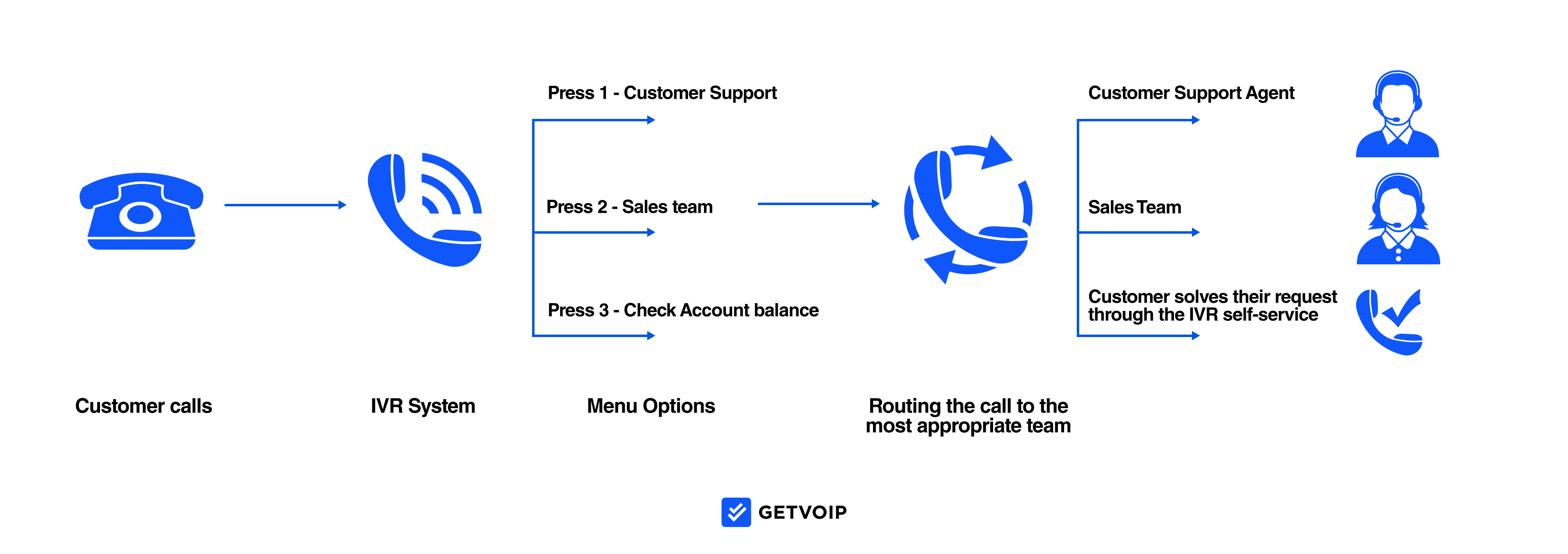
Through the IVR menu system, the business can direct callers to the right department and the right person within the department as quickly as possible. That way, customers get the answer to their questions with fewer delays, enhancing their interaction with the organization. These systems often integrate with ACD, or automatic call distribution, which helps get callers to the information they need without the need for human input.
IVR platforms are often built into business VoIP systems, unified communications platforms, or call center software. This makes IVR easy for brands to implement, regardless of the type of phone system they use. Many IVR applications also offer IVR customization options, like drag-and-drop call flow designers, allowing each company to utilize the technology for its own goals and customers. 78% of contact centers say they’ve already adopted IVR automation.[*]
Natural language understanding (NLU) and text-to-speech functionality enable the software system to interact smoothly with the customer, providing the information they need and helping them navigate to the right destination without frustration or repetition. Without IVR, problems such as transferring people to the wrong department or mistakes in directing calls become more common, which can harm the impression of the business.
How Does Hosted IVR Work?
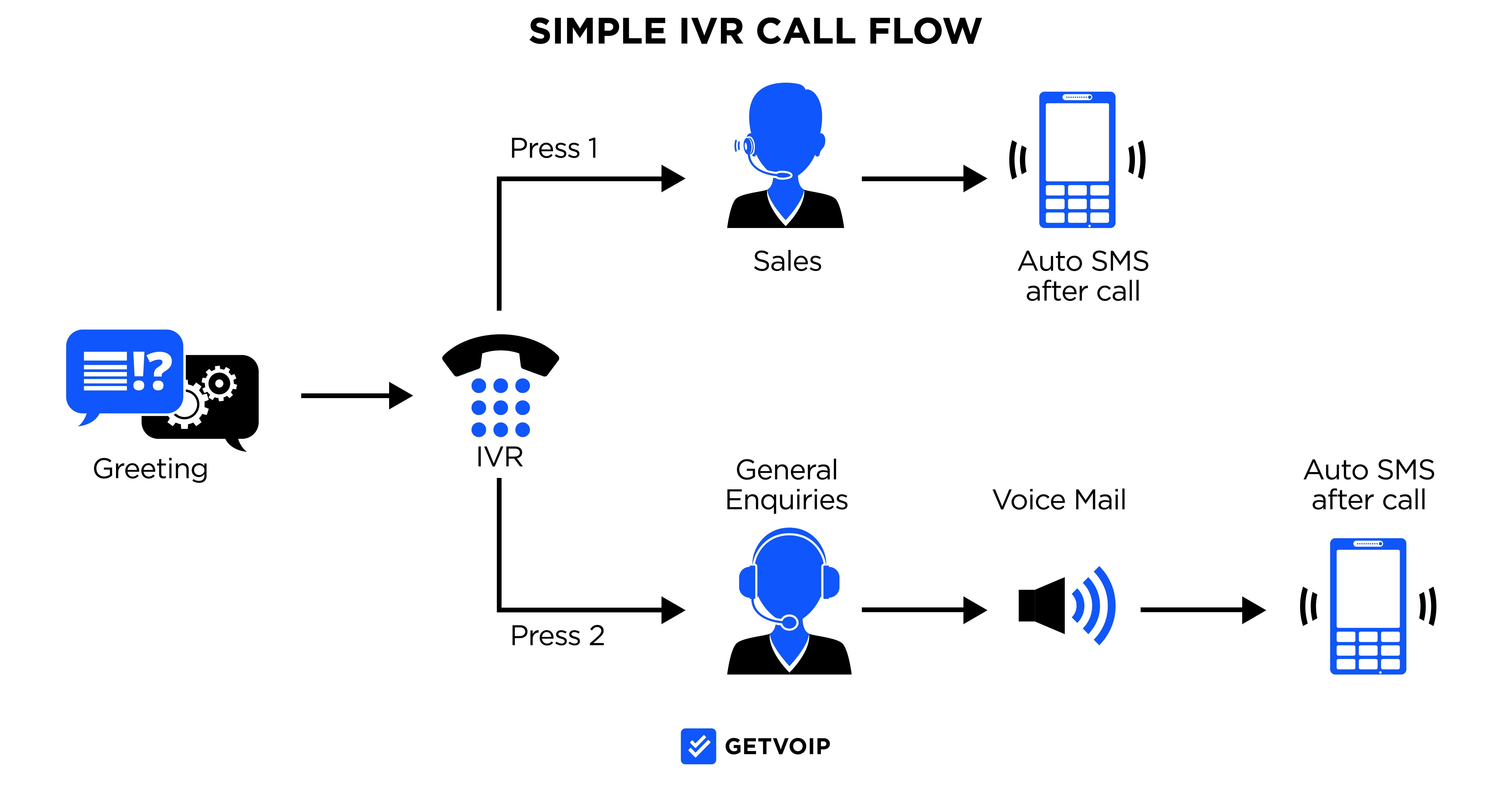
Hosted IVR works by building a routing voice menu that inbound callers use to reach a variety of users, departments, and actions in your phone system. Within your call center (CCaaS) or unified communications (UCaaS) software, you can connect these capabilities via an IVR call-flow designer.
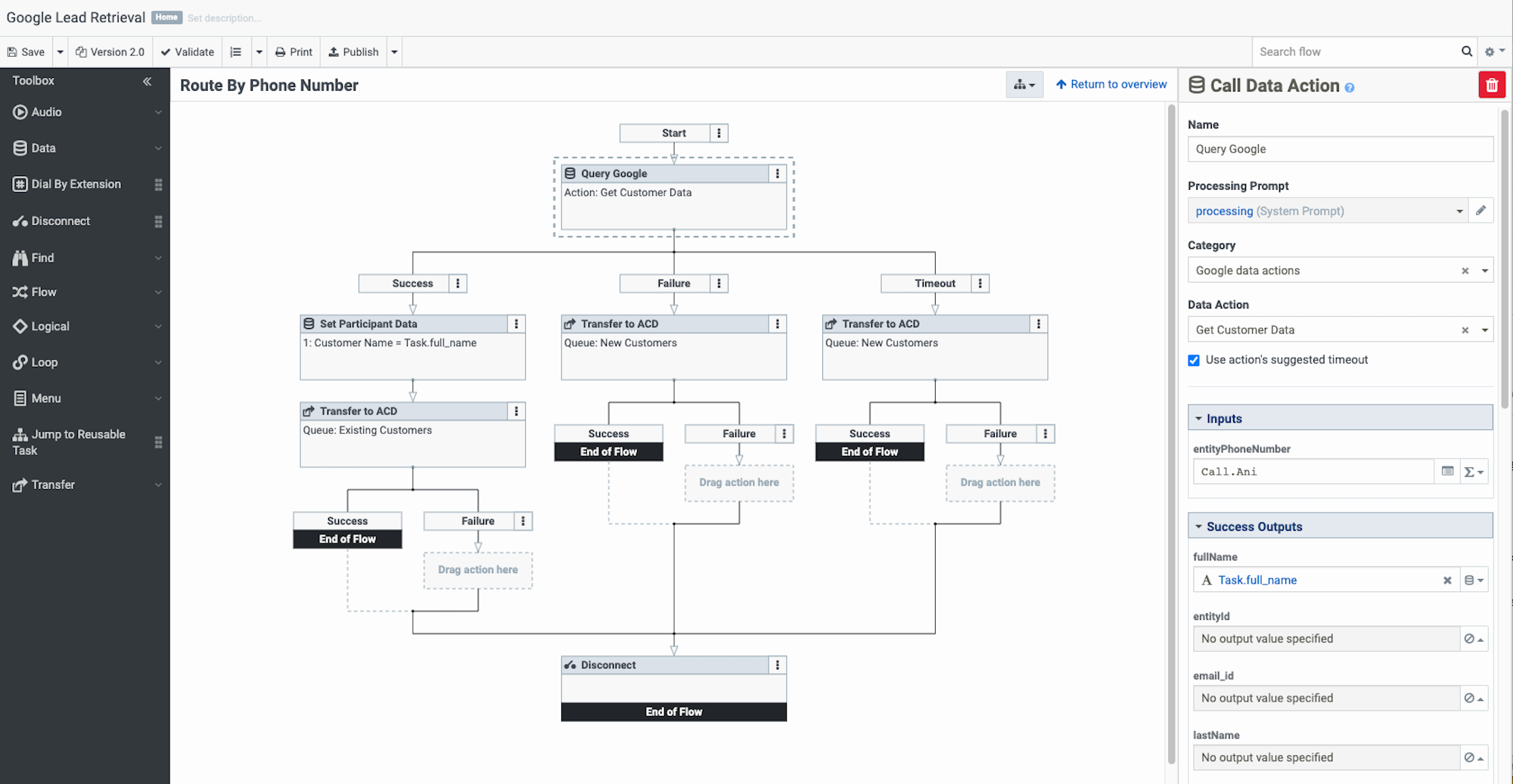
When callers contact your designated IVR business phone number, they hear a menu with preselected choices to reach the information, user, or action they need. For example, your IVR may give them options to Press 1 for Store Hours or Press 2 for Customer Service. After a customer inputs their selection via keypad or speech recognition, the phone system routes the caller to the right queue, action, or submenu.
Companies typically organize IVR call flows to handle inbound callers’ most common needs. Some IVR options may provide auto attendant self-service–like bill pay, appointment setup, and password retrieval–so customers never need to interact directly with an employee.
Many CCaaS systems integrate hosted IVR with an advanced automated call distribution system (ACD) that uses AI to detect the caller’s needs and route them to the optimal agent. This is called intelligent routing and can navigate callers based on agent skills or availability.
Advanced call center software includes intelligent virtual assistants (IVA) that act as visual or app-based multichannel routing systems. Essentially a mobile IVR system, virtual agents allow customers to connect with agents via not only voice but SMS text or web chat.
Hosted IVR vs. Alternatives Comparison Table
For your reference, we’ve compiled a short table to show you the core differences between hosted IVR, on-premise IVR, and a basic phone system:
| Feature | Hosted IVR | On-Premise IVR | Basic Phone System |
| Setup Time | Hours to Days | Weeks to Months | Days |
| Upfront Cost | Low ($0-$500) | High ($5,000-$50,000) | Medium ($500-$2,000) |
| Monthly Cost | $15-$150 per user | Minimal (after setup) | $20-$50 per line |
| Maintenance | Provider-managed | In-house IT required | In-house or vendor |
| Scalability | Excellent (instant) | Limited (hardware dependent) | Poor (line dependent) |
| Remote Access | Yes (cloud-based) | Limited (VPN required) | No |
| AI Integration | Common | Rare | None |
| Automatic Updates | Included | Manual | Manual |
| Disaster Recovery | Built-in redundancy | Requires backup systems | Minimal |
| CRM Integration | Easy | Complex | Difficult |
| Multi-location Support | Seamless | Requires networking | Not available |
| Advanced Analytics | Standard feature | Add-on purchase | Basic only |
| Speech Recognition | Available | Limited availability | Not available |
| 24/7 Availability | Always operational | Depends on power/internet | Limited |
| Implementation Complexity | Low (no hardware) | High (IT expertise needed) | Medium |
| Best For | Growing businesses, remote teams | Security-critical operations | Very small offices |
IVR Use Cases by Industry
IVR systems play different roles steering your callers depending on your industry. Here's how businesses across various sectors make great use of hosted IVR to handle their own call volumes and specialized customer needs. As many as 4 billion calls annually across all industries are handled by IVR.[*]
Healthcare
Medical practices and hospitals make solid use of IVR to slash down on front desk workload and give patients unprecedented 24/7 access to basic services without tying up staff working on precious time. The system handles routine appointment requests and prescription refills automatically, freeing nurses and receptionists to focus on patients who need more complex help. Many healthcare providers report cutting front desk call volume by 40-60% after implementing IVR for standard patient requests. Here's some common applications:
- Appointment scheduling, confirmations, and reminders
- Prescription refill requests
- Test result notifications and secure information delivery
- Insurance verification and billing inquiries
- Post-procedure follow-up calls
Retail & E-commerce
Retailers handle peak season call spikes and routine inquiries with IVR, letting customers get answers instantly without waiting for an agent. During Black Friday or holiday shopping rushes, IVR systems manage thousands of "where's my order" calls that would otherwise overwhelm support teams. The self-service approach keeps customers happy while avoiding the cost of hiring seasonal call center staff. Retail and e-commerce player can use it for customers looking for:
- Order status and tracking updates
- Store locator and hours information
- Return and exchange processing
- Inventory availability checks
- Gift card balance inquiries
Financial Services
Banks and credit unions use IVR for secure account access and transactions, handling millions of routine requests that would otherwise require tellers or service reps. Customers can check balances, transfer funds, and pay bills any time of day without visiting a branch or waiting on hold. Voice biometric authentication adds security while making the process faster than traditional PIN-based systems. Financial institutions rely on IVR for inquiries like:
- Account balance and transaction history
- Fund transfers between accounts
- Bill payment processing
- Card activation and fraud reporting
- Loan balance and payment information
Hospitality & Travel
Hotels and airlines manage reservations and guest services across time zones with IVR systems that never close. International travelers can confirm bookings, change dates, or check flight status without worrying about calling during business hours in a specific time zone. The 24/7 availability is crucial when guests need to reach a hotel at 2 AM or check a flight status before heading to the airport. Hospitality and travel power players use IVR for:
- Reservation booking and modifications
- Flight status and gate information
- Loyalty program account management
- Express checkout and billing
- Airport shuttle and transportation requests
Insurance
Insurance companies can en masse process claims and policy changes through IVR, slimming down reliance on paperwork and speeding up routine transactions. Policyholders have the power to file claims within moments after an accident instead of twiddling thumbs waiting until business hours to reach an agent. The system collects initial claim details automatically and routes urgent cases to adjusters while handling simple policy inquiries without human intervention. Here's some active scenarios where IVR can take over:
- Claims filing and status updates
- Policy information and coverage details
- Premium payment processing
- Agent locator by zip code
- ID card requests and policy changes
Transportation & Logistics
Shipping companies let customers track packages and schedule deliveries without jamming up call centers with basic "where's my package" calls. FedEx, UPS, and other carriers process millions of tracking requests daily through automated systems, saving massive amounts on customer service costs. Customers get instant answers by entering a tracking number, while complex delivery issues get routed to agents who can actually solve problems. Here's a quick hit list of things it can do:
- Package tracking by tracking number
- Delivery scheduling and address changes
- Pickup scheduling for shipments
- Shipping rate quotes
- Claims filing for damaged or lost items
Real Estate & Property Management
Property managers use IVR to handle tenant requests around the clock, especially for maintenance emergencies that can't wait until office hours. Grouchy and upset tenants can report a burst pipe or broken heater at 11 PM and have the system immediately notify on-call maintenance staff. For non-emergency requests like rent payment questions or lease renewals, IVR collects the information and creates work orders for the property management team to handle during business hours. See, here's a few ways it can help:
- Maintenance request submission
- Rent payment and balance inquiries
- Available unit information
- Showing appointment scheduling
- Emergency maintenance routing
What Are the Pros and Cons of Hosted IVR?
Hosted IVR software offers many benefits for businesses and their customers.
Pros
Below, are the pros of hosted IVR:
Reduce Communication Errors
With a computerized system that automatically receives a customer’s input and routes them to the right queue or agent, a company can reduce human routing errors that stem from speech misunderstanding or incorrect input.
This avoids queue overflow and keeps customer wait times as low as possible. Further, it boosts customer experience, improves first-call resolution, and builds stronger relationships with your customers.
Efficient Call Transfers
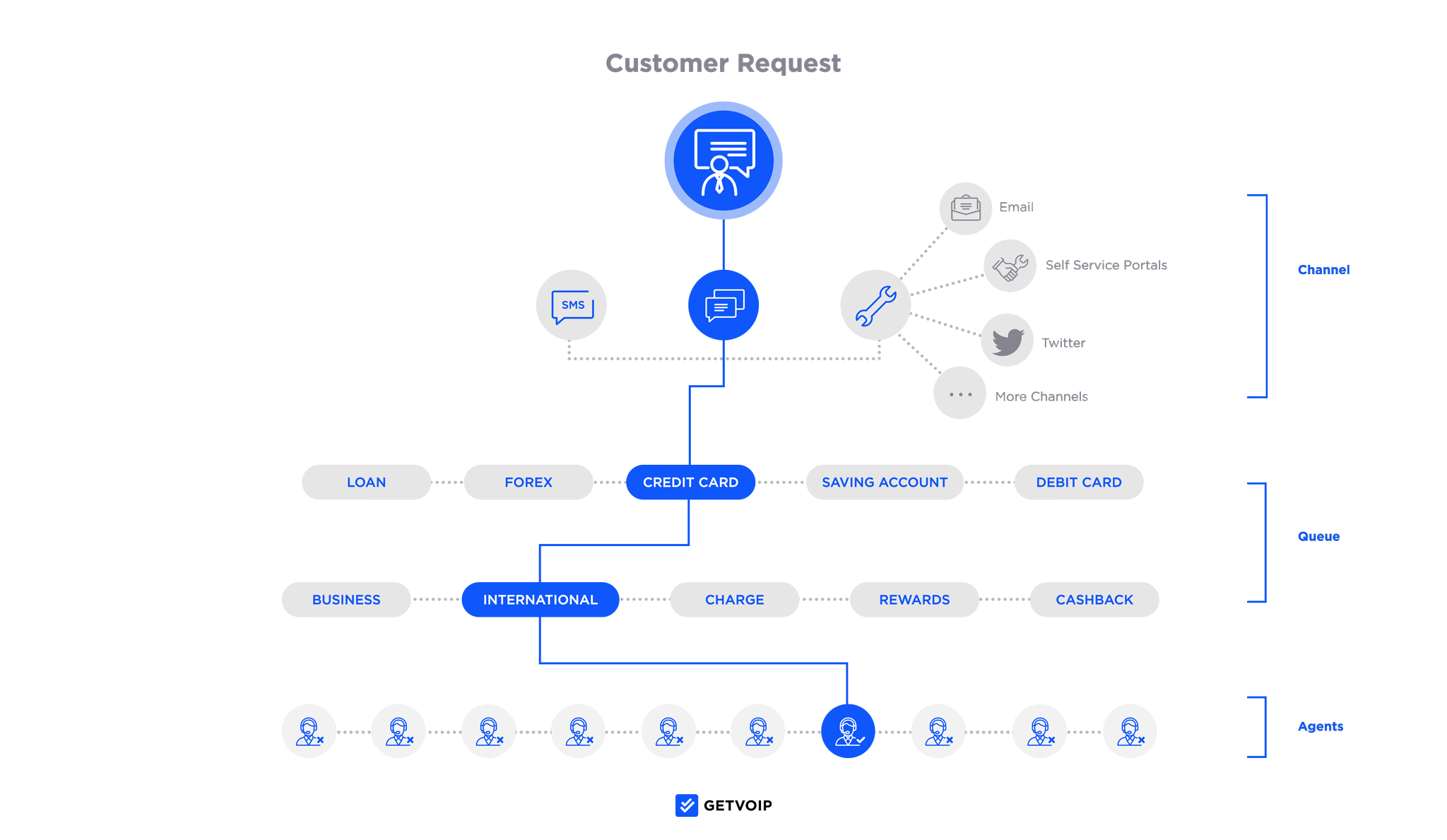
Automatic transfers route callers to the right agent instantly, saving time compared with manual routing. Agents don’t have to worry about forwarding calls but can instead focus on their call queues, providing more focused and personalized service. This improves agent morale and customer satisfaction.
Employee Productivity
With the IVR system, companies save time because employees no longer need to act as receptionists who answer the call, learn the caller’s needs, and transfer them. Computerized IVR systems and automations handle services previously performed by humans, such as providing business hours or basic account information.
Since IVR systems and automations are available around the clock, they provide availability that real humans can’t match. 61% of customers say they prefer using self-service options to resolve their most simple issues, give the customers what they want and save your team some headaches.[*]
Analyze Call Data
Call center and UCaaS software often integrates with call center analytics systems, making it easier to gather data about your callers and better understand their experiences. Visualize customer journeys within the system and the number of calls that were answered or missed by the employees in each department. Call recording features also help employers better understand the customer care callers receive and collect information about where customers are calling from.
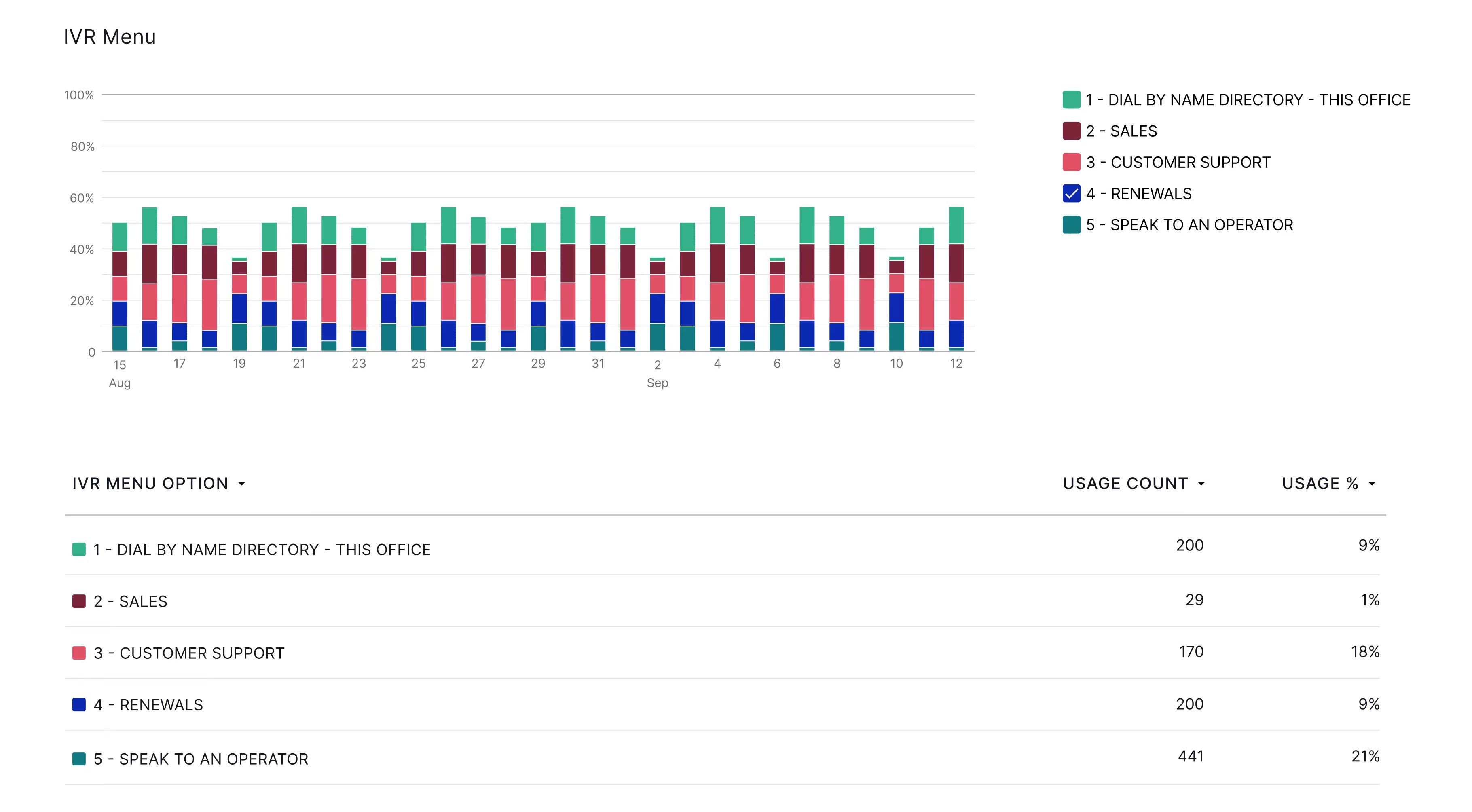
Call recordings and analytics helps businesses build stronger marketing campaigns and improve the level of service that customers receive from the organization.
Cons
Although the benefits are clear for many business owners, hosted IVR solutions have a few drawbacks:
Customers Prefer Live Agents
Some customers do not like the experience of feeling as though they must ‘talk to a machine’ and may prefer live chat vs chatbots or automated IVR. Brands will have to be able to balance these consumer needs with their desire for efficiency. This is why your IVR call flow should include a ‘select 0 to speak with an operator’ option for those who want to skip over the automated menu options.
Menus Are Confusing
There may also be some customers who have trouble successfully using automated menus and lists. For example, some customers may struggle to keep track of all the different menu options or determine what category their precise need fits into. Others may become increasingly frustrated if they find themselves engaging with multiple menus, or if your IVR menu includes mistakes.
Businesses that want to address these shortcomings should focus on creating short, efficient menu options as well as options for reaching an operator at any time.
Constant Upkeep
Make sure you take the necessary time to invest in your system. If you do not, your IVR system may cause problems via poorly organized menus or other inefficiencies that will cancel out IVR’s benefits. Taking the time to research effective IVR menu options, investing in a quality voice recording, and otherwise creating a high-quality IVR system can result in a tremendous difference in the customer experience.
Frustrated Customers
Brands also need to make sure that any potential buyers that contact their organization feel the personalized service that the brand is trying to create. If customers call, feeling ready to buy, but then get directed to endless menu phone trees, they may begin to feel ignored or not prioritized. The IVR system needs to take into account active buyers and be able to direct them to the best sales representatives so they can receive the personal attention they need to complete their purchase.
Does My Business Need Hosted IVR?
To determine if your company needs hosted IVR services, consider your inbound call traffic and how well your current call routing system meets your customers' needs.
Consider also your employees’ efficiency. Think about whether or not your employees waste time answering basic questions and if an IVR system can help them use their time more effectively.
Further, consider the three questions below to determine if hosted IVR will benefit you.
Does your business need a better system to manage call flow?
If your company struggles to effectively and efficiently manage incoming calls, then you may need an IVR. If your employees find themselves regularly wasting time answering mundane phone calls, when they could be completing tasks that would more directly impact the business’s revenue, then self-service may be the solution. Similarly, if the employees find themselves inundated with regular calls and struggling to get the potential customers to the right department, then a computerized call tree may be a great investment.
Do you need to improve inbound call efficiency?
If your callers often struggle to get the answers they need from your employees, then an IVR can help. If callers regularly get transferred multiple times between different departments and feel frustrated by their struggles to reach the people who can actively help them, then having a computerized system that will direct them exactly where they need to go can improve the level of customer care and create a better impression for your brand.
Do you want to enhance your business’ professionalism?
If you also want to take your business to the next level, increasing your appearance of professionalism and the level of service for customers, then an IVR system may be the most cost-effective solution. With an IVR platform, even small companies can make their organizations appear bigger and more developed through multiple lines and mailboxes dedicated to providing customers with a high-quality experience. Rather than have a single employee try to answer all the questions that come in, cloud IVR services make it simple for brands to automatically direct callers to the best-suited employee.
Top Hosted IVR Solutions
If you plan to switch to hosted IVR, here are some of our favorite service providers and CCaaS solutions.
At a Glance: Top Hosted IVR Solutions
| Provider | Key IVR Features | Pricing | Best For |
| 8x8 | Multi-level IVR, skills-based routing, queue reporting, custom submenus, multisite ring groups, emergency continuity menus. | Contact sales for a quote. (Note: IVR is fully included with Contact Center plans but usage-based for CPaaS plans) | Growing multi-location businesses or high-volume support teams |
| RingCentral (RingEX) | Multi-level IVR (up to 250 menus/submenus), ACD, drag-and-drop call flow editor, custom hours/rules, CRM integrations. | Starts at $20/user/month | Mid-market teams using CRM tools or hybrid or remote teams needing unified communications |
| Five9 | Cloud IVR with AI and speech recognition (add-on), omnichannel support (voice, SMS, chat, email), CRM sync, real-time analytics. | Starts at $119/user/month (50-user minimum) | Highly regulated sectors (HIPAA, PCI-DSS, SOC 2) and enterprise-sized organizations |
| Talkdesk | Cloud-hosted IVR with call history visibility, custom IVR Studio builder, queue management, AI options (Autopilot/Copilot). | Starts at $85/user/month (Optional per-hour or concurrent user pricing) | Enterprises needing customizable IVR flows and businesses with complex routing |
| Nice CXone | Omnichannel IVR with AI, CRM/database integration, CXone Studio (no-code flow builder), AI automation (Enlighten AI). | Starts at $110/user/month | Businesses leveraging AI for automation and analytics and omnichannel contact centers handling thousands of daily interactions |
8x8
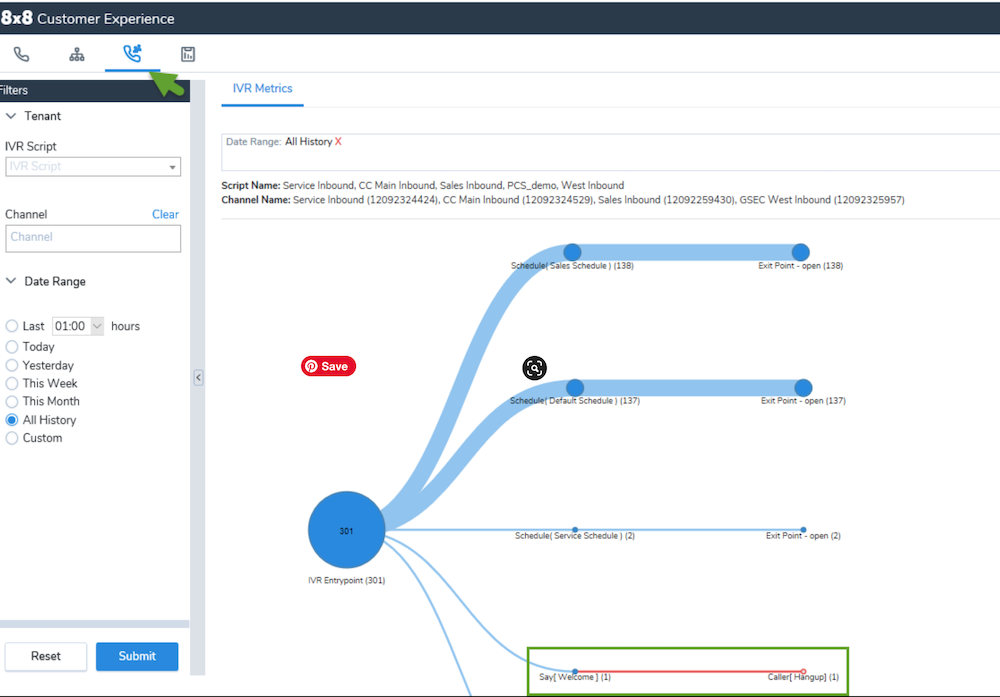
8x8 contact center and business communications platforms focus on providing services to small to medium size businesses. 8x8 supports popular IVR applications including voicemail, automatic callback, email, and webchat. 8x8’s ACD includes skills-based routing and advanced queue reports. The multi-level auto attendant supports complex call flows and allows administrators to configure submenus and create multisite ring groups with alternate menu options for business continuity during emergencies.
Pricing
8x8's IVR-enabled plans come in different packages which include multi-level IVR and automatic call distribution, but you must contact sales to get a real number. The Contact Center plan with full IVR capabilities includes advanced features like intelligent routing, call recording, and workforce management. For CPaaS customers, 8x8 offers usage-based IVR pricing. Prices scale based on features, with higher-tier plans offering unlimited international calling to more than 48 countries and advanced analytics.
Best For
- Growing businesses with multiple locations: Companies needing sophisticated call routing across 5-20 locations who want enterprise-grade features without on-premise infrastructure
- Customer service teams with high call volumes: Organizations handling 500+ daily calls that need skills-based routing, call queuing, and detailed analytics to optimize performance
- Companies requiring international support: Businesses with customers across North America, Europe, and Asia who need unlimited calling to 48+ countries and multilingual IVR capabilities
RingCentral
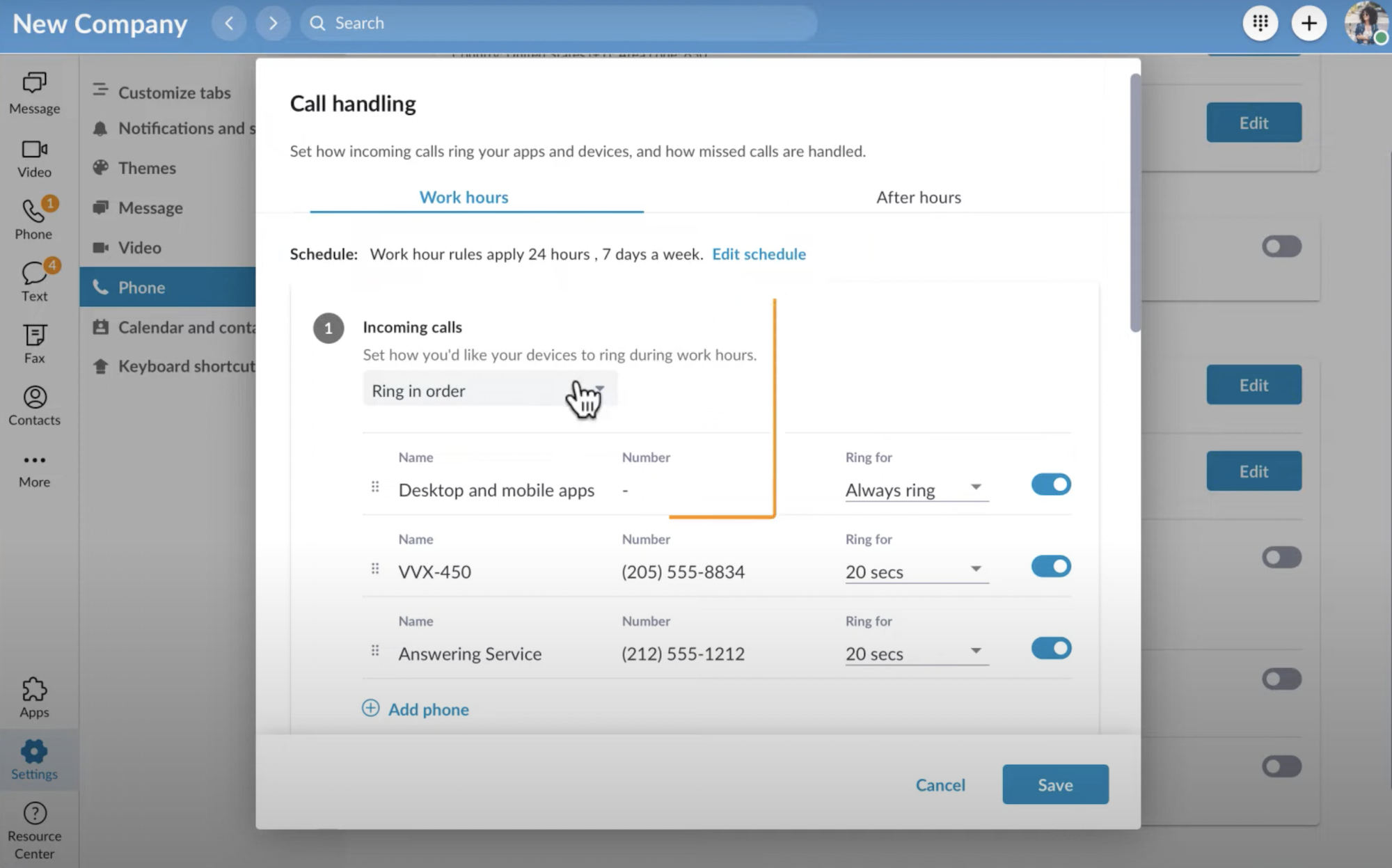
RingEX offers features such as automatic call distribution and blended communications including VoIP phone, SMS, webchat, and internal video conferencing–in addition to their IVR options. This program can be integrated with various third-party systems and includes features to help customers track and generate leads as well as perform market research. The platform supports multi-level IVR menus with up to 250 menus and submenus per account, allowing businesses to create sophisticated call routing strategies. RingCentral's drag-and-drop call flow editor makes it easy to configure custom business hours, answering rules, and complex IVR trees without technical expertise
Pricing
RingCentral's IVR-capable plans start at $20 per user per month (paid annually) for the Core plan, which includes basic multi-level IVR and automatic call distribution. RingCX contact center plans with advanced IVR start at $65 per agent per month. The AI Receptionist add-on costs extra and requires call forwarding to function.
Best For
- Mid-market teams needing CRM integrations: Companies with 20-200 employees using Salesforce, HubSpot, or Zendesk who want seamless click-to-dial and automated call logging
- Hybrid and remote workforces: Organizations with distributed teams who need unified communications across mobile, desktop, and web with consistent IVR experiences
- Businesses prioritizing video collaboration: Teams that combine customer calls with internal video meetings and need both capabilities in one platform with shared contacts and call history
Five9
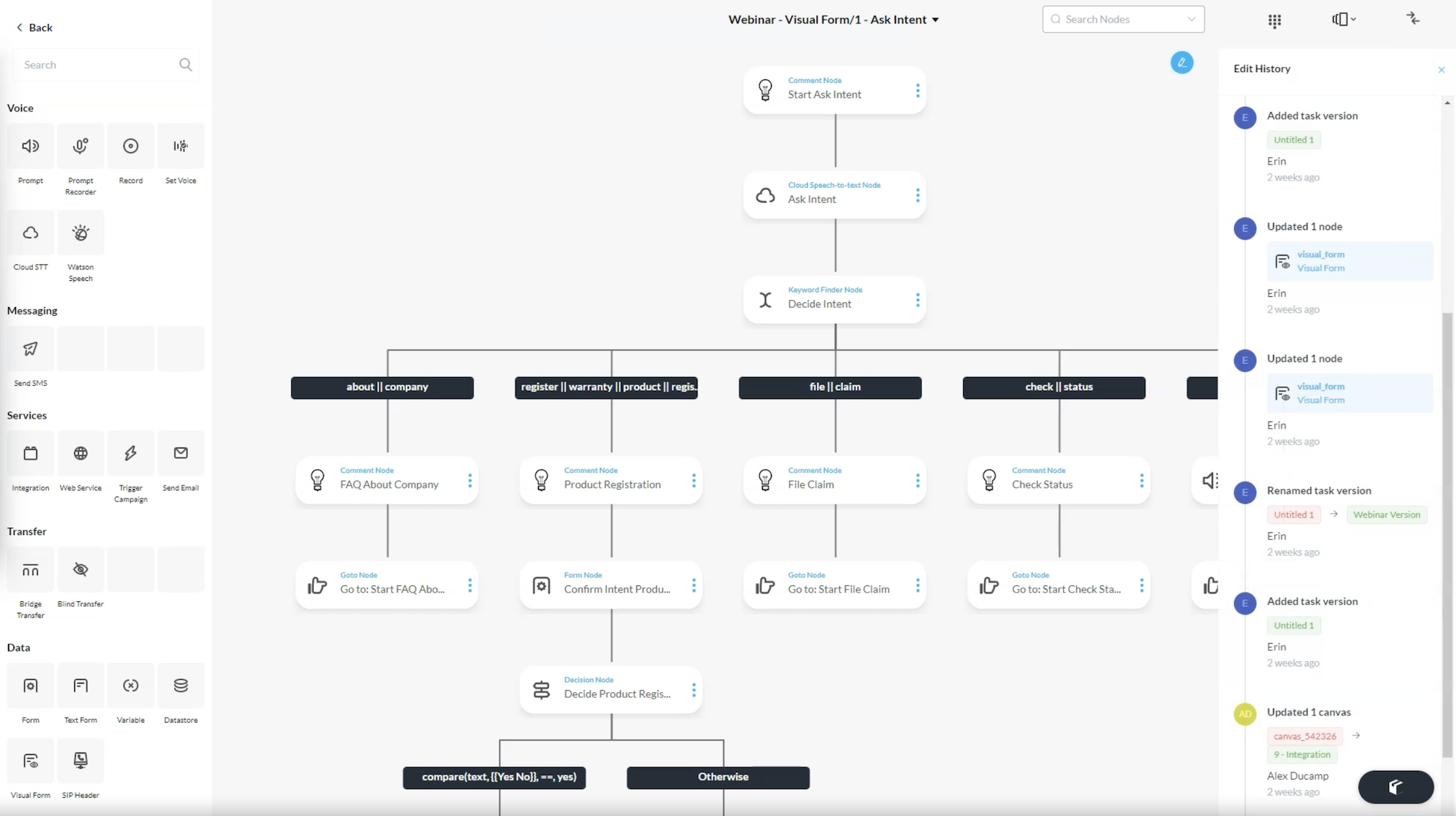
The Five9 Cloud Contact Center software combines inbound, outbound, and blended support to help brands take advantage of cloud-supported call center technology. This option works to improve the customer experience by integrating across multiple platforms including voice, chat, SMS, email, and mobile. Five9 uses AI to better understand customer needs and offers a range of tracking technology for its IVR systems. This data includes real-time metrics and the ability to track performance and sync customer data with the business CRM. Companies will find it significantly easier to understand how past interactions with customers have progressed.
Pricing
Five9's IVR-enabled pricing starts at $119 per user per month for the digital plan, $159 for the core plan (that adds all channels and the standard AI package). You'll need to contact them for higher tiers like the Plus, Pro, or Enterprise plans which include enterprise-level Quality Management and Workforce Management. Important note: IVR with Speech Recognition is a paid add-on not included in base plans. Most plans require a minimum of 50 users.
Best For
- Highly regulated industries: Healthcare, financial services, legal, and education sectors requiring HIPAA, PCI-DSS, and SOC 2 compliance with end-to-end data encryption
- Enterprise contact centers with 100+ agents: Large organizations needing advanced workforce management, quality monitoring, and omnichannel routing across voice and digital
- Outbound sales and marketing teams: Companies running predictive dialing campaigns with 50+ agents who need compliance management, list management, and dialer integration
Talkdesk
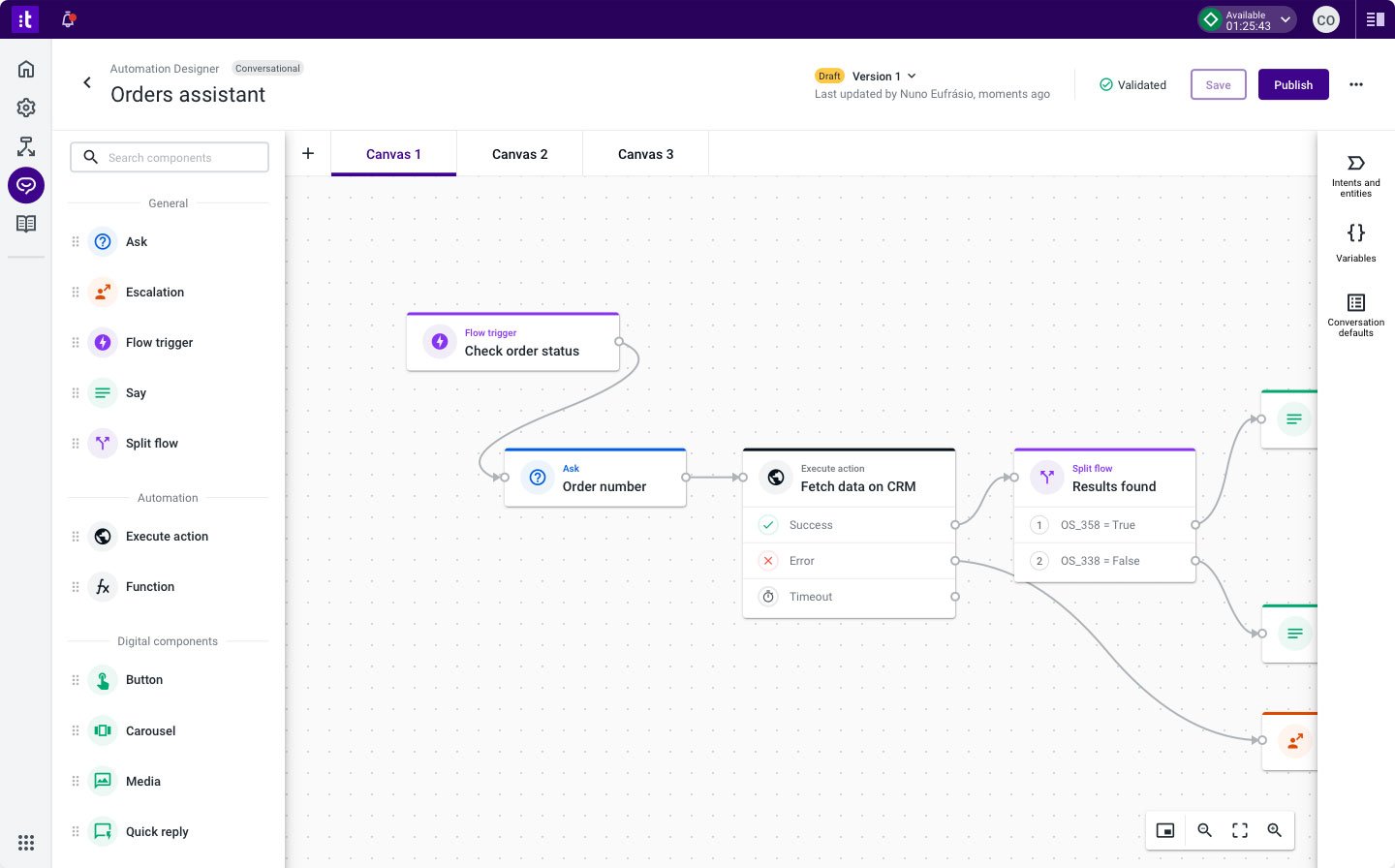
The Talkdesk call center uses cloud-hosted and managed IVR to help employees provide more personalized connections to customers. Agents can see the history of each particular customer while they talk, including their purchase information and their contact history, giving useful context. Talkdesk IVR combines with queueing and an advanced call distribution system, including intelligent skills-based routing.
Pricing
Talkdesk's IVR-enabled plans start at $85 per user per month for the CX Cloud Essentials plan (voice-focused with IVR Studio included). It goes up to the top-level CX Cloud Elite plan starts around $165 per user per month with custom reporting and advanced performance tools. Talkdesk also offers per-hour consumption pricing and concurrent user pricing options. Many advanced AI features like Autopilot (virtual agent) and Copilot (agent assist) are paid add-ons even on higher-tier plans.
Best For
- Enterprise contact centers prioritizing customization: Organizations with 200+ agents needing highly tailored IVR flows, custom integrations, and industry-specific configurations
- Teams requiring flexible IVR design: Companies that frequently update call flows and need easy-to-use Studio builder without relying on IT or developers for changes
- Businesses with complex routing needs: Organizations serving multiple customer segments (VIP, technical support, billing) who need sophisticated skills-based and relationship-based routing
Nice CXone
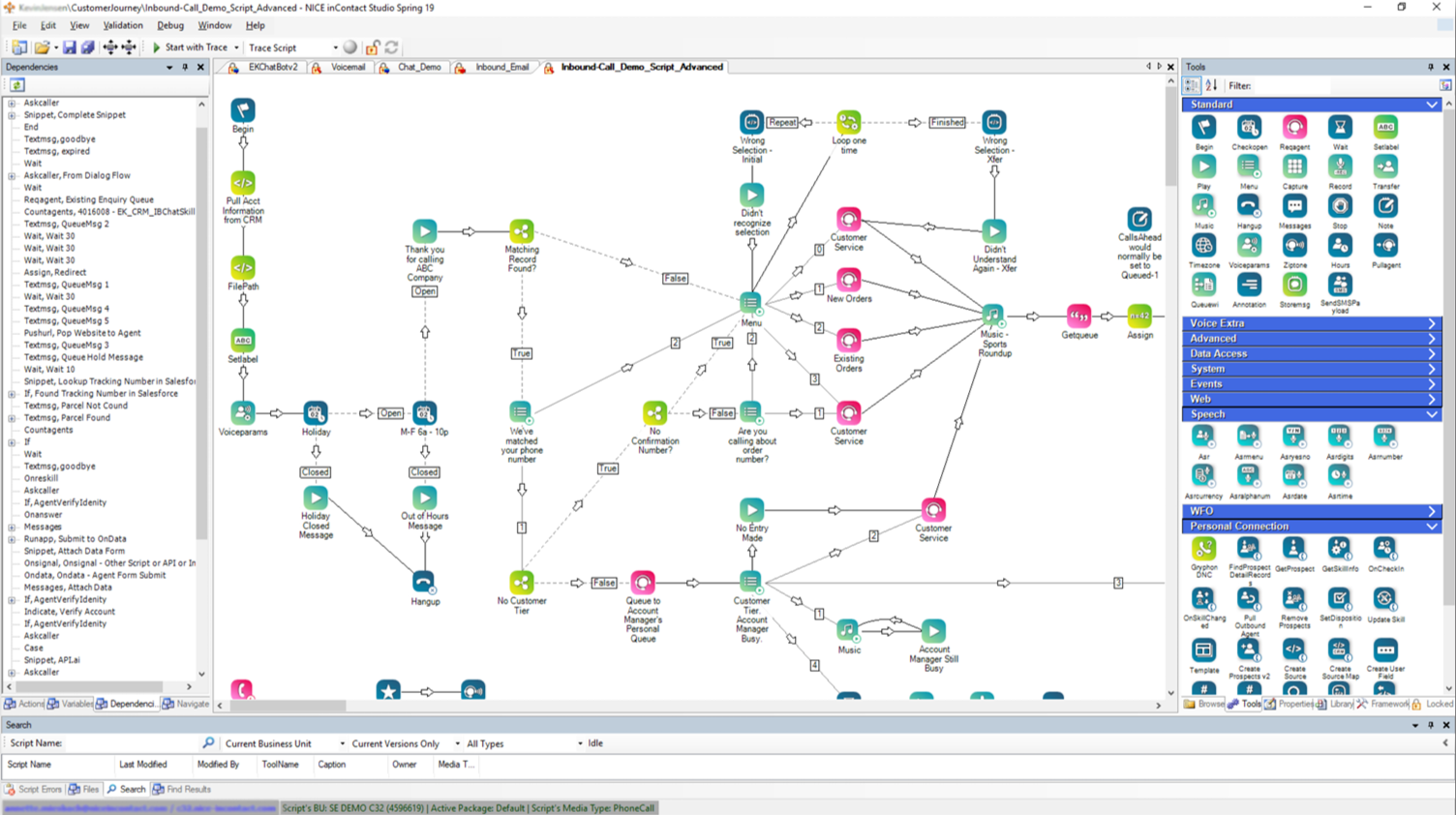
Nice CXone Call Center Software incorporates its IVR system with related technology to allow for inbound and outbound calls. It also integrates with voicemail, SMS, webchat, and social media. This call center can integrate with databases and CRM applications to make it easy to track customer interactions with the brand and enhance the customer service the company can provide. CXone Studio provides a no-code interface for creating and optimizing call flows with advanced routing strategies, standard IVR menus, and pre-built "if-then" actions.
Pricing
Nice CXone Mpower's IVR-capable plans start at $110 for the CXone Mpower Omnichannel Suite, which include IVR capabilities and the CXone Studio. At the high end, we have the CXone Mpower Ultimate Suite at $249 per user per month (includes full Enlighten AI capabilities). Custom quotes are available for any enterprise-sized implementations.
Best For
- Large enterprises with 500+ agents: Organizations needing deep workforce management, granular analytics, and enterprise-grade security with dedicated account management
- Companies prioritizing AI automation: Businesses wanting comprehensive AI capabilities including Enlighten AI for automated interactions, sentiment analysis, and predictive analytics
- Multi-channel operations at scale: Contact centers handling 10,000+ daily interactions across voice, digital, and social channels who need unified reporting and journey orchestration
Hosted IVR Personalizes Customer Service
IVR offers personalized experiences for customers throughout their call, connecting them quickly to representatives that can handle their needs.
If you want to help your business grow, you should consider the potential benefits of using IVR or auto attendants. This technology is an essential part of any enterprise VoIP system.
FAQs
Below, we've answered some FAQs related to hosted IVR.

