Whether you’re starting a call center or optimizing your existing one, the right inbound call center software can lower operating costs, improve CX, and increase agent retention.
Despite the rise of digital communication channels and AI-powered chatbots, phone-based customer service isn’t going anywhere. In fact, over half of consumers say they prefer to handle urgent customer support requests via a phone call–and 43% of those customers want to talk to a live agent, not a robot.[*]
Read on to learn more about the most important inbound call center features, use cases, benefits, and best practices.
What is an Inbound Call Center?
An inbound call center is a business that receives and manages incoming calls from existing and potential customers. Inbound call center agents typically handle incoming customer service and technical support calls. These agents may also respond to calls related to sales inquiries, subscription renewals/upgrades, bill payment, appointment management, order tracking, CRM data updates, customer onboarding, or customer feedback.
In addition to live agent-customer conversations, customer self-service via Interactive Voice Response (IVR) and Intelligent Virtual Agents (IVAs) are an essential part of inbound call center operations. IVR and IVAs either entirely resolve the customer’s support request without involving a live agent, or use advanced call routing strategies and Natural Language Processing (NLP) to connect the caller to the best available live agent.
Regardless of whether the interaction is fully automated or agent-led, the main goal of inbound call centers is to resolve customer support issues as quickly as possible while providing a superior customer experience.
Inbound vs Outbound Call Centers: Key Differences
The main difference between inbound and outbound call centers is that inbound call center agents receive incoming customer calls and outbound call center agents place outgoing calls to customers or leads. Inbound call center agents primarily manage service and support requests from existing customers, whereas outbound call center agents cold call leads to convert new customers or make sales calls to upsell or cross-sell to existing clients. Blended call centers handle both inbound and outbound calls, adjusting agent call queue assignments based on current call volumes and business goals.
Additional differences between inbound call centers vs outbound call centers are outlined below:
| Inbound Call Centers | Outbound Call Centers | |
| Call Direction | Receives incoming calls primarily from existing customers | Makes outgoing calls to existing customers and prospects |
| Use Cases |
|
|
| Key Features |
|
|
| Essential KPIs |
|
|
Key Inbound Call Center Features
The top inbound call center features are:
Call Forwarding
Call forwarding automatically directs calls to additional internal or external telephone numbers, extensions, call queues, or voicemail boxes if the initial agent called does not answer the phone–without disconnecting the caller or making them redial another number. Admins can create and edit call forwarding paths and set the specific amount of time or rings before the current call is forwarded to another number.
Call Routing
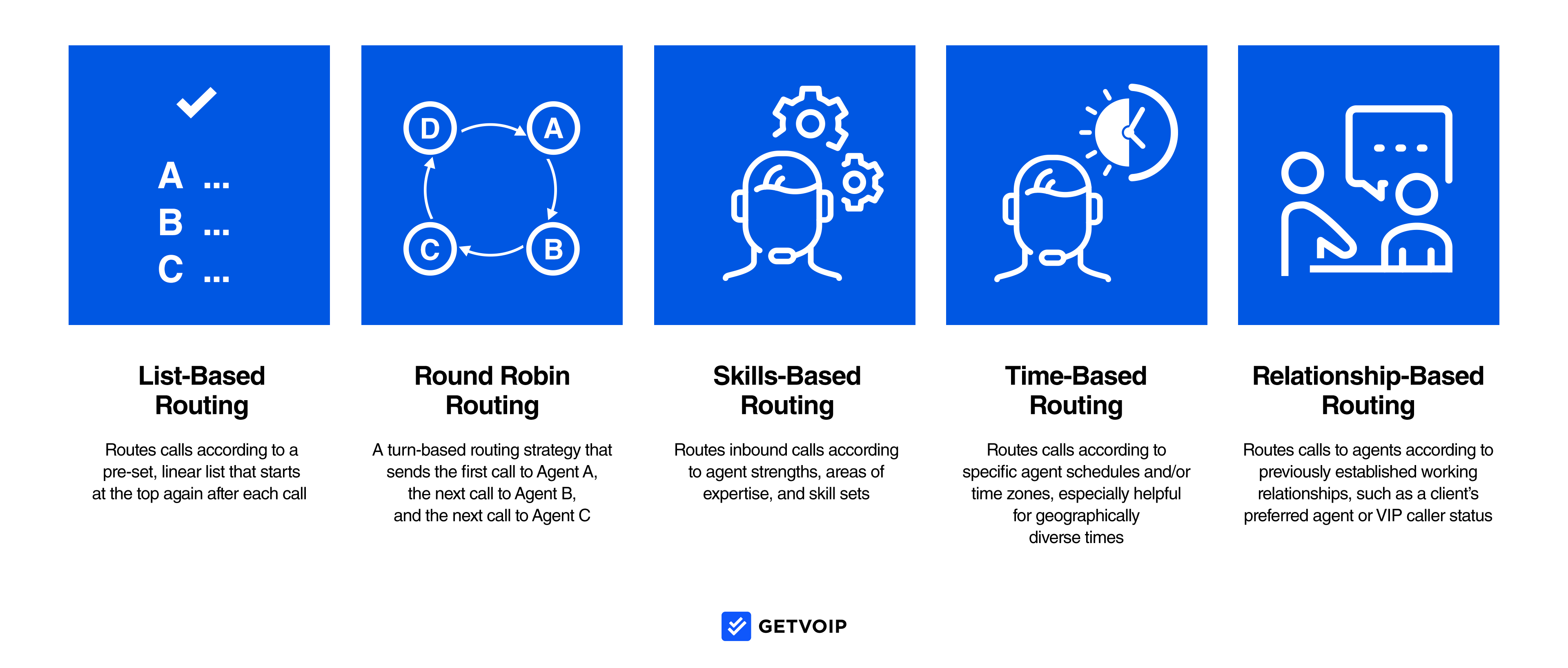
Call routing automatically directs inbound calls to the ideal agent, ring group, call queue, or extension according to preset custom call flow rules, current call center conditions, and the customer’s IVR input.
Effective routing strategies eliminate manual call transfers and connect callers to the best available live agent.Admins can choose from a variety of call routing strategies, including skills-based, round-robin, list-based, relationship-based, and business hour routing.
IVR+ACD
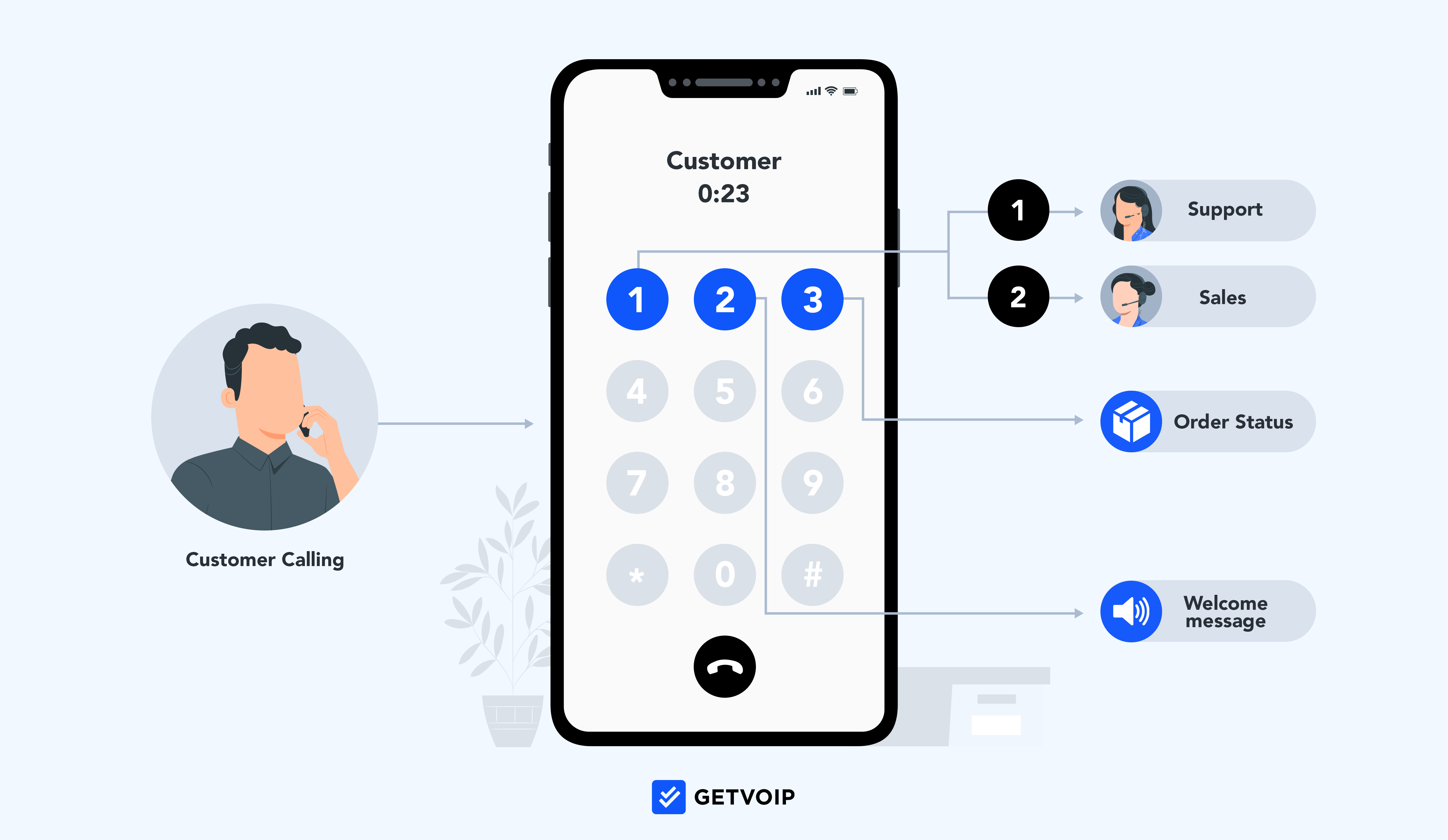
Interactive Voice Response (IVR) is a customer self-service feature that lets inbound callers direct their own calls by responding to pre-recorded call menu prompts. (“To speak to the billing department, please say “Accounting.” Also known as an auto attendant or virtual receptionist, IVR uses NLP to analyze customer intent and ACD to forward calls according to preset call flows and routing rules. Admins can create and edit these call flows via a drag-and-drop IVR design interface, add multi-level menus, and set business hour rules.
While standard IVR automates basic support interactions like appointment setting, account balance lookups, and bill payments, more advanced Intelligent Virtual Agents (IVAs) use Conversational AI to complete more complex customer service requests without involving a live agent.
Ring Groups
A ring group is a customizable group of agents assigned to a call queue. When an inbound call comes in, all phone numbers in the ring group can ring simultaneously (call blasting), in a fixed order, or according to another routing strategy. Ring groups ensure customer calls are answered promptly and keep call wait times low. Call groups usually include agents from a particular department, with the same skill sets, or with similar schedules.
Call Queues
Call queuing places inbound callers in specific virtual lines (queues) based on the number dialed or their responses to IVR menu prompts. Callers then wait in queues until a live agent becomes available (or until they leave a voicemail message or request a callback.) Admins can upload hold music or customized announcements that play to callers during queues (including announcements that let callers know their place in the line or provide an estimated wait time.)
Agent Assist
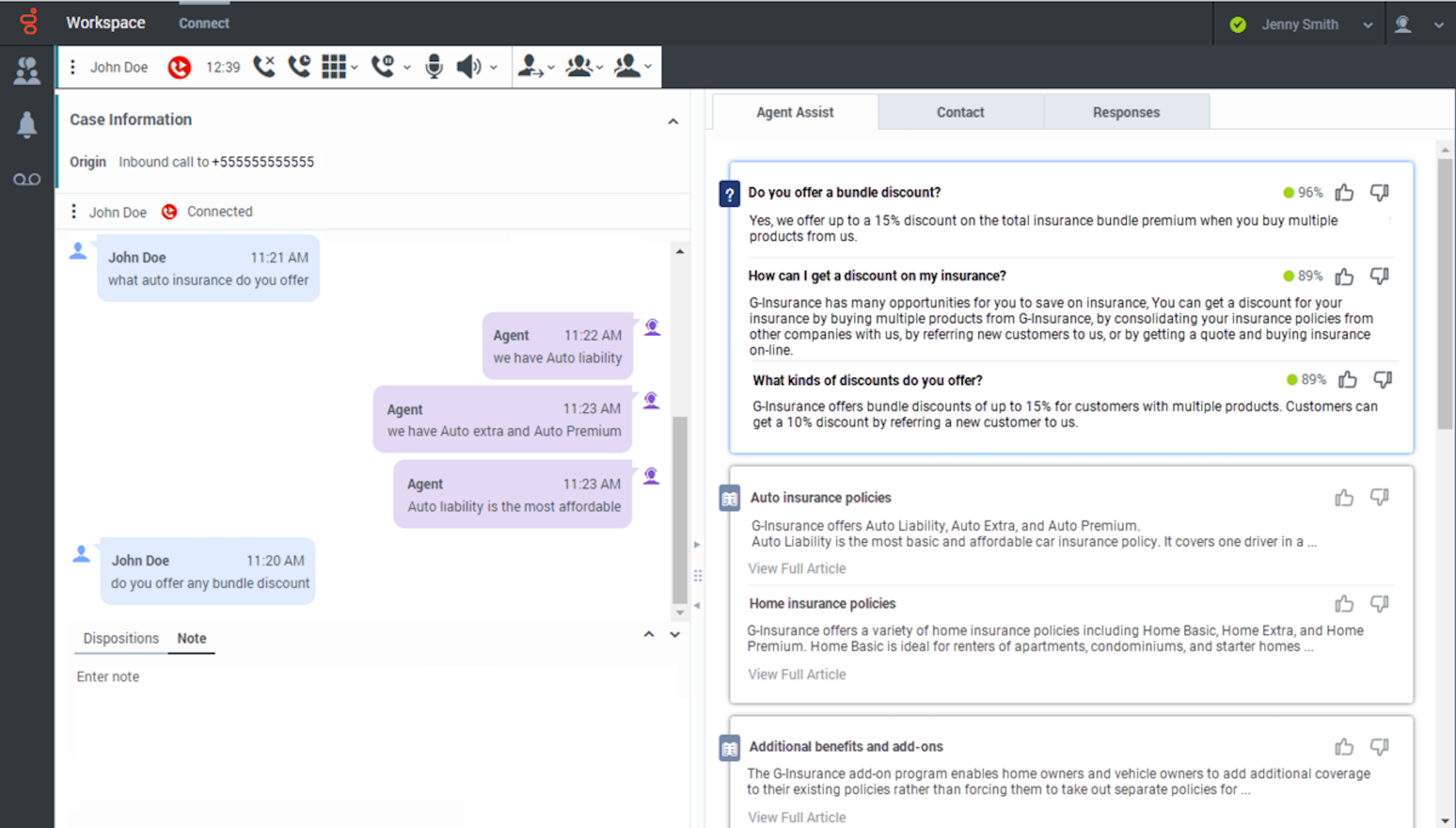
Agent Assist is an AI-powered feature that integrates with internal knowledge base systems and CRM platforms to display next-best-action suggestions and other essential customer data on agent screens during active calls.
It eliminates manual data lookups, helps agents provide accurate and effective customer service, and increases FCR. Agent Assist tools use Natural Language Processing and real-time call transcription to analyze customer intent and sentiment, while machine learning ensures results only get more accurate over time.
Customer Callback
The customer callback feature lets customers choose to receive a call back from a live agent at the date/time of their choosing instead of waiting in call queues or on hold. Customer callbacks are automatically assigned to agents based on pre-set call rules, and can be enabled as an option at any point in the call queueing process or only after a customer has been on hold for a certain amount of time.
Caller ID
Caller ID, also called call screening, displays the name of the inbound caller directly on agent screens and devices, allowing them to pull up relevant data and prepare for the call before connecting to the customer. Caller ID also helps inbound call center agents identify telephone numbers to be blocked and prioritize calls from VIP customers.
Agent Performance Management
Inbound call center software includes a variety of agent performance management and gamification features like:
- Wallboards: Real-time updates of key agent performance metrics displayed company-wide to encourage friendly competition and recognize top performers.
- Agent Scoring: Automatic post-call or in-call performance scoring according to customizable agent scoresheets, provides clear feedback and outlines performance expectations
- In-call coaching: 1:1 live in-call agent coaching from managers (via call whisper or chat messaging) or fully automated in-call coaching via agent assist and knowledge base integration
- Service Level Monitoring: Real-time call center activity and agent status monitoring with push notifications/alerts when service levels drop below preset thresholds
- Customer Surveys: Once support interactions are complete, agents can prompt customers to remain on the call to complete surveys or offer feedback
- Call Recording+Transcriptions: In addition to live call monitoring, managers can review call recordings and transcripts to evaluate support quality, agent performance, and customer satisfaction levels. Call recording can be automatic or on-demand, and agents can pause/resume recording to protect sensitive client data
Visual Voicemail
Visual voicemail, also called voicemail transcription, creates automatically written transcripts of voicemail messages. Agents can then read these voicemail transcripts instead of listening to them, which saves time, ensures agents are prepared for callbacks and makes prioritizing callbacks easy.
Voicemail-to-email automatically emails agents the voicemail transcript and an audio file of the voicemail message. Virtual voicemail transcripts and recordings are stored in a searchable database with custom retention periods.
The Benefits of Inbound Call Centers
The top benefits of inbound call centers are:
- Lower Operating Costs: Customer self-service via IVR lowers the average cost of a customer service call from $6.50 to $0.25 per minute and prevents call centers from hiring additional agents, dramatically decreasing operating costs.[*] Further, increasing IVR containment rates by 5-20% can decrease operating costs by up to 30% in six months or less.[*]
- Increased Agent Retention: Leveraging inbound call center tools like in-call coaching, post-call feedback, and other agent performance management tools can decrease agent turnover rates by 14.9%.[*]
- Higher First Call Resolution Rates: 40% of customer calls do not achieve first call resolution because agents lack in-call, real-time access to essential information.[*] AI Agent Assist, live team chat messaging, and deep CRM integrations automatically display relevant data on agent screens during active calls, increasing FCR as a result. Improving call center FCR also makes customers happier, as customer satisfaction rates drop by 15% each time a customer has to make a follow-up call.[*]
- Decreased Inbound Call Volumes: 81% of consumers want more customer self-service options.[*] Call center self-service tools like IVR and auto attendants provide 24/7 availability to drastically reduce inbound call volumes and free up agents so they can provide personalized customer experiences.
- Improved CSAT and CX: Almost 60% of customers cite long hold times as the worst part of a customer service interaction. Inbound call center features like call routing, remote call forwarding, and automated callbacks shorten call queues and keep wait times low, eliminating a major source of frustration. Further, 76% of shoppers expect personalized customer service–something CRM integrations, customer sentiment analysis, and in-call access to conversation histories all provide.[*]
- Increased Productivity and Operational Efficiency: Inbound call center software automates time-consuming yet routine tasks like post-call notes, call transcription, data entry, call transfers, and reporting. Depending on the industry, leveraging AI and automation can increase productivity levels by 15%-50%.[*]
Essential Inbound Call Center KPIs
When evaluating inbound call center software, ensure the provider offers customizable and template-based reporting tools that monitor real-time and historical activity. Admins should be able to automatically generate reports at preset intervals, drill down data, share reports, and review detailed Conversational AI speech+text analytics. The most important KPIs to monitor inbound call center performance are:
First Call Resolution Rate (FCR)
Definition: First call resolution (FCR) measures the percentage of customer service requests that are entirely resolved–meaning they require no follow-up–on the first call. Contact center owners can define the “first call” as either the customer’s first interaction with a live agent, or as their first interaction with an IVR menu or voicebot.
Industry Standard: 70-75%
Formula: FCR=(Total resolved cases÷Total number of cases) x 100
Average Handle Time
Definition: Average Handle Time (AHT) is the average duration of an entire customer interaction, starting the moment the customer dials your call center’s phone number and ending when both customer and agent agree the issue is completely resolved. AHT includes time spent interacting with IVR menus, on hold/waiting, talking to agents, and the time it takes agents to complete all after-call work.
Industry Standard: Varies according to industry and call center size, average is 6 minutes/call
Formula: AHT= (Talk time+hold time+after-call work)÷Total number of customer calls
Call Abandonment Rate
Definition: Call abandonment rate measures the percentage of calls where a customer hangs up before they connect to a live agent, or before they achieve their desired outcome (like making an automated bill payment via IVR). High call abandonment rates are associated with long call queues, lengthy call hold times, and inefficient IVR call menus.
Industry Standard: 5-8%
Formula: CAR= [(Number of inbound calls-number of abandoned calls-number of successfully handled calls)÷(Number of inbound calls-number of calls abandoned in 5 seconds or less)] x 100
Average Call Hold Time
Definition: Call hold time (or call wait time) measures the average amount of time customers spend on hold (in a call queue, waiting to be transferred to another agent, etc.)
Industry Standard: Varies dramatically based on call volume, call center size, and number of available agents, but the average ranges anywhere from 25 seconds to just over 2 minutes. The gold standard for most call centers is the 80/20 rule, which says agents should answer 80% of calls within 20 seconds. Call abandonment rates usually increase after a customer remains on hold for 120 seconds (two minutes.)
Formula: Average Hold Time=(Total talk time+total hold time+after-call work time)÷Total number of calls handled
Call Transfer Rate
Definition: Call Transfer rate measures the percentage of inbound calls that are transferred to another agent instead of being resolved by the agent that initially answered/accepted the call
Industry Standard:15-19%
Formula: CTR=(Number of calls transferred÷Total number of calls) x 100
Average Speed of Answer
Definition: The average speed of answer measures how long it takes agents to answer an inbound call, starting from the moment the call rings (call hold time measures how long the customer waits to be connected to an agent once they’re placed in a call queue)
Industry Standard: 28 seconds
Formula: ASA=Total wait time for answered calls÷Total number of calls answered
Agent Idle Time
Definition: Agent idle time measures how much time agents spend in the “idle” state, or the amount of time that agents are not on the phone with customers or actively engaged in call-related work like ACW, data entry, meetings, etc.
Industry Standard: 15-25%
Formula: Agent Idle Time=[Total length of agent shift+(talk time+hold time+ACW time)]
Agent Turnover Rate
Definition: Agent turnover rate measures the percentage of agents that leave/quit their jobs during a specific time period (usually 1 year)
Industry Standard: Varies by year and levels of agent burnout, average call center agent turnover rates range from 20% to 35%
Formula: ATR=(Number of agents who left their jobs during the selected time period÷Total number of agents employed during that same time period) x 100
Blocked Call Rate
Definition: The blocked call rate measures the percentage of calls that are intentionally or automatically blocked and disconnected (these calls never reach a live agent)
Industry Standard: 2-3%
Formula: BCR=(Number of blocked calls÷Total number of calls) x 100
How to Set Up an Inbound Call Center
These steps take you from feature selection to a working inbound operation. For a broader walkthrough, see our guide to starting a call center.
- Define call types and use cases: List the reasons customers will call, such as technical support, billing, order tracking, or inbound sales. This list shapes your staffing, IVR menus, and routing rules.
- Forecast call volume and staffing needs: Use historical call data, seasonal trends, and business growth plans to estimate peak and average call volumes. Then work out how many agents, with which skills, you need on each shift to meet your service level targets.
- Choose inbound call center software: Use this key features checklist to evaluate call routing, IVR, Agent Assist, performance management, and other functions. Prioritize providers with reliable uptime, scalable pricing, and the reporting tools you need.
- Design IVR menus and routing rules: Build short IVR menus that match your main call types, and set routing strategies (skills-based, round-robin, business hours) that send callers to the right agent. Give callers a clear path to a live agent.
- Integrate CRM and helpdesk tools: Connect your CRM, helpdesk, and team chat apps so agents see customer histories and account data during calls. Two-way data syncing keeps records accurate without manual entry.
- Set KPI targets and a reporting cadence: Choose benchmarks for essential KPIs such as FCR, AHT, and call abandonment rate. Review real-time dashboards daily and historical reports weekly or monthly to adjust staffing and call flows.
Do’s and Don’ts For Inbound Call Centers
To optimize agent performance and customer experience at your inbound call center, implement these best practices–and avoid these common mistakes:
DO
- Optimize IVR Menus: Keep IVR menus short and to the point to avoid increased call abandonment and higher AHT. For more complex self-service needs, use IVR sub-menus or direct customers to another self-service channel, like an online chatbot or your online knowledge base
- Integrate Existing Third-Party Software: Integrating CRM systems, helpdesk solutions, team chat apps, video conferencing tools, and WFM solutions into your call center interface eliminates app switching and gives agents in-call access to key data via CTI screen pops. Most call center platforms offer pre-built integrations with popular apps, customizable APIs for specific features, and automatic two-way data syncing
- Leverage Artificial Intelligence: Look for call center software with extensive AI-powered features like automatic post-call summaries, suggested action items, automated follow-up call scheduling, AI-generated canned responses/call scripts, and Conversational AI-powered voicebots for fully automated self-service
DON'T
- Over-Automate: While automation can streamline routine business processes and enable 24/4 self-service, always ensure customers can connect with a live agent quickly and easily when needed. Give callers the option to speak with an agent in your initial IVR call greeting and provide an automated customer callback option if no live agents are available
- Assume Interaction Resolution: As calls come to a close, instruct agents to ask for–and wait to receive–verbal confirmation from customers that all their issues have been resolved before ending the call. Assuming an issue is resolved when the customer isn’t happy with the available solutions renders KPIs inaccurate, decreases FCR, and lowers customer satisfaction
- “Set and Forget” Call Flows: Constantly update your preset call flows, IVR menus, and routing strategies according to peak call times, customer feedback, interaction analytics, and even specific events like new product launches, holidays, or special sales
FAQs
An inbound call center receives and resolves incoming calls from customers and prospects. Typical calls cover customer service, technical support, billing, order tracking, appointment management, and inbound sales, handled by live agents or self-service tools like IVR.
An inbound call center answers calls that customers place, while an outbound call center places calls to customers and leads. Inbound teams focus mainly on service and support, while outbound teams focus on sales, surveys, and outreach; the comparison table summarizes these differences.
An inbound call center gives customers a fast, direct way to reach a real person when they need help. Since many consumers prefer the phone for urgent issues, a well-run inbound operation improves first call resolution, customer satisfaction, and retention.
Yes, many inbound call centers also manage email, live chat, SMS, and social media messages. When all of these channels route through one platform, the operation is usually called a contact center, and agents get a single view of every customer interaction.