IVR (Interactive Voice Response) can only understand a limited number of customer inputs along preset paths. IVA (Intelligent Virtual Assistant) uses AI and database integrations to provide more dynamic responses and conversations. Unlike IVR, IVA can understand many more customer inputs and respond with knowledge base articles, bits of information, customer data, and more.
Choosing between IVA vs IVR can be a tough challenge for businesses of any size, but there’s no definitive right answer – which is why many companies use both.
If you’re looking to optimize your workforce, shorten customer wait times, and provide better self-service, this breakdown of IVR vs IVA will give you all the information you need.
What Is An IVR?
An IVR (Interactive Voice Response) is an automated VoIP feature streamlining business phone system menu navigation by routing callers to the most appropriate department or agent. It does so based on responses to pre-recorded voice prompts and questions, without needing a live receptionist. IVR expenditures globally are set to cross $6.7 billion by the end of the decade.[*]
How It Works
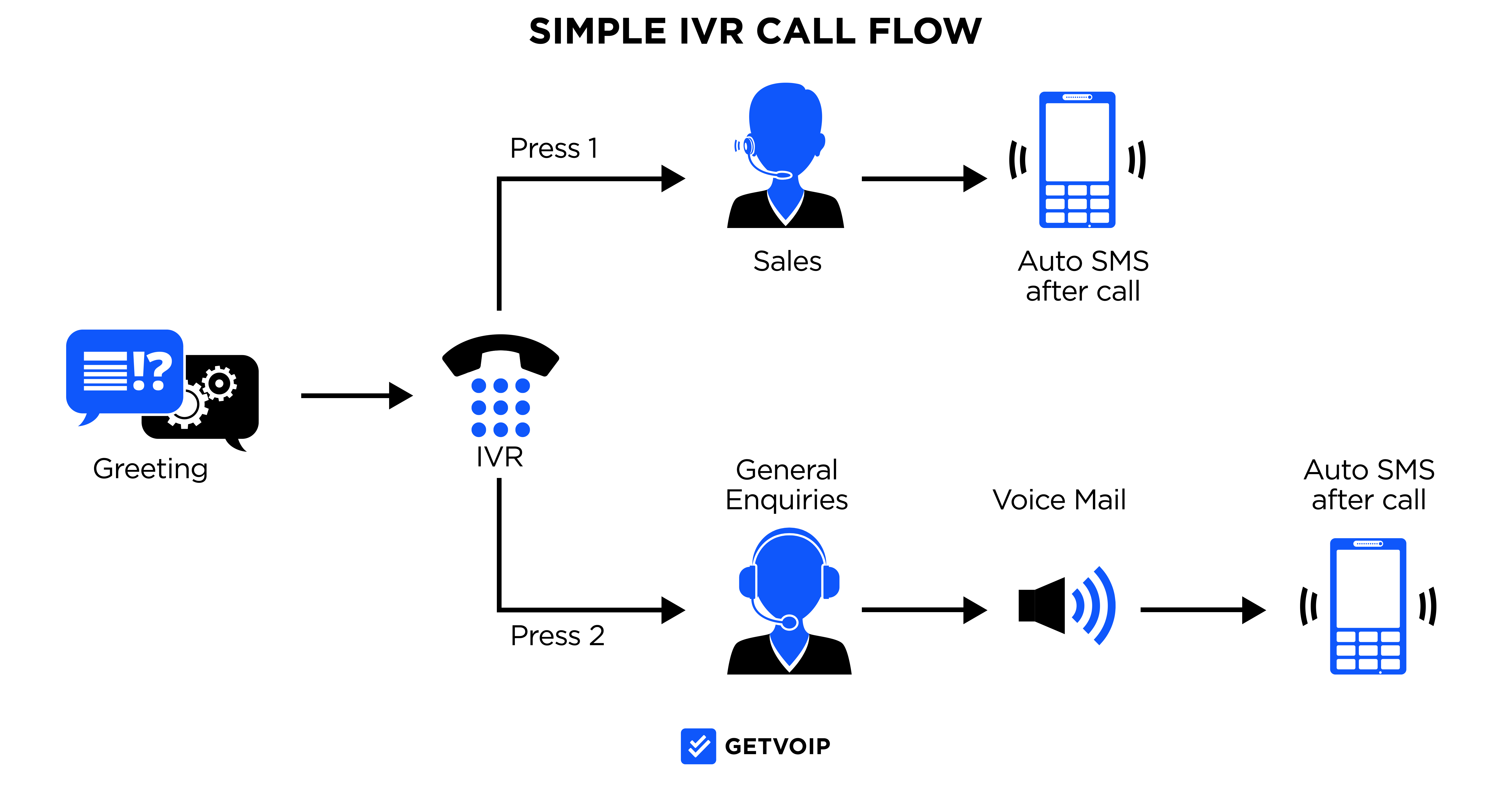
Most IVR systems guide callers through option menus with pre-recorded prompts and accept one of two input types.
Traditional DTMF (dual tone multi-frequency) systems have callers press numbers on their dial pad (“Press 1 for support”).
Speech-enabled IVRs add keyword recognition, so when a caller says something like “billing” or “sales”, the system matches that word to a menu option and routes the call accordingly.
At the high end, conversational IVR uses Natural Language Processing (NLP) to interpret full sentences instead of single keywords. This tier blurs the line with IVA, although it still follows preset call flows rather than pulling customer data to resolve requests.
Here’s a quick look at how it could work for you:
- Prompt: “To speak to sales, say ‘sales.’”
- Caller: “Sales.”
- IVR Response: Sends the caller to the sales department.
IVRs can offer self-service features through phrases like “say your credit card number to hear account balance” or “please state your appointment date to reschedule.”
Recent IVR systems include drag-and-drop editors for user-focused programming and customization. To improve accuracy, train the IVR to recognize multiple trigger words or phrases for common needs. This accommodates various ways callers express themselves.
Common Use Cases
Here are a few common use cases for an IVR system:
- Departmental-based Call Routing: Direct callers to the department they need (regardless if it’s support, sales, billing)
- Self-Service: Allow users to perform tasks like checking account balances, making payments, or confirming appointments, 75% of customer say they prefer to handle things via self-service first before paging in an agent[*]
- Call Prioritization: Identify high-priority calls and routing them faster using spoken keywords
- After-Hours Communication: Provide business hours, emergency options, or voicemail routing when offices are closed
- Multilingual Menus: Enables users to choose a preferred language before proceeding
Pros and Cons
Pros
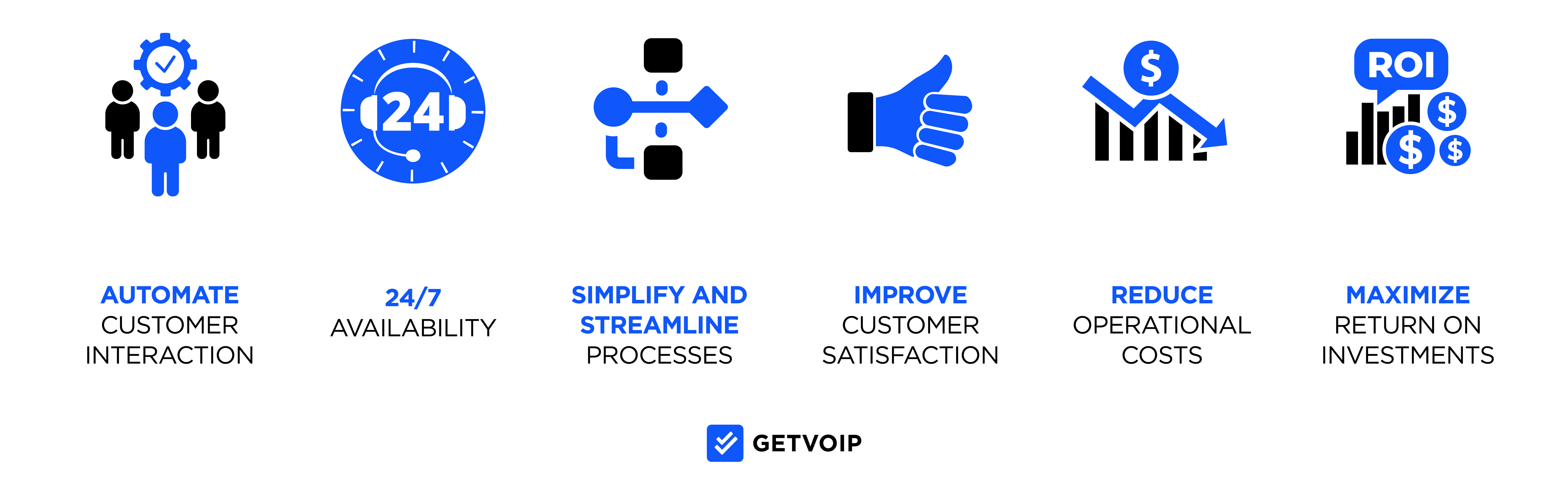
- Improved Efficiency: Automate call routing and reduce the need for a human operator
- Shorter Wait Times: Get customers to the right department faster
- 24/7 Availability: IVRs operate around the clock, even outside business hours
- Scalability: Easily handle high call volumes without added staff or expenses
- Cost Savings: Free up agents to focus on complex support rather than routing calls
Cons
- Misunderstood Commands: NLP may struggle with strong accents, background noise, or unclear speech
- Limited Flexibility: May frustrate callers if they don’t use recognized phrases
- Caller Fatigue: Overly long or complex menus can annoy users
- Setup Complexity: Requires thoughtful planning and testing to program effectively, but drag-and-drop interfaces help mitigate this
What Is An IVA?
An IVA (Intelligent Virtual Assistant), also known as an Intelligent Virtual Agent, is an AI-powered conversational tool that automates customer interactions. IVAs analyze spoken or written input, access relevant customer data, and respond naturally. This allows it to handle tasks that would usually require a live agent.
How It Works
IVAs use advanced artificial intelligence, including machine learning, Natural Language Processing (NLP), and natural language understanding (NLU), to simulate human-like conversations. Unlike traditional IVRs, which operate on simple voice commands, IVAs are capable of having dynamic, two-way dialogues with users.
Here’s how it works:
- A customer speaks or types a question
- The IVA will then interpret intent using AI and context clues
- IVA proceeds to pool together customer-specific data (like CRM records, order history, or location) to personalize the response
- Finally, it replies with relevant answers or actions to automate tasks like password resets, returns, or appointment scheduling, freeing up your agents
IVAs continuously learn from past interactions, so their performance improves over time. They're more fluent with slang, natural speech patterns, and various accents which make them more user-friendly than traditional IVRs.
Some popular consumer-grade examples of IVA technology include Apple Siri, Amazon Alexa, and Google Assistant.
Common Use Cases
Here are a few common use cases for an IVA system:
- Customer Self-Service: Answering FAQs, processing returns, updating account info, or checking delivery status
- Conversational Routing: Guides users to the correct department based on their stated need in natural language
- Multilingual Support: Offer assistance in multiple languages, often with contextual fluency for better coverage and empathetic responses
- Data Lookup: Access and reference CRM data or customer history during the interaction
- Hybrid Chat/Voice Support: Integrate IVA with chatbots or messaging apps to provide a consistent cross-channel experience
In contact centers, IVAs are often paired with live agents to handle routine questions while escalating more complex issues rather than serve as outright replacements.
Pros and Cons
Pros
- High Personalization Potential: Pulls from CRM and order history to tailor responses to each customer
- Conversational Feel and Tone: More natural and engaging than rigid IVR menus
- Omnichannel Compatibility: Works across voice, text, and chat interfaces to meet customers wherever and whenever
- Scalable and Efficient: Handles thousands of simultaneous queries with no wait time limitations
- Improves Over Time: AI and machine learning continuously refine responses and accuracy
Cons
- Initial Setup Complexity: Requires integration with CRMs and training on business-specific intents
- Potential for Misinterpretation: Can still misunderstand user intent, especially in early deployments
- Data Privacy Concerns: Relies on storing and accessing sensitive customer information
- Cost: More sophisticated and expensive than traditional IVRs, especially for smaller businesses
IVA vs IVR: Key Differences
The difference between IVR and IVA is that IVR routes callers using basic voice prompts, while IVA uses AI to deliver personalized, multi-channel support and handle complex tasks. IVAs are more advanced, integrating with customer data and systems to offer full self-service resolutions, not just call routing.
The table below compares the two technologies:
| IVA | IVR | |
| End Goal | Offer customer self-service resolutions without involving a live agent | Route callers to the correct live agent |
| Customer Input Handling | Integrates with CRM and analyzes customer history to provide detailed, contextual support | Primarily relies on customer responses to pre-recorded voice prompts |
| Complex Task Handling | Can handle complex support tickets, transactional tasks, and advanced customer requests | Limited to basic routing and simple self-service tasks |
| Security Features | Advanced anti-fraud measures such as voice biometrics and contextual verification | Basic security, may include spam caller protection (platform-dependent) |
| Personalization | High, because it uses customer data for personalized responses, recommendations, and proactive assistance | Low, but offers the same menu and experience to all callers |
| Multichannel Support | Yes, it works across voice, chat, web, and messaging apps (like WhatsApp, SMS, web chat) | No, limited to phone-based voice input and sometimes touch-tone keypad |
| Integration Capability | Deep integration with CRMs, ticketing systems, order management tools, and knowledge bases | Minimal integration as it’s usually tied to the phone system and basic data sources |
| Scalability | Highly scalable and can support thousands of simultaneous conversations across channels | Scalable for call routing but limited to voice channel interactions |
| Best For | Businesses that need advanced automation, high personalization, and omnichannel support | Businesses that need a basic call routing system to improve call flow efficiency |
IVA also uses machine learning to get “smarter” over time, so admins spend less hands-on time reconfiguring call flows. When it can’t fully resolve an issue, it gathers key information and creates a detailed support ticket, giving the agent who picks up the escalation the information needed to solve the problem faster.
The difference becomes clearest when a call does not go as planned. The table shows how each system typically handles these situations:
| Caller Scenario | IVR | IVA |
| Caller has two requests (“I need to pay my bill and change my address”) | Picks up one keyword and routes to one menu; the caller has to start over for the second request | Recognizes both intents and handles them in sequence within the same call |
| Caller gives an incomplete request (“I have a question about my order”) | Replays the menu or routes to a general queue | Asks a follow-up question, such as which order, and pulls matching records from the CRM |
| Caller changes their mind (“Actually, cancel that, I want to track a delivery”) | Continues down the original menu path unless the caller backs out or presses a key | Drops the first intent and switches to the new one without restarting |
| Request falls outside supported tasks | Repeats “Sorry, I didn’t understand” until it falls back to the operator or disconnects | Says it can’t help with that task, collects context, and escalates to an agent with a ticket |
| A connected system is down (CRM or payment gateway) | Unaffected for routing, since most menus don’t depend on live data | Loses access to customer data and must fall back to basic routing or an agent handoff |
Before buying either system, run these five scenarios as test calls during a demo or trial to see how the platform responds.
Top IVA Features
There are many IVA features that could be beneficial to your company but, in the interest of brevity, let’s take a look at the five most noteworthy ones.
Multilingual Processing
IVAs can interpret input from over a hundred languages through their NLU (Natural Language Understanding) and speech recognition algorithms. This makes it possible for your company to serve a global audience without having to hire additional employees or pay extra for translation software.
Account Verification
IVAs can use voice biometrics to verify a caller’s identity, which lets customers access account information over the phone while blocking fraudulent callers who try to phish for sensitive details. This feature is especially useful during possible security breaches, such as unusual account login attempts or other suspicious account activity.
Sentiment Analysis
Unlike IVRs, which only analyze caller input, IVAs can identify changes in the customer’s tone and mood during the conversation. If it detects that the customer has become frustrated, it automatically routes the call to a human agent to de-escalate the situation.
Intelligent Callback
If your business struggles with long queues and extended wait times, then IVA’s intelligent automated callback feature will be extremely helpful.
Instead of making customers wait on hold until an agent becomes available, the virtual agent can offer a callback option and then stay in the queue in their place until the live agent is ready for the call.
Security and Compliance
IVAs offer PCI-compliant and HIPAA-compliant services, meaning they can securely process payments, collect health information, and gather additional sensitive account data.
Because IVAs access that sensitive data to personalize conversations, security depends on proper configuration and maintenance. That includes role-based access controls, encryption, regular updates, and guardrails that limit what the assistant can read, say, or store.
With these protections, customers can use an IVA to handle financial and health-related requests without waiting for an agent, and some callers feel more comfortable sharing those details with an automated assistant.
The Benefits of IVA Over IVR
Like any business decision, choosing the right path comes down to identifying the benefits of each route and seeing which one would be the ideal fit for your company. Here are three things that IVAs are better at than IVRs.
Improved Customer Satisfaction
IVAs offer a high level of customer self-service combined with a more seamless overall support experience.
These systems collect key caller information and present it to agents before they take the call, and integrate with CRM tools to allow agents to take notes on their conversations. This eliminates the need for customers to constantly repeat their problems to a new agent, transfers them to the best available agent to help them, and increases first call resolution rates. Still IVRs show the best FCR of all channels.[*]
Plus, their sentiment analysis feature transfers callers to a live agent at the first sign of frustration — not to mention the fact that your customers will also be able to request callbacks! Overall, IVAs increase customer satisfaction far more effectively than an IVR system would.
Decreased Agent Turnover
It’s important to note that IVRs don’t actually reduce the workload of your agents – they just route customers to the right person the first time around, decreasing the number of call transfers.
By contrast, IVAs can independently handle simpler queries on their own, reducing the number of repetitive tickets that your team will need to handle. In making the work less tedious, IVAs will naturally lower your agent turnover as well.
Other factors that improve the work experience for your employees include internal knowledge bases that further cut down on ticket volume and the ability to see customer data before the call instead of going through a question script dozens of times per day.
Decreased Call Abandonment Rates
Since customers can immediately voice their concerns and avoid waiting on hold by selecting the automated callback option, call abandonment rates will decrease when IVAs are implemented. IVRs can only do so much when it comes to reducing queue length or keeping customers from hanging up before they speak to an agent.
IVR vs IVA Costs
IVR usually costs less upfront and less to operate, while IVA costs more but can resolve calls that would otherwise reach an agent. Costs differ across licensing, setup, maintenance, and agent involvement:
| IVR | IVA | |
| Licensing/Usage | Often included in a business phone or contact center plan, or sold as a flat add-on | Typically priced per conversation, per minute, or per resolved interaction on top of platform fees |
| Setup | Menu design and prompt recording, often done in a drag-and-drop editor | CRM and back-end integrations plus AI training on company-specific intents |
| Maintenance | Occasional menu and prompt updates | Ongoing tuning, intent updates, data management, and security reviews |
| Agent Involvement | Every caller who needs more than routing or basic self-service still reaches an agent | Agents handle escalations and complex issues, while routine requests end in self-service |
Containment rate is the share of calls a system resolves without transferring to a live agent. An IVR with high containment for balance checks can cost less overall than an IVA, but an IVA that contains a much larger share of calls can offset its higher fees by reducing agent hours.
To compare the two on equal footing, calculate cost per contained interaction:
Cost per contained interaction = total monthly system cost ÷ number of interactions resolved without an agent
For example, a system costing $3,000 per month that contains 6,000 calls works out to $0.50 per contained interaction. These figures are illustrative, not vendor pricing.
When requesting quotes, give vendors your monthly call volume, peak concurrent calls, the channels you need, and the systems you want connected (CRM, ticketing, payments). Integrations and volume tiers drive most of the price difference between IVA proposals.
When To Use IVR
Choose an IVR system if your primary goal is to streamline basic call handling without the need for advanced AI functionality, here are some scenarios when IVR outshines alternatives:
- You need to optimize call routing and balance agent workloads
- You want to reduce operating costs by automating call transfers, forwarding, and handling basic queries
- You prefer a simple, cost-effective system for handling routine tasks like account inquiries or bill payments
- You want to create a more professional, authoritative brand image with a menu-driven greeting
- You’re looking for an upgrade from DTMF menus without the complexity or cost of AI-powered tools
When To Use IVA
An IVA system is better suited for businesses looking for scalable, intelligent automation across voice and chat channels. Here are scenarios where an IVA just makes sense:
- You want automated support coverage during holidays, weekends, or after-hours without outsourcing to external agencies
- You need to reduce agent workload and improve call handling without hiring or training additional staff
- Your contact center expects to deal with high call volumes or field complex customer requests going beyond basic routing
- You seek more conversational, human-like interactions understanding accents, slang, and other context
- You plan to scale your support team and need a temporary stopgap to manage incoming requests while hiring
Using IVR and IVA Together
Many contact centers use IVR and IVA side by side in several common hybrid patterns:
- IVR for Quick Triage: A short menu sorts callers by language, department, or account type before the IVA takes over the conversation
- IVR as a Keypad Fallback: Callers in noisy places, or those who prefer buttons, can press keys instead of speaking
- IVA for Conversational Requests: Order status, returns, rescheduling, and other tasks that need customer data go to the IVA
- Live Agent Handoff from Either System: Both the IVR menu and the IVA can transfer to an agent, passing along what the caller already shared
A hybrid call flow might look like this:
- Prompt: “Tell me briefly what you’re calling about, or press 1 for billing, 2 for support, or 0 for an agent.”
- Caller: “My package says delivered but I never got it.”
- IVA Response: Looks up the order, confirms the delivery address, and offers a replacement or refund
- If the caller presses 2 instead, the IVR routes them to the support queue, and pressing 0 at any point connects them to a live agent
Should I Upgrade From IVR To IVA?
If you already have an IVR system in place, then upgrading to an IVA isn’t always the best option. The decision ultimately comes down to answering a few questions about how your current system is performing.
Ask yourself:
- Are call abandonment rates high?
- Are your queues always backed up?
- Are agents complaining about being overworked?
- Is employee turnover high?
- Are you struggling to achieve target KPIs and customer service metrics?
- Is your IVR system causing more frustration than it’s worth?
If you answered yes to one or more of these questions, then it’s likely time to consider making the digital transformation to an IVA. The upfront cost in both money and time may be difficult at times, but staying up to date with the latest technological advancements is sure to pay dividends in the long run.
FAQs
Below, we've answered some frequently asked questions about IVA vs IVR.
The difference between a chatbot and a virtual assistant is that chatbots are designed primarily to collect customer information and intent, while virtual assistants are able to actually complete business processes and tasks such as updating customer contact details, sending meeting reminder notifications, or providing real-time meeting notes.
IVA (Intelligent Virtual Agent/Intelligent Voice Automation) in a contact center is an AI-powered customer self-service tool designed to resolve a customer support interaction from start to finish without needing to involve a live agent.
Virtual Assistant technology is an automated customer service software that uses machine learning, Natural Language Understanding, and other AI-powered functionalities to interpret, respond to, and completely resolve consumer product questions, customer service issues, or simply general queries unrelated to business.
Well-known Virtual Assistant technology examples include Amazon's Alexa and Apple's Siri.