Call hunting distributes an inbound call to one number across multiple predetermined lines until someone answers. You may also see it called line hunting or Find Me/Follow Me, depending on the provider.
Recent research shows 54% of callers hang up within 8 minutes of being placed on hold, with a third abandoning after just 2 minutes. This is where call hunting comes into play. It helps reduce one of the biggest sources of customer frustration: waiting for someone to pick up.
You don't need to spend thousands on agent training or launch a new support channel. You need to make sure calls reach an available person on the first try.
In this post, learn how call hunting can slash customer wait and resolution times and prevent agents from getting overwhelmed by messages.
Call Hunting At a Glance
- Call hunting (also called line hunting, hunt groups, or Find Me/Follow Me) sends a call placed to one number through a list of phone lines until someone picks up.
- Four distribution methods cover most setups: simultaneous hunt group ringing, linear (top-down), round-robin, and most-idle.
- When no member answers, the call falls through to a defined destination: an overflow ring group, shared voicemail, a backup receptionist, or an after-hours message.
- Call forwarding sends every call to one alternate number; call hunting tries several numbers or people in sequence or all at once.
What is Call Hunting?
Call hunting is a business phone system feature that distributes inbound calls made to one telephone number to multiple predetermined phone lines.
Also called line hunting and Find Me/Follow Me, incoming callers avoid busy signals and voicemail messages by automatically dialing all of an agent’s available telephone numbers – often at the same time.

Additionally, it prevents agents from missing important business calls while out of the office on business trips or after-hours and provides a much higher level of agent flexibility. Plus, because inbound calls to one number are forwarded to others automatically, there’s no need to give clients your personal cell number.
Protect your privacy, take advantage of the mobility line hunting offers, and avoid returning to work to a full voicemail box.
Usually a standard hosted PBX and VoIP solution feature, line hunting lets agents/admins create a customized call path based on factors like:
- If the call is made during or after work hours
- If you want the caller to be able to leave a message
- If the calls should be forwarded to other users or groups of users (called ring groups or hunt groups)
- The number of rings before a call is forwarded to another line or extension
Call Hunting vs. Call Forwarding vs. Call Routing
Though call hunting, call routing, and call forwarding, are similar, there are subtle differences between them.
As explained above, line hunting exhausts all options to connect an incoming caller to the desired representative.
Multiple phone numbers for that representative can be dialed one after another or at the same time, a process known as simultaneous ringing.
Call forwarding means that all incoming calls are directed to one telephone number.
For example, after 5:00 PM, work-related calls you’d normally answer at your desk phone are instead forwarded directly to your smartphone. Forwarding means incoming callers won’t have to make several calls to a few different phone numbers in order to reach the desired party.
The call forwarding path could look like:
Incoming Call → Desk phone number → Personal cell phone number → Voicemail
Call routing forwards incoming phone calls to multiple numbers, and sometimes multiple agents, according to set more complex answering rules.
For example, let’s say a client calls your customer support phone number. There was no answer on the first line, so the tool will forward calls to the next available agent designated in the dial path. Call routing also gives callers the opportunity to direct themselves to the correct extension/department by selecting options from your automated IVR system menu. Additionally, it uses historical caller data to direct their calls to the best possible department or individual agent.
A call routing path could look like:
Incoming Call to Customer Support phone number → Automated Self-Service Call Menu → Agent Specializing in Order Tracking → Additional Agent Assigned to Order Tracking → Department Manager → Voicemail
Find Me/Follow Me vs. ACD
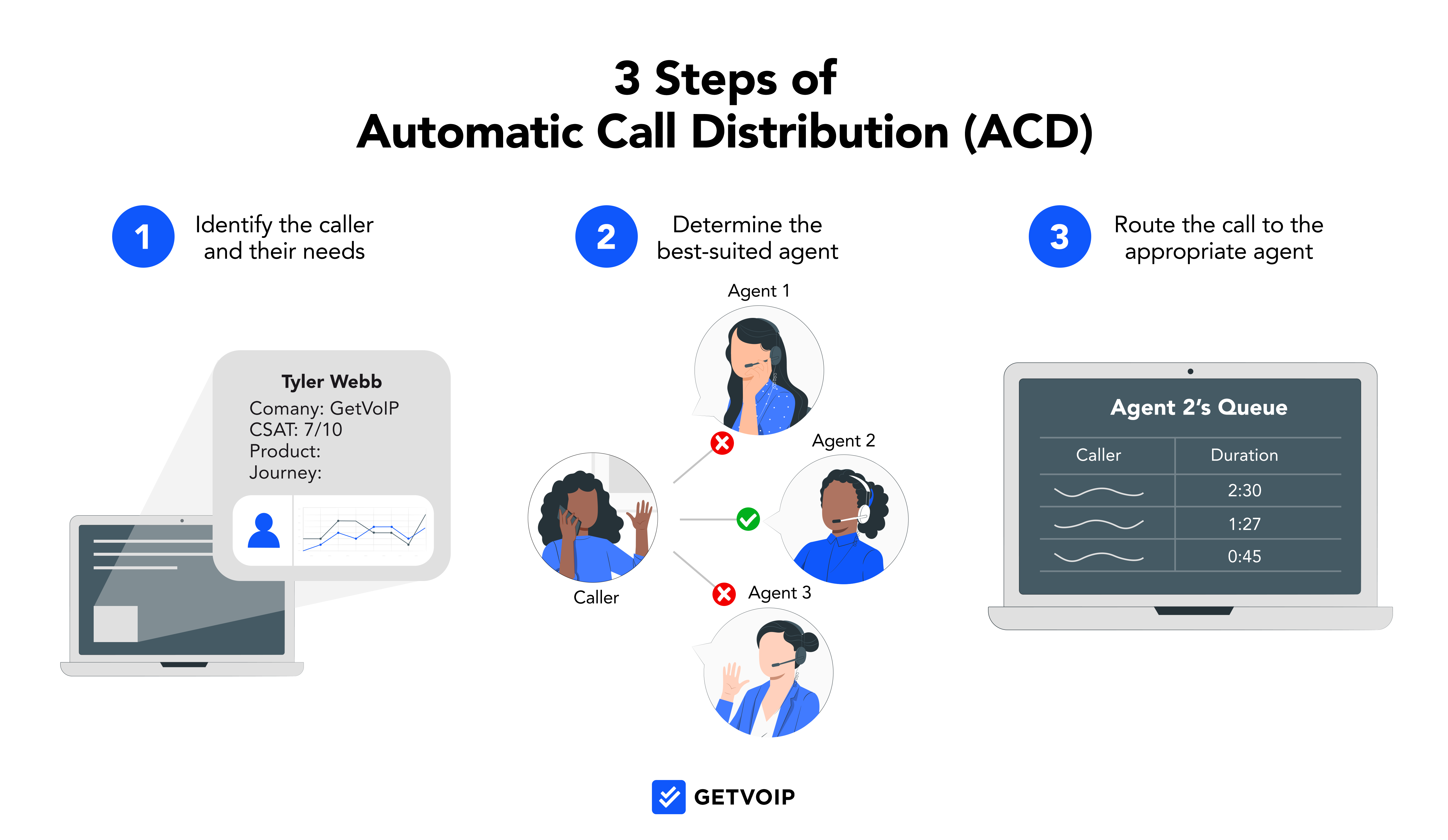
ACD, or Automatic Call Distribution, also uses IVR and CTI screen pops to help the incoming caller connect with the agent most qualified to assist with their particular issue.
Here, callers are placed in a queue that can involve hold times if the ideal representatives are currently on the phone. Think of it as an even more advanced kind of call hunting.
In Find Me/Follow Me, the goal is to reach one particular agent or department. With ACD and call routing, the specific agent the incoming caller connects with is less important. What matters more is that they’re connected with someone able to help them based on criteria like their call/order history, their overall priority as a client, or the specific question they have.
A sample ACD call path could look like:
Incoming Caller → IVR System → Technical Support Department → Calling Queue/Hold → Tech Support Agent 1 → Tech Support Agent 2 → Back to Main IVR Menu → Voicemail
Who Benefits From Call Hunting?
Any remote workforce, as well as any company that frequently has employees out of the office on business trips, conferences, or due to COVID restrictions, will benefit the most from Find Me/Follow Me features.
Customer service departments will see decreased customer wait times, meaning faster movement through call escalation matrixes, a higher level of agent availability, and a better overall customer experience.
Call centers will also benefit from more customer talk time and the increase in sales that comes from connecting the customer to the right agent as soon as possible.Studies show that businesses which respond within five minutes are 21 times more likely to qualify a lead than those that respond later. And since consumers can speak with in addition to a better overall customer experience.
More specifically, call hunting is essential within the healthcare and medical field, where being able to contact their doctor in the event of an emergency is essential.
The same goes for construction and manufacturing, where workplace accidents or even equipment malfunctions need to be reported to site managers and foremen.
Of course, call hunting is equally beneficial in less dire situations.
Clients can connect with their sales representatives to change meeting times or set up appointments and consultations. Management and higher-ups within both small businesses and enterprises can be available for essential decision-making calls no matter where they are.
Above all, employees can enjoy the freedom that comes with no longer needing to be tied to their desks.
What to Check Before You Buy
Call hunting shows up on nearly every VoIP feature list, but the details vary widely between providers. Confirm these points with a vendor before you sign:
- Which plan tier includes ring groups and call queues, and whether entry-level plans cap the number of groups you can create.
- How many simultaneous calls the system supports per group, and what happens to callers beyond that limit.
- Whether sequential, simultaneous, and round-robin distribution are all available, or only one or two of them.
- What overflow destinations you can set, such as a second ring group, shared voicemail, an auto attendant, or an external answering service.
- Whether external mobile numbers can be added as group members, and if those minutes are billed differently.
- Whether your admin can build and edit groups in the dashboard, or every change requires a support ticket to the provider.
The Different Types of Call Hunting
Users can customize numerous call hunting algorithms and paths, but there are a few options that are more consistently used.
The main types of call hunting are:
| Hunting type | How calls are distributed | Rings simultaneously? | Best for | Main drawback |
|---|---|---|---|---|
| Hunt group (simultaneous) | Every member’s phone rings at once and the first to pick up takes the call | Yes | High-volume teams that need the fastest possible pickup | Multiple agents grab for the same call, and repeated ringing causes alert fatigue |
| Linear | Dials members one at a time in a fixed, top-down order | No | Small teams where every member can handle any caller | The first name on the list absorbs most of the volume |
| Round-robin | Rotates the starting member so each takes a turn answering first | No | Sales teams splitting leads evenly, or support teams sharing load | Turn order ignores who is best qualified for the call |
| Most-idle | Sends the call to the member who has gone longest without a call | Optional, can broadcast to all idle members | Larger centers and teams spread across time zones | Depends on agents accurately setting their idle status |
Hunt Groups

Large call centers with high call volumes must assign multiple agents to answer incoming calls to a phone number.
Hunt groups are the representatives that have been assigned to a specific phone number.
Simultaneous hunt group ringing means that every agent assigned to that number’s phone line will ring at the same time, and any available agent can answer the call. (After hours or if all agents are busy, callers can be redirected to voicemail or instructed to call back at another time.)
Watch out for: simultaneous ringing creates collisions, with two agents answering at once or everyone assuming someone else will pick up. Constant ringing across the whole team also trains agents to ignore the alert, which raises abandonment rates.
Linear Call Hunting

Also known as serial or top-down hunting, linear hunting dials agents sequentially according to their placement on a predetermined line group.
The incoming caller is essentially going “down the line” of possible available agents until they connect with an available representative. The call list order will remain the same with every incoming call unless the admin opts to change agents’ positions.
This method does not use simultaneous ringing and is best-suited to small businesses or those where every staff member is equally prepared to assist a customer. Otherwise, linear hunting may mean that an unqualified representative ends up on the phone with a customer.
Watch out for: because the order never changes on its own, the top-listed agent fields nearly every call while the people at the bottom of the list rarely ring at all.
Round-Robin Call Hunting

Round-robin or circular call hunting is a more equal method of distributing incoming calls, allowing agents to “take turns” at being the first available agent.
Let’s say you have three people in your customer service department hunt group: Alex, Jessie, and Sandy.
The first incoming caller would be directed to Alex. The next call would be directed to Jessie – departing from the linear list method, which would once again result in Alex having the first chance to answer the call. After Jessie is connected to an agent, the third incoming caller would be routed to Sandy first. The cycle then repeats.
If no agents are available, customers can leave a voicemail or be directed to another ring group.
This method is well-suited for a sales environment where management needs to divide up leads fairly among representatives, or within customer support departments where agents may need to mark themselves unavailable to answer calls as they resolve an issue.
Watch out for: the rotation treats every member as interchangeable, so a caller with a technical question can land on whoever is next in line rather than the agent with the right skills.
Most-Idle Call Hunting

Most-idle call hunting first distributes incoming calls to the representative that has the highest overall idle time (the one that has gone the longest time without connecting with a customer on the phone.)
Note that only representatives who have entered into the idle state or who have marked themselves as idle will be considered for the most-idle call path. Agents who are on another call or who are currently designated as “available” will not be.
Admins can also opt to simultaneously broadcast an incoming call to all idle representatives within a call group.
This type of call flow is ideal for newer businesses that are still growing their client base, or call centers with a high number of employees. It also works well for those with long-distance employees that work across different time zones.
Watch out for: the routing is only as accurate as your agents’ status settings. If people forget to mark themselves idle or leave themselves idle while away from the desk, calls stall on an empty seat.
What Happens When No One Answers
Picking a distribution method is only half of the design. The other half is deciding where the call goes once the hunt path runs out of people, because that is the moment a caller decides whether to wait or hang up.
- Overflow to a second ring group: send the call to a backup team, such as routing overflow sales calls to customer support or to an after-hours answering service.
- Shared voicemail or a backup receptionist: a group voicemail box that the whole team can see beats an individual mailbox nobody checks, and a live receptionist beats both when the caller is urgent.
- After-hours destinations: define a separate path for nights, weekends, and holidays so calls hit a recorded message, an on-call cell phone, or a callback request form instead of ringing an empty office.
- Ring time per member: this setting controls how quickly the call moves down the path. Four to six seconds (roughly one or two rings) per member keeps things moving; 20 seconds per member on a five-person linear list leaves the caller waiting well past the two-minute mark before they reach voicemail.
Multiply your ring time by the number of members in the path and compare the total against how long your callers will realistically hold.Data shows customers most often abandon calls between two and five minutes of waiting, and 34% of those who hang up never call back. If the math exceeds that limit, shorten the ring time, trim the list, or switch to simultaneous ringing.
How to Set Up Call Hunting
The labels differ between providers, but the configuration follows the same sequence on nearly every hosted PBX or VoIP dashboard:
- Create the hunt group or ring group in your admin portal and give it a name that matches its purpose, such as Sales or Tier 1 Support.
- Add members to the group. These can be internal extensions, softphone users, and in most systems external numbers like an agent’s mobile phone.
- Set the ring order by choosing the distribution method: simultaneous, linear, round-robin, or most-idle.
- Set the ring time per member, typically four to six seconds, so the call moves down the list before the caller gives up.
- Define the no-answer destination: an overflow group, a shared voicemail box, an auto attendant, or an after-hours message.
- Point the inbound number or DID at the group instead of a single extension. Until you do this last step, the group exists but no calls reach it.
Test the path by calling the number yourself and letting it ring through every member to voicemail, then adjust the ring times based on how long the full cycle actually takes.
FAQs
Below, we answer some of the most frequently asked questions about call hunting.
In addition to following any of the call strategies mentioned above, admins can create their own unique paths in the call portal. They can also can reorder, add, and remove agents within a hunt group at any time.
Most VoIP plans offer the Find Me/Follow Me feature as a standard within their most affordable plan. However, in some cases, Find Me/Follow Me may be an add-on feature. Check with your individual provider for more pricing information.
Yes, though remember this may mean that an agent ends up assisting a client with about a topic they haven’t been trained on, while the caller who needed help within that agent’s field of expertise doesn’t receive assistance from the best possible representative.
It may be best to limit the number of call groups an agent is in to three or fewer.
Though this will vary based on the specific provider, most VoIP and call center platforms allow for up to 30 different hunt groups.
To learn more about the top VoIP providers that offer Find Me/Follow me and other advanced call routing options, use our comparison table to discover available plans and pricing, user reviews, and more.