

In this article, I'll provide a step-by-step guide to help you confidently find and compare the best business phone system for your particular needs. From assessing your business needs to comparing features and pricing and even considering factors such as integrations and security, I've got you covered.
So, let's dive in and discover how to choose the best solution.
How to Choose a Business Phone System
Here are the steps to choose the best phone system solution for your company:
Step 1: Determine Business Needs
First, note your current business phone system’s shortcomings and create a list of business needs – features and qualities for your ideal phone system.
When outlining business needs, consider the following:
- Current phone system shortcomings: What friction points and inefficiencies do you experience? Do you need to use multiple apps? Try to get a feel for your phone system's friction points.
- Current phone system usage: Analyze your current call volume, including the times of day and weekdays that you receive or make the most calls. Note your frequent calling destinations–and if they’re inside or outside the US.
- Business size: Note how many agents you have, where they’re located, and your team’s remote, in-person, or hybrid status. Consider where your agents work–home, coffee shop, office–and if they need an office phone system with a strong mobile app, or call flipping for on-the-go handling.
- Expenses: Record what your current phone system costs you per month, in total, for all users. Generate an average per-user cost.
Step 2: Identify the Features and Channels You Need
After identifying your phone system’s friction points and areas of need, specify the features and channels most important to you.
Consider the following features and channels:
- Communication channels: While VoIP and SMS texting might be all you need, your agents may also benefit from collaboration-focused channels like team messaging and video conferencing. Usually, these features come built-into a VoIP phone system.
- Routing features: If you have a complex phone system with multiple departments and specialties–prioritize IVR, call queueing, ring groups, and automatic call distribution (ACD) with skills-based routing
- Analytics and monitoring: If your team has a lot of agents, or if your supervisor feels overwhelmed, choose a business phone system that offers advanced real-time analytics and call center monitoring–with listen, whisper, and barge
- Collaboration tools: To facilitate team communication, choose a business phone system that offers file sharing and interactive video features like whiteboards, breakout rooms, and polls
- Phone number availability: Some VoIP providers offer virtual phone numbers based inside the US, while other providers offer business phone numbers from around the globe.
- Unlimited calling area: Most office phone systems support unlimited calling within the US and Canada. However, some providers and plans include expanded unlimited areas with dozens of countries–while some offer this as an add-on. If you frequently make international calls, opt for a provider with a larger unlimited calling area.
- AI capabilities: Consider whether you need AI voice agents for after-hours coverage, real-time call transcription and summaries, sentiment analysis for quality monitoring, or AI copilot features to assist agents during calls. These features can dramatically reduce staffing costs and improve customer experience, but they typically require add-on subscriptions or higher-tier plans.
Step 3: Set a Budget
AI features typically cost extra beyond base VoIP subscriptions, with AI add-ons like conversation intelligence, real-time transcription, and sentiment analysis generally ranging from $9 to $59 per user per month. Standalone AI receptionist services that handle calls autonomously typically range from $25 to $500+ per month depending on call volume, features, and whether you need 24/7 coverage or human escalation capabilities.
Keep in mind that VoIP includes dozens of additional features that will replace some of the apps you currently pay for.
Step 4: Compare Features and Pricing
Once you have outlined your budget and desired features, compare each VoIP provider’s offerings. Since most providers offer two or three subscription tiers, note the significant features that each tier adds.
Aim to find a plan that not only fits your budget but provides optimal value–including your must-have channels and features, with few excess features that you likely won’t use.
Step 5: Utilize Free Trials and Tutorials
Utilize free trials from your top phone system choices, asking agents afterward about their experience with each platform. YouTube demos and tutorials provide a valuable VoIP resource, showcasing each VoIP software’s interface, collaboration tools, analytics, and routing setup.
Use free trials and tutorials to research the following:
- Interface: The app’s interface should be spacious and intuitive for you, with channels and tools available in just a few clicks
- Menu: Ensure that the app’s menu makes sense to users, with menu tabs for key items like Calls, Contacts, Messaging, and Settings. Notification pings should be easy to spot, for new tasks and messages.
- On-call dashboard: Get a feel for the agent’s experience live on-call. Practice transferring calls, viewing the queue, and using call monitoring.
Step 6: Consider Additional Factors
- Value and pricing structure: Does the provider offer pay-as-you-go or bundled voice call minutes, tiered plans or a la carte add-ons, a free trial, contract-based or volume discounts?
- Available integrations: Is the cloud phone system compatible with any third-party platform you’re using now or plan to in the future? Are APIs available?
- Security and reliability: Does the platform have an SLA-guaranteed 99.9% minimum uptime, global points of presence, automatic data backups, backup power sources, and real-time service alerts? Is it HIPAA, PCI, GDPR, and SOC 3 compliant? Does it offer SSO, meeting passwords, and 24/7 network monitoring with end-to-end encryption?
- Customer support: Is 24/7 customer support available, and if so, on what channels? How long does it take customer service to respond to and resolve an incident? Is paid priority support available?
- AI readiness: Does the provider offer native AI features like voice agents, real-time transcription, sentiment analysis, and AI copilot or are they just delivering the basics? Will you need to integrate third-party AI tools through APIs? Do they even provide these APIs or will your development team need to take time to make these work?
Essential Features to Know
Though there are over 100 VoIP features, we’ve highlighted the most important ones for small businesses below:
Call Routing
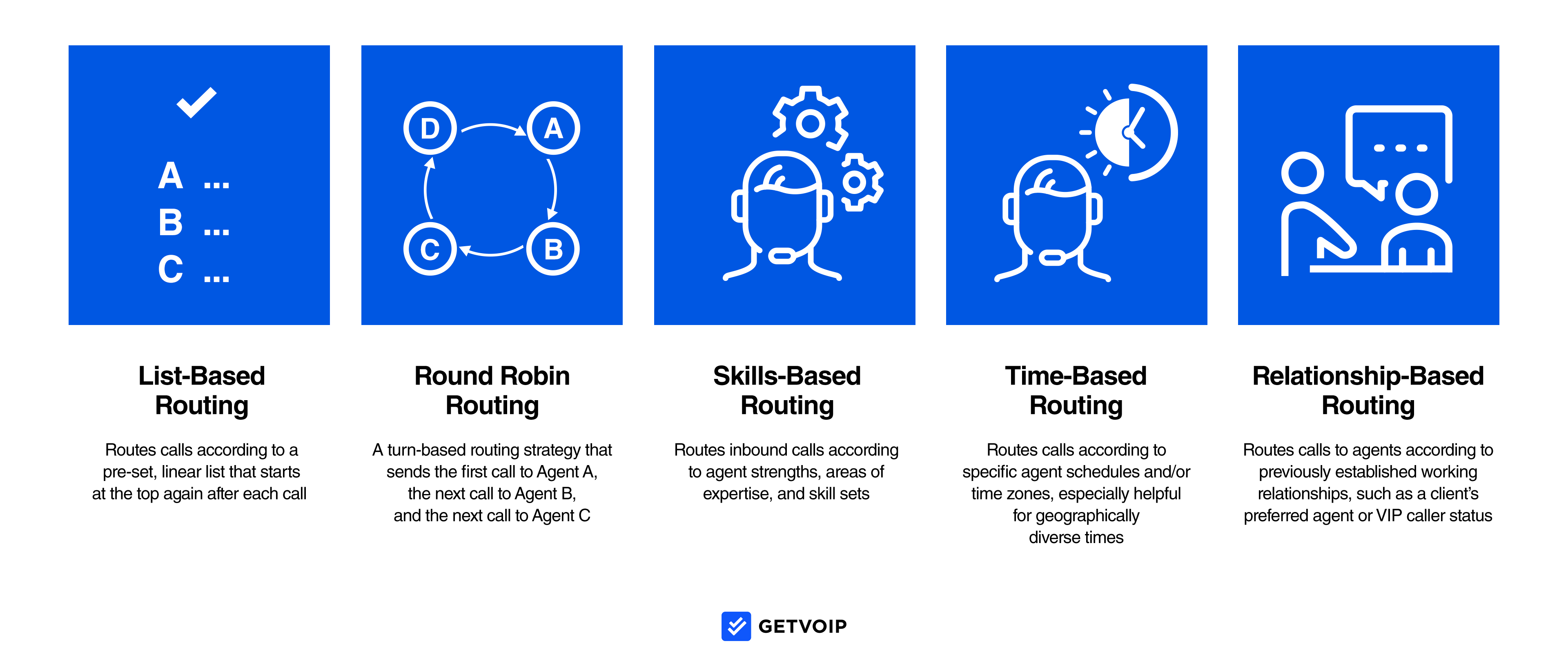
Call Routing is a business phone system feature that automatically distributes calls to specific agents, ring groups, departments, or voicemail boxes according to preset rules and/or responses to IVR prompts–without putting the customer on hold or forcing them to hang up call another number.
Popular call routing strategies include list-based routing, skills-based routing, VIP/relationship-based routing, time-based routing, most idle routing, and round-robin routing.
Call Forwarding
Call Forwarding automatically sends (forwards) unanswered calls to additional business telephone numbers instead of sending them to voicemail, ending the calls, or making customers call additional phone numbers themselves.
For example, if you miss a call at your desk phone, call forwarding will instantly forward the call to your mobile phone. If you don’t answer on your cell, the call is forwarded to your home phone, your voicemail box, another agent, or the main menu. Call forwarding settings can be customized and edited at any time, and admins can set the number of rings before the call is forwarded to the next number on the list.
Omnichannel Communication
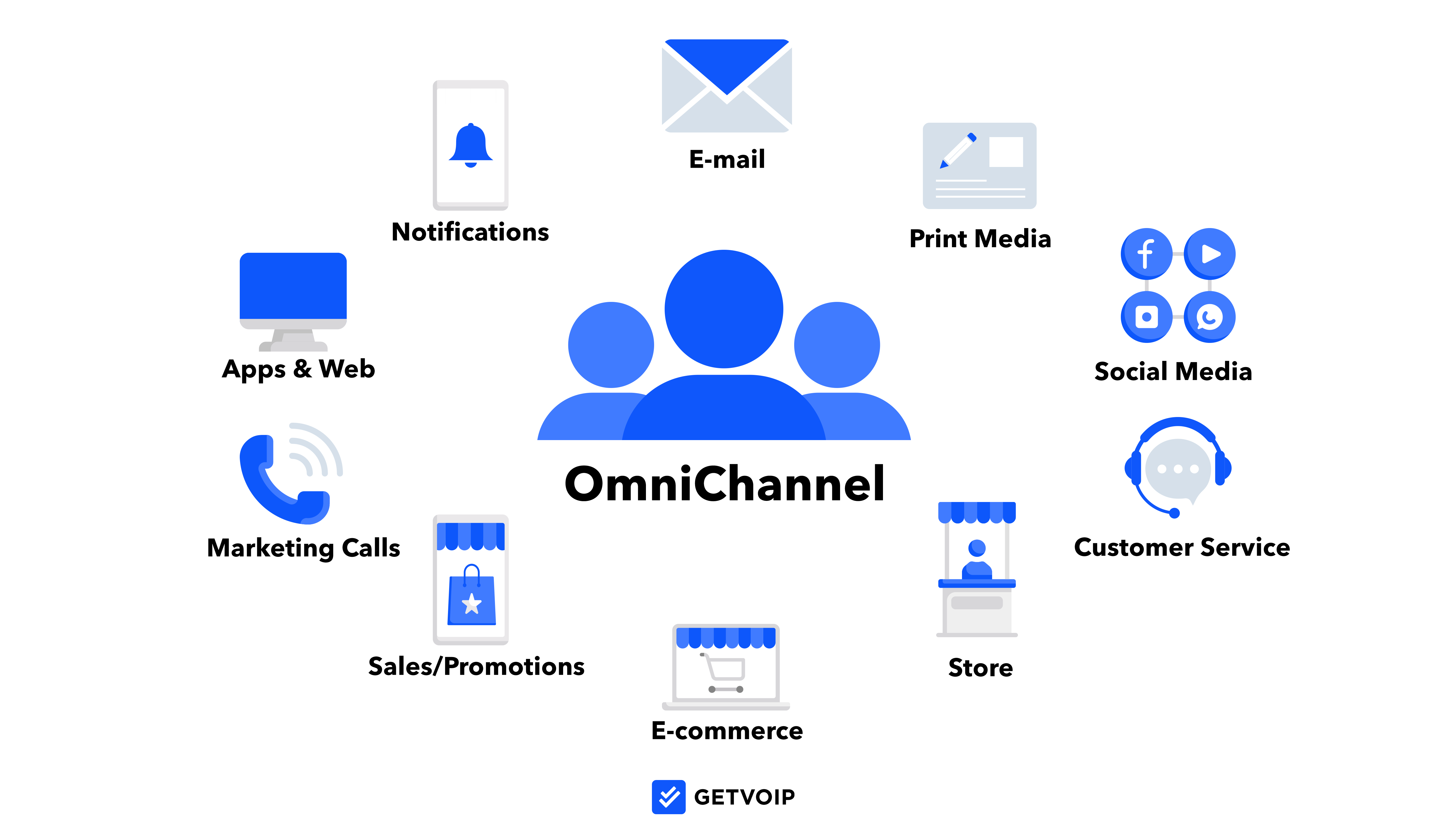
Omnichannel customer service and communication combine all your business communication channels (video, calling, SMS, etc.) into one unified, automatically-synced interface.
Customers and employees can easily switch between channels during a single conversation or support interaction without missing a beat. For example, a customer could start a customer support interaction with a phone call and end that interaction on a video conference with screen sharing for better assistance.
Omnichannel communication not only cuts down on app switching, it also lets customers choose their preferred way to connect with your company. Plus, it makes it easy for multiple reps to work on the same support ticket without the customer needing to repeat themselves each time they speak to a different agent.
Visual Voicemail
Visual Voicemail automatically transcribes voicemail messages, then sends these transcriptions to agents as emails, text messages, or displays the text directly in the softphone interface.
This way, agents don’t lose time listening to longer messages, can better prioritize callbacks, or send reply texts to callers they’ve missed with relevant information.
Automated Callbacks
Automated Callbacks (also called Customer Callbacks) let customers select their preferred date and time to receive a callback from a business, allowing them to avoid waiting on hold for extended periods or having to call back multiple times until they reach an agent.
Once the customer schedules their callback, the call is automatically placed in a relevant agent’s call queue, speeding up the resolution process and keeping customer satisfaction rates high by reducing hold times.
Integrations
Third-party integrations allow businesses to connect existing software and other applications they’re currently using to their business phone system, eliminating the need to switch between windows to access multiple tools.
Integrations make it easy for teams to access additional features that the VoIP provider may not offer, while APIs let IT teams customize their own features and apps to integrate with their phone system.
Common third-party integrations include marketing tools like MailChimp, chat apps like Slack, project management apps like Asana, CRM software like Salesforce, and industry-specific apps like Canva, Curve Dental, or Shopify.
Interactive Voice Response (IVR)
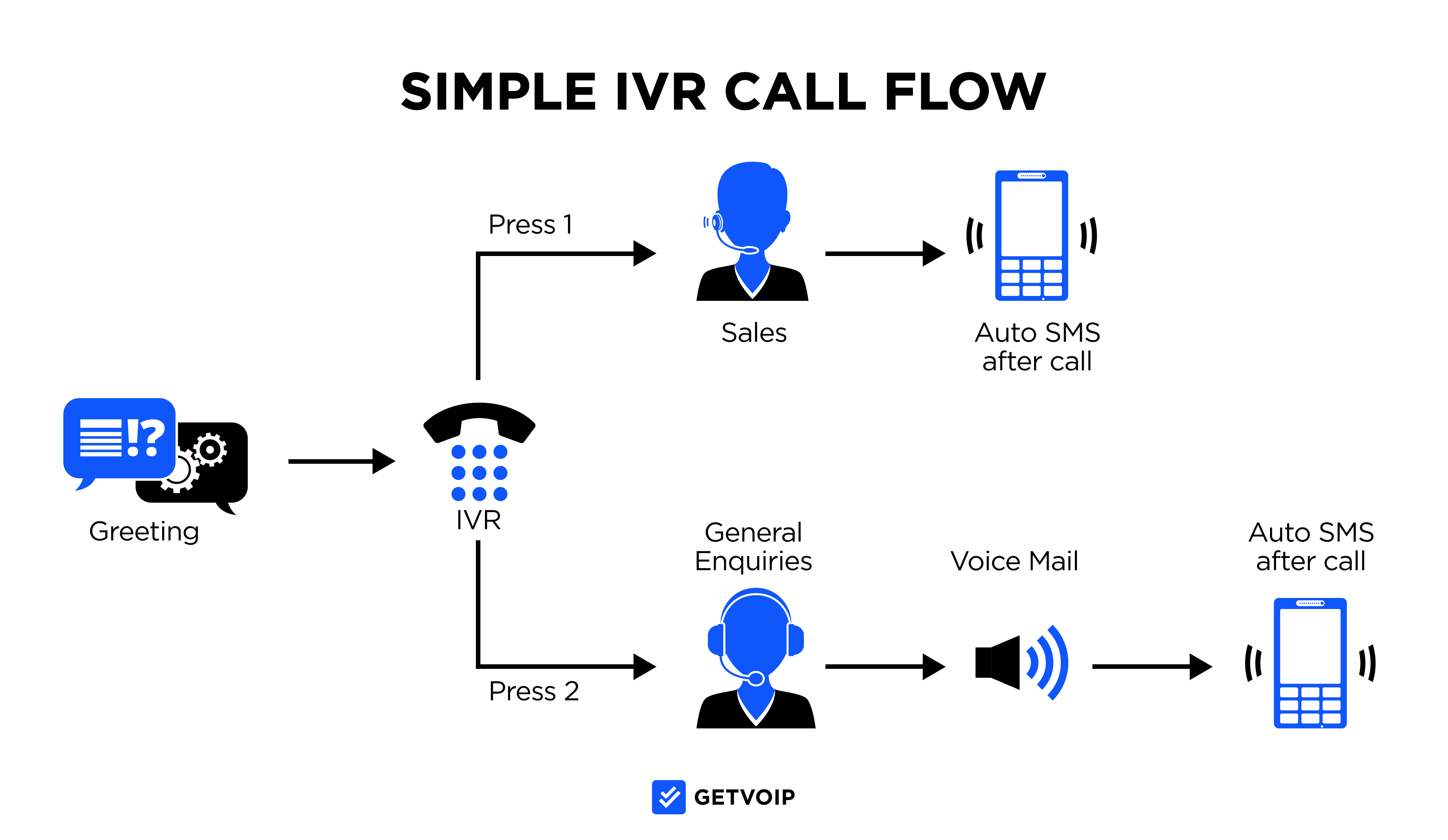
IVR is an interactive call menu that automatically plays when a customer dials your business phone number, providing prompts and information that allows for a higher level of customer self-service.
Callers can enter their responses to IVR system prompts via dial pad touch-tone or speak their responses into the phone directly. NLP (Natural Language Processing) and editable call flow paths analyze the customer’s response, sending calls to relevant agents and departments or playing helpful pre-recorded information.
Call Recording and Call Monitoring
Call recording records all business calls automatically or on-demand, saving these recordings in a searchable database that lets managers conduct quality assessments, review call histories, and protect themselves in the event of a false accusation by a client. Many recording tools allow agents and admins to pause and restart recordings during conversations, protecting clients’ most sensitive information.
Call monitoring lets managers listen to agent conversations with clients in real-time, while call whisper lets managers advise agents during live conversations (without the caller hearing.) Call barge (call takeover) lets managers immediately take control of any customer-client call that needs a higher-up's intervention.
Call Reporting and Analytics
Most business phone systems offer customizable and pre-made reporting templates that offer insight into customer and agent behavior, call center and contact center activity, and even AI-powered analysis.
These reports can be generated automatically or manually and shared and exported to other team members.
Common metrics to track include:
- Daily/weekly/monthly call volume (total number of business calls, calls per department, calls per agent, calls within a specific date range, etc.)
- Outbound Calls: Incoming Calls ratio
- Percentage of missed calls transferred calls, and calls that went to voicemail.
- Call Abandonment Rate
- Cost per Call
- Average call length
- Customer Satisfaction Rating (CSAT)
- First Call Resolution Rate (FCR)
AI-Powered Phone System Features
AI technology is automating away rote and routine tasks while handing your agents actionable and rich insights. When evaluating a business phone system, consider these AI-driven capabilities:
AI Voice Agents and Virtual Receptionists
AI voice agents will answer and handle your calls sans human involvement. They are smart enough to get natural speech and respond in live conversations, the ways a human receptionist should. Unlike traditional IVR systems which force callers to hit buttons, AI receptionists rely on just speech recognition and language models when determining your callers' needs.
These agents manage an array of tasks autonomously like:
- Scheduling appointments and sending confirmations
- Answering your frequently asked questions about hours, services, or policies
- Routing calls to the best available department or team member
- Qualifying sales leads through customized screening questions
- Providing basic account information and order status updates
These agents run 24/7, your business can field calls past midnight and on weekends without paying for overnight staff. AI can take on as much as 80% of routine inquiries, whittling down customer support costs by up to 30%.[*] AI voice agents work best for businesses that expect repetitive inquiries. For a team that answers the same questions dozens of times per day, an AI agent can square calls while staff can take on complex issues requiring the human touch.
Real-Time Call Transcription and Summaries
AI transcription transforms your phone conversations into searchable text in moments. All words spoken get recorded in your system, creating a permanent record for your agents' convenience. This is great for training new employees, clearing up disputes about what was said, and picking apart your most common customer concerns.
Most AI transcription tools create automatic summaries after each call ends. These summaries highlight:
- Key points discussed during the conversation
- Action items and commitments made by either party
- Important details like account numbers, dates, or specific requests
- Customer pain points or concerns mentioned
Managers can review summaries in seconds rather than listening to entire call recordings. Call transcripts also make quality assurance more practical. Traditional quality monitoring only gets to about 5-10% of calls due to time constraints. AI transcription allows you to search and analyze 100% of customer interactions for compliance issues, script adherence, or training opportunities.
Sentiment Analysis During Live Calls
Sentiment analysis features check the pulse on customers' emotional tone as live conversations unfold. When customers sound frustrated, confused, or satisfied, it alerts you to those changes by using their word choice or speaking pace. When your system sees a call going sideways, it sends for supervisors immediately.
This gives managers options for intervention:
- Use whisper mode to coach the agent without the customer hearing
- Barge into the call to take over if the situation needs management attention
- Note the issue for post-call coaching and training
On top of real-time notices, sentiment data pieces together patterns. It can point out which products generate the most frustrated calls, which specific agents deliver more positive conversations, or particular time periods that spark more difficult calls. These insights can point to better training decisions and where your process needs refinements.
AI Copilot for Agent Assistance
AI copilot tools (also called Agent Assist) provide instant guidance as agents navigate interactions with customers. As the conversation moves, the system parses through what's being discussed and points out helpful resources like:
- Relevant knowledge base articles for the issue at hand
- Company policies related to the customer's question
- Product recommendations based on customer needs
- Step-by-step troubleshooting guides
- Similar past cases and their resolutions
The copilot displays this information on the agent's screen without interrupting the call flow. Agents can use these suggestions or ignore them based on the specific situation. This is particularly valuable for newer team members who haven't memorized every product detail or policy.
AI copilots also help with after-call work. They can pre-fill case notes, categorize the interaction type, and suggest follow-up tasks. This reduces the administrative time agents spend between calls, allowing them to help more customers per shift while maintaining quality.
Types of Business Phone Systems
Below is the overview of the main types of business phone systems.
Landline
Landline phones systems use the public-switched telephone network (PSTN) to send an analog audio signal from caller to recipient. Landline phone systems require that phones are physically connected to the PSTN.
While landline service is reliable, it has a few drawbacks. For one, the telephony is noticeably slower than VoIP, and the audio quality is lower. Further, each landline phone number is fixed, which means that your business can only use numbers that are physically rooted to your address and local area code.
VoIP
Voice over Internet Protocol (VoIP) phone systems make phone calls over the Internet, rather than landline cables. Instead of landline’s analog signal, VoIP transmits voice via audio data packets, which travel from the caller's network through the VoIP provider’s server, to the call recipient.
VoIP providers typically offer service through a VoIP, which users can access and use to make calls via desktop, mobile, or browser. Cloud-based calling is typically included within virtual phone systems, unified communications (UCaaS) platforms, and call centers.
Compared to landline, VoIP phone systems offer several benefits:
- Better audio quality
- Faster sound transmission
- Mobility via computer and mobile-based calling
- Virtual phone numbers based anywhere in the world
- Scalability
On-Premise PBX
On-premise private branch exchange (PBX) is when your company hosts all phone system hardware onsite, in your company office. This means you manage your phones, VoIP servers, wires, and potentially a SIP trunk that connects your VoIP system to the PSTN.
While on-premise PBX systems grant greater control over your VoIP operations, they require frequent IT maintenance and can be costly, compared to cloud-hosted solutions.
Hosted PBX
A cloud-hosted PBX system is when your VoIP service provider manages all the servers and data centers required for digital telephony. As the user, all you need is an Internet connected device and a router. Your hosted PBX provider offers an app, through which your business users can make and receive calls from any device or browser.
Hosted PBX systems tend to be the most popular type of VoIP setup because they’re low-maintenance. Since hosted PBX saves your IT team headache and hours of upkeep, hosted PBX is generally more cost-effective than hosting your own on-premise VoIP system.
Benefits of a Cloud Business Phone System
- Cost savings: Free/unlimited local and long-distance calling, affordable international calling, flexible pay-as-you-go pricing or volume/committed use discounts, doesn’t require expensive premise-based equipment, provider handles ongoing maintenance, advanced features increase first call resolution (FCR) rates and lower cost per call
- Mobility and flexibility: Ideal for remote/blended teams, cloud phone systems are accessible on any device with an Internet connection. Agents can take calls on their preferred devices from any location and switch devices during active calls
- Quick setup process: Businesses can use existing equipment, port in existing business phone numbers, and add users/features with a few clicks. Cloud phone system providers offer onboarding, training webinars, and custom setup processes if needed
- Improved customer satisfaction: Call management features eliminate or reduce call hold times and connect customers to the best available agent, IVR/virtual receptionists provide 24/7 customer self-service, CRM integrations and call notes empower personalized customer service
- Increased productivity: Workflow automation, auto dialers, call recordings/transcriptions, real-time team collaboration, meeting summaries, and agent assist eliminate time-consuming manual tasks and decrease the margin of human error
- Ease of use: Quick installation and setup process, intuitive and customizable agent dashboards, on-demand or custom software training webinars
- AI-powered automation: AI voice agents and AI phone receptionists handle routine calls 24/7 sans staffing costs, managing tasks like appointments, basic inquiries, and call routing with no humans attached. Real-time AI coaching provides agents with suggested responses and next-best actions during live calls
Challenges and Limitations of Cloud-Based Phone Systems
- Requires sufficient bandwidth: A VoIP call requires about 300 Kbps of bandwidth to ensure strong sound quality. If your local network has too much traffic or a poor internet connection, you may experience jitter, latency, or dropped calls.
- Learning curve with new features: Some users familiar with an old phone system may face a learning curve when adapting to cloud-based VoIP software. Many cloud phone systems include a dashboard interface and advanced call controls. While these are valuable tools, it may take a few weeks for staff to adjust.
- Hidden fees: A VoIP system’s monthly cost usually includes not only the subscription itself but some additional taxes and fees that can add several dollars monthly per user.
- Setup confusion: Some companies struggle to get new users set up with phone numbers. Occasionally, a user’s phone will automatically send calls to voicemail, or fail to ring in response to an inbound call. Some administrators also struggle to create queues and IVR menus.
- Hacking vulnerability: While VoIP services encrypt call data and are generally quite secure, VoIP calls and cloud-based phone systems can be vulnerable to hackers and other online threats.
- Harder for emergency services to locate: Since cloud-based phone system phone numbers aren’t linked to a physical address, it’s harder for emergency dispatch services like 911 to track a user’s location when the user calls. Consider E911 services.
Choose the Best Fit System for Your Business
Selecting the right business phone system comes down to matching capabilities with actual requirements, not just aspirational ones. Begin by documenting existing friction points in your current setup and tracking when and how your team uses the phone system most heavily.
The biggest mistake businesses make is purchasing features they never activate. Resist it. A lean VoIP platform with solid fundamentals will outperform an overcomplicated enterprise solution for most small to mid-sized teams. This principle extends to AI capabilities as well. Feel free to skip the voice agents and sentiment analysis unless you can point to specific operational problems they will solve.
Total cost of ownership extends well beyond the advertised monthly rate. Calculate the full picture by including:
- Initial setup and implementation fees
- Desk phones or headset hardware
- Per-minute charges for international destinations
- Premium feature add-ons like advanced analytics or AI tools
For businesses managing high call volumes with customers, explore all-in-one platforms instead of stitching together multiple subscriptions. The ideal phone system delivers the features your team will genuinely use, maintains consistent call quality, and accommodates expansion without requiring a platform migration.

