
Cloud contact centers are flexible, scalable, and cost-effective solutions to help your business exceed customer expectations while increasing agent engagement.
CCaaS platforms have exploded in popularity in recent years, and continue to grow in research, development, and usage rates. The cloud-based contact center market is expected to reach a value of 86.4 billion by 2029 with a CAGR of 26.9%.[*]
In this article, we explore the benefits of cloud contact centers, essential features to look for, and how to choose the right provider for your business.
- Overview
- How It Works
- On-Premise vs Cloud
- Benefits
- Essential Features
- How It Improves CX
- How to Choose
- Best Providers
- Video Overview
What is a Cloud Contact Center?
A cloud contact center is a centralized business communications platform hosted and managed by a third-party provider offsite, on remote servers. It allows businesses to manage and optimize customer interactions across voice and digital channels like inbound/outbound calling, website chat, social media messaging, SMS, and email.
Cloud-based Contact Center as a Service (CCaaS) platforms aren’t tied to a single physical location and are accessible from any Internet-connected location and device, making them ideal for remote and hybrid teams looking to eliminate the need for costly on-site hardware. The CCaaS provider, not the business using their services, is responsible for maintaining, updating, managing the hardware and software.
This means businesses can focus on streamlining business processes and improving CX, free from the hassle of managing a complex contact center infrastructure.
How Does a Cloud Contact Center Work?
A cloud contact center works by routing customer interactions (e.g. phone calls, emails, chats, and social media messages) to the best available agents equipped with the necessary training and resources to resolve the customer's issue. Users can access their cloud contact center on desktop and mobile devices (or compatible hardware) inside and outside of a physical office space.
Core Components of a Cloud Contact Center
Cloud contact centers are web-based applications powered by Voice over Internet Protocol (VoIP), not a wired connection to the PSTN. All customer interactions are streamlined into a single unified interface (dashboard), eliminating constant app and channel switching.
There are several elements that make up an effective CCaaS solution:
- Automatic Call Distribution: Automatic call distribution, or ACD, is a system that automatically forwards incoming calls to a specific agent or department based on whether the call comes in during or after business hours
- Advanced Call Routing: IVR or omnichannel routing systems use advanced algorithms that route calls according to factors like agent availability and skillset, interaction type, customer priority, business hours, and custom routing rules
- Call Monitoring: Real-time call monitoring, call recording and transcriptions, call barge, and call whisper let supervisors listen in on active calls, coach agents, and intervene to avoid escalation
- Reporting and Analytics: CCaaS solutions monitor real-time and historical contact center KPIs, provide template-based and customizable reports, and leverage speech and text analytics to identify trends in customer/agent behavior and evaluate contact center operational efficiency
- Agent Productivity and Training Tools: Features like real-time Agent Assist, knowledge base integration, call scripts, canned responses, in-call coaching, agent scorecards, and workflow automations increase productivity and improve agent performance
- Integration with other systems: Cloud contact centers can easily integrate with third-party platforms like CRM and ERP systems, marketing apps, collaboration solutions, and more (on-premise contact centers may require significant effort to integrate with other systems)
-
Workforce Management Tools: Workforce management (WFM), or workforce engagement (WEM) tools include call volume forecasting, employee scheduling, shift swapping, and gamification capabilities
-
AI-Powered Virtual Agents: Virtual agents are able to interact with customers in natural language via voice or text using NLP and AI technology. Virtual agents can be used to answer common questions and perform simple processes like accepting payments and scheduling appointments
Difference Between On-Premise and Cloud Contact Center
The main difference between on-premise and cloud contact centers is that on-premise solutions are hosted and maintained on-site by the end user, while cloud-based systems are managed and maintained offsite, in the cloud, by the CCaaS provider.
On-premise contact centers require physical office space to house on-site servers and additional equipment, and must be installed and maintained by the business itself. expensive equipment
Cloud hosted PBX solutions are accessible through the internet, can be accessed from any Internet-enabled device or location, and are maintained by the third-party provider.
| On-Premise Contact Center | Cloud Contact Center | |
| Best For | Small businesses that want greater control over their contact center and want to use existing hardware | Remote or hybrid businesses of any size that prioritize flexibility, mobility, and scalable tier-based pricing |
| Available Communication Channels | Voice, Chat, Email, Social Media | Voice, Chat, Email, Social Media, Video conferencing |
| Essential Features |
|
|
| Average Monthly Cost | $8,000-$50,000 per month depending on the size of business, software licensing costs, equipment, etc. | $20-$500 per month depending on the number of users and features |
| Top Benefits |
|
|
| Scalability | Scaling is expensive, time-consuming, and requires physical installation | Scaling can be done quickly and directly on the provider website, since there’s no need to purchase extra hardware |
| Integrations | Cannot integrate with third party software applications | Cloud systems provide pre-built integrations with third party apps and APIs for custom integrations |
| Security | Dependent on the company’s server and firewalls | Many providers offer enhanced security with data encryption, single sign-on, multi-factor authentication, etc. |
| Reliability | Highly reliable as long as equipment is properly maintained | Many providers offer uptime guarantees and are highly reliable due to multiple global points of presence |
Benefits of Cloud Contact Centers
Cloud contact centers are more flexible and scalable than their traditional counterparts because phone lines and digital channels can be added online with one click. This also enables complete CCaaS platforms to be set up in minutes instead of weeks.
Top CCaaS platforms have more security protections and features than traditional PBX systems. As new features are developed, cloud-based systems are updated automatically.
Cloud-based phone systems save companies money because they don’t have to pay for expensive hardware, maintenance, and office overhead.
Flexibility
Cloud contact centers can be accessed from any location and on any device with an internet connection, whereas on-premise contact centers are tied to a single physical location. CCaaS platforms make it easier for businesses to ensure customer success from multiple locations and empower remote teams.
Without the need for maintenance and upgrades, cloud contact centers can free up IT resources for other initiatives, like hiring additional agents. Finally, cloud contact center software is billed per-line or per-user, and don’t require equipment, licensing, and installation costs.
Scalability
Cloud contact centers can easily scale up or down to evolve with changing business needs. As a business grows, admins can add more agents or expand the system's capabilities–and only pay for the additional lines/features they need. On the other hand, on-premise contact centers require physical hardware and software upgrades, a time-consuming and expensive process.
Cost-effectiveness
The cost-effectiveness of cloud contact centers is mainly due to lower upfront costs, scalable pricing, and the reduced need for IT support and upgrades.
With a cloud contact center, all of the necessary technology is provided and maintainted by the CCaaS platform, eliminating the costs of expensive VoIP equipment and IT costs. Software. Cloud contact centers also offer features that increase call center efficiency, like AI-powered workflow automations, WFM scheduling and forecasting tools, and real-time analytics with KPI alerts.
Advanced features
Cloud contact centers offer a range of advanced VoIP features unavailable in on-premise systems, including third-party integrations, high-level omnichannel customer self-service, and unified communications.
Cloud contact centers leverage artificial intelligence, machine learning, natural language processing, and customer intent and sentiment analysis to reduce call volume, improve customer satisfaction, and eliminate repetitive tasks. On-premise contact centers typically don't have access to these cutting-edge AI technologies.
Gartner predicts that by 2025, 80% of customer support teams will be leveraging generative AI to improve service.[*]
Reliability
Cloud contact center platforms are more reliable than on-premise contact centers, offering a minimum guaranteed uptime of 99.9%, network redundancy via numerous global points of presence, and automatic data backups and updates. On-premise contact centers, on the other hand, are susceptible to outages and disruptions as they rely on a single physical location and hardware. Unlike cloud solutions, premises-based contact centers require an in-house IT staff to configure and maintain their systems.
Quick Deployment
Traditional call center technology can take weeks to install due to the complex hardware and software involved. It is also necessary to find adequate space to house all of the physical elements.
Alternatively, cloud contact center systems can be set up in minutes as they rely entirely on the internet. Supervisors can start building IVR call paths almost immediately after purchasing a subscription. Employees and agents can access the system using their own smartphone or laptop so there is no special hardware to install.
Enhanced Security
Companies that rely on their own servers for contact center servers may have security vulnerabilities that they are unaware of. Cloud-based CCaaS providers comply with strict international security standards such as GDPR and HIPAA and utilize features such as SSO, 2FA and MFA, and E2EE to ensure voice, video and text-based interactions are secure.
Many CCaaS providers also give business owners control over who in their company has access to certain features and data with the ability to create roles and grant permissions.
Remote Work Capabilities
In addition to allowing agents to interact with customers from any device and any geographic location, cloud contact centers platforms give companies access to team collaboration features such as video conferencing, task assignment, and document sharing. These capabilities enable teams to stay connected even if they are in different countries and time zones.
Team leads are also able to monitor interactions in real-time using tools such as live transcription and sentiment analysis, giving them the same level of oversight they would have if they were in the same physical building as agents. Transitioning to remote work offers companies a number of benefits as over one-third of hiring managers have reported that implementing work from home policies increased productivity.[*]
Essential Features of a Cloud Hosted Contact Center
A cloud-hosted contact center includes many features to help businesses manage customer interactions effectively and efficiently. Some of the most essential cloud-hosted features are:
- Omnichannel support: Manage and provide a unified view of customer interactions through multiple channels (phone, email, chat, video calling, online faxing, social media, etc.)
- Advanced routing algorithms: Route customer interactions to the right virtual agent via round robin, time-based, relationship-based, and skills-based routing.
- Reporting and analytics: Monitor and track key metrics, such as call volume, wait times, and agent performance, and generate reports for analysis and improvement.
- IVR (Interactive Voice Response): Customers can interact with multi-level pre-recorded call menu prompts to direct their own calls or resolve basic support issues without involving a live agent
- Call recording: Record customer conversations and agent screens for quality assurance and training purposes.
- Call monitoring (listen, whisper, barge): Allows supervisors to listen in on agent calls and intervene or take over the call when necessary
- Integrations with other systems: Ability to integrate and sync with other systems, such as Microsoft products, Salesforce, HubSpot, social media platforms, and industry-specific apps to provide a more seamless, integrated customer service experience
How a Cloud Contact Center Improves the Customer Experience
A cloud contact center significantly improves CX by providing customers with more convenient, efficient ways to interact with a business–and by empowering agents with the tools and resources they need to quickly resolve customer issues while providing personalized support.
Some specific ways that a cloud contact center can improve the customer experience include:
- Multi-channel support: Enabling customers to use their preferred communication channel increases customer engagement and creates a more personalized customer experience
- Faster resolution times: Advanced IVR, auto attendants, and omnichannel routing connect customers to the right agent quickly. Analytics can be used to track specific metrics such as average handle time (AHT) and average on-hold time to alert management of issues or to determine when peak call times are. These measures reduce wait times, improve business processes, and streamline the customer journey
- Seamless and integrated experience: By integrating with other business software, such as CRM systems, ERP, and social media platforms, a cloud contact center provides customers with a seamless and integrated experience across channels. These integrations also give agents immediate access to full customer interaction and conversation history, so customers don’t have to repeat themselves
- Personalized and empathetic customer service: By providing agents with access to customer information, call scripts, and knowledge base articles, a cloud contact center can help agents provide personalized and empathetic customer service, building stronger relationships with customers and improving customer loyalty
- Improved self-service options: IVR (Interactive Voice Response) and chatbots can answer customer FAQs and process simple requests, resolving basic support issues while freeing up agents–improving CX and reducing agent burnout
- Consistent quality: Consistent customer service quality is imperative to building and maintaining strong customer relationships. Call recording, monitoring, agent coaching, and performance gamification features ensure customer calls are handled efficiently, improving CSAT scores and customer retention
How to Choose a Cloud Contact Center Provider
When choosing a cloud contact center provider, there are several key factors to consider to ensure that you select a solution that meets your business needs and provides a high-quality customer service experience. Some of these factors include:
- Pricing and value: The first thing to consider with any contact center software provider is the pricing and overall plan scalability. When determining cost, don’t forget to look at which features are included in plans, and which ones are paid add-ons
- Features and functionality: Research the features and functionality offered by different providers, such as skills-based routing, call center agent performance gamification, and automatic dialers. Necessary features will vary based on whether a contact center is inbound, outbound, or blended
- Reliability and security: look into the provider's track record for reliability and security, and ensure that they have robust measures in place to protect customer data and maintain high network availability
- Integration capabilities: Businesses already using various digital tools should consider the call center software's available third-party integrations, APIs, and developer community
- Customer support: Consider the level of customer support different providers offer, including support hours, channels, priority support options, and training/setup assistance–especially companies without an in-house IT team
- Ease of use: The ease of use and user-friendliness of the provider's platform is also important to consider. Ensure dashboards are intuitive and helpful for agents, supervisors, and administrators
By considering these factors and carefully evaluating the different options available, you can choose a cloud contact center provider that meets your business needs and provides a high-quality customer service experience.
Best Cloud Contact Center Solutions
Here is a quick overview of some of the best cloud-based contact center providers out there.
| Provider | Standout Features | Pricing | Best For |
| Five9 |
|
5 paid plans starting at $119 per user, per month | Large contact centers and enterprises that need omnichannel and self service capabilties |
| Talkdesk |
|
4 paid plans from $85-$165+/user/month | SMBs and remote contact centers in the financial and healthcare industries |
| NICE CXOne |
|
7 plans from $71-$249/agent/month | Enterprise level contact centers with a high daily call volume |
| Twilio Flex |
|
Per-hour pricing from $1 per active user hour, per-user pricing from $150/named user | Startups and SMBs that need to a flexible, customized solution |
| Genesys |
|
4 paid plans from $75-$240 per month | High volume contact centers that need advanced, real-time analytics |
| Nextiva |
|
3 paid plans from $129-$199 per user, per month | Contact centers of all sizes that need to rework and improve the customer journey |
Five9
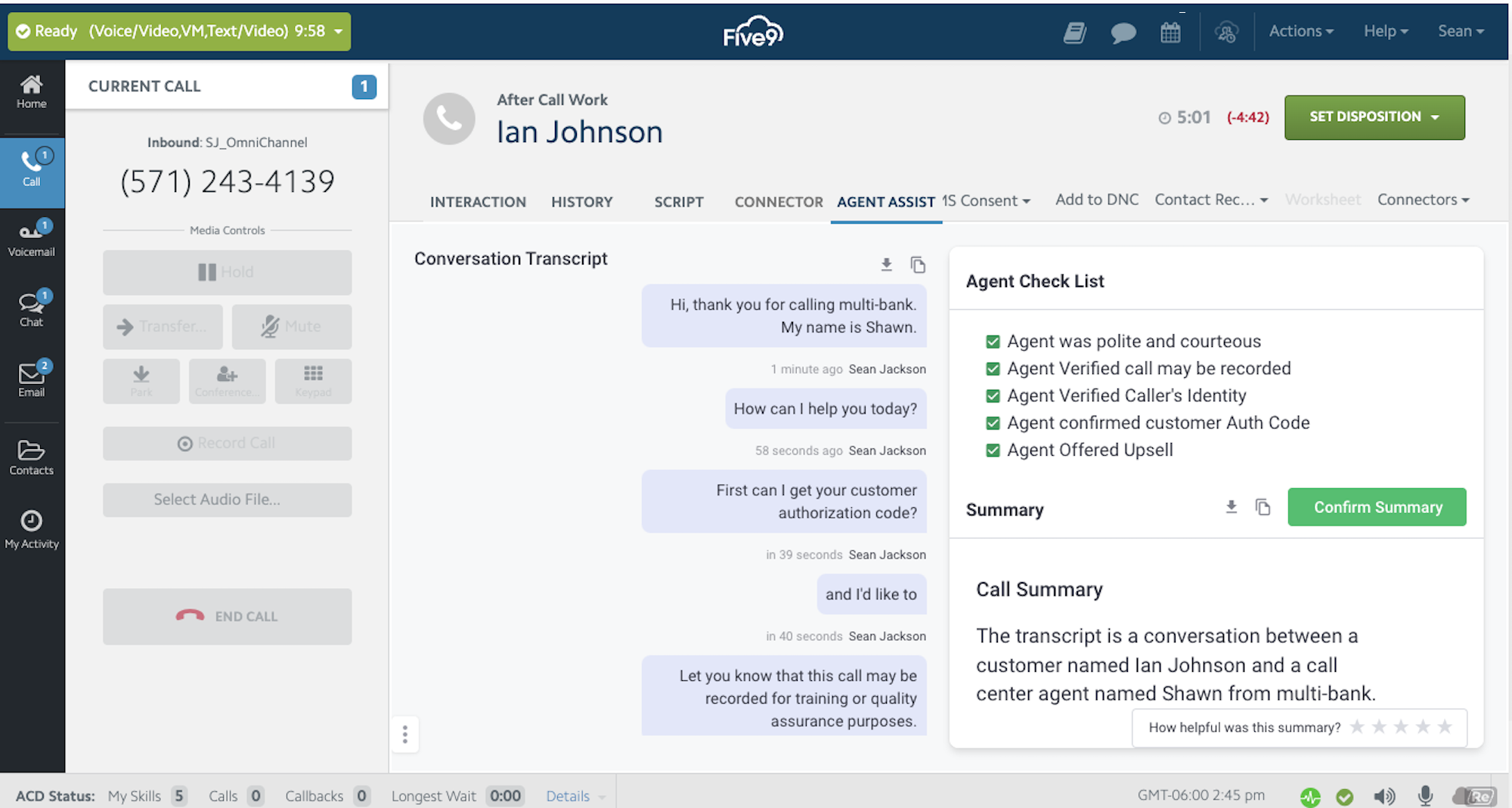
Five9 is an all-in-one CCaaS solution combing chat, voice, email, SMS/MMS, and social media interactions under one pane of glass. For voice calls, Five9 offers blended inbound/outbound call center features such as call recording, IVR, and auto dialing. Workforce engagement tools and advanced analytics are included in upper tier plans.
Five9 also offers enterprise grade security with HIPAA compliance, data encryption in transit and at rest, and secure data centers with two-factor authentication.
What We Like
- Customer Support: Five9 includes 24/7 live customer support on all plans eliminating the need to spend more on premium support packages
- Intelligent Virtual Agents: Enable companies to implement self-service and automate routine tasks such as accepting payment, scheduling appointments, or updating a customer address
- Auto Dialer: Includes 6 dialing modes: Progressive, Preview, Power, Predictive, Manual Touch, and Certified Caller (STIR/SHAKEN)
- Gamification: Supervisors build games for long term challenges, use historical data to ensure success, and assign rewards. Agents create customizable avatars
- Agent Assist: AI-powered agent assist automatically provides agents with real-time guidance cards displaying information on a customer or from the company's knowledge base
What to Know
Five9 starts at a higher price point than many competitors and is no longer transparent in it's pricing. Some advanced features like speech recognition must be purchased separately as an add-on. Although Five9 has some video capabilities such as allowing customers to share video on a mobile device with an agent, it does not offer a full video conferencing platform.
Cost
Five9 offers 5 different bundled pricing plans. The Digital and Core plans each cost $119 per user, per month. The Digital plan does not include voice, while the Core plan does not include digital channels or SMS/MMS. All other plans are quote-based. Add-ons include speech recognition IVR, admin and supervisor consoles, and Secure Pay.
For more information, please see our Five9 pricing guide.
Talkdesk
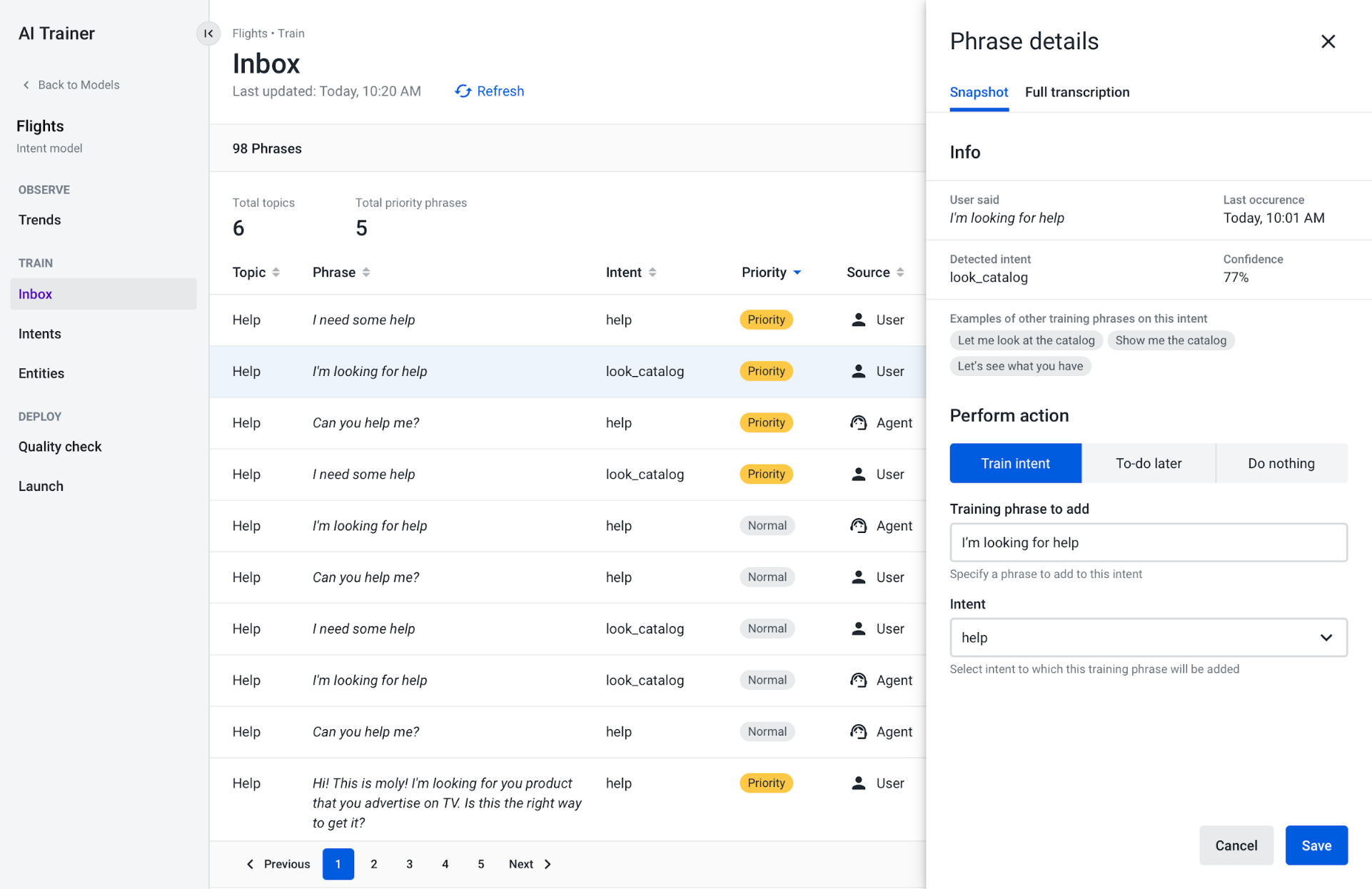
Talkdesk is an affordable contact center software platform that specializes in financial and healthcare industry specific tools such as pre-built workflows and industry specific workspaces and integrations. Talkdesk is reliable with a 99.999% uptime and it offers many advanced AI-powered tools such as translation, re-writes, autogenerated answer cards, virtual agents, and customer experience analytics.
Talkdesk provides a highly customizable platform with a visual routing builder that empowers supervisors to create omnichannel customer journeys without any code, and a "point-click-publish" automation designer.
What We Like
- Talkdesk Ascend AI: Multi-channel and multi-lingual digital and voice virtual agents converse with customers and answer questions using expressive, natural language and assist agents with real-time context and information from company databases and third-party platforms
- Automation designer: Accessible, no-code tool is used to design automations throughout the customer journey such as scheduling a follow-up email or creating a task
- Real-time analytics: Automatically transcribes and analyzes all conversations to identify keywords, topics, common issues, etc.
- Mood Insights: Goes deeper than sentiment analysis to uncover what customers are feeling and why they are feeling that way
What To Know
Talkdesk users have reported issues with latency and lagging. Audio quality can also be inconsistent, especially when it comes to call recordings and screen recordings. Talkdesk customer support is also inconsistent in their responsiveness and efficacy.
Cost
Talkdesk offers three CX Cloud editions of its platform ranging from $85 to $165 per user, per month. Talkdesk also offers five different industry specific platforms, all for $225 per user, per month. The industry specific packages include things like policy administration, claims management, and e-commerce integrations. These packages are great for businesses in the financial, healthcare, or retail industries. Talkdesk also offers a flexible pay-as-you-go platform for businesses that need less than 50 licenses called Talkdesk Express.
For more information, please see our Talkdesk pricing guide.
NICE CXone
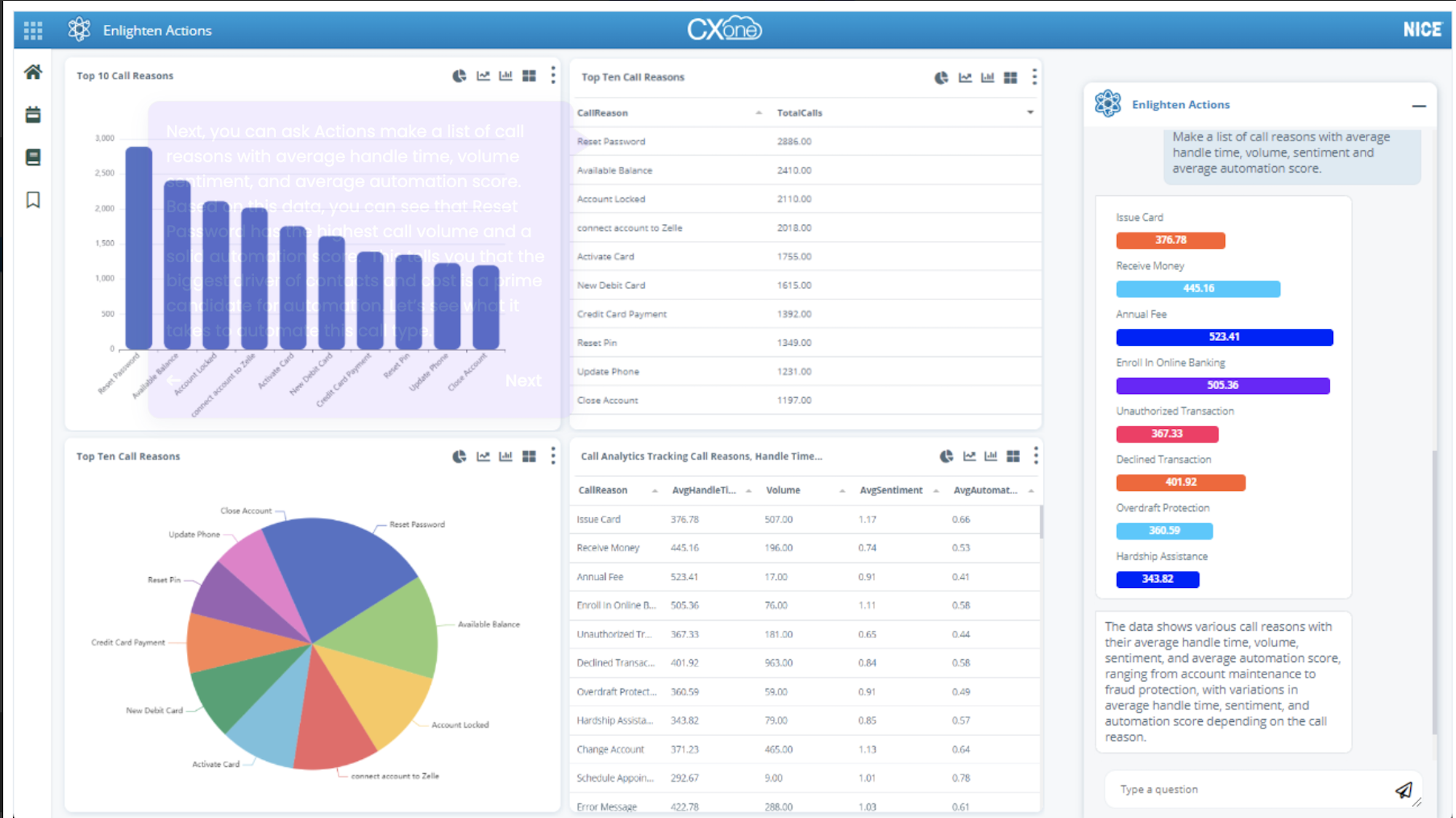
NICE CXone is a customer experience platform with voice, text, and over 30 digital channels. NICE offers a flexible pricing structure with 7 different feature-bundled plans. The CXone MPower Ultimate suite includes everything you need to fully integrate human and AI agents such as end-to-end automation of workflows, virtual agents, and customer journeys that can be tailored on a granular level.
Supervisors can easily manage dozens of agents with voice and digital capture, search, playback, and real-time monitoring and coaching capabilities.
What We Like
- Affordable digital only plan: NICE CXone's MPower Digital agent starts at just $71 per user, per month and includes digital recording, storage, and reporting for 30+ channels
- Quality management workflows: Includes advanced evaluation options, automated distribution, coaching, calibrations, appeals and self-assessment to help supervisors manage a large number of agents
- AI-driven omnichannel analytics: Tracks 100% of voice, digital, and text interactions to uncover trends, sentiment, insights, etc.
- Voice IVR: CXone's user-friendly IVR builder is included in every plan except Digital Agent. Companies create self-service IVR systems without code and universal queues with concurrent interaction handling
- Real-time interaction guidance: Improvement tips can be embedded into agent desktops while live supervisor monitoring ensures that coaches can intervene from any location
What To Know
NICE CXone's WFM features are difficult to use and lack the ability to pull customized data such as sitewide adherence. NICE CXone is also more admin heavy than other competitors, there is a steep learning curve and a substantial amount of time will be spent on building and customizing workflows and automations before the company will see an increase in agent productivity and customer satisfaction.
Cost
NICE CXone offers seven bundled pricing plans ranging from $71 to $249 monthly per user. AI and automation capabilities increase as plans go up in price. Add-ons include AI-powered self-service, knowledge management, and proactive engagement.
For more information, please see our NICE CXone pricing guide.
Twilio Flex
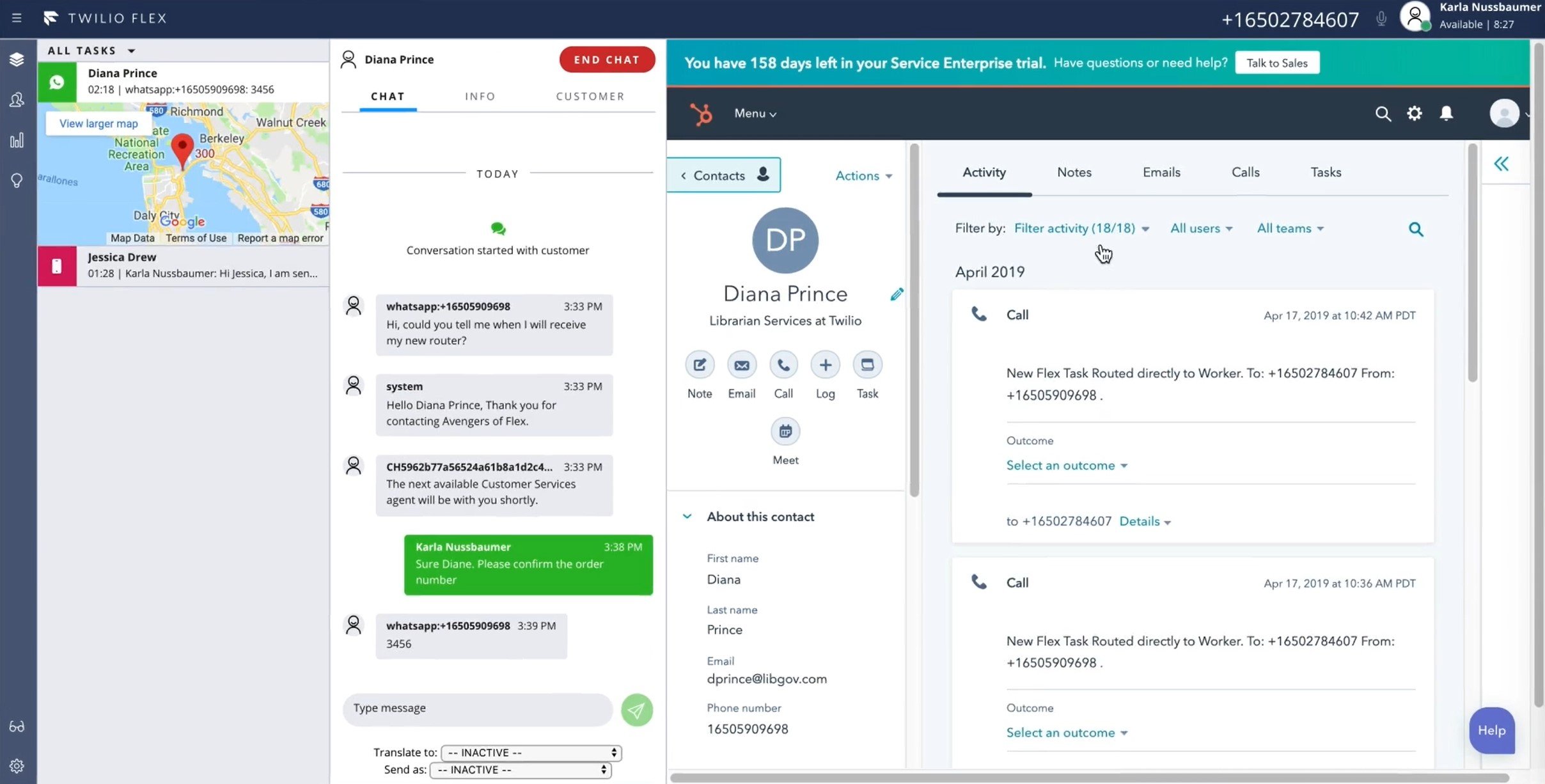
Twilio Flex is a digital engagement center that combines the customizability of APIs with the ease of an out-of-the-box solution. Real-time data is integrated with AI-powered tools allowing companies to individually tailor every sales and service interaction.
Twilio is an ideal platform for brands that need to upgrade or build a company app. Twilio users can add click-to-dial, or click-to-text to their app to streamline communication, offer a digital concierge, send pictures and video, and integrate with any data source. Additionally, Twilio includes standard CCaaS features such as IVR with escalation logic and fallback rules, KPI tracking, and customizable dashboards.
What We Like
- Niche integrations: Twilio users can pull customer data from nearly any third-party source including inventory management lists, billing systems, ERPs, and, of course, CRMs like Zendesk and Salesforce
- Omnichannel engagement: Agents can engage with customers via SMS, WhatsApp, voice, Facebook Messenger, webchat, etc. using a unified dashboard
- Plugins: Twilio users can choose from a huge list of plugins to customize their platform such as agent assistance, chat summary, emoji picker, internal chat, and more
- Flex Insights: Built-in dashboards for monitoring and managing critical KPIs such as average handle time, abandoned calls, queued under 90 seconds etc. Users can drill down to conversations
What To Know
Twilio Flex is a BYOC (bring Your Own Carrier) provider, meaning companies must use Flex with their existing PSTN or VoIP provider and phone number. Twilio allows for a very high level of customization but along with that comes an extended onboarding time. Some developer knowledge may also be necessary to get the most out of the platform. Twilio relies on third party integrations for some key CCaaS functions such as video conferencing, auto dialing, etc.
Cost
Twilio Flex is one of the few CCaaS providers to offer a free trial. The trial includes all Twilio Flex features for 5,000 active user hours. After that, users can choose to pay per hour ($1 per active user hour) or per named user ($150 per month).
For more information, please see our detailed Twilio Flex pricing guide.
Genesys
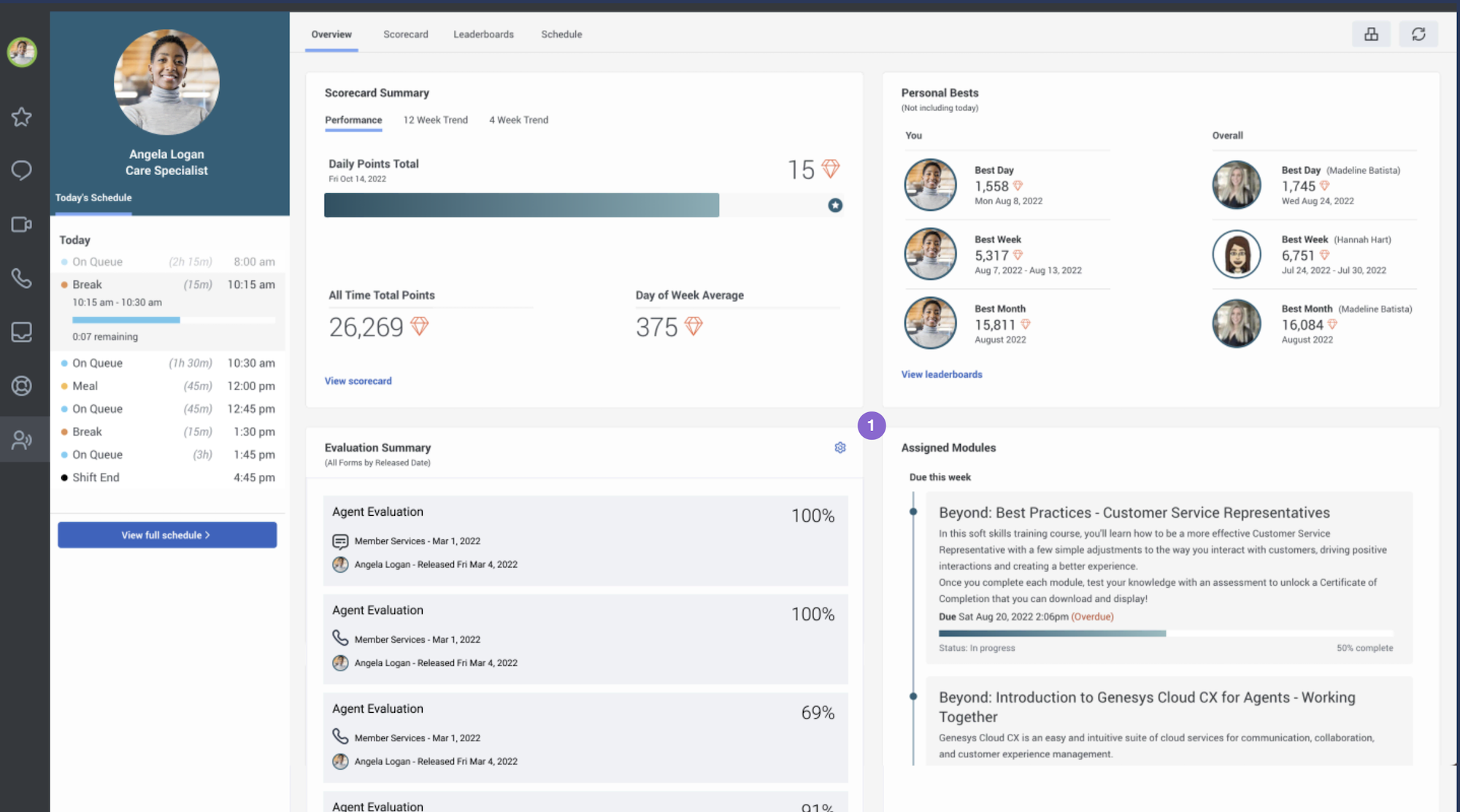
Genesys is a cloud based contact center software solution with powerful AI features, workforce management, and employee performance management tools. This is all in addition to its essential unified communications and call center features such as speech enabled IVR, outbound campaigns, scheduled callbacks, and more.
Genesys' unique pricing structure allows users of even the most economical plan to purchase advanced AI-powered features such as translating, summarizing, scoring, conversational intelligence, and empathy analysis using "Experience tokens".
What We Like
- Dictionary management: Enables companies to improve the accuracy of transcriptions and summaries by adding industry specific terms and phrases and product names to the LLM
- Speech and text analytics: Detects topics, conversation patterns, and sentiment. Uses acoustic analysis to pick up on non-verbal cues. Included in CX3 and CX4 plans, CX1 and CX2 users can purchase with tokens
- Quality assurance: Real-time monitoring, interaction and screen recording in 4K, automated post interaction surveys via web or voice
- Workforce management: Includes forecasting with 25+ machine learning models, scheduling, PTO request management, and real-time adherence monitoring. All features can be accessed via the Genesys mobile app
- Social listening and engagement: AI-led sentiment analysis and tools to track keywords, hashtags or accounts across social media platforms such as Facebook, Instagram, and Twitter
What To Know
Genesys does not offer a digital only plan. Their lowest priced plan is voice only, although digital channels can be added for a fee. Although Genesys offers several affordable plans, if features such as transcription, predictive routing, virtual agents, custom analytics, etc. are needed, the price will be driven up quickly. It should also be noted that WFM forecasts cannot be updated without redoing all of the schedules associated with that forecast.
Cost
Genesys offers four bundled pricing plans. It's most economical plan- Cloud CX1- is a voice only plan that allows users to purchase digital channels, omnichannel routing, and workforce management as needed. All plans are equipped with Genesys Cloud AI but certain features will require "Experience tokens". The number of included tokens depends on the plan. Add-ons include work automation and customized analytics.
For more information, please see our detailed Genesys pricing guide.
Nextiva

Nextiva has been a top provider in the business VoIP space for decades. With award-winning customer support available 24/7/365, reliable voice service with a 99.999% uptime, and enterprise grade security features such as geographic disaster recovery and PCI compliant payment assist, Nextiva is a solid choice for businesses of all sizes.
Nextiva's contact center solution is equally impressive with cutting edge AI-powered features such as agent assist, language translation, intelligent routing, and natural language understanding. Users can orchestrate customer journeys via website breadcrumbs, bots, and process automation, or create a completely custom communication platform utilizing Nextiva's REST APIs.
What We Like
- Optimized workflows: Customers are directed to more efficient channels such as self-service, chatbots, or digital messaging to reduce pressure on live agents during peak times
- Remote telephony edge server connect: Allows agents to work from anywhere and use any internet connect device to interact with customers securely. This makes Nextiva a great choice for remote and hybrid teams
- AI Chatbots: Users can build bots and deploy them on any channel including website, Facebook, Whatsapp, etc. Bots learn from every interaction, can handle simple processes, and escalate to live agents when needed
- AI-based routing: Nextiva's platform is able to identify the language of the caller or pick up on specific keywords to direct them to the appropriate team member
What To Know
Nextiva's CCaaS plans start at $129 per user, per month, which is a higher starting price than other providers like Talkdesk and NICE CXone. Nextiva's platform is also not as customizable as other platforms such as Twilio Flex.
Cost
Nextiva offers four UCaaS plans ranging from $20 to $60 per user, per month. These plans combine social media and review management with inbound/outbound calling, business texting, and video conferencing service. Nextiva offers three CCaaS plans ranging in price from $129 to $199 per user per month.
For more information, please see our detailed Nextiva pricing guide.

