
TL;DR
- AI phone systems take advantage of artificial intelligence to create voice agents to handle your calls with natural conversation versus outmoded rigid menus
- Cost savings are derived via the automation of more routine inquiries, slashing down staffing needs while keeping 24/7 availability
- Customer experience improves through human-like interactions powered by advanced language models that resolve issues faster
- Essential features you need are natural language processing, smart call routing, CRM integration, analytics, and especially compliance capabilities
- The top providers at this current moment to consider are Quo, Nextiva, Zoom, Upfirst.ai, Phonely.ai, CallRail.com, and Goto Connect
- Choosing the right system means evaluating call volume, checking in on integration needs, living up to compliance requirements, and testing with a pilot
Best AI Phone Systems for Businesses
To assist you as you navigate through different options, we found six major providers who meet the standards we’ve discussed so far and offer their own proprietary advantages and qualifications.
| Provider | Key AI Features | Pricing | Best For |
| Quo | Advanced NLP, multi-language support, custom voice agents | Starts at $15/user/month with 10 included Sona calls | Growing enterprises like startups or small businesses |
| Nextiva | Conversational AI, CRM integration, call analytics | Starting at $15/user/month | Mid-size businesses seeking all-in-one solutions |
| Zoom Phone | AI-powered routing, transcription, Zoom ecosystem integration | Starting at $18.33/user/month for the Pro Plus plan with AI companion | Teams already using Zoom for meetings |
| Upfirst.ai | Voice AI for appointment booking, lead qualification | Starts at $24.95/month for 300 calls with additional calls at $1.50 | Service businesses focused on scheduling |
| Phonely.ai | Customizable AI receptionists, multilingual support | Starting at $33/month | Contact centers and businesses with high call volumes |
| CallRail | Call tracking, conversation intelligence, lead scoring | Starting at $45/month for just Call Tracking | Marketing agencies and sales teams |
| GoTo Connect | Unified communications, basic AI routing, SMS | Contact for pricing | Small to mid-size businesses wanting simplicity |
Quo

Quo aims itself particularly towards small businesses and start-ups but we also found it a rather robust system. It was designed for businesses that need professional communication without enterprise complexity. It's a solution more concerned with bringing calls, texts, and customer information together in one collaborative space rather than overwhelming teams with features they don't need. The platform's AI capabilities huddle around its newer solution, Sona, a 24/7 AI agent that answers calls when teams are unavailable, captures detailed messages, and even handles common customer questions using a customizable knowledge base. Integration with tools like HubSpot, Salesforce, Slack, and Zapier means customer interactions stay connected to existing workflows.
Quo is particularly useful for any small or growing business where missing calls means missing revenue. Real estate agents, home services, dental practices, and consulting firms use Quo to ensure every customer gets a response even after hours or when staff is busy. The system handles shared phone numbers where multiple team members can see all calls, texts, and voicemails in one shared inbox with full context and collaboration features like internal notes and typing indicators. It even includes AI-powered call summaries, automatic transcriptions, and smart call tagging that categorizes conversations without manual logging.
Pricing
Quo’s plans start with a free trial that includes basic calling and recording features. Paid plans begin at around $15-20 per user per month with standard features, and Sona AI starts free with approximately 10 calls monthly before moving to paid plans at $25 per month that scale based on usage. Quo remains one of the most affordable options for small businesses needing 24/7 phone coverage.
What We Like
- Collaborative shared inbox: Multiple team members can share one phone number with full visibility into all calls, texts, and voicemails. Internal notes and typing indicators keep everyone aligned without confusion about who's handling what.
- Sona AI agent: The 24/7 AI answering service captures leads and answers customer questions around the clock at a fraction of traditional answering service costs. Sona learns from your business documentation to provide accurate, helpful responses.
- Simple setup and mobile-first: No hardware required, no complex IT involvement. Download the app, choose a number, and start calling within minutes. The mobile and desktop apps sync seamlessly for teams working from anywhere.
What We Dislike
- Sona pricing adds up: While Quo itself is affordable, the Sona AI agent costs over $800 annually after the free tier, which can be steep for solo practitioners or very small teams compared to some competitor offerings.
- Limited enterprise features: The platform lacks sophisticated call routing, queue management, and overflow logic that larger support or sales teams might need. This is a small business solution, not a contact center platform.
- Basic integrations: While Quo connects with popular tools like HubSpot and Salesforce, the integrations are lightweight and lack the deep, bi-directional data synchronization that enterprise systems provide.
Best For
- Startups and small businesses: Teams of 2-20 people who need professional phone capabilities without complexity, long implementations, or enterprise-level costs.
- Service-based businesses: Real estate agents, home services, legal practices, dental offices, and consultants where capturing every call directly impacts revenue and missing opportunities means losing business.
- Teams prioritizing collaboration: Organizations where multiple people need to handle customer calls and texts with full context and visibility rather than siloed individual lines.
Nextiva

Nextiva is a business phone system with conversational AI capabilities that handles inbound call routing, basic inquiry resolution, and intelligent call distribution across teams. It's a solution very versed in the art of unified communications taking voice calls, video meetings, team messaging, and SMS and jam-packing it into an elegant single interface. The platform's AI features include natural language IVR that lets callers describe their needs conversationally, sentiment-based routing that prioritizes annoyed customers, and automated after-hours handling. Integration with major CRM platforms like Salesforce, HubSpot, and Microsoft Dynamics means calls get logged automatically, customer data gets pulled during conversations, and records get updated post-call.
One killer feature is their dashboard providing AI-powered conversation intelligence that transcribes calls, identifies keywords and topics, scores call quality, and surfaces coaching opportunities for managers. Nextiva's AI handles common scenarios like appointment confirmations and order status inquiries without human intervention, then smoothly transfers complex issues to available agents with full context. The system scales from small businesses to enterprises with hundreds of users while maintaining consistent feature access across pricing tiers.
Pricing
Plans start at $15 per user per month (the basic Core plan), with Engage at $25 per month and Power Suite CX at $75 per month for advanced AI and analytics capabilities. AI transcription is charged on a per-use basis. Pricing can increase significantly as you add users and unlock premium features like advanced analytics and custom AI workflows.
What We Like
- Comprehensive feature set: The platform eliminates the need for multiple vendors by combining phone, video, messaging, and AI in one system. This consolidation simplifies administration and reduces the complexity of managing disparate tools.
- User-friendly interface: Visual call flow builders make adoption easier for teams without technical expertise. You don't need a developer to configure basic AI workflows.
- Unified communications: Maintaining conversation context as customers switch between voice, video, and messaging creates seamless experiences that simpler single-channel systems can't match.
What We Dislike
- AI capabilities less advanced: The conversational AI features are less sophisticated than specialized providers focused exclusively on phone intelligence. Nextiva prioritizes breadth over depth in AI capabilities.
- Pricing complexity: While the base price seems reasonable, costs can escalate as you add users and features. The final bill may be higher than anticipated for teams wanting advanced functionality.
- Master of none: By trying to be everything (phone, video, messaging, AI), Nextiva doesn't excel at any single category the way specialized providers do.
Best For
- Growing businesses seeking consolidation: Companies that want a complete communications platform with solid AI features rather than best-in-class AI specialization from multiple vendors.
- Teams prioritizing unified communications: Organizations where seamless switching between phone, video, and messaging matters more than cutting-edge AI phone capabilities.
- SMBs without dedicated IT: Businesses that need professional phone features with AI enhancement but lack the resources to integrate and manage multiple specialized systems.
Zoom Phone
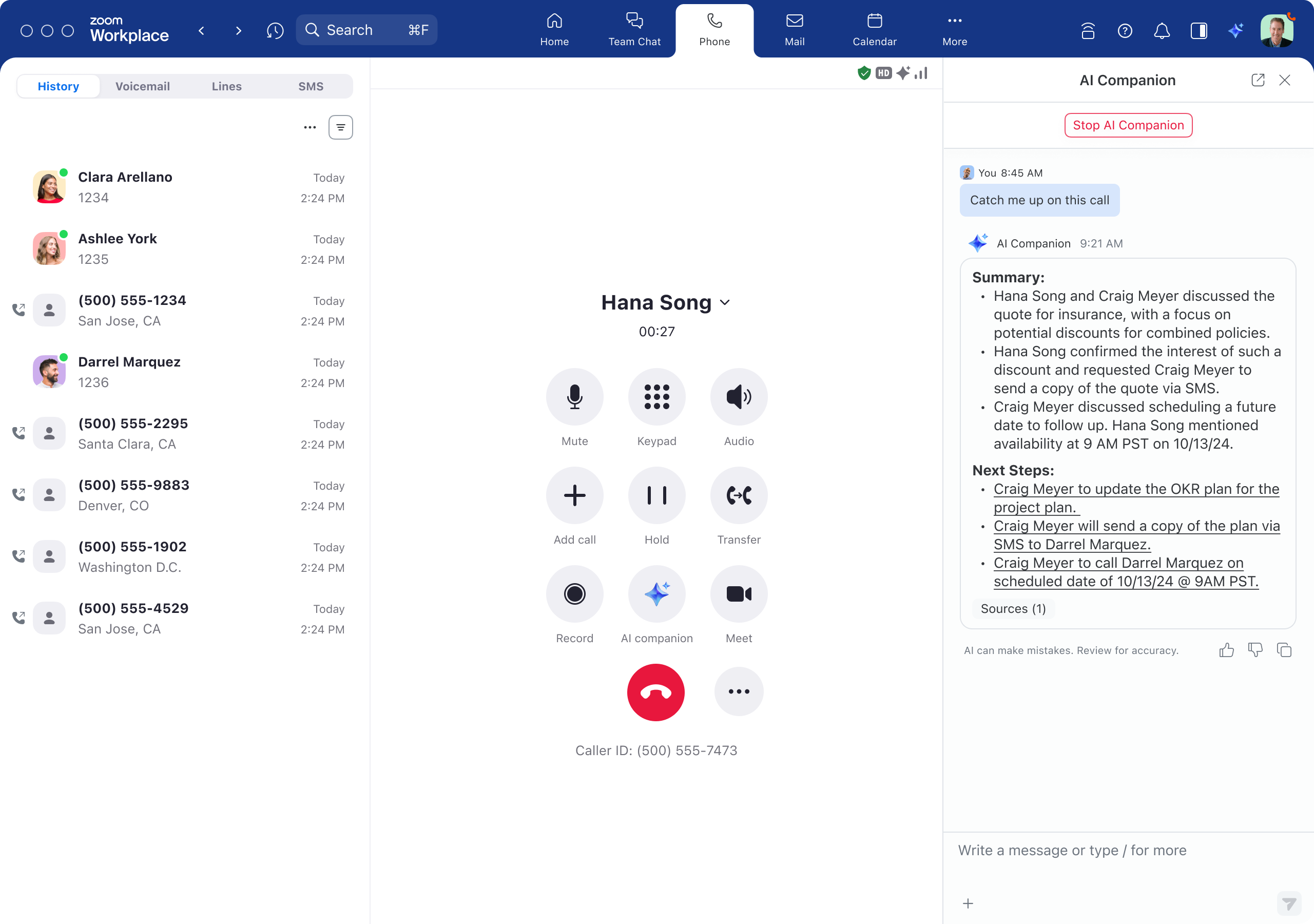
Zoom Phone is a video conferencing platform taking steps and extending well into business phone systems with AI-enhanced features honed around the virtues of productivity and collaboration rather than full call automation. It's a solution built for teams already embedded in the Zoom ecosystem who want phone capabilities without managing a separate vendor. The platform's AI capabilities include intelligent call routing, real-time transcription during calls that creates searchable records, and post-call AI summaries that highlight key points, action items, and customer sentiment. Integration with Zoom Meetings and Zoom Team Chat allows friction-proof escalation from phone calls to video conferences while maintaining conversation context because it's already so baked into the Zoom world.
The AI is mainly aimed at enhancing human agents rather than replacing them entirely but progress is being made on that front. The technology handles tasks like note-taking, follow-up scheduling, and information retrieval so agents can focus on relationship building. Conversation intelligence analyzes call patterns, identifies common customer questions, and recommends knowledge base improvements or agent training priorities based on recurring issues.
Pricing
Zoom Phone plans start at $10 per user per month (Metered), $15 per user per month (US & Canada Unlimited), and $20 per user per month for Global Select. When bundled with Zoom Workplace, pricing starts at $18.32 per user per month for Pro Plus. AI features like transcription and summaries are included with paid plans through AI Companion which starts with the Pro Plus.
What We Like
- Seamless Zoom integration: For teams already using Zoom Meetings, the phone system creates a cohesive collaboration environment where users switch between phone, video, and chat effortlessly without learning new interfaces.
- Competitive pricing: The price point makes it accessible for teams of all sizes without sacrificing core AI features. The value proposition is particularly strong for existing Zoom customers.
- Unified administration: Single sign-on, unified user management, and familiar interfaces reduce training time and administrative overhead compared to juggling multiple communication vendors.
What We Dislike
- Limited autonomous capabilities: AI voice agent features are more limited compared to specialized providers. Zoom focuses on assisting humans rather than autonomous call handling, which may disappoint teams seeking full automation.
- Best for existing customers: The value proposition diminishes significantly if you're not already embedded in the Zoom ecosystem. Starting fresh means you're choosing a platform where the phone is secondary to video.
- Phone as “also-ran” afterthought: The platform's heritage as a video conferencing tool shows. Phone features feel like an extension rather than a core competency.
Best For
- Existing Zoom users: Organizations already deeply invested in Zoom's workplace platform can leverage Virtual Agent without additional platform costs or integration challenges.
- Industry-specific needs: Healthcare, retail, manufacturing, and financial services companies benefit from specialized vertical intelligence and pre-built industry workflows.
- Agentic task automation: Businesses requiring AI that can autonomously complete complex multi-step tasks like booking appointments, checking inventory, or processing service requests without human intervention.
Upfirst.ai
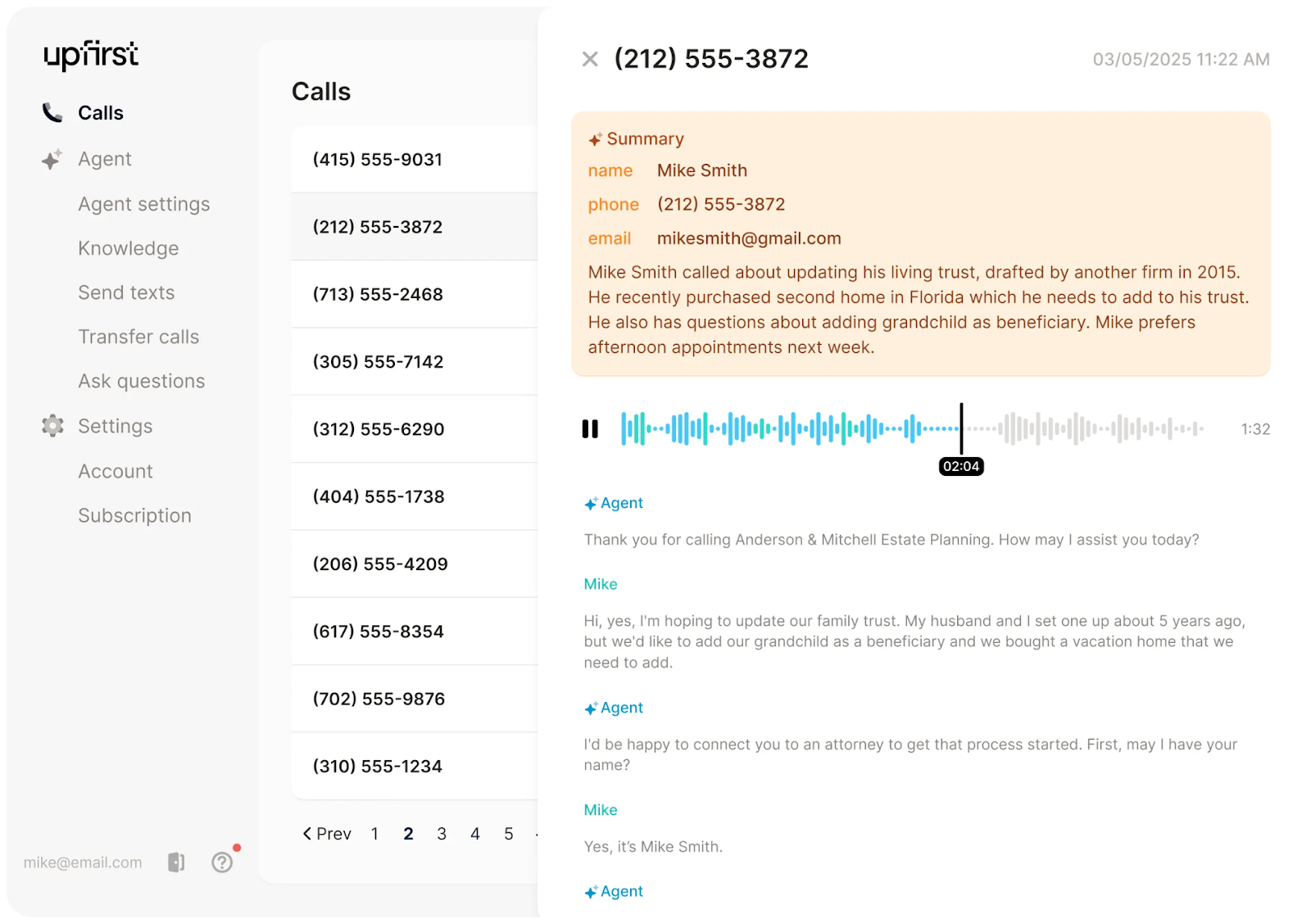
Upfirst.ai is a conversational AI phone system purpose-built for appointment scheduling, call answering, and lead qualification workflows common in service businesses. It's a solution more concerned with 24/7 coverage and handling the complete scheduling lifecycle rather than general-purpose call handling. The platform frees up so much bandwidth because of its range of abilities from answering calls when teams are unavailable to checking real-time availability across multiple calendars, booking appointments, sending confirmations, managing reschedules and cancellations, and sending automated reminders to reduce no-shows. The AI engages callers conversationally in over 90 languages to gather necessary intake information like service preferences, insurance details, or project scope before confirming appointments.
The system integrates with popular scheduling platforms like Calendly and Acuity, plus CRM systems and industry-specific tools for dental practices, medical offices, home services, and professional services. Upfirst.ai's AI adapts to business-specific terminology and workflows. For example, understanding that "root canal" requires longer appointment blocks than "cleaning" for dental offices, or that emergency plumbing calls need same-day scheduling priority.
Pricing
Plans start at $24.95 per month for 30 calls and actively push their “best value” offering of $299 per month for 600 calls. Spam calls are not counted against your limits. Costs scale with call volume but remain predictable based on usage tiers.
What We Like
- Purpose-built excellence: Focusing exclusively on 24/7 answering and scheduling workflows means it handles these use cases exceptionally well with minimal configuration required. The AI understands the nuances of appointment booking and lead capture that general-purpose systems miss.
- Multilingual powerhouse: Support for over 90 languages means businesses can serve diverse customer bases without hiring multilingual staff. The AI automatically detects and responds in the caller's language.
- Quick implementation: Businesses get up and running within days rather than weeks typical of general-purpose systems. The focused scope eliminates complexity that plagues broader platforms.
What We Dislike
- Limited scope: The platform is restricted to specific use cases rather than general-purpose call handling. Businesses need additional tools for customer support or technical inquiries beyond scheduling.
- Narrow analytics: Metrics focus primarily on scheduling performance rather than comprehensive conversation intelligence. You won't get the depth of insights that full-featured phone systems provide.
- One-trick pony: If scheduling isn't your primary phone use case, you're paying for specialized capabilities you won't use while still needing another solution for everything else.
Best For
- Service-based businesses: Medical practices, salons, home services, and consulting firms where appointment scheduling and 24/7 call answering represent the majority of incoming calls and directly impact revenue.
- Small businesses needing coverage: Organizations that can't afford round-the-clock staff but need to capture every call opportunity, especially after hours and on weekends.
- Businesses with complex scheduling: Companies managing multiple service types, providers, and locations where intelligent calendar management prevents double-bookings and optimizes utilization.
Phonely.ai
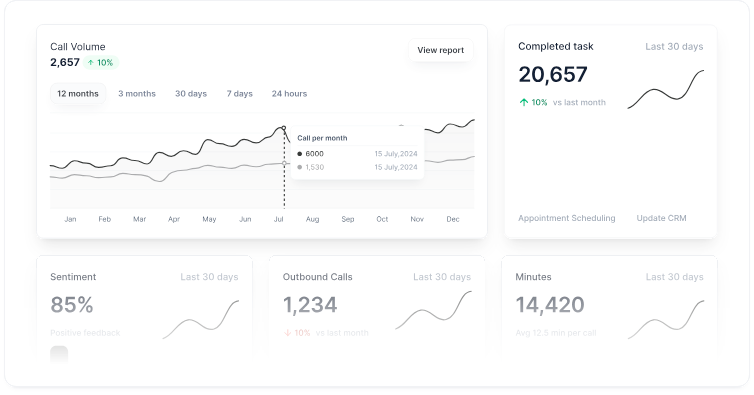
Phonely.ai is a customizable AI phone system formed specifically for businesses needing to automate support and sales calls at scale. It's a solution built for high-volume call handling with enterprise features like HIPAA and SOC II compliance, voice cloning, and support for 100+ languages and voices. Phonely.ai is killer at handling incoming calls with customizable workflows, routes inquiries to appropriate departments, captures detailed call information, schedules appointments by checking integrated calendars, and best of all, businesses get to tweak and fine tune the AI's capabilities through workflows and integrations with CRM systems like HubSpot and Salesforce.
Phonely.ai supports richly complex use cases beyond basic reception. Voice cloning lets businesses create AI agents that sound just like team members if needed. Call recording, transcription, and analysis provide insights into customer conversations. For healthcare organizations and legal services, the platform offers HIPAA-compliant configurations that takes care of sensitive information while maintaining strict privacy controls.
Pricing
Plans start at $35 and rise up to $500 per month for their Business tier but you will need to call for the Enterprise pricing custom. Phonely.ai also offers usage-based pricing at $0.10-0.20 per minute depending on volume. This flexibility accommodates both small teams and high-volume operations.
What We Like
- Enterprise-grade compliance: HIPAA and SOC II compliance make it suitable for healthcare, legal, and other regulated industries that need secure, auditable call handling with strict privacy controls.
- Multilingual scale: Support for 100+ languages and voices with voice cloning capabilities means businesses can create authentic-sounding AI agents for diverse markets and customer bases.
- High-volume optimization: Usage-based pricing and robust infrastructure handle thousands of calls efficiently, making it cost-effective for contact centers and businesses with significant call volume.
What We Dislike
- Pricing complexity: The range of pricing tiers and usage-based models can make it difficult to predict exact costs. Businesses need to carefully estimate call volumes to budget accurately.
- Setup sophistication: While not requiring coding, configuring advanced workflows and voice cloning features requires more upfront investment than plug-and-play alternatives designed for small businesses.
- Feature overwhelm: The breadth of capabilities (inbound, outbound, voice cloning, compliance) may be excessive for simple use cases like basic reception or appointment scheduling.
Best For
- Contact centers and high-volume operations: Businesses handling hundreds or thousands of calls where usage-based pricing and scalable infrastructure deliver cost-effective automation at scale.
- Healthcare and legal services: Organizations in regulated industries needing HIPAA-compliant call handling with audit trails and data governance for sensitive patient or client information.
- Multilingual businesses: Companies serving diverse, global customer bases where 100+ language support and voice cloning create authentic experiences across markets without hiring multilingual staff.
CallRail
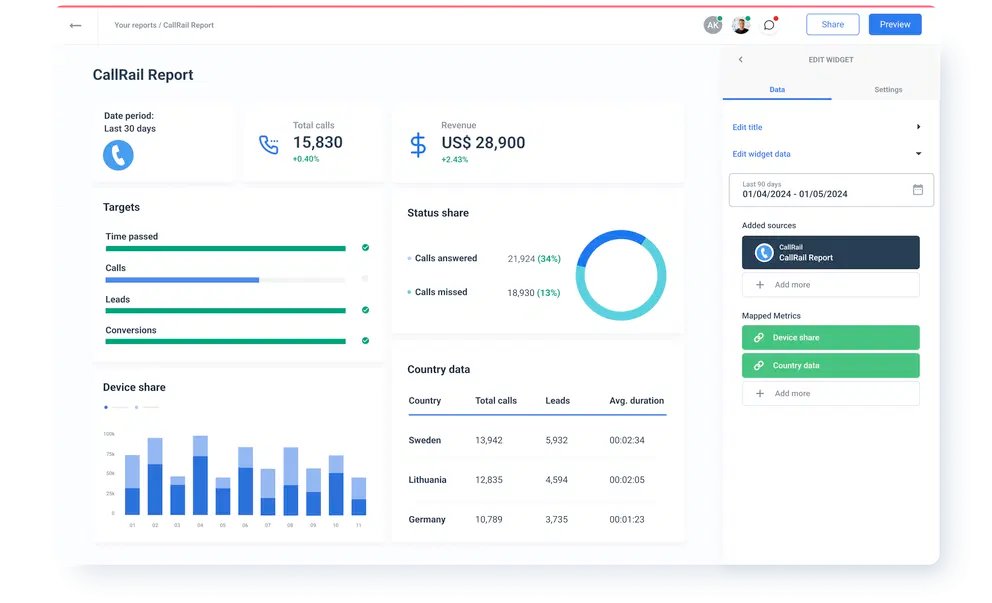
CallRail is a call tracking-first and conversation intelligence-second platform built primarily for marketing teams, agencies, and sales organizations measuring ROI on advertising spend. It's way more concerned with analytics and attribution rather than autonomous call handling which may be a no-go for those looking for autonomy-first and future forward wizardry. The platform's AI analyzes inbound calls to identify which marketing campaigns, keywords, or channels drove each conversation, then attributes revenue and conversions accordingly. Conversation intelligence features automatically transcribe calls, identify keywords and topics discussed, score lead quality based on configurable criteria, and surface insights about messaging effectiveness.
CallRail's AI smartly can peek when prospects mention competitors, complain or raise price concerns, or indicate buying readiness. This is all help for your hungry sales teams looking to pounce follow-ups and refine any approach. The system integrates with advertising platforms like Google Ads and Facebook Ads to feed conversion data back for campaign optimization. The platform tracks customer journeys across multiple touchpoints (form submissions, website chats, and phone calls) to provide comprehensive attribution reports.
Pricing
Plans start at $45 per month for the basic Call Tracking and $195 per month for the Complete Suite. Voice Assist AI agent is available as an add-on for $95 per month. Usage-based charges apply for call tracking minutes and conversation intelligence features.
What We Like
- Marketing attribution excellence: The call analytics and marketing attribution capabilities provide clear ROI measurement for advertising spend. Finally, phone calls get the same attribution rigor as digital channels.
- Lead scoring intelligence: AI-detected buying signals and conversation quality metrics help sales teams prioritize follow-ups based on actual conversation content rather than gut feel.
- Agency-friendly features: White-label reporting and per-client tracking make it ideal for agencies managing multiple client campaigns and needing to demonstrate clear value.
What We Dislike
- Analytics over automation: AI features emphasize measurement over call handling automation. Businesses seeking AI receptionists or autonomous agents need additional tools beyond CallRail.
- Not a phone system: This is analytics software first, with basic routing capabilities second. Don't expect the call handling features of dedicated phone platforms.
- Narrow focus: If you're not heavily invested in paid advertising or measuring marketing ROI, much of CallRail's value proposition disappears.
Best For
- Marketing agencies and teams: Organizations that need to prove ROI on advertising spend through detailed call tracking and attribution across campaigns and channels.
- Sales-driven organizations: Companies where phone calls represent significant revenue opportunities and lead quality scoring directly impacts conversion rates and sales efficiency.
- Performance marketers: Businesses running paid advertising campaigns where understanding which keywords and ads drive quality phone conversations determines budget allocation.
GoToConnect
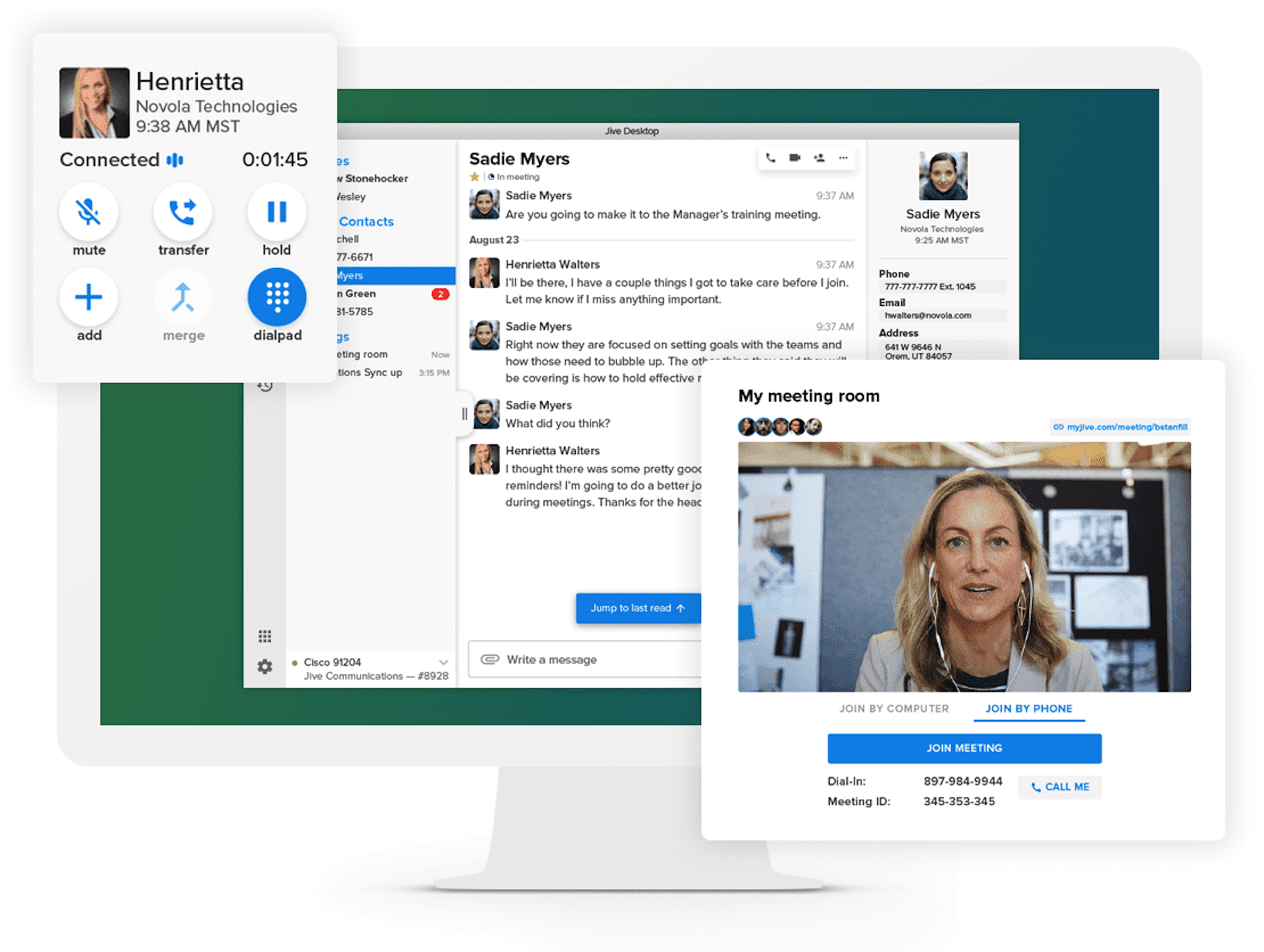
GoTo Connect is a UCaaS platform with AI-driven routing, analytics, and productivity features for those who find reliability and simplicity paramount and the top of the wish list. It's built for small and mid-size businesses that want incremental improvements over traditional phone systems without complexity or time-sucking implementations. The platform can take on voice calls, video meetings, SMS messaging, and fax in a single application with straightforward administration that doesn't require any tech know-how. AI capabilities include a modest AI receptionist add-on, smart call routing, voicemail transcription, call queue management, GoPilot AI setup assistant, and analytics dashboards showing call volume, duration, and missed call patterns.
Mobile apps maintain rare full feature parity with desktop, allowing remote teams to handle business calls from anywhere while preserving professional caller ID and company routing rules. Integration with common business tools like Microsoft 365, Google Workspace, and basic CRM platforms keeps the system connected to daily workflows.
Pricing
Pricing often requires contacting sales for exact quotes based on team size and feature needs. The AI receptionist is available as an add-on feature. You must call to get a true number.
What We Like
- Mobile-first design philosophy: GoTo Connect's interface is standard across both mobile and desktop with feature parity. It becomes exceptionally easy for your remote and hybrid teams to handle AI reception settings and track performance from preferred devices and locations.
- Plug-and-play implementation: The setup process is simple compared to enterprise solutions. Most businesses can get their AI receptionist running within hours rather than weeks.
- A bargain compared to others: The pricing structure offers good value for growing businesses that need reliable AI reception without paying for advanced enterprise features they won't use.
What We Dislike
- Limited AI feature sets compared to direct competitors: The AI capabilities are more basic compared to specialized providers, which may result in more frequent escalations to human agents for complex inquiries.
- Fewer integration options: The platform connects with fewer third-party business tools compared to enterprise solutions, potentially requiring manual data transfer for some workflows.
Best For
- Remote and hybrid teams: Companies with distributed workforces benefit from GoTo Connect's mobile-first design and consistent experience across devices and locations.
- Growing businesses: Small to medium businesses that need reliable, scalable AI reception without the complexity or cost of enterprise solutions.
- Quick deployment needs: Organizations that need to get an AI receptionist up and running within hours rather than weeks of implementation time.
What Is an AI Phone System
An AI phone system takes the power of artificial intelligence and harnesses it to make voice agents which take over business calls via natural conversation mechanisms. These smart systems automate away tasks that feel routine like your appointment scheduling, call routing, and common customer inquiries by taking on callers in a dynamic, context-rich conversational way rather than jamming them through boring static menu prompts.
Traditional phone systems lean hard on Interactive Voice Response (IVR) menus with pre-recorded options that ask callers to press numbers or speak specific keywords to get anywhere. AI phone systems remove these hurdles with conversational agents that quickly ascertain intent and chat back naturally. Major providers even take up language models from companies like OpenAI and Google to further their goals of fabricating truly realistic voice interactions.
How an AI Phone System Works:
- AI agent takes the call: The voice AI answers incoming calls, identifies itself as an automated assistant, and takes on the caller in a natural conversation that feels human
- Natural language understanding: The system evaluates and figures out exactly what the caller wants. Yes, even requests which come off as complex, unclear, or expressed emotionally
- Real-time response: The AI brings forth instant, relevant answers and may even ask follow-up questions to facilitate further assistance
- Data integration: The system retrieves customer information from your databases and sends call data to your CRM no questions asked during the conversation to further your data collection goals and provide future context for interactions
- Seamless handoff: When human intervention is warranted, the AI sends your human agents detailed call summaries for smooth handoffs and happier customers
Why Businesses Use AI Phone Systems
AI phone systems address critical operational challenges that traditional phone solutions can't solve efficiently.
Reduced Operational Costs
Automating away those pesky repetitive inquiries wisely cuts down the antiquated need for outsized call center teams. When AI takes on routine questions about basic common knowledge like business hours, the customer's order status, or basic troubleshooting, human agents win back needed bandwidth to take on complex, high-value interactions. Your agents get to work on things that actually require empathy, judgment, or specialized knowledge the AI phone system isn't ready to handle yet.
Improved Customer Experience
Human-like interaction leverages the most advanced voice and language models in the aim to form truly conversational experience. Customers no longer navigate frustrating menu trees or repeat information annoyingly, the goal is elegant and clean communication. Natural and seamless, the AI phone system needs to grasp context by remembering what was said earlier in the call. Doing so means faster resolutions because it can access pertinent information instantly.
24/7 Availability and Scalability
AI ensures no call goes unanswered even if time zones are wonky for your live team or call center spikes come up sight unseen. The system provides constant support during nights, weekends, and holidays without staffing constraints. This captures sales opportunities and resolves urgent issues around the clock without overtime costs or hiring additional shifts.
Data-Driven Insights and Analytics
Call and conversation intelligence features means a real-time opportunity for transcription, creation of automated summaries, and dipping into the fine art of sentiment analysis without intrusiveness or third-party tools. Managers learn directly what constitutes real customer pain points, grasp agent performance patterns, and forecast emerging trends and threats. These insights improve agent coaching, refine scripts, and identify process improvements that would be impossible to spot manually.
Seamless Integration with Business Tools
AI phone systems connect with popular CRM platforms and other business systems to deliver robust data-driven responses. The AI phone system can pull customer history, flag ongoing issues and even update records. One neat trick is triggering workflows automatically during calls, ensuring every interaction is informed and productive (and when needed, gets a follow-up).
Features to Look for in an AI Business Phone System
Before buyers commit to a single platform, they need to evaluate solutions to ensure they have the following key features available. Below are the critical features that form the lifeblood of any AI business phone system worth its salt:
Natural Language Processing and Voice Recognition
Natural Language Processing (NLP) is the magic behind your AI phone system, it does the legwork to understand what callers mean rather than just blindly work off keywords like an old-hat IVR system.
NLP and voice recognition form a dynamic duo that enables the following critical pieces of your AI phone system:
- Contextual conversation understanding: The system comprehends caller intent across multi-turn dialogues, following conversational threads even when customers change topics or express themselves unclearly
- Intent recognition: AI identifies what the caller wants to accomplish without requiring specific keywords or phrases, understanding variations like "I need to reschedule" and "can we move my appointment"
- Multi-language support: Advanced systems handle conversations in dozens of languages with native speaker quality, automatically detecting the caller's language preference
- Accent and dialect adaptation: Major experts reports that speech recognition systems achieve accuracy rates exceeding 95% in optimal conditions, accurately transcribing speech across regional accents and dialects[*]
- Industry-specific terminology: The system learns specialized vocabulary for healthcare, legal, financial services, or technical fields to accurately understand domain-specific conversations
Smart Call Routing and IVR
AI-driven call routing is one of your main allies in the quest to cut down on customer call time. It listens to caller needs and emotions to redirect and direct calls with smarts rather than brute forcing navigation through tiring and confusing menu trees. Recent findings demonstrates that emotionally-aware and smart routing can slice up customer churn by a near 20% by connecting frustrated callers to experienced agents fast.[*]
Look into these tenets:
- Intent-based routing: The AI analyzes what the caller says in the first few seconds to route calls to the appropriate department, agent, or automated workflow without menu prompts
- Sentiment and emotion detection: Real-time analysis identifies frustrated, angry, or confused callers and prioritizes them for human agents or senior support staff
- Skills-based distribution: Calls route to agents with specific expertise based on the inquiry type from technical issues to product specialists, billing questions to accounting, sales inquiries to available reps
- VIP and priority caller identification: The system recognizes high-value customers, account executives, or urgent cases and routes them accordingly, often bypassing queues entirely
- Predictive routing: AI predicts which agent is most likely to resolve the caller's issue based on historical performance, availability, and expertise matching
Call Analytics and Reporting
Comprehensive conversation intelligence is necessary, as it does the hard part of transforming raw call data into usable insights, don't just collect data to stockpile and waste server space and resources. Use it! Recent reports show that companies actually putting their data through and getting conversation analytics see 12% higher customer retention rates compared to those that opt out or let data rot.[*]
Here's how this could play out:
- Automatic transcription and AI summaries: Every call converts to searchable text in real-time with AI-generated summaries highlighting key points, customer requests, and action items without requiring agents to write notes
- Sentiment analysis: The system scores caller satisfaction, frustration levels, and emotional trajectory throughout each conversation to identify service issues
- Keyword and topic tracking: AI identifies frequently mentioned products, complaints, competitor references, or feature requests across all calls to surface trends
- Agent performance metrics: Detailed reporting on handle times, resolution rates, customer satisfaction scores, and compliance adherence helps identify coaching opportunities
- Custom reporting dashboards: Configurable views allow managers to track metrics relevant to their specific business goals and KPIs
CRM and Helpdesk Integrations
Real-time integration with business systems is one of the surefire ways to ensure each and every call renders you complete customer context for current and future dealings. Findings from experts found that CRM integration with phone systems delivers an average ROI of $8.71 for every dollar spent by cutting back on rote and superfluous manual data entry.[*] Instead actual human staff can be dedicated towards improving customer context and continually smartening up the system!
Here's some integrations each AI phone system should have:
- Screen pop with customer data: When calls arrive, agent screens automatically display the caller's account information, purchase history, previous interactions, and open cases
- Automatic call logging: Every interaction records to the CRM automatically with transcripts, summaries, duration, and outcome without manual data entry
- Real-time data access: AI pulls current account status, order information, support ticket details, or subscription data during calls to answer questions instantly
- Two-way data synchronization: Updates made during calls like address changes, preferences, notes should sync immediately to connected systems
- Popular platform support: Native integrations with Salesforce, HubSpot, Zendesk, Microsoft Dynamics, ServiceNow, Freshdesk, and other major business platforms
Multi-Channel Communication Support
Unified platforms handle customer interactions across multiple communication channels. Most AI phone systems account for more than just phones, dabbling into fax, SMS, and major social platforms as well. According to leaders in the field, 75% of customers expect consistent experiences across multiple channels and will leave you if they don't immediately see you have that.[*]
- Voice and video calling: Traditional phone calls with AI enhancement plus built-in video conferencing for face-to-face interactions when calls need visual context
- SMS and messaging integration: Two-way text conversations with AI responses, appointment reminders, and support for social media messaging platforms like WhatsApp Business
- Web chat, fax and email: Live chat on websites that escalates to phone calls when needed, plus AI-assisted email responses that coordinate with phone histories. Some even conduct e-fax services for legacy workflows
- Unified inbox: Single interface where agents manage all channels without switching between applications, maintaining conversation history regardless of medium
- Channel switching: Customers can start on one channel and seamlessly move to another while preserving context and conversation history
Security and Compliance Capabilities
Industry-specific compliance requirements means a one-size-fits-all system is a one-way ticket to violating important customer protection laws (and heavy fines where applicable). Take for example, the average cost of a healthcare data breach reached a staggering $10.93 million in 2023, making compliance critical and costly when not followed up with.[*] Do not let passivity and lack of care cost you millions in damages and more importantly customer trust and reputation.
- HIPAA and healthcare compliance: Healthcare-specific features including encryption, access controls, audit trails, and business associate agreements for protected health information
- GDPR and data protection: Data protection measures for European customers including data minimization, right to deletion, consent management, and data processing agreements
- Financial and telemarketing compliance: PCI DSS allows for secure payment handling, TCPA compliance is needed for any outbound calls with proper consent management, and FCC regulations requiring AI callers to announce themselves as such
- Encryption and access controls: Voice data and recordings encrypted during transmission and storage with role-based permissions ensuring only authorized personnel access sensitive information
- Audit trails and certifications: Comprehensive logs of system access and SOC 2 certification verifying security controls, availability, processing integrity, confidentiality, and privacy protections
How Real Businesses Use AI Phone Systems
AI phone systems work differently across systems and industries. The results are clear though: they're working to automate away specific workflows that previously demanded human staff. These real-world applications demonstrate how different sectors are shaking up their daily processes via AI phone systems:
Healthcare: Appointment Scheduling and Patient Triage
Medical practices are adopting AI phone systems en masse as they take up appointment booking, rescheduling, and cancellations without chaining up front desk staff to such rote tasks. The AI checks the provider whether the doctor is "in" or staff is ready real-time, double-checks insurance information, and sends appointment reminders via text or email without sass or complaint.
Patient triage features allow the AI to put away what symptom information patients offer, see the urgency level, and route calls to the right providers (and possibly even save a life or two). Urgent cases connect immediately to nurses or physicians, while routine requests just lead to standard appointments. This ensures critical cases receive help while less urgent cases still feel attended to and squared away in due time.
Retail and Ecommerce: Order Tracking and Returns
Retail businesses deploy AI voice agents to handle high-volume inquiries about order status, shipping delays, and return processes. The AI accesses order management systems in real-time to provide accurate delivery estimates and tracking information.
For returns, the AI will take over and walk customers through the process, generate return labels, and even process refunds or exchanges according to your company policies without even needing a human to walk in and supervise or listen in. This automation handles the majority of post-purchase inquiries, freeing customer service teams to address complex issues like damaged products or billing disputes.
Professional Services: Lead Qualification and Booking
Law firms, consulting agencies, and B2B service providers use AI to qualify inbound leads to save the working pros much needed time and not end up in terrible goose chases and mired phantom leads. The AI asks straight-up questions about the prospect's needs, budget, and timeline, then scores the lead and sends high-value opportunities to senior team members with robust information and insights to secure the bag.
Booking consultations and initial meetings happen conversationally. The AI is smart enough to check calendars and dole out confirmations automatically. This ensures no potential client is stuck in limbo waiting for a callback while filtering out pointless inquiries that don't match the firm's ideal customer profile (and crank calls).
Financial Services: Account Inquiries and Fraud Alerts
Banks and financial institutions deploy AI phone systems to handle routine account inquiries like balance checks, recent transactions, and payment due dates. The AI authenticates callers through voice recognition or security questions before accessing sensitive information.
Fraud alert systems use AI to call up your customers when suspicious activity is detected, verify which transactions they made, and lock thieves out of accounts if necessary. The conversational approach just scores as less robotic than automated alerts, improving response rates while shielding your customers from bad charges and headache-inducing fraud.
How to Choose the Right Artificial Intelligence Phone System
Selecting an AI phone system means accounting factors seen and unseen that concern themselves beyond just features and pricing. We've put together a quick list of septs to assess as you make a decision to find something that really does aligns with your operational needs and growth plans:
1. Assess your call volume and complexity
Tabulate how many calls you receive daily and what exactly needs human expertise versus routine information, ideally you'll want to have a percentage to make things easier and to showcase immediate gains to stakeholders. High-volume, repetitive inquiries justify advanced conversational tools, while lower volumes with complex issues may just get by on simpler AI with solid human handoff capabilities.
2. Evaluate integration requirements
List every CRM, helpdesk, scheduling tool, and business application the AI phone system must connect with and why exactly you need these applications. You may find tools have overlapping built-in tools that make third-party tools redundant. Verify that providers offer native integrations or robust APIs for your specific tech stack before committing.
3. Consider latency and voice quality
Response speed determines whether conversations feel natural or awkward. Too fast and it might not quite capture the information you need. Too slow and you’re setting up the customers to hang up and leave you. Test actual call quality, listen for delays between caller speech and AI response, and evaluate voice naturalness before making a decision
4. Review compliance needs
Identify industry-specific requirements like HIPAA for healthcare, GDPR for European operations, or TCPA for outbound marketing. The onus is still on you to see if the provider maintains necessary certifications and can demonstrate compliance through documentation and audit trails.
5. Calculate total cost of ownership
Look beyond monthly subscription fees to include setup costs, per-minute charges for AI interactions, integration expenses, and projected scaling costs as call volume grows. Factor in potential savings from reduced staffing needs but also be wary about long-term commitments or any contractual obligations requiring unexpected spend
6. Test with a pilot program
Finally, you’re going to meet the moment of truth. You’ve got to deploy the system initially with a limited subset of calls or a single department before full rollout. Be sure to monitor performance metrics, gather feedback from both customers and staff (the people who will be directly interfacing and using the wares day in and day out), and identify configuration issues in a controlled environment. Once satisfied, you’ve selected the ideal solution, but keep your eyes open. There are better tools and hungry competitors ready to bring you a better system.

