A small clinic that misses 30% of inbound calls during lunch hour loses real revenue every week, but hiring an after-hours human receptionist runs $3,000 to $5,000 a month in most US markets. An AI receptionist costs a fraction of that, is available 24/7, and automatically books appointments without human intervention..
AI technology has matured fast: modern systems deliver sub-second latency, natural-sounding voices, real-time calendar booking, CRM integration, and multilingual support. Building AI receptionists is no longer technically complex, but requires careful scoping, realistic expectations about AI capabilities, and a disciplined four-week implementation.
This guide covers architecture selection, prompt engineering, knowledge base construction, integration requirements, cost analysis across three stack options, and a detailed week-by-week implementation timeline.
What an AI Receptionist Actually Does (and When It Fails)
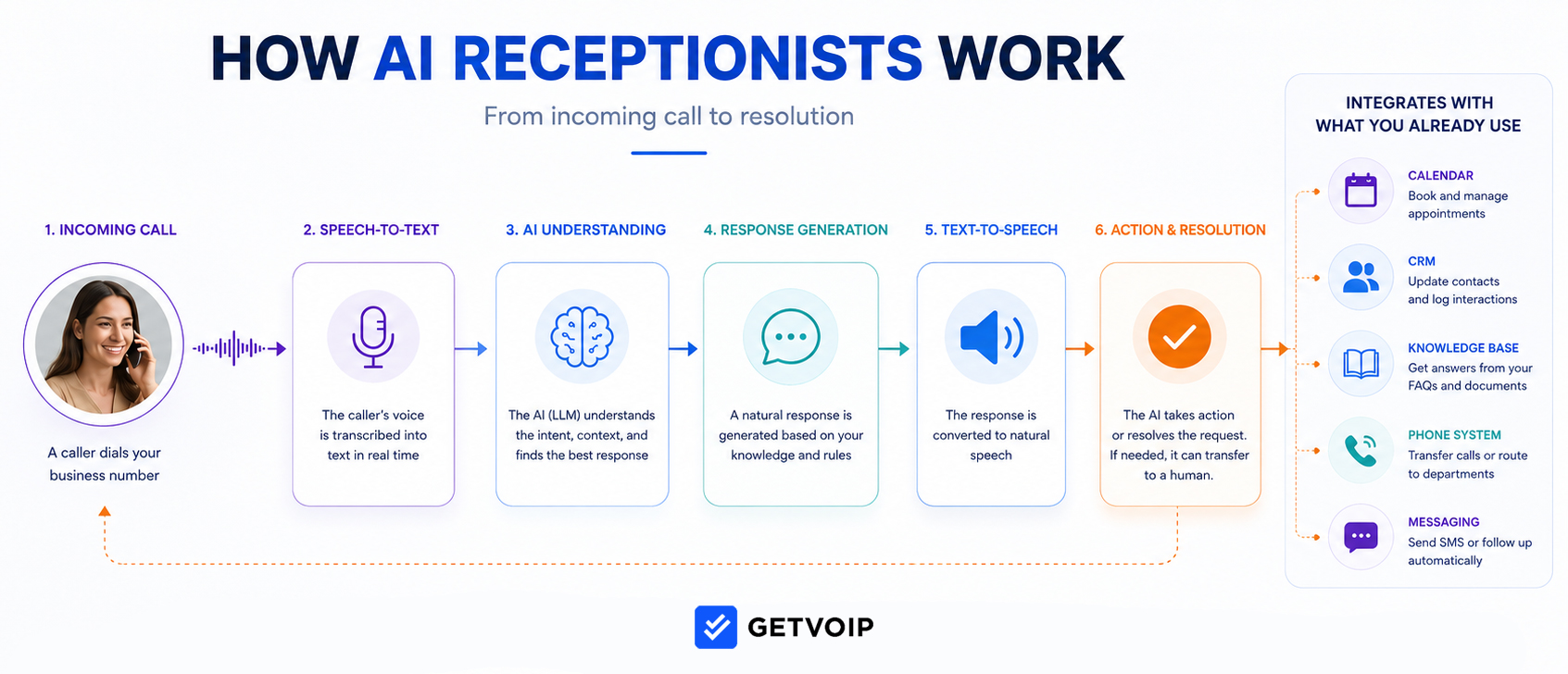
An AI receptionist is a voice agent that combines speech-to-text (STT), a large language model (LLM), and text-to-speech (TTS) to handle inbound phone calls without a human on the line. These virtual receptionists answer phone calls, identify caller intent, integrate with knowledge base data to answer questions, book appointments against live calendars, take messages, or transfer callers to human agents when conversations cross a defined boundary.
AI receptionists excel at bounded, repetitive tasks: opening hours, location, pricing for standard services, appointment booking, lead qualification, basic intake, and call routing by name or department.
However, some scenarios should never be completely automated and managed by an AI receptionist. These include medical or safety emergencies where seconds matter, legal intake when missed detail creates liability, complaints from existing high-value customers, and nuanced upsells or negotiations that require understanding customer tone. Your human compliance team should handle anything involving a regulated disclosure.
The common failure modes are predictable. Agents hallucinate pricing when the knowledge base is vague. They miss interruptions and talk over the caller, who then hangs up. They mishear strong accents and proper nouns. Their pacing sounds robotic when the TTS engine is cheap, and callers drop the call within ten seconds. Every one of these is fixable, but only if you know to test for them.
Scope your implementation to what AI handles reliably. Route edge cases to humans, and design that handoff carefully.
Choosing Your Stack: No-Code, All-in-One CRM, Turnkey Tools, Custom Build, or Enterprise Telephony Integration
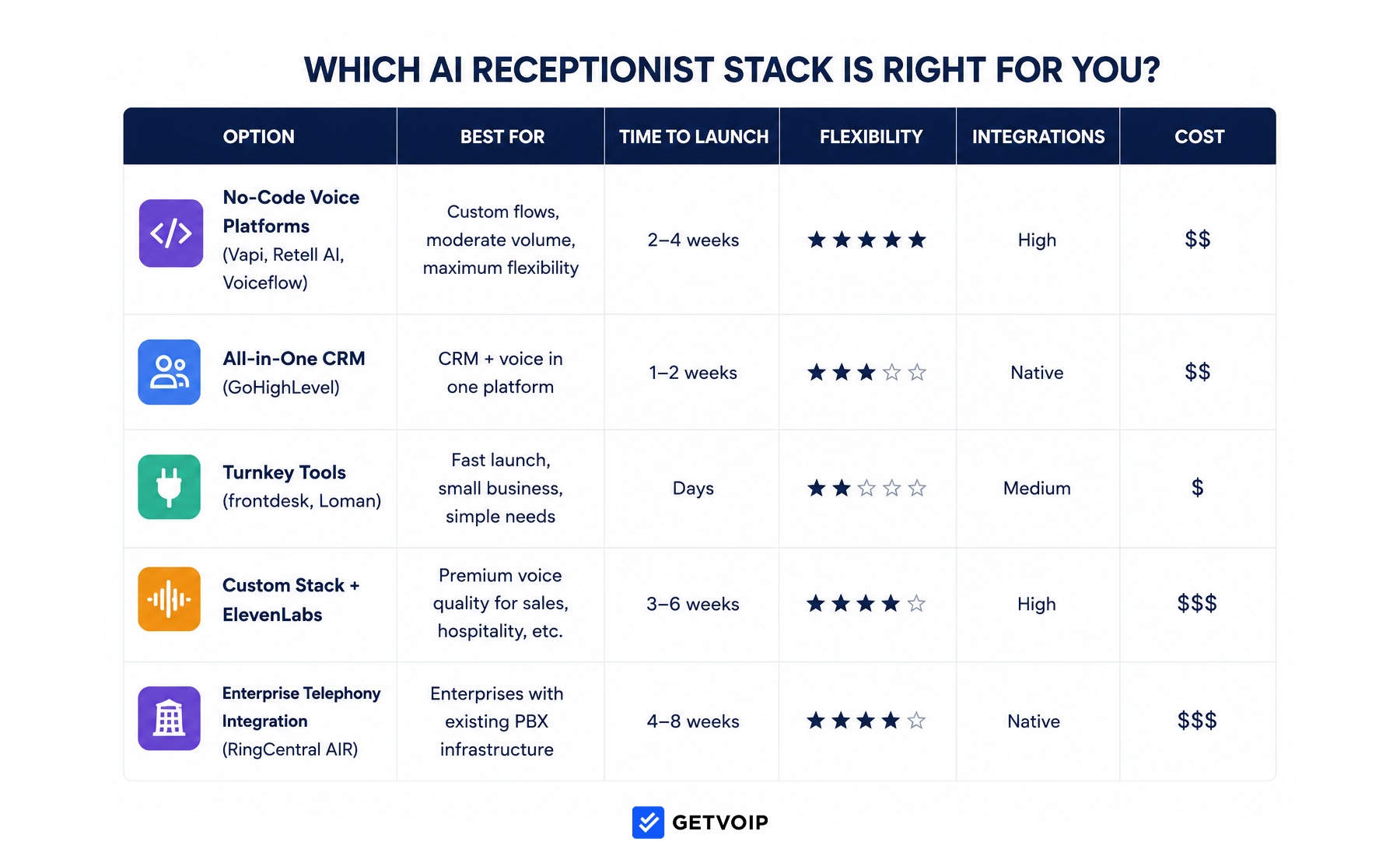
The architectural choice you make in week one sets your cost ceiling and flexibility for the next two years. There are five viable paths.
- No-code voice orchestration platforms like Vapi, Retell AI, and Voiceflow give you a visual builder, STT/LLM/TTS already wired together, and webhook integrations to anything you can reach with an API. You write the prompt, configure the flow, and connect the calendar. Most teams ship in two to four weeks.
- All-in-one CRM with voice is GoHighLevel’s pitch: the receptionist lives inside the same unified platform handling your contacts, pipelines, and SMS follow-ups. The voice module is less flexible than a dedicated orchestration platform, but the integration tax is zero because the data never leaves.
- Turnkey vertical tools like frontdesk and Loman are aimed at small business owners who want to plug in a phone number and a list of FAQs and be done. Shorter time to launch, less customization, flat monthly pricing.
- A custom stack pairs an orchestration layer with ElevenLabs for premium TTS when voice realism is the constraint that matters most. Hang-up rates drop measurably when the voice sounds human in the first three seconds.
- Enterprise Telephony Integration, like RingCentral AI Receptionist (AIR), are right for enterprises with existing PBX infrastructure. They offer enterprise-grade reliability and compliance and natively integrate with RingEX phone systems, but have a higher cost.
| If you need… | Choose |
| Fast launch, light integrations, small business | Turnkey (frontdesk, Loman) |
| Custom flows, moderate volume, flexibility | No-code voice (Vapi, Retell AI, Voiceflow) |
| CRM and voice in one system | GoHighLevel |
| Premium voice realism for sales or hospitality | Orchestration plus ElevenLabs |
| Enterprise telephony and existing PBX | RingCentral AI Receptionist |
Pick once, and pick for where you’ll be in eighteen months, not where you are today.
Build the Receptionist’s Profile First
Before you write a single line of system prompt, write the agent’s identity. Vague inputs at this stage produce vague answers on every call, forever.
- Persona: A name (callers respond better to “Sarah” than “the AI assistant”), a tone (warm, professional, brisk, friendly), and a formality level. Decide whether the agent uses contractions, whether it apologizes when it doesn’t know something, and how it handles a caller who asks “are you a robot?” The honest disclosure (“I’m an AI assistant, but I can help with most questions or connect you to someone”) tests better than evasion.
- Company description: Two or three sentences covering what the business does, who it serves, and the primary value proposition. The LLM uses this as anchor context for every reply.
- Greeting: One or two sentences, no longer. “Thanks for calling Riverside Dental, this is Sarah. How can I help you today?” Long greetings get interrupted, and interruptions during the greeting are where most calls fail.
- Hours and location: Include holiday handling. Specify what the agent says when called during closed hours, and whether it can still book appointments or only take messages.
- Transfer directory: A list of staff names, roles, direct extensions or phone numbers, and the conditions under which each is the right transfer target. “Transfer to Dr. Patel for clinical questions” is too vague. “Transfer to Dr. Patel only if the caller asks to speak with the doctor by name or has a clinical question the FAQ doesn’t cover” is usable.
Configure the Agent
The build itself follows six steps. Treat the first pass as a draft.
1. Provision or port a phone number
You can spin up a new local or toll-free number on any voice platform in minutes. Porting an existing business number takes 7 to 14 days and requires a Letter of Authorization. Most teams start with a new test number and port the production number only after live testing is complete, which keeps your real business line untouched during the build.
2. Write the system prompt
The prompt is the operating manual. Structure it in clear sections: persona and tone, company facts the agent must know, what it can and cannot do, escalation triggers, and fallback behavior.
Voice prompts differ from chat prompts in three ways. Keep responses short, ideally one or two sentences, because callers won’t tolerate a 20-second monologue. Instruct the model to ask one question at a time. Tell it to handle interruptions gracefully by stopping and listening, not finishing its sentence.
A useful pattern is to define hard rules with “always” and “never” language: “Never quote a price not listed in the knowledge base. Always confirm the spelling of names before booking. Never refuse to transfer if a caller explicitly asks for a human.”
3. Build a structured knowledge base
A single FAQ document is the most common mistake. Split the knowledge base into separate documents by topic: pricing, services, policies, hours and location, common edge cases, and a transfer matrix. The agent retrieves more accurately from focused documents than from one bloated file.
For each pricing entry, include the exact figure, what’s included, what’s not, and what to say if the caller asks about scenarios not covered (“Let me have someone follow up with an exact quote”). Vague pricing is where hallucination starts.
4. Map the conversational flow
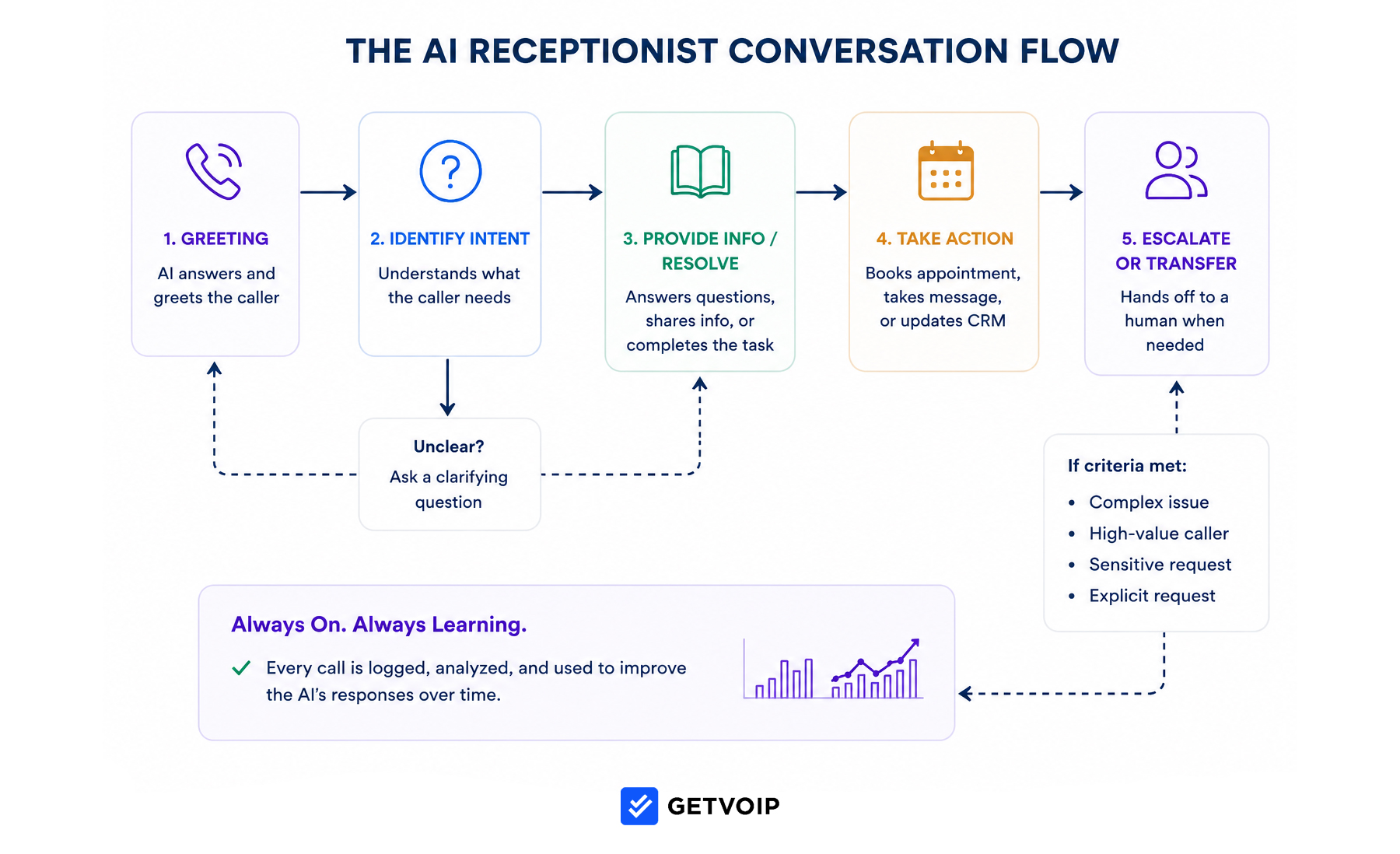
Sketch the call as a flowchart before you build it: greeting, intent detection, then branches for booking, FAQ, transfer, and voicemail. Each branch needs an exit path back to the main intent or a graceful end-of-call. Most platforms have a visual flow builder for this, and using it surfaces the dead-ends in your logic before they show up in production.
5. Connect integrations
This is where most builds slow down. Get the three core integrations working before you add anything else. These usually include calendar integration, CRM logging, and an automation hub like Zapier, Make, or n8n.
The calendar integration is the highest-stakes connection. Use direct Google Calendar or Outlook integration with real-time availability checks, not a static schedule. The agent should pull open slots at the moment of the call, hold the slot during the conversation, and confirm before releasing. Double-bookings destroy customer trust faster than any other failure.
CRM logging needs three things at minimum: contact creation or update, a call summary written by the LLM after the call ends, and a tagged intent (new lead, existing customer, support, booking, complaint) for filtering and reporting.
The automation hub is the layer between the voice agent and everything downstream. The voice platform extracts structured data during the call (name, phone, intent, appointment time, callback request) and posts it to a webhook. The hub then fires the confirmation SMS, creates the CRM record, alerts a staff member if the call was flagged urgent, and triggers any follow-up sequence.
Two gotchas worth flagging:
- Webhook authentication: most voice platforms support signed webhooks, and you should use them, because an unsigned endpoint can be hit by anyone who finds the URL.
- And idempotency: if the automation hub retries a failed webhook, you don’t want three duplicate CRM contacts and three SMS messages going out. Add a unique call ID and check for it before creating records.
For businesses that take deposits or co-pays, payment collection during the call is possible through Stripe or Square integration, but it adds compliance weight (PCI scope) that’s often not worth it for low-volume bookings. Send a payment link by SMS after the call instead.
6. Configure voicemail and after-hours logic
Decide what the agent does when it can’t help: take a structured voicemail, transcribe it, and send it to the right inbox or Slack channel with the caller’s number and a summary. After-hours rules can be simpler than business-hours rules, but they should still book appointments and capture leads if the calendar allows it.
Build and Test for Free First
Before you commit to a paid plan, build a minimal viable agent on a free tier. Vapi, Retell AI, and Voiceflow all offer trial credits sufficient for a few hours of testing. GoHighLevel offers a 14-day trial.
A weekend prototype looks like this: one greeting, three FAQs (hours, location, services), one booking flow tied to a personal Google Calendar, and a transfer to your own cell phone as the human fallback. Use a test phone number provisioned through the platform. Call it from your phone. Call it again from a friend’s phone. Try to break it.
Record every test call, transcribe it, and review the transcripts. Most platforms do this automatically. You’ll find that the agent confidently quotes a price you never gave it, fails to hear “Tuesday at 3” because your accent rolls the t, or talks over you when you try to interrupt. Each of these is a fix in the prompt or knowledge base, not a platform limitation.
Upgrade from the free tier when you exceed trial minutes, need a dedicated phone number, or are ready to point real callers at it. The goal of free testing is to validate the build before you spend, not to run production on a trial account.
The Four-Week Build Playbook
The realistic timeline from kickoff to live cutover is four weeks for a single-location business with standard integrations. Multilingual support, complex CRMs, or regulated industries add two to four weeks.
- Week 1 done looks like: The agent answers a test number, introduces itself correctly, answers the top 10 FAQ questions accurately, and gracefully says “let me have someone follow up” for anything it doesn’t know.
- Week 2 done looks like: A test caller can book an appointment that appears in the real calendar within seconds. A test call produces a CRM contact with a summary and intent tag. A booking triggers a confirmation SMS.
- Week 3 done looks like: 20 adversarial calls run by at least two different people, transcripts reviewed, top three failure patterns fixed in the prompt. Adversarial calls should include angry callers, overlapping speech, ambiguous booking requests (“sometime next week, maybe Tuesday or Thursday afternoon if Dr. Patel is in”), heavy accents, callers who ask trick questions about pricing, and callers who explicitly ask for a human in three different ways.
- Week 4 done looks like: The production number routes calls to the agent. A monitoring dashboard shows call volume, average duration, transfer rate, and hang-up rate. If the agent fails badly, you can forward all calls back to a human in under five minutes.
| Week | Focus | Deliverable | Success Criteria |
| 1 | Prompt and knowledge base |
|
Agent sounds like a coherent, helpful human on happy-path calls |
| 2 | Integrations |
|
Data flows correctly from call → CRM → calendar → SMS without manual intervention |
| 3 | Shadow testing |
|
AI Receptionists can handle accents, pauses, background noises, edge cases, transfer requests, angry callers, overlapping speech, and trick questions |
| 4 | Live cutover |
|
Agent handles 80%+ of test calls successfully, hang-up rate <10%, zero pricing hallucinations in 20 test calls, calendar integration has zero double-bookings in testing, voicemail and transfer-to-human works 100% of the time, rollback procedure tested |
The most common slip point is week 3. Teams skip adversarial testing because the agent “sounds great” on happy-path calls. The agent then ships and immediately mishandles a frustrated customer, and the rollback hurts. Spend the full week on shadow testing.
What an AI Receptionist Actually Costs
The cost stack has five components: STT per minute, LLM per token (which scales with conversation length), TTS per character, telephony per minute, and platform fees. Pricing on these moves quickly and isn’t always public, so the numbers below are estimates for planning, not quotes.
A custom stack using a no-code orchestration platform with a premium TTS typically lands between $0.10 and $0.20 per minute at moderate volume, before platform fees. An all-in-one CRM bundles voice into a monthly subscription, which makes the per-minute math cheaper at high volume and more expensive at low volume. Turnkey vertical tools are typically flat-rate, often $200 to $800 per month depending on tier and minute allowance.
| Monthly minutes | Custom stack (estimate) | All-in-one CRM (estimate) | Turnkey (estimate) |
| 500 | $80 to $130 plus $50 to $100 platform | Subscription typically $300+ | Flat plan, typically $200 to $400 |
| 2,000 | $250 to $450 plus platform | Subscription plus overage if any | Flat plan, often $400 to $800 |
| 5,000 | $600 to $1,100 plus platform | Subscription plus likely overage | Custom pricing tier |
Hidden costs to budget for: phone number rental ($1 to $5 per number per month), number porting (one-time, often $15 to $50), premium voice add-ons (ElevenLabs at higher tiers can add $0.05 to $0.10 per minute), and automation hub fees (Make and Zapier scale by task volume, n8n is self-hosted for free if you have the ops capacity).
At 500 minutes a month, turnkey usually wins on simplicity even if per-minute math favors custom. At 5,000+ minutes, the custom stack pulls ahead and the flexibility starts to matter. The breakeven is somewhere between 1,500 and 2,500 minutes for most teams.
Latency, Languages, and Compliance
Three details get glossed over in most build guides and break agents in production.
Latency. Total response time from end-of-caller-speech to start-of-agent-speech should sit under 1,000 milliseconds for the conversation to feel natural. Above 1,500 ms callers start talking over the silence. STT and TTS each add 200 to 400 ms; the LLM is the rest. Use a faster model for routing and a stronger model for complex booking flows, and stream responses where the platform supports it.
Languages and accents. If your callers include non-native English speakers, test with real accents during week 3, not synthetic ones. Most STT engines support Spanish, French, and major European languages cleanly. Mandarin, Hindi, and Arabic accent recognition varies widely between providers. If 20% or more of your calls are in a second language, test the multilingual configuration explicitly before launch.
Compliance. Call recording requires consent in two-party-consent states (California, Florida, Illinois, and others) and across the EU. Add a recording disclosure to the greeting if you record. HIPAA-covered entities need a Business Associate Agreement (BAA) with every vendor in the stack, including STT, LLM, and TTS providers. Most major platforms offer BAAs on enterprise tiers, but not on free or starter plans. PII in call transcripts is the most commonly missed compliance gap; decide where transcripts are stored, who can read them, and how long you retain them before you go live.
Post-Launch: The First 90 Days
Launch isn't the finish line. The first 90 days determine whether your agent becomes good.
Review every call transcript for the first two weeks. Yes, every call. Pattern-match the failures. A caller asked about a service you didn’t put in the knowledge base? Add it. The agent transferred when it should have answered? Tighten the transfer condition. A booking failed because the caller said “next Tuesday” and it’s currently Friday? Add date disambiguation to the prompt. Caller hung up immediately? Check greeting length and voice quality.
After two weeks, switch to a weekly review of flagged calls: any call that ended in a hang-up under 30 seconds, any call where the agent transferred, any call where the customer was angry. Track three metrics: hang-up rate (target under 10%), successful task completion rate (target over 80% for in-scope calls), and human-transfer rate (the right number depends on scope, but track the trend).
| Metric | Target | What It Indicates |
|---|---|---|
| Hang-up rate | <10% | Overall caller satisfaction with agent |
| Task completion rate | >80% for in-scope calls | Agent effectiveness at handling defined tasks |
| Human transfer rate | Baseline-dependent | Trend matters—are transfers increasing or decreasing? |
| Average call duration | Baseline-dependent | Extremely short (<30s) or long (>10min) indicate problems |
| Booking conversion rate | >60% when booking intent detected | Calendar integration and booking flow effectiveness |
Version your prompt. Every edit gets a date and a changelog entry: monitor what changed, why it changed, the expected impact of the change, and the actual impact (measured a week later.) Without version control, you're debugging blind.
Expect 2–3 meaningful prompt iterations per month for the first 90 days, then 1–2 per month as the system stabilizes.
FAQs
Easy is the wrong word. It’s accessible. A non-developer can ship a working agent in two to four weeks using a no-code platform. The hard part isn’t the build, it’s the testing and the iteration. Plan for both.
Turnkey plans start around $200 a month. A custom stack at 2,000 monthly minutes typically lands at $400 to $700 all in. Above 5,000 minutes, custom stacks are usually the cheaper path. None of these include the time cost of building, which is typically 40 to 80 hours of focused work spread over four weeks.
Yes. Vapi, Retell AI, Voiceflow, and GoHighLevel are all configurable without writing code. You’ll write prompts, structure a knowledge base, and configure integrations through a UI. If you can build a Zapier workflow, you can build an AI receptionist.
Four weeks for a standard single-location business. Six to eight weeks if you need multilingual support, a complex CRM integration, or HIPAA compliance. The build itself can be faster, but skipping the shadow-testing week is how agents fail in production.
The major platforms support multiple languages, often with automatic language detection from the caller’s first utterance. Accent recognition is uneven. Test with real callers in your actual language mix during week 3. Don’t assume the marketing claims match your real-world results.
Whenever the caller explicitly asks for one. Whenever the conversation hits a topic outside the agent’s defined scope. Whenever sentiment turns negative and stays there for more than one exchange. Whenever the agent has tried and failed to resolve the same intent twice. Build these as hard rules in the prompt, not soft suggestions.