
Today’s contact center solutions offer a variety of real-time historical analytics with pre-made reporting templates to make monitoring agents and customer communication easier than ever.
But with such an abundance of information available, it can be challenging for managers to determine which metrics offer the most insight.
Enter wallboard call center software – the solution to making sense of your metrics.
Read on to learn what wallboard software is, the benefits it offers, top providers, and which KPIs to keep a close eye on.
What Is a Call Center Wallboard?
A contact center wallboard is a visual tool displaying essential real-time performance and call center activity metrics to agents and managers through graphs, pie charts, notifications, and key statistics.
These wallboard displays can be seen on individual agent desktops, mobile apps, in team-wide channels, or even on larger screens visible to the entire office. You may hear wallboards referred to as performance dashboards or live agent monitoring.
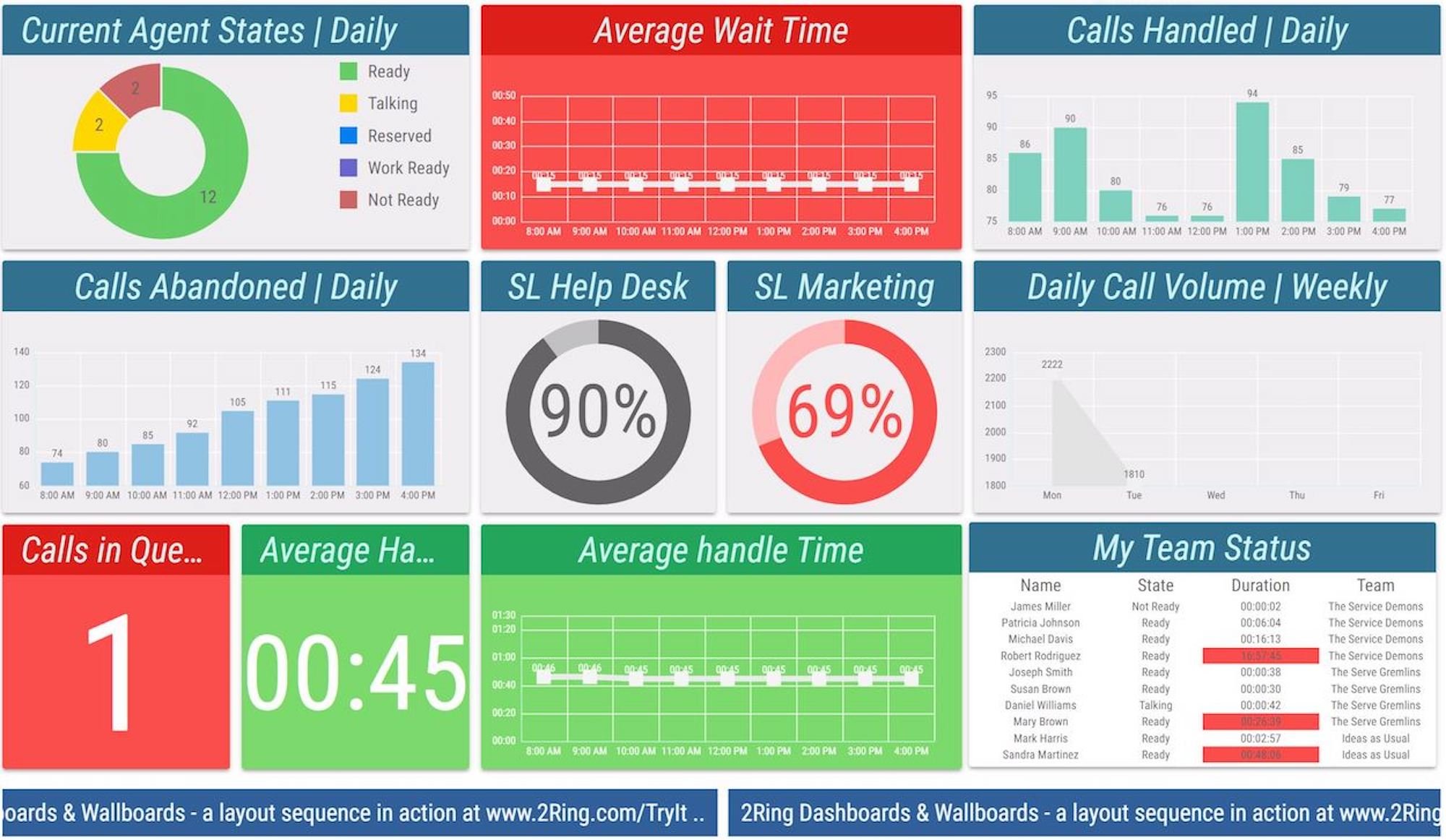
The above image shows contact center software provider Five9’s wallboard, which includes a wide variety of interactive KPIs.
The purpose of a wallboard is to provide managers with a birds-eye view of the most current performance statistics across their organization, offering insight into both agent and customer behavior.
These wallboards can usually be customized according to selected metrics, specific agents or departments, and even reporting type.
Instead of having to sort through pages of reports to identify trends and potential issues, managers have essential information at their fingertips. This makes it easier to fix common call center problems before they spiral out of control, and to understand where agent training may be lacking. managers can automate data updates at preset intervals, and receive notifications of agent performance shifts (custom alerts can also be set.)
Wallboards also help to motivate agents to keep pace with or exceed expected productivity levels, especially given the ways in which these tools gamify performance metrics.
Benefits of Using Call Center Software Wallboards
Using a wallboard in your call center offers many benefits, but four stood out as the most noteworthy:
1. Make Data-Driven Decisions in Real-Time
Wallboards display call center KPIs (Key Performance Indicators) in real-time, allowing managers to quickly and accurately monitor call center status and activity levels at record speeds.
In addition to displaying raw metrics, the wallboard shows how close current performance compares to pre-set targets–and alerts managers when teams are approaching performance lower thresholds.
2. Keep Your Agents Motivated
Knowing wallboards display agent productivity statistics to the entire office may be intimidating at first, but it’s an excellent way to empower agents to maintain high productivity levels and keep customer service skills sharp.
It also makes it easier for managers to identify top talent – and more importantly, ensure the entire team recognizes their efforts by showing their names on company-wide leaderboards.
To avoid publicly “calling out” low performers, admins can, for example, set wallboards to only display the top 3-5 most productive agents. This makes the competition friendly and allows managers to address lower agent performance levels privately.
3. Try Call Center Gamification
Call center gamification is yet another way to encourage agents to go the extra mile with every customer support ticket they handle.
Gamification takes recognizing top performers to the next level, as instead of simply displaying their names, agents can compete with one another to win prizes and rewards.
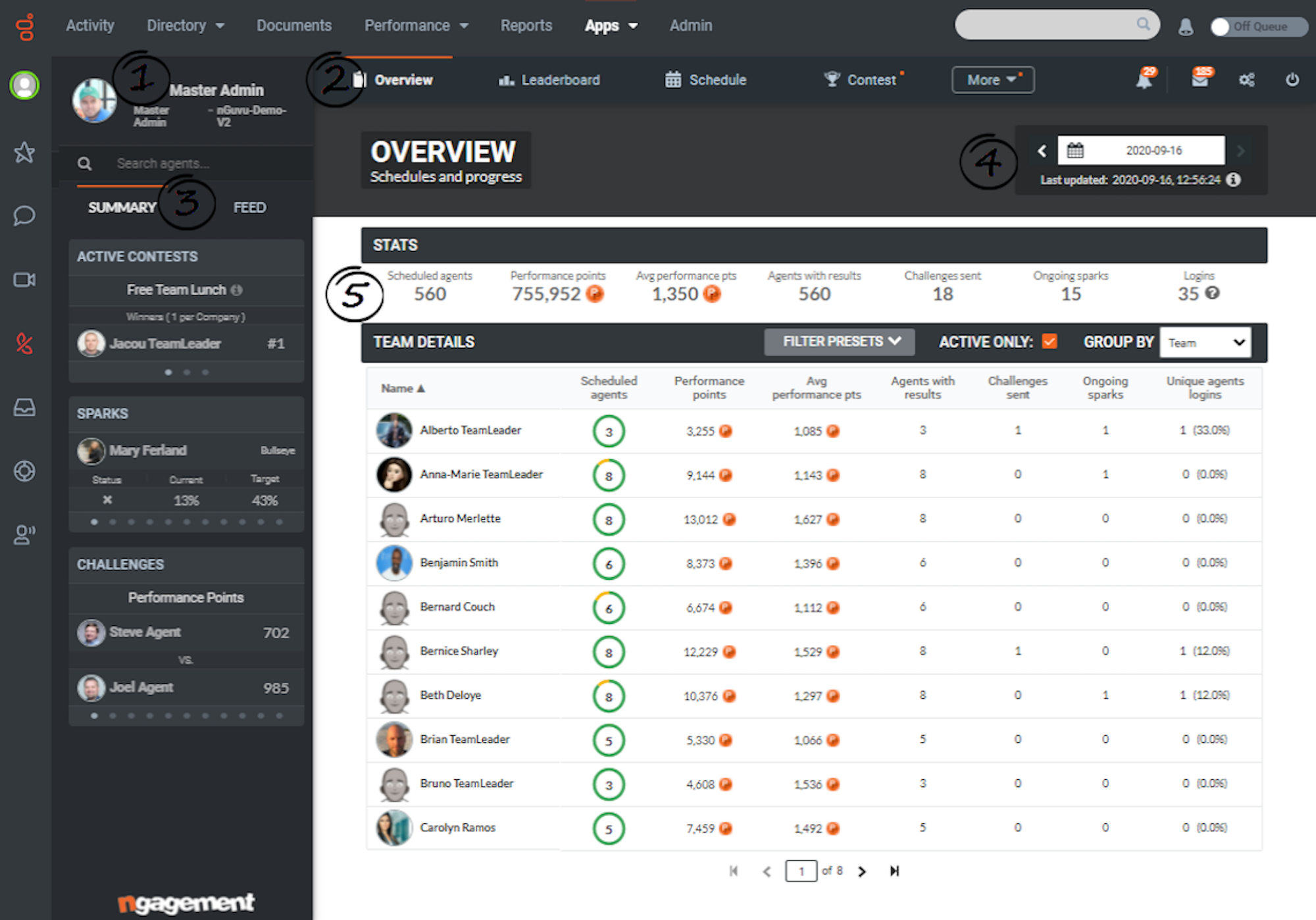
The image above displays the Genesys wallboard with gamification features like “Active Contests on the right-hand menu bar.
Popular metrics to gamify include average handle time (AHT), the number of sales and sales revenue, first call resolution rates, and customer experience and satisfaction ratings.
Admins can add daily, weekly, monthly, and quarterly rewards to encourage consistently high performance levels.
If you want to take the gamification to the next level then you could add daily, weekly, or monthly rewards for the top performers who manage to climb the leaderboards. A free lunch, spa voucher, or company merch are all popular rewards — as are additional vacation days.
4. Track All Metrics In One Place
Rather than having to hop between multiple tools and dashboards, call center managers can view every relevant metric from a single, unified wallboard.
This way, managers won’t waste time switching tabs and can identify and react to negative performance trends much faster.
Key Features to Look For in Wallboard Software
There are a myriad of features that wallboards can offer, and different providers specialize in different features. Here are some of the most useful and essential features to look out for:
- Real-time metrics: This features allows supervisors to monitor KPIs such as AHT, wait time, customer sentiment, and abandoned calls in real time
- Threshold alerts: Set up automatic alerts (usually color coded) when certain "thresholds" are reached such as a set percentage of abandoned calls, or a talk time limit
- Display flexibility: Allows managers to create custom displays with metrics of their own choosing or select from a template library
- Multi-channel support: Wallboards aggregate data from various channels such as voice, webchat, SMS, etc.
- No-code customization: Enables admins to customize wallboards by adding specific metrics, teams, themes etc., without code, usually by using drag-and-drop interfaces
- Integration ecosystem: Enables companies to integrate wallboards with CRMs and other tools that the company is already using so that data is shared between the two systems seamlessly
- Simultaneous wallboards: Allows admins to run separate wallboards showing different metrics, teams or queues simultaneously
- Permission-based access control: Enables admins to control which users have access to which wallboards
What Metrics Can You View on a Call Center Wallboard?
Essential wallboard metrics include:
- Average Wait Time: The average number of minutes before a call is answered by an agent
- Maximum Wait Time: The longest wait time (in minutes) that a customer had to wait before connecting to an agent.
- Call Abandonment Rate: The total number of calls that were disconnected before an agent picked up.
- Inbound-Outbound Call Ratio: The number of inbound calls received in comparison to the number of outbound calls made
- Call Queues: The number of active calls, live agents, and answered calls for specific call groups
- First Call Resolution Rate: The percentage of inbound tickets that were resolved without the need for a follow-up call.
- Average Handle Time (AHT): The average amount of time it takes each agent to resolve the tickets assigned to them — an invaluable metric for comparing agent-to-agent efficiency.
- Sales Performance: The number of total sales made by each agent over the phone.
- Queue Status Specifics: Displays information about current queues such as longest wait time, average speed to answer, and offered vs. handled
- SLA Percentage Tracking: The percentage of calls answered in a certain amount of time
- Abandonment Rate: Percentage of calls or chats that were abandoned by the caller
- Threshold Configuration: Set custom alerts for a chosen metric such as calls waiting (ex.: 0-4 calls waiting = green, 5-9 calls waiting = yellow, 10+ calls = red)
Call Center Software With Wallboards
Bellow, we'll outline the top call center software with wallboard features:
Five9
Five9’s agent dashboard serves as a color-coded native wallboard.
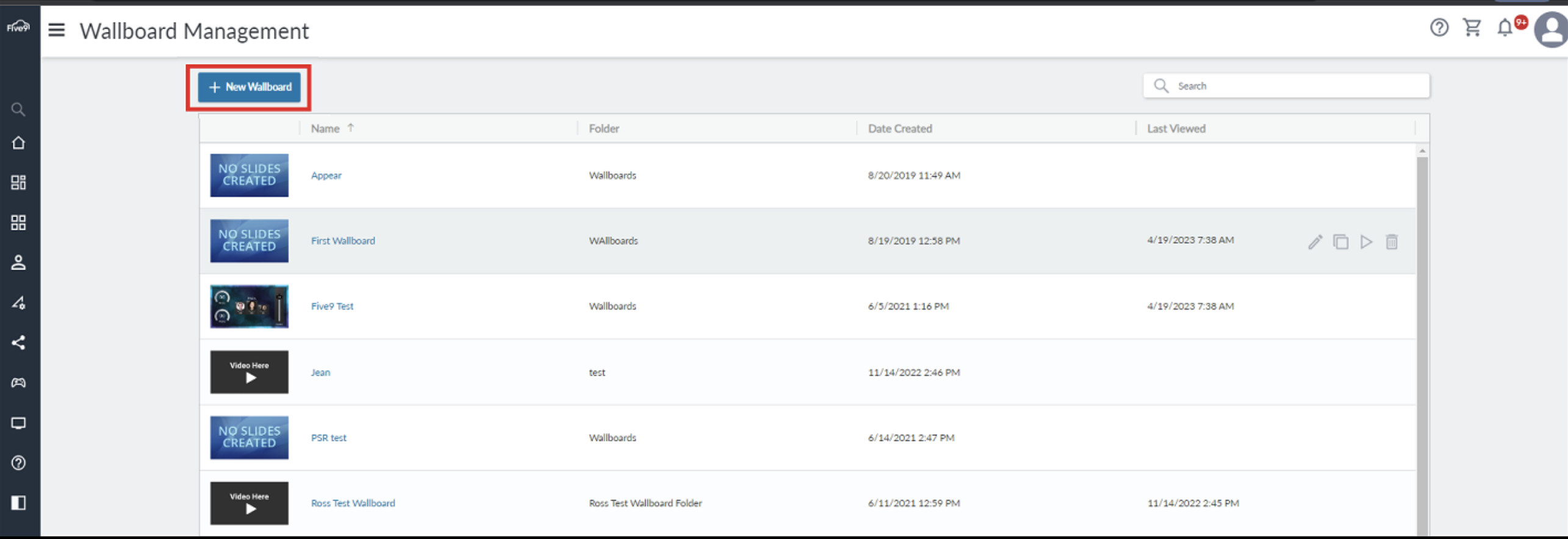
While it includes a high number of statistics, the volume of data means there is less diversity when it comes to how the statistics are shown. It relies too heavily on spreadsheet-like data representation instead of adding more graphs and charts for better visualization.
That’s why we recommend that you purchase the Five9 Dashboards & Wallboards add-on.
Its wallboards have a more modern look and add additional graphs and charts that make it extremely easy to digest key details.
2Ring’s Five9 wallboard also has a “my team status” tab that shows real-time data on the name, availability, assigned team, and average handle time for each agent. This makes it easy to spot agents that are lagging behind and help them course-correct.
Key Features
- Real-time reporting with a flexible layout
- 120+ historical report templates to choose from
- Agent and department-level views
Pricing
Five9 pricing offers five paid plans — Digital, Core, Plus, Pro, and Enterprise — ranging from $119 to well over $159 monthly, per agent. There is no free plan nor free trial available, so those interested should start with the Core of Digital plan to see if they want to continue/upgrade their subscription. Wallboard are included with Five9's Performance Dashboard add-on.
Best For
Five 9 is best for large contact centers with a variety of communication channels that need omnichannel functionality as well as deep insights. Five9 is also a good choice for contact centers that need:
- Gamification capabilities: Five9 wallboard include a deep gamification integration with avatars, coins, badges, and more
- High control: Five9 offers permission based access control as well as role-based views that can be customized for agents, supervisors, managers, and executives
Talkdesk
Talkdesk offers a minimalistic layout, optimized use of color-coding, and large numbers that make real-time data visualization a breeze.
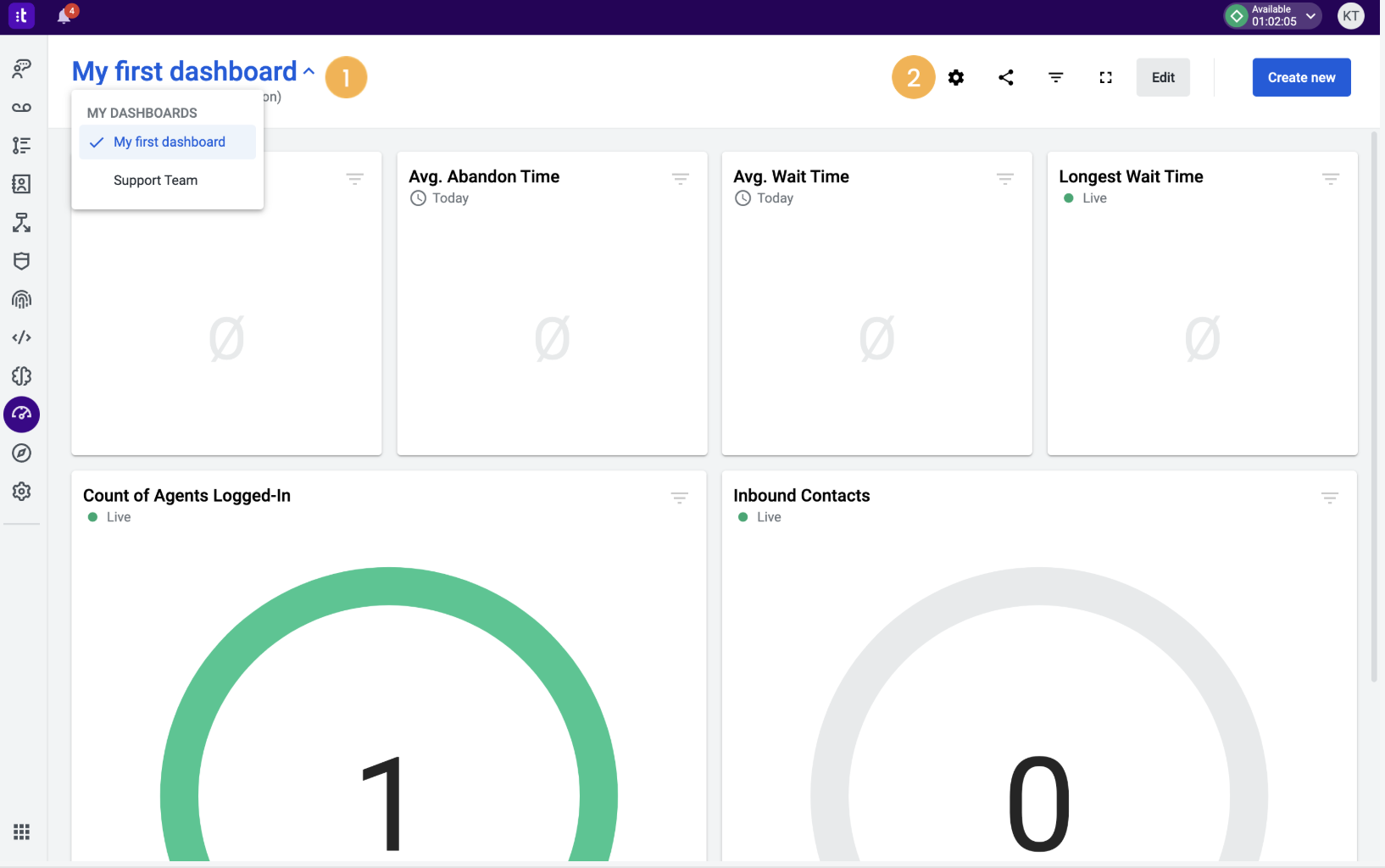
The drag-and-drop editor lets you select the KPIs that matter most to your company and customize an ideal layout for your team. If you don’t want to start from scratch, you can choose one of the prebuilt wallboards in Talkdesk’s library.
Lastly, switching on the dark mode for your wallboard’s background color palette makes it easier for your call center agents to stay on top of their real-time metrics at night.
Key Features
- Excellent UI
- Drag-and-drop editor
- Prebuilt wallboard templates
Pricing
Talkdesk has three paid plans for CX Cloud as well as industry specific packages. The three plans — Digital Essentials, Voice Essentials, and Elite — cost between $85 and $165 per month for each user while the Industry Experience Clouds start at $225 monthly, per user. All plans include real-time dashboards.
There is no free plan or free trial available but you can request a demo.
Best For
Thanks to its affordable pricing and user-friendly interface, Talkdesk is a great choice for SMBs. Talkdesk is also a good platform for contact centers that require:
- Smart notifications: In July 2025, Talkdesk added Live Sentinal (v1.0) allowing users to receive automated dual channel notifications and alerts when pre-defined thresholds are met
- Skill-based routing: Not only does Talkdesk offer this advanced feature, but supervisors can now monitor routing attributes directly on the wallboard
Dialpad
Instead of using graphs and charts, Dialpad uses a real-time table format to help you track the hold queue, agents, inbound/outbound calls, and other metrics for each team. Call center alerts can be triggered when certain criteria are met.
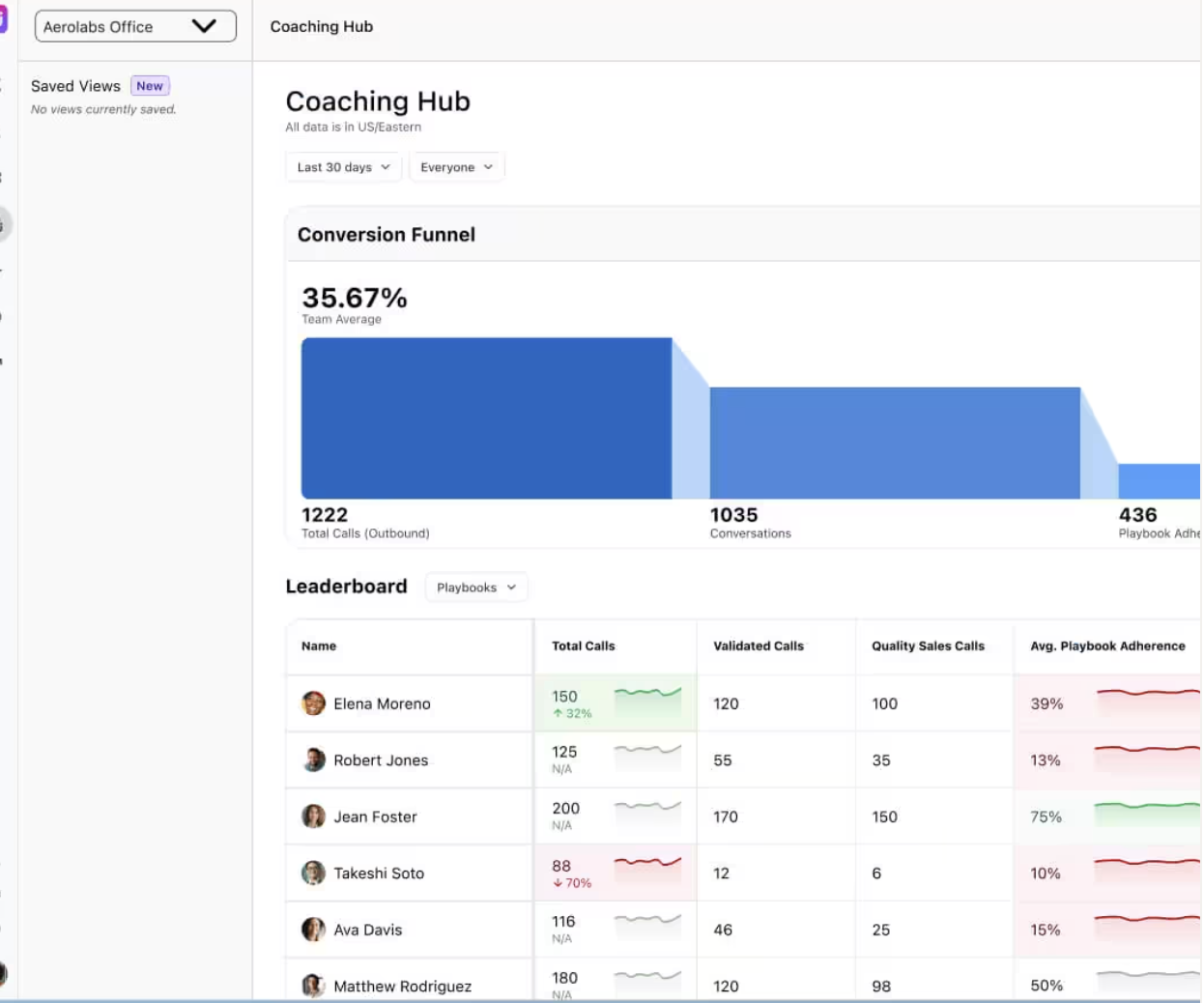
These alerts will turn either a specific cell or entire row red depending on the severity of the backlog. The KPIs you can add to columns include:
- Call center name
- Abbreviated name
- Longest wait time
- Number of agents available
- Number of agents in wrap up
- Number of inbound calls completed
- Number of inbound calls abandoned
- Number of inbound calls missed
- Number of voicemails received
- Number of outbound calls connected
- Number of outbound calls canceled
- Average wait time
- Service level
- Average call duration
- Link to dashboard
Key Features
- Live table-style wallboard
- Visual alerts
- Six timeframes to choose from (entire day, past eight hours, past four hours, past two hours, previous hour, and current hour)
Pricing
Dialpad wallboards are included with Dialpad Support, Dialpad's CCaaS platform. Dialpad Support offers three paid plans ranging from $80 to $150 monthly, per user. Wallboards on the Premium plan ($150 per user, per month) include advanced analytics, actionable insights, and CSAT scoring.
Best For
Dialpad is best for SMBs with 50-500 agents that prioritize AI-driven features and automation. Specifically, Dailpad is a great platform for companies that need:
- Agent Coaching: AI-powered real-time assist (RTA) cards are set to trigger on agent's dashboards whenever certain keywords or phrases are spoken on a call. The AI coaching hub allows supervisors to view performance metrics and scorecards under one pane of glass
- CSAT Scoring: AI-powered CSAT scoring reveals sentiment drivers in a narrative format to explain the reasons behind customer satisfaction trends
CXone Mpower
CXone Mpower (formerly NiCE CXone) positions its wallboard within the performance management ecosystem, deeply integrated with gamification, agent coaching, quality management, and workforce engagement.
The CXone wallboard includes a plethora of KPIs and is slide-based, with nine separate, purpose built slides including a summary slide, leaderboard slide, and challenges slide.
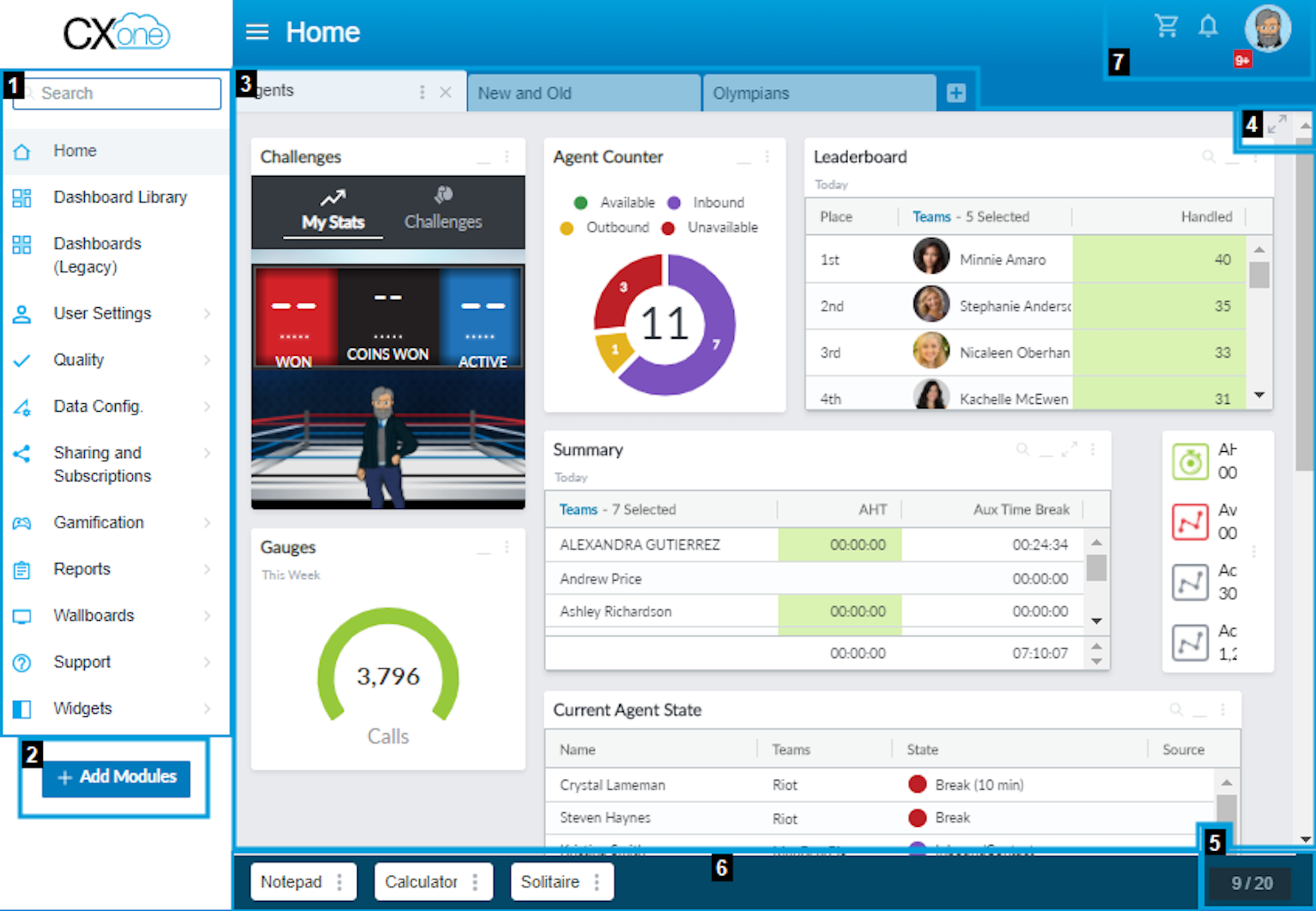
Its performance gauge tracks how many calls have been made and how close the call volume is to weekly targets.
The challenge widget helps with gamification, but the graphics could use an update to make it look more professional. You can also add a live leaderboard that ranks agents based on how many calls they’ve handled.
Other gamification features include coins, badges, and XP progression that makes your agents feel like they're leveling up in a video game. You can see all your active gamification campaigns under the Command Center of the Performance Management menu.
Other data you can attach to your wallboard include employee birthdays, new hire spotlights, team member awards, YouTube videos, and custom company messages. The entire user experience is more casual than most solutions but still helpful overall.
Key Features
- Live leaderboard tracking calls handled
- Gamification widgets
- Award and achievements system
Pricing
CXone Mpower offers five contact center plans that range from $110 to $249 monthly per user. The three highest-tier plans include highly customizable reports, with advanced real-time KPIs and wallboards. Wallboards are only included in the CXone Mpower Core Suite plan ($169/user/month) and up.
Best For
CXone is a great fit for large enterprises that employ multiple teams and need wallboards to span departments, data sets, and roles. CXone Power wallboards are also great for companies that need:
- Compliance: CXone's security features and compliance readiness (FedRAMP, HITRUST, SOC2, etc.) make it a great platform for highly regulated industries such as financial and healthcare organizations
- Quality Management: CXone combines quality scores with wallboard metrics, gamification, and coaching sessions to create a closed loop performance system
Genesys
Genesys offers highly-customizable wallboards that can be used for sales teams, call centers, and omnichannel outbound marketing campaigns. A nice feature is a fullscreen mode that automatically cycles through multiple wallboards when enabled.
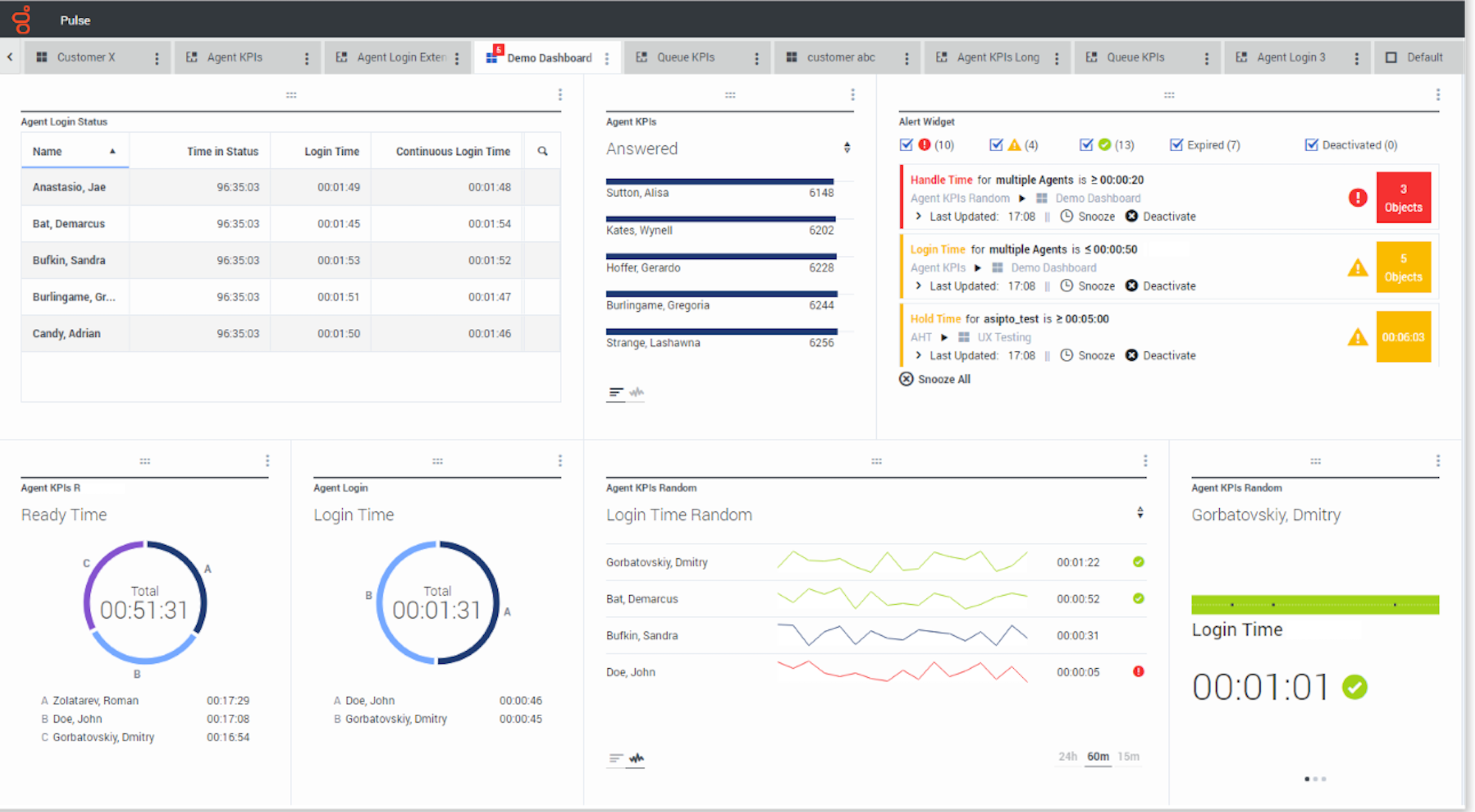
For alerts, Genesys wallboards have a dedicated widget that will show you how many objections there are, how severe the situation is, and let you snooze the notification if you’re currently preoccupied.
The platform also offers a simplified view for teams with only a few KPIs to track.
Key Features
- Customizable layout for multiple use cases
- Fullscreen wallboard cycling
- Alert widget
Pricing
Genesys has four paid plans priced between $75 and $240 monthly, per user. Genesys includes a native performance dashboard and agent workspace in all Cloud CX plans although access to gamification and WEM features are only available on the CX3 and CX4 plans. Genesys also offers a dedicated wallboard add-on through the AppFoundry marketplace.
There is no free plan available but you can sign up for a 30-day free trial to test the platform before subscribing to a paid plan. Hourly pricing is also available on selected PBX plans with listed prices ranging from $0.68 to $1.35 per hour.
Best For
Genesys is best for mid to large contact centers that are looking for AI-driven insights. Genesys' platform is also a great fit for businesses that need:
- Customization: Genesys includes a strong API layer as well as an active integration ecosystem with tools like 2Ring and NovelVox for visual alerts and templates
- TV Screens: Genesys provides the first wallboard account for free and offers reduced pricing for subsequent accounts, making it very affordable to run floor displays
8x8
8x8 has rather low-quality data visualization, given the interface mostly consists of rows, columns, and raw data.
There isn’t much in the way of color-coding either, which further adds to the bland, unintuitive UI.
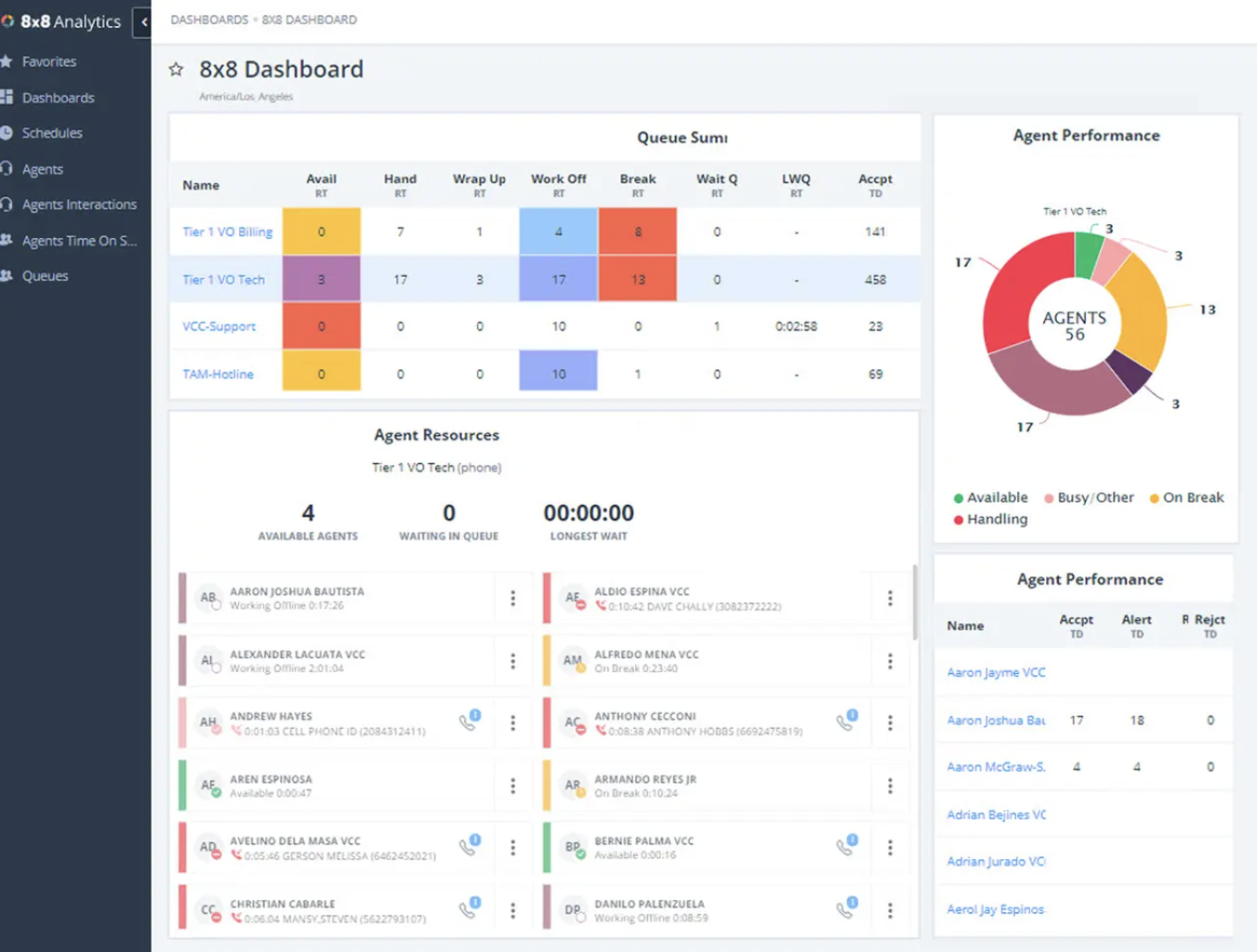
On the bright side, setting a wallboard up with 8x8 is very easy and only takes a couple of minutes. Simply click on “Add Wallboard”, fill in the name/description/timezone, add queues, and then select your background color of choice.
After saving your changes, you can then copy the URL to display the wallboard in a browser. The simplicity hardly makes up for the lack of UI/UX design, but you’ll still be able to track key metrics like abandoned calls, queue length, average handle time, and more.
Key Features
- Easy setup
- URL for browser display
- Real-time and historical widgets
- Custom metrics
Pricing
8x8 has one UCaaS plan and two CCaaS plans — Contact Center and CX Beyond — all with quote-based pricing.
8x8 also offers APIs enabling users to build a completely custom communication platform. 8x8 wallboards flow directly from the Analytics for Contact Center tool, included with both CCaaS plans.
Best For
8x8 is best for SMBs and mid-market contact centers that are looking for simplicity. 8x8 wallboard are fast to set up and extremely readable and user friendly. 8x8 is also a great fit for:
- Global teams: 8x8 has a presence in over 120 countries with a 99.999% uptime SLA making it a great choice for teams that need to access wallboards remotely across the world
- Companies looking for WFM: Workforce management is now included with every 8x8 Contact Center subscription and allows agents to access schedules, track shift changes, and manage availability right from their dashboard
Nextiva
Nextiva offers a legacy wallboard feature with a simple-yet-flexible UI layout with color coding for each KPI.
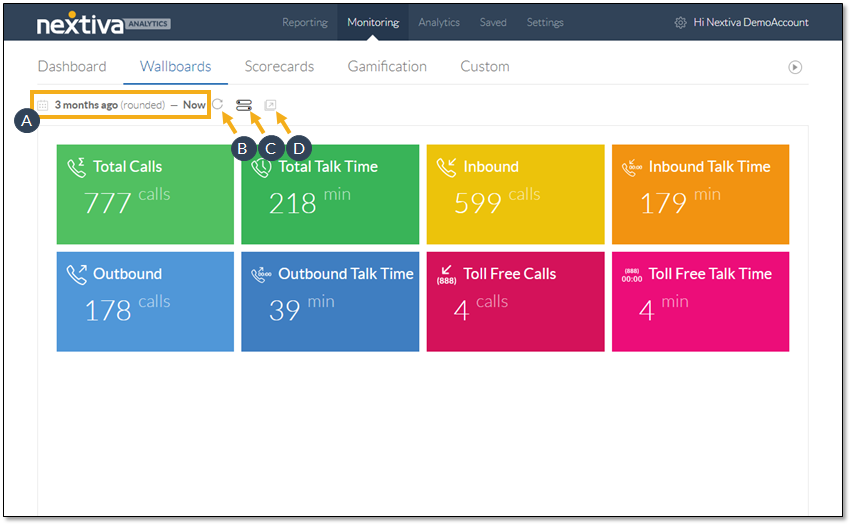
This makes it easy to track metrics like:
- Total calls
- Total talk time
- The number of inbound calls + total inbound talk time
- The number of outbound calls + total outbound talk time
- The number of toll-free calls + total free talk time
You can add “metric tiles” in just a few clicks. Metrics tiles are customizable by tile and arrow color, display either a percentage or value, set it to count/sum/average, and choose between Nextiva CRM, Voice, or both as the data source.
NextOS Analytics wallboards are a newer feature available to customers on the current CCaaS platform. These wallboards display high-contrast metrics on large TVs or screens.
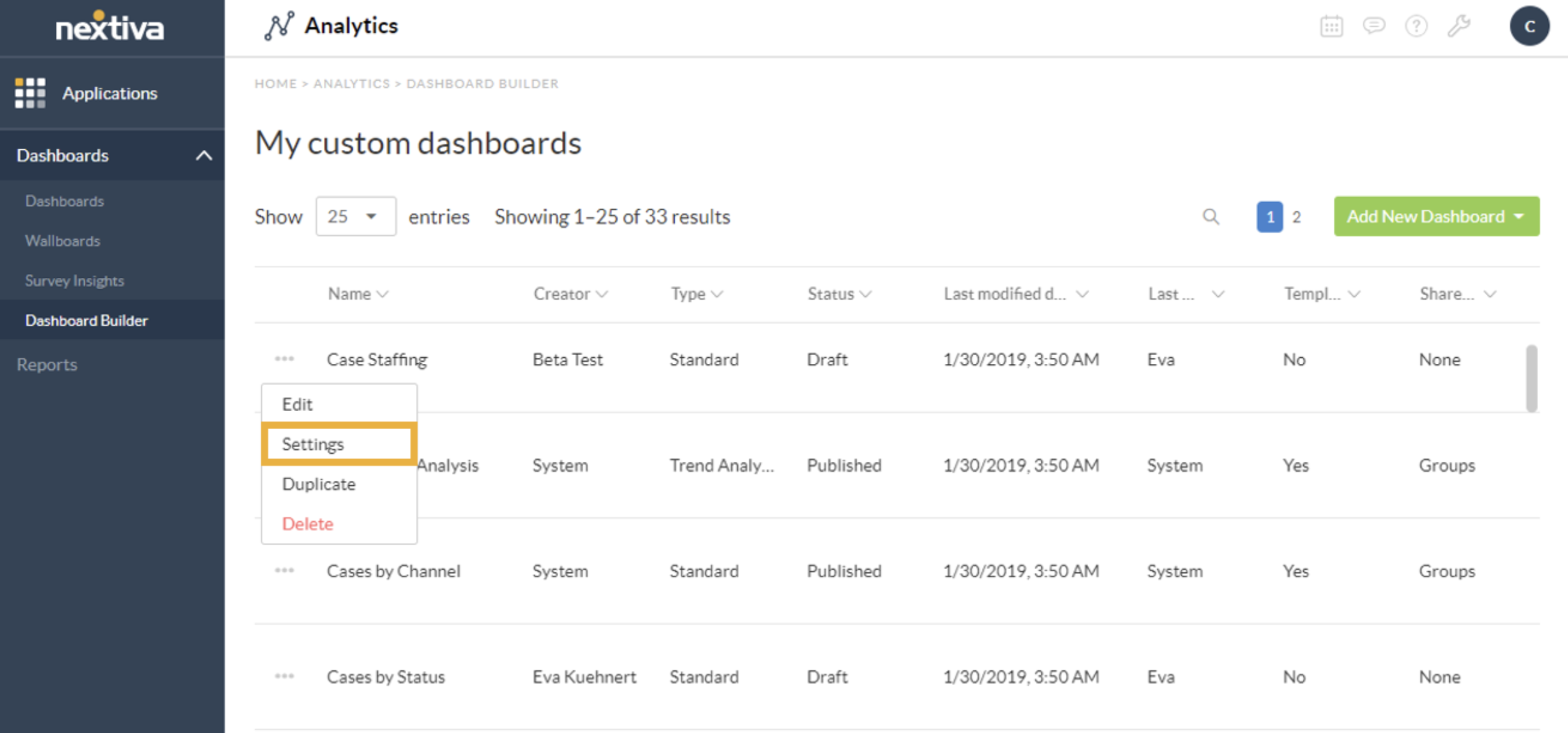
Current Nextiva users can create a wallboard from scratch or select a system-generated template. A real-time supervisory dashboard enables managers to actively monitor queues.
Key Features
- Modern, color-coded UI
- Metric tile customizability
- Data source selection (CRM/Voice/both)
- Real-time queue management
Pricing
Nextiva has three paid CCaaS plans starting at $75 per user, per month. AI transcription and summarization is usage based, and workforce management is only included in the Premium plan, but may be purchased as an add-on to the Professional plan. There is no free plan, but a 7-day free trial is available.
Best For
Nextiva offers gamification and wallboards on entry level plans, making it an affordable choice for growing SMBs. Nextiva is also a great fit for:
- Sales Teams: Nextiva leaderboards let users choose participants, metrics and themes and are meant for high volume, high engagement centers, such as sales teams
- Companies that prioritize customer support: Nextiva has some of the most highly rated customer service professionals in the CCaaS space and they offer 24/7 support to all users on a variety of channels
CloudTalk
Customizing CloudTalk live wallboards to suit your needs is easy. Data can be displayed as a title or a list, and users can choose between light and dark themes. Admins can also set specific time periods to track and monitor metrics.
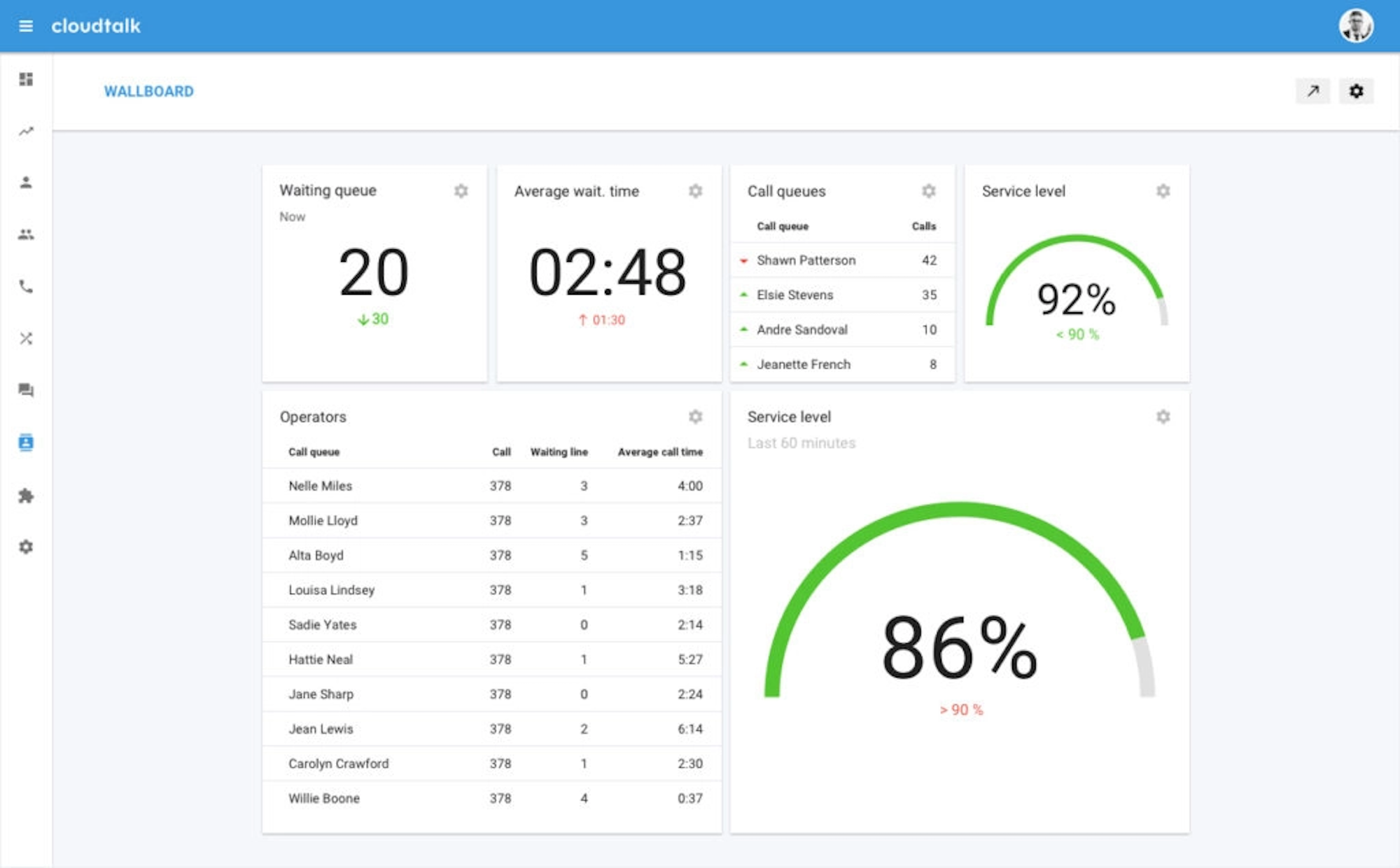
Every metric tile also shows you how close the current call center performance is to target values and if it’s trending upward or downward. Admins can also sort data by the individual agent to see agent name, number of answered calls, and current call duration, among others.
Key Features
- Light and dark mode UI options
- Granular agent performance tracking
- Modern, customizable interface layout
Pricing
CloudTalk has four paid plans — Lite, Essential, and Expert — costing between $19 to $49 per month for each user. AI Conversation Intelligence is an extra $9 monthly, per user, and AI Voice Agents are available for $350/month for 1,000 minutes.
There is no free plan but a 14-day free trial is available.
Best For
CloudTalk is best for startups to small businesses with 5-200 agents. Wallboards are designed to keep everyone on the same page and help managers spot issues quickly without breaking the bank. CloudTalk is also a good option for:
- CRM Centric Teams: CloudTalk deeply and automatically integrates with 80+ CRMS including Hubspot, Salesforce, Zendesk, etc.
- Remote Teams: The platform's cloud-based setup along with the ability to share wallboards using a link makes it ideal for remote and hybrid teams
Wallboard Software Pricing Guide
When selecting a wallboard software platform, price is usually the first filter, but it's important to be aware of different pricing structures as well as typical costs, and hidden fees. Here is a quick breakdown:
Pricing Models
Wallboard providers will typically charge per seat, which means that the subscriber pays for each employee that is using the wallboard. Most of the providers listed above use a per seat pricing model.
Some providers may charge per display, also called per usage. This means that the company pays a small fee each time a wallboard is created. Genesys, for example, includes one wallboard account at no cost, but additional wallboard accounts require additional licenses.
Most providers will bundle wallboards in with other CCaaS features such as call routing and analytics, but there are a few standalone wallboard providers such as Geckoboard and Plecto.
Typical Ranges
Price ranges vary greatly based on a variety of factors such as whether the wallboard is an add-on, standalone, or embedded feature, what features are included, and what reliability and security looks like.
For embedded wallboards, prices for the CCaaS subscription range from about $29-$125 per user, per month. Wallboard add-ons generally cost around $149 per user, per month. Standalone wallboards cost anywhere between $44 to $600 per month.
Hidden Costs
It is also to take note of hidden costs when determining whether a wallboard solution fits the budget. As stated above, many providers charge per license, meaning there will be a separate cost for each individual user. It is also important to be aware of what premium features you will need and then determine whether those features are included or must be purchased as a separate add-on. Some providers charge extra for AI-driven insights, AI-powered coaching, and IVAs.
Choosing the Right Wallboard Software
Choosing the right wallboard software depends on how your contact center operates and which metrics matter most day to day. When comparing options, keep these factors in mind:
- Team size and structure: smaller teams may only need simple real-time visibility, while larger centers benefit from multiple wallboards, queue-level views, and role-based access.
- Actionable metrics: focus on platforms that highlight KPIs you can respond to immediately, such as wait times, queue volume, SLA performance, and agent availability.
- Customization and ease of use: wallboards should be easy to customize without technical help, allowing supervisors to adjust layouts, metrics, and alerts as priorities change.
- Engagement and motivation: features like leaderboards and gamification can help reinforce productivity goals and keep agents engaged when used thoughtfully.
- Integrations: the most effective wallboards pull data directly from your CCaaS platform and connected tools, keeping metrics accurate and consistent.
At its best, wallboard software gives teams shared visibility into performance, helps managers respond faster to issues, and keeps everyone aligned around clear, measurable goals.

