
Best Team Collaboration Software for 2026

How I Evaluated Team Collaboration Apps for This Article
The team collaboration tools below are some of the best on the market today, tailored to any company size. Depending on your needs, the available options range from free subscriptions, all the way up to enterprise-class collaboration software.
I tried and compared these team collaboration apps from a business user's perspective. To provide the most useful evaluations, I considered the following:
- Ease of use and setup: I reviewed each app’s setup process, building channels and dashboards. I noted how seamless and intuitive this experience was on each app, especially for brand-new users.
- User interface: I observed the design and functionality of the user interface. I preferred platforms whose interfaces felt modern, spacious, appealing, and easy to use–with the option to quickly reach the page or feature you want.
- Features: I considered not only the number of features each software includes but also the complexity and value of the features. I placed higher emphasis on platforms that offered unique features that distinguished the platform from competitors.
- Views and display options: Especially for data and task management tools, I considered the display customization options. I prioritized software that enables you to visualize data in multiple easily digestible ways, serving a wider variety of use cases.
- Price and value: I compared each product’s price with its features, to determine the overall value for the cost
- Integrations: I examined each software’s library of integrated apps, considering the value and popularity of each third-party integration. I placed special priority on commonly used apps like Google Drive, Microsoft products, and CRM tools.
My Picks for the Best Team Collaboration Apps for 2026
| Platform | Pricing +Plans | Features | Best For |
| Slack | Free version and three paid plans from $7.25 to $15+ per user, per month |
|
Small and medium remote and hybrid companies that need a low cost team chat solution |
| Asana | Free version and two paid plans from $10.99 to $24.99 per user, per month |
|
Companies that need an affordable project management and task assignment solution |
| Trello | Free version and three paid plans from $5 to $17.50 per user, per month |
|
Businesses looking for simple to-do lists visualizations |
| Zoho Workplace | Four paid plans from $1 to $6 per user, per month, plus custom plans |
|
SMBs looking for an alternative to Google Workspace |
| Podio | Free version and two paid plans from $11.20 to $19.20 per user, per month |
|
Small businesses and sales teams looking for basic task management with CRM features |
| monday.com | Free version, three paid plans from $9 to $19 per user, per month, plus custom plans |
|
Companies that need to get organized and desire a high level of customization |
| ClickUp | Free version, two paid plans from $7 to $12+ per user, per month plus custom plans |
|
Small teams that often collaborate on documents with contractors and clients |
| Airtable | Free version, two paid plans from $20 to $45 per user, per month, plus custom plans |
|
Enterprises that need to create advanced data workflows |
Slack: Team Chat
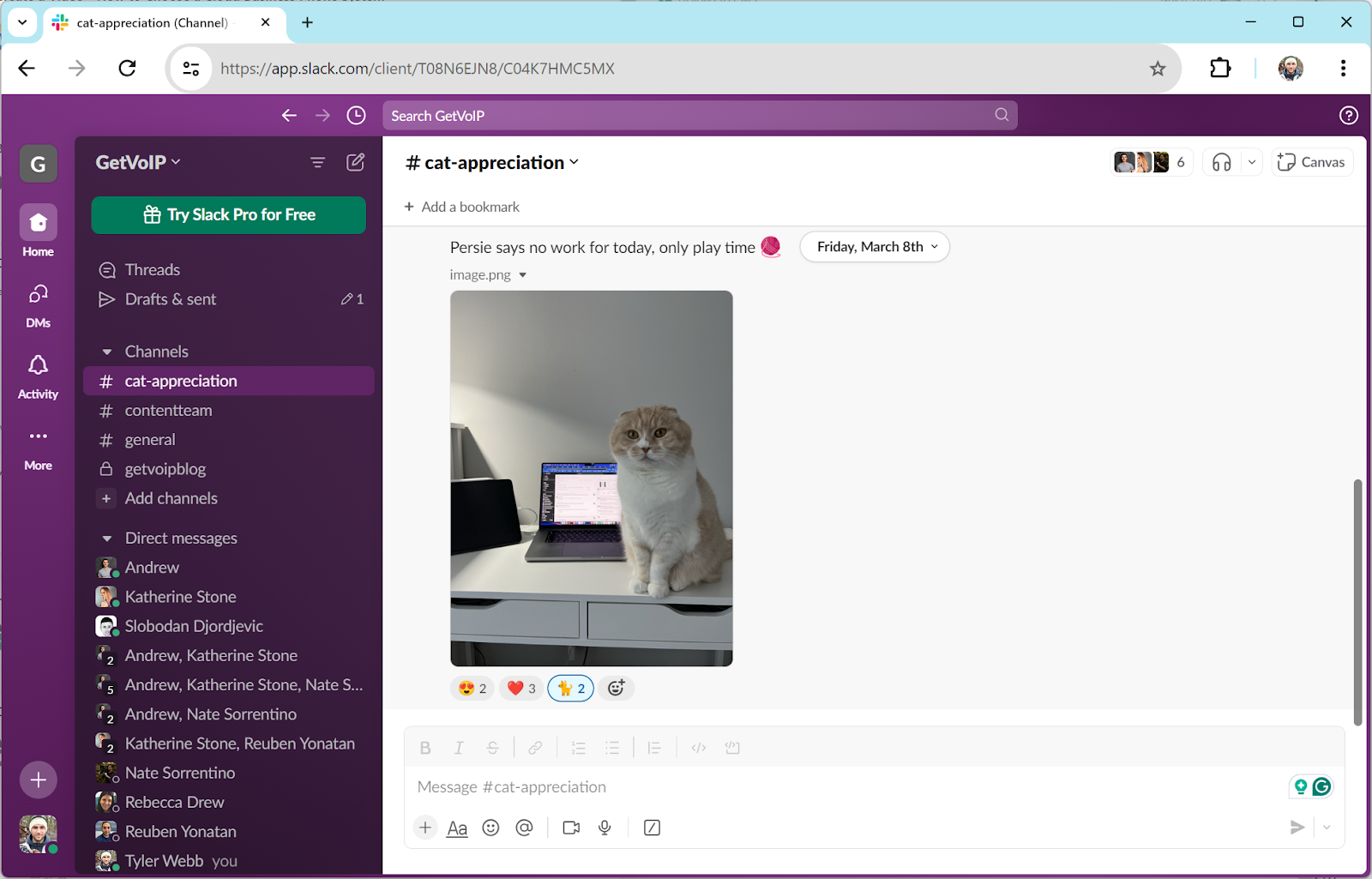
Slack is a team chat app where you can send 1:1 messages and create channels for larger groups. Create as many channels as you want, with collaboration features like file sharing, threaded conversations, and emoji reactions. Record quick video clips and audio recordings, embed links, and use advanced message formatting like bold font, bulleted lists, and more. The “huddle” button lets you jump into impromptu collaborative video meetings.
Key Features
- Workflow creation: The drag-and-drop designer lets you build workflows that streamline business processes. Schedule and automate outbound messages, information collection, signatures, task forwarding, documents, input requests, and more. My favorite part is that none of this requires programming experience.
- Video meetings and clips: Slack Huddles are audio or video meetings you can initiate with one click, right within a chat channel. Anybody in the chat can join a huddle or send a video clip instead of a chat message. Huddles have in-meeting chat, file sharing, and screen sharing.
- Inviting outside groups: Invite external users to your groups and channels, even if they don’t have a Slack account. I use this option to create chat groups for clients and customers, keeping communications organized in one app.
Pricing: Slack has three plans from $7.25 to $15+ monthly per user, with a free version that supports unlimited chat channels and groups.
Best For: Companies that need an all-purpose team chat app for quick text-based communication on desktop or mobile.
What I Like About Slack
- Beginner-friendly interface shortens onboarding time
- Built-in video calling and file sharing condenses your tech stack
- Users can create an unlimited number of channels
What I Dislike About Slack
- Limited video features, lacks whiteboards, polls, breakout rooms, etc.
- Not ideal for long-term project planning
- Lacks task management features
Asana: Task Management
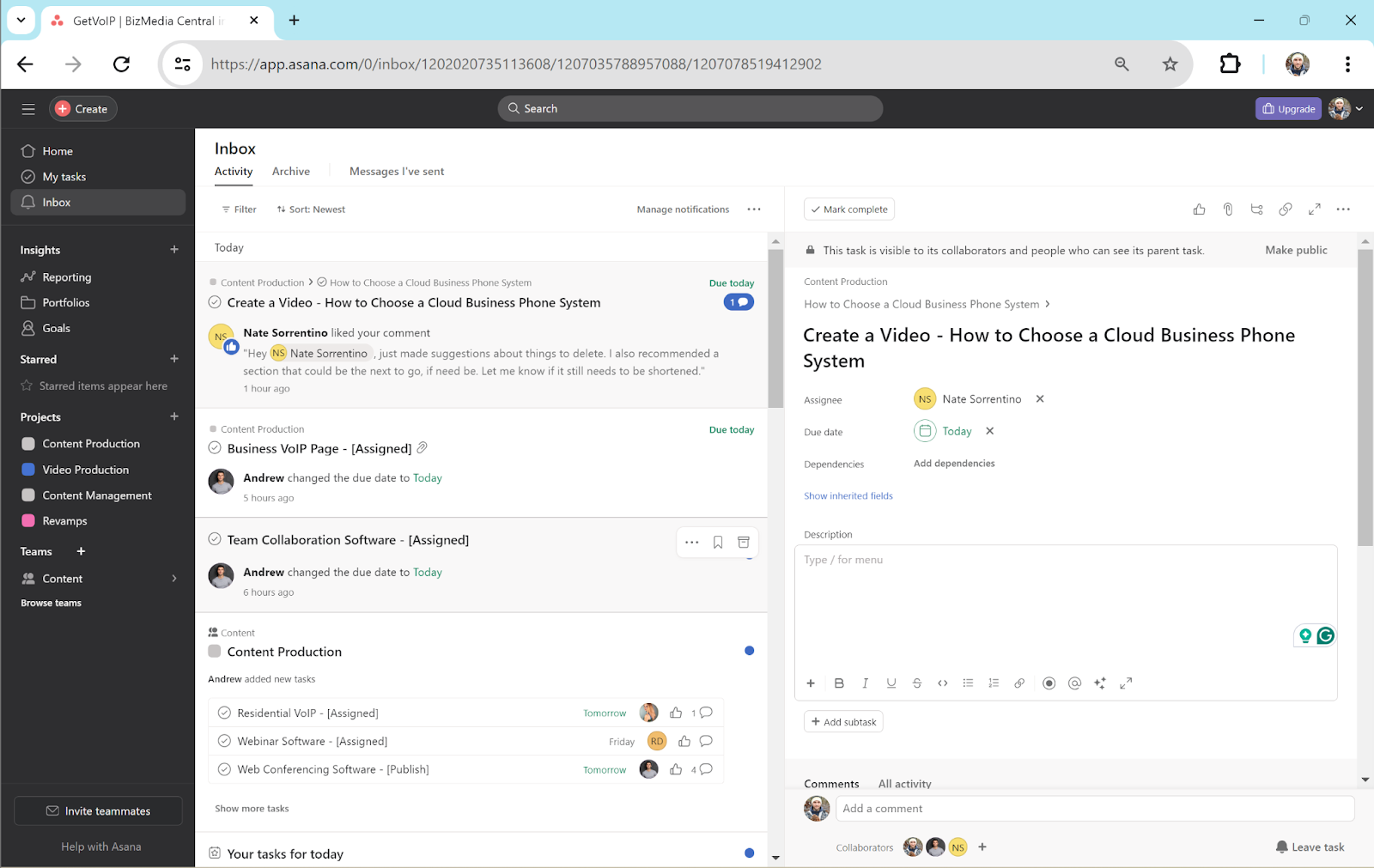
Asana provides a hub to organize projects for users across your company. The dashboard organizes tasks and due dates, along with comments and relevant files that my teammates have shared. Supervisors can monitor project status and progress for all tasks and users across the team.
Customize tasks with tons of variables like deadlines, completion statuses, subtasks, multiple assignees, and more. Leave comments under tasks, share files, and “like” teammates’ comments.
Key Features
- Project management options: Asana’s interface makes it easy for me to communicate with teammates about task status. My managers can set deadlines and add comments, and I can adjust the deadlines and update the project status to keep them updated on my progress. I can create and assign subtasks to teammates, and everything stays organized under the main project.
- Reporting: The Reporting tab tracks data over time, to help you identify trends in project completion. View charts and graphs for statistics like completed vs incomplete tasks, overdue tasks, and more. Supervisors can see how much time employees spend on each project, sorting this data by user and timeframe.
- Workflows: Automate sequences for any routine task flows. Build a flow of to-do checklists, rules, forms, integrated apps and documents, task templates, and more. Set a schedule or initial trigger that begins the event sequence. I build complex workflows with this tool, despite having no coding experience.
Pricing: Asana offers a free version and two paid plans that range from $10.99 to $24.99 monthly per user when paid annually, plus custom plans.
Best For: Teams that need a project management platform with features to communicate within a task.
What I Like About Asana
- User friendly dashboard is easy to navigate
- Multiple communication options such as commenting on tasks, sharing files, etc.
- Hundreds of popular integrations such as Slack, Google and Microsoft suites
What I Dislike About Asana
- Too many task customization features result in a steep learning curve
- Comments get buried in the inbox
- Mobile app is cluttered and difficult to use
Trello: Project Pipeline Visualizer
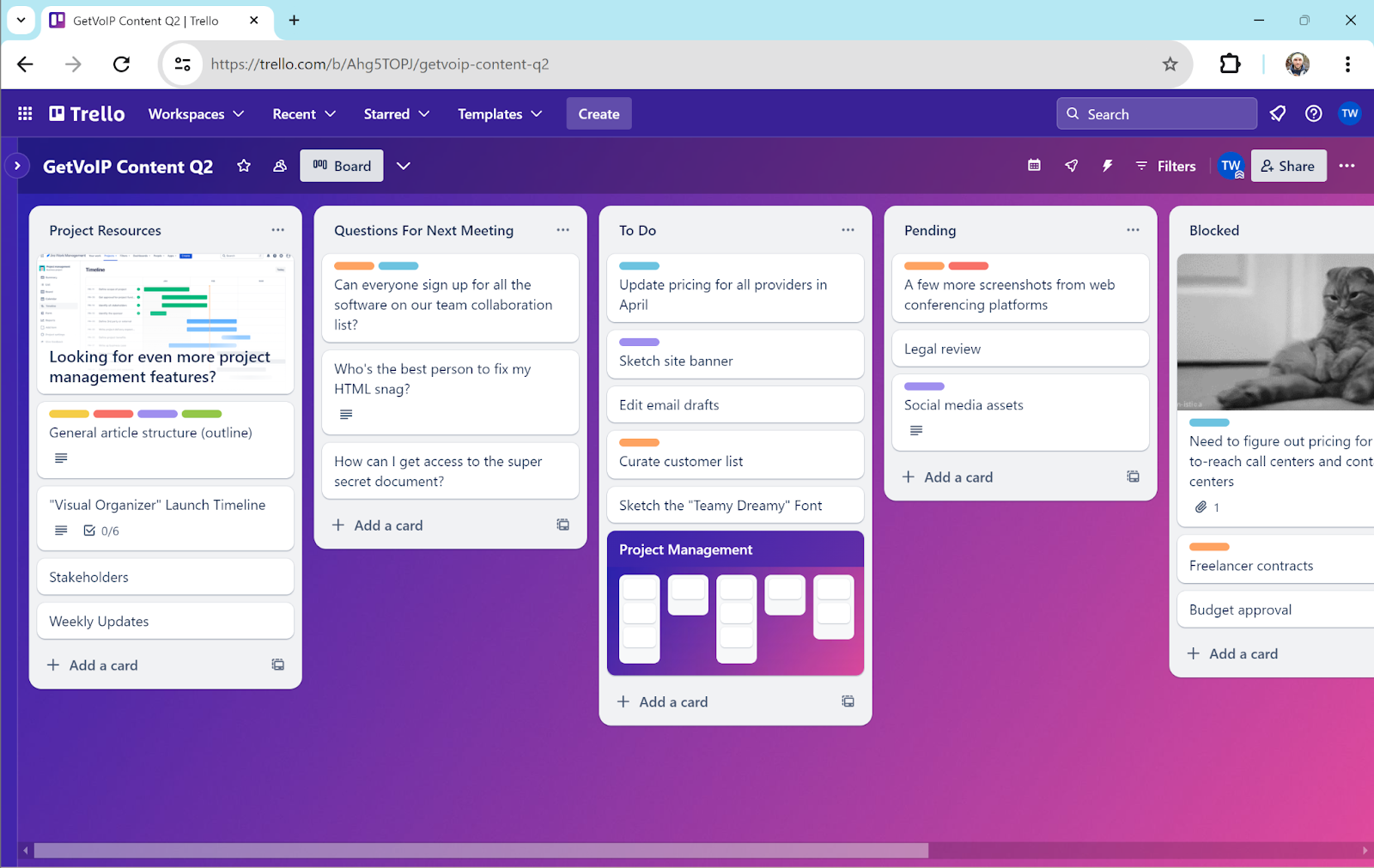
Trello provides a visual display of project timelines. You can organize your company into different Boards. Each board has a drag-and-drop panel view of however many tasks you want.
Organize the tasks within each board into timeline steps, or Lists–such as Not Started, To Do, In Progress, and Completed. As you complete each task, drag them to the next category and assign them to the appropriate teammate. Clicking on a task opens a window with dozens of customization options like description, assignees, dates, checklists, attachments, and relevant Google Drive or Slack files.
Key Features
- Boards and tasks: Create an unlimited number of boards, each with its own set of tasks. Within each board, organize tasks into a drag-and-drop pipeline. Customize each List, or step the pipeline. Customize tasks with colored labels, descriptions, attachments, and custom fields.
- Power-ups: Trello has a constantly growing library of Power-ups, which are mini apps and tools that add new features to your tasks. Power-ups integrate CRM functions, developer tools, social media and marketing, and more–directly within your tasks.
- Automation rules: Create triggers and events that automate actions for tasks. Set triggers like task creation, card status changes, or a time limit. Then, choose the triggered action, such as moving the task to a new list or assigning it to another team member.
Pricing: Trello has four plans ranging from free to $17.50 monthly per user.
Best For: Businesses that want simple visual displays to track project completion.
What I Like About Trello
- Visually appealing organization of task pipelines
- Users can make comments, add checklists, and add Google Drive files and templates to tasks
- Offers many free integrations and power-ups, which seem to grow by the month
What I Dislike About Trello
- No clear subtask field for projects
- Lacks messaging, video, calendaring, and other aspects of collaboration.
- Reports lack detailed statistical insights like trends and averages
Zoho Workplace: Complete App Ecosystem
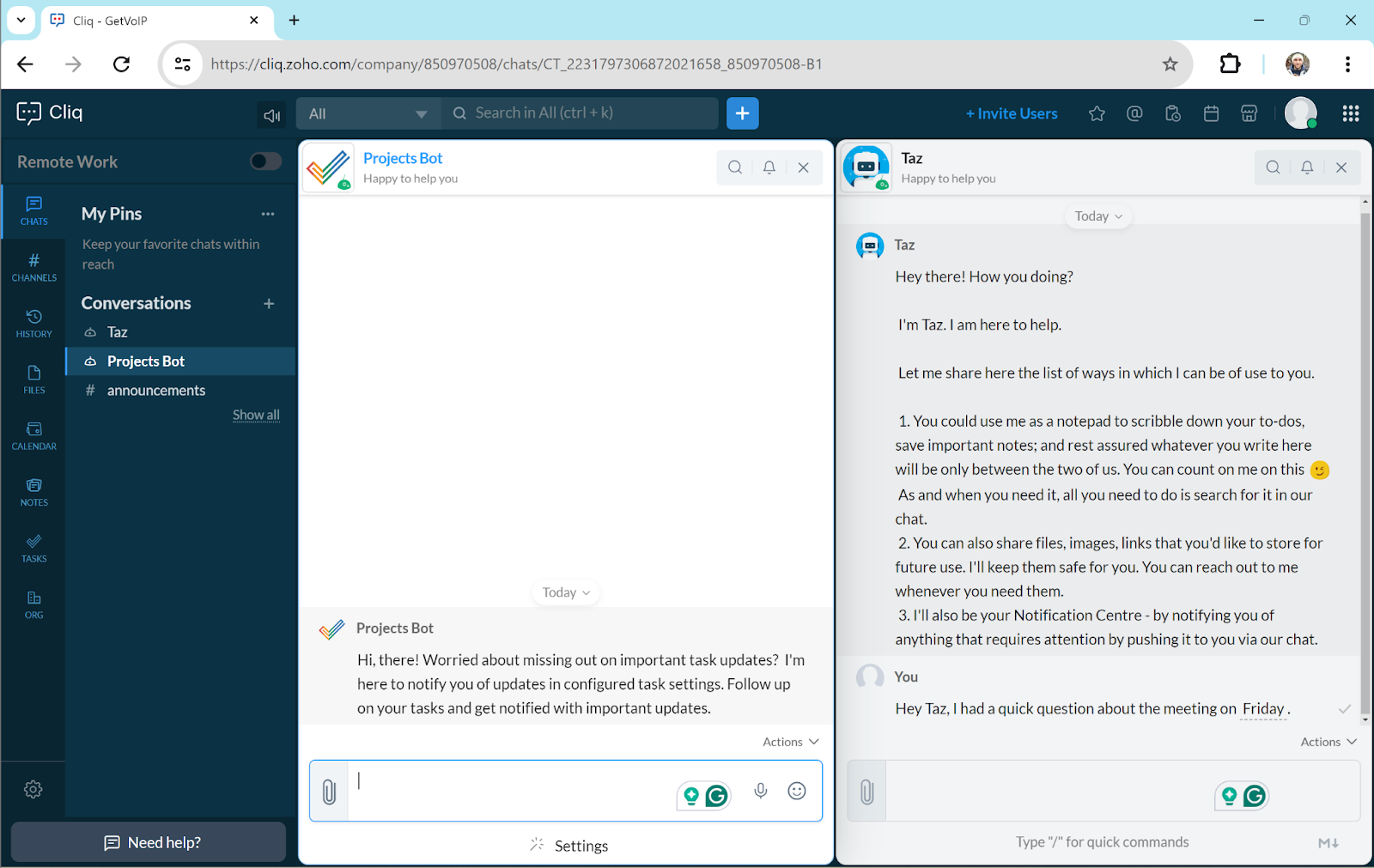
Zoho Workplace unifies an entire ecosystem of collaboration apps: email hosting, team chat, video meetings, file storage, knowledge-base creation, and more.
Workplace provides an all-in-one dashboard that serves as a central hub for you to view activity across all apps, for all users within your company. Zoho includes an Office Suite where you can create and collaborate on docs, slides, and sheets with up to 50 users. Invite up to 100 participants to video meetings with screen sharing. Connect everything to the Zoho Calendar, which you can send to clients and customers for appointment booking.
Key Features
- Cliq for team chat: Cliq is Zoho’s team collaboration and chat platform, similar to Slack or Microsoft Teams chat. It’s a mobile and desktop-accessible dashboard to send 1:1 chats, create group channels, share files, and view teammate availability. Like Slack, it connects with calendars and meetings, with buttons for one-click video huddles.
- Video meetings: Zoho Meetings host up to 100 participants on desktop and mobile with screen sharing, recording, chat, and notetaking
- Email hosting: Create and host custom email domains for all users within your company. Check your emails from the Workplace dashboard, invite users to meetings, and sync calendars.
Pricing: Zoho Workplace has 4 paid plan options that range from $1 to $6 monthly per user plus custom plans.
Best For: Companies that need an ecosystem of apps to replace Google Workspace, including email domains.
What I Like About Zoho Workplace
- Massive app ecosystem that spans many productivity use cases
- All-in-one dashboard unifies activity across all Zoho apps
- Incredible value considering the number of features included
What I Dislike About Zoho Workplace
- Cannot be used in conjunction with Google and Microsoft apps because the platforms are too similar
- Video meetings don’t offer any advanced interactive features
- Lacks some of the third-party software integrations offered by alternatives like Google Workspace
Podio: Basic Task Management with CRM Functionality
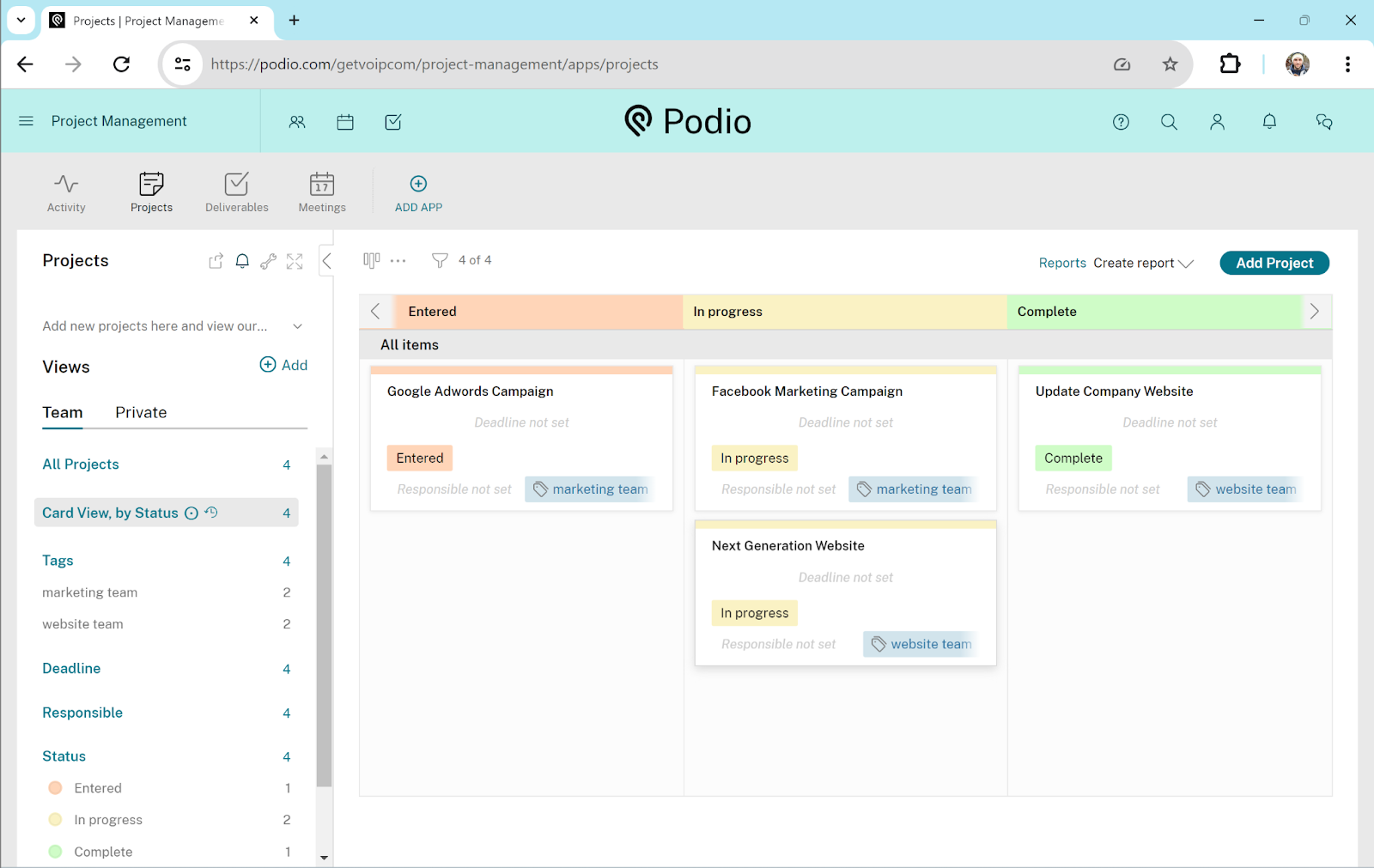
Podio is a project management platform with some CRM functionality built in. Manage project status, assign tasks, create forms and reports, and organize contact data.
Create workspaces for each department in your company, visualizing tasks in a completion pipeline. Customize each task with to-do lists and assignees. Design forms and data sheets with custom items, which serve all types of use cases: sales, human resources, marketing, event planning, education, and more. The app includes built-in team chat with 1:1 and group messaging. These forms work well for lead management and contact profiles.
Build workflows that link data, forms, profiles, and tasks across workspaces. When one user updates data or takes action in a form, the software automatically updates all relevant data points and contact information throughout the company.
Key Features
- Task management: Podio Workspaces organize each department’s tasks for each department or group within your company. Build as many workspaces as you want, organizing tasks into a pipeline. Customize tasks with descriptions, labels and tags, due dates, to-do checklists, and assignees. Drag and drop tasks between phases in the visual pipeline.
- App market: The Podio app market offers thousands of plug-ins that add functionality to your Podio workspace. Apps include premade forms, pages, reports, workflow automations, and other formats. I installed forms and workflows for lead management, but they also offer them for HR, sales, and many other categories.
- Workflows: Automate workflows that link triggers and data from different sources–apps, reports, and tasks. Customize if-then sequences that lead to new actions like task creation, item creation, or item updates. You can also automate channel outreach for linked business channels, like SMS or email.
Pricing: Podio has 3 plans that range from free to $19.20 monthly per user when paid annually.
Best For: Companies that are looking for a simple task-management interface with profiles to manage customer information.
What I Like About Podio
- Includes CRM functionality to manage client, customer, and lead data
- Users can customize their workspace, reports, tasks, and more
- Mobile app retains most of the functionality from the desktop app
What I Dislike About Podio
- Free plan is limited and paid plans are expensive
- Interface is outdated and lacks dashboard styles and project options that competitors have
- Difficult to set up and can have reliability issues
monday.com: Custom Dashboards and Layouts for Projects and Data
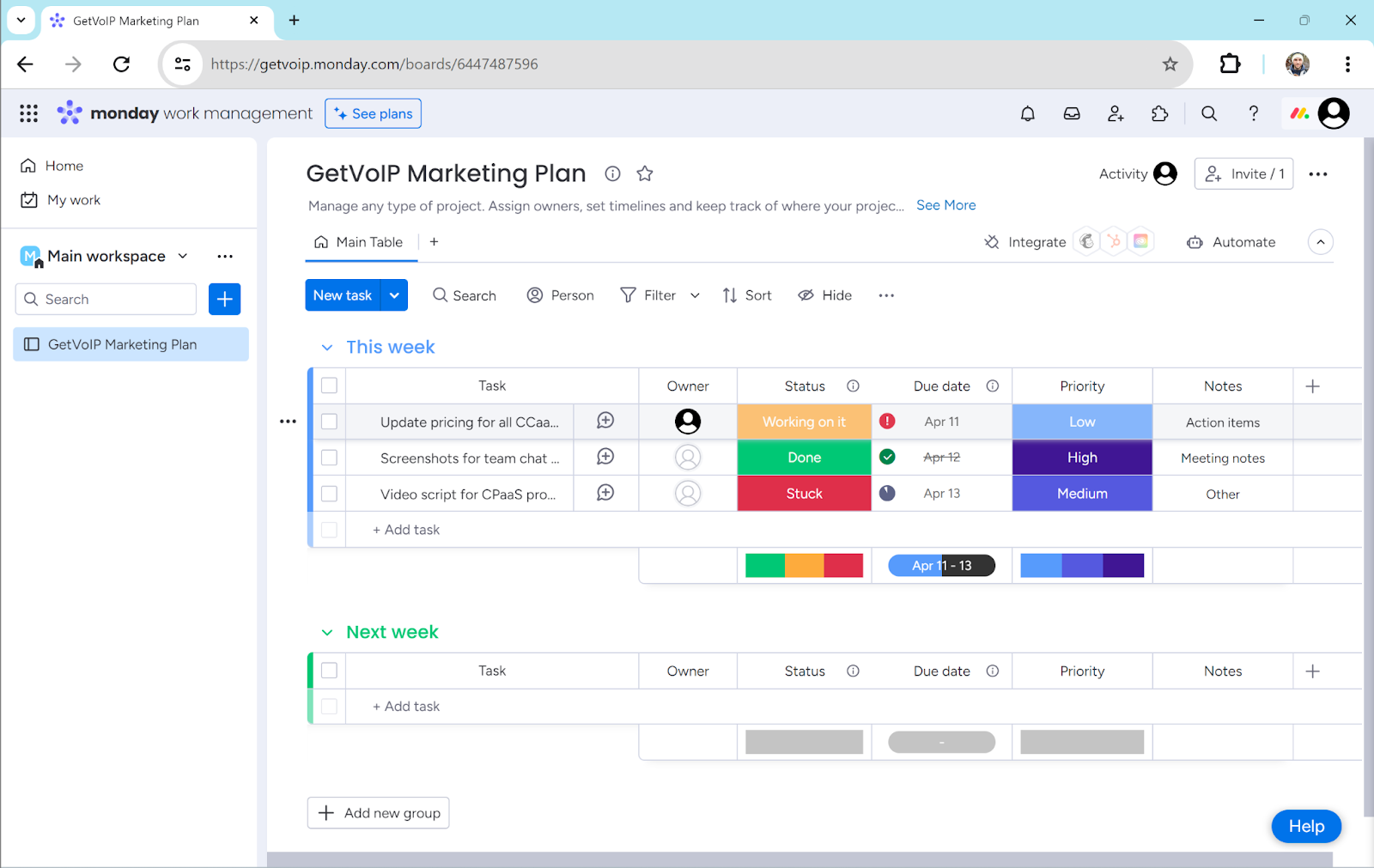
monday.com offers customizable visual organizers that help you organize and build all types of projects. I have used the software to manage tasks, client relations, campaigns, budgets and statistics, documents, and forms.
You can create dashboards that display data in multiple formats: tables, kanban boards, cards, Gantt charts, calendars, and timelines. Every time you start a new project, Monday’s tutorials and prompts simplify the setup process. But Monday goes beyond dashboards. Teammates can collaborate on documents and forms within the app, incorporating widgets and displays from your dashboard. Create drag-and-drop workflows to automate notifications, task creation, emails, and more.
Key Features
- Dashboard layouts: The Monday workspace organizes dashboards for departments, projects, and campaigns. Depending on the project, choose from a ton of display options like Gantt chart, Kanban board, table, card, and calendar.
- Automations: Monday’s automation portal provides drag-and-drop templates that link app functions, data, communication channels, and integrations. Create workflows for notifications, date reminders, task assignments, task creation, email outreach, and more.
- Docs: A collaborative document whiteboard where multiple editors can write, draw, and create. Use text formatting tools, drawing and design tools, and connect them with the data and dashboards from your workspaces.
Pricing: Monday has 4 plans ranging from free to $19 monthly per user when paid annually. Custom enterprise plans are also available.
Best For: Businesses that was a user-friendly project management platform with an impressive array of dashboards and organization tools.
What I Like About monday.com
- Task-formatting and dashboard display options are surprisingly easy to customize, set up, and understand
- Users can quickly switch between data display styles
- Form, doc, and workflow creation tools require no code
What I Dislike About monday.com
- Features require a wide, large screen, so the mobile app feels difficult to use
- No native real-time chat feature
- All plans require a minimum of 3 users
ClickUp: In-Depth Task Customization
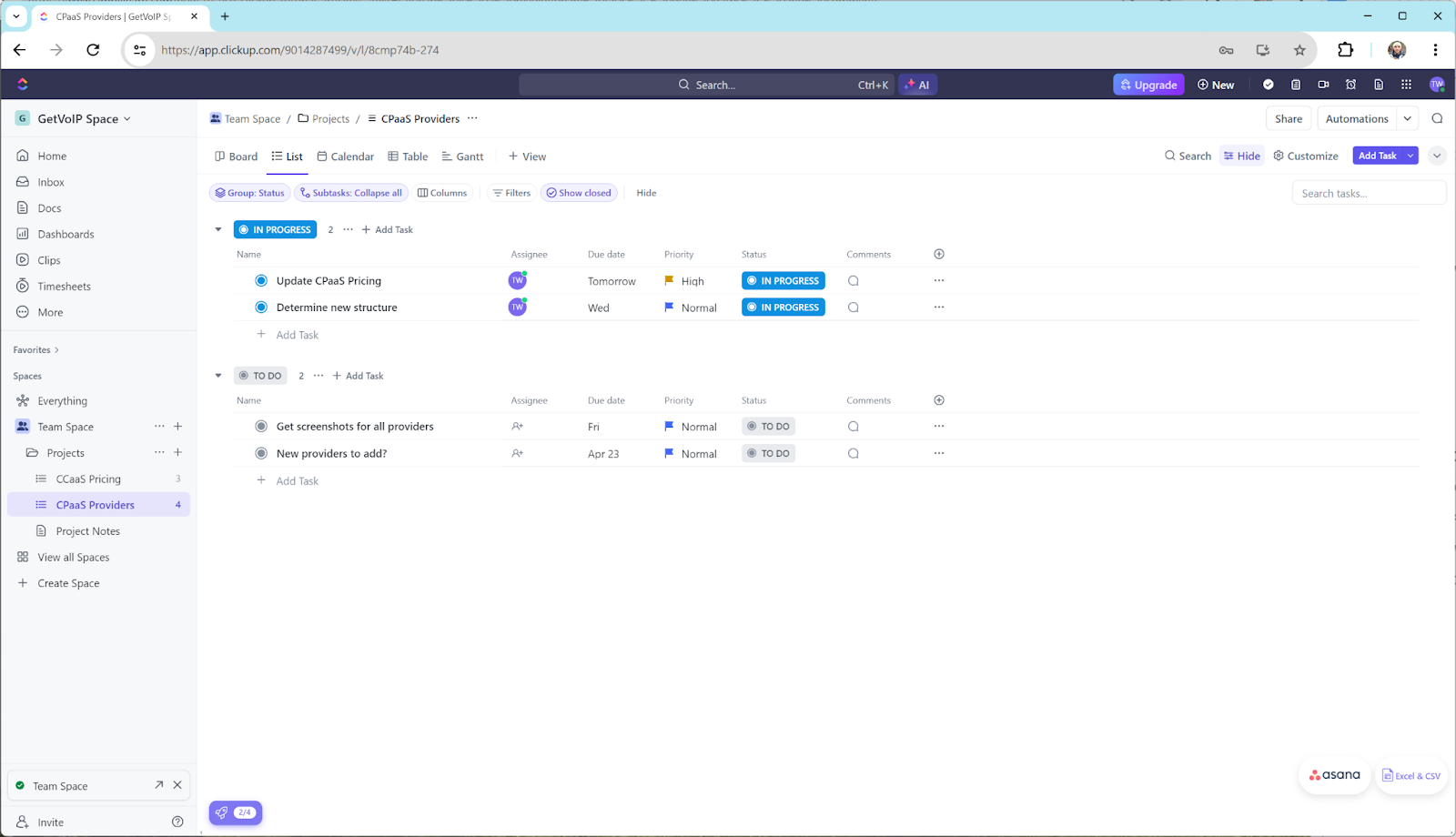
ClickUp is a project management app with multiple views for companies to coordinate projects, tasks, checklists, documents, and chat. The UI lets you create tasks and display them in different views, like a table or GANTT board.
Customize each task with subtasks, deadlines, and assignees. Categorize tasks by urgency, creating to-do lists for each user in the company. Comments and assigned tasks appear in each user’s inbox and dashboard, keeping everyone on the same page. Create drag-and-drop automation workflows, design whiteboards with teammates, and collaborate on documents together. Create materials to build an internal knowledge base for employees.
Key Features
- Multiple task views: Create projects, tasks, and subtasks for multiple layers of task organization. Within the task dashboard, display tasks in multiple views: list, calendar, Gantt charts, board, map, or Kanban board. Within each task, create subtasks, checklists, and other custom fields.
- Collaborative apps: Work with teammates to create forms, whiteboards, documents, and mind maps. Create customer profiles, share video clips, capture and edit screenshots within the appShare these tools within tasks for asynchronous or live collaboration.
- Document creation: The app has a built-in document editing tool with tons of customization options, which multiple teammates can use at once. Customize font, page width, cover image, authors, and more. Attach these documents to tasks, publish them, or use them to build an internal knowledge base.
Pricing: ClickUp offers a free version and two plans ranging from$7 to $12+ monthly per user when paid annually. Custom enterprise plans are also available.
Best For: Companies that want project management combined with document creation, reporting, and chat.
What I Like About ClickUp
- Collaboration tools and task-customization options are easy to use
- Offers several task-customization tools that alternatives don’t have
- Integrates with several email platforms
What I Dislike About ClickUp
- All the features and customization fields make the dashboard feel cluttered
- Difficult to jot down quick tasks due to multiple fields
- Easy for comments to get lost in the mix and pushed down in the inbox
Airtable: Customizable Data Management
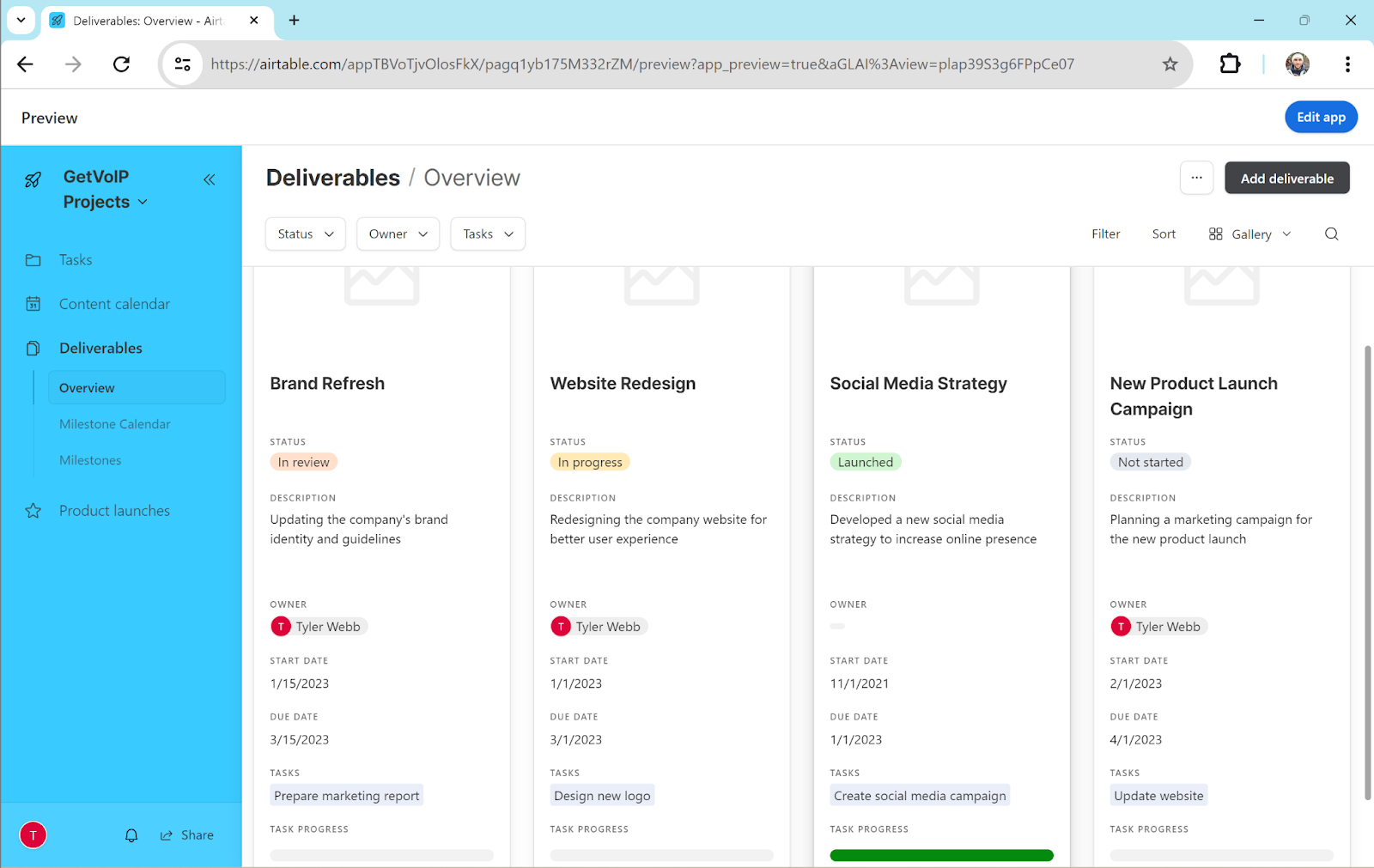
Airtable is a project and data-management platform that lets you extract data from varied sources and synchronize it in unique ways.
Create project and task dashboards with multiple views: kanban, list, calendar, Gantt, table, and many more. Populate each view with custom fields and categories. Users can manually enter data, or you can extract data automatically from connected apps like CRM tools, social media platforms, messaging apps, and even YouTube. Combine these data sources into new displays and apps, serving unique use cases. Then, sync data across dashboards and projects to create workflows that keep everyone up-to-date.
While its display tools are similar to competitors like Trello or Monday.com, Airtable sets itself apart by letting you extract data from unique sources, arrange it in custom views, and synchronize it across multiple projects.
Key Features
- Multiple views for tasks and data: Organize tasks and data in several formats–table, Gantt chart, list, kanban board, calendar, or gallery. Customize each view with fields, items, categories, and columns for the project’s demands.
- Interface designer: Users can customize dashboards with data from separate sources, displaying it in new ways. Combine data from integrated software like social media, SoundCloud, SMS, YouTube, and more. Create dashboards with drag-and-drop elements, or use premade templates.
- Custom apps and workflows: Link projects and data sources into workflows such as automated notifications, data updates, task assignments, and communication channels. This creates custom apps to support your internal users, clients, and customers.
Pricing: AirTable has a free version, two plans from $20 to $45 monthly per user, and custom plans.
Best For: Business that need custom dashboards to unify data from many sources and apps.
What I Like About Airtable
- Syncs data across projects and integrated apps with instant and automatic updates across all dashboards.
- AI leveraged to identify trends in the data
- Users can create forms in Airtable, such as surveys, evaluations, or customer feedback forms
What I Dislike About Airtable
- Lots of advanced workflow features make onboarding difficult
- Some of the desktop app’s project views are not accessible on mobile app
- Substantially pricier than other apps that achieve a similar purpose
Which Provider Should You Choose?
The best team collaboration software provider for you company will depend on what you hope to achieve, what channels your employees prefer to communicate on, and what other digital tools you are currently using.
- Choose monday.com or Trello if project management and organization are a priority
- Choose Airtable if you are currently using a variety of platforms and need to unify them under one pane of glass
- Choose Slack if your team communicates mostly via text or asynchronously
- Choose Asana if you need an affordable task management solution