

As a business VoIP and Unified Communications provider, Vonage Business Plans has multiple features that help SMBs stay in the loop with both customers and internal teams. Vonage's strongest differentiator is its API extensibility and developer ecosystem, allowing tech savvy teams to build completely custom workflows or embed communications into other software. On the other hand, VBC can also be used out-of-the-box as a complete, user-friendly communication suite with voice, SMS/text and video conferencing capabilities.
What is Vonage Business Cloud?
Vonage Business Cloud (VBC) is a business phone service solution that offers features like conference calling, caller ID, call forwarding, various integrations, and routing features like a multi-level auto attendant phone system. Vonage for business also provides unlimited calling and SMS messages and has Microsoft and Mac desktop apps, Google Android, and Apple iOS users.
A growing business can start with their base level offering, the Mobile plan. This includes team messaging, so it serves as a good, low-cost option for businesses that want to start collaboration across multiple offices. The Premium and the Advanced plans present more features like CRM integrations and call groups, which we’ll tackle in a more in-depth way in the next few sections.
Vonage Pricing
VBC offers three pricing plans. The prices vary based on the number of users and they also offer annual discounts. For a business with 10 users, pricing starts at $12.59/user/month for the Mobile plan and goes up to $26.59/user/month for the advanced plan when paid annually.
Paid add-ons include AI transcription, AI Virtual Assistant, Business Inbox, Call Queue, Secondary Line Appearance, etc.
Vonage Features for Business Users
What features make Vonage Business Cloud stand out compared to other VoIP providers? On their site, Vonage speaks about “50+ business features” that are included in their plans. These VoIP features are designed to help employees communicate with each other and customers anywhere.
Their flexible features allow you to integrate with other tools and apps you already use. Here are a few that will make a difference for a small business:
Mobile App
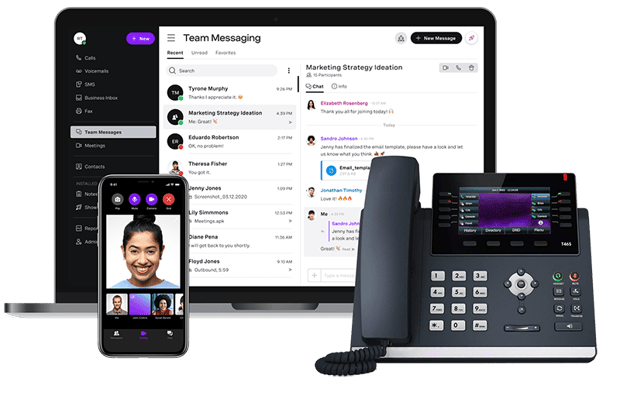
The Vonage Business Cloud mobile phone VoIP app is an application that your company downloads to smartphones from either the Google Play Store or the Apple App Store. The app requires no additional downloads for features as they are all included in one unified app. Once downloaded, it’s a simple process of entering your Vonage credentials. Once logged in, the softphone will then mimic the extension associated with the credentials. This means that all of the features associated with the account are unlocked and accessible. These include:
- The ability to dial and receive phone calls with the same caller ID information.
- The same hold music is associated with your phone line.
- The ability to use call flip when you need to go mobile – this extends to when traveling overseas.
- Access to visual inbox so that you can see messages transcribed on your screen.
Business SMS
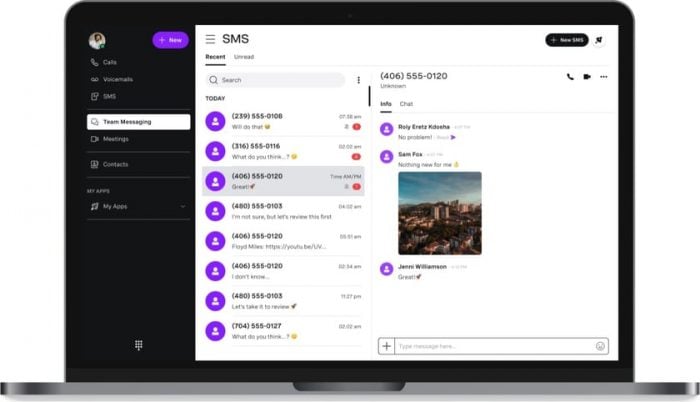
Vonage Business Cloud also has business SMS that works independently of your smart device’s SMS. This is based entirely on your internet connection, so as long as you have Wi-Fi connectivity, you’ll have a text-based line of communication. The desktop-based Business Inbox extends this to your computer so that you can answer customer inquiries via text using a keyboard and monitor.
Call Flip
Call flip is a convenience feature that allows users to seamlessly switch from desktop or softphone to an iPhone or Android cell phone without losing the call. With Vonage, this is done using a code that you type on the keypad. Afterward, the call will be sent to the mobile device so that you can go about your business without being tethered to your desk. Once back in the office, the call is flipped back to the preferred app or desk phone.
Voicemail to Email
This feature is similar to the voicemail transcription feature found on the Vonage mobile app. When someone leaves you a message in your inbox, the Vonage system will transcribe it and send it to any associated email accounts. This saves time because you read incoming messages while you check your email throughout the day. This is typically more efficient than taking time out to listen to your recordings.
Visual Voicemail
Visual voicemail is designed to bring more efficiency to the message retrieval process. When a contact leaves a message, each message is populated in a list that you view in an app or when logged into the Vonage.com admin portal.
Instead of listening to each audio recording in a list of messages, you can see the information that summarizes each. Based on ID information, time of receipt, and the date, you can determine the messages that are most important to you and delete the extraneous ones. It makes management much easier to do at a glance.
Work from Anywhere
This feature enables users to build a virtual workforce. With this functionality, you can take your desk phone away from the office and use it anywhere with high-speed internet. After doing this, you can transfer calls to your cell phone, set up your extension to ring multiple phones at once, and access all Vonage's features. This feature makes sure you never have any interruption in your communications.
Phone Dashboard
With the phone dashboard, administrators can see the real-time status of all account users. You can customize views, see who is one the phone, and even dial extensions. This feature even allows you to limit access per user and turn Do Not Disturb on and off with the click of a button.
Additional Vonage Options and Services
In addition to the advanced features that we listed, Vonage for business also offers a few additional services to their customers. These include:
- AI Virtual Assistant - Vonage's AI Virtual Assistant uses Natural Language Understanding (NLU) to understand caller intent, intelligently route calls, answer FAQs, and qualify leads. Pricing for the AI Virtual Assistant in not listed. All plans are quote-based and include a conversational designer that ensures a custom solution tailored to your business.
- Conference Bridges - For an additional $14.99 per month as an add-on, your business can add a conference bridge that connects up to 30 participants. During a conference bridge call, the presenter is granted the ability to mute or add participants during the meeting via a dashboard. Vonage's conference bridges are password-protected for security.
- HIPAA-Friendly Features - Vonage has a HITRUST CSF certification, which is considered the most widely adopted security framework for sensitive information. Vonage is a HIPAA-compliant provider – your company will need to sign a business associate agreement (BAA) to certify that any information stored is encrypted and protected from theft. Keeping clear recordings is vital for contact centers and businesses that need records for confidential information like electronically protected health information (ePHI). Vonage’s on-demand call recording (ODCR) provides 15 hours of recording for users and once recorded, the audio can be sent via email. Every user has direct access to their recordings, but administrators are not provided access unless the recordings are shared.
- Orange Glove Setup - This works as a sort of IT support and works separately from Vonage Technical Support, which will help you install any software feature set associated with the service. For example, if a business is trying to set up integration with a CRM suite like Zoho or Salesforce, the Orange Glove Setup team will assist in getting these apps integrated with Vonage. This feature is only available for Advanced Plan subscribers.
- Integration - Vonage is a PBX solution that has seamless integrations for your business to make day-to-day communications easier. The right integrations help employees be more productive while handling calls, making social media posts, and collaborating with each other. Some of the common integrations that will work with a Vonage’s business phone system include:
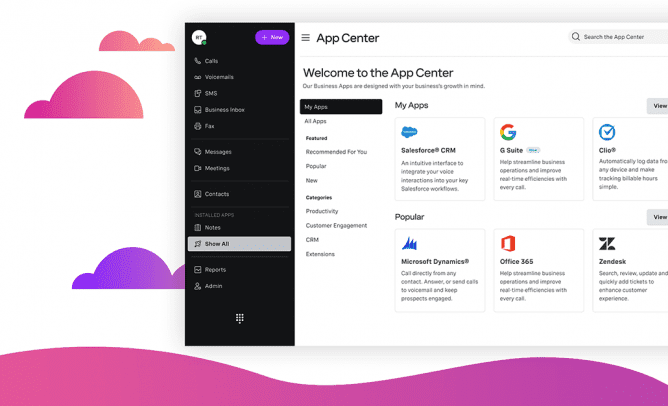
| Integrations | Type of Solution | Typical Uses |
| Bullhorn | VMS | Staffing firms to automate workflow |
| Clio | Collaboration | Streamline legal apps and services |
| ConnectWise | Security Software | Manage tech support tickets |
| G Suite | Collaboration | Calendars organization and communications |
| JobDiva | VMS | Applicant tracking system for job boards |
| Microsoft Dynamics | CRM | Take business connectivity to the next level |
| Office 365 | Collaboration | Document and project management |
| Oracle Netsuite | CRM | Connect to e-commerce capabilities |
| Salesforce | CRM | Customer relations in sales and marketing |
| Slack | Collaboration | Communication between team members |
| SugarCRM | CRM | Optimize data in marketing and sales |
| Zapier | Collaboration | Automate repetitive tasks |
| Zendesk | CRM | Handle support tickets and communications |
| Zoho | CRM | Analysis and chat automation |
Vonage for Business: Pros and Cons
Vonage for business offers high-quality voice capabilities along with affordable rates and 24/7 live support, but many features are only available as paid ons.
Here are some more of the strengths and drawbacks of Vonage:
Vonage Pros
- Affordable rates on international calls
- 24/7 customer support available on live chat
- High quality voice capabilities for web conferencing
- Single sign on included with most plans
- Flexible pricing and customizable platform with integrations
Vonage Cons
- Many essential features like call queue and conference bridge on available as paid add-ons
- Video meetings are not included on the Mobile plan
- Calls disconnect easily with low internet service
- The recording is limited to 15 hours per month with the advanced plan
What Customers are Saying
Overall, customers of Vonage that have subscribed to Business Cloud have several positive things to say about the VoIP phone service. They like that the business applications are easy to use and provide good stability. There are a few complaints about Vonage, but they are mostly limited to how knowledgeable customer service agents are instead of the communications service itself. Here are a few examples from the GetVoIP blog:
“All in all a good system, fairly stable, knowledgeable staff, some of the extra features such as mobile and desktop client, and the video conferencing come in handy when really needed.” - Jeff F.
“Vonage is very convenient for businesses on the go. I use it a lot on my phone while on the field.” – Mike L.
“We have used Vonage for 2 to 3 years now and it has a lot of nice benefits for an office phone system. It does take some time to learn how to program the phones so only our Admin has that knowledge.” – Linda R.
Vonage Business Alternatives
Vonage for business is ideal for small to medium-sized companies, but what if they lack some of the features that you need? Maybe your business only has a few users, so you prefer a more flexible pricing structure. Some alternatives to consider include:
Nextiva
Nextiva has three plans that include Core, Engage, and Power Suite CX. Prices for these are $15, $25, and $75 respectively. All plans have unlimited calling within the United States and Canada, and unlimited business SMS starts with the Professional plan. Nextiva stands out because, at the base tier, users are granted unlimited audio conference calls with up to four participants and are granted free local and toll-free numbers.
While Vonage's strengths are API flexibility and customization, Nextiva excels in simplicity, reliability, and customer support. Nextiva offers 24/7 live support via phone and webchat with consistent positive reviews, while Vonage has limited phone support hours and some reviewers noting unresolved issues.
8x8
8x8 is a well-rounded, actively developed UCaaS/CCaaS platform. What makes 8x8 stand out is unlimited calling to 48 countries included on all plans, while Vonage charges extra for international calling. This comes at a cost, however, as 8x8 is one of the more expensive phone systems in the space, and they do not list their prices publicly.
8x8 is best for large enterprises that need multi-site management along with advanced features like AI-powered analytics and large scale video conferencing.
Dialpad
Dialpad offers flexibility and mobility to businesses that need it. Dialpad has three different plans that start at $15 a month. Dialpad does not publish pricing for their enterprise plan, but simply contact them for additional information. All plans come with a 14-day trial to try the VoIP business service. Dialpad has integrations with Salesforce, Zendesk, and G Suite as well.
Dialpad's AI Agent is significantly more sophsticated than Vonage's AI Virtual Assistant. Dialpad AI Agent offers autonomous voice and chat agents, seamless handoffs, and conversational AI analytics while Vonage AI Virtual Assistant is more focused on voice-enabled self-service. Dialpad AI Agent is a separate service which admins purchase a pool of credits to use.
GoTo Connect
GoTo Connect offers one UCaaS plan and two different CCaaS pricing plans. All plans are quote-based and pricing is not listed publicly. All GoTo Connect plans offer over 80 features to help businesses collaborate and communicate, so you will not have to opt into a higher plan level to get specific features that your business needs. For example, GoTo Connect's base plan includes unlimited extensions, auto attendants, and ring groups, while Vonage only includes ring groups in its highest tiered plan.
GoTo Connect also includes video conferencing with up to 250 participants in all plans, while Vonage does not include video meetings in all plans and caps participants at 200. GoTo Connect also includes unlimited calling to over 50 countries in every plan, while Vonage does not.
RingCentral
RingCentral has three flexible plans that can be versatile enough to grow with a business. Prices for these plans start at $20 per month and they go up to $35 per month. The essential plan is limited to 20 users, but the other plans are unlimited. RingCentral also offers a 15-day trial to try out their service with all plans.
Many key features such as the Salesforce integration and real-time insights are locked behind higher tiers, making Vonage a more affordable option, however, RingCentral is better for scaling with a robust contact center platform and enterprise features like AI Receptionist, intelligent call routing, and AI Assist.
Who is Vonage for Business for?
Vonage’s QoS helps teams connect globally by making meetings and calls clearer and easier to follow by attendees. With an uptime of 99.999%, calls and data will be dropped less frequently. Vonage is present in over 85 countries, so you’ll have a better growth capacity, which increases your bottom line. Team messaging and video collaboration through the platform improves productivity and bridges the gap between the United States and global offices.
Vonage's VBC platform is a great fit for:
- SMBs: Vonage lets users pick a local number anywhere in the U.S. or from over 50 international locations with an affordable starting price and solid call quality
- Developers and Tech Savvy Teams: Vonage's API ecosystem allows teams to embed calling, SMS, and messaging into their own apps or create custom workflows
- Businesses that rely heavily on CRMs: Vonage has deep, out-of-the-box integrations with many popular CRMs such as Salesforce, Microsoft, Zendesk, Zoho, etc.
- Rapidly growing businesses: SMBs using VBC can easily and quickly scale to Vonage Contact Center which offers screen pops, whisper coaching, post-call surveys, workforce management, and more

