
Summary: Microsoft Teams is video conferencing and collaboration platform that fits in seamlessly with the Microsoft 365 universe while Cisco Webex is a standalone communication and collaboration solution. Microsoft Teams excels in document sharing and collaboration features while Webex is best known for its reliable and feature-packed video conferencing.
Microsoft Teams and Cisco Webex both offer video meetings, chat messaging, and VoIP calling into one intuitive interface. Each cloud-based provider offers desktop and iOS/Android mobile apps that organize unified communication channels into customizable dashboards, with other tools like AI support, analytics and reports, workflow and task management apps, and engagement features.
This article compares Microsoft Teams vs Webex Teams in depth, outlining each product’s features, pricing, user experience, pros, and cons.
How We Compared Webex and Microsoft Teams
- Pricing and Plans: We compared the different pricing tiers of each provider and looked at hidden costs such as add-ons and setup costs
- Security: We tested the security of each platform looking for firewalls, data encryption, advanced authentication, single sign-on, etc.
- Reliability: We compared the reliability of each platform by analyzing points of presence, uptime SLAs and looking into recent outage data
- Integrations: We looked into how many pre-built integrations were offered by each provider and whether custom integrations were possible with APIs and SKUs
- Customer Support: We tested customer support lines and looked at what channels were available, what the business hours, and whether priority support plans are available and affordable
- Video Conferencing Features: We tried out the video conferencing features on each platform paying special attention to advanced AI powered features such as translation, captioning, and summaries
- Team Collaboration Features: We tested other non-video collaboration features on each platform such as team chat, whiteboards, audio conference, etc.
- Reporting and Analytics: We compared the analytics of each provider such as the availability of customizable templates, AI-powered insights, drilling down for details, etc.
Webex vs Microsoft Teams: Overview
| Cisco Webex | Microsoft Teams | |
| Pricing | 3 plans ranging from free to $22.50 monthly per user | 4 plans ranging from free to $12.50 monthly per user |
| Key Features |
|
|
| Integrations | Microsoft Teams, ServiceNow, Salesforce, Slack, Hubspot, Meta, and hundreds more | Salesforce, RingCentral, Cisco Webex, Zoom, Freshdesk, SurveyMonkey, and hundreds more |
| Meeting Basics | Up to 1000 participants and 24 hours | Up to 300 participants and 30 hours |
| Webinars and Events | Up to 100,000 participants | Up to 10,000 participants |
| Hardware and Room Systems | Cisco-backed hardware such as room kits, desk devices, and conference phones | Supports several hardware bands such as Poly, Jabra, Yealink, etc. |
| AI Features | Built-in AI Assistant with transcription, summaries, translation, etc. | AI Assistant (CoPilot) offering summaries, chat assistance, etc. |
| Analytics | Meeting and calling reports, video mesh analytics, device analytics, AI insights, sentiment analysis | Usage reports, quality analytics, advanced engagement analytics with a premium license |
| Customer Support | Self-service, phone, web, premier support packages available | Self-service, phone, web, premier support for enterprises |
| Best For | A balanced collaboration platform with all primary channels and strong video features | A low-priced platform geared toward document editing and task management, without voice calling |
Microsoft Teams vs. Webex: Pricing
Summary: Webex and Teams both offer limited free plans, but Teams has a longer meeting duration limit in the free limit (60 minutes compared to Webex's 40 minutes). Webex is more expensive overall, but offers more advanced video features out of the box.
Webex’s free Basic plan includes chat and video messaging, with most video features. The Webex Meet plan ($12 per user/month) expands the meeting time limit and participant capacity, with added video features and full calling capabilities. The Webex Suite plan ($22.50 per user/month) adds on unlimited local and domestic long distance calling. Quote-based Enterprise plans add unlimited cloud meeting recording and a 1000-participant meeting capacity.
Microsoft Teams’ free version includes chat, internal calling, and 60-minute meetings with 100-participant capacity. The Essentials plan ($4 per user/month) broadens meeting time and capacity. A 365 Business Basic plan ($6 per user/month) adds whiteboards, meeting transcription, hundreds of built-in apps, and online collaboration in Microsoft Office apps. The Business Standard plan ($12.50 per user/month) includes webinar hosting.
Calling non-Teams phone numbers requires a separate Teams Phone Calling Plan, which offers a one-month free trial.
Webex vs Microsoft Teams: Feature Comparison
Here, we’ve compared key features between Webex vs Microsoft Teams:
Video Meetings
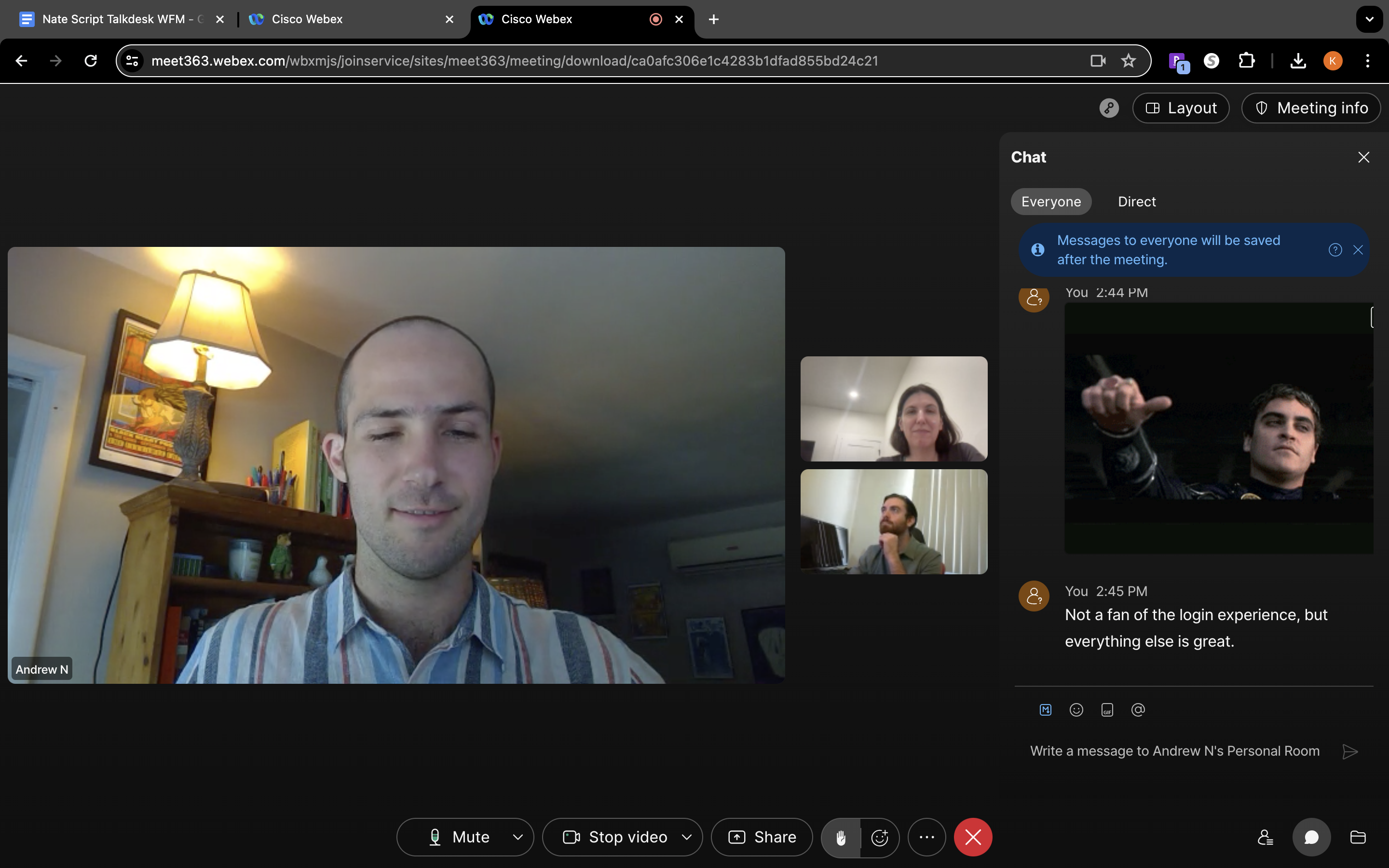
Summary: Webex offers a higher level of reliability as well as better noise cancellation. Microsoft Teams has improved in both of these areas and is competitive, but Webex is still the gold standard for both reliability and noise cancellation, even in low bandwidth scenarios. Microsoft Teams is less expensive, but certain features like AI Assistant and translations capabilities require purchasing an extra license or subscribing to a higher tier plan, while Webex includes these features in most paid plans.
Webex allows users to schedule recurring or one-time meetings and invite attendees via the creation menu or by sharing a link and meeting number. Every account has a unique personal meeting room with a link and button for impromptu, on-demand meetings.
In Teams, users schedule one-time or recurring meetings, invite participants, grant dial-in access, set a location, attach files, assign the meeting to chat channels, and create an event description. Each meeting has its own tab, where users can chat, collaborate on meeting-specific whiteboards, share and co-edit relevant files like spreadsheets and slide decks, create an agenda, print the participant list, assign tasks, and take in-meeting notes.
Both platforms include engagement features like polls, digital infinite-canvas whiteboards with drawing and ideation tools, screen sharing, polling, picture-in-picture, and virtual backgrounds, although Webex also offers Q&A management and more robust polling. Both offer calendar integrations, meeting recording, noise removal, and gesture recognition.
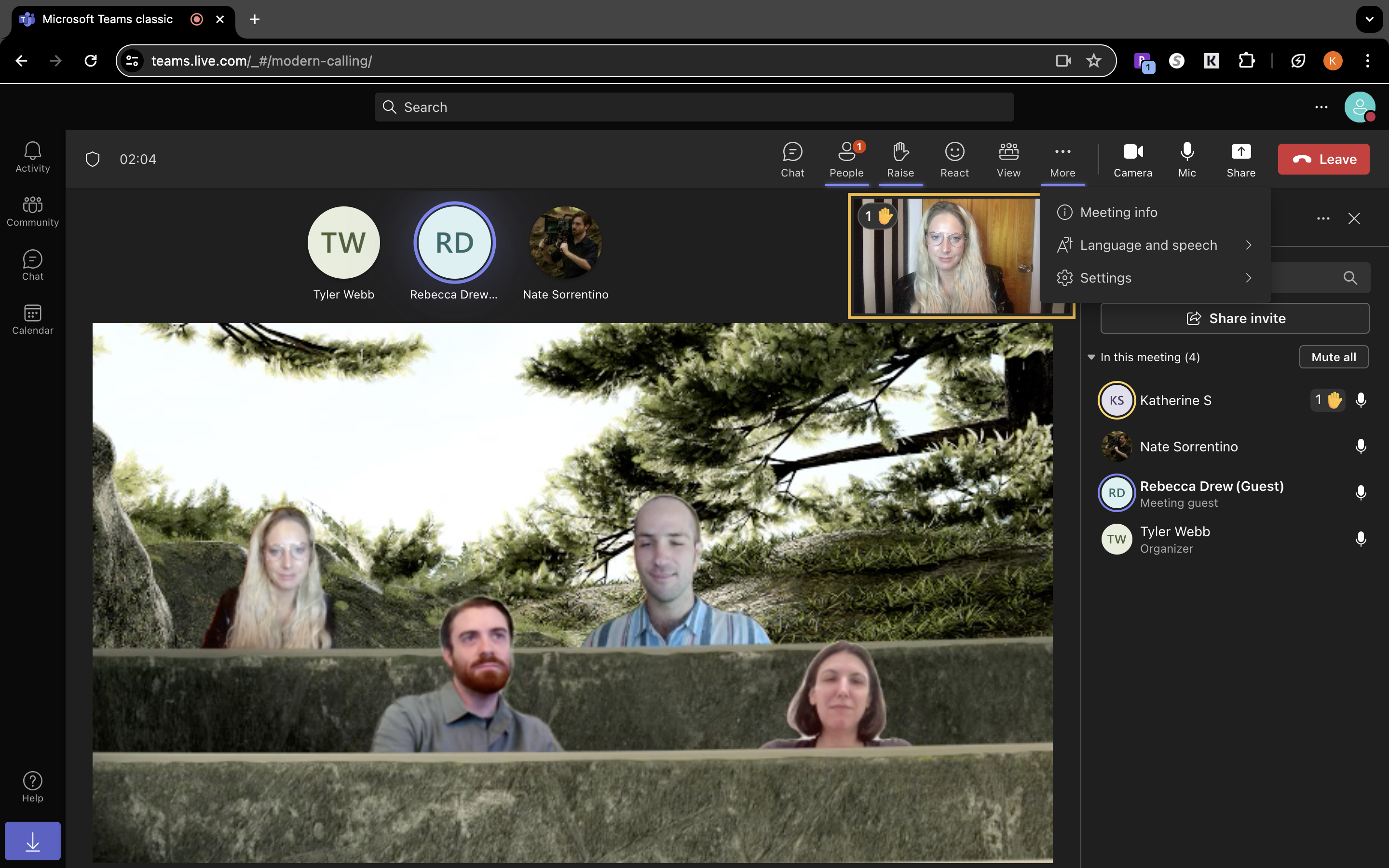
Microsoft Teams also offers something called "together mode", which arranges participant streams into an on-screen “scene”, like a coffee shop or classroom to resemble an in-person meeting as well as "speaker coach", A private virtual “coach”, available to all meeting participants, that uses AI to offer feedback about body language, pacing, pronunciation, repetition, interruptions, and more
Calling Features
Summary: Both Webex and Microsoft Teams offer full service business phone systems. Teams users can add on Microsoft Teams Phone, while Webex subscribers can purchase a Webex Calling Platform license, or upgrade to the Webex Suite or Webex Enterprise plan. Both providers offer similar PSTN connectivity options and call management features, but Webex offers better reliability thanks to its Survivable Remote Site Telephony capabilities and local gateway options. Webex also has broader international phone coverage and offers a native contact center solution, while Teams does not.
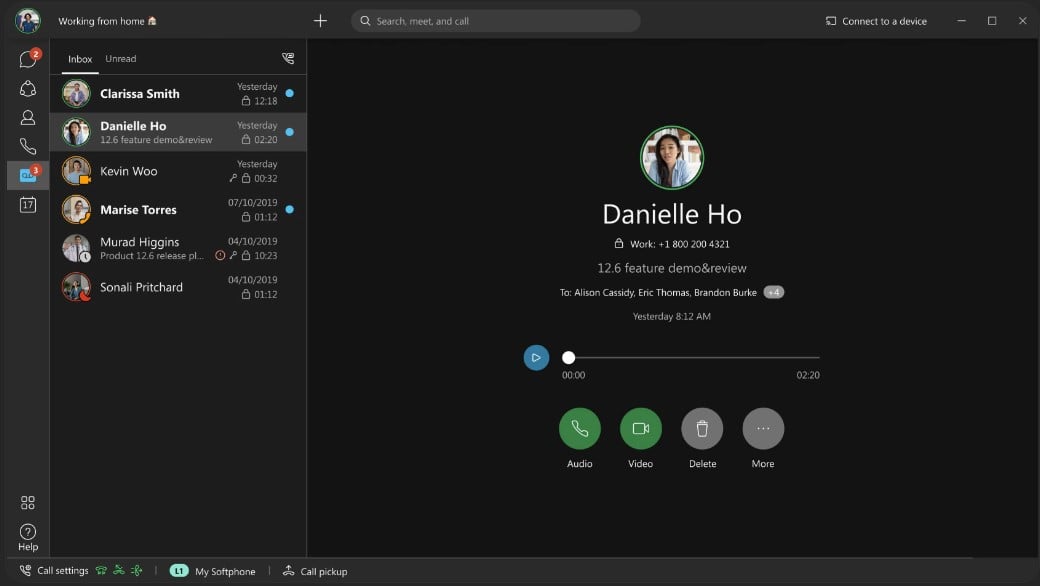
Webex users can make unlimited local and domestic long-distance calls while international long-distance calls are billed by the minute. Webex’s free Basic plan gives unlimited calling to anyone with a Webex account. Microsoft Teams similarly allows users to call other Teams users with any plan.
On a call, use one click to merge calls, initiate an audio conferencing call, place on hold, transfer, forward, or set Do Not Disturb mode.
Webex and Teams offer call management features such as:
- Voicemail with transcription: Set up a business voicemail, create a custom message, and access virtual voicemail logs with transcriptions and one-click callback
- Call queues: assign queues, extensions, or agent/ring groups to direct incoming calls
- Auto attendants/IVR: Create a self-service IVR menu to route incoming callers to the right destination via DTMF. Using text-to-voice or a recorded message, give customers up to 9 routing options.
- Channel and device flip: Switch calls seamlessly between desktop/mobile devices and channels like video, VoIP telephony, and chat
- Integrated address book: Share a company-wide address book
- Call barge: Admins can listen in on active calls, join them with call barge/call takeover, or coach the agent without the customer hearing via call whisper
- Call parking: Places a call on hold and generates a retrieval code that a new agent uses to take over the call
- Call queuing: Create a call queue for customers to wait for an available agent
- Call management features: Call transfer, forward, hold, do not disturb
- Ring groups: Custom agent groups that simultaneously receive an inbound call with round-robin, one-at-a-time, or longest-idle call routing strategies
Webex Contact Center supports omnichannel interactions including voice, email, webchat, SMS, and social media as well as AI-driven routing, AI-powered virtual agents, real-time agent coaching, and more. Teams does not offer a native contact center platform but users can integrate with a third party solution or utilize Teams APIs to build a more custom contact center solution. Major certified partners include Genesys, NICE CXone, Five9, and Avaya.
Webex vs. Teams Messaging and Collaboration Features
Summary: Both platforms offer robust collaboration hubs but Teams excels in depth and formatting options for messaging, while Webex has a cleaner interface. Teams also shines when it comes to document collaboration thanks to real-time co-authoring capabilities in Word, Excel, PowerPoint, etc. Teams and Webex both support bots and automated assistants, but Teams is more accessible to non-developers while Webex has a simpler approach to external collaboration than Teams.
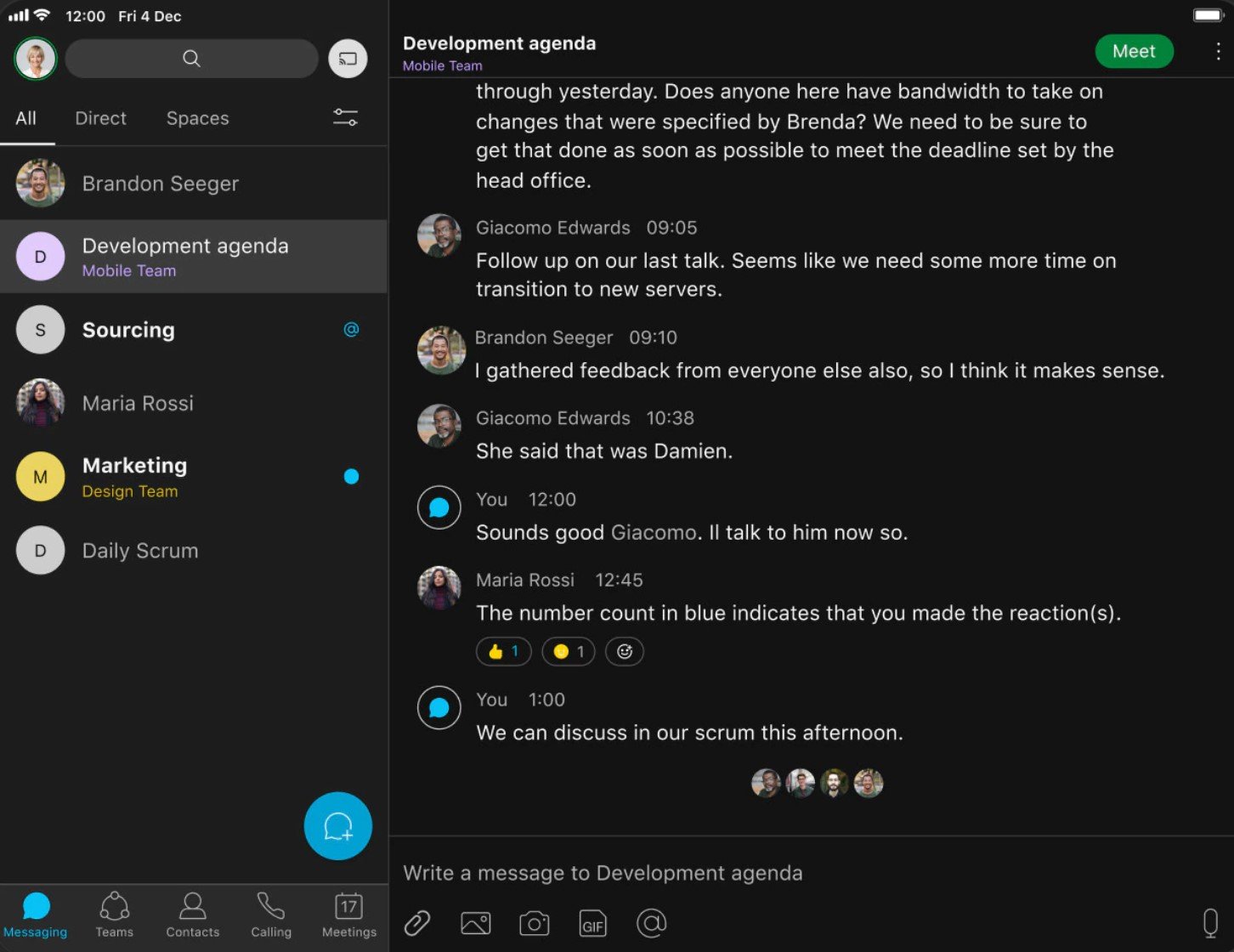
Webex Chat enables teams to initiate 1:1 and group message threads in channels called Spaces. Users can add internal or external parties, share files, react with emojis, share GIFs and media, grant guest access, and send voice messages.
In Spaces, users can share online meeting agendas, prepare presentation documents, or organize an into-through-beyond hub for a major event. Schedule impromptu meetings from a calendar within Spaces, where meeting transcripts, notes, and recordings are compiled afterward.
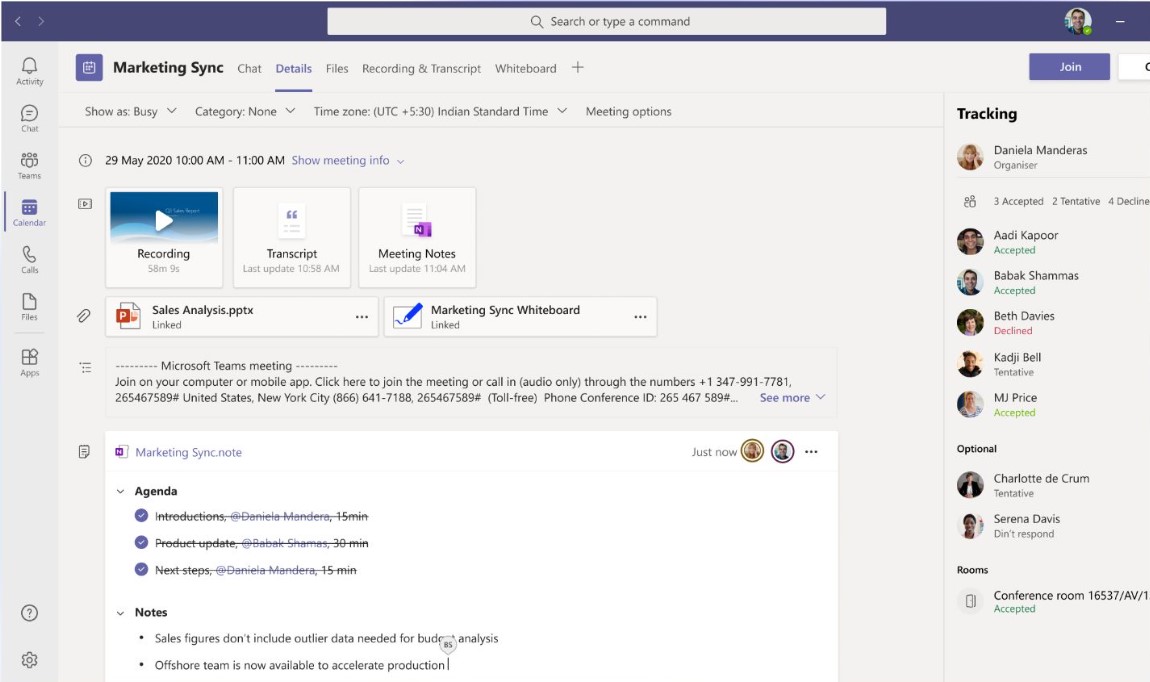
In Teams, users chat in channels, send 1:1 messages, and organize into teams based on location or department. Within each team, users create unlimited channels–ongoing conversations where groups can discuss projects or meetings, and share files.
The Activity tab notifies users about new activity across channels–conversation replies and mentions, reactions, missed calls, and voicemails.
Users can jump from chat to video call or voice call with one click, or pop out the conversation to overlay it on other tabs, but some find the Teams interface a bit cluttered.
With Microsoft SharePoint and OneDrive embedded into Teams, use Teams chat to share and simultaneously collaborate on documents within Microsoft apps like Word, Excel, and PowerPoint.
Both Teams and Webex offer whiteboard capabilities with sticky notes, drawing, shapes, text, images, etc. A key strength of Webex whiteboards is that they persist after meetings and can be accessed in subsequent session.
Both platforms maintain full message history that is searchable, but Microsoft Teams seach tool is slightly more powerful with the ability to search across messages, files, people, and channels.
Webex vs. Teams Analytics and Administrative Tools
Summary: Both platforms offer powerful administrative and analytics tools, but Teams spreads administrative functionality across multiple portals, while Webex consolidates everything in the Control Hub. Microsoft Teams Entra ID is better for complex enterprise identity scenarios while Webex has better out-of-the-box analytics presentation. Teams offers better workforce-level people analytics, but this requires an extra license from Viva Insights. Teams offers more powerful custom analytics with Power BI.
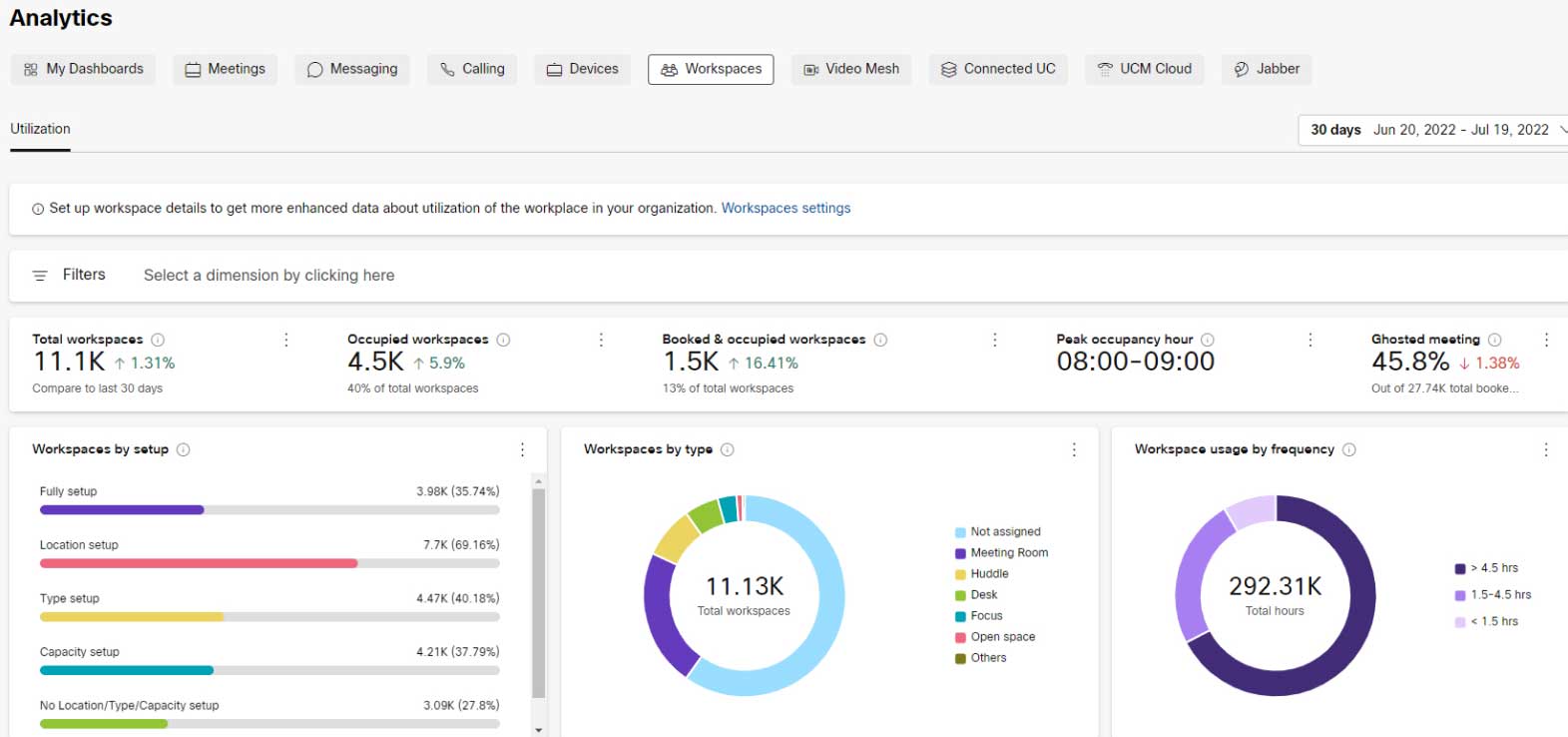
Microsoft Teams administration is mainly handled through the Microsoft Teams Admin Center, but full administration over the entire Microsoft 365 environment requires multiple tools including Microsoft 365 Admin Center, Entra ID (formerly Azure Active Directory), Sharepoint Admin Center (for file storage), Exchange Admin Center (for email and calendar management) and the Microsoft Purview compliance portal (for data governance).
Webex, conversely, consolidates user management, device management, meeting configuration, calling settings, security policies, and more onto the Webex Control Hub.
Both platforms offer usage reporting across meetings, calling, messaging, and devices, as well as real-time quality data, compliance, system health monitoring, and custom analytics.
Microsoft Teams uniquely enables users to export data into Power BI, a program that lets users build fully custom dashboards and reports with virtually unlimited possibilities.
Webex vs Microsoft Teams: User Experience
Summary: Webex users appreciate the audio functionality in the platform’s meetings but wish it offered more calling features in the standard plans. Microsoft Teams users love the Microsoft Office collaboration, but don’t like having to purchase a separate calling plan.
Webex Pros
- Clear voice sounds in meetings
- Easy to invite users to meetings
- Live streaming on third-party social media apps
Webex Cons
- Critical features (call queues, call recording with cloud storage, voicemail-to-email) only offered in Enterprise plan
- Storing meetings requires a lot of memory space
- More expensive than some competitors
Microsoft Teams Pros
- Can collaborate on Microsoft Office documents
- Diverse chat formatting options
- Very affordable video and chat plans
Microsoft Teams Cons
- Must purchase a phone plan separately
- Without a strong internet connection, the app lags
- Many of the built-in apps are confusingly similar

