
Virtual call centers pose strong alternatives to traditional contact centers, offering businesses wider flexibility, cut costs, and direct lines to global talent ready to serve your needs now.
Whether you're a startup looking to establish your first customer service experience or an established player wishing to commit to a transition away from physical call centers, you need to arm yourself with knowledge about these game-changing tools before you make informed decisions about your customer communication playbook.
- What Is It?
- Virtual vs. Traditional
- Types of Virtual Call Centers
- Benefits
- Must-Have Features
- Other Considerations
- How to Start One
- Costs
- FAQs
What Is a Virtual Call Center?
A virtual call center runs very similarly to a traditional call center, sharing core functionalities (like handling customer interactions at scale), but it relies upon cloud-based software and Voice over Internet Protocol (VoIP) tech without the limitations of physical office spaces. Rather than working from cubicles, your agents jack in from anywhere with a strong and speedy internet connection, whether it's a home office or even during travel.
Supervisors can spot-check team performance and keep quality standards high via surveilling built-in digital tools ranging from call recording to real-time sentiment analysis and even provide live coaching features. A virtual call center offers a centralized cloud platform that folds in all communication channels (voice calls, live chat, SMS, and socials) on top of your analytics dashboards and CRM integrations. This creates a workspace working in lockstep where agents tackle all sorts of customer interactions sans the need to switch through applications.
The cloud infrastructure gives you full coverage as all the tech traditionally housed in server rooms is instead maintained through a software provider. This generously allows businesses enterprise-grade services without the enterprise-level infrastructure spending. Updates, security patches, and all the new bells and whistles deploy automatically, assuring that the system stays current without requiring IT to step in or causing wasteful downtime.
Virtual Call Center vs. Traditional Call Center
Both virtual and traditional call centers work at managing customer communication at scale, but take different pathways when it comes to location requirements, technology, scalability, and equipment demands. Gripping these differences allows businesses to determine which model rings most true to your organization's own operational and growth goals.
Location Differences
Virtual call centers extinguish the need for a physical office dedicated to customer service. Agents can work remotely from their own locations, working in different cities and even countries. Traditional call centers, instead, require a singular physical space where all agents report for duty, complete with stocked desks, completed conference rooms, break spaces, and infrastructure to support potentially hundreds of employees in one place for extended times.
Recruitment and Workforce Reach
The geographic reach virtual centers possess opens up hiring on a global scale, changing how companies constitute and create their customer service teams. Instead of posting a job and hoping qualified candidates are local, you can recruit the top-tier talent you deserve, regardless of their locale. Here are some facets to look at:
- Global talent access: Hire specialists with niche skills, rare language combinations, or deep industry expertise from anywhere in the world
- Regional presence: Place agents in the same time zones and cultural contexts as your customers for more authentic interactions
- Diverse perspectives: Build teams that reflect your customer base rather than just your headquarters location
- Competitive advantage: Access labor markets where top talent may be underutilized or more affordable
Traditional centers remain limited by geography, limiting their hiring to candidates who can commute to the physical location within a reasonable timeframe or are willing to relocate great distances fast.
Telephony Technology
Virtual call centers take full advantage of trusty VoIP and cloud telephony systems that route calls over the internet, providing coverage, features that traditional systems lack, and easy integration with business tools.
Traditional centers have historically been chained to analog Public Switched Telephone Network (PSTN) lines, but the time has come to modernize with carriers working hard to phase out legacy systems. The transition away from PSTN infrastructure is accelerating, making cloud-based telephony increasingly necessary even for centers wishing to remain physical hubs.
Equipment Requirements
Leveraging your virtual call center is a snap due to the minimal hardware investment required to get in. Your team just needs computers, quality headsets with a microphone, and reliable internet connections (things they can bring on their own or already have). Traditional centers require extensive infrastructure, like dedicated phone lines for each desk, pricy desk phones, niche telephone jacks, server equipment, PBX systems, and office furniture.
Supervision and Management
Consistent and active monitoring of agent performance in virtual environments can be conducted solely via digital tools. You will want unprecedented visibility into call quality and customer satisfaction. Virtual call centers encourage and allow for supervisors to coach and support teams, moving from basic floor crawls to proactive, data-rich guidance.
- Live call monitoring: Listen in on calls without being physically present, observing agent technique and customer sentiment as they happen and steer when needed
- Automated quality scoring: AI rates calls against your criteria, flagging for killer performances and improvement areas that need fine-tuning
- Sentiment analysis: Detect customer emotion instantly, alerting supervisors when frustration levels rise to catastrophic levels
- Whisper coaching: Provide real-time guidance that only the agent hears, helping them navigate difficult situations without the customer knowing
Traditional centers rely on antiquated techniques like physical floor supervision, where managers roam the space, observe conversations firsthand, and pull agents aside for feedback. This approach works a-ok for in-person oversight, but doesn't scale well and wastes quite some time.
Technology Integration
Cloud call center providers will take on core duties like infrastructure maintenance, security updates, and feature rollout should you opt for virtual call centers. This makes deploying improvements across your customer base consistent and smooth.
Traditional centers face a different outcome: upgrading systems requires coordinating with vendors for physical installation, scheduling downtime windows when the call center is down for unknown and inconvenient time windows, and keeping your daily operations regular while technicians work on-site.
Scalability and Flexibility
Adding or removing agents in a virtual call center is as simple as adjusting your subscription and sending login credentials. This is just minutes out of a day. Scaling a traditional center requires securing additional office space, ordering and installing new phone equipment, setting up workstations, and onboarding people into a physical facility. This process can mean weeks or months of dead time and can cost you in unexpected ways across the board.
Types of Virtual Call Centers
Virtual call centers take the center stage in three distinct operational models: inbound centers to combat incoming customer requests, outbound centers to outreach toward prospects, and hybrid centers that house both methodologies under one roof.
Inbound Virtual Call Centers
Inbound operations center on intake and response to customer-initiated communications. These centers handle service inquiries, think of people who just need help with products or services. This also encompasses technical support calls that troubleshoot problems and provide solutions.
On top of that, these inbound virtual call centers maintain order management systems, not limited to reservation and booking systems for appointments, payment processing, billing questions, and even inbound sales, where customers can call to purchase things from you. The emphasis is on availability, quick response times, and resolving issues efficiently to maintain customer satisfaction.
Outbound Virtual Call Centers
Outbound centers take the lead when it comes to reaching out to customers or prospects. Imagine cold calling to generate new business opportunities. Think of prospecting to qualify leads and build sales pipelines. These call centers do the diligence of conducting customer surveys to gather feedback, running telemarketing campaigns to push products.
Success in outbound operations depends on persistence, persuasive communication, and efficient list management. These systems can even set appointments for your sales teams or service providers and conduct market research to parse together profiles on consumer preferences and competitively position you as a leader.
Hybrid Virtual Call Centers
Hybrid models take the best of these inbound and outbound capabilities, giving businesses flexibility to handle both customer service and proactive outreach. Mid-size businesses that need support infrastructure to handle customer questions but still plan on running campaigns to drive sales tend to be the best fit for this model. Under this model, agents might spend some time answering support tickets and other periods of the day making follow-up outreach, maximizing productivity by keeping things running on either side of the aisle.
Benefits of a Virtual Call Center
Transitioning to a virtual call center means quick wins like better customer experiences, cost savings, wider work flexibility, and cutting down on costly turnovers that could be avoided. Here's the gamut of benefits you unlock:
Improved Customer Experience
Virtual platforms create opportunities to serve customers in ways that traditional call centers cannot do. 43% of customers said that poor customer service experience discouraged them from buying from a brand again.[*] Virtual call centers prevent that curt rejection in these ways:
- Multi-language support: Hire native speakers in different regions to serve customers in their preferred language with cultural fluency and care
- 24/7 coverage: Staff agents across the world so someone is always ready without forcing overnight shifts
- CRM-based personalization: Agents see complete customer history the moment a call arrives, enabling tailored conversations
- Intelligent routing: Direct calls to specialists based on issue type, customer value, or agent expertise for faster resolution
- Reduced wait times: Scale staffing dynamically to match demand patterns, minimizing queue times during peak periods
Cost Savings
Operating expenses plummet when you let go of physical office leases and equipment costs and just let the provider handle infrastructure maintenance. The financial advantages compound over time, particularly when it comes time to scale up. Here's a quick hit list of cost savings you might be missing out on:
- No facility costs: Eliminate rent, utilities, office furniture, and building maintenance expenses that traditional centers require
- Reduced IT overhead: Cloud providers take the mantle of keeping updates, security patches, and system maintenance running all the while not requiring in-house technical staff to overtax themselves
- Minimal hardware investment: Agents need only laptops and headsets rather than desk phones, server equipment, and potentially frivolous telecommunications infrastructure
- Workflow automation: Software takes the lead on call logging, data entry, and routine follow-ups that previously required oversight manually
Studies show that businesses that use virtual call centers see killer cost reductions up to 30% compared to traditional call center operations, freeing up budget for other improvements.[*]
Greater Flexibility
The ability to work from home or just about anywhere is key to creating agility that traditional models can't dare to match or envision. This flexibility benefits everyone involved, from agents to customers to the business’s health and capacity to serve. Here's how:
- Work from anywhere: Agents connect from home offices or while traveling, making commutes feel prehistoric
- Dynamic scheduling: Workforce management integrations account for agent preferences and availability, making shift planning less combative
- Time zone coverage: Operate seamlessly across regions without requiring graveyard shifts or impeding workers' personal schedule commitments
- Market expansion: Enter new geographic markets without establishing physical offices or infrastructure
- Demand responsiveness: Scale capacity up or down quickly in response to seasonal patterns or unexpected volume spikes
Employee Satisfaction
The remote work flexibility that virtual centers provide leads to higher employee satisfaction scores across the industry. 65% of remote workers said they were “extremely satisfied” with their jobs, compared to just 34% of office-based employees.[*]
Facets like transparent scheduling grants agents control over their work-life balance, and live coaching tools urge them to step up their game without the embarrassment of public feedback. Think about the reduced commute stress as they get back hours of lost time and expenses related to travel.
The picture is clear: overall work-life balance improves when people can integrate their personal responsibilities with their professional obligations.
Increased Scalability
Need to add 50 agents for a seasonal rush? With virtual call centers, you can provision accounts and onboard remote workers in days rather than months. The same applies to adding features like SMS support or social media channels (typically just as toggles in your admin panel for absolute ease and convenience).
Expanding internationally means acquiring local phone numbers and hiring in-region agents. The days of expensive requirements to establish foreign offices are over. Businesses have even deployed entirely new call centers in different countries within weeks to support product launches.
Greater Productivity
It's clear that the best virtual call center platforms incorporate healthy amounts of automation that make agents all the wiser and just overall more effective at their jobs. Technology handles the routine tasks, freeing humans to focus on the complex problem-solving and emotional support that customers actually value.
- AI productivity boots: Real-time tools suggest responses, surface relevant knowledge base articles, and provide coaching during calls
- IVR self-service: Interactive systems handle routine requests like balance inquiries or appointment confirmations without agent involvement
- Virtual assistants: Chatbots manage simple questions, escalating only when human judgment becomes necessary
- Knowledge base integration: Agents access answers instantly without putting customers on hold to consult supervisors
- Automatic call logging: Systems record outcomes, categorize issues, and update CRM records without manual data entry
Agents spend more time helping customers and less time on administrative work, which improves both productivity metrics and job satisfaction. Tools like AI improve employee productivity by a healthy 66% across a range of studies.[*]
Broader Market Reach
Accessing global talent pools means finding agents with specialized skills, language capabilities, or industry knowledge, regardless of location. Hiring agents in multiple regions provides an authentic local presence for international customers, and coverage across time zones means someone is always available when customers need help (even on “dead hours”).
Reduced Turnover
Employee retention improves when you offer the flexibility and work arrangements that modern workers prefer. The ability to work remotely is now a top consideration for job seekers. Just 19% of applicants noted they wanted a strictly in-office job, the majority wanted some form of remote work built into their daily commitments and responsibilities.[*]
Companies that embrace this see lower turnover rates, reduced recruiting costs, and more experienced teams that deliver better customer outcomes. Turnover costs the average business $36,723 annually.[*]
Must-Have Features of Virtual Call Center Software
When scoping out your virtual call center options, some features just clinch necessity and possess that "it factor" regardless of your industry, size, or specific use case. Prioritizing these means you're actively looking for the best avenues of improvement:
Call Queues

Meaningful and context-savvy call queue management keeps customers informed while they wait, displaying wait times and position in line. A superior system is one that allows customers to receive a callback rather than waste time just holding, preserving placement to liberate some time for them and you. Queue analytics spot out the peak periods and let you staff accordingly, preventing wait times that just spook customers away and inflate abandonment rates.
IVR (Interactive Voice Response)
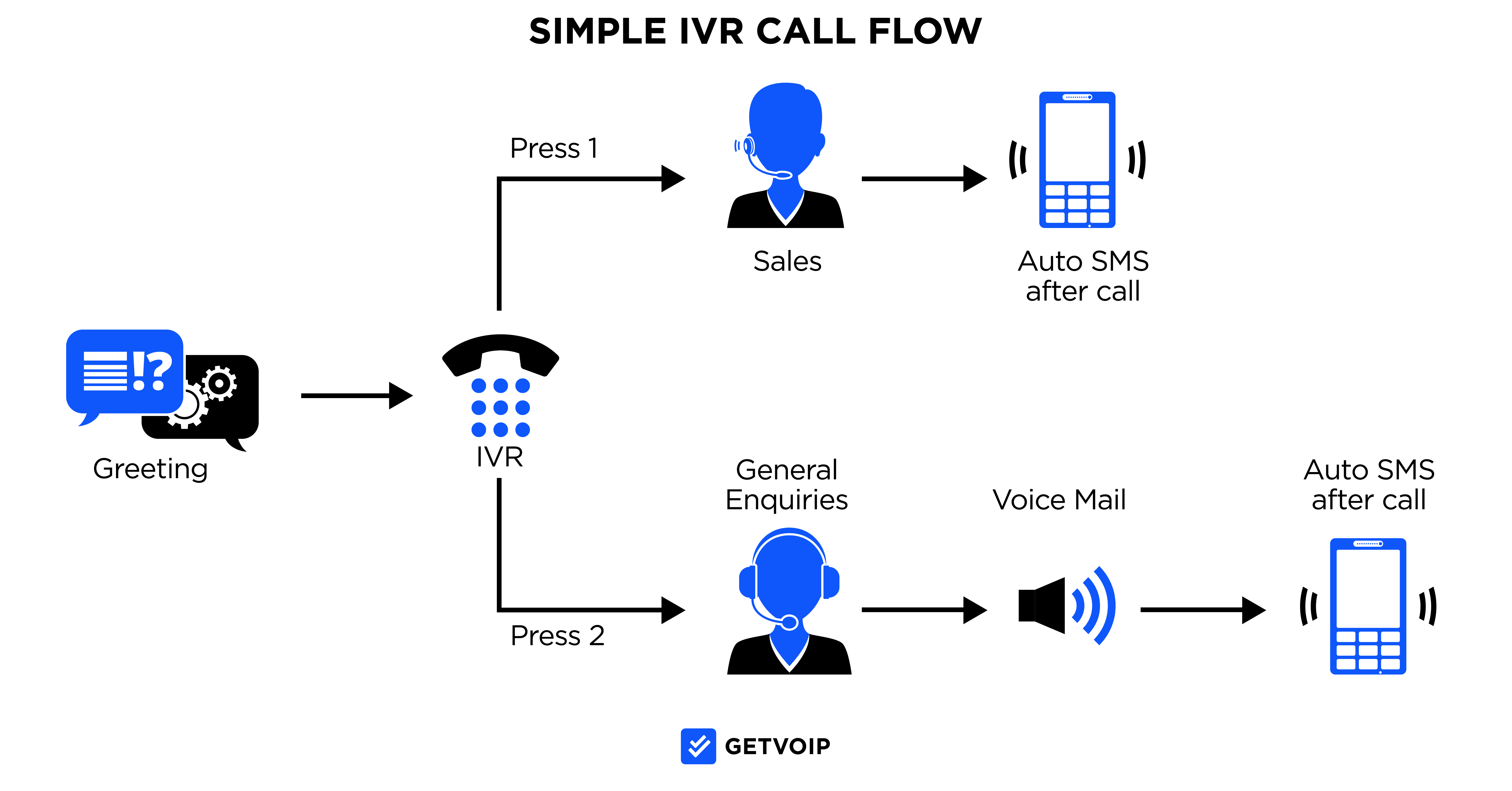
A truly productive IVR system does more than route calls; it takes the extra leap and provides an array of self-service options, like allowing customers to just check account balances, make payments, or get basic answers without a single human agent picking up.
Furthermore, it should integrate with your CRM and provide personalized greetings. Most importantly, it should route based on customer history, priority level, or previous interactions. Your endgame is a faster resolution for simple requests, and agent time being redirected towards complex issues.
Call Monitoring and Recording
Supervisors must access and assess live calls for coaching opportunities. Recorded calls run point in many ways: training new agents with actual lived-in examples, conducting quality assurance (QA) reviews, resolving disputes about what was said, and fortifying your compliance to and with regulatory requirements.
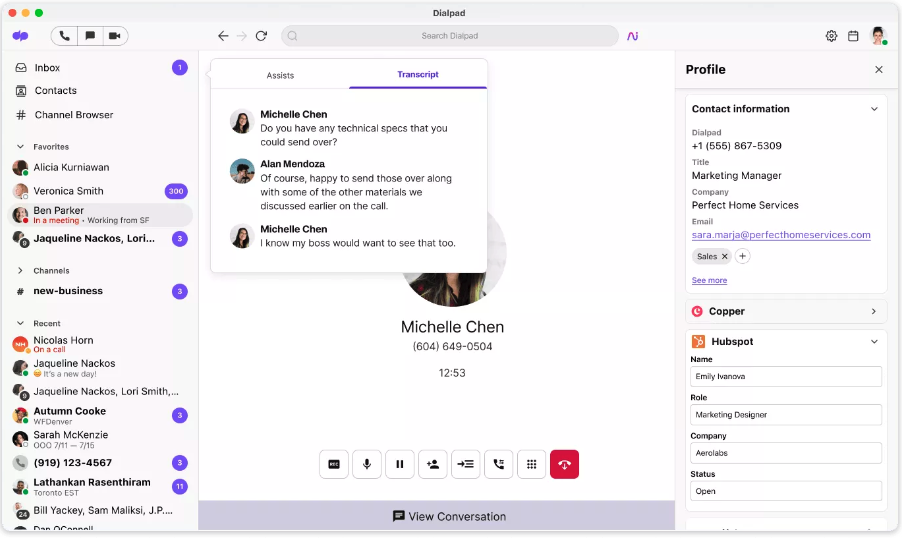
The best platforms are those that are built with smart features like being able to just search recordings by agent, customer, or outcome, reforming your call archive into an irreplaceable and unimpeachable resource for continuous improvement.
Analytics & Reporting
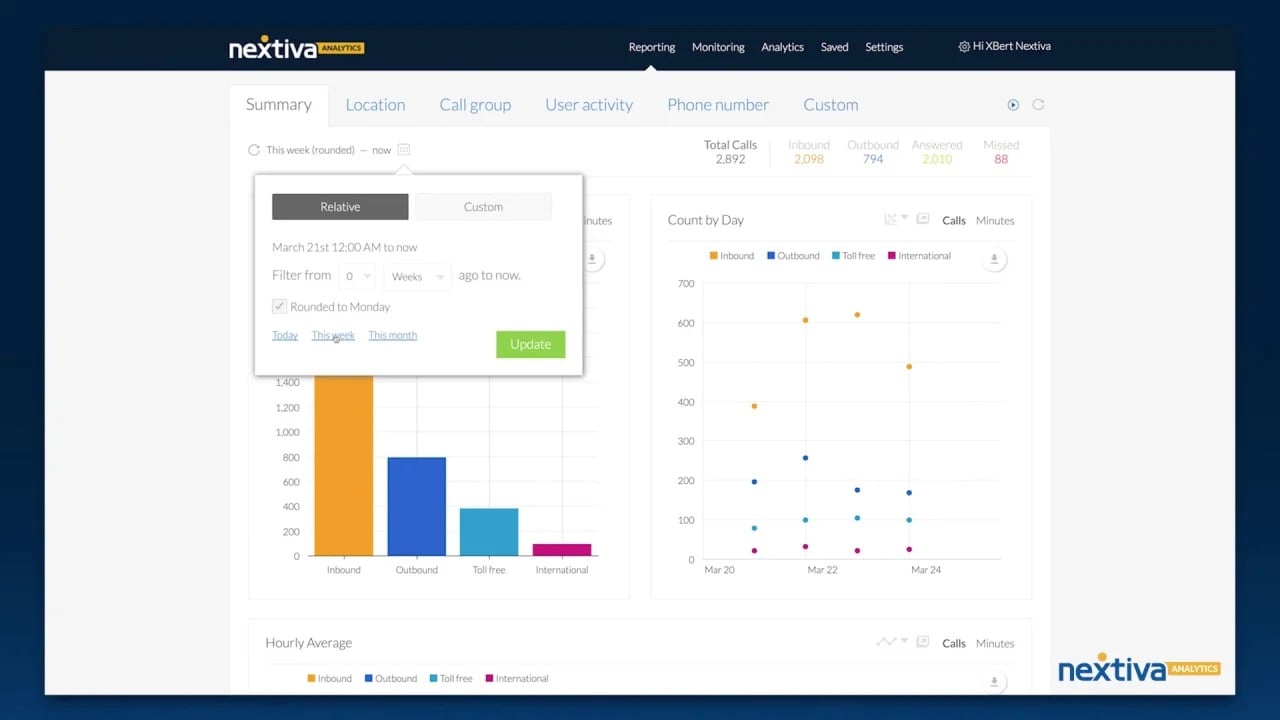
Real-time dashboards show what's actively most important right now (amount of calls waiting, average handle times, and agent availability), allowing supervisors to make staffing adjustments in a pinch, not reactively. Historical reports reveal trends over time periods you see most crucially which makes identifying patterns in call volume, common issues, and performance metrics child's play.
Key performance indicators (KPIs) like first-call resolution, customer satisfaction scores, and service level attainment give you objective measures of success and areas needing attention.
CRM Integrations
Plugging in your virtual call center to your CRM creates a unified engine of truth and support using your customers' data. The integration works behind the scenes to strengthen and embolden your agents with information they need at the right time, always. Here's how:
- Complete visibility: Agents see full interaction history the moment a call arrives, including previous tickets, purchase history, and notes from colleagues
- Automatic logging: Calls are recorded with notes and outcomes, eliminating manual data entry and ensuring nothing falls through the cracks
- Workflow triggers: Actions smartly fire based on call outcomes (creating follow-up tasks, sending confirmation emails, or escalating unresolved issues)
- Data synchronization: Changes made during calls update the CRM instantly, keeping all systems aligned
Omnichannel Communication
Customers might actively avoid phone calls nowadays and your platform needs to be prepared to meet them on their preferred platform before they leave you for someone who plays ball on their court. 73% of customers identify as omnichannel users who are prone to fly from platform to platform during one interaction.[*]
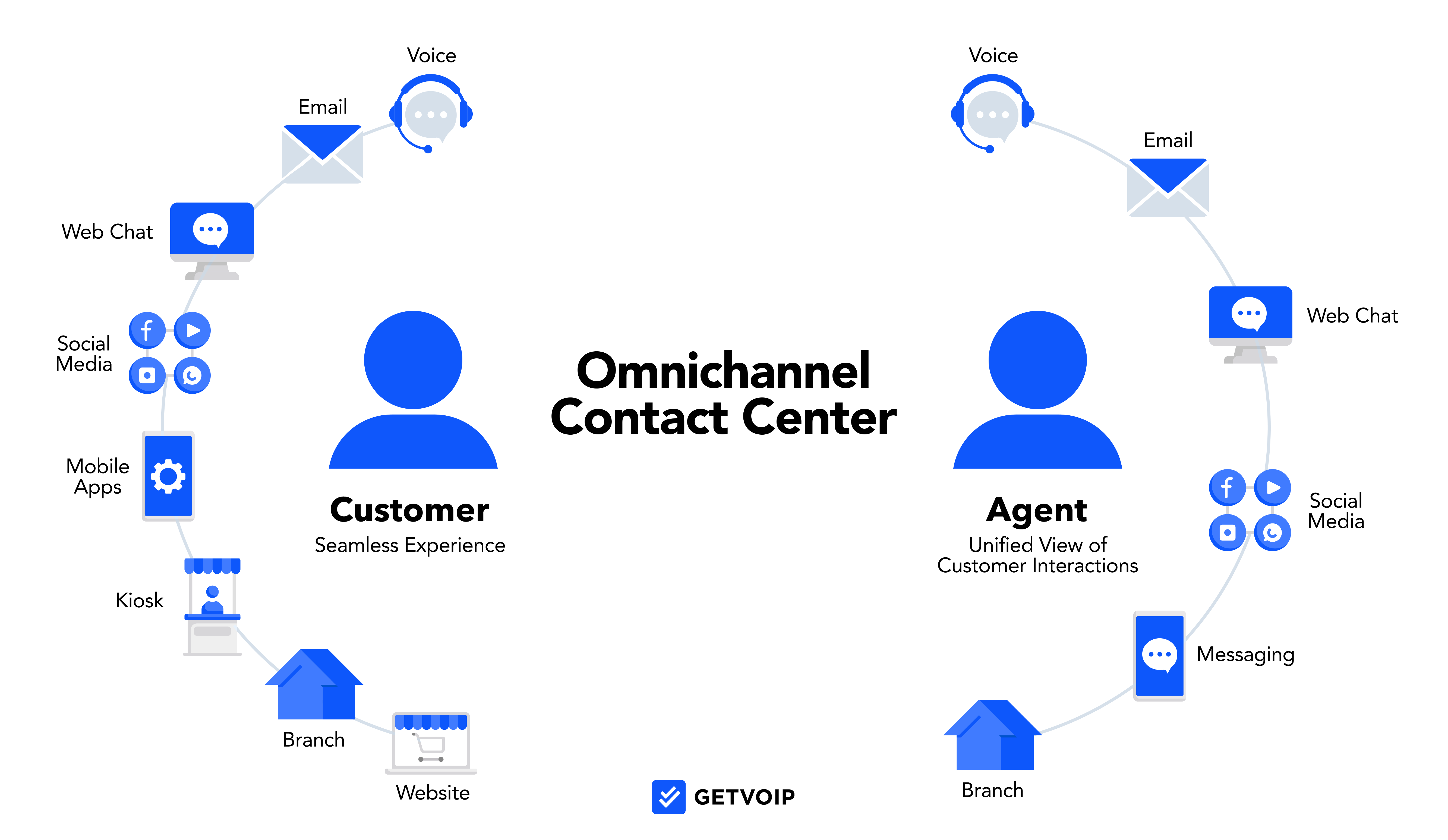
Handling voice, live chat, SMS, social media messages, and email within a unified interface means agents can elevate interactions by leveraging multiple channels without jumping to different tools. Conversations that start on one channel can seamlessly continue on another, with full context intact all around.
Unified Communications
Beyond customer-facing channels, your team needs internal communication tools too. Virtual call centers employ built-in messaging for quick questions and verification before action between agents, video capabilities for team meetings or screen sharing during collaborative problem-solving.
An underrated must-have in collaboration features are shared notes or knowledge articles as these form a more centralized tone to your call center platform rather than settling for a scattered and confused vibe across separate applications.
AI-Powered Features
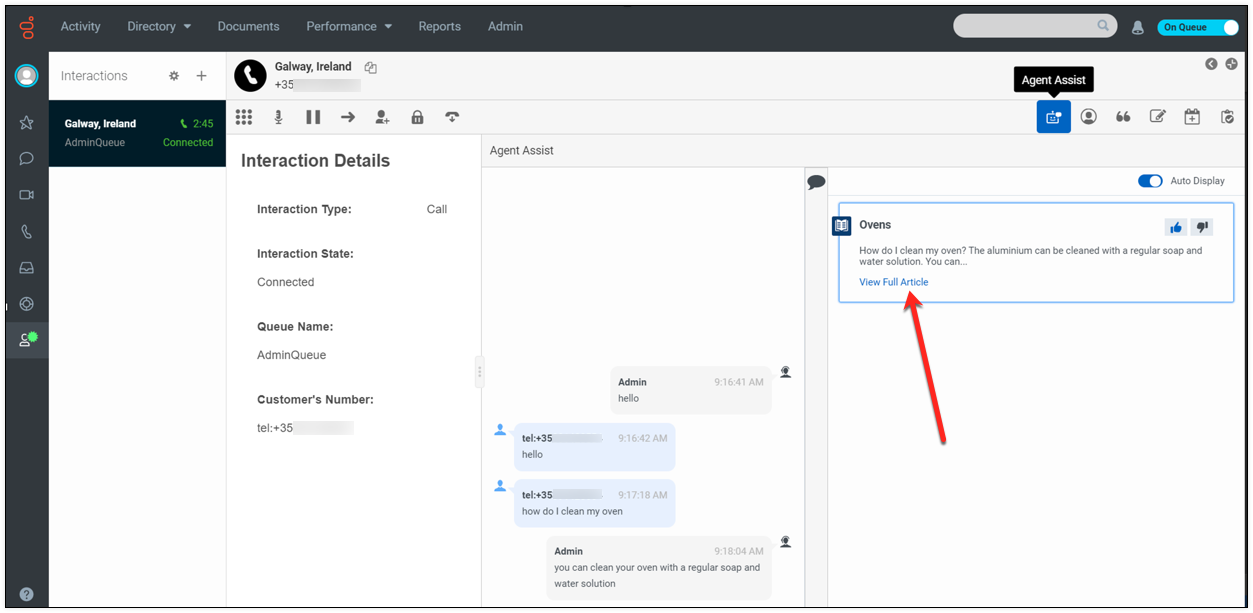
Artificial intelligence is no longer some fictional plot device in a movie like Skynet, nowadays it’s a practical tool used and seen just about everywhere. It's especially the case with modern call centers, augmenting human agents rather than terminating their jobs. These capabilities work tirelessly and without any true complaint to make every interaction smoother and that much more smart:
- Real-time coaching: The system listens to conversations and prompts agents with relevant information or suggestions at exactly the right moment
- Sentiment analysis: Detect customer frustration or satisfaction early so agents can adjust their approach before small issues escalate
- Conversation intelligence: Identify trends and patterns across thousands of calls, revealing insights no human could spot manually
- Automated summaries: Generate accurate post-call notes without manual typing, freeing agents to move immediately to the next interaction
Other Considerations When Choosing a Virtual Call Center Provider
Beyond the bare necessities, we have to look at other big ticket items to see whether a platform will truly meet your needs and provide a wholesome and encompassing experience for both customers and employees, here are a few core considerations we wanted you to ponder on:
Pricing and Transparency
No one wants sticker shock. You've got to look for subscription models with clear per-user pricing so you can easily forecast the price of scaling up when the time comes. The best providers say "no" to hidden fees (surprising charges we found included: call recording storage, international numbers, or premium support that weren't disclosed upfront). Predictable costs are here to make straightforward budgeting your reality and prevent unwelcome surprises on your monthly bill.
Support Availability
When your call center platform goes down, every minute damages customer relationships and burns not just goodwill but your bottom line. Don't get burned by poor service. You're going to want 24/7/365 support availability across phone, chat, and email to get aid whenever issues pop up (and they will).
Comprehensive knowledge bases, community forums, and self-service resources aid your team in troubleshooting common problems on their own, but when you need human assistance, it needs to be there at the drop of a hat from people who can actually crack your case and fast!
Ease of Use
An intuitive user interface reduces training time and focuses agents to become productive quickly. Quick onboarding processes (ideally measured in days rather than weeks) get your call center operational faster. Minimal IT setup requirements mean you're not dependent on specialized technical resources just to make configuration changes or add new users.
The best platforms feel second nature and intuitive even to new or not tech-savvy users and must guide them through setup with clear instructions.
Security Standards
Customer conversations can get pretty confidential very fast. You may be dealing with sensitive information (personal details, payment data, account credentials) that could spell hefty fines and broken trust if leaked. Studies say the average cost of a single data breach is $4.4 million.[*]
End-to-end encryption ensures calls and messages can't be intercepted, identity verification prevents unauthorized access system-wide, and compliance features ensure you hit mission-critical industry regulations (like PCI-DSS for payment processing, HIPAA for healthcare, or GDPR for European customers). Be sure to ask providers about security certifications and how these allow you to attain and maintain compliance.
Integration Capabilities
Your call center is not some repository that stands alone at all times. It needs to connect with your CRM for relevant and targeted customer data, help desk software for ticket management, ecommerce platform for order information, ticketing systems for technical support, and others.
Robust API access and pre-built integrations for popular business software extend the platform's mileage in terms of use and allow you to forge seamless workflows across your entire tech stack.
Call Quality and Reliability
Even the most feature-rich platform is absolutely moot if calls regularly drop, audio quality is subpar or just awful, or the system goes offline way too often. Stable audio quality creates professional experiences, minimal downtime means your operations go the distance, and global coverage ensures good connections regardless of where your agents or customers are located. Check provider carrier-grade uptime guarantees (we recommend you look for 99.9% or better) and read reviews specifically addressing reliability.
How to Start a Virtual Call Center
Getting your virtual call center off the ground takes genuine time and effort, but, when executed properly, can have you operational within weeks. Following a measured and repeatable approach ensures you don't overlook critical fundamentals and create snafus from bad planning. Here’s how you can do it:
Define the Purpose of Your Call Center
Start by checking in on your own needs. What is it you need? Inbound support to handle customer questions? Or perhaps outbound capabilities for sales and prospecting? Or a hybrid approach combining both? This means considering your customers' needs (actually knowing their problems when they contact you).
Factor in your industry context: a software company often must have 24/7 technical support, while a local service business might only operate during standard business hours, which can be handled entirely through functional appointment scheduling capabilities.
Identify Customer Communication Channels
You have to meet your customers where they want to meet you. Some may just hate phone calls, others might want just emails. Survey your audience or analyze current behavior to understand whether they prefer phone, SMS, email, or live chat.
And definitely consider social media messaging. 30% of customers say they want to see that from you as they're considering using that as their primary path to getting to you.[*] Start with the channels your customers actually use rather than trying to support everything immediately. You can always expand channel coverage as you grow.
Prioritize Features You Need
We recommend you have two lists at the ready: must-have features required for basic daily life and nice-to-have features that would elevate the experience but aren't end-all be-alls. Must-haves could be things like call recording for QA, CRM integration, and basic reporting. Nice-to-haves tend to be things like AI-powered coaching, advanced analytics, or social media integrations. All of which are nice, but not quite the priority for all businesses.
Choose a Virtual Call Center Platform
Armed with your requirements, the onus is now on you to evaluate platforms based on aspects like how well they scale with your growth expectations, which business tools they integrate best with, the overall value in terms of both price and capabilities, and which mission-critical specific tools they offer for your use case.
You should also be sure to request demos from multiple providers to truly see day-to-day efficacy, take the time to get all those pointed questions about limitations out of the way, and consider ensuring you run a small pilot before committing to any sort of contract.
Source Equipment
The hardware requirements are straightforward but important. Each agent needs reliable equipment that won't fail during critical customer conversations.
- Computer: A laptop or desktop capable of running modern web applications smoothly
- Headset: Quality audio equipment with a noise-canceling microphone to ensure clear communication
- Internet: Stable high-speed connection of 10 Mbps or faster for reliable call quality
- Optional accessories: Webcam for video meetings, external monitor for additional screen space, or backup internet connection for redundancy
Most remote workers already own much of this equipment, keeping your initial investment low but be prepared to offer stipends to keep your workers up-to-date and operational.
Hire the Right People
Remote work demands an attitude that might be beyond standard call center skills. Look for self-motivated individuals who get it done without needing too much oversight, strong written and verbal communication skills that resonate with remote-first cultures, they need to navigate through pressure and difficult conversations without handholding from higher-ups.
Most importantly, they must have comfort with your existing technology and most-used software tools. Customer service experience matters, but remote work competency is non-negotiable as you expand and scale.
Build an Onboarding Process
New agents need thorough training on your platform's features and interface, access to a learning management system (LMS) or knowledge base for reference, prepared scripts or talk tracks for common scenarios, and detailed product or service information to answer customer questions.
The best onboarding programs combine self-paced learning with live coaching sessions, gradually increasing complexity as agents demonstrate mastery of fundamental skills.
Track Call Center Metrics
If you're not tracking performance, you're already losing the war on productivity and gaining optimal performance. Understanding starts with tracking the right indicators and watching trends as consistency becomes the north star and improvement becomes the wind in your sails.
Here's some quick hits to look for:
- Average handle time (AHT): Measures the mean amount of time an agent spends on a call–including talk time, hold time, and post-call work like notes and records
- First-call resolution (FCR): Tracks how often an agent can resolve a customer’s query in the first interaction
- Abandonment rate: Shows how many callers hang up while waiting, signaling queue problems
- Customer satisfaction (CSAT): Post-interaction surveys that form a survey-response metric measuring a customer’s contentment with a product or service
- Net Promoter Score (NPS): Indicates your customer’s likelihood of recommending your brand or company to others
- Cost per call: Measures the average cost of each call your business makes
Evaluate and Improve Continuously
You need to conduct regular performance reviews with individual agents and the team. That's a must; check-ins keep people accountable. Additionally, you should be poring over your call recordings to laser in on training opportunities.
Look towards successful techniques worth sharing, gather qualitative feedback from both customers and agents about their experiences, and adjust processes based on what the data reveals. The most successful call centers treat improvement as a marathon and not a sprint towards marginal gains or trend hopping. You are building an engine of growth. Act accordingly.
Cost of Starting a Virtual Call Center
Understanding the potential cost surrounding these virtual call centers helps you budget wisely and steer away from financial surprises as you build and scale your operation. Virtual call centers are cheaper than traditional solutions, but that doesn't mean they're anywhere close to free or negligible.
Software Costs
VoIP subscriptions form the bedrock of your tech spend, with pricing that is ultimately based on chosen features and personal usage patterns. Understanding what you're paying for (and getting) is the key to choosing that right plan and avoiding overspending on useless things you don't need.
Here’s a quick rundown on costs that can accumulate fast if unchecked:
- Base subscription: Typically $20 to $100 per user per month depending on platform tier and included features
- Add-on features: Advanced analytics, AI coaching tools, or sentiment analysis often carry additional per-user fees
- Phone numbers: Local, toll-free, and international numbers cost $5 to $50 per month each
- Usage charges: Some providers charge per-minute fees for calls, particularly for international destinations
- Storage fees: Call recording archives may incur costs beyond included storage limits
Hardware Costs
We suggest you plan for about $500 to $1,500 per agent per laptop or desktop computer, $50 to $200 for a quality headset that lasts, $100 to $300 for additional monitors which for some may be non-negotiable, and potentially security hardware like tokens or authenticators. The latter may be key for systems that demand enhanced access controls. These are chiefly one-time investments, though you'll need to budget for replacement cycles every few years to ensure your operation remains technically capable and modern.
Setup and Onboarding
Initial training costs vary based on whether you develop materials in-house or hire external trainers. Platform configuration might be something you handle yourself or require paid professional services from your provider.
Some businesses say they budget up to $5,000 per agent for comprehensive onboarding programs that run the full gamut: training materials, certification processes, and shadowing periods.
Ongoing Operational Costs
The largest expense is and will always be agent salaries or contractor fees, which will vary dramatically by geography and skill levels. Internet stipends (typically $30 to $100 per month per agent) may be a required thing to dole out to ensure they have reliable connectivity.
Also, don't forget about complementary software like CRM systems, help desk platforms, or workforce management tools that integrate with your call center but require separate subscriptions.
Scaling Costs
As you grow, expect additional costs to ratchet up. You may need international phone numbers in countries where you operate ($5 to $50 per number per month), incremental per-user software fees tend to rise as you add agents, and premium features tend to be locked or gatekept on the higher subscription tiers.
The advantage of virtual call centers is that these costs are incremental (you pay for what you use when you use it) rather than requiring large upfront spending.

