
AI voice agents have advanced to the point they can handle conversations with the empathy and fluency customers can expect from human service agents. They represent systems that don’t just respond to queries but also adapt to emotional cues and comprehend context to resolve issues faster than ever before.
Customer support agents are using generative AI assistance to raise their productivity by up to 14% on average, squaring away the smaller tasks for more complex and human judgment-demanding tasks.[*] On the other hand, AI voice agents are bridging the gap between opportunity cost and recovering lost profit. 85% of customers who reach voicemail will not call you back; in just the home service sector, a lost call can represent up to $1,200 in lost revenue.[*]
AI voice agents are the solution, ensuring calls do not go unanswered while allowing your human agents to center their efforts and know-how towards situations that need their expertise and empathy. We’ve created this guide to assist you in navigating options, seeing how the tech works, and considerations to make before taking your first leap into this groundbreaking revolution.
How We Evaluated + Tested AI Voice Agents
Our team looked into the leading providers and platforms in the AI voice agent space, putting each through a rigorous examination process that mirrored potential real-world scenarios your business could face. We looked into call handling accuracy, AI voice analytics, natural language processing, pricing transparency, voice quality, and how it integrated with leading business tools. We also determined how each fared in terms of respective security protocols, support documentation quality, and uptime reliability.
Here’s what we paid extra attention to:
- Pricing Structure and Transparency: We looked into each provider and their pricing model, extra attention was given to per-minute charges versus subscriptions, hidden fees, and how scalable each one was for smaller businesses versus enterprises. We also checked who offered a free trial (few did) and what limits came with those trials
- AI Functionalities and Language Processing: We examined how each platform fared when it came to complex queries, how many languages were supported, how well they maintained context in conversations, and how they handled interruptions. On top of that, we checked for response accuracy, how the system “learns” from interactions, and conversational flow (including common human patterns like adding “uh” and “um” mid-conversation
- Voice Quality and User Experience: We evaluated how natural voices sounded, how clear they were against different connection types, latency, and the ability for the system to recognize dialects and accents. Other aspects we noted were overall caller experience, hold music, error handling, and transfer protocols
- Call Management Features: We checked for the appointment scheduling accuracy, how logical the call routing was, whether messages taken down were right, and protocols for escalation when human help was absolutely necessary
- Analytics and Reporting: We looked into the depth of call analytics, how well conversation summaries noted things, the actionable insights generated, and accessibility into performance metrics widely recognized and used in reporting
- Setup and Customization: We measured the exact time to deployment, how flexible the workflows and custom responses could be, whether or not a learning curve existed for your less tech-savvy users, and how quickly the AI could pick up on your industry-specific terminology and language
- Integration Ecosystems and Range: We evaluated whether each platform could link to popular CRM systems (think Zoho, Hubspot, or Salesforce), phone systems (Twilio, RingCentral, etc.), and other business software (like calendar applications). We also saw if API documentation was developer-friendly and if proprietary systems could play nice with them
- Support and Reliability: We checked each provider’s service level agreements, backup systems for peak usage times, their respective historical uptime data, and how well customer support was on an omnichannel-level. Extra care was taken into the quality of onboarding and materials as well as any documentation on a technical level
Top AI Voice Agents Compared
Here's a quick overview into how the leading AI voice agent platforms stack up across key criteria:
| Provider | Best For | Starting Price | Voice Quality | Integration Depth | Setup Complexity |
| Sierra | Enterprise customer experience | Custom pricing (outcome-based model) | Excellent | Deep CRM integration | Moderate |
| Cresta | Real-time agent assistance | Custom pricing | Excellent | Strong | Complex |
| Regal | Sales and outbound calling | Custom pricing | Very Good | Moderate | Moderate |
| Retell | Developers and custom builds | $0.07+/min | Very Good | Extensive API | Technical |
| Decagon | Support ticket automation | Custom pricing | Good | Deep helpdesk integration | Moderate |
| PolyAI | Complex call center operations | Custom pricing on a per-minute basis | Excellent | Strong | Complex |
| Synthflow | No-code automation | Plans from $29-$1,250/month | Good | Moderate | Easy |
| Bland.ai | High-volume calling | $0.09/min (only active call time is counted) | Very Good | Basic | Easy |
Sierra

Sierra is an enterprise-grade solution to AI customer service that shares DNA with Salesforce (they came from a shared co-founder). It is a solution that I discovered is more concerned with conversational experiences that feel truly human as it's built with world-class natural language processing techniques. The use of NLP allows it to have nuance, emotion, and a rich multi-turn conversational flow that integrates deeply with customer data systems. I experienced personalization as its key distinguishing feature where customer history, preferences, and past issues form a tapestry of information to build interactions from.
I observed that Sierra is particularly useful for any industry where customer experience is the key determinant for brand loyalty and affinity. Retail, financial services, and healthcare organizations of all makes and models use Sierra to tackle things like account management and product inquiries. It is a master at processing customer returns, managing subscriptions, and the like. I was impressed that it even handles basic sales conversations with appropriate escalation points to send potential customers to human agents.
Standout Features
- Multi-turn Conversation Memory: Sierra maintains context across complex, lengthy phone conversations, recalling customer details mentioned earlier in the call and referencing them without forcing customers to repeat information
- Emotion Detection and Adaptive Tone: Advanced NLP parses through vocal cues like pitch, pace, and word choice to detect customer frustration or satisfaction, automatically adjusting Sierra's tone and approach to match the emotional context of the conversation
- Dynamic Personalization Engine: Sierra was great at finding customer history, previous interactions, and preferences in real-time during calls, tailoring recommendations based on individual customer profiles rather than generic catchall scripting
- Intelligent Escalation Logic: Sierra recognizes conversation complexity and customer sentiment to determine optimal handoff points to human agents, ensuring seamless transfers with full context passed to the human representative
- Natural Conversation Flow: Unlike rigid IVR workflows, Sierra handles interruptions, tangents, and non-linear conversations delicately, allowing customers to speak without following predetermined menu paths
Pricing
Sierra operates on outcome-based pricing rather than just charging per conversation or minute. When you get a successful business objective done (like a closed sale or a processed return), then and only then will Sierra charge you.
Exact pricing is not publically available per successful interaction, but one should note it is a premium option for the mid-market and enterprise-sized businesses out there looking for the fanciest solution. Expect an annual contract with scalable pricing based on complexity and conversational volume. There is no free trial available at this time.
Integrations
- Salesforce Service Cloud
- Zendesk
- Adobe Experience Cloud
- SAP Customer Experience
- Oracle CX Cloud
- Shopify
- Microsoft Dynamics 365
What We Like
- Enterprise-grade security and compliance: Sierra meets SOC 2 Type II standards and GDPR requirements. Sierra even encrypts data both in transit and at rest while offering granular controls over data retention and access. For healthcare clients, HIPAA-compliant configurations are available.
- Contextual conversation memory: Sierra doesn't treat each interaction as isolated incidents. In multi-turn conversations, the system remembered details from earlier in the call and referenced them naturally. If a customer mentioned they were calling about a previous order, Sierra retrieved that context without requiring an order number.
- Brand voice customization: Sierra has distinct voices for different test scenarios. Sierra doesn't just change the words but rather varies in tone, pacing, and even the level of formality to match brand guidelines. This consistency across thousands of conversations is difficult to achieve with human agents alone.
What We Dislike
- Pricing not clear: Sierra doesn't publish pricing, which means you'll need to go through a sales process to understand costs. For smaller businesses trying to compare options quickly, this may be a non-starter. While the outcome-based model is innovative, it's difficult to budget without understanding how outcomes are defined and measured.
- Complex implementation: Getting Sierra fully operational took longer than simpler platforms. The deep integrations that make it powerful also require significant IT involvement. Companies without dedicated technical resources or existing robust CRM systems may find the setup process overwhelming.
- Overkill for simple use cases: If you need basic appointment scheduling or FAQ handling, Sierra's sophisticated capabilities go largely wasted. The platform is built for complex customer journeys and multi-step problem resolution. Businesses with straightforward needs might find the feature set more than they require.
Best For
- Mid-market to enterprise companies with complex customer service needs: Organizations handling sophisticated customer journeys across multiple touchpoints where conversation context and personalization directly determine retention and lifetime value.
- Brands where customer experience is a primary differentiator: Retail, financial services, and healthcare companies where every customer conversation reflects brand values and maintaining quality at scale separates market leaders from competitors.
- Organizations handling extremely sensitive data: Businesses in regulated industries needing SOC 2, HIPAA, or GDPR compliance with audit trails and data governance that meet the strictest security requirements.
Cresta
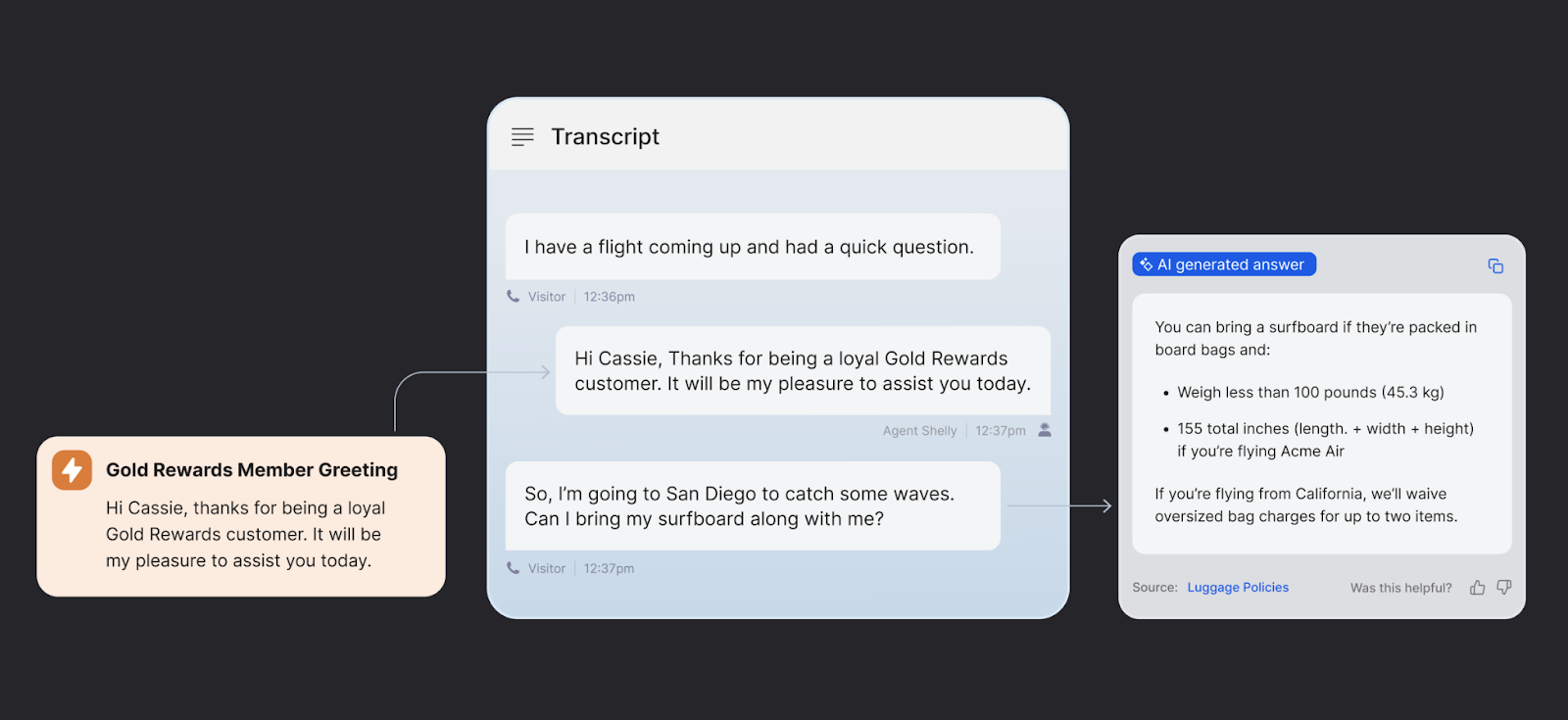
Cresta takes AI voice agents in another direction where the focus and onus is more on real-time agent assistance than outright full-on automation techniques, though it has its own AI agent as well to handle the smaller tasks. I found that Cresta will listen in on live conversations between your customers and your human staff to surface relevant information, flag big issues, and suggest solutions all in the moment. It is an expert supervisor who's there to coach and mentor your agents at a moment's notice across thousands of simultaneous interactions.
I observed that Cresta is great at looking into conversational patterns from your highest performing agents and juicing out what best practices they're coming up with. It distills this information into real-time guidance for your team to replicate at scale. I experienced how Cresta can identify when agents lose out on a potential upsell opportunity or forget to mention an ongoing or relevant promotion. With that in mind, I noticed it was able to generate and suggest recovery strategies that could work into an existing conversation flow. Abilities like that make it a compelling and thrilling experience for newcomers into this space who want to put more shine on their human teams.
Standout Features
- Real-time Agent Coaching: Cresta's AI analyzes live phone conversations as they happen and surfaces contextual suggestions, relevant knowledge base articles, and battle-tested response templates directly to your human team during active calls
- Performance Pattern Analysis: Cresta identifies conversation behaviors and techniques used by top-performing agents, then codifies these best practices into real-time coaching prompts that help all agents replicate successful approaches
- Conversation Intelligence: Advanced speech analytics detect customer sentiment shifts, buying signals, objection patterns, and compliance risks during voice calls, automatically alerting supervisors to conversations requiring immediate intervention
- Automated Quality Assurance: Cresta's proprietary AI evaluates 100% of voice interactions against customizable scorecards, identifying coaching opportunities, compliance violations, and performance trends that manual sampling would miss
- Dynamic Battlecards: Cresta's systems will automatically surfaces competitor comparisons, pricing objection responses, and product feature explanations based on what the customer says during the call, giving agents instant access to winning talk tracks
Pricing
Cresta uses an enterprise pricing model that’s based on your agent seat number and what features you’ll anticipate using. You will pay per agent per month, with additional costs for advanced functionality like their voice biometrics or any custom integrations. No exact numbers were listed on their site, but based on publicized quotes from clients, it may start at the tens of thousands. You’ll need to request your own custom quote. The platform also requires annual commitment and implementation tends to be billed separately. They offer a free demo, but no free trial.
Integrations
- Salesforce
- Zendesk
- Five9
- Genesys Cloud
- NICE CXone
- Talkdesk
- RingCentral Contact Center
What We Like
- Real-time coaching capabilities: Cresta does in-the-moment suggestions that immediately improve call outcomes. When an agent was struggling to explain a technical concept, the AI surfaced a simplified explanation that the agent could adapt. This is contextual to the specific conversation happening right now.
- Behavioral analytics depth: Cresta doesn't just track call duration and resolution rates. It analyzes conversation patterns to identify what drives positive outcomes. These insights are specific to your business and your customers.
- Performance leveling effect: The gap between your best and worst performers shrinks when everyone has access to the same expert guidance. Junior agents may be able to take on complex objections more confidently because Cresta surfaced the exact rebuttals that top performers used successfully.
What We Dislike
- Steep learning curve for administrators: Setting up Cresta's coaching rules and configuring what guidance appears when requires deep understanding of your business processes. The platform is powerful, but that power comes with complexity.
- Agent resistance to real-time monitoring: Some agents may feel uncomfortable with AI analyzing their conversations in real time. The technology works, but change management and clear communication about how the data is used are critical for adoption.
- Limited value for small teams: Cresta shines when you have enough call volume to identify meaningful patterns and enough agents to justify the per-seat costs. A team of five agents won't get the same ROI as say, a contact center with 50 or 500 agents. Cresta demands scale to deliver full value.
Best For
- Contact centers looking to improve agent performance: Organizations with 50+ agents where reducing onboarding time from months to weeks and improving first-call resolution rates create measurable competitive advantages.
- Sales teams that want to increase conversion rates: Inside sales organizations where standardizing successful objection handling and upselling approaches across the entire team directly impacts revenue per representative.
- Companies with large enough call volumes: Businesses handling thousands of calls monthly where pattern analysis reveals optimization opportunities that would be impossible to identify through manual quality assurance sampling.
Regal
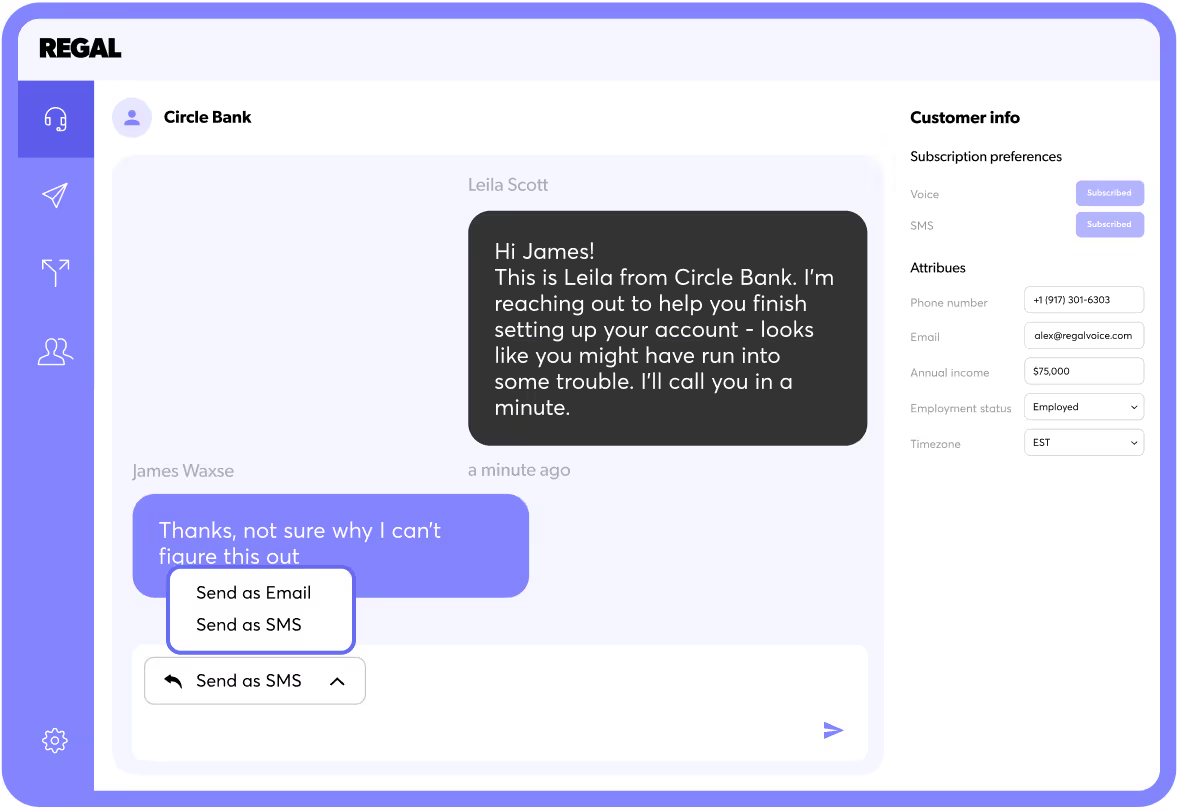
Regal is primarily built to handle sales and your outbound calling tasks using AI agents that amplify and qualify leads, move prospects through your sales funnel, and even book meetings. I discovered it is not primarily built to handle support tasks, instead it optimizes for conversion metrics such as: conversion rates, contact rates, and meeting set rates. I experienced that it's meant to connect deeply with your sales engagement tools and CRMs to help you orchestrate omnichannel campaigns that weave in and out of calls, emails, and texts for all-around coverage.
I observed that Regal's AI voice agents can handle your lead qualification calls, schedule reminders and appointments with room to reschedule, and even follow-up on conversations when the marketing campaigns come to a close. Its intelligence is highlighted when it comes time to call each lead as I noticed it uses engagement signals and behavioral cues to ensure the best outcomes. For example, I was impressed by how it prioritizes hot leads who just visited a pricing page against those colder prospects who've been disengaged for weeks.
Standout Features
- Behavioral Lead Prioritization: Regal AI voice agents use real-time engagement signals like website visits, email opens, and previous call history to dynamically prioritize which leads to call and when, ensuring sales reps contact prospects at peak buying intent
- Adaptive Call Cadencing: Regal automatically adjusts call timing and frequency based on individual prospect responsiveness, backing off when someone isn't engaging and increasing touchpoints when behavioral signals indicate interest
- Intelligent Conversation Routing: Voice agents via Regal's specs will qualify leads during initial calls and route high-value prospects to appropriate human sales reps based on product interest, company size, budget signals, and buying timeline indicators mentioned during conversations
- Multi-Channel Orchestration: Regal is great at coordinating voice calls with SMS follow-ups and email sequences, seamlessly transitioning between channels based on prospect response patterns and engagement preferences detected through conversation analysis
- Sales-Specific Dialogue Design: Conversation flows are optimized for sales objectives with built-in objection handling, urgency creation, discount offering logic, and closing techniques that adapt based on prospect responses during calls
Pricing
Regal pricing is based on specific factors pertaining to your business, it has a custom pricing model that accounts for the number of contacts in your database and your volume (calls, texts, emails) on a monthly basis. It could run several hundreds monthly for small teams but quickly runs thousands in the enterprise space. While it has no per-minute charges, it does require paying for platform access and per-volume of outreach. Implementation and onboarding costs are typically included, but any customized integration may incur charges. Regal notes “as you commit to higher spend and longer contracts, pricing is discounted” on their page. You can request a personalized demo before committing to the service.
Integrations
- Salesforce
- HubSpot
- Outreach
- Salesloft
- Gong
- Calendly
- Slack
What We Like
- Sales-specific intelligence: Unlike general-purpose AI voice agents, Regal understands sales conversations. The platform knows when to persist with a prospect and when to back off, when to offer a discount and when to create urgency.
- Multi-channel orchestration: Regal doesn't just make calls in isolation. The platform coordinates when to call versus text versus email based on what's working for each prospect. If someone doesn't answer the phone but clicks a follow-up text, Regal adjusts the cadence accordingly.
- Intent-based prioritization: The platform uses behavioral signals (website visits, email opens, previous conversations) to determine who to call and when. The system learns which signals predict readiness to buy in your specific business.
What We Dislike
- Not designed for support: If you need an AI voice agent for customer service, Regal isn't built for that use case. The platform excels at outbound sales but doesn't have the support ticket integration, knowledge base connectivity, or empathetic conversation design needed for customer service.
- Requires clean data: Regal's intelligence depends on having accurate contact information and behavioral data. Companies with messy CRMs or limited tracking of customer engagement will struggle to get full value from the platform.
- Learning period required: The AI performs better after it has data on what works in your specific business. The first few weeks of usage may not show optimal results as the system learns your ideal customer profile and effective messaging. Patient implementation is required to see the full benefit.
Best For
- B2B companies with outbound sales motions: Organizations where lead volume exceeds sales team capacity and AI-powered qualification and nurturing can identify buying-ready prospects while freeing human reps for closing conversations.
- High-velocity sales teams making hundreds of calls daily: Inside sales operations where speed-to-contact determines conversion rates and AI ensures every lead receives immediate follow-up regardless of when they express interest.
- Businesses running multi-channel campaigns: Marketing-driven sales organizations where prospects engage across multiple touchpoints and coordinated omnichannel outreach based on behavioral signals significantly improves contact and conversion rates.
Retell
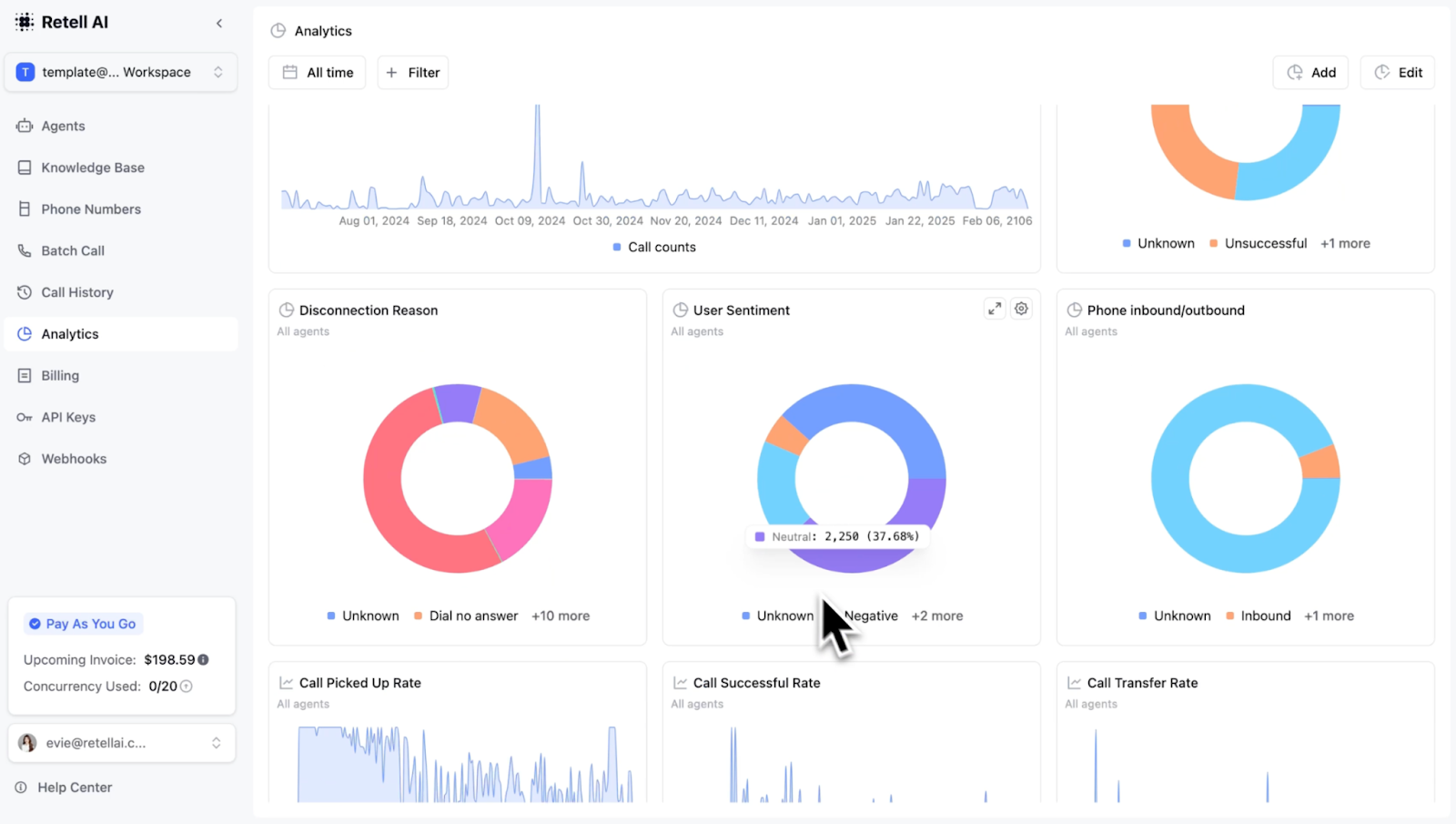
Retell stands out as an API-first platform and choice that's really ultimately made for developer-first organizations that need to build customized AI voice agents and have full control. It is not a pre-built solution, I found that Retell merely gives you the infrastructure (think conversation management, speech recognition, voice synthesis) and leaves you the ability to connect your homegrown language models and business acumen. I experienced that you have complete control over conversational flow, feature sets, and personality when it comes to the voice agents you make.
I observed that Retell supports both outbound and inbound calling. It can even do barge-in handling (where AI jumps to respond when it's cut off), customized pronunciation, and can swap out AI models mid-call. It's a very advanced tool, I found you can create a custom agent that could manage technical support inquiries just by connecting it to your existing product database and setting rules for it to escalate to engineering as needed.
Standout Features
- Model-Agnostic Architecture: Voice agents via Retell can use any language model (GPT-4, Claude, Gemini, or open-source alternatives) and even switch between models mid-conversation based on complexity, cost optimization, or specific task requirements
- Sub-800ms Latency Optimization: Real-time streaming and processing infrastructure delivers response times under 800 milliseconds from when callers finish speaking to when AI begins responding, creating natural conversation pacing that feels human
- Advanced Barge-In Handling: Retell detects when callers interrupt the AI mid-sentence and immediately stops speaking to process the new input, mimicking natural human conversation flow better than turn-based systems
- Custom Pronunciation Control: Developers can define exact pronunciations for brand names, technical terms, and industry-specific vocabulary, ensuring the voice agent speaks with domain expertise and accuracy
- Webhook-Driven Actions: Retell-built voice agents can trigger real-time API calls to external systems during conversations, enabling actions like database lookups, payment processing, or appointment booking without ending the call
Pricing
Retell offers a pay-as-you-go pricing model that’s self-serve and instant. It costs nothing to start with AI voice agent calls being charged at a per-minute basis starting at just $0.07 per minute. You will need to bring your own language model and pay for those services separately if you take up a DIY approach. For companies that anticipate huge call volumes (over $3000/month), there’s an enterprise plan that is custom priced and has discounted pricing based on volume. On this plan, they can even custom-build and scale an AI agent for you. But anticipate shelling out more cash for that level of support. They offer a limited demo.
Integrations
- Custom API connections (unlimited)
- OpenAI GPT models
- Anthropic Claude
- Google Gemini
- Twilio
- Stripe
- Any webhook-compatible system
What We Like
- Complete customization freedom: You're not limited to pre-built templates or conversation flows. Build agents that could query our internal databases, make API calls to third-party services, and implement complex business logic that would be impossible with no-code platforms. The flexibility is unmatched if you have specific requirements.
- Model agnostic architecture: Retell doesn't lock you into a specific language model. You can use GPT-4, Claude, Gemini, or even open-source models depending on your needs and budget. During testing, we switched between models based on the complexity of the conversation and saw significant cost differences without changing our integration.
- Real-time streaming and low latency: Retell optimizes for response speed with typical latencies under 800 milliseconds from when a caller stops speaking to when the AI begins responding. This natural conversation pace makes interactions feel human.
What We Dislike
- Requires technical expertise: Retell is built for developers. If you don't have engineering resources or aren't comfortable working with APIs, webhooks, and language model prompts, this platform will be frustrating. There's no visual interface or drag-and-drop builder.
- You manage the complexity: With flexibility comes responsibility. You need to handle error cases, build your own analytics, implement your own quality monitoring, and debug issues across multiple systems (Retell, your LLM provider, your business systems).
- Language model costs add up: While Retell's per-minute pricing is competitive, the total cost includes your language model usage. Long conversations with complex prompts can get expensive quickly.
Best For
- Development teams building custom voice experiences: Organizations with engineering resources who need voice AI that connects to proprietary systems, implements unique business logic, or creates conversational experiences that pre-built platforms cannot support.
- Companies with unique requirements that can't be met by pre-built platforms: Businesses in specialized industries or with complex workflows where off-the-shelf solutions lack the flexibility to handle domain-specific terminology, multi-step processes, or custom data integrations.
- Organizations that want full control: Tech-forward companies with specific latency requirements, cost optimization goals, or data governance policies that demand choosing their own language models and infrastructure rather than vendor-locked solutions.
Decagon
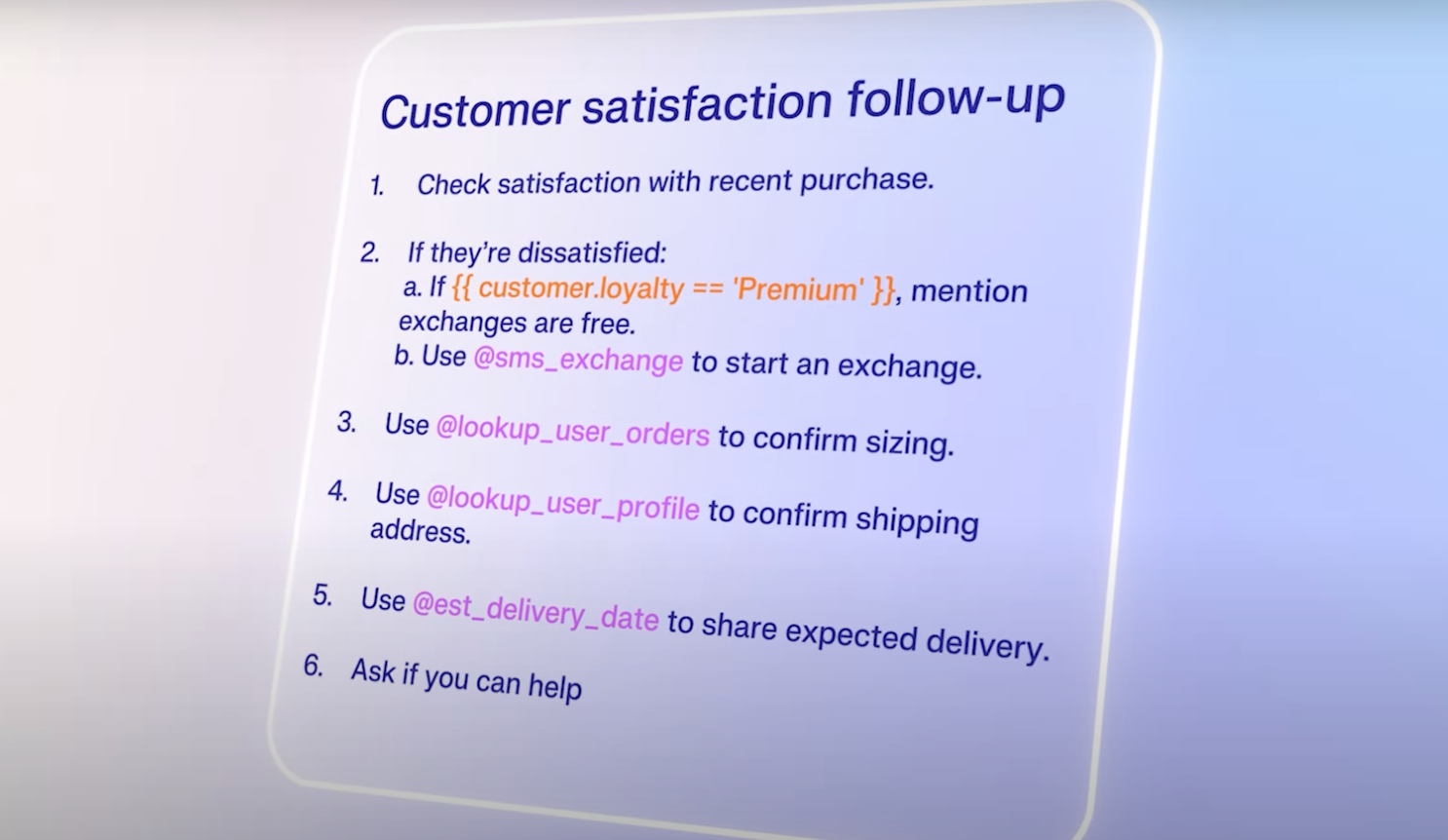
Decagon is another specialized AI voice agent provider but with a focus on customer support, its greatest strength I discovered is being able to connect with help desk providers like Zendesk, Freshdesk, and Intercom. I experienced that Decagon creates, updates, and even resolves support tickets automatically at scale, making it more useful than something that just answers calls. Customers can call about order issues and I observed that Decagon will just pull up their account, check for order status, process needed refunds, then close the ticket without even calling for human help.
I noticed that Decagon learns and grows using your historical data regarding support tickets, documentation, and macros to parse together how your team handles issues and what types of issues happen. I was impressed that Decagon can correctly and accurately route your calls based on how complex they are or what issues are happening. If it's just a simple password reset, it'll handle it. If it's a billing issue it cannot resolve, it'll send it forward to a human agent. It knows what to do.
Standout Features
- Helpdesk-native Ticket Management: Decagon and its voice agents will automatically create, update, and resolve support tickets during phone conversations with proper categorization, priority levels, and custom field population based on what customers say during calls
- Historical Learning Engine: Decagon takes steps to analyze past support tickets, agent macros, and resolution patterns to understand how your team handles specific issues, then replicates these proven approaches during voice interactions
- Intelligent Issue Classification: Decagon's AI categorizes customer problems in real-time during conversations, automatically routing simple issues to self-service resolution and complex cases to specialized human agents with full context already documented
- Knowledge Base Synchronization: When support documentation is updated, voice agents via Decagon immediately learn the new information without manual retraining, ensuring customers always receive current answers during phone calls
- Resolution-first Analytics: Beyond standard call metrics, Decagon kills it at tracking actual issue resolution rates, customer satisfaction by problem type, and AI-versus-human performance comparisons for continuous improvement insights
Pricing
Decagon uses a customized pricing model that favors the enterprise setting more than anything. It will determine your final total using your call volume, complexity of workflows, and the overall number of integrated support channels you connect it to. Many customers note they pay annualized contracts that start anywhere in the five-figure range for small support teams, going up for large operations.
Pricing includes implementation, training on support data, and future features. You will pay a platform fee rather than per-minute charges, but you will need to contact Decagon for the specifics. You can request a free demo before committing to services.
Integrations
- Zendesk
- Freshdesk
- Intercom
- Salesforce Service Cloud
- Gorgias
- Help Scout
- Slack
What We Like
- Helpdesk-native design: Decagon doesn't just make calls; it operates within your support workflow. The platform creates tickets with proper categorization, updates them as conversations progress, and triggers the same automation your human agents use.
- Knowledge base synchronization: When you update your help documentation, Decagon automatically learns the new information without manual retraining. This keeps the voice agent current without ongoing maintenance.
- Resolution analytics: Decagon tracks not just call metrics but actual resolution rates and customer satisfaction specific to issues handled by AI versus humans.
What We Dislike
- Support-only focus: Decagon is purpose-built for customer support. If you need sales calling, appointment scheduling, or other use cases, you'll need a different platform. The specialization makes it excellent for support but limits versatility.
- Integration dependency: The platform's value depends heavily on having a robust helpdesk system with clean data. Companies using basic ticketing or running support through email will find limited benefit.
- Longer implementation timeline: Getting Decagon trained on your specific support processes takes weeks or months depending on complexity. The platform needs to learn your product, common issues, escalation policies, and resolution procedures. Quick deployment isn't realistic for this solution.
Best For
- Support teams handling high volumes of repetitive inquiries: Customer service organizations where 60% or more of tickets involve password resets, order status checks, and account updates that AI can resolve without human intervention.
- Companies with well-documented support processes: Organizations already using Zendesk, Intercom, or Freshdesk with comprehensive knowledge bases and structured workflows where AI can leverage existing documentation to provide consistent resolutions.
- Organizations looking to reduce support costs: Businesses facing support scaling challenges where AI automation can handle tier-one inquiries 24/7 while human agents focus on complex issues requiring judgment and empathy.
PolyAI
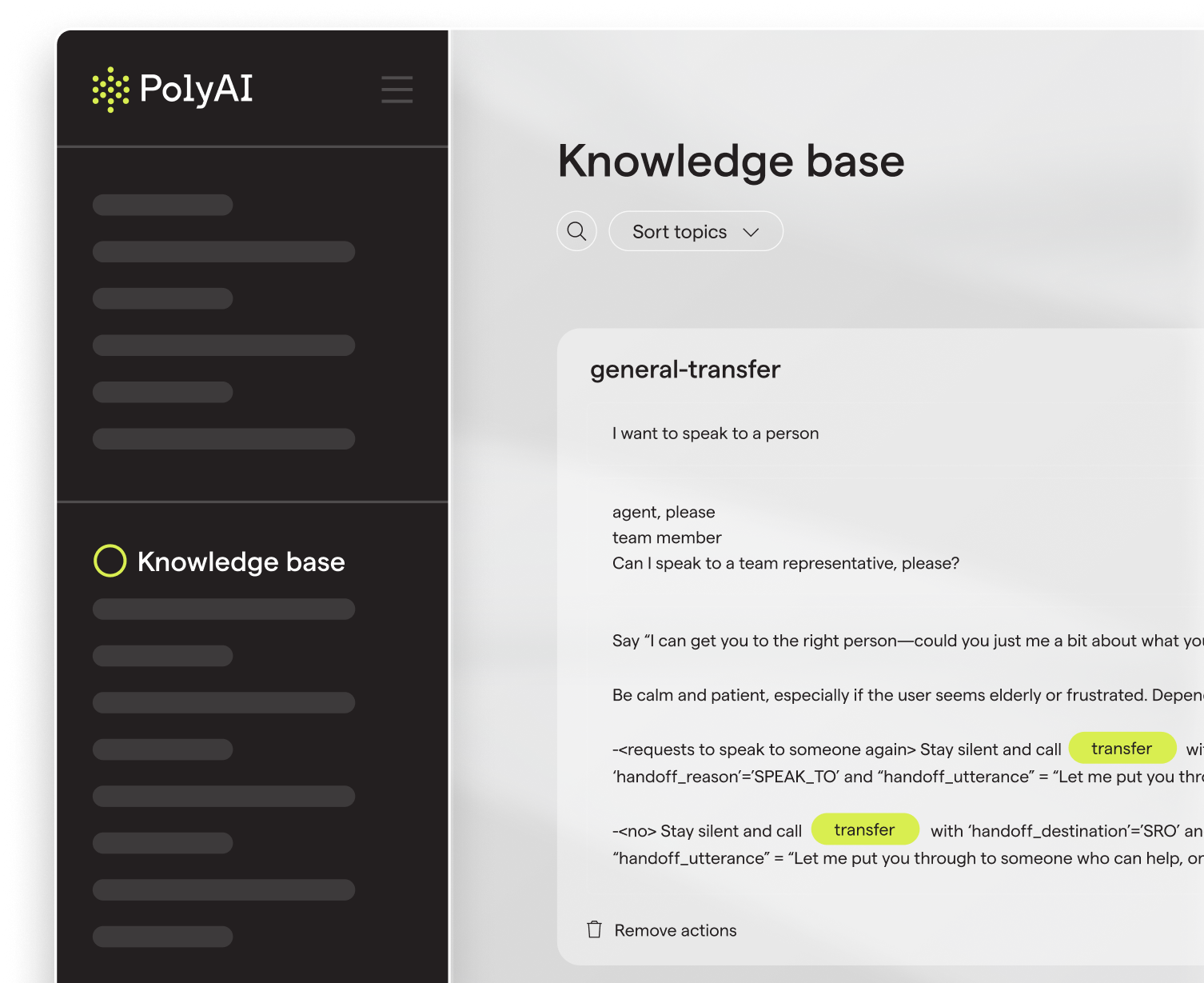
PolyAI is centered around creating conversational AI that's made for the more complex and higher-stakes elements of customer service, particularly in the banking, healthcare, and hospitality industries. I found that PolyAI handles calls which will need multiple turns, contain unclear customer requests, or inhabit ambiguous spaces that may normally need a human touch. I was impressed that it's cutting edge in the sense that it can understand heavy accents, customers who aren't quite sure about their purpose of calling, and any background noise.
I experienced that voice quality stands very high when compared to the rest of the competition, there's a natural intonation and pacing to it that makes it register as the most human amongst robotic-sounding peers. That is because of its proprietary speech recognition software trained on millions of different real service calls.
Standout Features
- Ambiguity Resolution: Voice agents from PolyAI will handle vague or unclear customer requests by asking natural clarifying questions rather than forcing callers into rigid menu structures, allowing customers to speak normally without stiffness or having to know the exact terminology
- Accent and Dialect Recognition: Proprietary speech recognition trained on millions of real customer calls accurately understands heavy accents, regional dialects, and second language speakers that other voice AI systems get totally stumped on
- Background Noise Filtering: Advanced audio processing filters out ambient noise, cross-talk, and environmental sounds during phone calls, maintaining conversation quality even when customers call from noisy locations like airports or busy streets
- Natural Voice Inflections and Imitations: Speech synthesis includes appropriate pauses, conversational fillers, emphasis patterns, and intonation variations that make PolyAI's AI sound genuinely human rather than robotic during extended phone conversations
- Multi-turn Conversation Management: PolyAI and its AI agents maintain context across complex conversations requiring multiple back-and-forth exchanges, handling topic shifts, follow-up questions, and clarifications without losing track of the original inquiry
Pricing
PolyAI works off a per-minute basis-pricing model for ongoing use of its voice assistant which includes proactive performance improvements, maintenance, and 24/7 support. However, the specific rates are not publicly available on their website. You will need to contact them for your personalized rate based on call volume and anticipated needs. They have a 99.9% SLA uptime guarantee on phone lines and offer a 365/24/7 emergency response line as well as high security standards with compliance certifications and regular audits. A free demo is available on their website.
Integrations
- Genesys Cloud
- Five9
- Avaya
- NICE CXone
- Salesforce Service Cloud
- Microsoft Dynamics 365
- Custom telephony systems via SIP
What We Like
- Conversational sophistication: PolyAI handles ambiguity better than any platform we tested. When a customer called saying "I need to change my thing," the AI asked clarifying questions naturally rather than forcing the caller into a rigid menu structure. This flexibility reduces customer frustration and matches how humans actually communicate.
- Voice quality excellence: The speech synthesis sounds human, with appropriate pauses, natural emphasis, and conversational fillers that make interactions feel authentic. This quality matters for brand perception and customer comfort.
- Enterprise-grade reliability: PolyAI offers strong service level agreements and has demonstrated uptime exceeding 99.9% in production environments. The platform includes redundancy, failover systems, and capacity management to handle peak call volumes without degradation.
What We Dislike
- Premium pricing limits accessibility: PolyAI is expensive compared to newer platforms. The enterprise positioning and white-glove implementation make sense for large call centers but put it out of reach for small and mid-sized businesses. We estimate you need thousands of calls monthly to justify the investment.
- Long sales and implementation cycles: From initial contact to going live took several months in our observation. The platform requires extensive discovery, custom voice design, and integration work. If you need a solution deployed quickly, PolyAI's thorough but slow process may be frustrating.
- Limited self-service capabilities: Unlike platforms with visual builders and templates, PolyAI requires working with their team to make changes to conversation flows. This professional services model ensures quality but reduces agility.
Best For
- Large enterprises with complex needs and a budget: Organizations handling thousands of daily calls across multiple departments where sophisticated conversation handling and enterprise reliability justify premium pricing over budget alternatives.
- Industries where conversation quality directly impacts brand reputation: Businesses where every customer interaction reflects brand values and poor voice quality or conversation failures create immediate reputational damage that exceeds technology cost savings.
- Organizations handling high call volumes in multiple languages: Global companies serving diverse markets where multilingual support, 99.9% uptime guarantees, and handling accent variations are operational requirements rather than nice-to-have features.
Synthflow
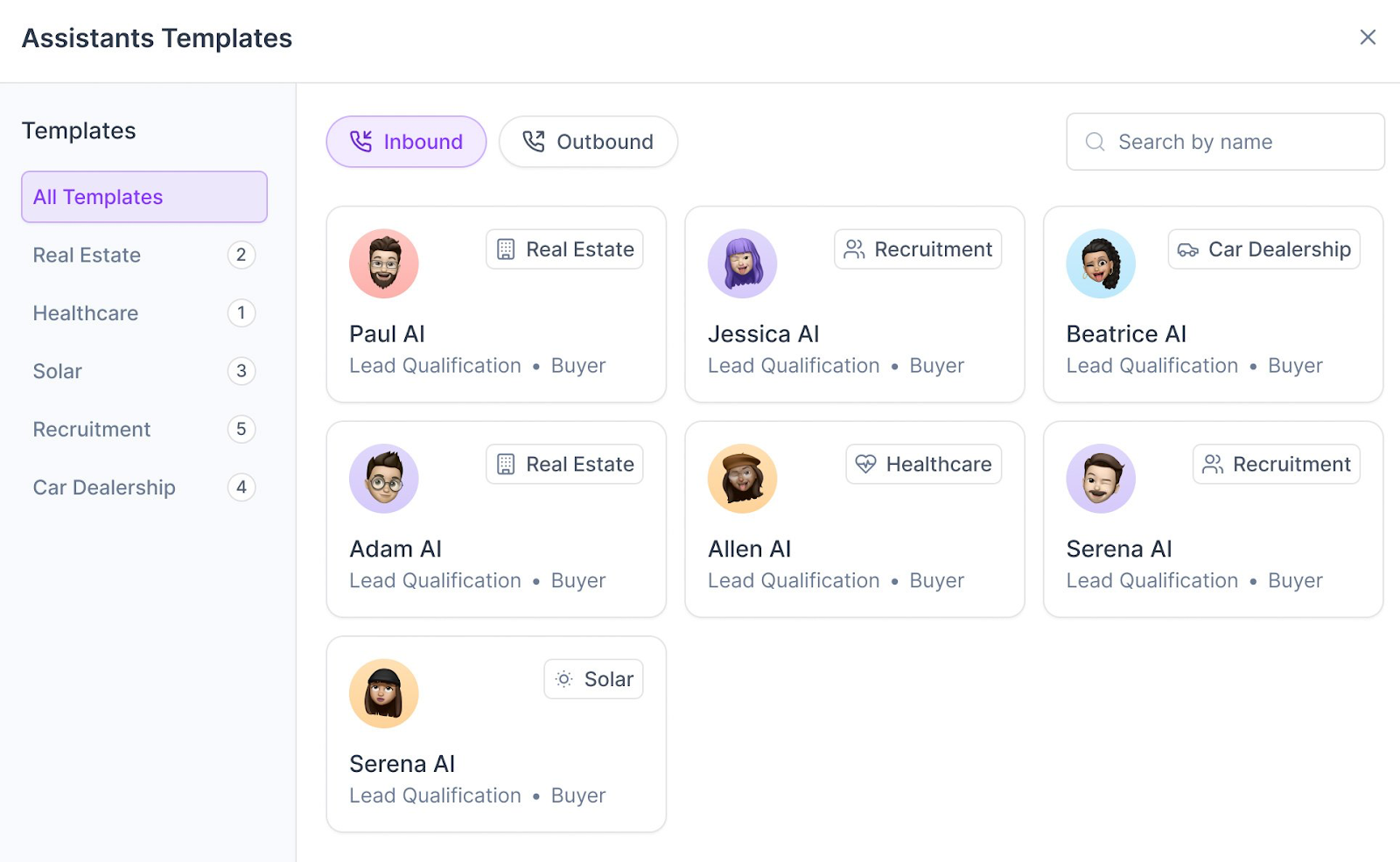
Synthflow specializes in conversational AI for customer service, offering advanced natural language capabilities and extensive customization options. Their unique selling point that impressed me is voice cloning technology that can replicate your actual voice or create custom brand voices, ensuring complete brand consistency across all customer interactions while having the most natural-sounding conversations in the market.
I discovered the platform's API-first architecture makes it seamless for any business system that needs connectivity, making it a boon for tech-forward companies that want to integrate with their existing tech stacks. The higher degree of customization and tech buy-in does make this less a plug-and-play and more a long-term investment. But what I observed is the payoff is clear: an AI voice agent that can be fine-tuned to your exact business process, brand expectations, and customer interaction standards. I found Synthflow is part of the cutting edge of the AI voice agent tech world, making it a truly different customer experience for businesses that want to leap into optimization.
Standout Features
- Voice Cloning Technology: Synthflow's industry-leading voice synthesis can uncannily replicate your actual voice or create custom brand voices with specific accents, tones, and speaking patterns for complete brand consistency across all phone interactions
- Visual Workflow Builder: No-code interfaces from Synthflow allow users to design complex conversation flows with conditional logic, branching paths, and dynamic responses without requiring programming expertise
- Real-time Call Monitoring: Live dashboard displays active phone conversations with sentiment analysis, conversation topics, and AI confidence scores, allowing supervisors to monitor quality and intervene if absolutely needed
- Unlimited Concurrent Calls: Higher-tier plans on Synthflow support multiple simultaneous phone conversations without call queuing or busy signals, automatically scaling based on inbound call demand
- Advanced NLP Processing: Natural language understanding handles complex multi-intent queries, interruptions, and conversational nuances during phone calls, creating dialogue that feels genuinely human rather rote, soulless scripting
Pricing
Synthflow bases pricing on anticipated monthly usage minutes. Plans start at $29 per month for small-scale use with limited minutes and concurrent calls. Mid-tier plans range from $375 to $750 monthly with thousands of minutes included and lower per-minute rates. High-volume plans provide 6,000 minutes for $1,250 per month.
Enterprise customers can negotiate custom pricing that includes compliance features, SLAs, SIP trunking, and volume discounts. The platform charges approximately $0.13 per minute, with additional fees for workflow usage and concurrent call capacity. They offer a free trial for up to 14 days.
Integrations
- Custom API connections
- Salesforce
- HubSpot
- Zapier
- Twilio
- Stripe
- Google Sheets
What We Like
- Industry-leading voice tech: Synthflow's voice cloning and natural speech synthesis capabilities are among the most developed which means they can create conversations virtually indistinguishable from human interactions.
- Extensive customization options: The platform offers deep customization of conversation flows, personality traits, and response patterns. Businesses can adjust their AI voice agents to reflect their specific voice and values.
- API-first architecture: API integration capabilities enable seamless connectivity with just about any business system.
What We Dislike
- Steep learning curve for optimization: Synthflow has many customization options but also will require technical know-how and more time for businesses to fully optimize it for what they need.
- Limited track record: Synthflow also lacks the reliability and support reputation and capabilities of more established providers, proceed at your own risk.
Best For
- Brand-focused businesses: Organizations where maintaining consistent brand voice and personality across all customer touchpoints is a critical competitive advantage.
- Companies with complex workflows: Businesses requiring deep integration between their AI voice agent and existing business systems, CRMs, or proprietary software.
- Cutting-edge adopters: Organizations willing to work with newer technology in exchange for industry-leading natural language capabilities and voice cloning features.
Bland.AI
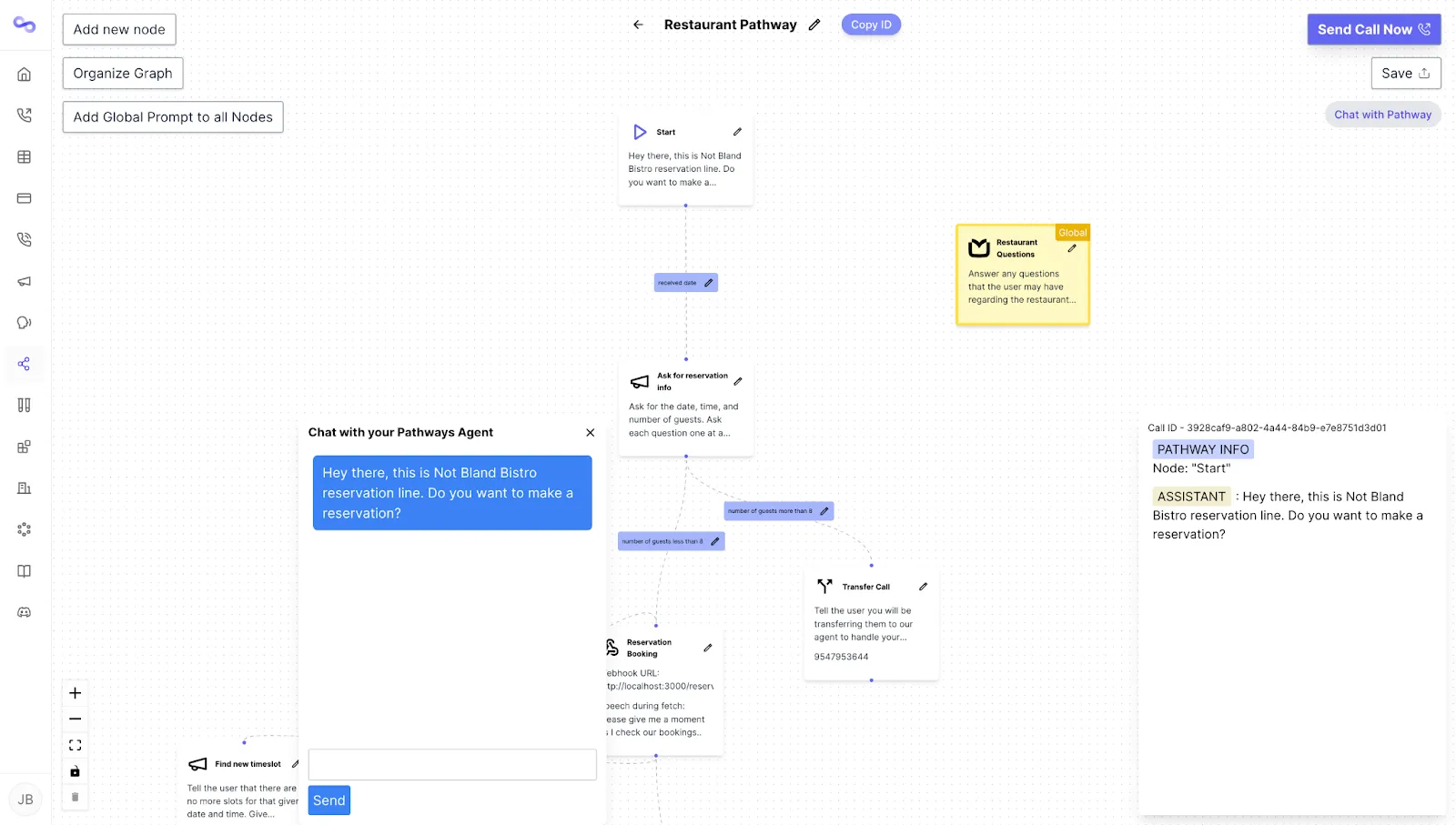
Bland.ai offers a simple value: high-quality AI calls at a fixed rate of just $0.09 per minute with little to no setup complexity gumming up your chances to hit the ground running. I found the platform is just focused on one task it does very well: making and receiving phone calls using AI. There are no crazy or extensive feature sets or any customized pricing models that you'll need to account for or bother a sales team about, I experienced it's a no-frills solution that might work best for people who just need AI voice agents now.
I observed it's popular for outbound calling situations like reminders for upcoming appointments, surveys, notification delivery, and lead follow-up. I found Bland.ai is great at handling the technical aspects of your speech recognition, voice synthesis, and telephony needs. It has a straightforward API that I noticed developers can quickly get to work for your needs and some say they've launched outbound calling campaigns in less than an hour.
Standout Features
- Rapid Deployment API: Developer-friendly API with clear documentation and code examples allows technical teams to launch voice calling campaigns within an hour of starting integration, eliminating lengthy setup processes
- Flat Per-Minute Pricing: Bland's transparent $0.09 per minute pricing for both inbound and outbound calls with no platform fees, subscription minimums, or complex tier structures, charging only for active talk time
- Voice Quality at Scale: Delivers natural-sounding speech synthesis and accurate speech recognition comparable to premium platforms despite competitive pricing, maintaining conversation quality across high call volumes
- Simple Call Logic: Pre-built templates provided by Bland themselves made for common use cases like appointment reminders, payment notifications, and survey calls allow non-technical users to launch campaigns through web interface without needing prior coding expertise
- Instant Provisioning: No waiting periods, sales calls, or approval processes. All you need to do is create an account, add credits, and start making AI voice calls immediately with a pay-as-you-go model.
Pricing
Bland.ai charges $0.09 flat per minute in both outbound and inbound calls for active call time only. There are no minimums or platform fees for your basic everyday usage. It is a pay-as-you-go model that’s truly cost effective for any business that has variable call volume. Enterprise customers can save even more if they negotiate volume discounts with the sales team. What’s included at all levels are: speech-to-text (and vice versa), telephony, and barebones analytics. However, expect to pay for custom voice cloning and dedicated phone numbers. Free trial credits are available.
Integrations
- Zapier
- Custom webhooks
- Twilio
- Basic REST API connections
- Google Calendar
- Calendly
- Limited CRM integrations
What We Like
- Simple, usage-based pricing: The per-minute model is transparent and predictable. You're not locked into monthly subscriptions or trying to forecast usage tiers. This simplicity appeals to businesses that want to avoid complex pricing calculations.
- Quick implementation: Bland.ai integrated and made calls faster than any other platform we tested. The API is well-documented with clear examples, and the web interface allows non-technical users to launch campaigns without coding. Speed matters when you need a solution deployed immediately.
- Good call quality at competitive pricing: At $0.09 per minute, Bland.ai delivers voice quality comparable to platforms charging significantly more. During our testing, callers found the voice natural and easy to understand. For many use cases, the quality is more than sufficient.
What We Dislike
- Limited analytics and reporting: Bland.ai provides basic call logs but lacks the sophisticated analytics of more comprehensive platforms. You can see call duration and outcomes but not detailed conversation analysis, sentiment tracking, or performance insights.
- Basic feature set: The platform does calling well but doesn't include workflow automation, CRM integration, or advanced conversation management. Companies needing complex call routing, multi-turn conversations, or deep business system integration will find Bland.ai insufficient.
- Costs accumulate with volume: While $0.09 per minute seems reasonable, high-volume users will find monthly costs adding up quickly. A business making 10,000 minutes of calls monthly pays $900, which exceeds many subscription-based platforms. Companies with consistent high volumes might save with flat-rate enterprise solutions.
Best For
- Businesses needing straightforward outbound calling without complexity: Companies running appointment reminders, survey campaigns, or payment notifications where simple, reliable calling infrastructure matters more than sophisticated conversation management.
- Developers who want calling infrastructure immediately: Development teams adding voice capabilities to existing applications where API-first architecture and pay-as-you-go pricing eliminate the technical complexity and fixed costs of telephony infrastructure.
- Companies with variable call volumes: Organizations with seasonal fluctuations or testing multiple campaigns where usage-based pricing prevents paying for unused capacity during slow periods.
How to Choose the Right AI Voice Agent
Selecting an AI voice agent is primarily about matching capabilities to your specific needs, not rushing into something that appears as a best-fit but ends up wasted time and money. Below we've laid out actionable steps as you peek at potential partners and consider what works for you on the AI voice agent front:
Step 1: Define Your Primary Use Case
AI voice agents can serve a range of purposes, from handling calls through AI receptionists to assisting teams across customer support and sales:
- Customer support: Platforms like Decagon integrate with helpdesk systems and focus on resolution accuracy and ticket deflection.
- Sales outreach: Tools such as Regal are built for outbound engagement, lead qualification, and conversion tracking.
Trying to use a sales-driven solution for support (or vice versa) often leads to inefficiency and frustration for your teams.
Anchor your selection process with clear questions:
- What’s the core problem we want to solve?
- Are we aiming to reduce wait times or boost appointment bookings?
- Do we need help qualifying leads or handling after-hours calls?
Step 2: Assess Your Technical Resources
Honestly evaluate your team's technical capabilities:
- No engineering support? Choose platforms with visual builders and pre-built templates like Synthflow and similar no-code tools that let non-technical users create agents independently.
- Have development capacity? API-first platforms like Retell and Bland.ai offer more flexibility for unique requirements but require developer resources to build and maintain custom integrations.
Consider not just initial setup but ongoing maintenance and optimization.
Step 3: Determine Your Volume and Budget
Do the math before you buy:
- Low-volume businesses (under 1,000 minutes monthly): Pay-as-you-go pricing often works best.
- High-volume operations: Subscription or enterprise-level contracts typically deliver cost savings.
Factor in more than platform costs:
- Implementation services
- Integration development
- Ongoing optimization and tweaking
Enterprise platforms have higher upfront costs but include professional services that reduce internal resource strain.
Step 4: Evaluate Integration Requirements
Create a must-have list of business systems your AI voice agent needs to connect with:
- CRMs
- Calendars
- Helpdesks
- Phone systems
- Payment processors
- Proprietary software
Check your platform's existing integrations and API capabilities to ensure compatibility. Native integrations work better than scrambling together multiple tools through middleware.
- Mainstream software (Salesforce, Zendesk): Most platforms have you covered.
- Custom or less common systems: Prioritize platforms with robust APIs and developer support.
Step 5: Test with Real Scenarios
Use free trials and demos to test platforms with actual scenarios from your day-to-day operations:
- Feed it real customer questions
- Test common objections
- Include edge cases your team encounters regularly
Evaluate these critical factors:
- Voice quality and response accuracy
- How tactfully the AI handles failures
- Latency between responses
- Natural handling of interruptions
- Conversation flow matching your brand tone
Testing reveals limitations glossy marketing materials hide.
Step 6: Plan for Scalability and Evolution
Choose a platform that can grow with your business. Consider future needs:
- Adding languages
- Scaling call volume significantly
- Expanding into new use cases
Review these indicators of platform viability:
- Product roadmaps
- History of feature releases
- Provider's adaptability to industry changes
Assess ease of making changes:
- Updating conversation flows
- Maintaining knowledge bases
- Adjusting routing logic
Switching platforms later is disruptive and expensive: factor in your 12 to 24 month needs, not just immediate requirements.
Key Features and Benefits to Look For
Picking an AI voice agent, the main goal you have is supporting a better customer journey and adding to your team so that you can rise to the occasion when things go sideways. Features are not made equally at all. It is important to know what you choose at the end of the day will depend on your general and niche business needs. Oh, and ultimately your customers' expectations.
Here's a list of what we found to be lynchpins for most general cases:
- Voice Quality & Natural Language Processing: The living soul and backbone of your AI voice agent are these elements. They determine just how well it can do human-like conversations that feel real to them and don't frustrate your callers.
- Customizable Scripts & Agents: Your AI needs to be a living and tailored representation or avatar of your brand voice and values. Human-like AI has the ability to be flexible enough to create different personas so that a diverse set of departments or scenarios can be accommodated accordingly.
- Business Integrations: Your solution will need to seamlessly mesh with your existing CRM, calendar, payment methods, and tools per industry. In doing so, you free up resources, cutting down on manual data entry which can be error-prone.
- Call Management: Your callers need to reach the right places at the right time which means employment of smart routing logic, forwarding rules that account for behavioral patterns, and only the smoothest escalation protocols so people do not fall in the cracks.
- Workflow Automation: Your AI can talk the talk, but needs to walk the walk when it comes to routine tasks: it should be able to book appointments, process any payments, and update or refresh customer records without human intervention.
- Industry-Specific Solutions: All-in-one systems are a pipe dream. Especially if you have a niche business or one that has regulatory needs. You've got to account for industry standards across healthcare, legal services, home services, or etc.
- Security & Compliance: Robust encryption, audit trails, and compliance certifications protect sensitive customer data and meet regulatory requirements (like HIPAA, GDPR, etc.)
- Multilingual Support: Look into AI that's wise enough to detect and jump between languages naturally to maintain quality across language barriers. That's an innovation that lets you cross borders and service a deeper diverse bench of customers
AI voice agents that combine these features create experiences that complement but never compromise human interaction quality. Rendering authenticity through a comprehensive feature suite working in tandem with a knowledgeable staff is the key to making customers and teams happy.
Pricing Considerations
Understanding AI voice agent pricing requires looking beyond headline monthly rates to consider the total cost of ownership and value delivered. AI voice agents offer a diverse range of pricing models, each of which benefits different business types and accounts for usage patterns.
Common Pricing Models
- Per-minute pricing: Ranges from $0.08 to $0.15 per minute for typical use cases that aren’t too strenuous. Ideal for businesses with fluctuating call volumes or seasonal demand.
- Per-call pricing: Typically $0.50 to $7.00 per call, best for businesses with predictable call patterns and longer conversations.
Unlimited plans: From $49 to $299 monthly, offering the best value for high-volume operations. - Per-agent pricing: Between $30 and $100 per seat, fitting for teams that scale gradually.
Typical Cost Ranges
Most services cost around $29 to $199 per month for small to medium businesses. Enterprise plans often start at $1,000+ monthly, but they include advanced features and dedicated support that may be unnecessary for smaller operations.
Trials and Starter Options
Free trials, if available, typically last 7 to 14 days. Some providers feature starter plans with limited capabilities or call volumes, allowing you to test performance before fully committing.
Hidden Costs to Watch
Be aware of additional fees that can affect your total spend:
- Setup and onboarding charges
- Integration or API fees
- Premium feature add-ons
- Overage penalties
- Contract termination fees
Implementation Best Practices
AI voice agent deployment requires thoughtful planning and a sense of continual optimization to deliver value and satisfaction to your customers. We’ve outlined a few best practices to help you transcend mediocrity and become exceptional (and to avoid the pitfalls of picking a platform and calling it a day):
- Train your AI agent with business-specific data: If you’re not uploading FAQs to answer simple questions or service descriptions that reflect your business promises, or even keeping pricing info accurate, your AI will suffer in quality and helpfulness
- Integrate with your existing business systems: You need to connect AI services to your wider ecosystem of tools. Everything becomes more streamlined and customer-ready from your CRM to your calendar to your toolkits, but you must let the data flow between them
- Monitor performance then make adjustments: Automation is no excuse for getting lazy, you will need to look into call transcripts regularly and monitor feedback. This is to ensure your AI responses are refined to combat pitfalls using hard data like today’s conversations
- Balance AI automation with human agents: Do not let your human capital and oversight fall by the wayside in response strategy. There are still complex issues that AI just cannot handle right now, seamless handoffs ensure your customers don’t hang up in rage on your bots
- Create effective customer responses and scripts: Conversational scripts must have this polished but natural tone to them that allows callers to be led to relevant information or common troubleshooting tips. The scripts must let customers relay what they need to say or the right outcomes will never materialize
To implement AI voice agents in a way that lives up to their promise and evolution, you’ll need to understand that it’s a constant work in progress. You cannot extract maximum value from a set-it-and-forget-it approach because these solutions will find themselves outdated or outpaced without your customer’s recent feedback. AI Voice Agents are only as useful as you make them.

