
Web conferencing software helps remote, in-person, and hybrid teams connect and collaborate virtually in real time from anywhere with an Internet connection.
Dialpad AI Meetings is Dialpad’s standalone HD video conferencing solution, known for its feature-rich plans complete with screen sharing, analytics, meeting recording, AI-powered automations, and more.
This Dialpad AI Meetings review covers key features, pricing options, pros and cons, and popular Dialpad alternatives to help you determine if it’s the right solution for your team.
What is Dialpad AI Meetings?
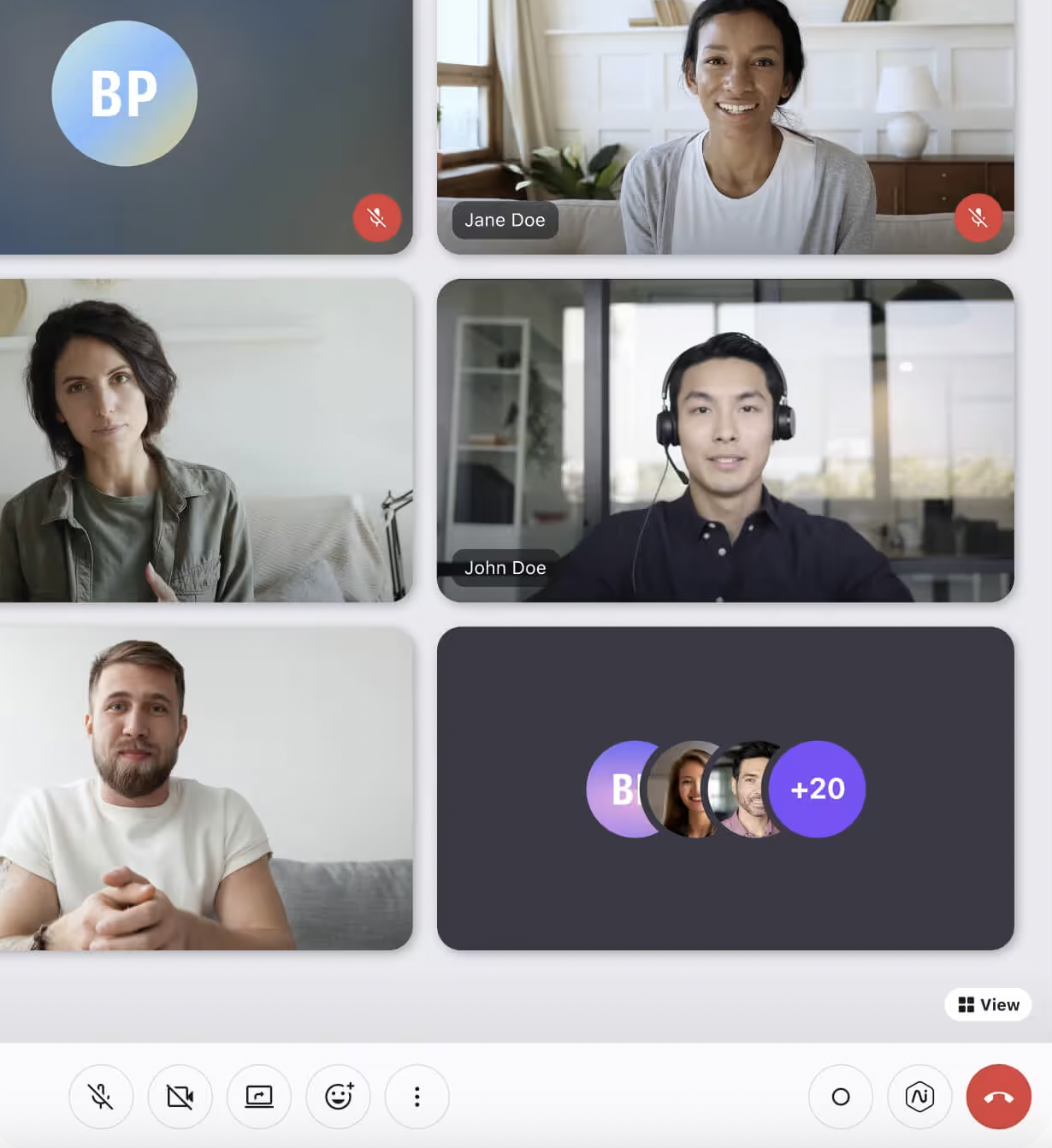
Dialpad AI Meetings is a cloud-based web conferencing tool that enables teams to collaborate with HD video conference calls. Meetings include a variety of interactive tools like sidebar chat, emoji reactions, virtual backgrounds, and noise cancelation.
Even more, Dialpad AI Meetings are enhanced with AI productivity tools:
- Live transcriptions
- Post-call summaries
- Highlighted to-do lists
- Analytics
- AI-powered voice isolation and background noise reduction
- AI Playbooks with suggested questions or phrases in real-time for agents
Users can download the standalone Dialpad Meetings app as free software, or upgrade to the paid Business Plan for advanced features and longer meetings. Dialpad also includes the Dialpad Meetings Business Plan with all Dialpad Connect, Support, and Sell plans.
Participants can join online meetings from a web browser such as Google Chrome, an Apple iOS or Android smartphone or tablet, or a compatible VoIP phone. Attendees can also call into any meeting with a dial-in number. Since users can share meeting links with anyone, companies or individuals can use Dialpad Meetings for team collaboration, customer support, interviews, and essentially any video-based use case.
Dialpad AI Meetings Pricing Plans
Dialpad AI Meetings offers two pricing options: Free and Business.
- Free ($0 monthly per user): Hosts 10 participants for 45 minutes, with instant join on desktop and mobile. Includes screen sharing, virtual backgrounds, emoji reactions, waiting room, and all security features and integrations
- Business ($15 monthly per user): Hosts 150 participants for up to 5 hours, adds all AI features–transcription, action items, post-meeting summaries, and custom hold music
- Large Meetings Add-on (Quote-based): Dialpad users with any paid plan can add on the large meetings feature which enables them to host meetings of up to 1500 participants with viewer, speaker, and host roles.
Dialpad Meetings Key Features
Here are the top Dialpad AI Meetings features:
- Interactive features
- Video meeting interface and layouts
- AI Recap
- AI Playbooks
- Meeting recording
- Real-time transcription
- Post-meeting summaries and action items
- Analytics dashboard
- Automatic dial-out
- Security features
- Integrations
- Large Meetings
Interactive Features
Dialpad AI Meetings facilitate team collaboration with the following interactive features, available on both the free and Business plans:
- Dynamic Screen sharing: Pin important participants, resize and drag images, optimize for large meetings
- Sidebar chat: The group can participate in whole-meeting chats or send 1:1 messages live during the meeting
- Hold music: Set custom hold music, for participants to enjoy while waiting for the meeting to begin
- Emoji reactions: Users can respond or vote by sending emojis for the whole group to see
- Virtual backgrounds: 160 new virtual backgrounds were recently added, or create a custom background
- Background noise reduction: Meetings software automatically detects and reduces unwanted background noise, like people talking or dogs barking
- Timer: The host can set a timer, to ensure that discussions and presentations stay on schedule
- Host meeting controls: The meeting host can mute participants, remove participants from the meeting, toggle on-demand recording on and off, and invite participants to share their screens
Video Meeting Interface and Layouts
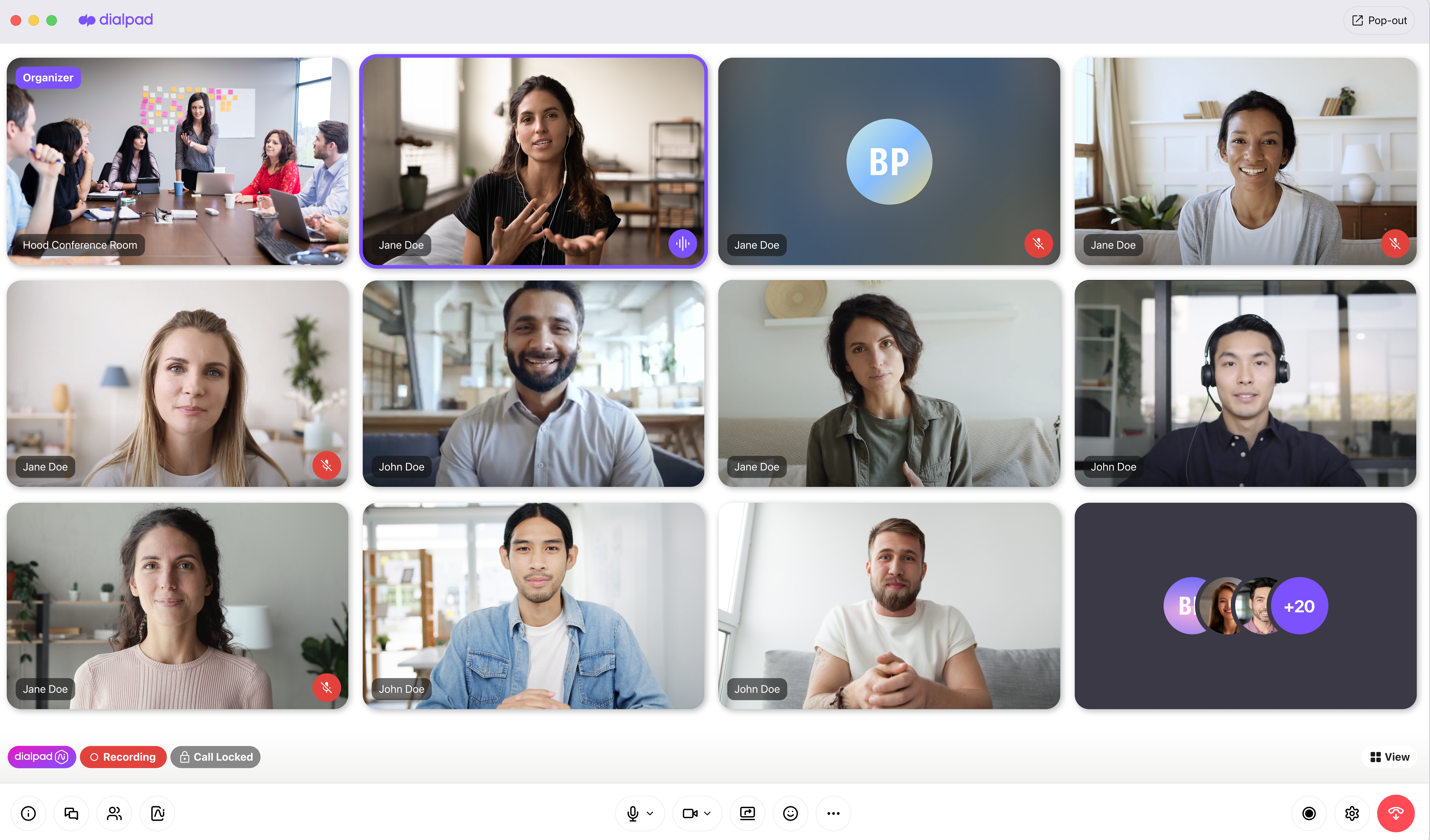
Dialpad Meetings users can toggle between 4 different video layouts:
- “Dynamic” view: Splits the screen between up to four participants ordered by who spoke most recently
- “Grid” view: Shows each participant’s live video or contact card
- “Filmstrip” view: Displays contact cards atop the screen, while displaying the live speaker’s video
- “Spotlight” view: Populates the whole screen with the current speaker’s video
AI Recap
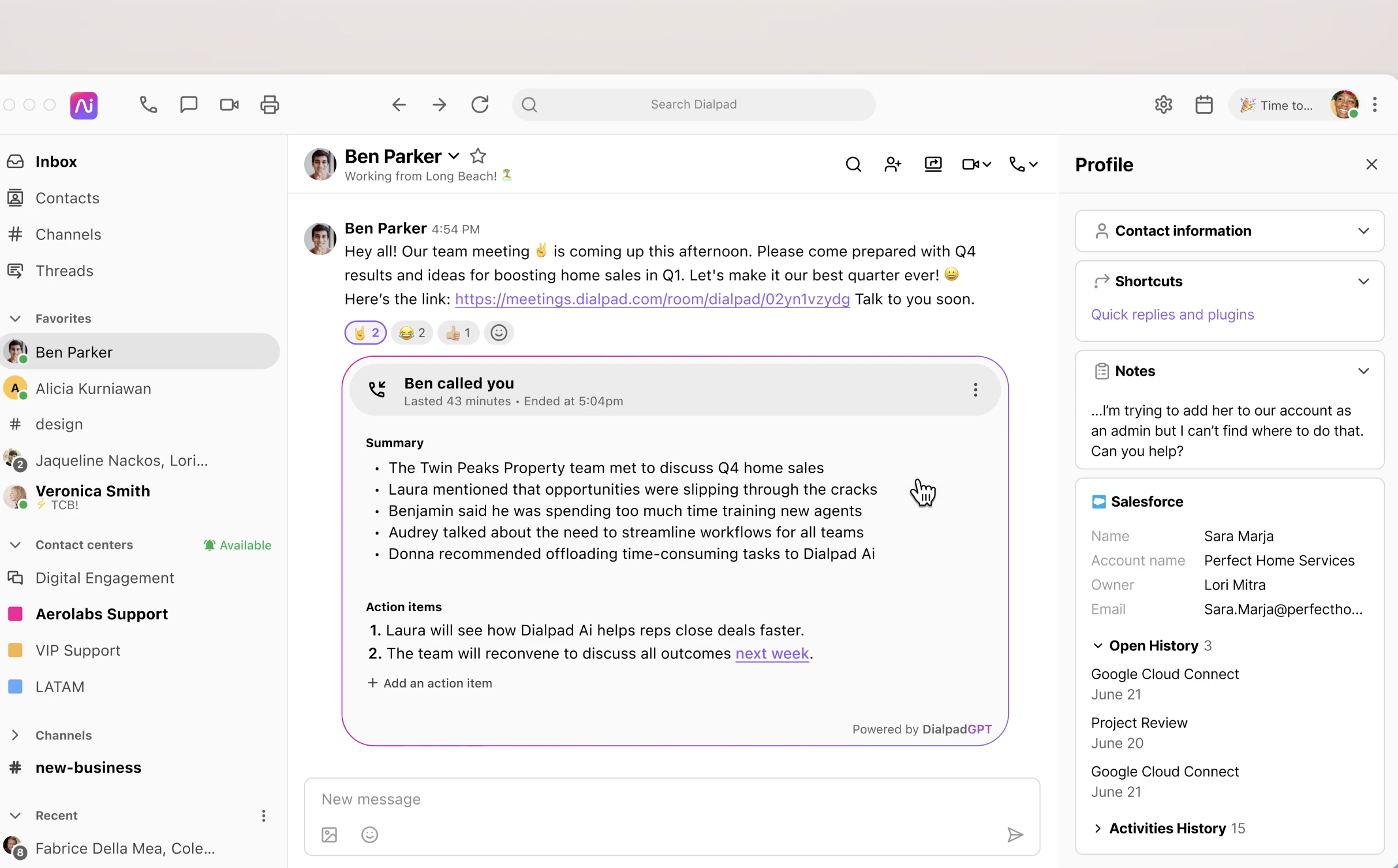
AI meeting recaps are created automatically and including in the post-meeting summary along with action items and transcripts. AI recaps are not only for video meetings, but also include quick summaries of voice calls and customer interactions.
Meeting hosts can now easily share AI recaps directly from the summary email.
Co-hosts also have access to AI Recaps and can share them and include Dialbot notifications and email confirmations. Users can delete unneeded action items from the AI recap to keep things clean and search AI Recaps for keywords.
AI Playbooks
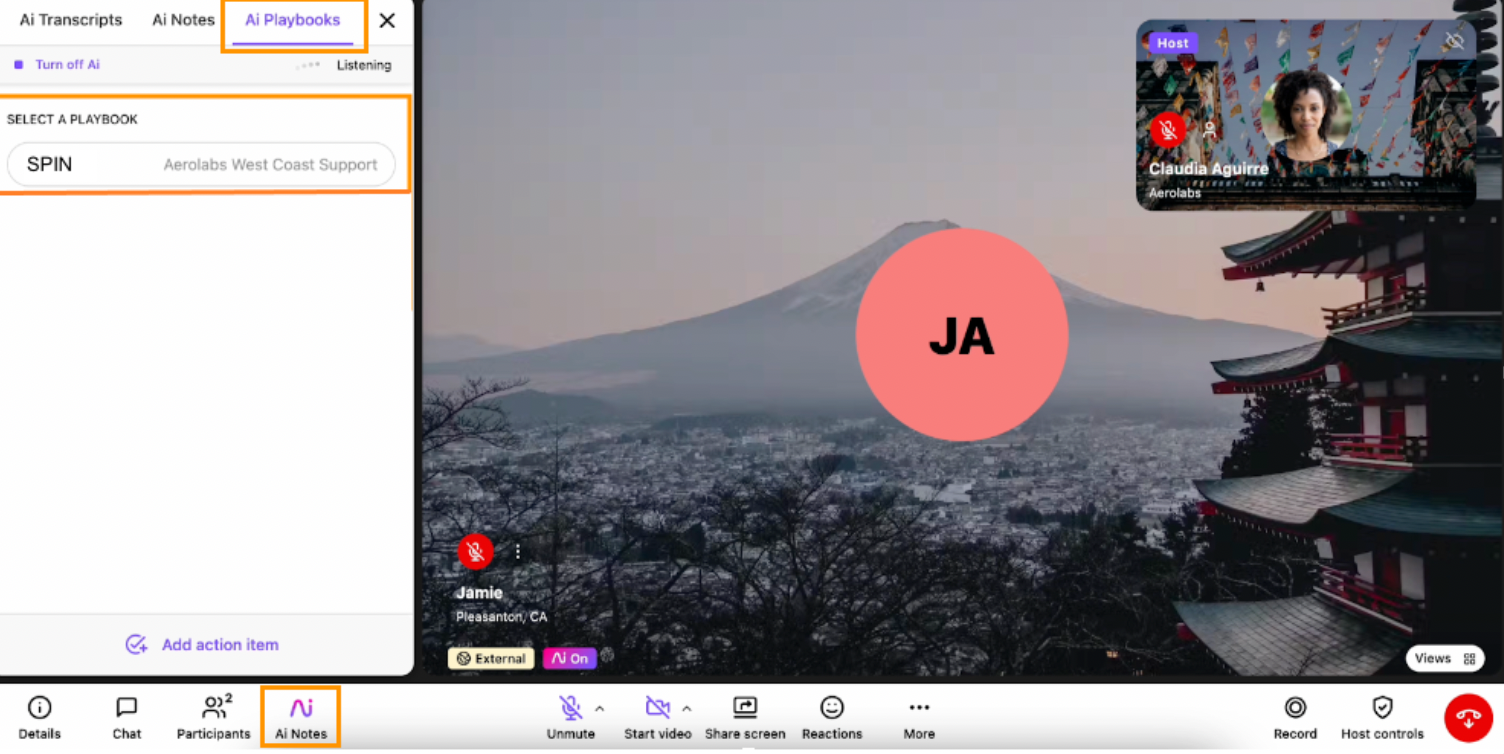
Dialpad's AI Playbooks features leverages generative and agentic AI to make suggestions to agents in real time and check off tasks as they are completed. When an agent uses an AI-recommended phrase or question, the AI uses speech recognition to register that the task has been completed and checks it off.
Agents can view the AI playbook in real time in the AI Notes tab on the dashboard. It remains accessible even while screen sharing. The AI can detect when specific topics are addressed, specific questions are asked, etc.
Users can create their own custom playbooks or choose a template based on common sales methodologies including:
- BANT
- SPIN
- MEDDIC
- CHALLENGER
- SPICED
Meeting Recording
Dialpad Meetings allows organizers to record video, audio, and shared screens.
Video call recording is only available with Dialpad Meeting’s paid Business plan, though free plan users can record meeting audio.
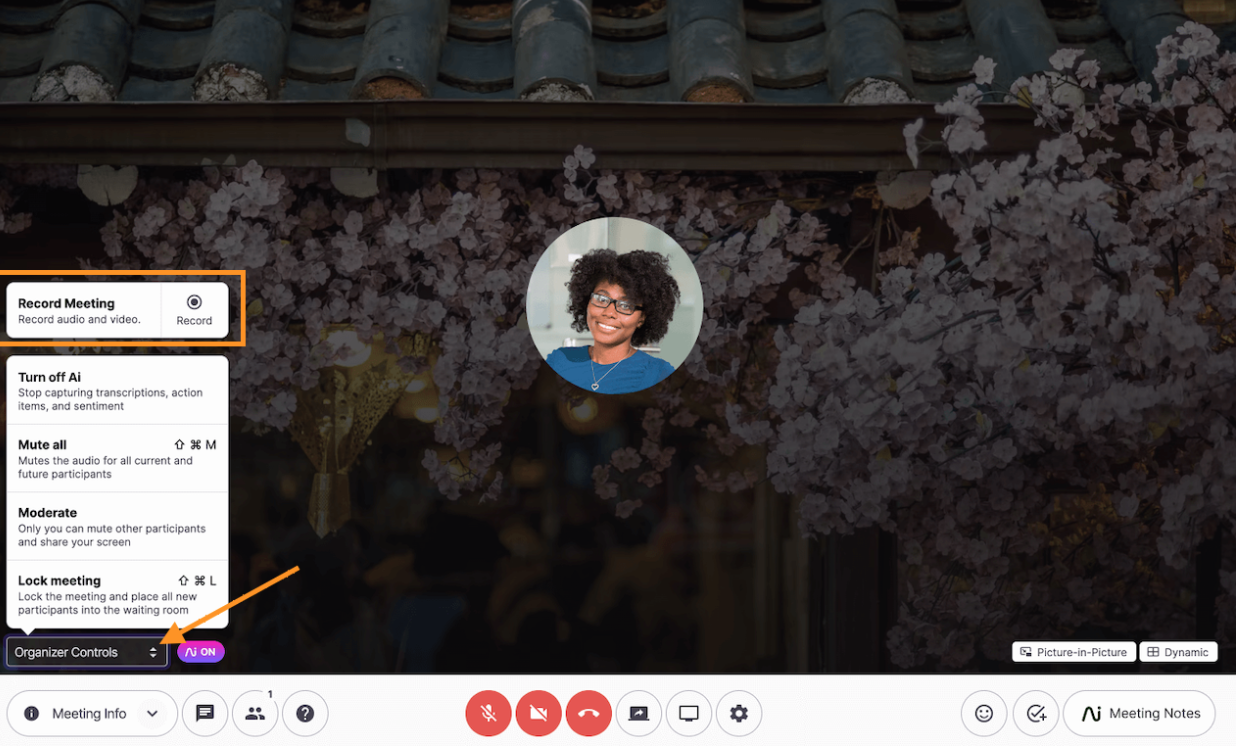
Everyone in the meeting room receives an on-screen notification and audio message at the start of each meeting recording, simplifying compliance with call recording laws. Choose between automated and manual recording options, and recordings can be stopped, paused, and resumed at any point in-meeting by returning to “organizer controls”.
Video is captured in “Dynamic Layout”, a split screen that displays up to four participants in the order they most recently spoke.
Real-Time Transcription
Dialpad Meeting business plan users have access to Dialpad AI, Dialpad’s cutting-edge voice intelligence software that includes speech analytics, sentiment analysis, and natural language processing.
When Dialpad AI is enabled, Meetings users can simply click on the “Meeting Notes” button to access a side panel displaying a real-time meeting transcription, differentiating each speaker. Recordings and transcripts are logged afterward, for review or to update those who missed the meeting.
Dialpad AI also uses the live transcript for the following features:
- Keyword identification and tracking
- Sentiment analysis
- Recording important questions
- List action items
Post-Meeting Summaries and Action Items
Post-meeting summaries are in-depth recaps of video meetings, which are sent to the organizer after the meeting has concluded. Then, the organizer can choose to share the call summary with other participants. 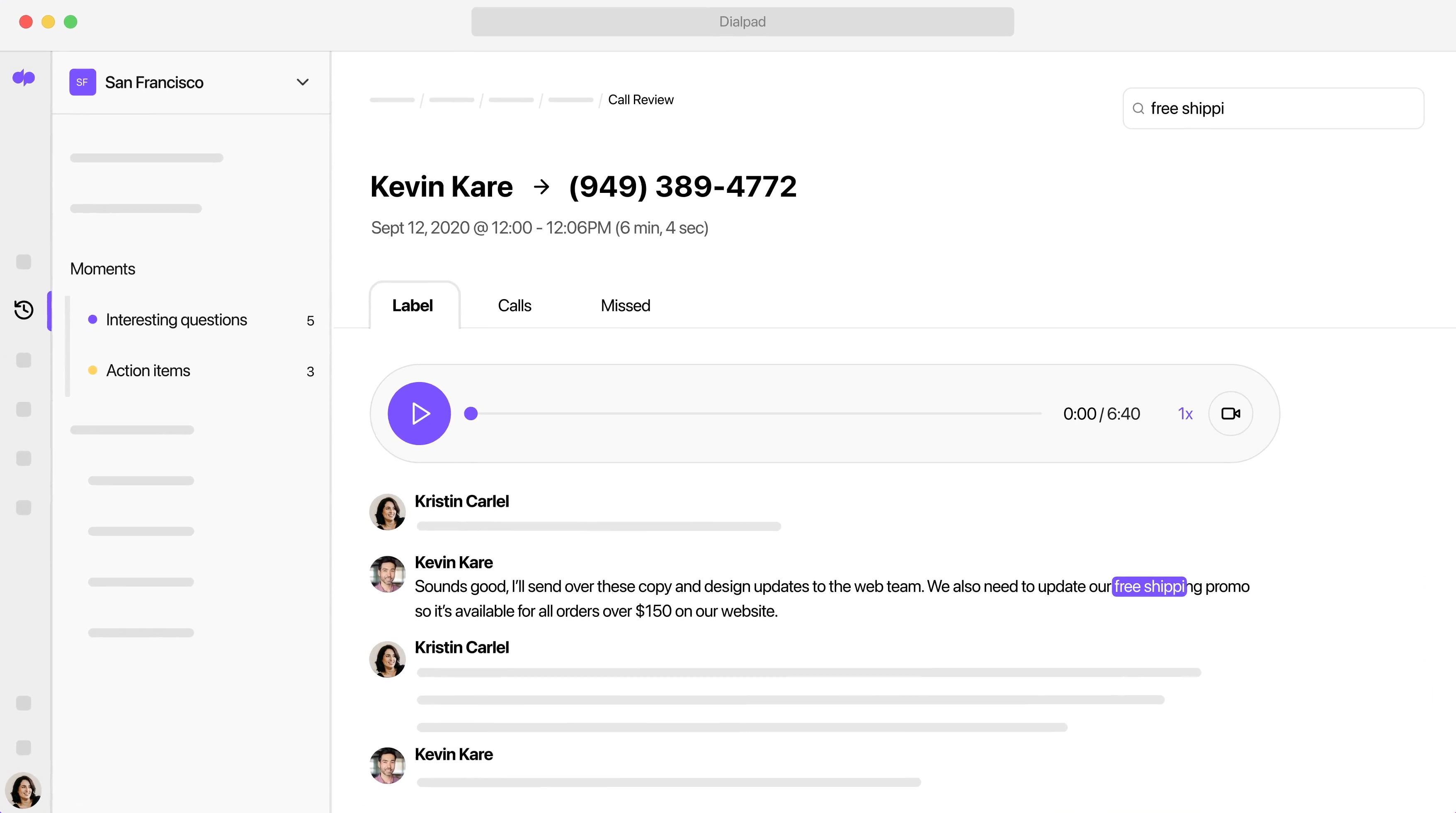
Post-meeting summaries include the following information and moments:
- Meeting information: Date, time, and participants
- Meeting recording: Full audio playback with the option to jump to specific timestamps during the meeting
- Action items: User tasks defined during the meeting to be competed afterward–for example, “I’ll call you tomorrow”
- Moments: Unique or interesting quotations or discussions during the meeting
- Sentiments: Notably positive or negative interactions that occurred
- Full transcript: A searchable meeting transcript
Administrators can click on any moment from the call summary and immediately revisit that part of the meeting’ transcript, with audio and video playback.
Analytics Dashboard
The Dialpad Meetings Analytics dashboard provides admins with historical data and KPIs about each team’s and agent’s activity and Meetings usage. Only included with the Pro plan, the analytics dashboard includes a visual display of when meetings occurred, how long each meeting lasted, and the number of screen shares per meeting.
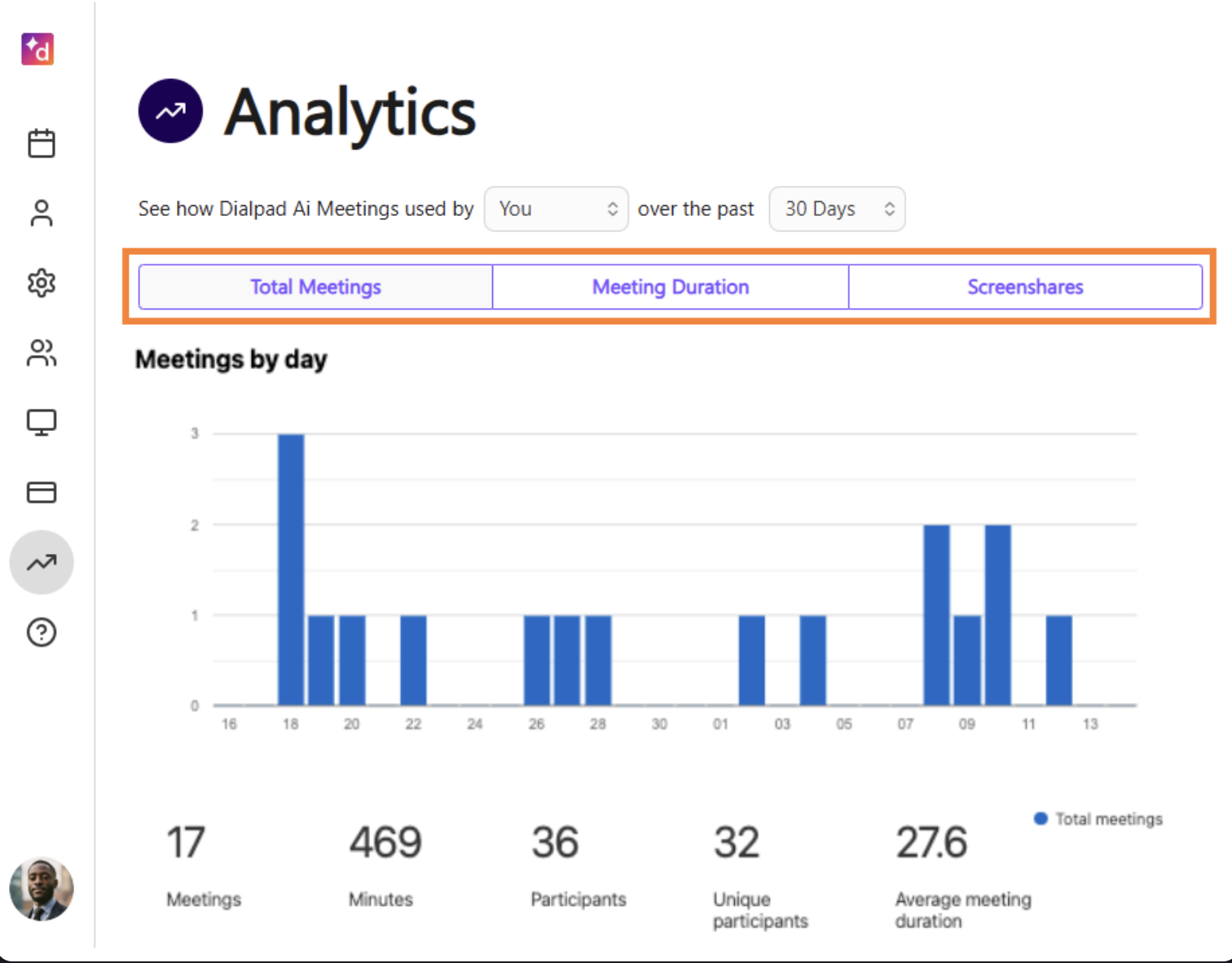
Managers can sort this information over the past week, month, or three months to view data for individuals or whole teams. Print or export any report as a CSV file.
Available metrics and KPIs include:
- Average participants
- Total conferences
- Total number of unique participants
- Average conference duration
- Percentage of conferences viewed online
- Total screen shares
- Percentage of meetings that utilized screen share
Automatic Dial-Out
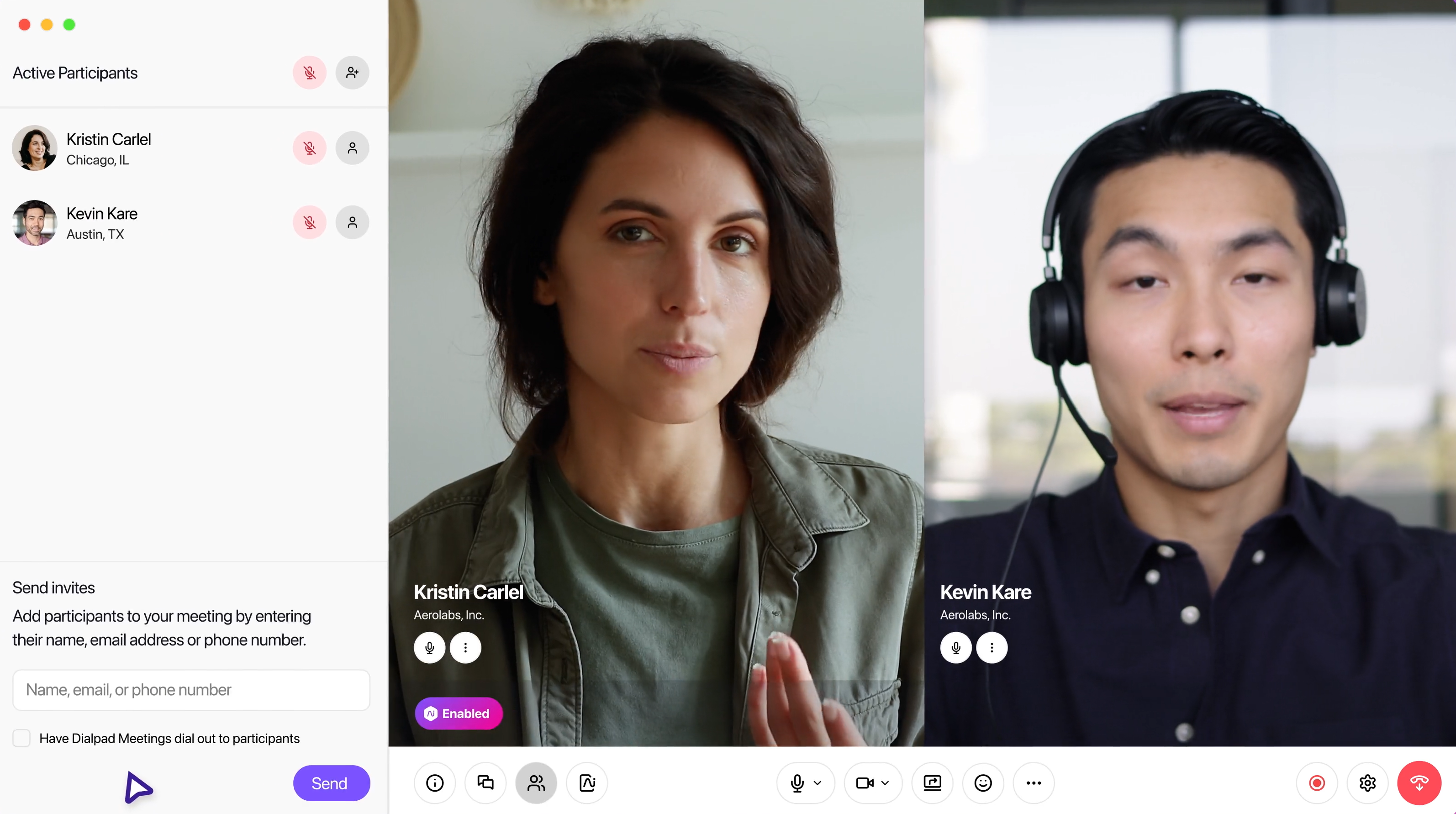
The Meetings dial-out feature enables hosts to automatically dial participants via phone calls before or during a scheduled meeting. Invitees who receive a dial-out can join meetings by pressing 1.
Hosts can set dial-out when scheduling a meeting or when during a meeting:
- When scheduling a meeting: Toggling “Dial-out” will automatically send participants an SMS reminder five minutes before the meeting begins, then dial all participants’ phone numbers as the meeting begins.
- During a meeting: Users can click on “Invite Participants” and switch on the auto dial-out feature in the same way.
Security Features
Dialpad AI Meetings is one of the most secure video-conferencing platforms on the market. All meetings are encrypted end-to-end, and all account data and recordings are stored in the secure Google Cloud Platform. All Dialpad products are HIPAA compliant, protecting sensitive user data.
Dialpad AI Meetings also includes in-conference security tools:
- Hang up: The meeting host can kick out any participant from the meeting
- Conference lock: Hosts can lock a meeting once it’s begun, preventing new participants from joining
- Waiting room: Set a waiting room for new participants, holding them until the host manually lets them in
- PIN number: Protect the meeting with a PIN number or passcode
Integrations
Dialpad AI Meetings integrates with 9 apps–including CRM tools, calendars, communication apps, and whiteboards.
Notable Dialpad Meeting Integrations:
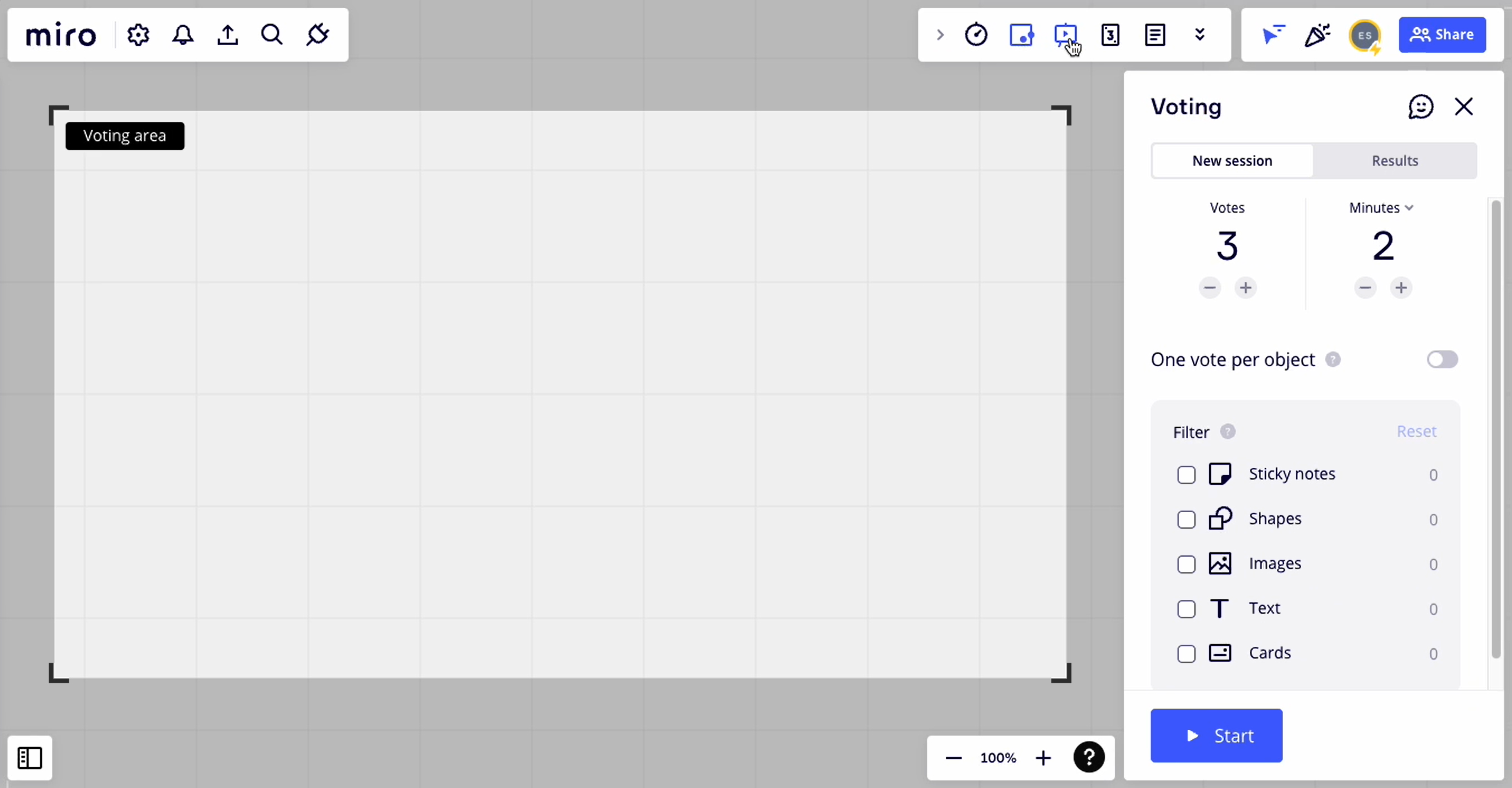
- Miro Whiteboard: Create a shareable whiteboard, for teams to draw and ideate in real time. Miro includes templates, sticky notes, text, drawing tools with different colors, and more. Save and share whiteboards after the meeting.
- Microsoft Outlook and Google Workspace: Sync Dialpad Meetings with Outlook and Google Calendar. Schedule meetings and invite participants directly within these calendar apps, join meetings directly from the calendar and automatically populate all users’ calendars with updated meeting schedules.
- HubSpot and Salesforce: Dialpad Meetings automatically match meeting participants and Salesforce contacts by name, updating user activity and logging upcoming meetings as tasks within Salesforce.
Large Meetings
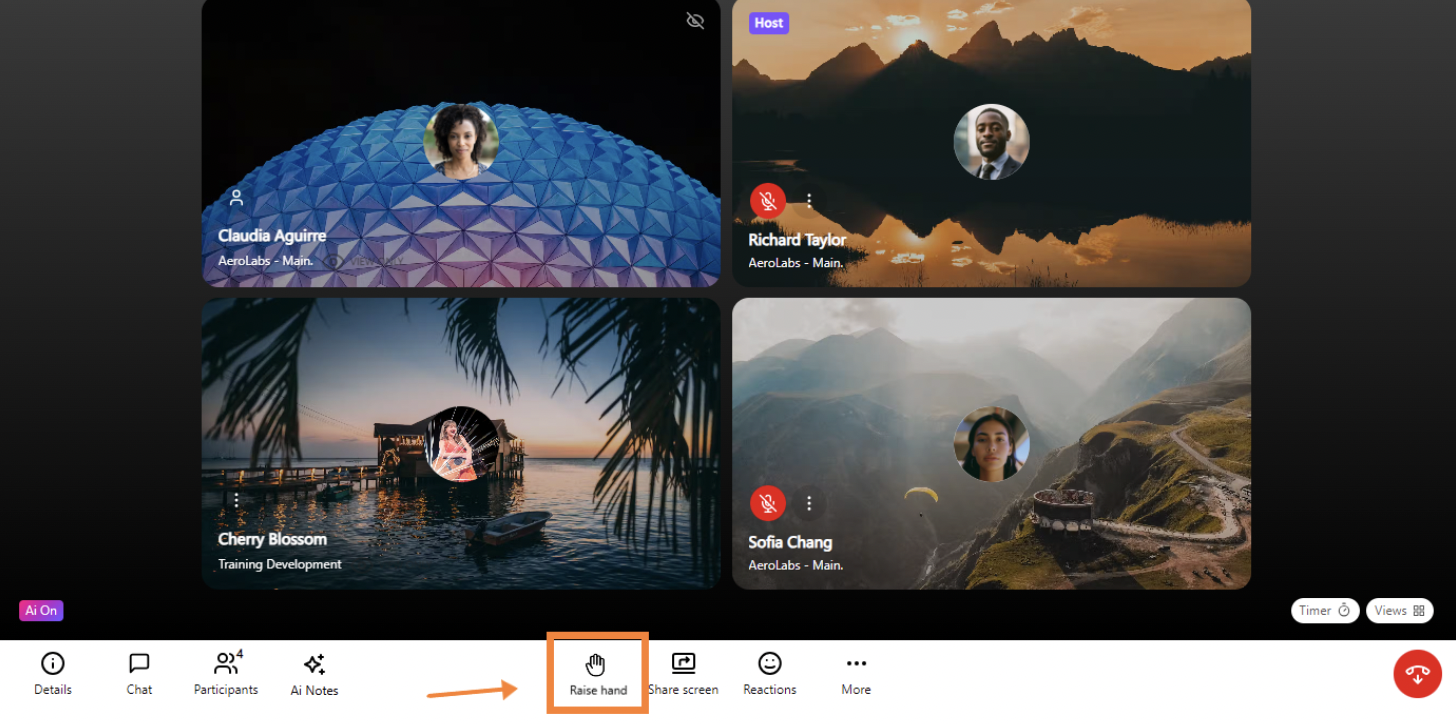
Dialpad's Large Meetings add-on enables users to host webinars and video meetings for up to 1500 participants. Large Meeting organizes participants into three possible roles: Host, Speaker, and Viewer. Only speakers have mic and camera access. Hosts can manage participant types, approve hand raising requests, allow others to speak, and change permissions during the meeting.
Viewers can participate with emoji reactions, hand raising, and in meeting chat. Viewers are able to view both speakers and real-time transcripts.
Dialpad AI Meetings Pros and Cons
Dialpad Meetings Pros
- Offers a free plan with interactive features
- 11 integrations–including calendar apps–available on all plans
- One-of-a-kind AI features like post-call summaries
- Calls are easy to initiate
- Crystal-clear video
- Live customer support available for all users
- Host controls feel intuitive
Dialpad Meetings Cons
- Lacks some popular features, like breakout rooms
- Whiteboarding requires a Miro integration
- Small participant capacity and meeting length on free plan
- Screen updates can be slow during large-capacity meetings
- The service drops or lags occasionally during calls
Compare Dialpad AI Meetings to Its Alternatives
Here’s a comparison chart of Dialpad Meetings’ biggest competitors.
| Provider | Pricing | Standout Features | Best For |
| Zoom Workplace | 3 plans from free to $18.33 monthly per user |
|
Teams that prioritize drawing as a collaboration tool |
| GoTo Meeting | 3 plans from $12-$16+ monthly per user |
|
Medium-sized businesses |
| Google Meet | 4 plans from free to $18 monthly per user |
|
Businesses of any size |
| RingCentral | 4 plans from free to $99 monthly per user (webinars) |
|
Contact centers and UCaaS platforms |
| Cisco Webex | 4 plans from free to over $22.50 monthly per user |
|
Large teams and enterprises |
| Microsoft Teams | 3 plans from $4-$12.50 monthly per user |
|
Teams seeking video and chat, especially those already using Microsoft 365 |
| Zoho Meeting | 2 meeting plans from $1 to $3 monthly per user and 3 webinar plans from $8 to $66 monthly per user |
|
Small businesses and medium-sized businesses |
| Vonage Meetings | 3 UCaaS plans from $19.99 to $39.99 monthly per user |
|
Teams looking for a collaborative UCaaS platform along with video |

