
Given that consumers expect to receive a response within 10 minutes or less of contacting a company, around-the-clock customer support is now a requirement, not an option.
While interactive voice response (IVR) and dedicated call center software help customers reach the right rep, what happens if that agent doesn’t answer the phone or is working remotely?
Remote call forwarding (RCF) automatically forwards unanswered calls to alternate and/or external agent phone numbers, ensuring customer needs are met regardless of an agent’s physical location.
Compare call center software from top providers
What is Remote Call Forwarding?
Remote call forwarding is a call flow management process that automatically sends inbound calls to additional phone numbers if there is no answer at the initial number dialed.
Remote call forwarding describes two related capabilities:
-
- Remote access to call forwarding: you change where a line’s calls go from any phone or from an admin portal, without touching the desk phone the number is tied to.
- The carrier sense of RCF: an inbound-only service that lets a business keep a number in one geographic area, or keep a legacy advertised number, while the calls land at its actual location.
Call forwarding prevents customers from having to hang up and redial multiple phone numbers to reach the same agent or another available representative.
Let’s say a customer calls an agent’s in-office telephone number, but there is no answer. After a predetermined number of rings or wait time, the call is instantly forwarded to that same agent’s business cell phone number. If there’s no answer there, the call is forwarded to the agent’s home phone number. If there’s still no answer, the call may be forwarded to the agent’s voicemail box, another agent within the department, or back to the main IVR menu.
A sample remote call forwarding path is:
Agent’s A’s Office Phone Number→Agent A’s Mobile Phone Number→Agent A’s Home Phone Number→Main IVR Menu
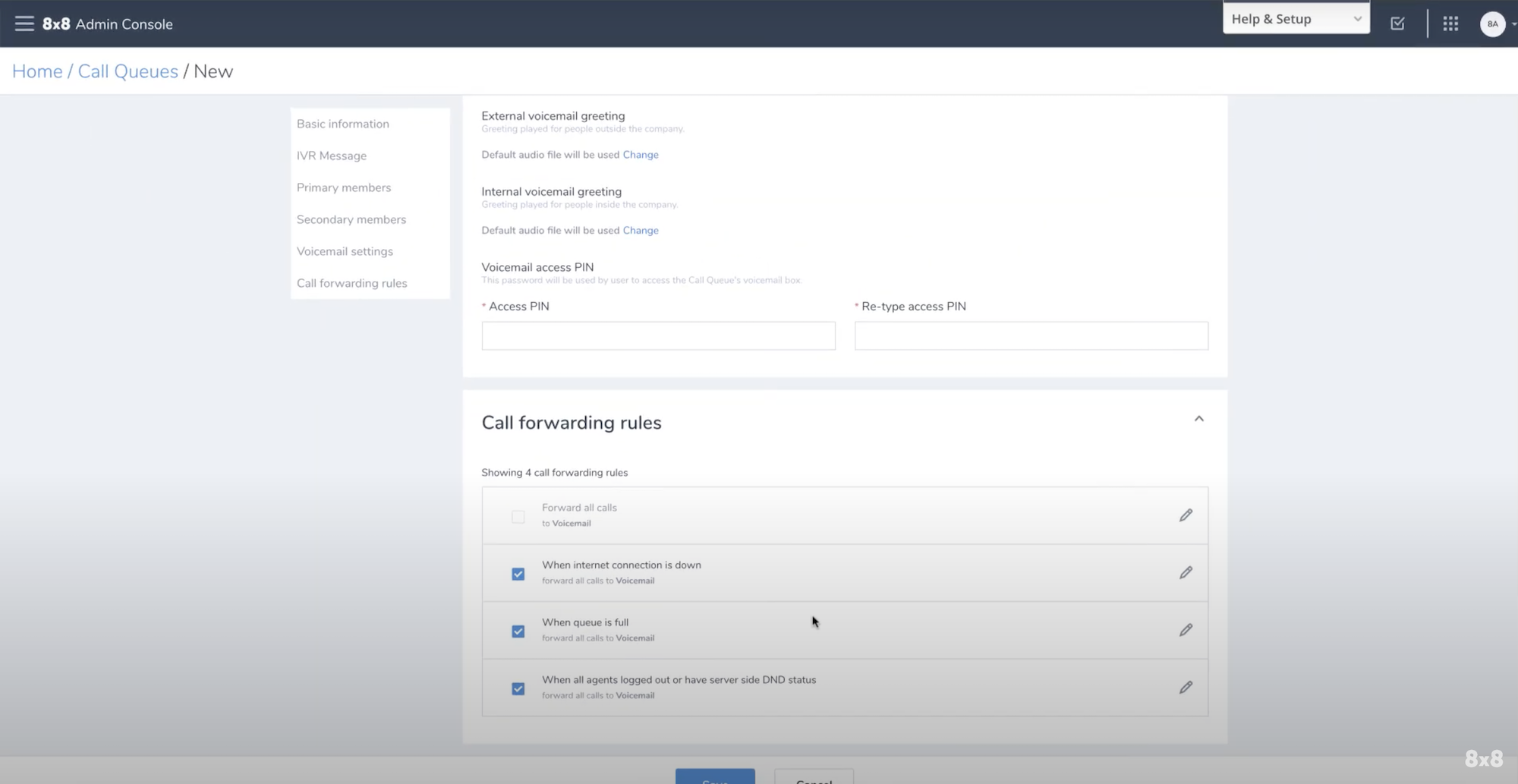
An efficient call forwarding strategy cuts down on the number of missed calls, increases first call resolution rates, and prevents you from needing to hire additional agents to manage high call volumes.
Quality customer service and support depend on your brand’s ability to be consistently accessible and available to consumers–and remote call forwarding ensures a reliable point of contact with your reps.
Types of Remote Call Forwarding
Forwarding is not a single switch. Each mode changes the caller experience in a different way, and admins usually configure more than one at a time.
- Unconditional forwarding (forward all calls): every inbound call goes straight to the destination number and the original device never rings. Use it for office closures, extended leave, or a permanent redirect of a legacy number.
- Forward on busy: calls route to the destination only when the line is already in use, so callers get a live person instead of a busy signal or an immediate voicemail drop.
- Forward on no answer: the original device rings for a set number of rings or seconds, then the call moves to the next destination. This is the behavior the sample path above illustrates.
- Selective forwarding: the system checks the originating number against a list and forwards only matching callers, which is useful for VIP accounts, on-call escalation, or screening known spam ranges.
On carrier lines, each mode is provisioned separately with its own feature codes. On a VoIP system, each mode is a separate step in the call flow. Either way, turning one mode off may leave another still active, so verify every rule attached to the number.
What Benefits Does Remote Call Forwarding Offer?
Small businesses, startups, enterprise-level contact centers, and international corporations all rely on call forwarding to streamline business processes and increase team productivity.
Call forwarding benefits like increased agent availability, consolidated calling across multiple locations, and decreased customer callbacks improve the agent and customer experience.
Plus, remote call forwarding lowers operating costs associated with hardware, staffing, office space, and cost per call, among others. Below is a more in-depth look at the most critical benefits of call forwarding.
Enhanced Availability
Remote call forwarding ensures customers can always reach your company and get the support they need on their own schedules, in and outside of standard office hours. Even when agents are working remotely, have stepped out of the office, or when office hours are over for the day, call forwarding sends inbound calls to other available offices or call centers in appropriate time zones.
Alternatively, calls can be directly diverted to home desktops equipped with business VoIP softphones or smart devices. This is all done quickly and remotely via built-in UIs or dedicated numbers.
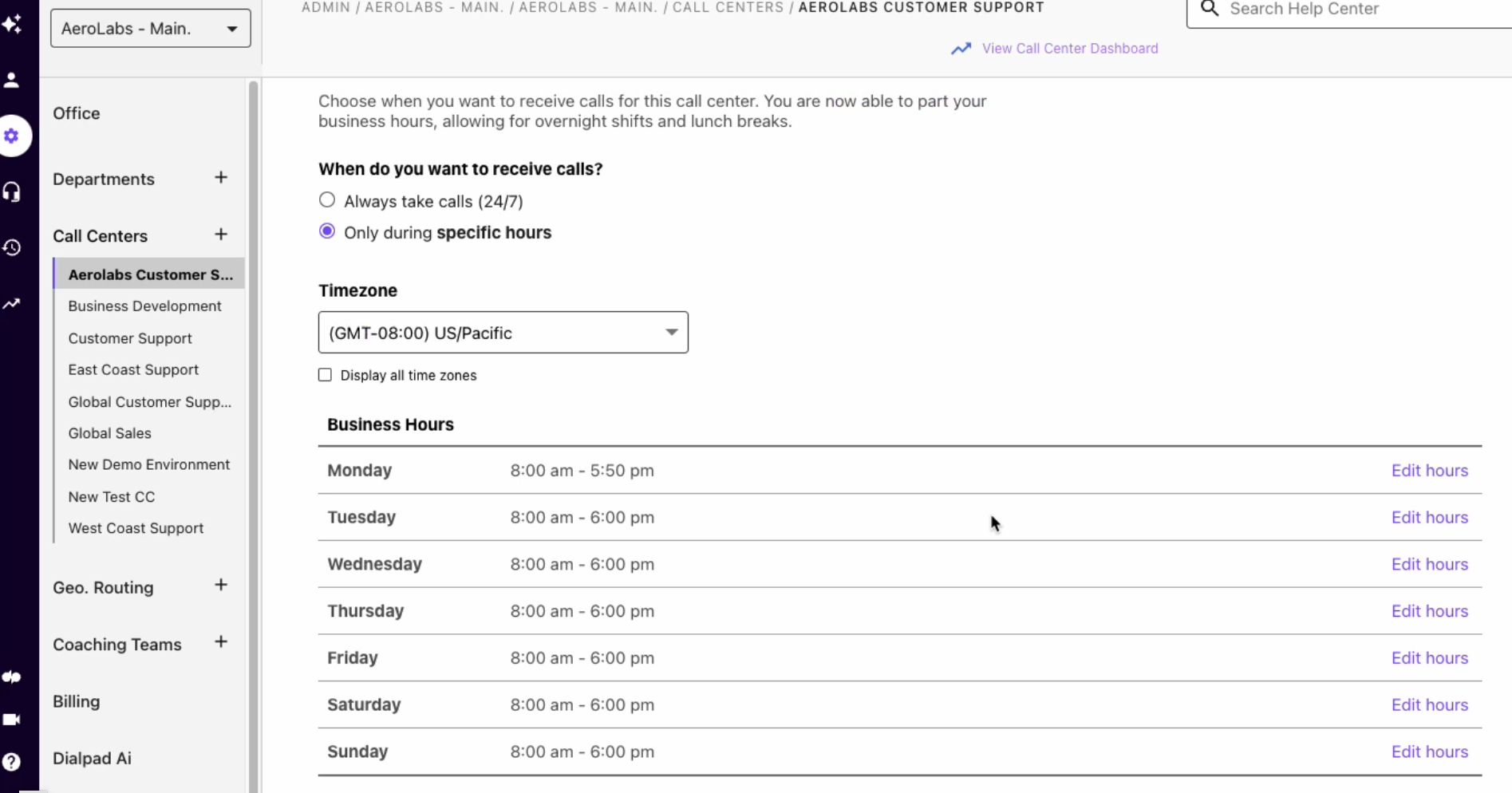
Companies set forwarding rules to enable specific routines at certain times of the day. For example, calls could be directed to a physical office between 8 AM and 6 PM, then automatically forwarded to a home phone or iPhone at all other times. It’s even possible to set the system to automatically send inbound calls to voicemail at certain times, such as during lunch or after hours.
Reach Multiple Offices
VoIP-based call forwarding also permits you to route calls to where they need to be. Let’s say the business has locations in Westchester, NY, Columbus, OH, and Saratoga, CA. All the business’s inbound calls are routed to these locations from one single toll-free number, simultaneously ringing until an agent takes the call. This is a concrete way to manage calls quickly and get customers the timely help they need, even when a branch office closes for the night.
Conversely, this is an excellent way to consolidate numbers. Call forwarding unites all of a business’s geographically diverse virtual phone numbers in one platform, routing calls to the most appropriate agent or ring group accordingly.
Convenient for Customers
Direct inward dial (DID) numbers, or virtual numbers, use a form of call forwarding that’s very useful for anyone intending to expand into long-distance domestic or even foreign markets. With this technology, locals dial the assigned local or toll-free numbers but still reach your remote offices without incurring extra charges.
In foreign, non-English speaking markets, local calls from these remote areas are forwarded directly to your agents with the required language proficiency. The caller themselves will never know whether they’re connecting to an office in their home country, or if they’re actually speaking to an agent at your Florida branch office.
Flexibility for any Phone Numbers
A forwarding destination can be almost any endpoint, including desk phones, desktop softphones, mobile apps, and traditional PSTN landlines.
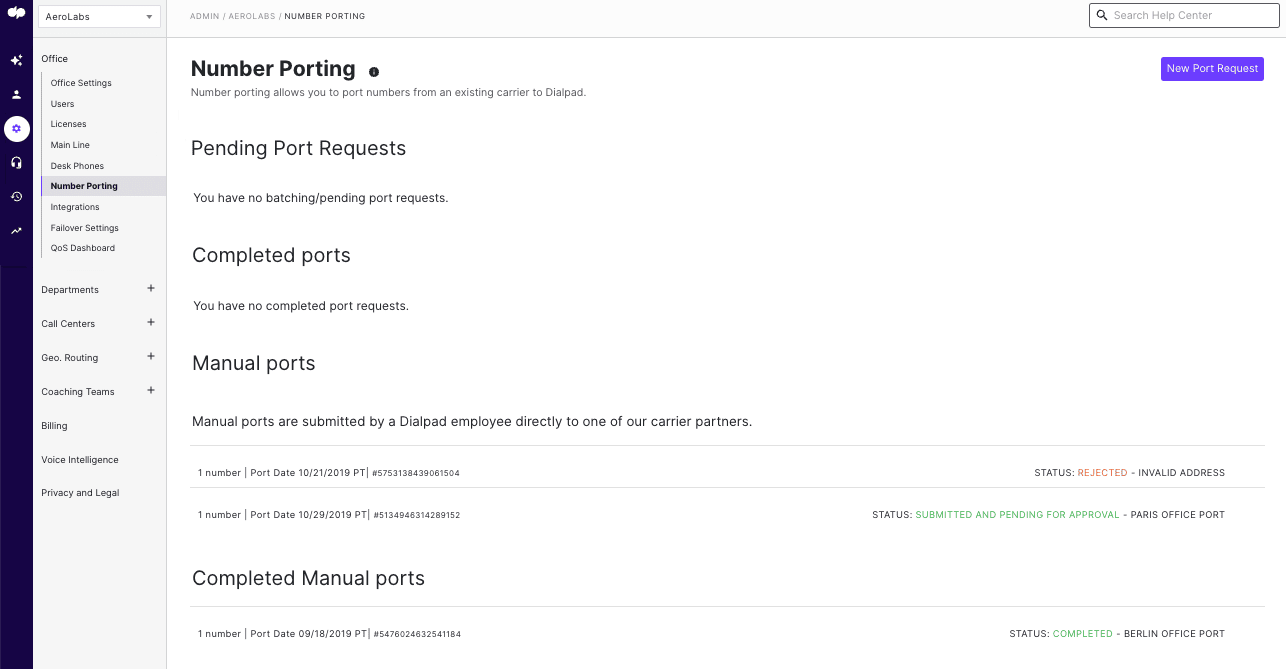
You can also use number porting and continue using an existing number when you transition to a new phone service.
No New Hardware Required
Cloud hosted PBX office phone systems with remote call forwarding capabilities are managed, hosted, and updated by the provider, not your business as the end user.
Since the server and other equipment are hosted by the provider, end users can continue to use their existing business hardware or let team members use their personal devices. Most systems receive this add-on feature with zero downtime, so your phone calls can be forwarded to new numbers almost as soon as you’ve purchased the service from your provider.
Carrier Forwarding vs. Cloud VoIP Forwarding
Remote forwarding works differently depending on whether the number lives on a carrier line or in a cloud phone system.
| Consideration | Carrier/Landline Remote Call Forwarding | Cloud VoIP Forwarding |
| How it’s turned on | Dial a remote access number and enter a PIN plus a feature code | Log into the admin portal or mobile app and edit the call flow |
| Change without the physical phone | Yes, from any phone with the access number and PIN | Yes, from any browser or app with admin credentials |
| Availability | Mostly landline and fixed business lines; wireless support varies by carrier | Any internet-connected device, wireless included |
| Destinations supported | Usually one forward-to number per line | Multiple destinations, ring groups, and sequential or simultaneous ringing |
| Conditional rules | Limited to separately provisioned busy and no-answer options | Rules by business hours, agent state, call volume, holidays, and caller ID |
| Team/shared numbers | Per-line only | Shared numbers, queues, departments, and IVR menus |
| Cost model | Paid per-line add-on, plus possible long-distance or per-minute charges on forwarded legs | Included in most per-user plans at no extra call charge |
Carrier RCF makes sense when a business needs to keep one advertised or geographic number pointed at a single answering location and does not want to change phone systems. Cloud VoIP forwarding fits distributed teams, since one admin can reroute several numbers at once and attach conditions like time of day or agent availability. Teams that already run softphones and mobile apps rarely need the carrier service at all.
How to Activate Remote Call Forwarding
Activating remote call forwarding varies based on the VoIP provider you choose, but most business phone systems can be configured in just a few minutes via the software’s mobile app, softphone, or in-browser interface.
Most providers make the setup process relatively simple.
Call forwarding is activated via remote access number, and users must create a custom PIN for user verification and authentication.
Once activated, admins can add one or more forwarding numbers–even if these numbers aren’t the ones they usually use for business calls and customer contact. (Increased user privacy is another benefit of call forwarding, as agents no longer have to give out their personal phone numbers.)
During the setup process, users can specify the number of rings or the maximum amount of time before the call is forwarded to the next number, order and edit phone number forwarding sequences, and create IVR call menus and drag-and-drop call flows to optimize call paths.
Admins can set call forwarding rules according to:
- Current Agent State (Away, At Lunch, On A Call, Busy, Available, etc.)
- Time of Day
- Current Call Volume
- Peak Times
- Agent Schedules
- Call Queue Activity
- Number of Available Agents
- Holidays
- Business Hours
These forwarding rules can be applied to all calls, only unanswered calls, or selective call types. Call forwarding can be enabled and disabled by toggling the slider button on and off.
To activate forwarding from any phone when you aren’t at the desk phone:
- Dial the remote access number your provider assigned to your account.
- Enter the business or home line whose calls you want to forward.
- Enter your PIN.
- Enter the activation feature code.
- Enter the forward-to number, including 1 plus the area code.
- Wait for the voice prompt confirming that forwarding is active.
On a cloud or VoIP system, the same job is done in software: log into the admin portal or mobile app, open the number’s call flow, and add or edit the forwarding destination.
How to Turn Off Remote Call Forwarding
Reversing the setup follows the same path you used to enable it.
- Dial the remote access number.
- Enter the line you forwarded and your PIN.
- Enter the deactivation feature code.
- Listen for the voice prompt confirming that forwarding is off.
On a cloud or VoIP system, switch the number back to its default call flow or toggle the forwarding rule off in the admin portal. Deactivation on a business VoIP system takes effect immediately, with no waiting period for the next inbound call.
One caveat: conditional and after-hours rules are stored separately from a blanket “forward all calls” rule. Turning off forward-all does not disable a no-answer or after-hours rule, so review every rule attached to the number before you assume calls are landing at the original device again.
What Are Best Practices for Remote Call Forwarding?
The following remote call forwarding best practices will help callers connect to the best available agents, make customers feel valued, and prevent agent burnout.
Highlight Your Brand
Most enterprise-level businesses set business phone system greetings that include the name of the business and a quick overview of essential information like operating hours, additional phone numbers, and the business address.
Keep pre-recorded greetings consistent across all phone numbers added to a call forwarding path, so customers can be sure they’ve been transferred to the right agent or department. This also gives callers an excellent first impression of your business.
Create Short IVR Menus
Companies with a high volume of incoming calls use IVR menus to provide customer self-service, and to learn the reason for the customer’s call for optimized call forwarding and routing.
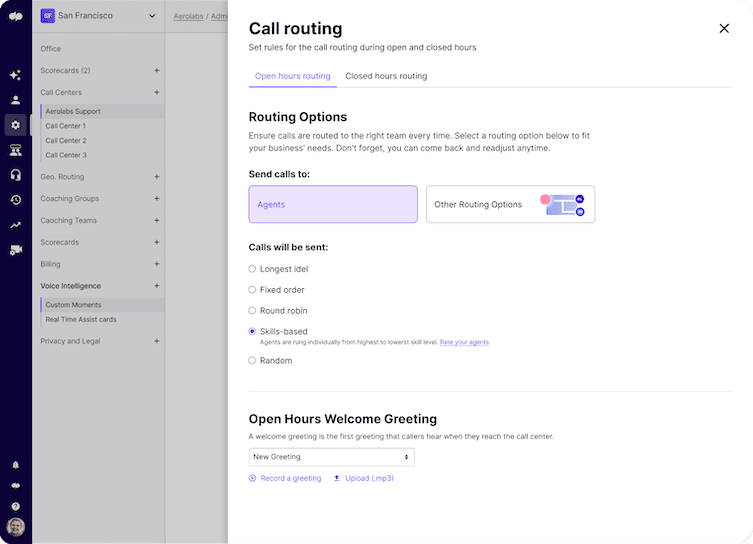
Avoid making IVR call menus too lengthy and complicated, as the idea is to save the customer time and to ensure you connect them to the correct agent the first time. Optimized IVR call flow is a smart way to gather information without putting the customer off.
Keep Timeout Values Short
When calls are forwarded remotely because no one is available at the original number, avoid setting high transfer and forwarding timeouts. No caller wants to sit and wait for an agent to pick up for more than a few seconds. Timeout value needs to be relatively short so that the caller stays on the phone line, and the call is resolved.
Keep Your System Up to Date
If your remote call forwarding system uses any type of IVR system, voicebot, or auto attendant, make sure it’s updated regularly. Outdated and incorrect business information leads to miscommunication, agent and customer frustration, missed calls, and damage to your business reputation.
Protect Your Remote Access PIN and Admin Logins
Anyone with your remote access number and PIN can redirect your business calls, so treat the PIN like a password. Rotate it whenever staff with access leave the team or change roles, and confirm the provider’s PIN reset path before you actually need it during an outage.
On the VoIP side, enable two-factor authentication and role-based permissions in the admin portal so only authorized admins can edit call flows. Most platforms log who changed a routing rule and when, which is worth reviewing after any unexpected routing behavior.
Also account for number takeover. A SIM swap or unauthorized port-out can reroute calls away from your business entirely, so enable a port-out PIN or number lock wherever the carrier offers one.
How to Use Remote Call Forwarding in an Emergency
Most larger companies have a single E911 number where calls are sent in case of an outage or emergency.
However, calls can also be forwarded to cell phones. This is a function that is extremely useful for businesses that need their employees to work remotely for some time.
During the 2020 Coronavirus pandemic, this became common, but other situations may require the majority of the employees to work remotely. Companies should be prepared for this so that calls are not missed.
Incoming calls can also be directed to an automated message that will give the customer details about what is happening and an option to leave a message.
This freedom and flexibility leads to higher job satisfaction, lower rates of agent absenteeism and turnover, and better customer service. Call center turnover rates average 40-45% annually, with high-stress sectors reaching as high as 55-60%, according to industry turnover data.
FAQs
Feature codes tell the switch which forwarding mode to change. One code activates forward-all, another cancels it, and separate codes handle busy and no-answer forwarding. Most carriers also publish a single code that cancels all forwarding types on the line at once, which is the fastest way to confirm calls are ringing the original device again.
It is possible if they have your remote access PIN or admin credentials, or if they take over the number through a SIM swap or unauthorized port-out. Rotate PINs when staff change, require two-factor authentication on the VoIP portal, and enable a port-out PIN with your carrier. Check your call flow settings if calls stop arriving without explanation.
Many providers allow it, but not all do, and international forwarding is often blocked by default on carrier lines. Where it is supported, the forwarded leg is billed at international rates, so a call answered abroad can cost far more than the inbound call itself. Confirm both permission and per-minute pricing before you route anything overseas.
Usually not. Traditional call forwarding applies to voice calls only, and SMS follows a separate path tied to the number itself. Business VoIP platforms handle this differently by delivering texts to a shared inbox or mobile app, so any team member with access to that number can see and reply to messages.
Forwarding rules live on the provider’s network rather than on the handset, so they keep working even when the device does not. A no-answer or unreachable rule sends the call to the next destination, such as a mobile number, a ring group, or voicemail. Set at least one destination that does not depend on office power or internet, and use the turn-off steps above once service is restored.