
An automated answering service handles incoming business calls during off hours, peak times, when employees are unavailable, when the calls are routine, or at all times. As opposed to leaving a message on a voicemail box, an automated answering platform allows callers to get some service, and in many cases to have their issue completely resolved.
Automated answering services vary considerably in what they can do. While all can handle basic answering and routing using natural conversations, some can also complete tasks such as appointment booking, lead capture, and FAQ answering leading to full resolution without a human team member needing to step in.
The right option for your business depends on the types of calls you receive, your volume levels, other apps you use, your budget, and how often your customers need a real person. Read on for our top seven picks.
How We Evaluated These Automated Answering Services
In addition to having strong inbound call handling capabilities, we chose the providers for this list based on how well they performed in a number of different areas:
- Task completion and issue resolution: We looked at what the service can actually accomplish during an incoming call, from answering questions to booking appointments
- Call routing: We researched what call routing features were available such as skill-based, round robin, ring groups, etc.
- Human handoff: We determined whether and how callers can reach an employee or live receptionist and whether those transfers are blind or warm
- Integrations: We compared connections with calendars, CRMs, phone systems, and other tools needed to complete or log calls.
- Pricing: We compared the starting prices, billing models, included usage, add-on fees, and relevant overages.
- Setup effort: We looked into the level of difficulty in configuring the AI agent or setting up the service, how user friendly the process is and how long it takes.
- Coverage and availability: We looked at whether the service can handle after-hours, overflow, and simultaneous calls.
- Business fit: We determined which types of companies and call workflows each service would be best suited to.
At-a-Glance Overview
| Provider | Cost & Billing Model | Call Handling | Integrations | Best For |
| Nextiva XBert | Bundled plans per conversation
$99 per month (includes 100 conversations per month) plus a Nextiva UCaaS plan ($15-$75/user/month) |
You have control over what topics and tasks XBert handles and which calls are escalated to a human agent | Google Calendar, Salesforce, Hubspot, REST APIs, webhooks, etc. | SMBs and mid-market teams that want AI tied into their communications system and CRM |
| Reception.ai by ElevenLabs | Minute-bundled plans
Three plans from $29-$199/month (including 75-1,000 minutes/month) |
Answers questions and connects to booking software to make/change/cancel appointments, send quotes, etc. | Google Calendar, Calendly, Cal.com, and custom integrations via Zapier | Small businesses that need automation for appointment booking especially those with customers who speak multiple languages |
| RingCentral AIR | Minute-bundled plans
$49/month as a standalone, $59+/month when combined with RingEX (100 minutes/month included) |
Matches caller requests to the company knowledge base for deep question answering capabilities, books appointments, processes orders, and more | Dedicated integrations tab with apps like Salesforce, Hubspot, Outlook, Google Calendar, Shopify, etc. | SMBs that need to automate repetitive processes in addition to call answering |
| Retell AI | Pay-as-you-go pricing model
$0.07-$0.31 per minute for AI voice agents plus custom enterprise plans |
You connect knowledge bases and set policies, procedures, and boundaries, and safety guardrails for the voice agent to follow when answering calls | Connects natively with major CRMs like Zoho, Zendesk and Salesforce, and scheduling apps like Calendly and Cal.com | Tech savvy teams that need flexibility and want a custom solution |
| Ruby | Minute-bundled plans
Four plans from $250-$1,725/month (50-500 minutes/month) |
100% of calls are handled by human agents trained on your business preferences | Most major CRMs and calendar apps such as Keap Law Ruler, Google calendar, etc | Customer service teams that need compassionate agents who can handle nuance |
| Goodcall | Bundled plans per unique customer
Three bundled plans from $79-$299/month (with 100-2,000 unique customers/month) |
Have Goodcall answer every call or set up conditional forwarding for overflow. Configure custom skills, greeting, task automation, etc. | Google Calendar, Google Sheets, HighLevel or anything with an API | Growing businesses who have many repeat callers and longer conversations |
| Quo Sona | Bundled plans per call
10 calls (1,000 credits) included in all Quo plans (ranging from $15-$35/user/month) Bundled add-ons range from $25-$199/month (include 40-600 calls/month) |
Handles incoming calls, captures leads, and answers customer questions automatically. Drag-and-drop call flow builder | Integrates with Quo and Quo’s integrations like Hubspot, Zapier, Slack, Salesforce, etc. | Small businesses and low call volume companies already using Quo |
The 7 Best Automated Answering Services in 2026
There are many AI receptionists out there to choose from, each with its own strengths and weaknesses. The seven platforms listed below are all ideal for businesses that need to automate call answering, specifically. The best one for you will depend on the size of your business, call volume, and other features you may need.
Nextiva XBert: Best for SMBs That Need an All-In-One Omnichannel System
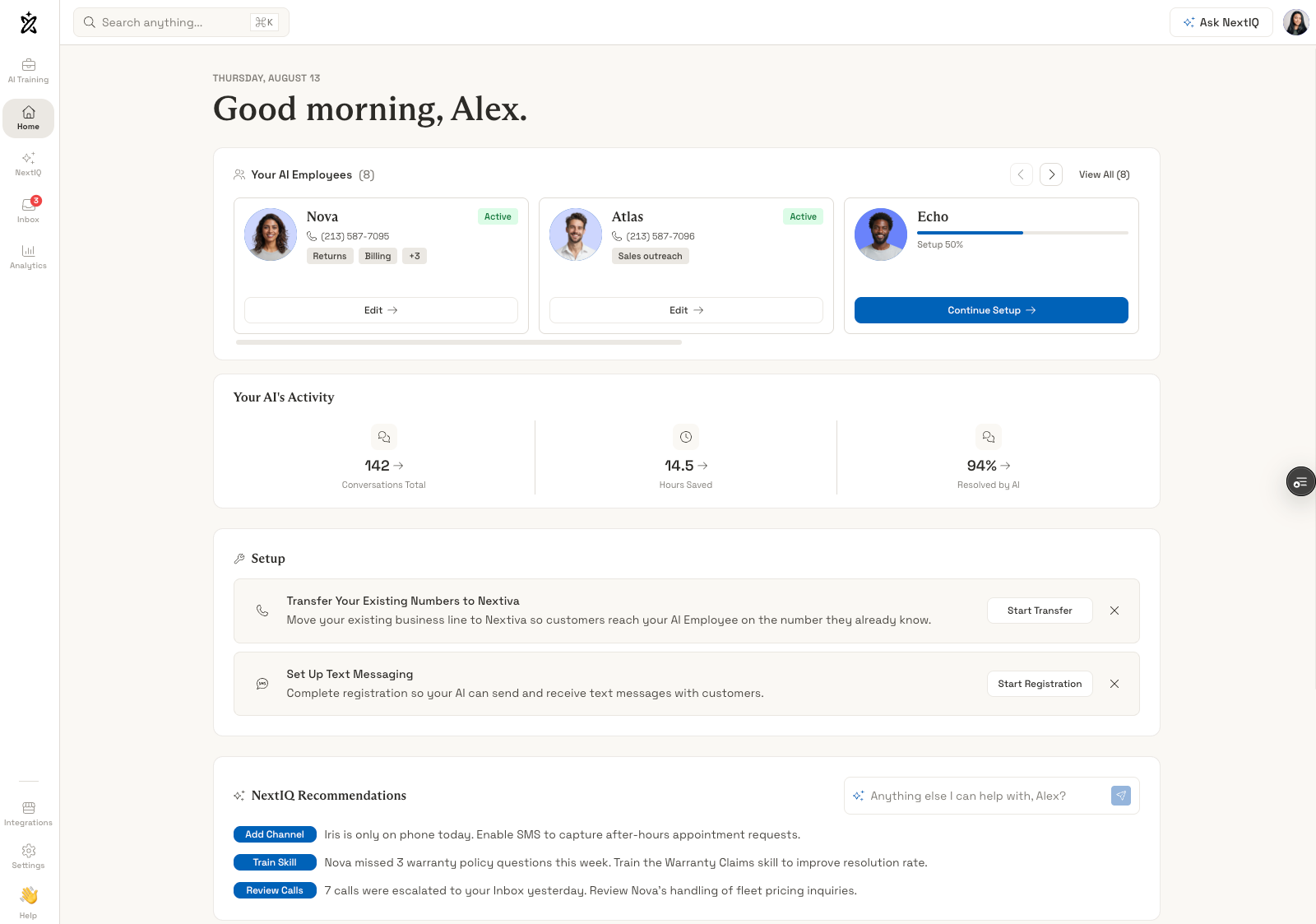
Nextiva XBert is an AI answering service that automatically answers incoming calls, speaks with customers in natural language, answers questions, performs routine tasks, and runs pre-approved workflows.
XBert stands out because it works within the Nextiva communications ecosystem and integrates data from voice, messaging, and text interactions so that customers don’t need to repeat themselves during second or third interactions, even when they switch channels.
When calls need to be escalated, XBert routes the call to a department or agent based on pre-determined rules. Human agents take over the interaction and receive an AI-generated summary and full transcript from XBert, along with suggested next steps, caller intent, and customer data.
Standout Capabilities
- Smart appointment scheduling: Admins connect XBert to the company calendar and set up a schedule using templates in the XBert dashboard to automate appointment booking
- Intelligent call routing: Agentic routing is used to determine customer intent and route the call to the right human agent or department if an issue cannot be resolved by XBert
- Lead qualification: Admins create a campaign for XBert and customize the workflow template for lead capture specifying qualifying questions
- Real-time insights and summaries: Real-time transcript and plain English summaries are produced for every interaction along with live AI performance metrics, missed call hotspots, call volume metrics, etc.
Pricing & Plans
XBert can be added onto any existing Nextiva UCaaS or CCaaS plan. Nextiva UCaaS plans range from $15-$75 monthly, per user, when paid annually.
XBert costs $99 per month which includes 100 conversations (voice, text, or live chat). Overage is $1.50 per conversation.
Setup Process
XBert includes a guided setup with pre-built roles, personalization, and testing capabilities. The entire process takes approximately 5 minutes to an hour depending on integrations and other complexities:
- Step 1: Allow XBert to scan you company knowledge base, customer data, or Google business website to learn your business information
- Step 2: Personalize your AI agent by giving it a name and voice, and specifying communication channels, create a custom greeting
- Step 3: Use the sandbox/preview tool to test conversations, request bookings, or give the AI agent information it should not be able to answer to see how it responds
- Step 4: Launch
Where It Needs Improvement
- Limited customization: XBert is meant to run out-of-box and while there are some customizations, you cannot choose your own LLM and specific pre-configured skills override custom prompts
- Not a standalone: XBert cannot be used with other communications platforms or purchased as a standalone answering service
Best for: XBert is best for users who are already using Nextiva for phone, messaging, and texting service, or those who are looking for a multichannel platform with automated answering built-in across channels.
Reception.ai by Elevenlabs: Best for Appointment Focused Businesses
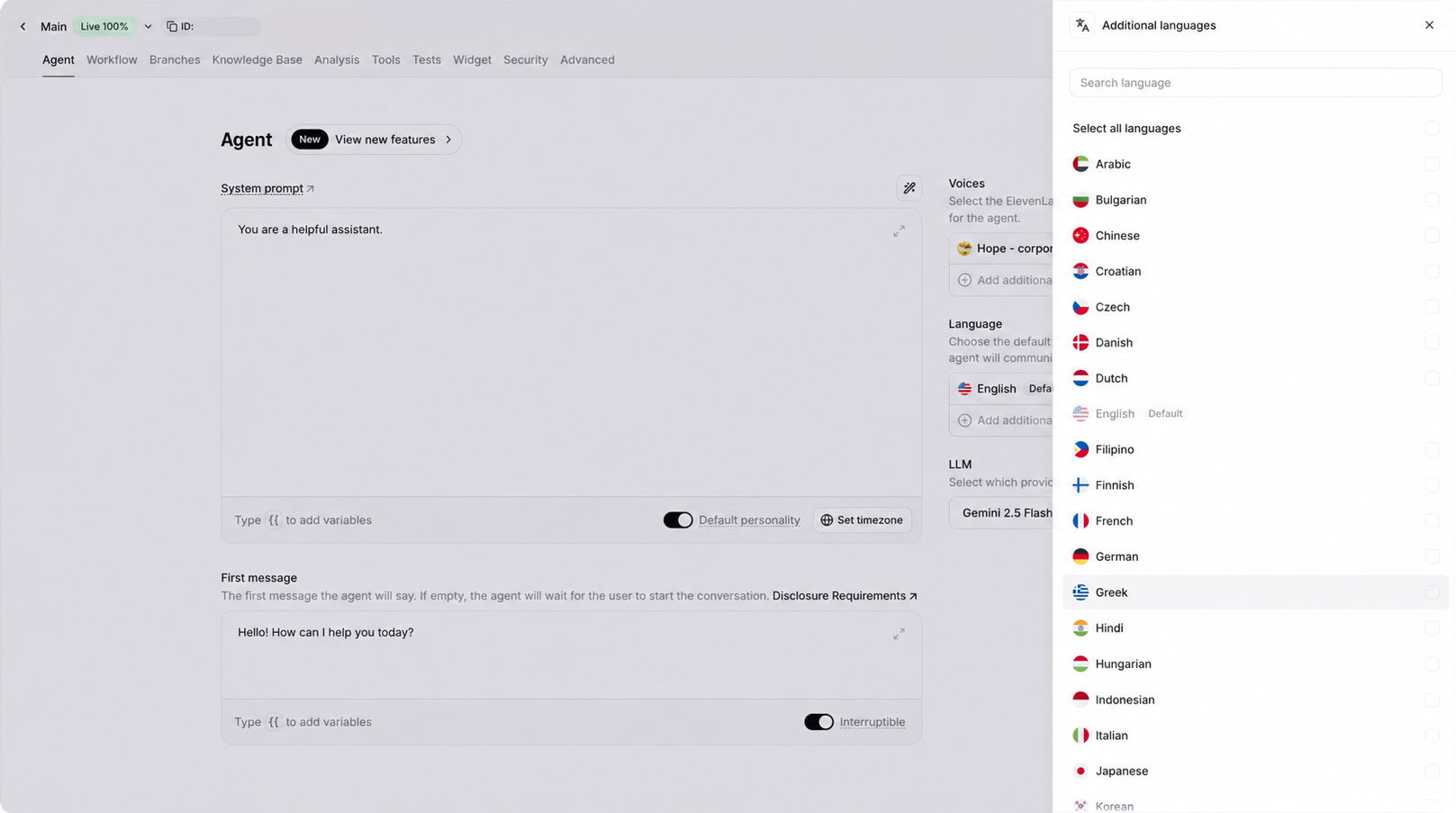
Reception by Elevenlabs is a primarily single channel AI answering service that handles calls and connects to booking and scheduling software. While Reception provides SMS and Email updates to human admins and agents, it only interacts with customers over voice and web chat.
Reception is one of the most affordable solutions on this list with plans starting at just $29 per month. It can be set up quickly and will answer customer questions in accordance with your knowledge base, route calls and allow customers to book, reschedule, or cancel appointments, place orders or request quotes.
If a question is asked that Reception does not have the answer to, it will log a “knowledge gap” for review. Admins can review, track conversations and monitor results from one dashboard.
Standout Capabilities
- Multi-lingual: Includes over 90 languages, able to detect the customer’s language, and can switch languages mid-conversation
- Booking page and web widget: Reception allows you to set up a hosted booking page where customers browse services and book appointments, a web widget button can be added enabling customers to chat with Reception AI
- Client list: Built-in customer database with automatic data capture and caller recognition
- Scheduling: Reception is able to check availability, coordinate calendars and write booking straight into your calendar during an AI managed call
Pricing & Plans
Reception offers three bundled plans ranging from $29-$199 per month. The main difference in the plans is how many minutes are included, although upper tier plans also add on simultaneous call handling, webhooks and multi-location support.
The Basic plan ($29/month) includes 75 minutes with overage costing $0.45/minute and no simultaneous call handling. The Plus plan ($79/month) includes 275 minutes with overage costing $0.38/minute. It can handle up to 3 calls simultaneously. The Premium plan ($199/month) includes 1,000 minutes with overage costing $0.30/minute. It can handle up to 10 calls simultaneously.
Setup Process
Due to its singular focus, Reception is fast to set up and the entire process normally takes about five minutes without any need for code.
- Step 1: Input your business website URL so that Reception can learn about your company
- Step 2: Input your phone number, a US or Canadian number is required. You can have a local number assigned from ElevenLabs’ pool or bring your own
- Step 3: Customize your receptionist with voice, tone, rules and procedures, and a greeting
- Step 4: Test in the browser by speaking directly with your AI receptionist
- Step 5: Go love and connect to your calendar (Google Calendar, Calendly, etc.)
Where It Needs Improvement
- Limited in scope: Reception does not chat with customers over SMS/text or social media and is therefore not a good fit for multi-channel companies
- Concurrent calls: Reception can only handle 1-10 calls at a time depending on the plan
Best for: Appointment focused small businesses- especially those that have callers who speak in different languages- that want automation for after-hours booking but don’t need omnichannel service (such as salons, studios, consultants, tutors, etc.).
RingCentral AI Receptionist: Best for Robust FAQ Answering and Routing
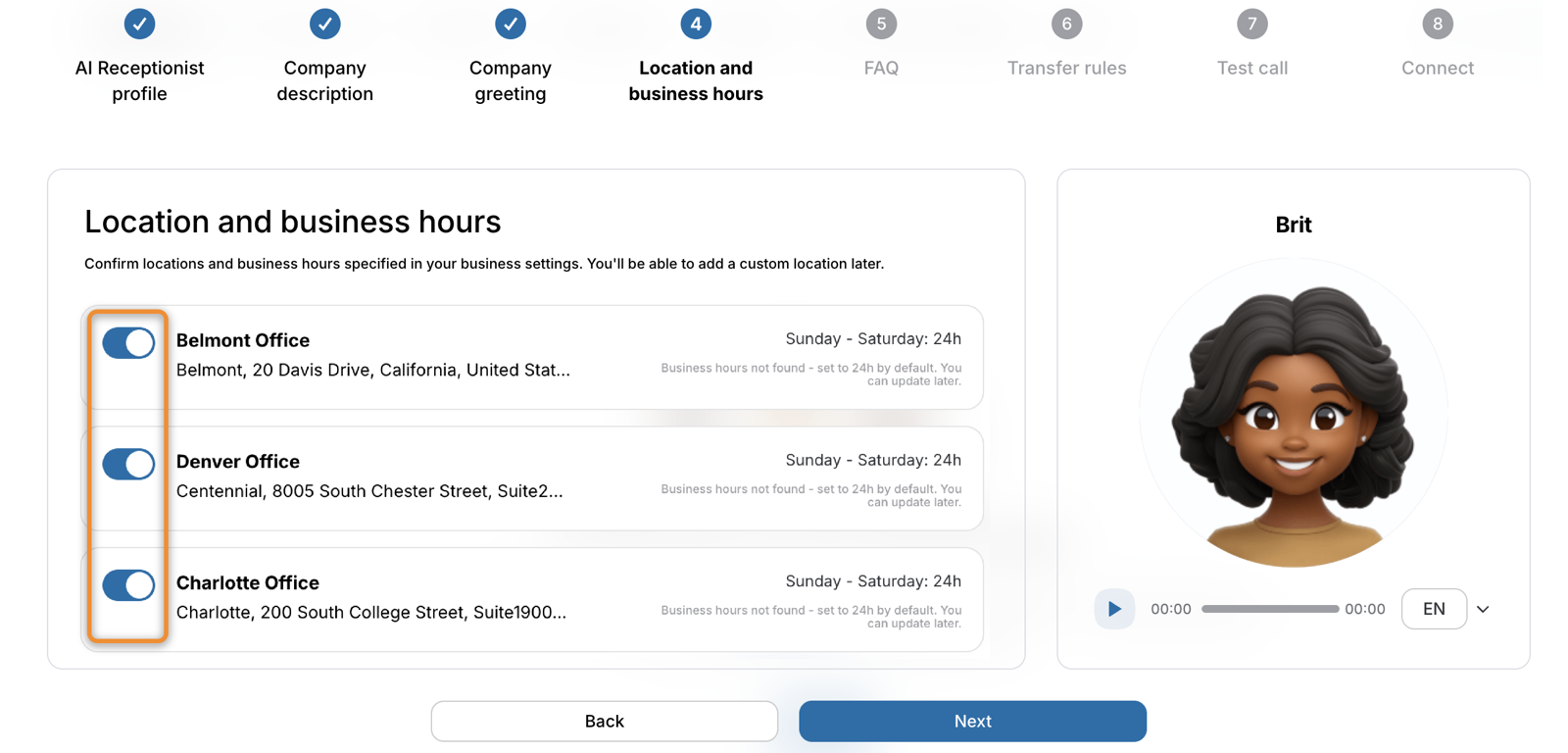
RingCentral AI Receptionist (AIR) is a feature-rich AI answering service that answers voice calls, texts, and messages and connects to your company’s knowledge base in order to answer customer questions around the clock. It stands out because it can be used with any phone system.
AIR is more than just an answering service, it can qualify leads, book appointments, and send SMS follow-ups. AIR connects to multiple calendars and can schedule unique RingCentral video links for virtual appointments. Multiple languages are available and AIR can detect and switch languages mid-conversation.
During human hand-offs, AIR provides full context including summaries with customer intent, and analytics reports include metrics on call volume, trends, unanswered questions, and knowledge gaps.
Standout Capabilities
- Intelligent call routing: Calls are routed by name or intent to users, extensions, queues, or external numbers
- Custom intake questions: Create custom intake questionnaires, turn on the lead capture skill, and AIR will conduct intake and input leads directly into your CRM
- Multi-location support: Calls are routed using location specific rules and individual team rules, with different business hours and staff calendars for each location
- Enterprise-grade security features: AIR is HIPAA compliant and when combined with RingCentral’s platform, all interactions are secured with end-to-end encryption
Pricing & Plans
AI Receptionist can be purchased as a standalone for $49 per month. This includes 100 minutes per month. AIR can also be combined with the RingEX Core plan for $59 per month (when paid annually). Overage costs $0.50 per minute.
RingCentral also offers two AIR Customer Engagement bundles for custom pricing. These plans allow AIR to assist on call queues and the shared SMS inbox.
Setup Process
RingCentral has a guided setup process for AIR that can take minutes for a simple answering service, but may take longer if multi-step workflows and tasks are needed.
- Step 1: Pick a personality based on your brand from a selection of templates
- Step 2: Drop in a company description up to 500 characters or link to a website
- Step 3: Customize routing rules, greetings, hours and location, and add lead capture questions
- Step 4: Add knowledge bases, return policies, etc.
- Step 5: Run a test call through the portal and then go live
Where It Needs Improvement
- Works best within RingCentral’s stack: Although AIR can be purchased as a standalone and combined with any phone system, you can only get native routing, SMS inbox, and queue assistance if you are combining with the RingCentral platform
- Costs can climb quickly: AIR plans only include 100 minutes per month and the overage rate of $0.50 per minute is higher than many competitors
Best for: Businesses that have multiple locations and/or departments and need an answering service that can work across multiple channels and handle multi-step workflows, especially those in healthcare and those already using RingCentral.
Retell: Best for Tech Savvy Teams That Need Customizability and Scalability
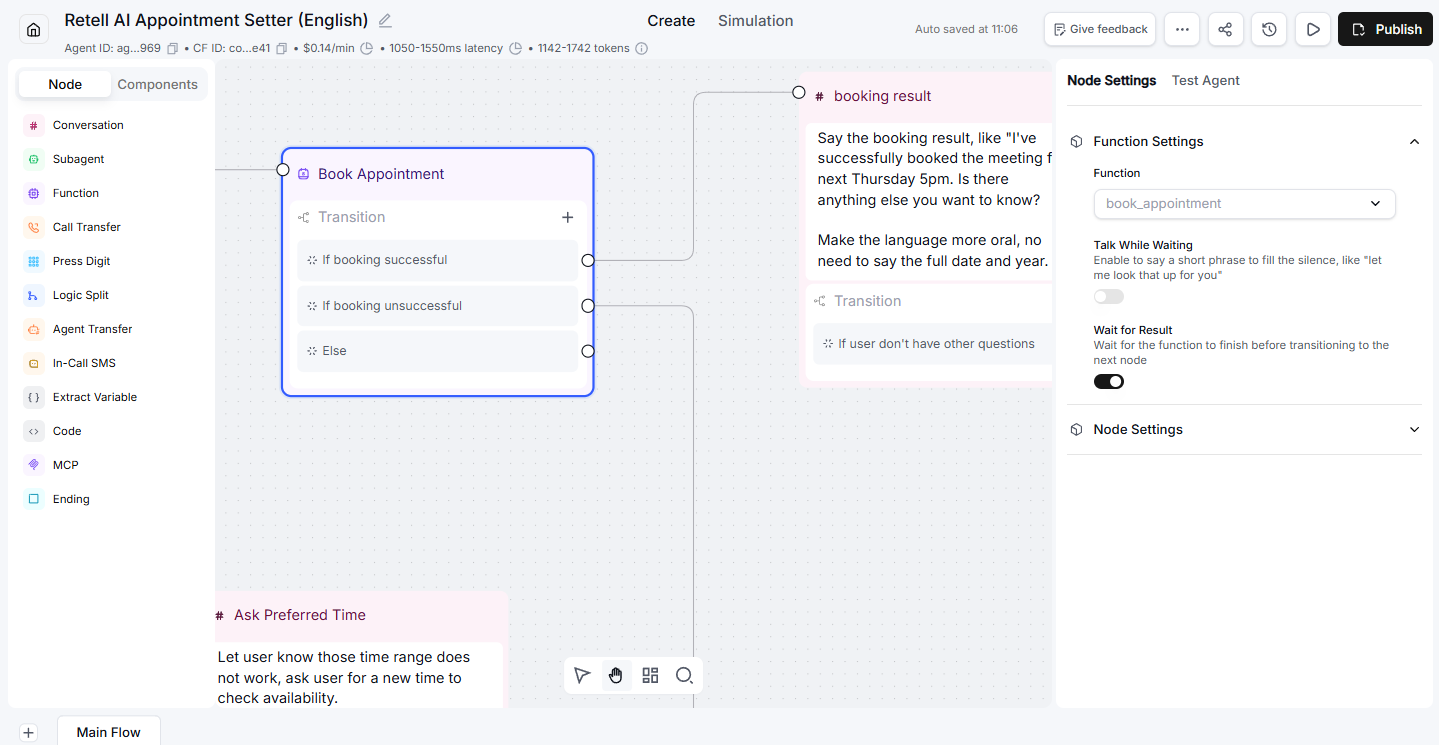
Retell is a developer-led AI answering service tool that lets the user choose which LLM and telephony provider to use, and then build the conversation logic that guides each AI agent.
Pricing is pay-as-you-go and the platform is extremely customizable, but it requires some setup time and technical know-how. The modular pricing structure along with the ability to conduct 20 calls simultaneously (and unlimited simultaneous calls in the Enterprise plan) makes Retell a great choice for scaling.
Retell is HIPAA ready and also includes SOC 2 Type 1 and 2 certifications making it a good choice for those in the healthcare industry. In addition to voice agents, Retell users can also build chat agents that interact with customers over web chat or SMS.
Retell includes a built-in analytics dashboard enabling users to monitor and improve the AI agent’s performance.
Standout Capabilities
- Analytics dashboard: Custom charts and graphs track call counts, latency, sentiment, handoff rates, first call resolution, and more.
- A/B Testing: Compare different AI agent versions side-by-side and prompt custom metrics to find the best agent for your customers
- Advanced denoising: Optional add-on for $0.005/min improves speech clarity and transcription accuracy by removing background noise and speech
- Automated summaries: Automatically generates post-call summaries with customer intent, discussion points, and resolution status
Pricing & Plans
Retell pricing is pay per minute and the rate depends on which LLM and telephony provider you choose as well as what call agent add-ons you might need (knowledge base, denoising, safety guardrails, and quality assurance)
Pricing starts at $0.07 per minute but this only includes a custom LLM, custom telephony, and Retell text-to-speech. Using Claude or Chat-GPT as the LLM will raise the price as will using Twilio or Telnyx telephony.
Even with a premium LLM and telephony provider, and all of the add-on features, pricing stays under about $0.40 per minute.
Setup Process
The Retell setup process is more complicated than others on this list and the time it will take will depend on how complex you need your AI agents to be.
- Step 1: Open an account, verify your phone number, and answer a few questions about your team size and setup preferences
- Step 2: Create a voice agent using a template or the Conductor tool that enables you to use plain text prompts
- Step 3: Select LLM, voice, response speed, and speech setting for your voice agent
- Step 4: Write prompts and rules for the voice agent’s identity, role, greeting, and operational boundaries
- Step 5: Add a knowledge base integrations, and functions such as appointment booking or CRM updating
- Step 6: Test your voice agent using the built in audio test tool or run your own simulation
- Step 7: Publish and connect to a phone number. You can obtain a phone number from Retell or link to an external provider
Where It Needs Improvement
- Requires technical knowledge to implement: Although Retell offers a no-code builder, if you need to build AI agents that can handle anything beyond basic answering and call forwarding, you will need some developer skills
- Customer support: Only community and email support is available to non-enterprise plan users
Best for: Small and medium sized teams with developers on board who want a completely custom and flexible solution that is quick and affordable to scale.
Ruby: Best for Customer Service Teams That Handle Complex Calls

Ruby is an answering service with live human agents (called “virtual receptionists”) who answer calls, take detailed messages, schedule appointments, collect payment, and conduct intake according to the rules, policies, and scripts that you give them.
Ruby can be used to handle overflow and after-hours calls, or it can be used to handle all of your calls, complete with phone service hosting, if needed. Spanish and bi-lingual Ruby agents are also available.
AI is used by Ruby agents as an agent assist tool that provides them with customer history and data during calls. AI-generated transcripts and sentiment analysis are provided to you for every Ruby interaction.
Standout Capabilities
- Notifications: Ruby sends out real-time notifications via email, SMS, or web app whenever an interaction finishes with customer details and next steps
- Scheduling: Integrates with 20 calendar tools in order to schedule appointments for you and your team during live calls
- Payment collection: Ruby operates in a PCI-compliant environment allowing Ruby agents to accept payment securely. Agents guide customers through the process step by step
- Custom scripts: Ruby receptionists follow tailored scripts based on your specific business rules and preferences
Pricing & Plans
Ruby offers four minute-bundled plans ranging from $250-$1,725 per month. All features are included in all plans.
- 50 minutes = $250/month ($5 per minute)
- 100 minutes = $395/month ($3.95 per minute)
- 200 minutes = $720/month ($3.60 per minute)
- 500 minutes = $1,725/month ($3.45 per minute)
Setup Process
The Ruby setup process is straightforward and a live Ruby team member will guide you through the process.
- Step 1: Choose your plan, sign up, and start working with a Ruby onboarding specialist
- Step 2: Set up call forwarding with your current phone provider or obtain a Ruby-hosted number
- Step 3: Log in and customize your dashboard with your availability, notification preferences, etc.
- Step 4: Review call summaries and monitor lead intake data on the Ruby dashboard
Where It Needs Improvement
- Cost: The highest value plan at $3.45 per minute is still more than triple the cost of an AI answering service
- Slower setup: You are training people as opposed to software so there is a significant briefing period and the agents’ level of knowledge on your business will depend on the quality of the content you provide
Best for: Companies that handle mostly longer calls, or calls that require sensitivity, complexity, nuance, and/or compassion.
Goodcall: Best for Teams That Handle Longer Calls With Repeat Callers
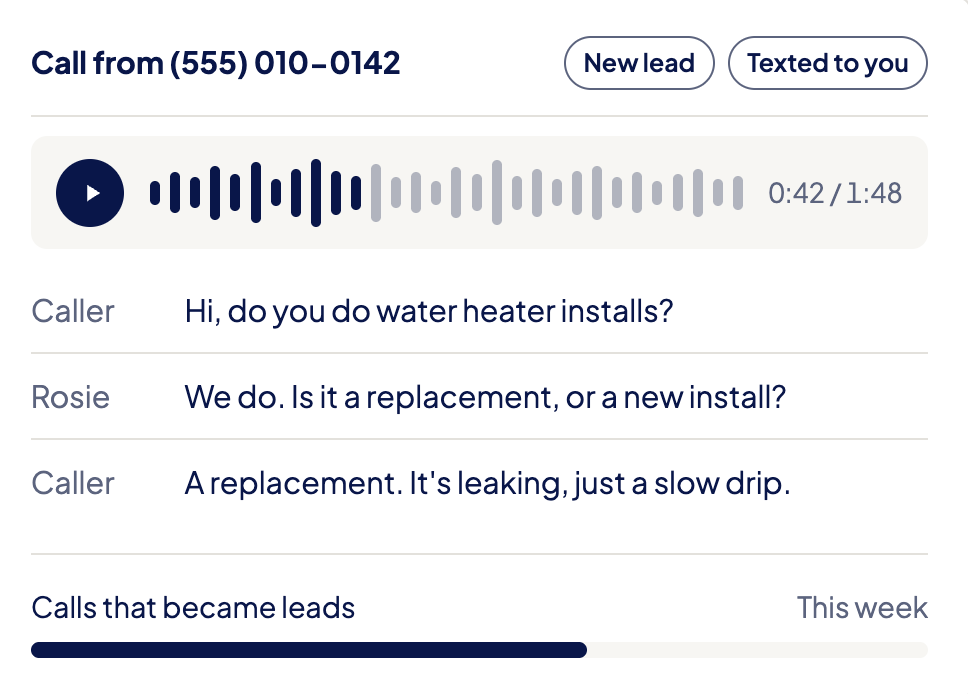
Goodcall is an AI-powered answering service that lets companies build AI agents that answer calls, book appointments, and route calls.
Admins build logic workflows that can branch on yes/no or multiple choice questions and the AI agents can collect lead details and pick the next action. Goodcall can also be connected with third party systems to integrate POS, ordering, and loyalty programs.
Goodcall stands out because it charges by unique customers instead of per minute, and it is able to ascertain new callers from returning ones and personalize the conversation accordingly.
Multiple fallback paths can be set for situations when the AI agent is unable to answer a question. These include transferring to a live person, taking a message, sending a link, or scheduling a callback.
Standout Capabilities
- Returning caller recognition: Goodcall AI agents recognize returning callers and greet them by name
- Teach-and-correct training: You review Goodcall’s conversations and correct answers when it gets something wrong, making the AI agent better and better
- Analytics: The analytics dashboard includes recordings, transcripts, caller details, intent, outcomes,and the automation rate (percentage of calls handled by AI)
- Instant CRM lookup: When a call comes in, the AI agent checks the number against your CRM automatically and if it finds a match will personalize the conversation
Pricing & Plans
Goodcall offers three bundled pricing plans ranging from $79-$299 per month. Instead of bundling minutes or conversations, Goodcall bundles “unique customers”. Each new phone number that calls your business during the month counts as one “unique customer”.
The tiered plans increase not only in unique customers, but also in team members, workers (specialist logic and form flows), external tools (integrations), test runs, and call history.
Overage costs range from $0.15-$0.79 per unique customer depending on the plan.
Setup Process
Goodcall has a guided setup handled by Gabi, its own AI agent, who takes you through the entire agent building process.
- Step 1: Let Goodcall scan your company website, and tell Gabi what you do, what your costs are, what information you need from callers, and any other relevant company data
- Step 2: Set up call transfer rules and human handoff rules
- Step 3: Connect third party apps such as calendars and CRMs
- Step 4: Test- Gabi can send practice calls for you and your team
- Step 5: Launch and set up call forwarding using your existing number or obtain a new one from Goodcall
Where It Needs Improvement
- Integration limits: Goodcall limits the number of external integrations you can add to 1 to 15 depending on the plan so it’s not a good fit for companies that use many third-party apps
- “Worker” limits: “Workers” are defined as specialists within your AI such as a message taker, or an appointment booker (essentially, specific logic workflows). Workers are limited to 5 to 20 depending on the plan
Best for: Inbound teams, especially restaurants and clinics, who receive a lot of repeat calls and have customers that expect personalized service.
Quo Sona: Best for Startups and Low Volume Businesses
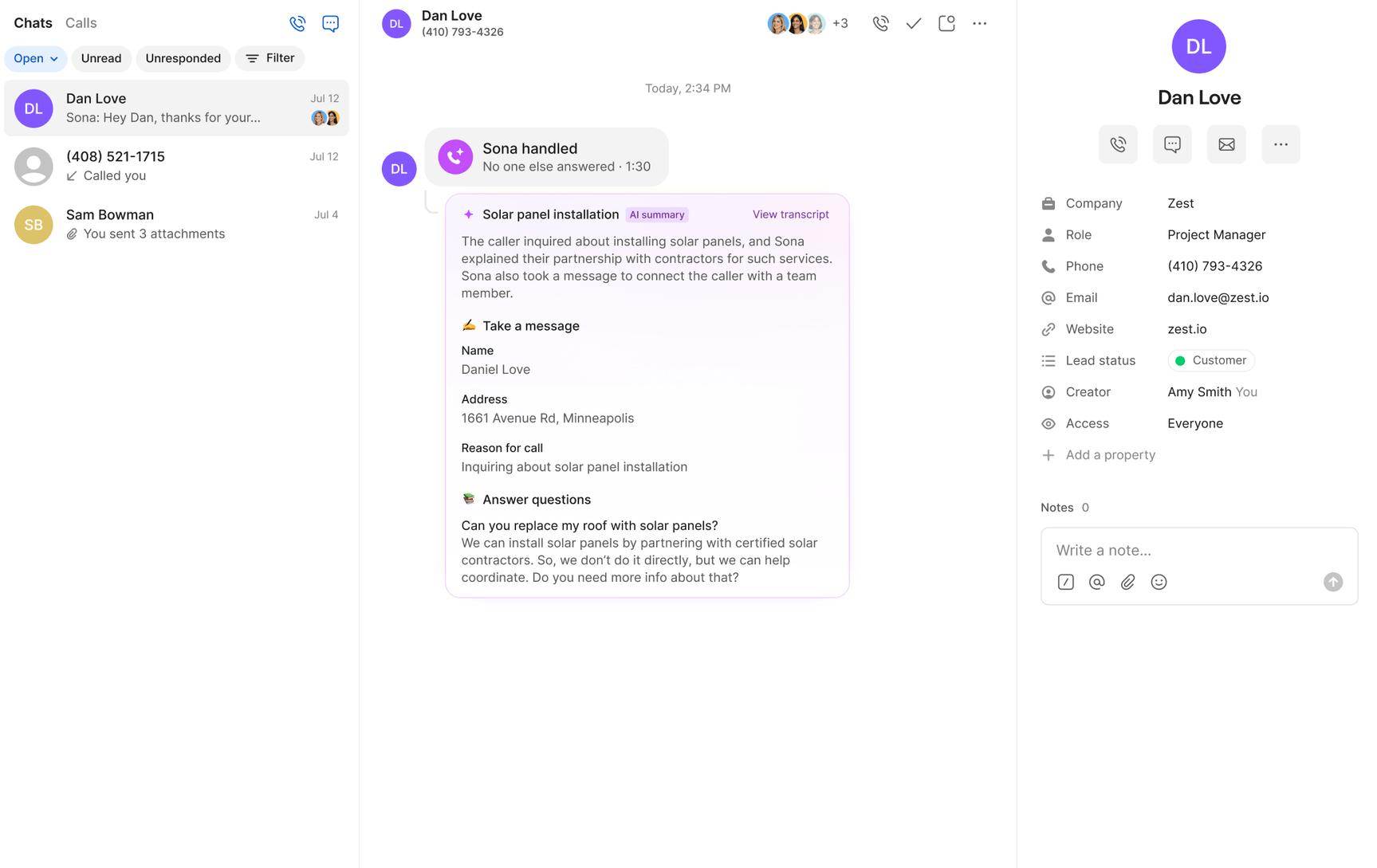
Quo Sona is an AI powered answering service that focuses on lead capture and question answering. Sona only works with the Quo cloud communications platform and cannot be combined with other phone systems, but one of Sona’s biggest advantages compared to other providers on this list is that it is included in all Quo plans and does not need to be purchased as an add-on.
You can add Sona to multiple points in your Quo call flows so that Sona answers calls whenever your team is unavailable. You can customize its greetings, the questions it answers, and the information it captures.
For each Sona interaction, the tool automatically logs the call along with a recording, summary, and outcome. Sona can also send text messages to callers during the call.
Standout Capabilities
- Multiple Sona steps in one call flow: You can set up separate “Sonas” to handle different scenarios with different instructions and you are only limited by the number of calls
- Shared inbox: The Quo shared inbox keeps AI-generated summaries, transcripts, and messages organized and readily available for all team members to engage with
- Text lead capture: in Beta as of the time of this writing, allows Sona agents to follow up with callers automatically via SMS/text
- Overage control: If you want to ensure you don’t go over your call limit, you can have all overage calls go automatically to voicemail
Pricing & Plans
Quo Sona is included with all Quo plans and cannot be purchased as a standalone. Quo plans range from $15-$35 monthly, per user, when paid annually.
Additional Sona credits can be purchased in 4 bundled plans ranging from $25 to $199 per month. Tier 2 ($25/month) includes 40 calls and an overage rate of $0.75 per call. Tier 3 ($49/month) includes 100 calls and an overage rate of $0.65 per call. Tier 4 ($99/month) includes 250 calls and an overage rate of $0.55 per call. And Tier 5 ($199/month) includes 600 calls and an overage rate of $0.45 per call.
Calls under 15 seconds (such as hangups) are free and do not count towards the monthly call limit.
Setup Process
Sona works within the Quo platform and can be added to a number of Quo call flows depending on what you want the AI agent to do.
- Step 1: Choose an inbox, and add Sona to a call flow using Quo’s call flow builder (it could be only for after-hours call answering, or could be an IVR menu option, for example)
- Step 2: Set up Sona’s knowledge base, and indicate what information it should collect from callers (tell Sona what you want it to do using plain language)
- Step 3: Test in the call flow builder before going live
Where It Needs Improvement
- Not a standalone: Sona only works within the Quo platform and cannot be used with other phone systems
- Lacks booking capabilities: Unlike other AI agents on this list, Sona is not yet able to confirm, change, make, or cancel appointments on a call
Best for: Companies that don't receive a lot of volume and only need a basic AI answering service with lead capture, especially those already using Quo.
AI vs. Human Answering Services
Most of the providers on this list (with the exception of Ruby) are AI-powered answering services, but there are some providers that offer both human answering and hybrid answering. There are some practical differences between these approaches.
| AI Answering | Live Human Answering | Hybrid |
| Handles routine calls automatically | Better suited to nuance, emotion, and judgment | AI handles routine calls and people take defined cases |
| Can handle multiple calls simultaneously | Capacity depends on available receptionists | Human capacity is reserved for calls that need it |
| Usually subscription or usage-based | Often billed by minutes or service level | Cost depends on how much traffic reaches people |
| Handles repeatable workflows consistently | Handles unpredictable conversations more naturally | Combines consistency with human escalation |
| Well suited to after-hours and overflow automation | Extended coverage may increase staffing costs | AI often handles overflow or after-hours calls first |
| Pay-as-you-go, bundled-minute plans, or tiered subscription plans, can be various add-on features that make pricing complex, generally a fraction of the cost of live human answering | Usually straightforward pricing in bundled minutes, less cost efficient than AI Answering | Generally priced somewhere in between AI Answering and 100% Human Answering, usually subscription-based |
Companies with high call volume can usually save the most money with an AI answering service while also shortening wait times and improving service, but the complexity of the conversations also matter. Routine, repeatable calls are the best kind for AI automation to handle, while complex, sensitive, or particularly valuable calls can strengthen the case for live receptionists.
Hybrid answering is best when routine traffic can be automated but certain conversations still require a person.
In Hybrid models, the quality of the handoff matters, not merely whether the service technically supports transfers. Look for providers that offer warm transfers with a summary, transcript, information from the CRM such as customer history, and possible suggested next steps for the best outcomes.
How to Choose an Automated Answering Service
Choosing an automated answering service is an important decision, here are some questions to ask yourself to help make the best choice for your team:
- What do callers need to accomplish? Do your customers just need simple routing? Or do they require answers about your business, appointment booking, payment collection etc.?
- What do you need from the service? Do you need the service to qualify leads, or updating business systems?
- What types of calls do you receive? Routine and predictable conversations are easier to automate than calls involving emotion, negotiation, complaints, or complex judgment.
- How many calls do you receive? Consider your normal volume, peak periods, overflow, and after-hours demand. How many calls do you hope to automate and how many answered by your team?
- Does every caller need access to a person? If yes, look closely at transfer rules, human availability, and what happens when nobody answers.
- What third party apps do you use? If you use booking software, calendars, CRMs, productivity apps, etc., make sure your answering service integrates with them
- Do you have a developer on staff? If not, make sure you select a provider that has no-code builders and guided setup
- How does pricing scale with your call volume? Check included usage, overage rates, per-minute charges, human-agent costs, and other usage fees rather than comparing entry prices alone.
- Are there security, privacy, recording, or regulatory requirements? Where applicable, verify these first, for example, if your business requires HIPAA compliance, make sure the answering service is at least HIPAA ready
FAQs
The average cost is about $20-$79 per month for an AI Answering Service that answers calls and makes appointments
Yes an automated answering service will work with your existing phone number either through SIP trunking, number porting, or call forwarding
You first set up a workflow for the service that is connected to your business calendar, and then, when a caller makes an appointment, the service will trigger the workflow, offer the caller your available times and book an appointment right on your calendar
When a caller asks to speak to a real person or when the service detects that a human is needed, an escalation is triggered and the service will handoff the call to a human agent in accordance with your rules and preferences, and often with a summary and transcript of the call
Some only support one or two languages, but many like Reception by Elevenlabs and AIR by RingCentral support many languages
It depends on the service provider, and sometimes the plan but it could be anywhere from one at a time to nearly unlimited simultaneous calls