A missed call is rarely just a missed call. For an appointment-based business, it's a prospect who dialed your competitor next, a booking that never happened, and revenue that walked out the door. The worst of it lands at peak hours when staff are slammed, evenings after the front desk goes home, and weekends when nobody's there.
An AI receptionist fills exactly those gaps. It's a voice-based virtual assistant that uses natural language processing to answer calls, book appointments, respond to common questions, qualify leads, and route the urgent ones to a person, around the clock, without a salary or a lunch break.
What is an AI Receptionist?
An AI receptionist is a conversational, voice-based virtual assistant that answers business phone calls using natural language processing. It picks up, talks to the caller in plain language, and handles the request, whether that’s booking a slot, answering a pricing question, or taking a message.
Unlike the old automated phone tree that forces callers through “press 1 for sales, press 2 for support,” an AI receptionist understands what someone means. It responds with personalized answers based on how it was trained on your business: your services, your hours, your scripts, your FAQs. Ask it a multi-part question (“Do you have anything Thursday afternoon, and is the first visit covered?”) and it can handle both parts in one breath.
It also adapts to mid-conversation. If a caller changes their mind, backtracks, or interrupts, the AI follows along instead of dumping them back to the main menu. And it does this 24/7, so calls that arrive at 9 p.m. on a Saturday get the same treatment as ones at 10 a.m. on a Tuesday.
How Does an AI Receptionist Work?
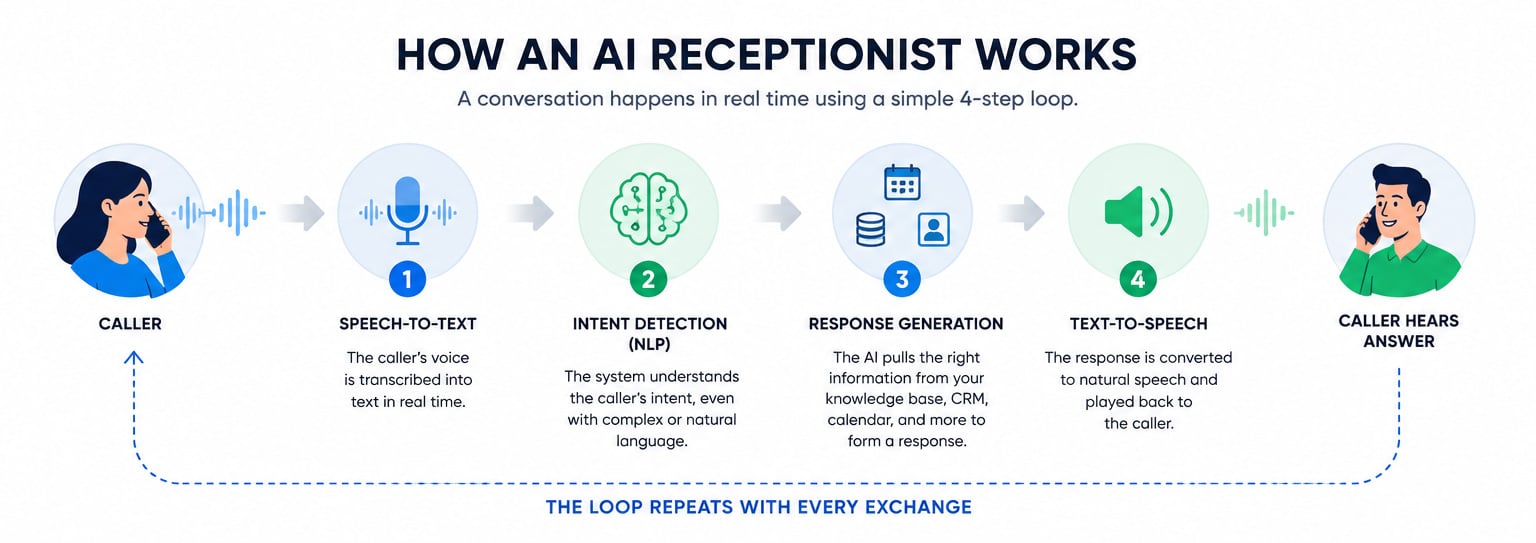
Behind a natural-sounding phone call sits a four-step loop that runs in real time, usually in under a second per exchange.
- Speech-to-text converts the caller’s voice into words. The moment someone speaks, the system transcribes the audio into text. This is the same technology that powers dictation on your phone, tuned for live phone audio with background noise and varied accents.
- NLP detects what the caller actually wants. The text gets analyzed for intent. “I need to reschedule my Friday appointment” is recognized as a rescheduling request, not a new booking, even though the caller never used the word “reschedule” in a tidy way. This is where an AI receptionist separates from a phone tree: it maps messy human speech to a clear goal.
- The system generates a response from its training data. Once it knows the intent, the AI pulls the right answer from what you taught it: your calendar availability, your pricing, your policies, your FAQ content. If the caller asked about Thursday availability, this is the step that checks the calendar and forms a reply.
- Text-to-speech speaks the answer back. The generated text is converted into a natural-sounding voice and played to the caller. Then the loop starts over with the caller’s next sentence.
The whole cycle repeats every time the caller speaks, which is what makes the exchange feel like a conversation rather than a menu. A phone tree has a fixed script and dead-ends the moment you say something it didn’t anticipate. An AI receptionist re-runs the listen-understand-respond loop on every turn, so it can follow tangents, handle corrections, and pick up where the caller left off.
AI Receptionist vs Human and Virtual Receptionists
The core difference is that an AI receptionist trades emotional range and flexibility for unlimited availability and flat cost, while a human brings judgment and warmth but can only take one call at a time during their shift.
| Factor | AI Receptionist | Human / Virtual Receptionist |
| Availability | 24/7, instant | Business hours or staffed shifts |
| Cost | Flat or usage-based monthly | Hourly wage or per-minute service fees |
| Call volume | Handles spikes simultaneously | Limited by staff count |
| Emotional / complex calls | Limited | Strong |
| Setup | Training and integration required | Minimal |
It also helps to separate three things that often get lumped together.
A voice AI receptionist answers phone calls and talks back, the focus of this guide.
A chat-based receptionist does similar work over text or website chat, where there’s no audio to transcribe and callers tend to be more patient.
A hybrid human-plus-AI answering service, like Abby Connect, uses AI to catch and qualify calls but routes to live agents when a person is the better fit.
Where each fits: pure voice AI suits businesses drowning in repetitive calls; chat suits website-heavy lead flow; hybrid suits businesses that want a safety net of real humans for the calls that matter most.
The honest framing is that AI supports staff rather than replacing them, and the role split makes that concrete:
- AI handles: repetitive FAQs, after-hours and weekend booking, and overflow during call spikes.
- Staff handle: escalations, sensitive or emotional conversations, and high-value relationship calls.
Think of the AI as the front line that absorbs volume, freeing your people for the conversations where a human voice changes the outcome.
When an AI Receptionist Fails and Which Calls Need a Human
Vendor demos always go smoothly. Real phone lines don't. An AI receptionist is a filter, not a full replacement, and pretending otherwise is how businesses lose trust.
Three failure modes show up again and again:
- Accents and unclear speech. Strong or unfamiliar accents get misheard at the speech-to-text stage, which throws off everything downstream.
- Emotionally complex calls. An upset patient or a grieving client breaks the system, because the AI detects words but not the situation behind them.
- Off-script requests. Anything outside the system's training leaves the AI guessing or looping, and nothing frustrates a caller faster than an assistant that repeats itself.
Security and privacy add another layer of risk. Voice spoofing lets a bad actor impersonate a caller. Prompt injection, where someone phrases a request to manipulate the AI's behavior, can coax it into doing something it shouldn't. And every call that touches health details, financial data, or legal matters is a mishandling risk if the system isn't built to protect it.
For regulated industries, the stakes climb. A medical practice needs HIPAA-aware handling of any health information the AI hears or stores. Call recording consent laws vary by state and country, so an AI that records without proper notice creates liability. Legal and medical callers expect a standard most generic tools don't meet out of the box.
Calls that should always route to a human:
- Distressed or emergency callers, where delay or a wrong answer causes real harm.
- Complex complaints, where a frustrated customer needs to feel heard.
- High-value negotiations, where tone and judgment close or kill the deal.
- Anything requiring legal or medical judgment, which an AI is not qualified to give.
Catching these early comes down to escalation triggers. The ones worth configuring: repeated misunderstandings (two or three failed attempts to parse a request), detected frustration in the caller's language, explicitly out-of-scope requests, and sensitive keywords like "emergency," "lawsuit," or "complaint." Most vendors will tell you escalation exists. Far fewer tell you which triggers to set, and that's the part that actually protects your callers.
Should Your Business Use an AI Receptionist?
Start with four questions. They sort most businesses quickly.
- Do you miss calls after hours or during peak times? If yes, that’s the clearest case for AI, since it never closes.
- Is a large share of your calls repetitive FAQs and booking requests? High repetitive volume is exactly what AI handles best.
- Are most calls simple, or do they involve sensitive, emotional, or complex situations? Simple favors AI; emotional and complex favor humans.
- Do you have the CRM and calendar tools to integrate? Without these, the AI can answer but can’t act on much.
The pattern: high repetitive volume plus missed calls points toward an AI receptionist. Mostly complex, emotional calls points toward keeping humans or running a hybrid setup where AI screens and people handle the substance.
Two buyer personas show how different “the right setup” looks.
A solo home-service contractor, a plumber or electrician on a job site, can’t answer the phone with their hands in a sink. Their need is simple: never miss a job call, capture the caller’s details, and book a slot. Budget is tight, call types are straightforward. A lean standalone AI receptionist with calendar booking covers it.
A multi-location medical practice is a different animal. It needs HIPAA-aware handling, high call volume across several offices, routing to the correct location, and every interaction logged into the CRM. The configuration here is heavier: compliance controls, multi-location routing logic, and tight CRM integration matter far more than price.
Common users include medical clinics, law firms, dental practices, salons, and home service contractors, basically any appointment-driven business where a missed call is a missed booking.
How to Set Up an AI Receptionist
Going live takes more prep than vendors imply. Here’s a realistic four-week path from picking a tool to running it on real calls.
- Selection. Define your call types first: what do people actually call about, and which of those can be automated versus escalated? Then choose a provider that fits your category (standalone, telecom-integrated, or hybrid) and confirm it supports the integrations you need. Don’t buy before you’ve listed your call types; it’s what determines whether a tool fits.
- Training. Feed the system the material it answers from. This is the work most setups underestimate. You’ll need:
- Call scripts for common scenarios
- FAQ answers pulled from your site and documents
- Business hours and holiday schedules
- Escalation triggers (the sensitive keywords and failure conditions from earlier)
Garbage in, garbage out applies fully here. The quality of these inputs decides the quality of every call.
- Integration and testing. Connect your calendar and CRM, commonly Google Calendar, Salesforce, or HubSpot, and map the fields so booked appointments and caller details land in the right place automatically. Set your routing and escalation rules. Then test hard: run calls with tricky accents, multi-part questions, and deliberately out-of-scope requests to see where it breaks before customers do.
- Full deployment. Go live, then watch closely. Read call transcripts daily, catch the misunderstandings, and tune responses based on what real callers actually say. The first two weeks of live calls teach you more than any amount of pre-launch testing.
Before week 4, make sure these are genuinely ready: call scripts, FAQ answers, escalation triggers, calendar access, and CRM field mapping. Skip any one of them and your launch will feel half-built to the people calling you.
FAQs
They answer phone calls, book and reschedule appointments, respond to common questions, qualify leads, take messages, and route urgent or complex calls to a human. Many also log caller details and call summaries into your CRM automatically.
Pricing varies by provider and model. The common structures are flat monthly subscriptions, per-minute billing, and per-call pricing, so your cost depends heavily on call volume. Compare the monthly figure against what missed calls and a part-time human cost you, not against zero.
It’s worth it when you have high call volume, a lot of repetitive FAQs and bookings, and missed calls after hours or during spikes. It’s a weaker fit when most of your calls are emotional, complex, or sensitive, where a human still wins.
An AI receptionist works 24/7, handles unlimited simultaneous calls, and costs a flat or usage-based fee, but it struggles with emotional and complex conversations. A human brings judgment and warmth but is limited to one call at a time during set hours.
Yes, when it’s integrated with your tools. Connected to Google Calendar, Salesforce, or HubSpot, it can book and reschedule appointments live and write caller details and call outcomes into your CRM without manual entry. The integration and field mapping have to be set up first.
When it hits an escalation trigger: distressed or emergency callers, complex complaints, high-value negotiations, anything needing legal or medical judgment, repeated misunderstandings, detected frustration, or sensitive keywords. These rules should be configured during setup, not left to chance.
Some are, but it’s not automatic. For regulated industries you need a provider that explicitly supports HIPAA-aware handling, proper call recording consent, and secure treatment of sensitive data. Confirm compliance in writing before routing any medical or legal calls through one.