Missed calls are missed revenue, and they’re costing you more than you think. Call-tracking studies consistently find that over 80% of callers who hit voicemail hang up without leaving a message, and many simply dial the next business in their search results. The math is unforgiving: if your average new customer is worth $200, losing two callers a month costs more than most AI receptionist plans – which is what you should be using to make sure those calls get answered.
An AI receptionist books appointments, qualifies leads, captures messages, and flags the urgent notifications 24/7, without putting anyone on hold.
That said, tasks considered “essential” vary by industry: a law firm needs conflict screening, a salon needs to fill a last-minute cancellation, and an HVAC company needs to tell "no heat" from "leaky faucet" at 2 a.m. This guide breaks down the real use cases industry by industry, with the integration that powers each one and a sample call flow that shows exactly how the AI responds. It also covers where AI underperforms, the compliance lines you can't cross, and how to decide what to automate first.
What an AI Receptionist Does (and How It Connects to Your Tools)
An AI receptionist is software that answers phone calls using natural language, understands what the caller wants, and then books, routes, or qualifies based on the request. Unlike traditional IVR, an AI receptionist speaks, listens, and takes action rather than reading a fixed "press 1 for sales" menu.
A handful of functions recur in nearly every industry:
- 24/7 answering with no hold time, including overflow when your team is already on the line
- Appointment booking and rescheduling with live calendar sync
- Lead qualification using questions tailored to your business
- Message capture for anything the AI can't resolve
- Call routing to the right person, department, or on-call staffer
- Urgent-keyword detection that flags time-sensitive calls (flooding, chest pain, gas smell) and escalates them immediately
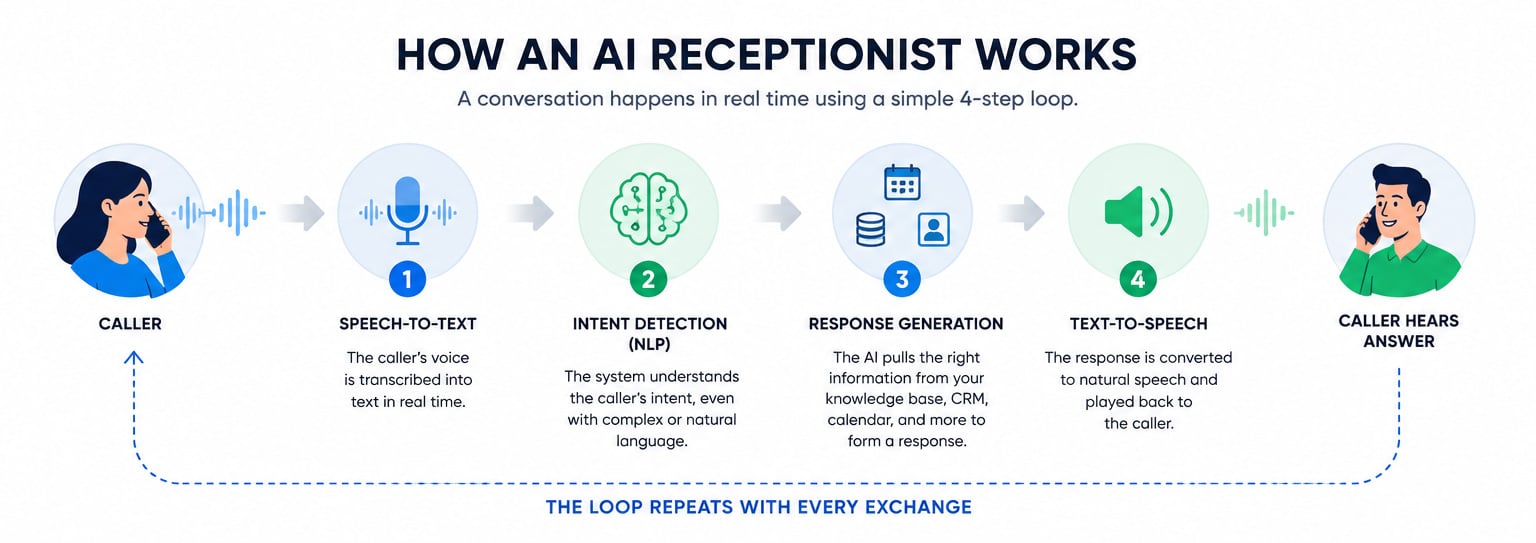
Integration is what separates a useful AI receptionist solution from standard IVR or voicemail. Booking a time slot, logging a lead, or pulling up an order status only happens if the AI is connected to the system that holds that data. Without a linked calendar, the AI can promise an appointment, but can't actually reserve it. Without a connected CRM, it can collect a lead's details, but has nowhere to post them. Without read access to your order system, it can't look up a tracking number.
Integration is the difference between an AI agent answering a call and an AI agent resolving it.
AI Receptionist Use Cases by Industry
The industry determines the most impactful AI receptionist use cases. Below, each industry has specific tasks, the integration that makes those tasks real, the qualifying criteria that matter, and a short call flow showing how the AI handles a live caller.
Home Services (HVAC, Plumbing, Electrical)
Trade businesses live and die by emergency response. The AI's first job is triage: it listens for urgent keywords like "no heat," "flooding," "burning smell," or "gas," and routes those calls straight to the on-call tech instead of scheduling them for next week. Everything else gets booked or queued.
Qualifying a home services caller comes down to three things: the service type (HVAC, plumbing, electrical), the property address, and the urgency level. Those determine which tech, which truck, and which day. Connected to ServiceTitan, the AI books and reschedules jobs against the live dispatch board, so it won't promise a slot that's already taken.
The other advantage is seasonal overflow. When the first cold snap hits and the phone rings forty times an hour, the AI handles the spillover your front desk can't, so the booking comes to you instead of the competitor whose line was open.
- AI: Thanks for calling Ace Plumbing, this is the front desk. What's going on today?
- Caller: My water heater is leaking all over the floor.
- AI: Got it, that's urgent. What's the service address?
- Caller: 418 Maple Street.
- AI: Thank you. I'm flagging this as an emergency and connecting you to our on-call technician now.
Healthcare and Medical Practices
Medical practices use AI receptionists mostly for appointment logistics: booking, rescheduling, and confirming visits against the practice calendar, plus reminder calls that cut no-shows. On intake, the AI identifies whether the caller is a new or returning patient, captures the reason for the visit, and routes anything that sounds urgent (chest pain, difficulty breathing) straight to clinical staff.
Insurance verification is where you draw a hard line. The AI can safely capture the front-desk basics: which carrier the patient has, the member ID, and whether a plan is already on file. However, AI should never confirm insurance eligibility, coverage amounts, or what a visit will cost. Those require a verified system check or a human, and an AI that guesses wrong about coverage creates a billing dispute and a compliance problem at once. Capture and pass along; don't decide.
Every one of these tasks touches protected health information, so HIPAA handling is non-negotiable. Confirm any vendor signs a Business Associate Agreement before going live.
- AI: Thank you for calling Riverside Family Medicine. Are you a new or existing patient?
- Caller: New patient, I need to get in this week.
- AI: Happy to help. Can you tell me briefly what you'd like to be seen for?
- Caller: Bad cough that won't go away.
- AI: Understood. We have Thursday at 10:40 a.m. open. Shall I book that and send a new-patient form by text?
Legal and Law Firms
Law firms use AI receptionists for new-client intake: capturing the matter type, the parties involved, and contact details directly into tools like Clio so the lead doesn't slip through the cracks after hours. The function unique to legal is conflict pre-screening, and it has to be handled carefully.
The workflow goes like this: the AI asks for the names of the opposing parties and the matter type, then checks those names against the firm's existing client list in Clio. If it finds a potential overlap, it flags the call for attorney review rather than booking a consultation. The accuracy limit is the whole point: the AI surfaces possible conflicts, it does not clear them. A licensed attorney makes the final ethical determination every time. Treating an automated "no match" as a green light is how a firm walks into a disqualification.
Qualifying a legal caller is about practice-area fit and conflict status, not budget. Get the matter type and party names first; everything else follows.
- AI: Thank you for calling Hartwell Law. What kind of legal matter can we help with?
- Caller: I want to file for divorce.
- AI: I understand. May I have your full name and the other party's name?
- Caller: I'm Dana Reyes, my spouse is Michael Reyes.
- AI: Thank you. I'm checking for any conflicts before scheduling. One moment, I may need an attorney to review this before we book your consultation.
Real Estate
For agents and brokerages, the AI receptionist captures leads while you're at a showing or asleep. It collects buyer and seller leads with the details that actually qualify them: budget, timeline, and target area. Those land directly in Salesforce so nothing leaks overnight.
The qualifying criteria are specific. For buyers: pre-approval status and target price range. For sellers: timeline and reason for selling. The first fork is always buy versus sell, because it routes the lead into a completely different workflow. The AI also schedules and reschedules property showings against the agent's calendar, so a hot buyer at 8 p.m. gets a Saturday slot instead of a callback that comes too late.
Speed matters more in real estate than almost anywhere else. Leads contacted within the first few minutes convert at several times the rate of leads called back the next morning, and most portal inquiries go to whichever agent responds first. The AI closes that gap by engaging the caller immediately, capturing which listing they're asking about, and logging the lead source in Salesforce, so follow-up and attribution don't depend on an agent's memory after a long day of showings.
- AI: Thanks for calling the Calloway Group. Are you looking to buy or sell?
- Caller: Buy. I saw the listing on Oak Street.
- AI: Great. Are you already pre-approved, and what's your target price range?
- Caller: Pre-approved up to 550.
- AI: Perfect. I can book a showing for Saturday at 1 p.m. and have your agent confirm. Does that work?
Beauty, Wellness, and Salons
Salons and wellness studios run on their calendar, so the AI's core value is booking, rescheduling, and handling cancellations with live sync, all without pulling a stylist off the floor. It identifies the service requested (cut, color, massage, facial), checks availability, and offers open slots.
Two functions do more than their share. The AI can sell gift cards over the phone and text a checkout link to close the sale on the spot. It can also work a waitlist: when a 2 p.m. cancels, the AI fills the gap from the waitlist instead of leaving a high-value chair empty. Chasing last-minute openings is exactly the kind of task no front desk has time for during a busy Saturday, and every filled slot is revenue that would otherwise vanish.
- AI: Thanks for calling Luxe Studio. What service can I book for you?
- Caller: Highlights, sometime this week if possible.
- AI: We have Wednesday at 3 or Friday at 11. Which works?
- Caller: Friday at 11.
- AI: Booked. I'll text you a confirmation and a link to pre-pay if you'd like to save time at checkout.
E-Commerce and Retail
Online and retail sellers use the AI receptionist to absorb post-purchase support: order tracking and status lookups, returns and exchanges, and basic product questions, with anything complex routed to a human.
Order tracking only works with a data connection, and this is the part most descriptions skip. The AI can report order status only if it has read access to whatever holds the record: Shopify, your ERP, or your order management system. To resolve a tracking request, it needs the order number and the customer's email to verify identity and pull the right record. Without that access, "let me check your order" becomes "I'll take a message," and the customer is no better off than before they called.
The prerequisite for this use case isn't the AI; it's the integration. Connect the order system first, then automate.
- AI: Thanks for calling Northgate Goods. How can I help?
- Caller: Where's my order? It said it shipped four days ago.
- AI: I can check. What's your order number and the email on the account?
- Caller: Order 88213, dana@email.com.
- AI: Thank you. Your package is out for delivery today by 8 p.m. Anything else?
Hospitality and Restaurants
Restaurants get buried in calls at the exact moment staff has the least time to answer: the dinner rush. The AI handles reservation booking, modification, and cancellation, plus waitlist management and table-availability questions, so the host isn't choosing between the phone and the people standing at the door.
It also fields the endless repeat questions (hours, location, parking, whether you can seat a party of six at 7 p.m.) during the peak times when those calls would otherwise hit voicemail or a busy signal. Capturing party size and requested time, then checking availability, is the whole job, and it's a high-volume one. Connected to OpenTable or Resy, the AI books against live table availability rather than guessing.
Two details separate a useful setup from a basic one. Confirmation and reminder texts cut no-shows, which matters when a held four-top on a Friday night is real revenue walking out the door. Restaurant cancellations currently hover around 20 percent, according to data averaged across reservation platforms like Resy and OpenTable. And large-party or private-event inquiries should route to a manager rather than through the booking flow, since a 30-person holiday dinner is a sales conversation with deposits and menus attached, not a reservation.
- AI: Thanks for calling Osteria Bianca. Would you like to make a reservation?
- Caller: Yes, four people tonight around 8.
- AI: Let me check. We're full at 8, but I have 8:45, or I can add you to the waitlist for 8. Which would you prefer?
- Caller: 8:45 is fine.
- AI: Booked for four at 8:45. You'll get a text confirmation shortly.
Financial Services and Insurance
Banking, lending, and insurance offices use the AI receptionist for routing and intake, not transactions. It directs callers to the right department or agent, captures quote requests, and schedules appointments with advisors or adjusters.
The boundary here is even firmer than in healthcare. The AI captures intent and contact details, then routes account-specific or sensitive requests to verified human staff. It does not confirm account balances, make policy decisions, or discuss anything tied to a specific account it can't securely authenticate. A caller asking "what's my balance" gets routed to a verified agent, not an answer from the bot. Capturing a quote request ("I need auto coverage, here's my info") is fair game; confirming a claim payout is not.
- AI: Thank you for calling Meridian Insurance. What can I help you with?
- Caller: I want a quote for homeowners insurance.
- AI: Happy to set that up. Can I get your name, phone number, and the property address?
- Caller: Sam Ortiz, 212-555-0148, 22 Birch Lane.
- AI: Thank you. I'm scheduling a callback from a licensed agent for tomorrow morning to walk you through a quote.
Where AI Receptionists Underperform
An AI receptionist isn't a clear win for every business, and pretending otherwise sets owners up to waste money. In high-complexity, high-empathy, or low-volume situations, the setup effort and monthly cost can outrun the benefit.
Nuanced, emotional, or highly variable calls. Some conversations resist scripting. A grieving family calling a funeral home, a patient describing ambiguous symptoms, a customer who's already furious: all need human judgment and warmth the AI can't fake. Push automation into them and you frustrate the exact callers you most need to keep.
Very low call volume. If you take six calls a week, the math rarely pays back. A monthly AI receptionist fee against a handful of calls a human could easily handle is hard to justify. The return lives in volume and after-hours coverage; without either, skip it.
No system to integrate with. If your calendar, CRM, or order system can't connect, the AI is stuck taking messages. That's still better than voicemail for some, but you're paying for a fraction of the value, and you should price the decision accordingly.
A few failure scenarios are worth naming directly: repeated misunderstandings where the AI keeps mishearing, callers who flatly refuse to talk to a bot, and multi-issue calls where someone wants three unrelated things at once. Each one degrades the experience quickly.
That's why the handoff rules matter as much as the use cases. A human handoff should trigger on any of these:
- Repeated misrecognition (the AI asks the caller to repeat themselves more than twice)
- Detected frustration or anger in the caller's tone or words
- Out-of-scope or sensitive requests the AI isn't authorized to handle
- An explicit request for a human, honored immediately, with no friction
The threshold should drop in regulated, high-stakes verticals. In healthcare, legal, and financial services, hand off sooner: a symptom that might be an emergency, a possible conflict, or an account-specific financial question should reach a person fast, because the cost of the AI getting it wrong is far higher than an awkward transfer.
What to Automate First
Rolling out everything at once is how deployments fail. The sequence below starts with the lowest-risk, highest-return jobs and works toward the ones that need trust and tuning, with each phase generating the call transcripts you'll use to configure the next.
- After-hours and overflow answering. Start here because it captures calls you're currently losing outright, with zero disruption to how your team works during the day. Every call the AI takes at 9 p.m. is pure recovered opportunity, and the transcripts show you exactly what callers ask for.
- Appointment booking. Add this once your calendar integration is connected and verified, not before. A double-booked slot or a promised appointment that never lands on the calendar burns trust faster than a missed call.
- Lead qualification. Layer in your qualifying script (service type and urgency, buy versus sell, matter type) once the AI is reliably handling bookings. By now the transcripts from phases one and two tell you how your real callers actually phrase things, which makes the script better.
- Routine FAQs. Hours, location, pricing basics, service-area checks. Train these from your real call data rather than guessing what people ask.
- Everything complex stays human. Emotional calls, compliance-sensitive determinations, and multi-issue requests go to people, indefinitely. The goal of the first four phases is to free your staff for exactly these calls, not to eliminate them.
Before moving from one phase to the next, check the containment rate (the share of calls the AI resolves without a handoff) and audit a sample of transcripts. If callers are repeating themselves, getting misrouted, or asking for a human more than occasionally, fix the current phase before expanding the AI's job.
FAQs
High-call-volume, appointment-driven, and after-hours-sensitive businesses see the strongest returns: home services, salons and wellness, medical and dental practices, real estate, and restaurants. The common thread is a steady stream of bookable, routable calls plus revenue lost when the phone goes unanswered. Low-volume or highly emotional businesses benefit least.
Yes, but only with a vendor that signs a Business Associate Agreement and handles protected health information under HIPAA controls. The AI can safely book appointments, capture the reason for a visit, and collect insurance details to pass to staff. It should not confirm coverage, eligibility, or clinical decisions on its own, and urgent symptoms should route to clinical staff right away.
The qualifying questions map to whatever determines value in each sector. Home services qualify on service type, address, and urgency; legal qualifies on matter type and conflict status; real estate qualifies on buy-versus-sell, budget, timeline, and pre-approval; financial services capture quote intent and contact details. The AI runs whichever script you configure, which is why "qualifies leads" means something different in each vertical.
When the caller explicitly asks for a person, when the AI misunderstands repeatedly, when it detects frustration, or when the request is sensitive or outside its scope. Healthcare, legal, and financial offices should set a lower handoff threshold than, say, a salon, because the stakes of a wrong answer are higher.
Many AI receptionists handle multiple languages, detecting the caller's language and responding in kind, which is genuinely useful for businesses serving diverse customer bases. Coverage varies by provider, so confirm which specific languages a platform supports and how it handles a mid-call switch before you rely on it.