

Most AI receptionists answer questions, book appointments, and transfer calls. XBert AI by Nextiva aims to go further. It handles voice calls, SMS conversations, and live chats, takes action in connected business software, and keeps the customer’s history available when the conversation changes channel or reaches an employee.
That broader scope is the product’s main appeal. XBert can operate as an autonomous "AI employee," a hybrid receptionist, or an assistant that coaches human agents. However, buyers still need to distinguish the entry-level promise from the work required to connect systems, set guardrails, and make the service reliable in real customer conversations.
This review examines XBert’s capabilities, pricing, setup, integrations, and limitations to explain what the product offers and what to verify during its free trial.
What Is XBert AI?
XBert AI is Nextiva’s AI platform for handling customer conversations across phone, SMS, and live chat. It can answer questions, qualify leads, take messages, book or reschedule appointments, update customer records, send follow-ups, and transfer a conversation to an employee.
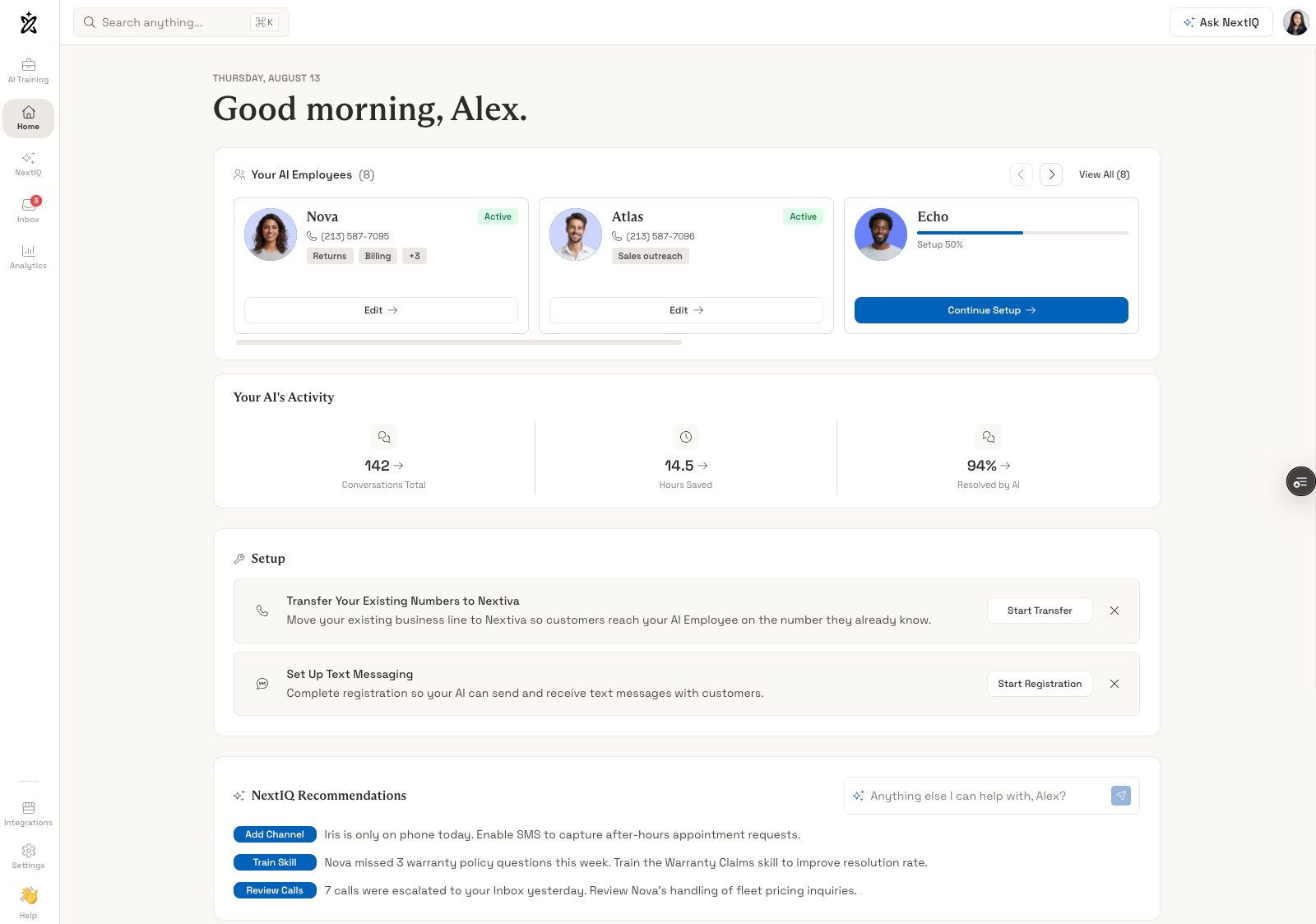
The product is available as a standalone service or as an add-on to Nextiva’s broader communications platform, according to Nextiva’s current product guide. Businesses do not need to replace their phone system simply to try it, although existing Nextiva customers may have an easier path to keeping calls, messages, customer records, and analytics in one environment.
Nextiva uses "AI employee" as an umbrella term for three related ways to use XBert:
- Autonomous: XBert handles approved conversations and tasks from start to finish.
- Autopilot: XBert leads the interaction while employees monitor or approve sensitive actions.
- Agent Assist: An employee leads the conversation while XBert supplies customer context, sources, suggested replies, and next steps.
This makes XBert broader than a basic answering service. The receptionist is the customer-facing layer, while its customer journal, integrations, guardrails, and Agent Assist features determine how much useful work it can complete behind the conversation.
Pricing and Plans
XBert publishes one standard plan at $99 per month. It includes 100 sessions, with additional sessions charged at $0.99 each. There is no contract, and Nextiva advertises a 30-day money-back guarantee.
The plan includes call answering, SMS and live chat, appointment booking, calendar and CRM synchronization, transcripts, analytics, team handoffs, and Agent Assist. Nextiva offers negotiated volume tiers above 1,000 monthly sessions.
| Monthly sessions | Published calculation | Estimated monthly cost |
| 100 | Included in the subscription | $99 |
| 300 | $99 + 200 × $0.99 | $297 |
| 500 | $99 + 400 × $0.99 | $495 |
| 1,000 | $99 + 900 × $0.99 | $990 |
These examples use the public overage rate and exclude taxes, phone-number costs, custom integration work, and any negotiated volume discount.
How XBert Counts Sessions
A phone session is a call that lasts longer than 30 seconds. An SMS or live-chat session requires at least three AI interactions. Hang-ups, wrong numbers, and trivial messages do not count.
This model is easier to forecast than per-minute billing when calls vary in length. A qualifying two-minute call and a 20-minute call each consume one session. The tradeoff is that a short, simple conversation costs the same as a long one.
Sessions are defined through duration and interaction thresholds, however, it is unclear when an SMS thread resets, whether a transferred call is billable when XBert does not resolve it, or how reopened conversations are counted. Businesses should reproduce these cases during the trial and compare them with the usage report.
Nextiva also does not publish standard allowances for AI employees, phone numbers, users, recordings, data retention, or concurrent conversations. XBert says its infrastructure can handle large numbers of conversations in parallel, but a buyer with seasonal spikes should confirm the limits and service commitments that apply to the purchased deployment.
Free Trial and Volume Pricing
XBert offers a 14-day trial with unlimited sessions and no credit card required, according to its current pricing page. The trial includes help scanning the business website, training the AI, and preparing it to go live.
Unlimited trial usage is useful because teams can test difficult scenarios without protecting a small credit balance. However, trial volume does not simulate the economics of the paid service. A business should estimate monthly sessions from real call, text, and chat data before subscribing.
Setup and Ease of Use
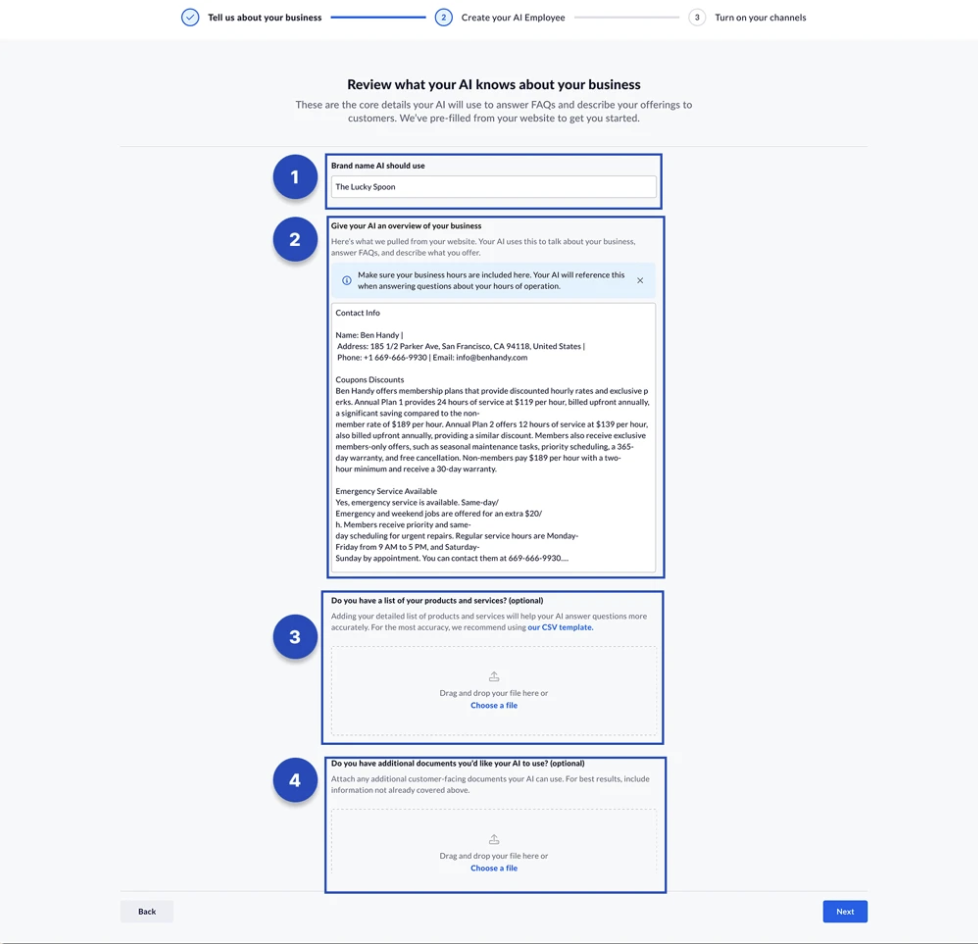
XBert’s basic onboarding is designed for a business without a dedicated technical team. Users can provide a website, select a Google Business Profile, or enter company information manually. The platform then generates a business overview that the user reviews and corrects.
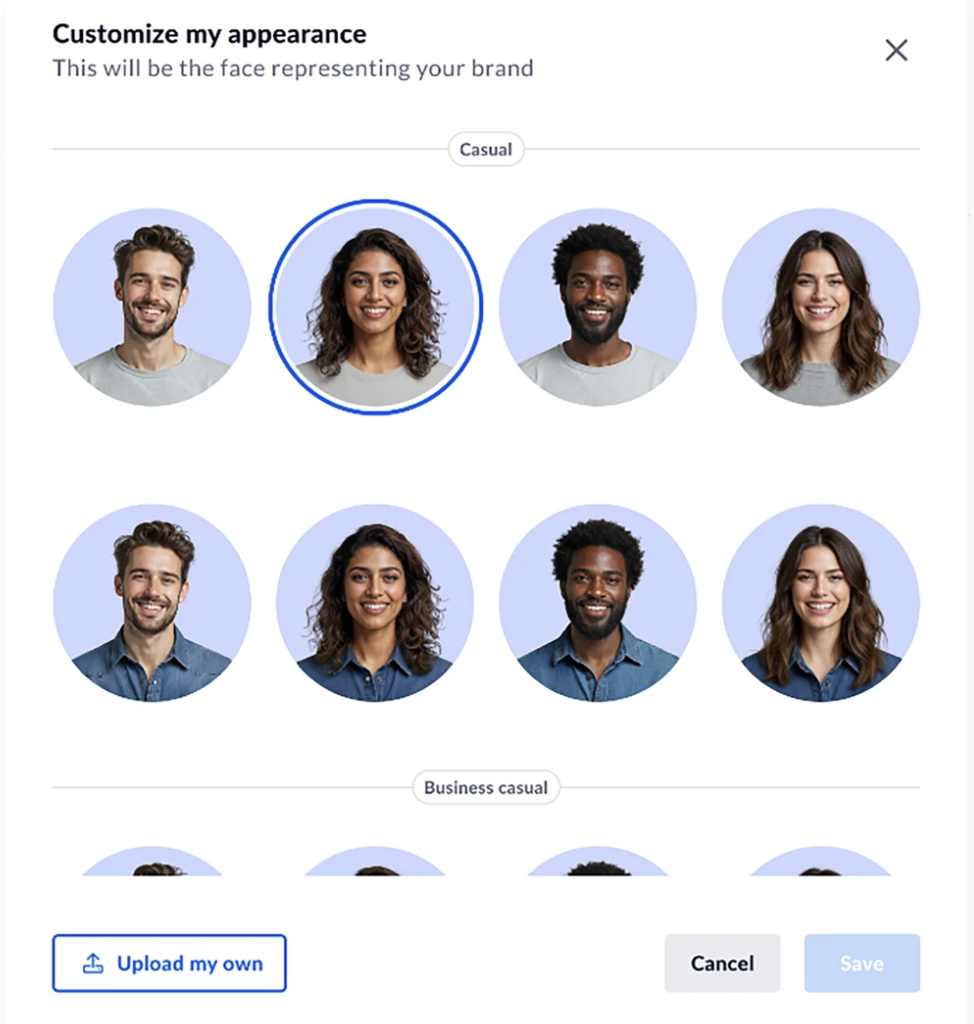
The next steps include naming the AI employee, selecting a voice, editing the greeting, and choosing an avatar for live chat. The standalone setup guide shows ten preset voices, while newer product pages advertise more than 23 voices and accents plus voice cloning. Buyers who need a particular language, accent, or cloned voice should confirm what is available in their account.
The knowledge setup can use the company website, a structured product or service file, and additional customer-facing documents. The public guide permits one CSV or Excel file up to 10 MB for products and services, plus multiple supporting files. XBert can then be tested through a telephone number and a browser chat before it reaches customers.
Users configure whether XBert answers every call or only after hours, where calls transfer when it needs help, and whether staff receive a summary by email or SMS. SMS and chat have their own handoff settings.
Nextiva says a basic setup can take five minutes, an integration setup about 15 minutes, and most teams can go live in under an hour. Those estimates describe the initial configuration, not necessarily a production-ready rollout. The advanced steps can include:
- Porting an existing local or toll-free number
- Completing 10DLC registration for business texting
- Adding the live-chat code to the company website
- Connecting Google or Outlook calendars
- Configuring transfer and after-hours behavior
- Reviewing imported knowledge and correcting gaps
- Testing restricted topics, failed actions, and escalation rules
More complex businesses may need a longer pilot. XBert’s own industry pages estimate up to a day for some practices and two to four weeks for a regional insurance deployment with a compliance review.
Top Features and Standout Capabilities
XBert’s strongest capabilities connect the conversation itself with customer history, business rules, and actions in external systems. The following seven areas explain how that works in practice.
1. Omnichannel Conversations With Shared Memory
XBert handles voice calls, SMS, live chat, and inbox work through the same AI employee. Its customer journal threads these interactions together rather than treating each channel as a new contact.
For example, a customer could ask about availability through web chat, confirm by text, and call later to reschedule. XBert can use the earlier messages and the customer’s stated channel preference instead of asking the customer to repeat the request.
This is more valuable than simply offering three channels. Omnichannel service and shared context can reduce repeated questions and preserve unresolved work during a handoff. Its usefulness still depends on identity matching. Teams should test how XBert distinguishes customers who share a phone number, use different email addresses, or contact the business anonymously through chat.
XBert also advertises more than 23 languages and can switch languages during a conversation. That can extend coverage beyond the languages the existing team speaks, but each required language should be tested with local names, addresses, dates, and industry terminology.
2. Grounded Answers From Approved Business Knowledge
XBert can learn from websites, uploaded files, policies, FAQs, product information, and connected records. It is designed to answer from approved sources rather than relying on a general AI model’s memory.
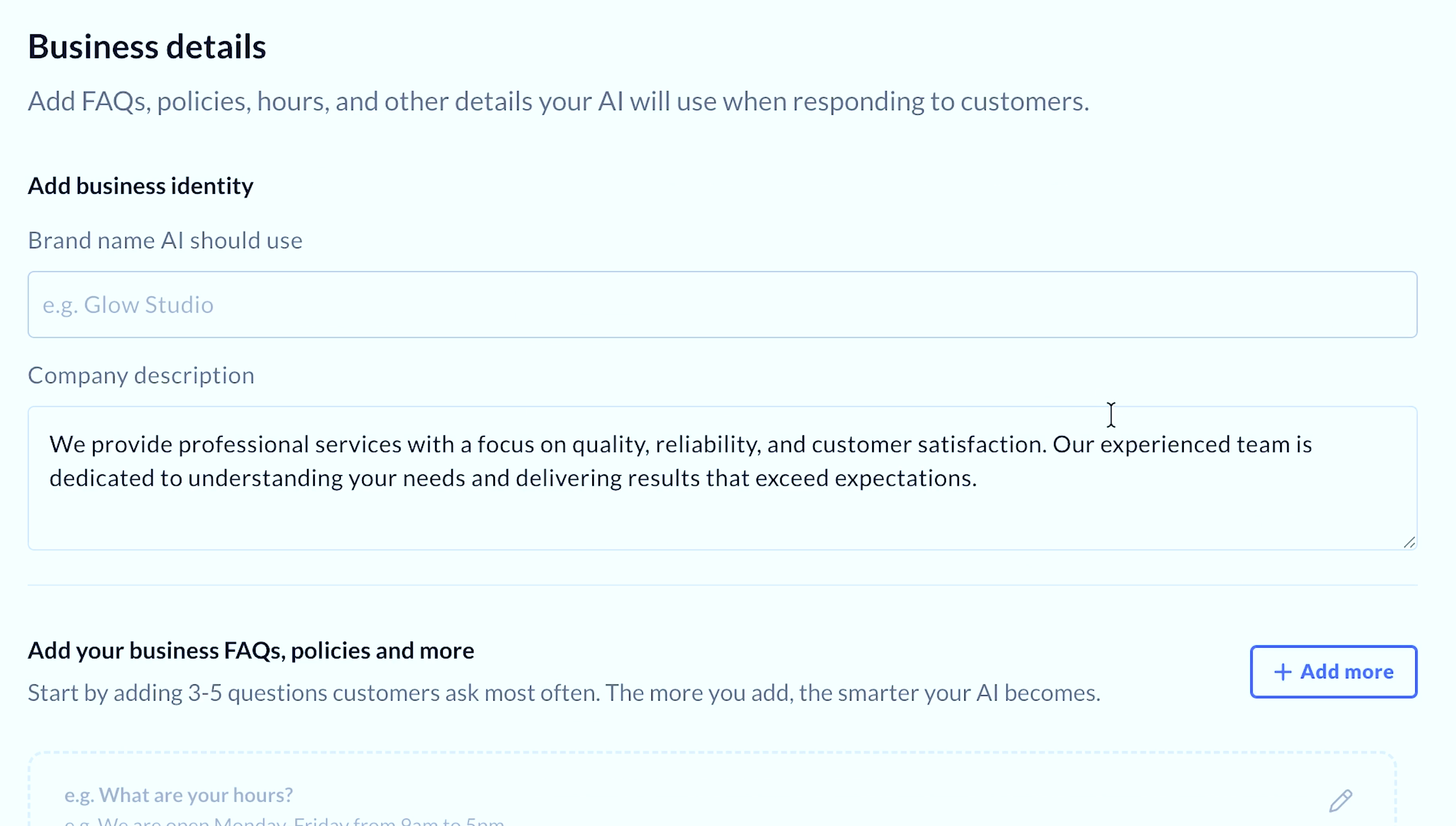
The security documentation separates knowledge from behavior. A team can update a policy or price without changing the instructions that determine tone, permitted actions, and escalation. Answers and Agent Assist suggestions can also include citations, giving employees a way to check where the information came from.
This approach should reduce unsupported answers, but it does not remove the need to maintain the source material. An outdated web page can become an outdated answer delivered with confidence. Someone still needs to review imported content, remove contradictions, and monitor questions XBert cannot answer correctly.
3. Actions in Calendars, CRMs, and Other Systems
XBert is designed to complete the task behind a customer’s request. Depending on the connected systems and permissions, it can check availability, book or reschedule an appointment, create or update a CRM record, send a confirmation, check an order, initiate a return, or prepare a follow-up.

This is the main difference between a useful AI employee and a conversational FAQ. A caller receives an outcome during the conversation, while the business system remains current without separate data entry.
The action layer also increases the cost of a mistake. An incorrect verbal answer is inconvenient; an incorrect booking, refund, or record update changes operational data. Businesses should begin with a narrow set of reversible actions, review the results, and expand permissions only after the workflow performs reliably.
XBert does not process card details directly. Payment workflows should use an approved payment link or PCI-compliant IVR path.
4. Flexible Handoffs and Operating Modes
Teams define which subjects XBert can handle, what information it should collect, and when an employee must take over. A handoff can include the live transcript, summary, customer history, key facts, and a recommended next step.
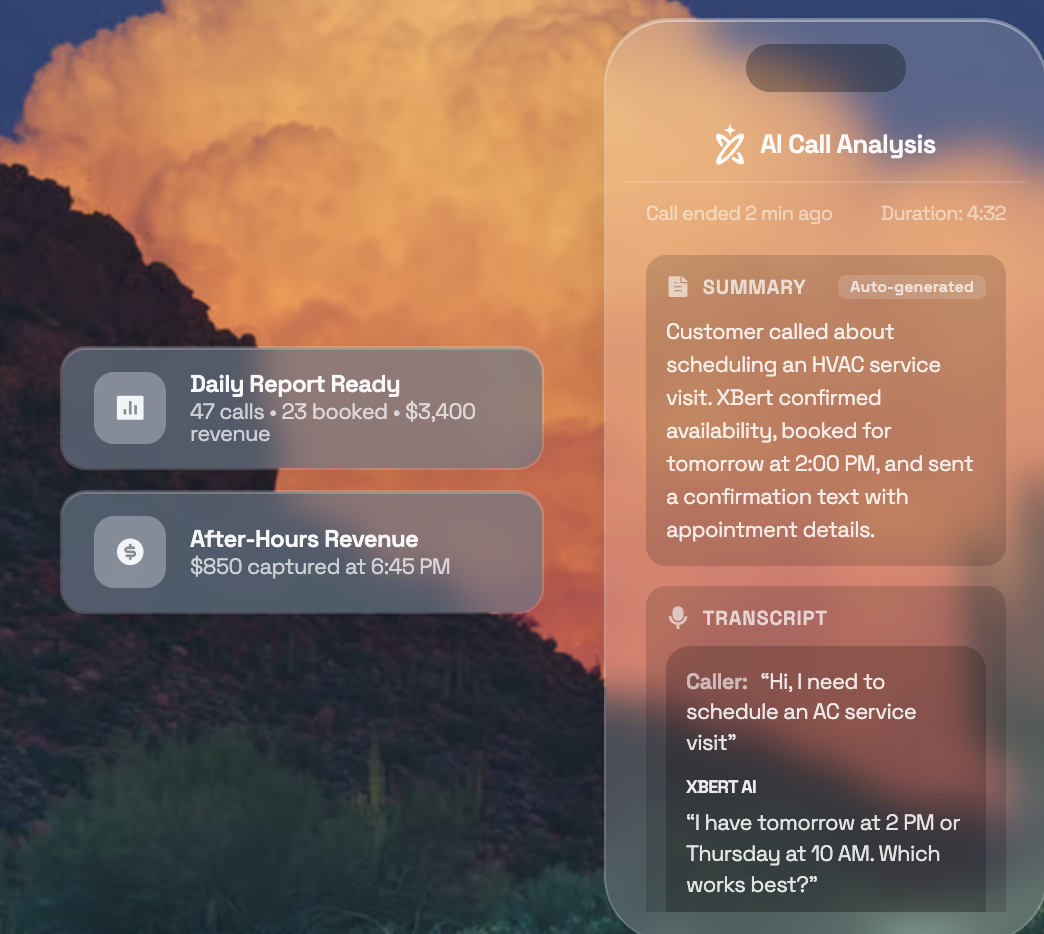
This is useful for businesses that want automation without forcing every interaction into an all-or-nothing model. Routine bookings may run autonomously, while complaints, emergencies, financial decisions, or professional advice can move directly to a person.
The platform’s autonomous, autopilot, and assistive modes can vary by channel or request type. A healthcare practice might automate scheduling but require human review for refill requests. A law firm could automate intake while transferring any question that becomes legal advice.
The quality of the fallback is as important as the AI response. A transfer that rings an unavailable employee or loses the customer’s context still creates a poor experience. Test handoffs during business hours, after hours, and when the intended recipient does not answer.
5. Agent Assist for Human-Led Conversations
Agent Assist supports employees when XBert does not handle the interaction autonomously. It can display customer history, find relevant policies, draft a response, translate messages, recommend next steps, summarize calls, tag tickets, set dispositions, and update CRM fields.
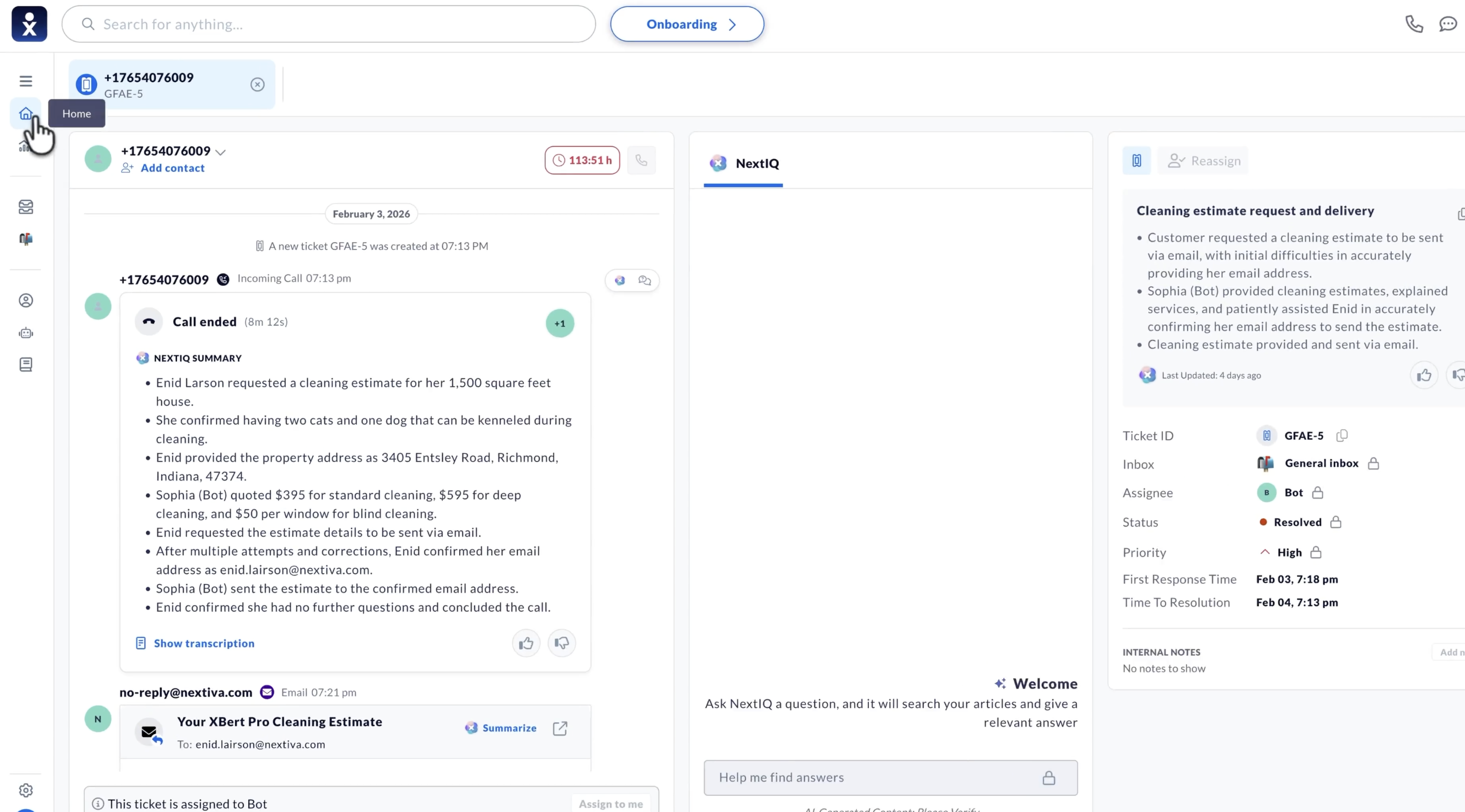
Suggested messages remain drafts. The employee can send, edit, or reject them, while a supervisor can compare the suggestion with the final response. This provides a useful control point for sensitive or judgment-heavy work.
The product pages also describe conversation scoring, coaching guidance, and an onboarding mode for new employees. These features could make XBert relevant to a contact center even when the company does not want an AI agent speaking directly to every customer.
The benefit depends on where Agent Assist appears. XBert advertises side-panel support for major help desks, but a team should verify that its exact workspace, objects, and actions are supported before assuming agents can stay inside their existing interface.
6. Guardrails, Verification, and Audit Trails
XBert’s security model checks identity, approved knowledge, action permissions, and sensitive content before responding or acting. Administrators define disallowed topics, verification requirements, escalation triggers, and the fields or systems XBert may access.
Nextiva states that customer data is not used to train shared models and is encrypted in transit and at rest. The platform offers SOC 2 Type II, ISO 27001, HIPAA and GDPR alignment, and BAAs for healthcare customers.
These controls provide a foundation, not automatic compliance for every business. The customer still needs appropriate permissions, disclosures, retention settings, and review processes. Companies should confirm that XBert itself, its AI providers, recordings, transcripts, and every connected application fall within the required contractual and regulatory scope.
7. Conversation Management and Analytics
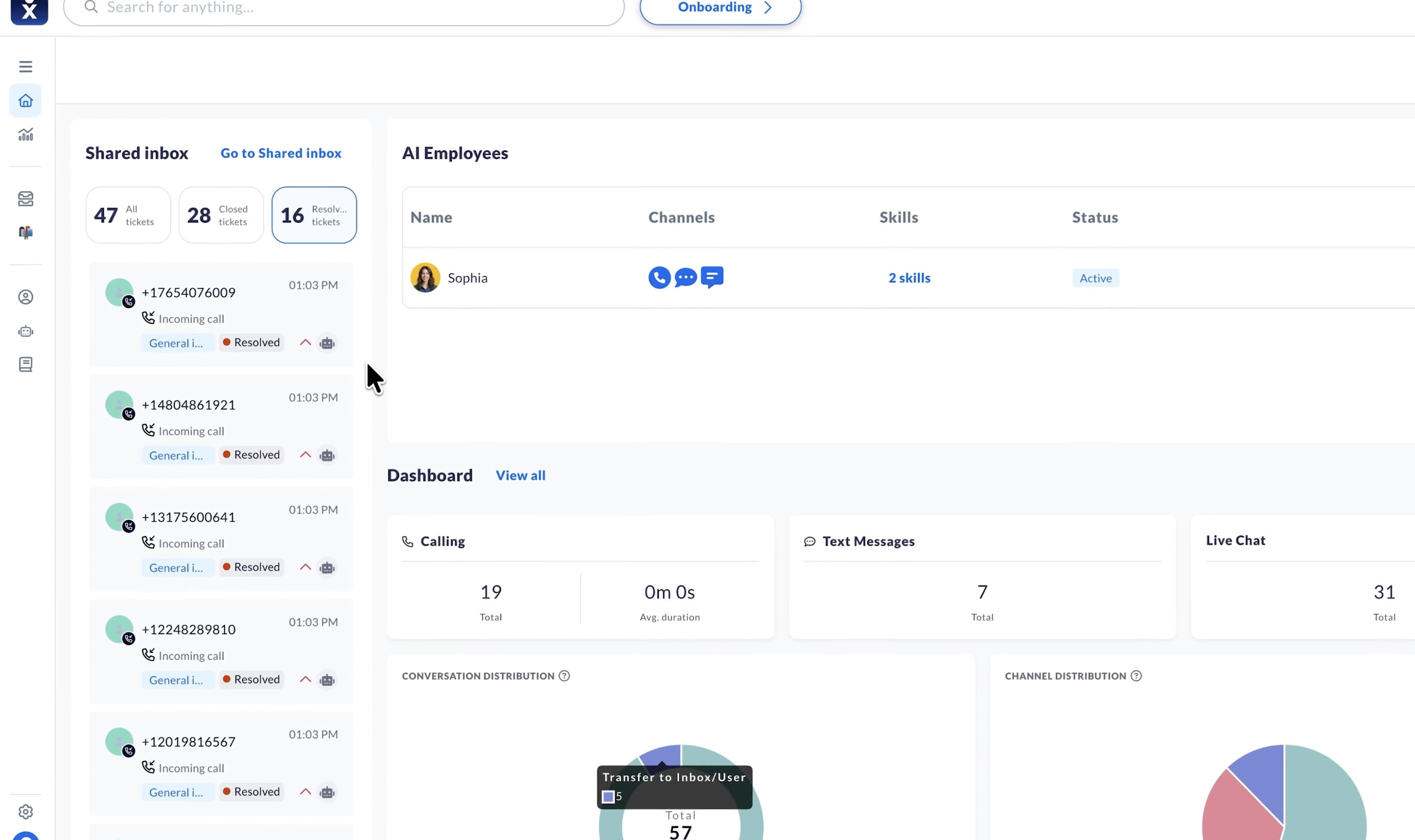
The XBert dashboard tracks conversations by channel, status, and outcome. Published metrics include total calls, average call duration, SMS and chat volume, escalations, resolved and forwarded tickets, and AI-generated leads.
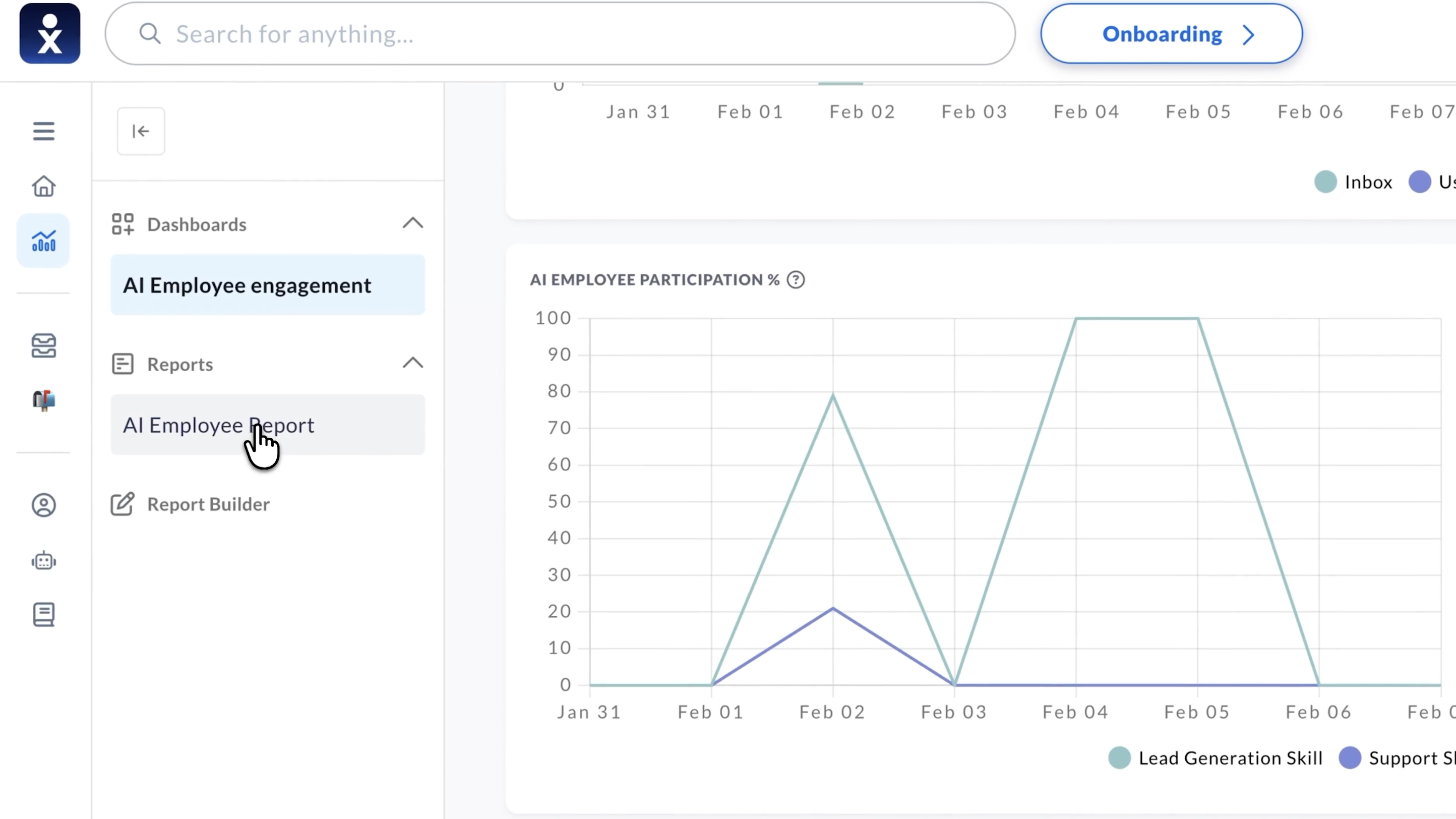
Administrators can search and filter the general inbox, inspect ticket history, take over SMS or chat conversations, make outbound calls, close tickets, and use NextIQ to draft responses. Usage reporting and spend alerts help teams monitor billable sessions.
These reports are most useful when tied to business outcomes. A high resolution rate may look positive while masking poor lead quality, unnecessary transfers, or incorrect bookings. Track completed appointments, qualified opportunities, customer satisfaction, corrections, and repeat contacts alongside XBert’s internal metrics.
Key XBert Integrations
XBert advertises integrations across calendars, CRMs, service desks, commerce systems, collaboration tools, and specialist industry software.
| Category | Named platforms | Potential use |
| Calendars and scheduling | Google Calendar, Outlook, Calendly | Check availability, book, and reschedule |
| CRM and service | Salesforce, HubSpot, Zoho, Zendesk, ServiceNow | Read customer context, create records, update tickets |
| Collaboration | Slack, Microsoft Teams | Send alerts, summaries, and coaching guidance |
| Commerce and operations | Shopify, Clover, QuickBooks, Housecall Pro | Check orders, send payment links, update operational records |
| Healthcare | Epic, Cerner, athenahealth, NextGen | Scheduling, patient records, and practice workflows |
| Insurance | Applied Epic, AMS360, Guidewire, Duck Creek | Policy, claims, billing, and agency workflows |
| Real estate | Follow Up Boss, kvCORE, BoomTown, MLS feeds | Qualify and route leads, check listings, book showings |
| Professional services | Clio, MyCase, PracticePanther, Karbon | Intake, conflict-check inputs, consultation booking |
| Retail and fulfillment | BigCommerce, Magento, WooCommerce, ShipStation, FedEx, UPS | Inventory, order status, returns, and delivery tracking |
Custom APIs are available on request. That wording matters. The generic pricing and integration pages present a broad set of connections, but the public self-service guide provides the most detailed setup instructions for Google and Outlook calendars. Some specialist integrations may therefore require sales scoping, implementation work, or a particular deployment.
Before buying, ask whether the required integration is native or custom, which objects and actions it supports, how frequently data syncs, what permissions it needs, and whether setup or usage adds cost.
Benefits of XBert AI
XBert’s practical value comes from resolving routine customer work without losing context or control.
1. More Conversations Resolve
Answering a missed call is useful, but completing the caller’s task is better. XBert can move a customer from a question to a booking, record update, or qualified handoff during the same interaction.
This is most valuable when speed affects conversion. A service business can capture an after-hours lead before the prospect contacts a competitor. A clinic can reschedule an appointment without adding another callback to the front desk’s queue.
2. One System Covers Several Customer Channels
Using the same AI employee for calls, messages, and chat reduces the need to train separate bots or reconcile disconnected histories. A shared customer journal also gives employees more context when they take over.
The benefit grows when customers regularly switch channels. It matters less if the business uses only a single telephone line and rarely needs to recognize returning callers.
3. Session Pricing Deliver More Value On Longer Calls
XBert charges per qualifying session rather than by the minute. Businesses with long intake or support calls may find this more predictable than a service that charges for every minute of AI talk time.
The reverse is also true. A company with many brief, low-value interactions can consume sessions quickly. The cost model should be tested against the business’s actual mix rather than judged only by the $99 starting price.
4. Human Teams Benefit Even When Automation Stops
Agent Assist, transcripts, summaries, citations, and structured handoffs reduce the administrative work that remains after an escalation. This gives XBert a second source of value beyond the percentage of conversations it resolves alone.
For a growing support team, faster call wrap-up and better customer context may matter as much as 24/7 coverage.
5. Guardrails Support a Gradual Rollout
Businesses can start with narrow tasks, keep humans responsible for sensitive actions, and expand automation as the results improve. This is a more practical adoption path than attempting to replace the entire front desk on launch day.
Disadvantages and Important Limitations
XBert has a broad feature set, but several details require closer evaluation before a business gives it control of customer conversations and operational systems.
Session Definitions Need More Detail
The basic price is clear, but several billing edge cases are not. Nextiva does not explain the reset window for a text conversation, whether failed long calls count, or how a transfer is billed when the AI does not complete the request.
One hundred sessions equal roughly three per day in a 30-day month. A business with steady inbound volume can move beyond the $99 tier quickly, making the overage model more important than the entry price.
Integration Depth Varies and May Require Scoping
XBert names an unusually broad integration ecosystem, including specialist EHR, insurance, real-estate, legal, and commerce platforms. The public documentation does not provide the same implementation detail for every connection.
A logo or platform name does not establish that every record, field, and action is available. Confirm the exact workflow in a live demonstration using the intended system. Custom API work may extend the setup timeline and total cost.
Public Product Details Are Inconsistent
The standalone guide lists ten selectable voices, while current product pages advertise more than 23 voices and accents plus cloning. Setup estimates range from minutes to several weeks depending on the page and use case. The marketing site describes thousands of concurrent calls and 99.999% platform uptime, but the standard pricing page does not publish a concurrency allowance or state whether its entry plan includes a contractual uptime SLA.
These differences may reflect deployment type, newer features, or documentation lag. Buyers should use the current account and contract as the source of truth.
Permission Controls Need Clarification
The security and industry pages describe role-based access, yet the public standalone guide says all added users receive administrator privileges. That may be unsuitable for a larger or regulated team if the standalone product lacks granular roles.
Confirm which users can view recordings, export transcripts, change knowledge, edit billing, configure integrations, and authorize actions. The answer may differ between standalone XBert and a broader Nextiva deployment.
Human Oversight Remains Necessary
XBert is best suited to repeatable work with clear rules. Negotiation, complaints, clinical questions, legal or financial advice, unusual exceptions, and emotionally sensitive interactions still require judgment.
The product can identify a boundary and transfer the conversation, but the business must define that boundary and make a qualified employee available. Poor escalation design can turn automation into another delay.
Vendor Evidence Is Stronger Than Independent Evidence
Nextiva publishes customer outcomes for booking, lead response, resolution, and staffing. Several industry pages also state that figures are illustrative, drawn from demonstration accounts, representative, or attached to anonymized customers.
Independent XBert-specific feedback remains limited. Public anecdotes include a small-business user who reported capturing after-hours leads and another who said the system was helpful but needed more tuning and support. These reports are useful context, not representative performance data.
The trial should carry more weight than broad Nextiva ratings or a polished industry example.
International Availability Is Not Clear
XBert supports more than 23 languages, but language coverage does not establish local phone-number availability or regulatory support in the same number of countries. The public onboarding material focuses on US number porting and 10DLC registration.
Businesses outside the United States should confirm local numbers, number portability, outbound messaging, data residency, emergency routing, and language quality before relying on XBert.
Who Is XBert AI Best For?
XBert is most suitable for businesses whose customer conversations follow repeatable paths and connect to a clear next action.
- Appointment-led businesses: Clinics, dental offices, salons, fitness studios, consultants, and home-service companies can combine questions with booking or rescheduling.
- Lead-driven teams: Real-estate firms, legal practices, insurers, and contractors can qualify inquiries and route the strongest opportunities quickly.
- Retail and service operations: Order status, returns, routine billing questions, and policy lookups create high volumes of structured work.
- Businesses needing after-hours or overflow coverage: XBert can answer continuously or take over only when the team is unavailable.
- Existing Nextiva customers: They may benefit from keeping AI conversations, human communications, and customer context within the same vendor’s infrastructure.
- Support teams evaluating Agent Assist: Companies that are not ready for full autonomy can use XBert for drafts, summaries, coaching, and administrative updates.
The fit is weaker when most customer conversations involve specialist judgment, negotiation, unpredictable exceptions, or relationship management. It may also be difficult to justify when the business receives very few suitable interactions or needs an integration, country, or permission model that Nextiva cannot demonstrate clearly.
What to Test During the Free Trial
The trial should prove that XBert can complete the business’s actual work, not only answer a prepared FAQ. Use real customer language, realistic data, and the systems intended for production.
Prioritize the following tests:
- Import the business knowledge: Check services, prices, hours, locations, policies, and exceptions after the website scan.
- Ask the same question several ways: Use casual language, background noise, local names, interruptions, and corrections.
- Complete and reverse an action: Book, reschedule, and cancel an appointment, then inspect every resulting calendar and CRM entry.
- Cross channels: Begin in chat, continue by SMS, and call later to see whether XBert identifies the customer and preserves the context.
- Trigger every handoff: Test urgent, restricted, and unknown requests during and after business hours, including an unanswered transfer.
- Check integration permissions: Confirm which records XBert can read, create, change, and delete. Test failed connections and stale data.
- Test billing boundaries: Run a call under and over 30 seconds, transfer a call, reopen an SMS thread, and inspect recorded session usage.
- Review languages and voices: Test dates, prices, names, addresses, and industry terminology in every required language.
- Verify governance: Check AI disclosure, recording consent, transcript access, retention, audit logs, user roles, and BAA coverage where relevant.
- Measure business results: Track correct resolutions, qualified leads, completed bookings, corrections, repeat contacts, and staff time saved.
Judge each scenario by accuracy, completion, customer effort, human cleanup, and cost. A realistic failure that hands off cleanly is often safer than an impressive answer that changes the wrong record.
Final Verdict
XBert is more ambitious than a typical AI receptionist. Its strongest proposition combines omnichannel coverage, shared customer memory, business-system actions, human handoffs, and Agent Assist. That design can help a business resolve more routine work while still giving employees the context to handle difficult conversations.
The published $99 entry price is accessible, especially for long calls, but 100 sessions will not cover a busy operation. Buyers should model overages, clarify session edge cases, and confirm the limits that are not listed on the pricing page.
The broader risk is the gap between a named capability and a production-ready workflow. XBert advertises extensive integrations, fast setup, strong guardrails, and high concurrency. A successful evaluation should prove those claims with the buyer’s own phone routing, data, permissions, staff, and edge cases.
If XBert can complete the intended actions accurately and hand off the rest without creating cleanup, it offers more value than an answering bot. If the required connector is custom, the knowledge changes constantly, or most calls require judgment, the business should expect a longer implementation and more human involvement than the "AI employee" label suggests.
FAQs
Yes. Nextiva describes XBert as a standalone service as well as an add-on to its communications plans. Businesses can forward or port an existing number, although the exact number setup and country availability should be confirmed.
Yes, when the required calendar or CRM integration supports the action and the business grants permission. XBert can check availability, book or reschedule, create or update records, and send confirmations. The exact read-and-write scope varies by integration.
Nextiva offers HIPAA compliance, SOC 2 Type II controls, encryption, audit trails, and BAAs for healthcare customers. A healthcare organization should confirm that its specific XBert deployment, recordings, AI providers, connected systems, and workflows are included in the signed BAA and configured appropriately.
XBert can automate repeatable receptionist tasks such as answering common questions, capturing details, booking appointments, taking messages, and routing calls. Human employees remain necessary for sensitive judgment, complex exceptions, relationship management, and any request outside the configured guardrails.