

XBert
XBert
Most AI receptionists can answer the phone. XBert goes further by handling tasks that require access to calendars, customer records, and other business systems. It answers calls, texts, and web...
About XBert
Most AI receptionists can answer the phone. XBert goes further by handling tasks that require access to calendars, customer records, and other business systems.
It answers calls, texts, and web chats, then takes actions such as booking appointments, updating CRM records, and sending confirmations. XBert is built and operated by Nextiva, so it also runs on the same infrastructure and security framework as the company's broader communications platform.
This review covers what XBert does, how its session-based pricing works, which integrations are available, and where the platform has limitations.
What Is XBert?
XBert is an AI agent that handles inbound customer conversations across voice, SMS, and live chat. Nextiva calls it an "AI employee" because the product is designed to complete customer requests rather than simply answer questions or take messages.
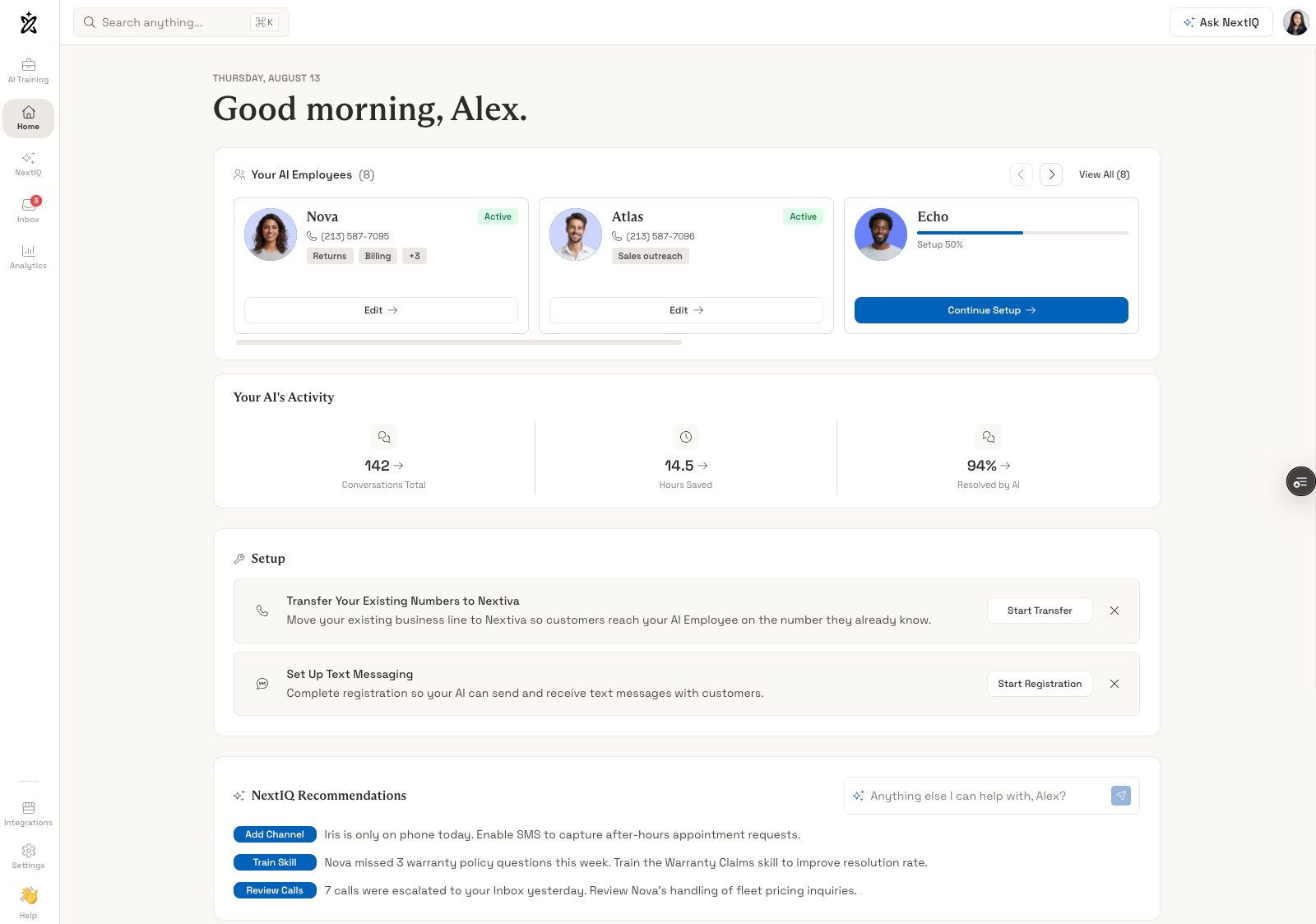
The product covers three overlapping capabilities:
- AI Receptionist: Answering calls, routing, and handling routine questions
- AI Employee: Completing tasks like booking, lead capture, and record updates
- Agent Assist: Supporting human agents with context and suggested responses when a conversation escalates
All three are included in the same subscription instead of being sold as separate products or add-ons.
XBert is mainly aimed at service businesses with steady inbound demand, including dental and medical practices, home services companies, law firms, insurance agencies, real estate teams, and retailers. Nextiva also publishes industry-specific material for healthcare, insurance, real estate, retail and e-commerce, and professional services.
How XBert Works
XBert uses the same basic process across calls, texts, and chat. It identifies what the customer needs, checks the information you've approved, and determines whether it can answer the request or needs to take an action in a connected system.
The Conversation Path
- Identify the request: XBert determines whether the customer needs scheduling, support, billing help, lead capture, a status update, or a person.
- Check approved knowledge: It answers from your website, uploaded files, policies, and FAQs rather than relying on general AI knowledge.
- Select the right skill: Receptionist, appointment, support, and lead capture skills can run during the same conversation.
- Take the permitted action: Depending on your settings, XBert can look up records, check availability, create or update CRM entries, send confirmations, or prepare a handoff.
For example, a caller can ask to move an appointment to Thursday at 2 p.m. XBert can check the calendar, book the new slot, update the contact record with the customer's communication preference, and send an SMS confirmation. Nextiva's documentation lists those system actions at 0.4, 0.7, and 1.1 seconds, with typical response times under one second.
Setup Runs as an Interview
XBert doesn't start with a traditional flow builder. Instead, it asks questions about your business and uses the answers to create its operating instructions.
You provide your website, XBert scans it, and then asks how you want different situations handled. That can include what should happen after hours, whether it can book appointments directly, and which scheduling system it should use.
Nextiva estimates about five minutes for basic setup and 15 minutes when integrations are involved, with most teams going live within an hour. You can test the configuration before launch and make changes afterward by giving XBert new instructions.
The setup process should be easier for teams without technical resources, but businesses with complicated routing or a large number of conditional workflows may prefer the precision of a visual flow builder. Those teams should test their more unusual call scenarios during the trial.
Handoffs Carry Context
When XBert escalates a conversation, the human agent receives the transcript, a summary of the important details, the action XBert attempted, and a recommended next step. That gives the agent context before taking over and reduces the need for customers to repeat information.
Agent Assist can then suggest responses based on the customer's history, company policies, and current information. It's included with every XBert plan.
Key XBert Features
XBert combines customer-facing AI with tools for completing routine business tasks. Here are the features that stand out most in day-to-day use.
Multi-Channel Coverage With Shared Context
XBert handles voice calls, SMS, live chat, and inbox messages through the same AI system. Customer history carries across channels, so a person who calls one day and texts later can continue from the previous interaction.
That gives XBert broader channel coverage than AI receptionist products built primarily around voice.
Customer Journal
XBert maintains a running record of customer interactions, including what the customer asked about, communication preferences, unresolved issues, and previous outcomes. Nextiva calls this the customer journal.
The system stores intent as structured context, logs channel and timing preferences, writes results back to the customer record, and prepares summaries when a conversation needs to be handed off. For repeat customers, that can give XBert useful context before the next interaction begins.
NEXT.IQ Intelligence Layer
Nextiva describes the underlying AI system through three layers:
- Knowledge Layer: Answers are backed by approved sources and can be traced to the information used to produce them
- Customer Journal Layer: Connects interactions into a continuous customer history
- Guardian Layer: Applies guardrails, separates account data, and logs actions
Source tracing is particularly relevant for regulated businesses because teams can review which approved document or source XBert used when answering a customer.
Actions XBert Completes
XBert can perform several types of work in addition to answering questions:
- Appointment booking: Checks availability, reserves time, captures the visit reason, and sends confirmation
- Lead capture: Collects name, need, urgency, and contact details, then creates or updates the CRM record
- Support answers: Resolves common questions using approved company information
- Request routing: Identifies the request, collects the necessary context, and directs the customer to the appropriate next step
- Payment links: Confirms the preferred communication channel and sends the appropriate payment link
- Follow-up packages: Sends your team the transcript, relevant facts, current status, and recommended next action
Configurable Guardrails
You control what XBert is allowed to do, which subjects it should avoid, and which situations require a handoff to a person. You can also require identity verification before XBert updates records or performs sensitive actions.
If the AI can't safely complete a task within those rules, it can escalate the conversation while passing the existing context to the human agent. That level of control is especially relevant for healthcare, legal, and financial services organizations.
Learning Loop
XBert can use patterns in the customer journal to adjust its guidance. In one example from Nextiva, customers who miss reminders are more likely to reschedule by text, so follow-up guidance can be adjusted to prioritize text for those customers.
Teams can also review conversations, change instructions, and add new knowledge manually.
Language Support
XBert supports more than 23 languages. Nextiva doesn't publish performance data for each language, so businesses serving multilingual customers should test the specific languages they use during the free trial.
Pricing and Plans
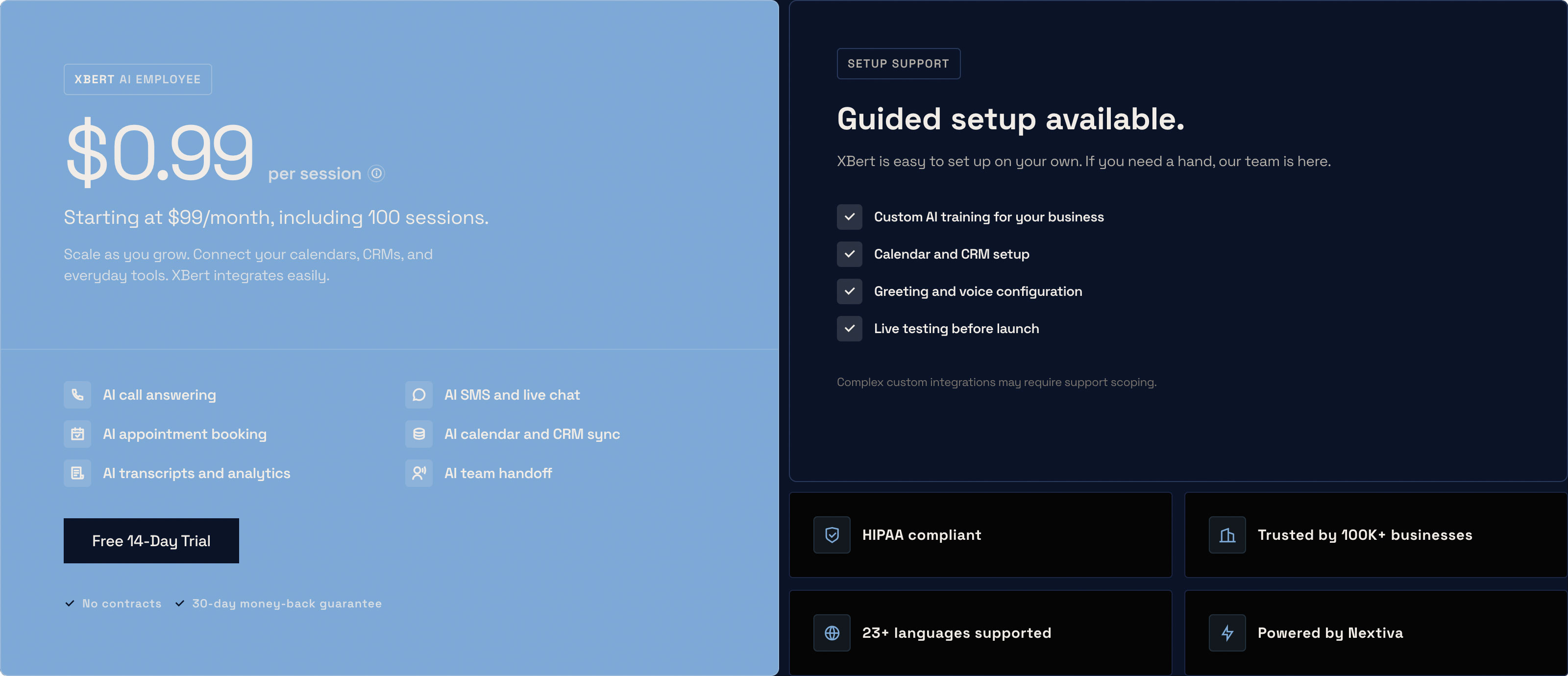
XBert starts at $99 per month and includes 100 sessions. Additional sessions cost $0.99 each. Nextiva lists no platform fees, setup fees, or per-seat charges, and the service doesn't require a contract.
What Counts as a Session
XBert counts a session as:
- One phone call lasting longer than 30 seconds
- One SMS or chat conversation with 3+ AI interactions
Hang-ups, wrong numbers, and very short interactions don't count toward your monthly sessions.
What's Included at Every Price
XBert doesn't split its main features across pricing tiers. The subscription includes:
- AI call answering, SMS, and live chat
- Appointment booking with calendar sync
- CRM write-back
- Transcripts and analytics
- Agent Assist with suggested responses
- 23+ language support
- Website knowledge scanning and custom AI training
- Topic and action guardrails
That pricing structure makes it easier to understand the actual starting cost because features such as CRM integrations, appointment booking, and Agent Assist aren't reserved for a higher tier.
Trial and Guarantees
The free trial lasts 14 days, doesn't require a credit card, and includes unlimited sessions. Nextiva also provides help scanning your website and training the AI during the trial. Paid plans come with a 30-day money-back guarantee and can be canceled at any time.
Cost Control and Volume
You can set monthly session limits, receive usage alerts, and review individual sessions in reporting. Session caps are useful for businesses with variable inbound volume that want to put a hard limit on monthly usage.
Nextiva offers volume pricing above 1,000 sessions per month but doesn't publish the rates. High-volume customers will need to contact sales for a quote. The company also has a program for qualifying early-stage startups.
What It Costs in Practice
At 100 sessions, the monthly cost is $99. At 300 sessions, it's about $297. At 600 sessions, it's about $594.
For businesses handling more than 1,000 sessions each month, the unpublished volume rates become important. At that point, it's worth comparing XBert's quoted rate against platforms offering flat-rate or higher-volume plans.
XBert Integrations
Integrations determine which customer requests XBert can actually complete. Calendar access is required for live appointment booking, for example, while CRM or billing access allows XBert to retrieve and update customer information.
Native Connections
XBert connects to the following systems:
- CRM: Salesforce (lookup, create, update), HubSpot (contacts and tickets), Zoho
- Calendar and scheduling: Google Calendar, Outlook Calendar, Calendly
- Support and ITSM: Zendesk, ServiceNow
- Collaboration: Slack, Microsoft Teams
- Commerce and billing: Shopify, Clover, QuickBooks
- Vertical tools: Housecall Pro (home services), Epic (patient scheduling)
Custom API integrations are available on request. Nextiva notes that more complex integrations may require additional scoping with its support team, so businesses with custom systems should confirm the implementation requirements before purchasing.
How Integrations Get Used
XBert accesses connected systems when a customer request requires live information or an external action. A question about availability can trigger a calendar lookup, while a billing request can require customer or invoice data from another system.
In one example from Nextiva, a 42-second call triggers a Salesforce contact lookup, a Google Calendar availability check, a QuickBooks invoice lookup, and a Slack notification to the sales channel.
Administrators control which systems, fields, and actions XBert can access. These permissions are particularly important when the AI is connected to systems containing sensitive customer or patient data.
The Epic Connection
XBert supports Epic for patient scheduling, giving healthcare organizations an option beyond general-purpose calendar integrations. Medical practices using an EHR should still verify exactly which Epic workflows and data fields XBert can access before implementation.
Security and Compliance
XBert runs on Nextiva's broader infrastructure and includes several security and compliance controls that are relevant to regulated industries.
Certifications and Standards
- SOC 2: Audited platform controls
- ISO-27001: Certified information security management
- HIPAA: Compliant, with BAAs signed with AI providers
- GDPR: Compliant, with in-region data residency for supported deployments
- Telecom standards: CPNI, STIR/SHAKEN, TCPA, and Robocall Mitigation
- Encryption: Data protected in transit and at rest
- Uptime: 99.999% on the Nextiva platform
Data Handling
Nextiva states that customer data isn't used to train shared models and that account-specific knowledge remains isolated from other customers. Customers retain ownership of their data.
Businesses operating under a BAA or other data-handling requirements should still review the applicable terms and confirm that their intended workflows fall within Nextiva's supported compliance scope.
The Four-Gate Check
Nextiva says each answer passes through four checks before reaching the customer: identity verification, knowledge approval, action scope, and sensitive content clearance.
The checks are intended to confirm that the response comes from an approved source, the requested action is permitted, and sensitive information isn't exposed improperly.
Knowledge Control
You can add approved knowledge through URLs and files, including PDF, DOC, CSV/XLS, PPT, JSONL, and TXT formats. Specific website pages can also be included or excluded.
Instructions and knowledge are managed separately, allowing teams to update the information XBert uses without rewriting its behavioral rules.
Industry-Specific Boundaries
Nextiva documents guardrails for several regulated industries:
- Healthcare: Avoids treatment advice, stays within approved practice information, and escalates clinical questions
- Legal: Handles intake and scheduling without providing legal advice
- Financial and tax: Verifies the customer, collects structured information, and routes sensitive account questions to a person
The PCI Limitation
XBert doesn't process credit card information directly. Payment workflows instead use approved links sent by SMS or email or transfer the caller to a PCI-compliant IVR system.
Businesses that routinely accept card payments over the phone should confirm that this workflow fits their existing payment process before implementing XBert.
Pros and Cons
XBert has a strong mix of automation, integrations, and compliance features, but its workflow limitations and session-based pricing may make it less practical for businesses with high call volumes.
What We Like
- Multi-channel handling: Voice, SMS, chat, and inbox conversations run through the same AI with shared customer context.
- Short calls don't count as sessions: Hang-ups, wrong numbers, and brief interactions don't consume the monthly allowance.
- Features aren't split across tiers: Agent Assist, CRM write-back, appointment booking, and other core capabilities are included with the standard subscription.
- Strong compliance support: XBert includes SOC 2, ISO-27001, HIPAA support with BAAs, GDPR compliance, encryption, and policies preventing customer data from being used to train shared models.
- Simple setup: The interview-based configuration and website scanning reduce the amount of technical work required to get started.
What We Don't Like
- Per-session pricing gets expensive at higher volumes: At $0.99 per additional session, a business handling 800 monthly sessions would pay close to $800 before any volume discount.
- Conversational setup provides less control: Teams with complex routing rules may find a traditional visual flow builder easier to configure and manage.
- Custom integrations require additional scoping: Workflows outside the supported connector list may require help from Nextiva's team.
Who Should Use XBert
- Multi-channel service businesses: Companies whose customers regularly switch between phone, text, and web chat can keep those conversations within the same AI system.
- Regulated practices: Healthcare, legal, and financial services organizations can use documented guardrails and compliance controls instead of relying solely on basic AI answering features.
- Appointment-driven businesses: Dental practices, salons, home services companies, clinics, and similar businesses can use XBert to check availability and book appointments directly.
- Existing Nextiva customers: Businesses already using Nextiva can add XBert without bringing in a separate communications vendor.
Look Elsewhere If
Your business consistently handles more than 1,000 sessions per month and you want fully published pricing before speaking with sales. A platform with flat-rate or unlimited pricing may be easier to budget at that volume.
XBert may also be a poor fit if you need to accept credit card information directly during calls or require complex routing that is easier to manage through a visual flow builder.
Share Your Experience
Help others make informed decisions by sharing your experience with XBert.
Write a Review